-
May 2021 - Daz 3D New User Challenge - Using Props and Push Modifiers/Deformers
OriginalSamhain said:
davidjones8418 said:
OriginalSamhain, I am struggling myself to work out what to do here. I spend so much of my time trying to work around tricky stuff like this!
You could use a dformer to pull down the skin under the fingers. Apply the d-former to the body part, manouver the field into the right spot, fiddle with the x/y/z scale of the field and then use the d-former control to push/pull the skin. It's time consuming and I was doing this for everything nefore I discovered clothing helper etc. What was I thinking!?
Not sure how much it should dig in anyway. Real shoulders just aren't very fleshy. Compared to other squishier body parts. Maybe move the arm up so the wrist is bending higher?
That's basically what I did, I think. I essentially just followed the video tutorial in the first post and it was just a matter of setting the brush to a very narrow size, then looking at where his finger was clipping, bending that finger back and painting in the dip - super tedious and probably completely the wrong way of doing it!
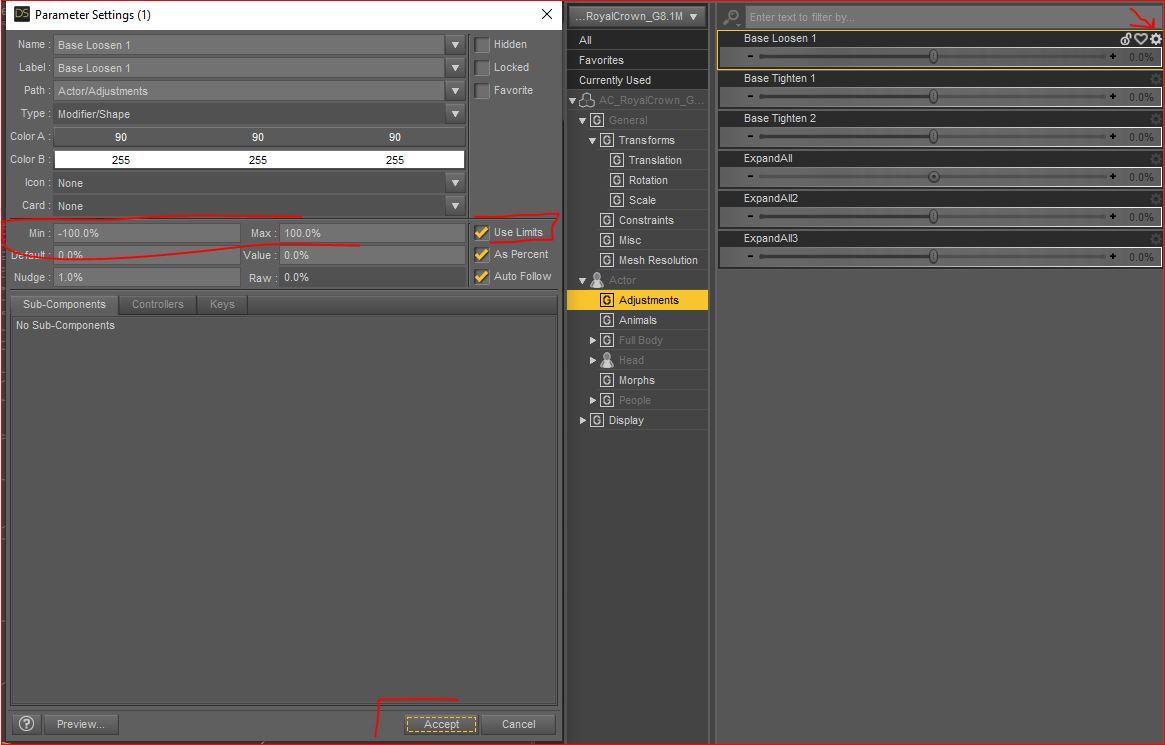
If you get the intended result then it is never the wrong way. That said, the look of that would be subtle (it wouldnt be very pronounced or firm - to know you could always stand in a mirror and grab your own shoulder as sometimes that helps to see what you need) Personally I think it looks really good and nicely done. If you wanted it more pronounced you could try taking limits off the dial for that perticular morph. To do that, go to the dial you made (like the KickRipple dial in the video) and then click on the little cog wheel on the right hand side of that dial and then see what limits are set on your dial. You can uncheck limits and completely shut them off to get more depth or you can change the minimum and maximum numbers. That said, occasionally as you make the morph/depth more pronounced it can start to look odd so you want to strike a balance between accentuating the look and going "too far". Hope that helps

Face Mojo [Commercial]his x said:
I too am now a happy camper. My experiments aen't finished yet, but I've succeeded in superimposing my own facial movements onto one of my characters, and the results are what I'm looking for. It was simple enough to do, too. I used the Face Mojo iOS capture program. I recomment it, even though there are other ways to get the data into DAZ.
Now I'm going to see how easy it is to tweak the facial expressions in DAZ. My original video recording is much more expressive than the result in DAZ, so if I can, I'm going to bring them more into line with one another. I'm a bit concerned that there are many new morph controls with inscrutable names, and nothing more than YT videos as a guide. In fairness, it's a sign of the times.
Even if I totally fail at the tweaking part, the results just as they are are good enough that I would use them as is. Mocap rules. I'm sold.
Hi! Thanks for sharing your experience!
I find the easiest way to adjust the animation is using the Strength Modifiers found in 'Actor/Face Mojo' and 'Pose Controls/Face Mojo.' They can be animated and it's easier to set them where and when needed vs. trying adjust the keyframes created on the morphs themselves during the baking process.
I will give the documentation a look over and see if I can make it more comprehensive as well as make a new video showing what I'm describing with the Stength Modifiers.
Face Mojo [Commercial]charles.conyers_5a1dbe4d8c said:
This is a FANTASTIC app-- works exactly as advertised in Daz Studio. I'd LOVE to be able to use it in Unreal Engine, but I am absolutely stumped as to how to make this happen. I tried exporting from Daz, but that only seems to work with animations as keyframes on the timeline. Unreal DOES read blend shapes and morph targets, but I'm not really sure how to get that information into Unreal.
I've also experimented using Live Link Face with Genesis 8 models in Unreal, and I hate it. It's just not as articulate as Face Mojo is, but I simply CANNOT GET IT OUT OF DAZ! I love the results of Face Mojo, and I love the speed and efficiency of Unreal Engine. How the heck can I get these two things to work together?!Hi! Thanks, and thanks for sharing your experience!
I'm not sure of the best way to try and get the best of both worlds, so to speak.
I have this video that shows how to export the Face Mojo animation on a character out of Daz Studio via FBX:
Does that process work to then take to UE for rendering?
Tongue Deform Glitch, Spiky (Lickalicious)felis said:
My guess is that it is an unwanted morph kicking in.
Do you have any morphs packs for the tongue?
If you do not pose it, is there then also deformation?
My suggestion is to load it on a default G8F, and then get the problem to kick in, and then look in parameters under currently used, with show hidden enabled, for the tongue, and then I would assume you can find the morph causing the problem.
Thank you very much for responding!
Thanks to you I learned you can delete parameters without having to dig around in my library!
Yes I have a few morph packs like easy tongue, i tried deleting them but the issue persisted, but I could try to be more thorough.
Solution: It's fixed.. mostly. I'm pretty sure it was TMC (Teeth master control) that was causing the biggest conflict.
Thanks again!
SereneNight’s Sci-Fi Fun Thread 3Here's more legacy of the 3DU infant morph. It seems to interfere with expressions. Brow Outer Down and Brow Outer Down Right for infant are dialed in hidden and are affecting expressions on G8M
 How to fit cloth with other other meshes to charactor?
Dforce will most likely screw it up because I will bet it has submeshes for the loops and things. it'll look goofy. Your best bet is to export the belt as an obj (base resolution) by itself and bring it into blender, then use the sculpting option and either nudge or pose (or both) to realign the belt like you want (use mask to block off sections like holster or whatever you don't want to effect). Export that (keep verts order) from blender as an OBJ and use Daz's Morph Loader Pro and reimport that as a morph on the belt.
Face Transfer Squash FacesLike you said they are using the 3rd party tool Zbrush, not a photo transfer add on. I've been using FaceBuilder combined with Blender for great results.
Morphs on Geografts... how?charles said:
Sure, but I've had it with Hex crashing, Blender is the way to go.
Yes Blender has improved its interface a lot and certainly has a lot to offer. However, what Hexagon has with D/S is called a working bridge. If you have mastered the export settings for an .obj export to import into Blender; and back out from Blender to import into D/S, wonderful.
Depending upon the edition, and the settings used, .obj files exported from D/S have some terrible things happen to them going by the readings in Hexagon. {Generally speaking with regard to the surfaces} The figure bridged over to Hexagon will be one mesh and have all the surfaces reading correctly. Tip: For cases wherein an .obj export and import into another program is not working well, one can bridge the figure into Hexagon, then export out the .obj from Hexagon. Import that .obj into the other modeller {i.e. Sculptris or whatever} to mold a morph, export that out as .obj. Import that into Hexagon. Then [careful that the names match] bridge that morphed mesh back into D/S to create the morph.
Face Transfer Squash Facescharles said:
All the plugins are really bad IMO, if you want something goofy, sure, but if you want it to look realistic you'll need to use other sources, combined with blender and then back to DAZ, and LOTS of work. The reason is the sampling is just too poor. You'll never get something like this:
{image removed}
Ok you wont' get this in Daz either..well maybe if you try hard enough. This was by a pro in Maya.
Actually Daz Studio artists have gotten some excellent results in their artwork - many using Zbrush for morphing and skin texturing. There is at least one product for those tiny face hairs, several for fiber eyelashes ... IMHO hair is the hardest item to get looking realistic although a few artists are getting close.
In the meantime, many are quite happy to make use of the D/S plugins {Face Transfer, Headshop, Facegen} to make a likeness or simply another character for the Genesis clans. Not everybody has hundreds or thousands of dollars to blow for one image render.
Unofficial Updates for DazToUnity Bridge (URP, Built-In, PBRSkin, Anims... dForce?)danielbui78 said:
Artini said:
How can we install your version of the bridge?
- For the current development version, go to: https://github.com/danielbui78/DazToRuntime/releases/tag/v0.1-alpha-unity
- Download: Unofficial_Daz3D_Bridge.unitypackage
- Drag-and-drop Unofficial_Daz3D_Bridge.unitypackage file onto the project pane of the Unity Editor window.
By the way: do you have any idea about how to transfer morphs from the older items from Daz 3D,
like the freebie EmotiGuy? https://www.daz3d.com/emotiguy
It has 41 facial expressions, but none of them are transferring to Unity.
I'll try to look into that... [EDIT] ...it doesn't seem to be an issue with the DazToUnity Bridge, but with the underlying FBXExporter module itself -- DzFBXExporter does not seem to recognize the existence of those morphs.
Thanks a lot for explanation and checking out EmotiGuy issue. I actually like the look of EmotiGuy in Unity, so I will continue my quest.
Death Strikes Again!! [Commercial]Well it depends on if u can isolate the braid with that. In zbrush, i would mask the whole hair and unmask just the braids so i could morph them. Idk if mesh grabber works like that?
Base morphs for FBX exportI'm using the DAZ to Maya bridge and I edited the script to allow me to choose the export rules. Before, I had so many morphs (expressions, poses, body types, etc) that it would either take forever or simply crash on the Maya side during the import.
So, I went in and set it to only export the .CTRLVS morphs.
But now my character seems to not have a rigged skeleton once in Maya.
Does anyone know if my morph rules would affect the rig? I don't think I changed anything else, but I can't seem to find any morphs that would be necessary. Are there other export rules I should be including?
Thank you!
Face posemorph take the whole bodyRichard Haseltine said:
A morph is for the whole mesh (which belongs to the figure node), even if most of the vertices stay in the same place. What do you mean by the project being too big?
I mean the .c4d file I save is over 200mb, because it contains those meshes. I would like to look for a way to create meshes that only affect the face
Unofficial Updates for DazToUnity Bridge (URP, Built-In, PBRSkin, Anims... dForce?)Artini said:
How can we install your version of the bridge?
- For the current development version, go to: https://github.com/danielbui78/DazToRuntime/releases/tag/v0.1-alpha-unity ;https://github.com/danielbui78/DazToRuntime/releases
- Download: Unofficial_Daz3D_Bridge.unitypackage
- Drag-and-drop Unofficial_Daz3D_Bridge.unitypackage file onto the project pane of the Unity Editor window.
By the way: do you have any idea about how to transfer morphs from the older items from Daz 3D,
like the freebie EmotiGuy? https://www.daz3d.com/emotiguy
It has 41 facial expressions, but none of them are transferring to Unity.
I'll try to look into that... [EDIT] ...it doesn't seem to be an issue with the DazToUnity Bridge, but with the underlying FBXExporter module itself -- DzFBXExporter does not seem to recognize the existence of those morphs.
Unofficial Updates for DazToUnity Bridge (URP, Built-In, PBRSkin, Anims... dForce?)Wow, thank you for doing it - very, very interesting.
I am in the middle of the big project in HDRP, but later I could try.
How can we install your version of the bridge?
By the way: do you have any idea about how to transfer morphs from the older items from Daz 3D,
like the freebie EmotiGuy? https://www.daz3d.com/emotiguy
It has 41 facial expressions, but none of them are transferring to Unity.
I was stacked at it and could not help the fellow Unity user:
https://www.daz3d.com/forums/discussion/492886/importing-emotiguy-to-unity#latest
Face posemorph take the whole bodyA morph is for the whole mesh (which belongs to the figure node), even if most of the vertices stay in the same place. What do you mean by the project being too big?
Tongue Deform Glitch, Spiky (Lickalicious)My guess is that it is an unwanted morph kicking in.
Do you have any morphs packs for the tongue?
If you do not pose it, is there then also deformation?
My suggestion is to load it on a default G8F, and then get the problem to kick in, and then look in parameters under currently used, with show hidden enabled, for the tongue, and then I would assume you can find the morph causing the problem.
The following files could not be found: data/daz 3d/genesis 8/female/genesis8male.dsfThere are three probable causes of this that I'm aware of
1 - bad parent data in one or more morph DSF files.
2 - bad reference in the scene/subset DUF file.
3 - bad/corrupt database/metadata.
From what you've posted option 3 is the most likely suspect.
Show us your Blender Rendersalso in terms of lighting one thing that will help infinitely is not rendering in "the void." Outside of the depths of space, we are surrounded by walls, floors, the ground, trees, etc things lights can bounce off. And the whole purpose of a path tracer is to trace the path of light as it bounces off things so not having anything to bounce off defeats the purpose a bit. Even just adding a floor plane and backdrop can help
also in general I think there tends to be too much focus on shaders relative to other elements. If your lighting, morph, or hair isn't realistic adding veins isn't really going to do much one way or the other. (I'm definitely guilty of this myself)
Classic Ladies BriefsBased on looks alone, my first choice would be this set for G8F (it's very new and I've never played with it; all the female figure underwear I own either has less fabric or more frills and, well, doesn't get used on female figures). It includes a nice nightgown but also very specifically a full cut panty brief. It looks like it includes individual shaders that would be useful for you in creating solid colors, as well as full material presets: https://www.daz3d.com/dforce-yesteryear-nightgown-outfit-for-genesis-8-females
The rest of these would probably/definitely require you to apply your own more conservative shaders for the fabrics that you're looking for, but given how uncommon a full-cut style bottom of any sort is in this hobby, I'm looking at shape more than material.
The bottoms in this G3F set look promising, assuming you could dial down the material thickness sufficiently (it seems to include a morph for that, as well as one for closeness of fit). Novica mentioned them making for a good swimsuit: https://www.daz3d.com/h-c-zip-front-rash-guards-for-genesis-3-female-s
Assuming that the decorative buttons are their own surface/geometry that can be hidden, the bottoms from this set for G8F could work, athough they ride a bit high in the back. I remember seeing them mentioned in an older thread about "frumpy underwear": https://www.daz3d.com/high-waist-pinup-bikini-for-genesis-8-female-s
Over at Rendo, there's a pair of nearly-full cut briefs for G3F in amongst the much less full cuts of this set: https://www.renderosity.com/rr/mod/bcs/panties-collection-for-g3-female-s-/112815/
Daz 3D is part of

Connect
DAZ Productions, Inc.
7533 S Center View Ct #4664
West Jordan, UT 84084Licensing Agreement | Terms of Service | Privacy Policy | EULA
© 2026 Daz Productions Inc. All Rights Reserved.