-
Need help performing head transplant surgery (Sasuke 8 -> G8M)
On a side note, the Briar / Posey eye problem I mentioned earlier may have been fixed in an update. I don't recall if they showed up in the Product Updates section of the Install Manager, but both figures' eyes seem to be staying in the right place when I change the face and body shape. I'd have to redo all of the morphs, but I think I could safely slap the Sakura 8 eyebrows onto them and live with it.
Briar's eyes are fine. Posey's are all kinds of weird. They start with translation, rotation and scale values as if to correct for loading in improperly. Scale the head, and the eyes don't scale linearly. At zero Head Propagation Scale, the default Scale for Left Eye and Right Eye are 330%.Head Propagation Scale of 100% makes the eye scale climb to 430%, but they don't grow to fill in the eye sockets.
In comparison, Briar's Left and Right Eye Scale are at 100% with zero Head Propagation Scale, 200% with 100%, and they fit just fine. Something about that Posey head morph is tripping up the eyeballs.
Need help performing head transplant surgery (Sasuke 8 -> G8M)charles said:
It's not IDEAL, but it works.
You just have to manage it as 2 characters fused into one.
The burning question, before I even think about going down this avenue, is: When I pose Figure A, will I need to manually reposition Figure B's head every single time? That part's the deal-breaker.
There's also the matter of parenting, that wasn't well explained in the example I linked. It seems I cannot simply right-click on the head in the scene tab, and set its parent to something else. My only option is to parent the entire figure (Sasuke 8) to another figure (Genesis 8 Male), not the head to the neck. Maybe that was what was implied, but the documentation didn't elaborate beyond "parent the head to the neck stump."
In Edit > Figure > Rigging, I see "Convert Figure to Prop," and "Transfer Rigging". Would either of these be of any use in my case? Another hypothetical, is it possible to turn an entire figure's head into a geo graft? I imagine the fact that a head has its own eyes and mouth to control might complicate things, but I'm not entirely clear on what the rules are when performing this kind operation.
Cow!!!!NorthOf45 said:
You want wings? Griffin Wings for DAZ Horse 2. Again, don't know if they can follow the cow morph, but they do conform to the chest.
Youdo know that those are Pegasus wings not griffin wings right? Griffins have the body of a lion and head of an eagle.
 GenX2 Options Greyed and No Definitions Found
Tried dialing morphs into M4, Gen 1, 2, 3, and 8 in a scene together and none of them showed.
There are no characters to select in the transfer tab, and the Source and Load Figure buttons are greyed out.
Says "No source figure definitions found" and "No target figure definitions found"I have the base plugin and the addons for Gen 2 and Gen 3.
I tried reinstalling all the starter essentials in the same directory as all other content (that apparently contains the clones), as they were originally installed via the DIM.
I'm using Daz3D 4.12 Pro and have GenX2 located in C:Users\ProfileName\AppData\Roaming\Daz 3D\Studio4.I tried setting its 'Connect Path' to My DAZ 3D Library then restarted as someone suggested but that didn't change anything.
Don't remember which one it was originally set to, but my two My Daz Connect Library folders are mostly empty, one just having a Data->Cloud->Meta folder, and the other having those and a DAZ3D->Genesis->Base->Morphs folder.
Tried changing around which Connect Library Daz3D uses and what Connect Path GenX2 is set to, to no avail.
I install stuff manually to My DAZ 3D Library and categorize on my own, typically.The PDF doesn't mention troubleshooting this issue or anything related to Connect Path, and following other forum topics on this doesn't help.
Clicking the GenX or All buttons on the morph tab causes Daz3D to crash.
HELLO I NEED HELP CLOTHING MY CHARATERHi Everyone im new to daz and i created a charater named pooh shiesty using face transfer
I have come across 4 problems..........
1. I dont have any GENESIS 8 T-SHIRTS JEANS JACKETS ETC so im using genesis 3 white t-shirt and it doesnt auto fit onto my charater properly, i logiclly thought it through to make the shirt bigger to make it fit better but i cant seem to find a setting or option for that in parameters section
3. on top of that default pose of face transfer is stuck and everytime i try reset pose it doesnt got back to the arms up postion just hands by side so i cant try to fit his arm into the shirt cuffs unless i drag his arm
2. I would like to know where i could find geneisis 8 2021 hip urban clothing for my charater like plain jeans and jackets that i can customize via daz studio tranfering into cenima 4d
4. also when i render my charater as an obj to c4d should i render the hair separate or is there a way to mold the hair onto his head ergonomically apon rendering
Can anyone whos knowlageble give me tips tricks solutions that i can use to help make my vision into reality im willing to sacrifice time and detication thank you for reading and your time
pick a number and give me your best awnser :)
NEW 2021 Sales thread: Report Issues Here "There's Always Another Sale™"Xanathon said:
Cris Palomino said:
Xanathon said:
L4N4: https://www.daz3d.com/l4n4-hd-morph-for-genesis-8-females
Installed via DIM.Body materials cannot be applied. Error: "An error occured while reading the file, see the log for details."
Log:
2021-05-17 22:46:54.772 Error reading file, see log for more details.
2021-05-17 22:46:55.424 Iray [INFO] - IRAY:RENDER ::   1.0   IRAY   rend progr: Received update to 01584 iterations after 14.825s.
2021-05-17 22:46:56.878 WARNING: ..\..\..\..\..\src\sdksource\cloud\dzcloudtasknotifier.cpp(178): curl_easy_perform(https://cdn.daz3d.com/file/dazcdn/p/11/80611/meta/80611_a1e45f_data.json) failed: HTTP response code said error
2021-05-17 22:46:56.878 WARNING: ..\..\..\..\..\src\sdksource\cloud\dzcloudtasknotifier.cpp(178): TaskLoadProductDataWeb (80611) failed, url: https://cdn.daz3d.com/file/dazcdn/p/11/80611/meta/80611_a1e45f_data.json
2021-05-17 22:46:56.878 Updated metadata for 4 of 5 items.
2021-05-17 22:46:56.915 Iray [INFO] - IRAY:RENDER ::   1.0   IRAY   rend progr: Received update to 01798 iterations after 16.316s.
2021-05-17 22:46:57.277 WARNING: ..\..\..\..\..\src\sdksource\cloud\dzcloudtasknotifier.cpp(178): curl_easy_perform(https://cdn.daz3d.com/file/dazcdn/p/83/72283/meta/72283_d76c27_file.json) failed: HTTP response code said error
2021-05-17 22:46:57.277 WARNING: ..\..\..\..\..\src\sdksource\cloud\dzcloudtasknotifier.cpp(178): TaskLoadProductDataWeb (72283) failed, url: https://cdn.daz3d.com/file/dazcdn/p/83/72283/meta/72283_d76c27_file.json
2021-05-17 22:46:57.277 WARNING: ..\..\..\..\..\src\sdksource\cloud\dzcloudtasknotifier.cpp(660): sync completed with errors, 3 items succeeded, 2 items failed.
2021-05-17 22:46:57.277 Metadata update failed: 3 items succeeded, 2 items failed.
Uninstalled and reinstalled. Download failed multiple times.
After multiple installation trieds it installed. Still the same problems.
Please submit a ticket.
That takes more than six weeks for an answer, as usual? If DAZ takes my money they should resolve problems like this WAY faster.
This is not, however, something that can be addressed in the forums.
NEW 2021 Sales thread: Report Issues Here "There's Always Another Sale™"Cris Palomino said:
Xanathon said:
L4N4: https://www.daz3d.com/l4n4-hd-morph-for-genesis-8-females
Installed via DIM.Body materials cannot be applied. Error: "An error occured while reading the file, see the log for details."
Log:
2021-05-17 22:46:54.772 Error reading file, see log for more details.
2021-05-17 22:46:55.424 Iray [INFO] - IRAY:RENDER ::   1.0   IRAY   rend progr: Received update to 01584 iterations after 14.825s.
2021-05-17 22:46:56.878 WARNING: ..\..\..\..\..\src\sdksource\cloud\dzcloudtasknotifier.cpp(178): curl_easy_perform(https://cdn.daz3d.com/file/dazcdn/p/11/80611/meta/80611_a1e45f_data.json) failed: HTTP response code said error
2021-05-17 22:46:56.878 WARNING: ..\..\..\..\..\src\sdksource\cloud\dzcloudtasknotifier.cpp(178): TaskLoadProductDataWeb (80611) failed, url: https://cdn.daz3d.com/file/dazcdn/p/11/80611/meta/80611_a1e45f_data.json
2021-05-17 22:46:56.878 Updated metadata for 4 of 5 items.
2021-05-17 22:46:56.915 Iray [INFO] - IRAY:RENDER ::   1.0   IRAY   rend progr: Received update to 01798 iterations after 16.316s.
2021-05-17 22:46:57.277 WARNING: ..\..\..\..\..\src\sdksource\cloud\dzcloudtasknotifier.cpp(178): curl_easy_perform(https://cdn.daz3d.com/file/dazcdn/p/83/72283/meta/72283_d76c27_file.json) failed: HTTP response code said error
2021-05-17 22:46:57.277 WARNING: ..\..\..\..\..\src\sdksource\cloud\dzcloudtasknotifier.cpp(178): TaskLoadProductDataWeb (72283) failed, url: https://cdn.daz3d.com/file/dazcdn/p/83/72283/meta/72283_d76c27_file.json
2021-05-17 22:46:57.277 WARNING: ..\..\..\..\..\src\sdksource\cloud\dzcloudtasknotifier.cpp(660): sync completed with errors, 3 items succeeded, 2 items failed.
2021-05-17 22:46:57.277 Metadata update failed: 3 items succeeded, 2 items failed.
Uninstalled and reinstalled. Download failed multiple times.
After multiple installation trieds it installed. Still the same problems.
Please submit a ticket.
That takes more than six weeks for an answer, as usual? If DAZ takes my money they should resolve problems like this WAY faster.
NEW 2021 Sales thread: Report Issues Here "There's Always Another Sale™"Xanathon said:
L4N4: https://www.daz3d.com/l4n4-hd-morph-for-genesis-8-females
Installed via DIM.Body materials cannot be applied. Error: "An error occured while reading the file, see the log for details."
Log:
2021-05-17 22:46:54.772 Error reading file, see log for more details.
2021-05-17 22:46:55.424 Iray [INFO] - IRAY:RENDER ::   1.0   IRAY   rend progr: Received update to 01584 iterations after 14.825s.
2021-05-17 22:46:56.878 WARNING: ..\..\..\..\..\src\sdksource\cloud\dzcloudtasknotifier.cpp(178): curl_easy_perform(https://cdn.daz3d.com/file/dazcdn/p/11/80611/meta/80611_a1e45f_data.json) failed: HTTP response code said error
2021-05-17 22:46:56.878 WARNING: ..\..\..\..\..\src\sdksource\cloud\dzcloudtasknotifier.cpp(178): TaskLoadProductDataWeb (80611) failed, url: https://cdn.daz3d.com/file/dazcdn/p/11/80611/meta/80611_a1e45f_data.json
2021-05-17 22:46:56.878 Updated metadata for 4 of 5 items.
2021-05-17 22:46:56.915 Iray [INFO] - IRAY:RENDER ::   1.0   IRAY   rend progr: Received update to 01798 iterations after 16.316s.
2021-05-17 22:46:57.277 WARNING: ..\..\..\..\..\src\sdksource\cloud\dzcloudtasknotifier.cpp(178): curl_easy_perform(https://cdn.daz3d.com/file/dazcdn/p/83/72283/meta/72283_d76c27_file.json) failed: HTTP response code said error
2021-05-17 22:46:57.277 WARNING: ..\..\..\..\..\src\sdksource\cloud\dzcloudtasknotifier.cpp(178): TaskLoadProductDataWeb (72283) failed, url: https://cdn.daz3d.com/file/dazcdn/p/83/72283/meta/72283_d76c27_file.json
2021-05-17 22:46:57.277 WARNING: ..\..\..\..\..\src\sdksource\cloud\dzcloudtasknotifier.cpp(660): sync completed with errors, 3 items succeeded, 2 items failed.
2021-05-17 22:46:57.277 Metadata update failed: 3 items succeeded, 2 items failed.
Uninstalled and reinstalled. Download failed multiple times.
After multiple installation trieds it installed. Still the same problems.
Please submit a ticket.
Daz Original 8 Figures - Most Photorealistic Skin?charles said:
It depends on your lighting and goals and figure. There is no magic one that fits all. I personally like bluejaunte as a base and tweak... A LOT. But that's just for here, there is a lot of other options outside of the daz store as well.
I use @bluejaunte and iSource Textures skins almost exclusively these days. No matter what character (mostly morphed extensively using the sliders and morph packs), those skins are hard to beat. Some of my older females use Grandmother or Mabel skins though. I hope @bluejaunte makes an older character too.
One thing that will instantly cause me to abandon a skin texture is the presence of creases and shadows - especally where the skin has to bend. Most particularly in the glute area. a dark line embedded in the texture for the glute crease becomes an ugly thick smear when the thighs are bent. If I really like that skin otherwise, I will take the time to try to paint out the line in an image editor but I think that PAs should be aware of this problem.
Face Transfer Squash Faceswildbillnash said:
Thanks for such detail, Catherine. I found the face morphs not long after my last post. It's where you mentioned. I found it by searching FTS. I just wish the designers of these programs include instructions. These are not video games for you to learn by trail-by-error. There is another location for other adjustements for the chin and nose. What we found only seems to work with the head configuration, not the nose or chin. I found where I can fix that to a degree. I found it under Products/Documents/Face Transfer Shapes for Genesis 8. I really don't understand the settings yet, but it corrects the chin and nose. Then I use 200 Plus I bought a couple of years ago to fine tune them.
I'm going to have to learn the Hexagon way of things you posted. Meanwhile, I have a lot of correcting to do.Thanks again and have a great week.
You're quite welcome wildbillnash, and you as well :-)
Need help performing head transplant surgery (Sasuke 8 -> G8M)GhostofMacbeth said:
Sasuke is a male character and I think, from the product description, it has a separate head dail. So just use that. I might be wrong though.
Sasuke is actually a morph for G8F, to shape Sakura into a male form.
NEW 2021 Sales thread: Report Issues Here "There's Always Another Sale™"Xanathon said:
L4N4: https://www.daz3d.com/l4n4-hd-morph-for-genesis-8-females
Installed via DIM.Body materials cannot be applied. Error: "An error occured while reading the file, see the log for details."
Log:
2021-05-17 22:46:54.772 Error reading file, see log for more details.
2021-05-17 22:46:55.424 Iray [INFO] - IRAY:RENDER ::   1.0   IRAY   rend progr: Received update to 01584 iterations after 14.825s.
2021-05-17 22:46:56.878 WARNING: ..\..\..\..\..\src\sdksource\cloud\dzcloudtasknotifier.cpp(178): curl_easy_perform(https://cdn.daz3d.com/file/dazcdn/p/11/80611/meta/80611_a1e45f_data.json) failed: HTTP response code said error
2021-05-17 22:46:56.878 WARNING: ..\..\..\..\..\src\sdksource\cloud\dzcloudtasknotifier.cpp(178): TaskLoadProductDataWeb (80611) failed, url: https://cdn.daz3d.com/file/dazcdn/p/11/80611/meta/80611_a1e45f_data.json
2021-05-17 22:46:56.878 Updated metadata for 4 of 5 items.
2021-05-17 22:46:56.915 Iray [INFO] - IRAY:RENDER ::   1.0   IRAY   rend progr: Received update to 01798 iterations after 16.316s.
2021-05-17 22:46:57.277 WARNING: ..\..\..\..\..\src\sdksource\cloud\dzcloudtasknotifier.cpp(178): curl_easy_perform(https://cdn.daz3d.com/file/dazcdn/p/83/72283/meta/72283_d76c27_file.json) failed: HTTP response code said error
2021-05-17 22:46:57.277 WARNING: ..\..\..\..\..\src\sdksource\cloud\dzcloudtasknotifier.cpp(178): TaskLoadProductDataWeb (72283) failed, url: https://cdn.daz3d.com/file/dazcdn/p/83/72283/meta/72283_d76c27_file.json
2021-05-17 22:46:57.277 WARNING: ..\..\..\..\..\src\sdksource\cloud\dzcloudtasknotifier.cpp(660): sync completed with errors, 3 items succeeded, 2 items failed.
2021-05-17 22:46:57.277 Metadata update failed: 3 items succeeded, 2 items failed.
Uninstalled and reinstalled. Download failed multiple times.
After multiple installation trieds it installed. Still the same problems.
same here
NONE of the H.Materials is working
Face Transfer Squash FacesThanks for such detail, Catherine. I found the face morphs not long after my last post. It's where you mentioned. I found it by searching FTS. I just wish the designers of these programs include instructions. These are not video games for you to learn by trail-by-error. There is another location for other adjustements for the chin and nose. What we found only seems to work with the head configuration, not the nose or chin. I found where I can fix that to a degree. I found it under Products/Documents/Face Transfer Shapes for Genesis 8. I really don't understand the settings yet, but it corrects the chin and nose. Then I use 200 Plus I bought a couple of years ago to fine tune them.
I'm going to have to learn the Hexagon way of things you posted. Meanwhile, I have a lot of correcting to do.Thanks again and have a great week.
Need help performing head transplant surgery (Sasuke 8 -> G8M)I messed around a bit with Briar and Posey as poltential character bases, but there were some weird issues with their eyes (or at least Posey's, IIRC). It was something about their positioning that resulted in them not scaling correctly with the rest of the head, causing them to poke through the forehead or eventually float outside the mesh. Clothing had some jarring distrotions around the center chest, but I think Fit Control has a correction morph to help that region. I like them more for that custom nose graft.
I'm not sure that converting the Sasuke head morph into a G8M morph is a feasible approach. What I was wondering - and apologies for the oversimplification - is it possible to have a rigged figure, with a separate figure's head "welded" onto it? I know that with a lot of 3d character design, the head is made as a separate object from the body, but whether or not that applies to the figures in Studio. I'm looking for a way to isolate Sakura 8's head (as in, more than just enabling and disabling visibliity of body parts), and then treating it like a prop that's parented to the G8M base figure, or rigged to its skeleton somehow. Again, I don't know a lot about rigging. The documentation makes it sound like you could save such an amalgamation as a figure, but based on what I know right now, it seems that their example would result in "M3 with invisible body, positioned over a V3 with an invisible head, as two independent figures."
Face Transfer Squash FacesAnd the rest of the images:
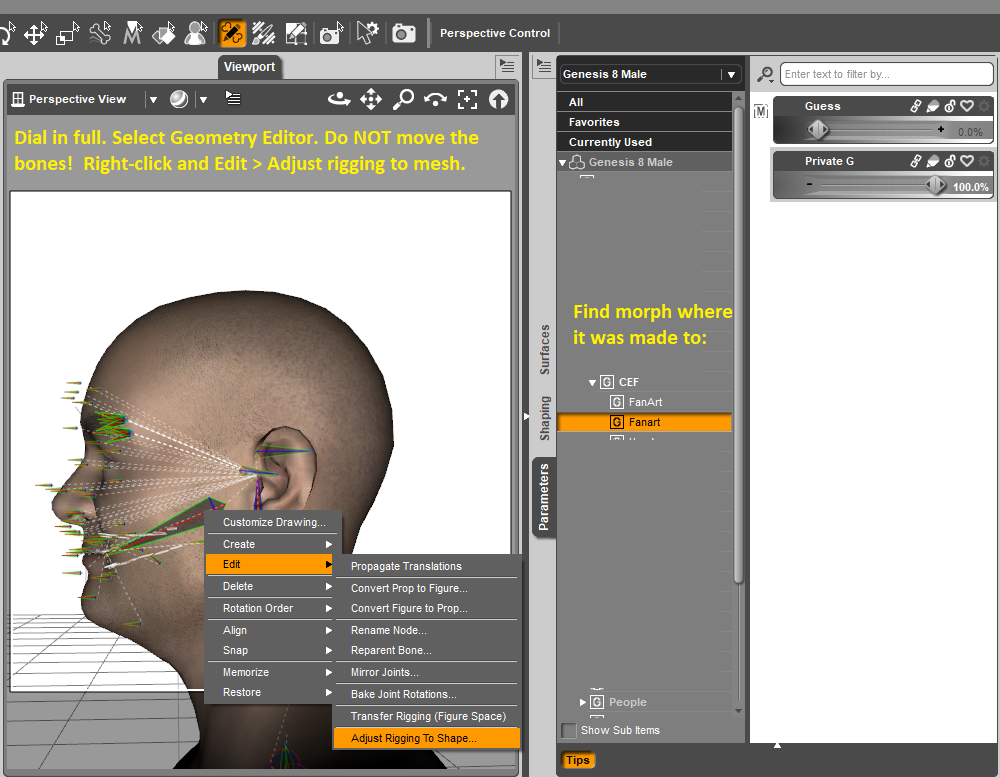
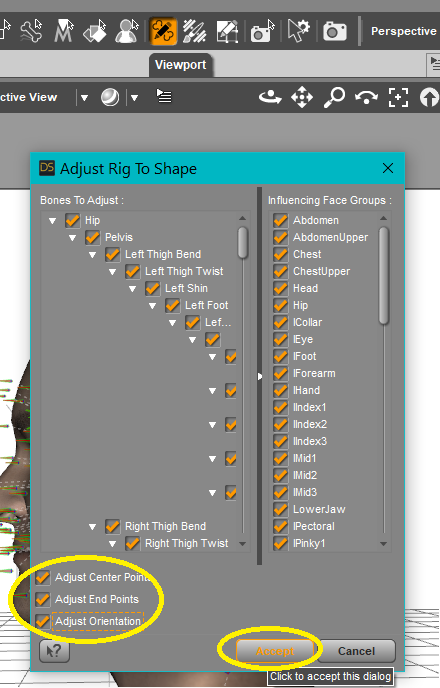
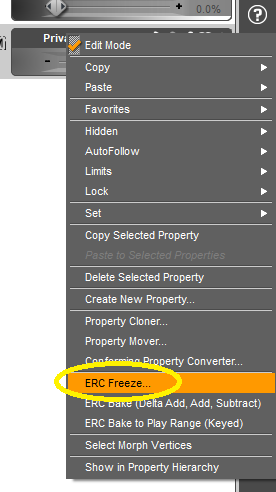
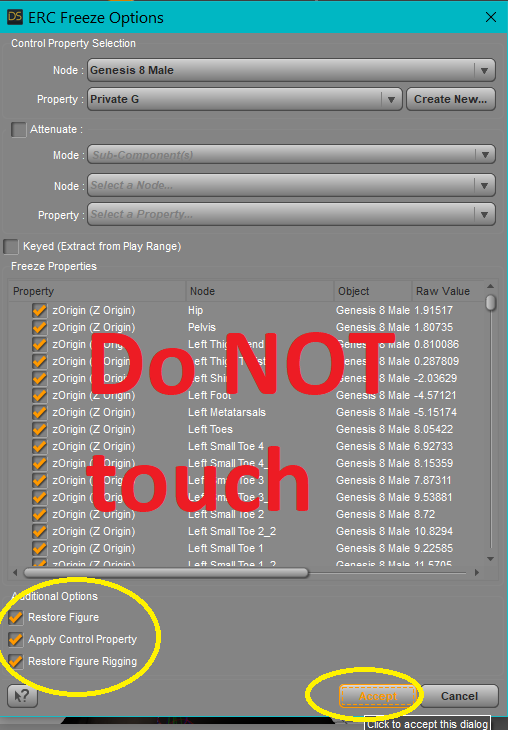
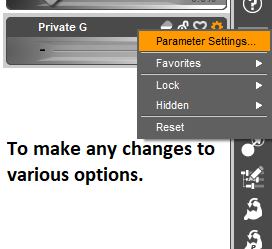
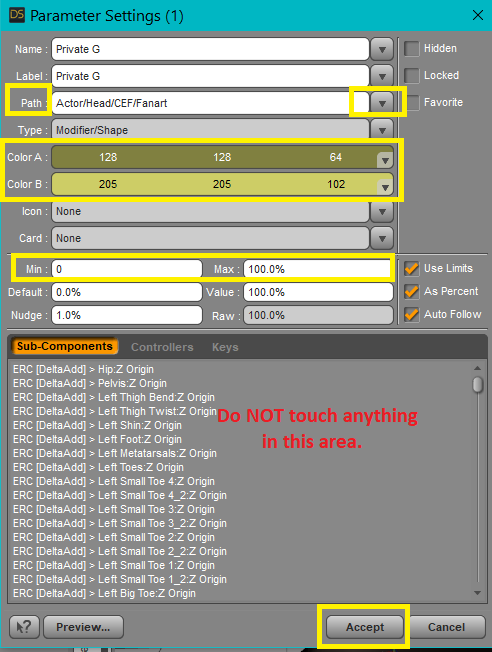
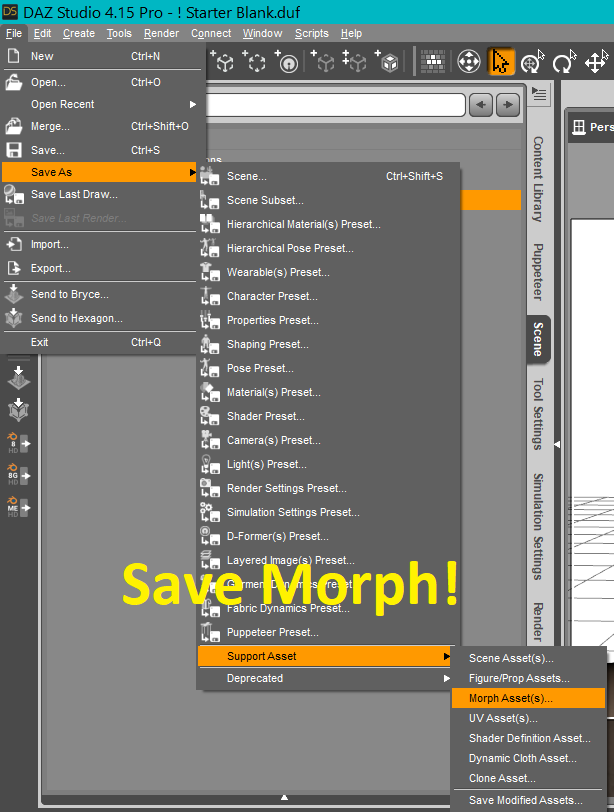
And now it is safe to fiddle with, add some hair, eye mats, clothes, whatever, and render out images!
Added bonus: The morph made by Face Transfer can now be used on any G8 M or F figure :-)
Pinned modelsWhat precisely do you mean by "I save it as a character file?"
Personally, when I make a new character, I save them as a scene subset - which means I can save their hair and clothes (and maybe the odd prop) as well as their morph and materials. I don't get the problem you describe.
Face Transfer Squash Faceswildbillnash said:
Where can I find the morphs? I don't see it them in the parameters tab.
Okay, I'll be back in a few minutes, have to load up D/S and get the images for you.
Updating: I will admit that these are not easy to find.
They are started with "FTS" which can be used as a search term.
Location is: Actor > Head > Real World > Face Transfer ShapesI have loaded to the scene a saved Face Transfer Subset:
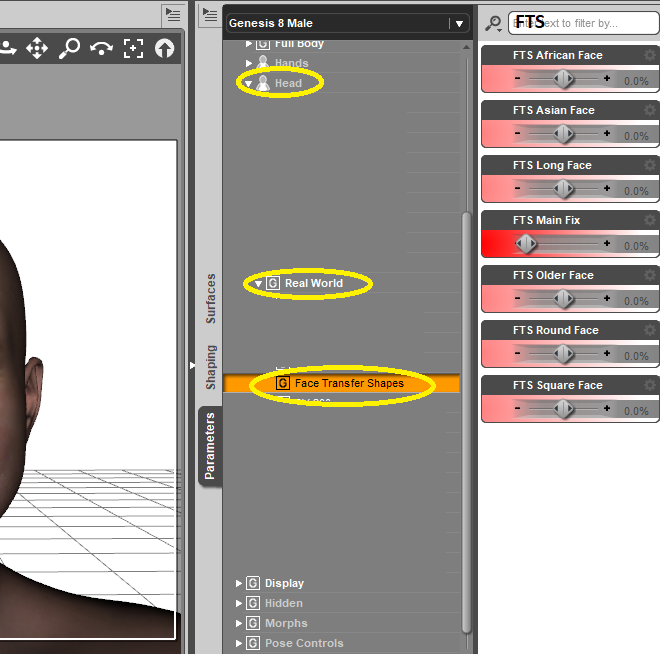
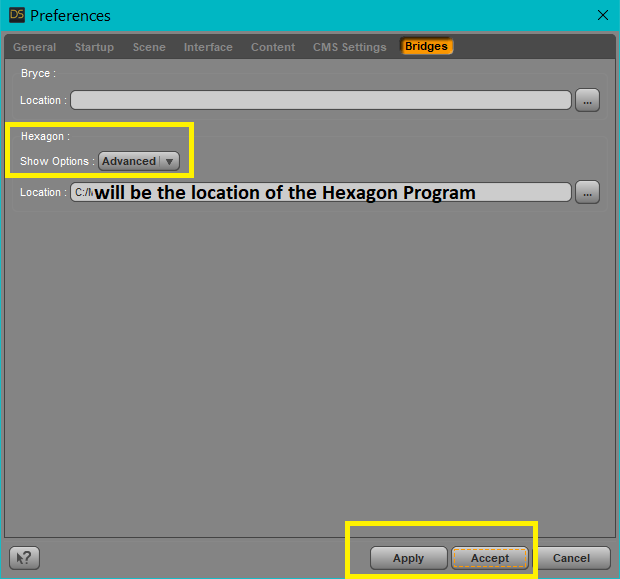
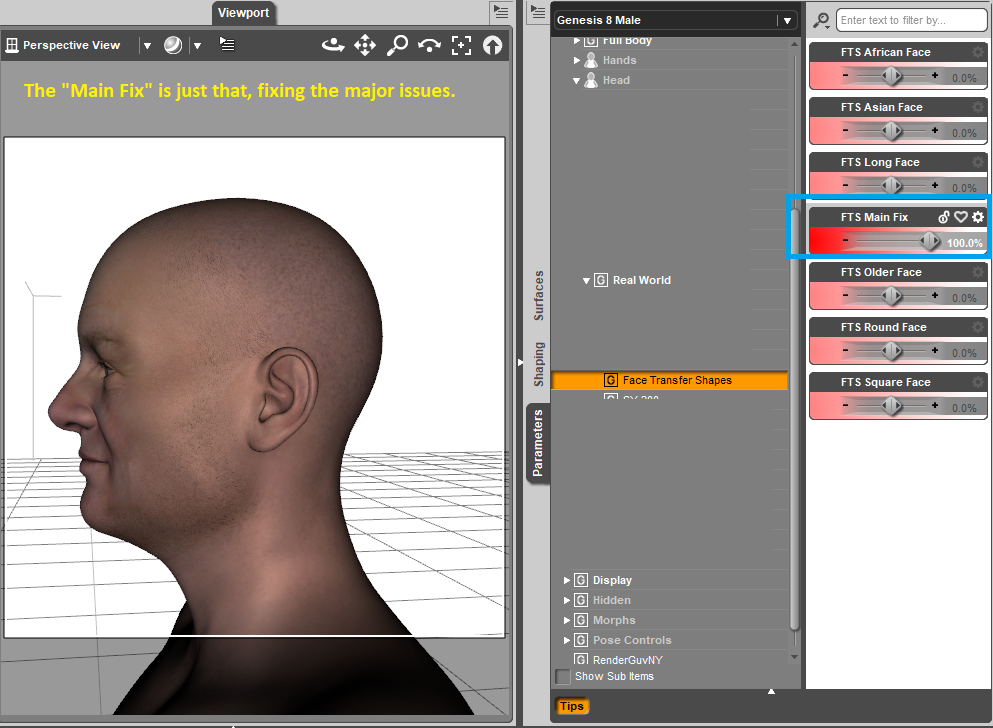
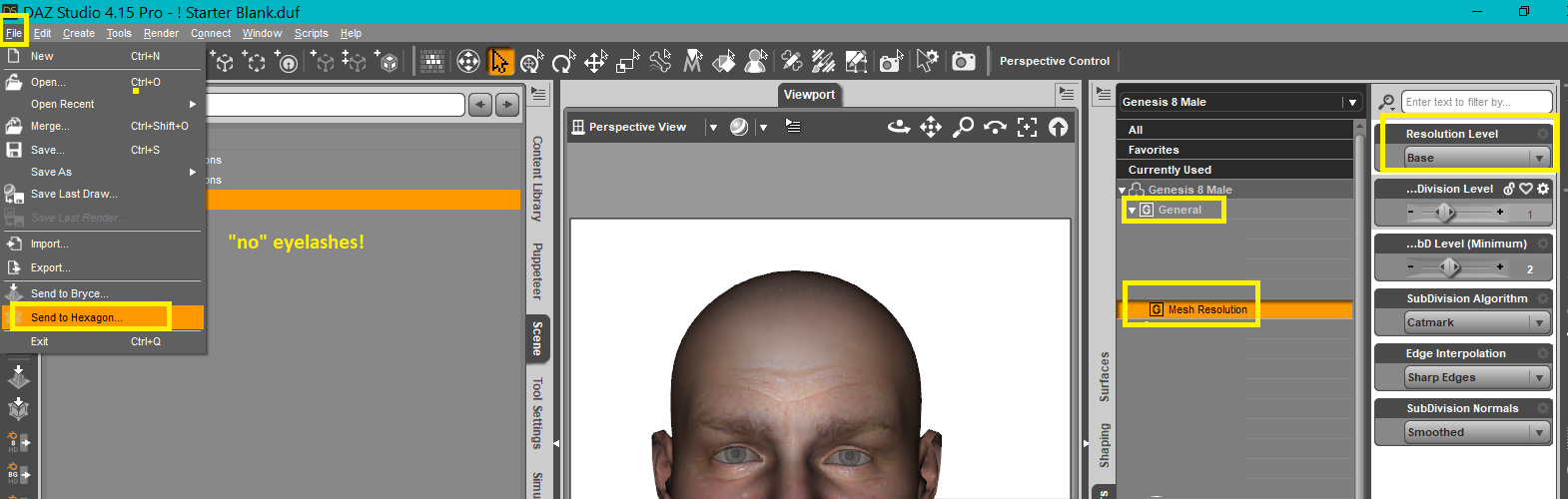
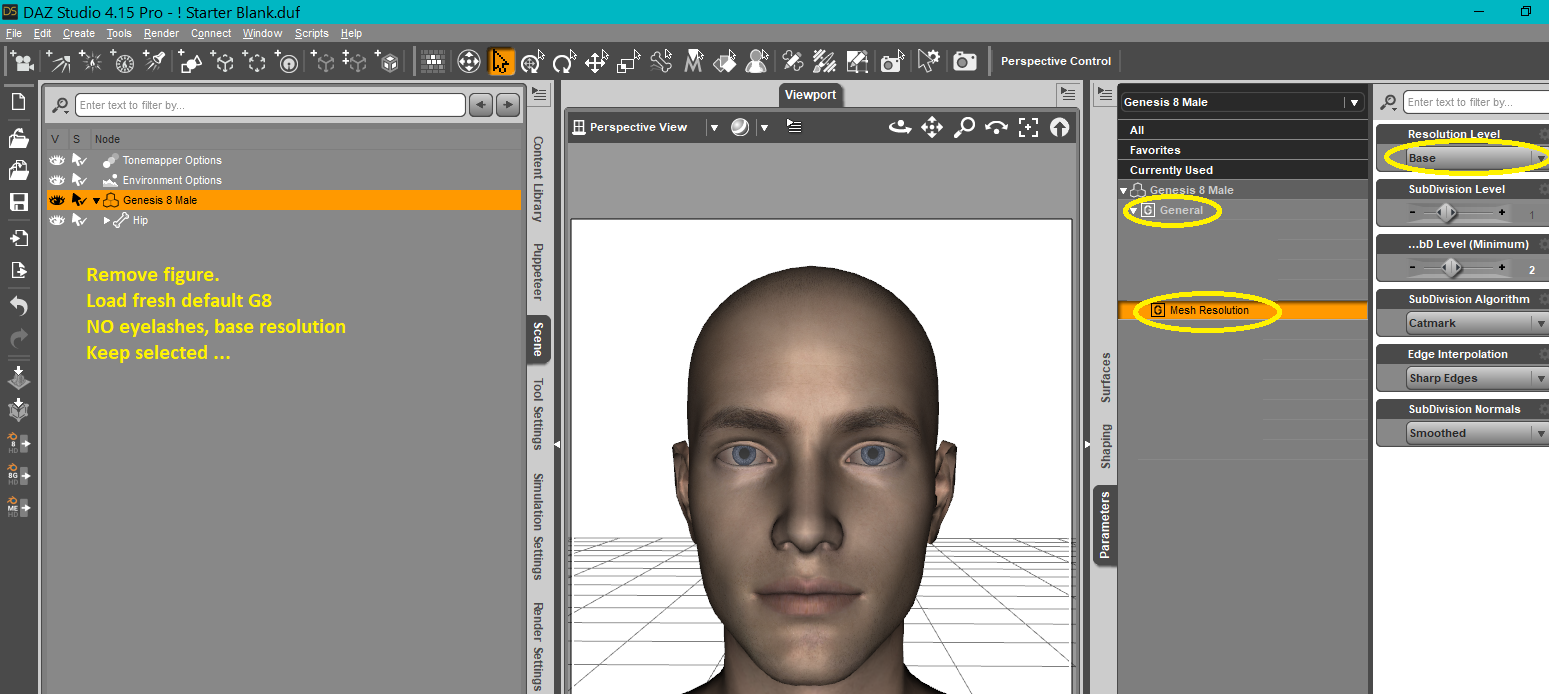
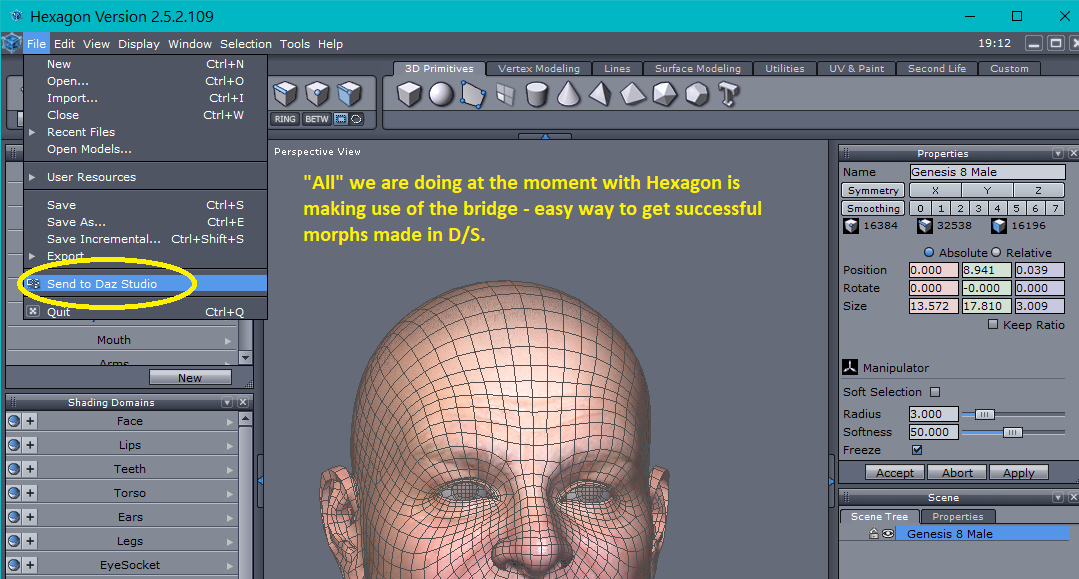
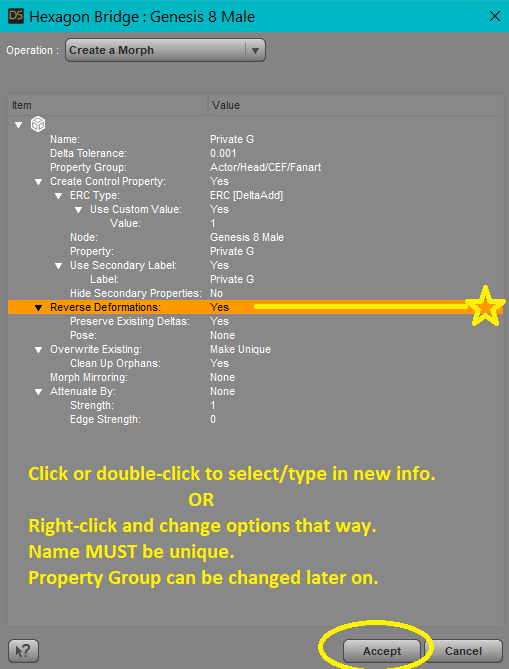 Face Transfer Squash Faces
Catherine, you said, " It is just a set of morphs which will adjust the full head to more realistic shapes. After you have used Face Transfer, then find the morphs on the Parameters Tab and dial in the ones that help the character's overall profile, etc. look more accurate."
Okay, I loaded one that I did. I looked in the Parameters tab and don't see anything new. What am I missing?
Just had a thought (don't know why this is highlighting itself), do I find the controls in DS or Hexagon?
Need help performing head transplant surgery (Sasuke 8 -> G8M)Gordig said:
Hylas said:
In any case, the thing with Sakura is that her eyes are geografts and I don´t think there´s a way to transfer those across genders. Or if there is I´d very much like to know about this myself!
Just happened to have this tab open already: https://www.daz3d.com/forums/discussion/comment/5287791/#Comment_5287791 ;
Oooohhhhhh kay!
Funny thing is, I apparently bookmarked that thread once, then promptly forgot about it.
 Need help performing head transplant surgery (Sasuke 8 -> G8M)
Hylas said:
In any case, the thing with Sakura is that her eyes are geografts and I don´t think there´s a way to transfer those across genders. Or if there is I´d very much like to know about this myself!
Just happened to have this tab open already: https://www.daz3d.com/forums/discussion/comment/5287791/#Comment_5287791 ;
Daz 3D is part of

Connect
DAZ Productions, Inc.
7533 S Center View Ct #4664
West Jordan, UT 84084Licensing Agreement | Terms of Service | Privacy Policy | EULA
© 2026 Daz Productions Inc. All Rights Reserved.