-
Can't find/install face transfer unlimited
Catherine3678ab said:
odastein said:
riverman63 said:
Just found this in a post from a few years back.....
How to activate the plugin
This plugin does NOT require a separate installer to be downloaded and run separately. The plugin itself is included in the installation of Daz Studio, but it is not activated until you enter a valid serial number. To do this, go to the "Help" menu in the main menu bar of Daz Studio and select the "About Installed Plugins…" action. Next, find the entry for "Face Transfer" and paste or type in your serial code* into the Serial Number field. Finally, click on the "Accept" button to finish the registration process. You will need to close Daz Studio and reopen it before you can start using the the plugin.
*Your serial code will be listed in the "Serial Numbers" section of your www.daz3d.com account.
Thank you, but there was no "about installed plugins" in "help". So, I had to submit a ticket for an information that should be immediately and obviously available when you buy a product, instead of having to ask people and then send a ticket.
Yes there is:
OK. I wasn't looking in "help" in Daz studio. I was looking in "help" on this website, assuming that it worked like when you redeem a gift card. Thank you very much.
But how are we supposed to guess all that? To figure out that there's no download, to realise that there's a serial number, to find it, and then to figure out where to enter it????
Looking For An Older Female CharacterEllithia 8? Her separate HD comes with an older HD morph https://www.daz3d.com/ellithia-8Can't seem to apply "Metal+Skin" combination materials to L4N4 HD Morph?I don't seem to be able to apply the "Metal+Skin" materials to L4N4 HD Morph figure from the PA, Daveyabbo. I am getting the same error message whether I select the figure itself using the Universal Tool in Daz Studio and then double click on one of the "combined" materials, or select just the skin GEO shell, or just the metal GEO shell, or even a combination thereof... it's usually a pretty straightforward process that I've done a million times so I'm wondering is there a fault with the product?
Is anyone else having this issue, or if not is there something else I should be doing or selecting to be able to apply these "combined" materials successfully to this figure, as without them it's uses are severly limited?
Many thanks for any help!
Unofficial Updates for DazToUnity Bridge (URP, Built-In, PBRSkin, Anims... dForce?)Work-in-Progress: Experimental dForce Support:
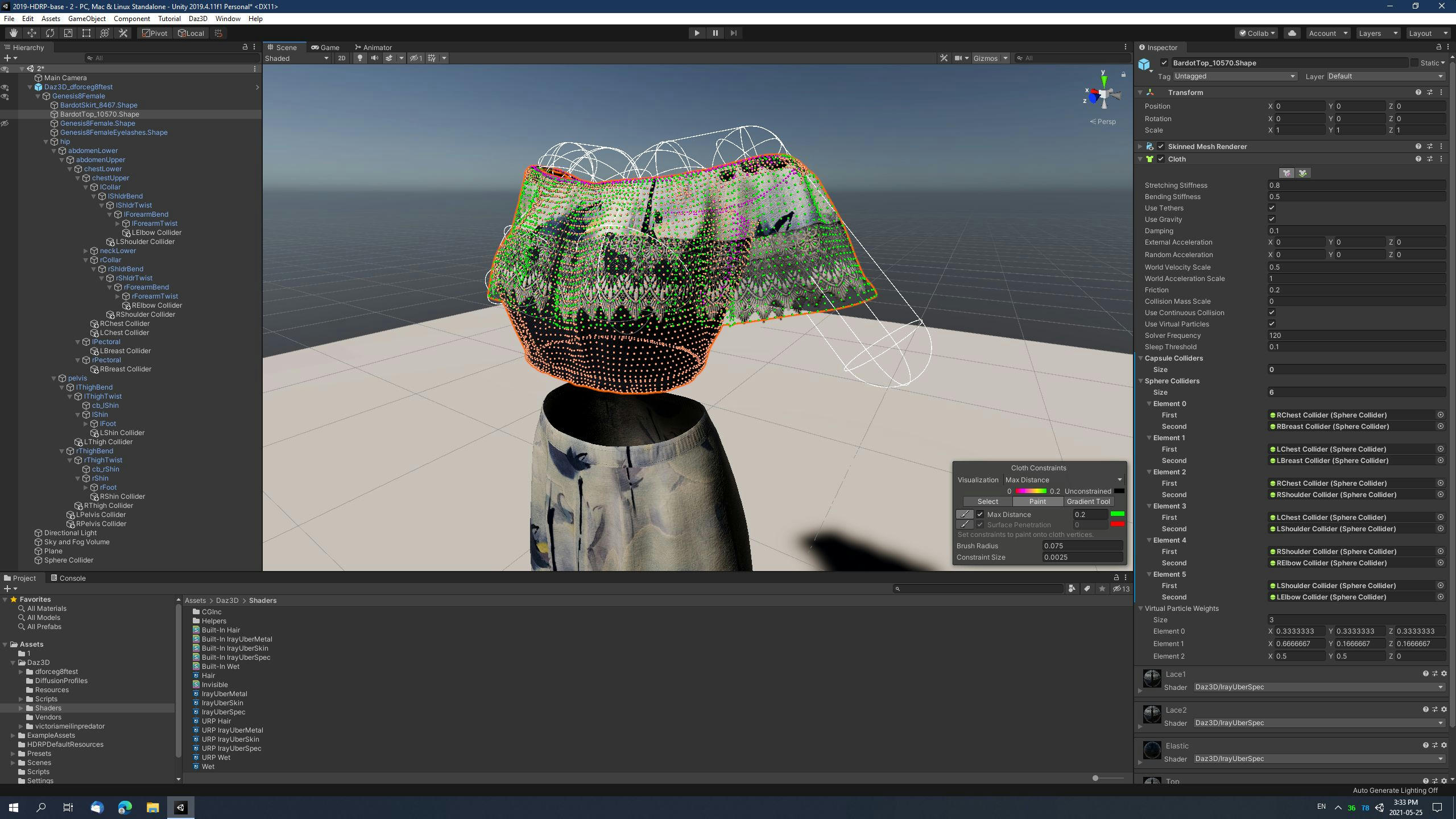
There is no packaged release with this feature yet, just work-in-progress source code: https://github.com/danielbui78/DazToRuntime/tree/dforce-experimental
This new bridge feature will export Daz dForce settings from the Simulations section of dForce enabled materials in the Surface Pane. It then imports those settings into Unity Cloth components, which it adds to the gameobjects that are using these dForce enabled materials. It then generates a Unity Cloth weightmap from the submesh vertices of each material group and the Dynamics Strength value for that material from the Daz Studio side. Right now, I'm working on making a sphere collider body to add to the Unity Prefab skeleton. It's currently pretty rough when you activate the game. I need to calibrate the transfer of simulation settings from Daz Studio to Unity, since right now, almost everything is a 1-to-1 transfer of coefficient values. Daz Studio dForce Weightmap modifiers are not currently supported.
Daz Connect Installations not appearing as Installed in Daz CentralRichard Haseltine said:
bike_angel said:
PerttiA said:
bike_angel said:
PerttiA said:
bike_angel said:
So this is also not a matter of wrong/different install directories. It seems Daz Central is not registering my Daz Connect installations at all.
-------------------------
What I want to know is why do Daz Studio installations (through Daz Connect) not synchronize with Daz Central and how can I make them synchronize?
It is because DAZ Connect uses installation paths which DAZ Central cannot see.
Thank you.
Is there any way that I or the developers can make Daz Central see the Daz Connect installation path?
Why are they separated in the first place?
That is a very good question, since quite a lot of problems surfacing here are related to DAZ Connect installing content to a location that no other installation method uses, it fails quite often and still has priority over all the other installation methods (DIM/DAZ Central/Manual installation)
1. DAZ Connect, as the name suggests can be used to connect to DAZ servers within DS
2. DAZ Connect uses installation path with \Cloud\ in it
3. Some years back DAZ tried to introduce encrypted contentI'm not connecting the obvious dots, but the reason for abandoning the traditional folder structure and placement of files can be read between the lines.
So it seems the content downloaded through Daz Connect is installed into an encrypted folder stored on my PC but which only Daz Connect can access by connecting to the Daz Cloud. And this encrypted folder is what is preventing Daz Central from accessing and seeing the contents installed, therefore not allowing Daz Central to know the status of Daz Studio contents installed via Daz Connect.
None of that is correct. The content is installed into /data/cloud/1_SKU/, where SKU is a unique identifier for each product - you can see it on the product page. The files are compressed but not, barring errors, encrypted. You do not need to be connecrtwed to Daz to use the content. Daz Central can't see the Connect instalaltion, and if there is a Connect isntalaltion DS will use that in preference to any other, but nothing is interferring with Daz Central itself. Daz Central simply doesn't have a way to know what is isntalled through Connect.
I always install morphs/sliders/add-ons using Daz Central because they can't be installed via Daz Connect. However, I install all my figures/props/environments/clothes using Daz Connect.
The only native Daz Studio content and tools that cannot be installed through Connect are plug-ins, and things that install like plug-ins (some older scripts and shaders that have to place files in the application folder) or content that needs access to other content in the same location (ExP morph expansions for Victoria 4, Michael 4 etc.). Some scripts will not work if installed through Connect, but that is down to the way the scipt is written.
Would you recommend that I install my figures/props/environments/clothes using Daz Central instead of Daz Connect? Are there any differences between these install methods for such products?
The big difference is Connect can see updates, when it goes on line, and can download just the updated files instead of the whole zip.
Thank you for explaining. It took a while, but you finally understood my question.
Daz Connect Installations not appearing as Installed in Daz Centralbike_angel said:
PerttiA said:
bike_angel said:
PerttiA said:
bike_angel said:
So this is also not a matter of wrong/different install directories. It seems Daz Central is not registering my Daz Connect installations at all.
-------------------------
What I want to know is why do Daz Studio installations (through Daz Connect) not synchronize with Daz Central and how can I make them synchronize?
It is because DAZ Connect uses installation paths which DAZ Central cannot see.
Thank you.
Is there any way that I or the developers can make Daz Central see the Daz Connect installation path?
Why are they separated in the first place?
That is a very good question, since quite a lot of problems surfacing here are related to DAZ Connect installing content to a location that no other installation method uses, it fails quite often and still has priority over all the other installation methods (DIM/DAZ Central/Manual installation)
1. DAZ Connect, as the name suggests can be used to connect to DAZ servers within DS
2. DAZ Connect uses installation path with \Cloud\ in it
3. Some years back DAZ tried to introduce encrypted contentI'm not connecting the obvious dots, but the reason for abandoning the traditional folder structure and placement of files can be read between the lines.
So it seems the content downloaded through Daz Connect is installed into an encrypted folder stored on my PC but which only Daz Connect can access by connecting to the Daz Cloud. And this encrypted folder is what is preventing Daz Central from accessing and seeing the contents installed, therefore not allowing Daz Central to know the status of Daz Studio contents installed via Daz Connect.
None of that is correct. The content is installed into /data/cloud/1_SKU/, where SKU is a unique identifier for each product - you can see it on the product page. The files are compressed but not, barring errors, encrypted. You do not need to be connecrtwed to Daz to use the content. Daz Central can't see the Connect instalaltion, and if there is a Connect isntalaltion DS will use that in preference to any other, but nothing is interferring with Daz Central itself. Daz Central simply doesn't have a way to know what is isntalled through Connect.
I always install morphs/sliders/add-ons using Daz Central because they can't be installed via Daz Connect. However, I install all my figures/props/environments/clothes using Daz Connect.
The only native Daz Studio content and tools that cannot be installed through Connect are plug-ins, and things that install like plug-ins (some older scripts and shaders that have to place files in the application folder) or content that needs access to other content in the same location (ExP morph expansions for Victoria 4, Michael 4 etc.). Some scripts will not work if installed through Connect, but that is down to the way the scipt is written.
Would you recommend that I install my figures/props/environments/clothes using Daz Central instead of Daz Connect? Are there any differences between these install methods for such products?
The big difference is Connect can see updates, when it goes on line, and can download just the updated files instead of the whole zip.
Reducing loading times of scenes
1 minute is actually not bad at all. If you really want to speed up the loading time, delete every product which you seldom use in the product library.ps2000 said:I have a ryzen 2700x and a fast M2 SSD (Samsung Evo 970)
But loading scenes takes still a lot of time (often over 1 minute).
I own a lot of different morph packs and thinks that they are in part responsible for the long duration it takes to load a scene.
But parts of every of them are still in use and one shouldn't remove only parts of morph packs I read somewhere.
Is there any other method to reduce loading times?
Thanks.
Reducing loading times of scenesI have a ryzen 2700x and a fast M2 SSD (Samsung Evo 970)
But loading scenes takes still a lot of time (often over 1 minute).
I own a lot of different morph packs and thinks that they are in part responsible for the long duration it takes to load a scene.
But parts of every of them are still in use and one shouldn't remove only parts of morph packs I read somewhere.
Is there any other method to reduce loading times?
Thanks.
DELETEThis bundle moves hidden sliders (Morph Controlled Morphs) that, we have to trust, will "enhance" our expressions.
I installed it a long time ago and only today realized that a weird issue I had for a while was linked to those hidden MCM : I couldn't close eyes properly. I thought for a long time that it was issues with girls bundles. But nope.
I got rid today of Auto Face Enhancer (and Auto Shape Enhancer too, just to be on the safe side) and suddenly my facial expressions, not just the eyes, looked MUCH cleaner. I had issues with weird wrinkles on the neck and so many little problems that I now realize came from that bundle. I mean... I'm sure that the bundle has some qualities, but the fact that the controlled morph sliders are locked + hidden away and that we have to trust that they'll be at the best % at all times is just wrong.
On big scenes, I can now feel a very significan improvement in the overall speed without those Auto MCM "improving" the default DAZ skinning. I can now move in the timeline in real time when before i had to wait minutes just to move from a frame to another. Loading a girl preset takes 1 or 2 seconds, when before I was used to wait minutes for that. It's impressive the difference.
Zev0 does similar shape enhancing tools but at least we can decide to use them or not, and we can act on the sliders (as they are not hidden and locked by default) if for some reason the impact was not the one expected. It's a much more respectful approach to improved facial and body morphs than this "Auto" bundle that does things without us knowing about it and slows down DAZ tremendously (I mean it, again the difference is incredible).
3D Art Freebie Challenge-May 2021-"May Mysteries" -Entries Thread OnlyMAY MISTERY OF ROSES
She holds the mystery of the rose and show the path, but only during may month
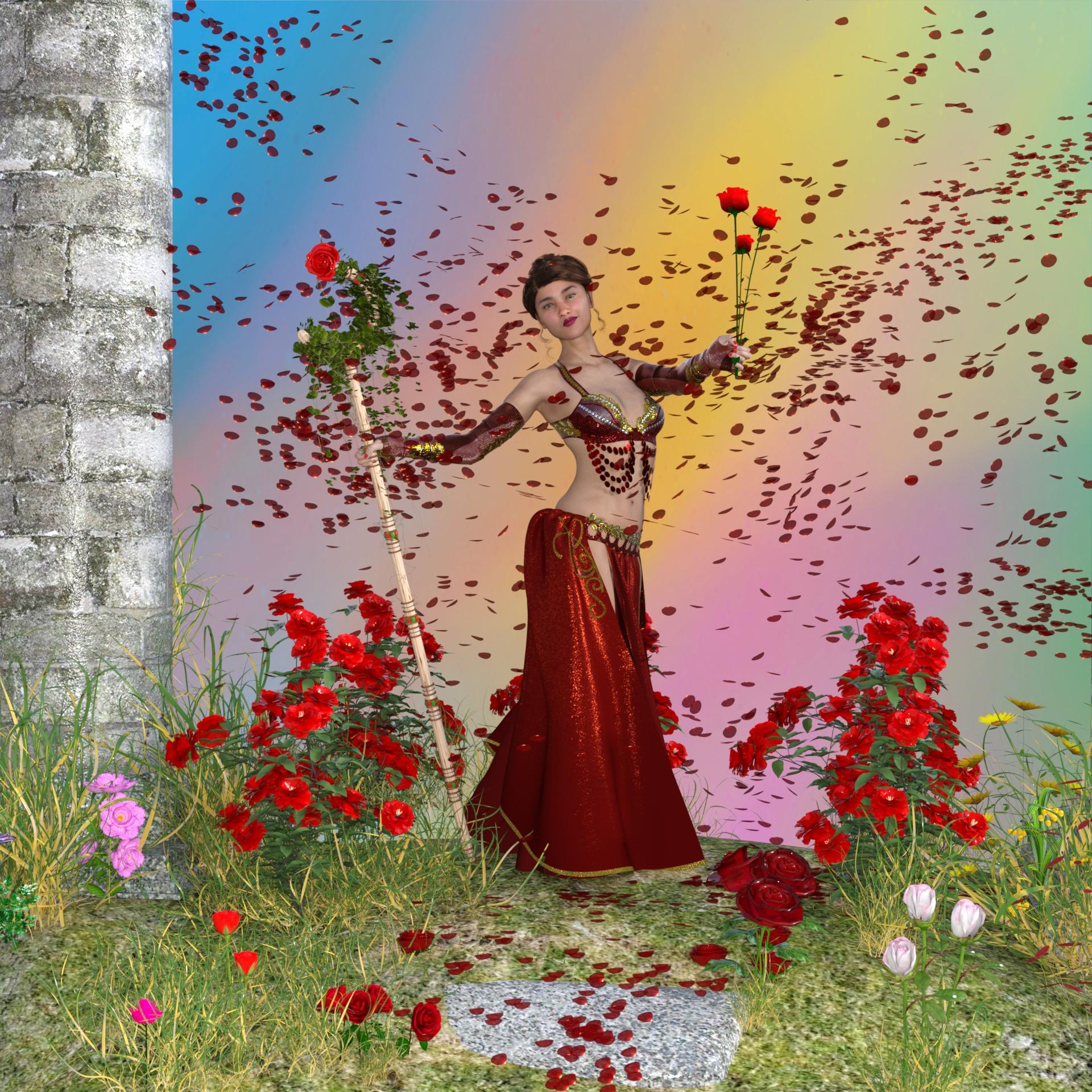
This image has been resized to fit in the page. Click to enlarge.
no count: Genesis 8.1 female
Freeware
GENESIS 8.1 STUFF
dForce_French Twist Hair for Genesis 8 Female(s)
https://www.renderosity.com/mod/freestuff/dforce-french-twist-hair-for-genesis-8-female-s-/81937dForce_Belly Dance Nights Outfit for Genesis 8 Female(s)
https://www.renderosity.com/mod/freestuff/dforce-belly-dance-nights-outfit-for-genesis-8-female-s-/82950Ella for Genesis 8Female by tottallou (only skin)
https://www.renderosity.com/freestuff/items/77844/ella-for-genesis-8femaleAdriana for Genesis 8 Female by Zia3d (head morph)
https://www.renderosity.com/freestuff/items/82827/adriana-for-genesis-8-female
ENVIRONMENT, PLANTS AND FLOWERS
Rose by weld
https://www.renderosity.com/freestuff/items/74900/rose3D model Rose by alenaesaulova
https://www.turbosquid.com/3d-models/3d-model-rose-flower-plant-15360153D model Rose by Stylesharp
https://www.turbosquid.com/3d-models/3d-model-rose-1242547
Merlins Rose
http://www.merlinstudios.co.uk/temp/MerlinsRose.zipPoser Rose
https://www.robinwood.com/Catalog/FreeStuff/FreeModels/FModelPages/PoserRose.htmlRose bush
https://downloadfree3d.com/3d-models/plants/flowers/rose-bush/Rose Bushes Flower 3D Model
https://open3dmodel.com/3d-models/rose-bushes-flower_309977.html
rose.zip
http://tullugaq.com/free.htmlPack1_Fleurs by chacornac
https://www.renderosity.com/rr/mod/freestuff/pack1-fleurs/78828Pack_Fleurs by chacornac
https://www.renderosity.com/rr/mod/freestuff/pack-fleurs/78586Fleur des champs by chacornac
https://www.renderosity.com/freestuff/items/79468/fleur-des-champs
Grass as Grass can be! (DAZ3D, Iray) by SmidA
https://www.renderosity.com/freestuff/items/88095/grass-as-grass-can-be-daz3d-iray
HoSM Flowers set 2 by mapps
https://www.renderosity.com/freestuff/items/25770/hosm-flowers-set-2
https://www.renderosity.com/freestuff/items/25734/hosm-flowers-amp-shrubs
Rose Thorn Staff by -Wolfie-
https://www.renderosity.com/freestuff/items/75754/rose-thorn-staffbackground: made by me with GIMP
Limited time frteebies - Now they are no more free- they are to be paid or cannot be found
Rain Of Petals
https://www.renderosity.com/rr/mod/bcs/rain-of-petals/95628/ ;"Fantasy Ruins"
Dec.2020 - 24 Days Of Christmas Renderosity's freebies during Christmas 2020 period
hope you like
thanks
emanuela1Right Fred Thread - the Fred 8.1 virtual talk show *canned applause*Well, it's a coherent theme, and everything in the bundle actually fits it. That's doing better than most of the latest attempts.
I like the morph and the hair, and the pose sets actually look like they could be somewhat useful. Not sure about the suit, but I've certainly seens worse.
This might be one where I let it sit in the cart to see what might be in a follow-up bundle tomorrow or Wednesday. We've sometimes seen what looked like deeper discounts for buying both bundles together.
And if not, I'll probably pick up the character and the hair by themselves.
Is Studio 4.15 worth upgrading to from 4.12??outrider42 said:
kyoto kid said:
Fishtales said:
You can run the 4.15 Beta along with the 4.12 full program, that's what I have. I dodge between the two as the mood takes me to see if there is any difference between the two on some renders.
...one of the issues with that however is if you make changes to and save a scene in a newer version (like 4.15)and decide to back to and stay with an older version the scene cannot be opened. This has been the norm ever since I started with Daz.
This is not correct. I literally do this on a daily basis hopping between a beta and full release. The only time you may have any issue is if you save something in the scene that is specifically a new feature that is not yet part of the other version. For example, you cannot save a dforce strand hair in a current Daz and open it in 4.10 because 4.10 did not have the strand hair. The scene will actually load, however, it will pop up a bunch of errors and the strand hair will not load. The rest of the scene will in fact load.
BTW, @Fishtales, if you are rendering to compare speeds, look at how many normal maps you have in use at the time.
I did a series of tests between 4.12 and 4.14 trying to see what was different. Also, if you look at the update log for 4.14, there is a mention of (to paraphrase) 'changing how Iray handles normal maps to be more efficient'. I found that using a normal map on a character in 4.12 really impacted render times vs using HD subdivision. It was actually faster to render a Daz Original with their HD than it was to render the same character and scene with a normal map applied. At least until you got to subD 4 and 5, and subD 4 was pretty close. In 4.14 and above, the same scene with normal maps now renders more on par with the HD subD. I can't recall if it jumped back ahead or not, but the difference was striking, in some cases nearly twice as fast over 4.12. I did observe a small bump in VRAM in this scene when rendering, but it was quite small, like 50MB if I remember right, BUT only when using normals. I tested out displacement maps and bump maps, and I was not able to find any difference in performance between them.
Genesis 8.1 will load in older versons of Daz, even versions that predate Iray. However it will not load your collection of 8.0 morphs.
I use Daz 4.12 and found that if I copy the Morph folder from /data/DAZ 3D/Genesis 8/Male and paste it into /data/DAZ 3D/Genesis 8/Male8_1, the morphs work. Expressions are another story. I only gave it a try because Storybook Mouse was said to only work with 4.15.
Does Genesis 8 Not have Ability to have Defined Abdominal Muscles?Hi nokoteb99.
What is your SubD level setting (for both the viewport and rendering)?
It's up to the individual product developers to craft morphs with more definition. Not a bug, but perhaps an artistic design decision. Some G8M figures do have better defined abdominals right out of the box and using various morph packages can bring those out nicely.
I do like your render from the 2nd post. Very nice abdominal definition. I hope you find add-on products that give you what you're looking for. :)
Here's a forum thread where we discuss Auto Muscle Enhancer for G8M. You might find some ideas there useful.
https://www.daz3d.com/forums/discussion/389081/auto-muscle-enhancer-hd-commercial
Lee
Does Genesis 8 Not have Ability to have Defined Abdominal Muscles?I am trying with the many Products i bought of muscularity Plus the basic DAZ Body morphs and although they claim to be body builder, the abdominal muscles are mildly defined. This did not happen in Genesis 2. Genesis 2 would have greatly defined abdominal muscles. So what's going on, am i doing something wrong. look at this guy. supposedly a super muscle man, and super defined, and i set body builder defined muscles to the max.
Can anyone tell me how to make the muscles more defined? i have
a)DAZ Body Morphs..and bodybuilder details and morph to the mx
b)I have here in this image im using Z Muscle Man product and his body preset Plus on top of that i added
The Full body morphs for Body builder and Fitness Details...and do you see great Ab details. NOpe!! NOthing.
The male is Genesis 8
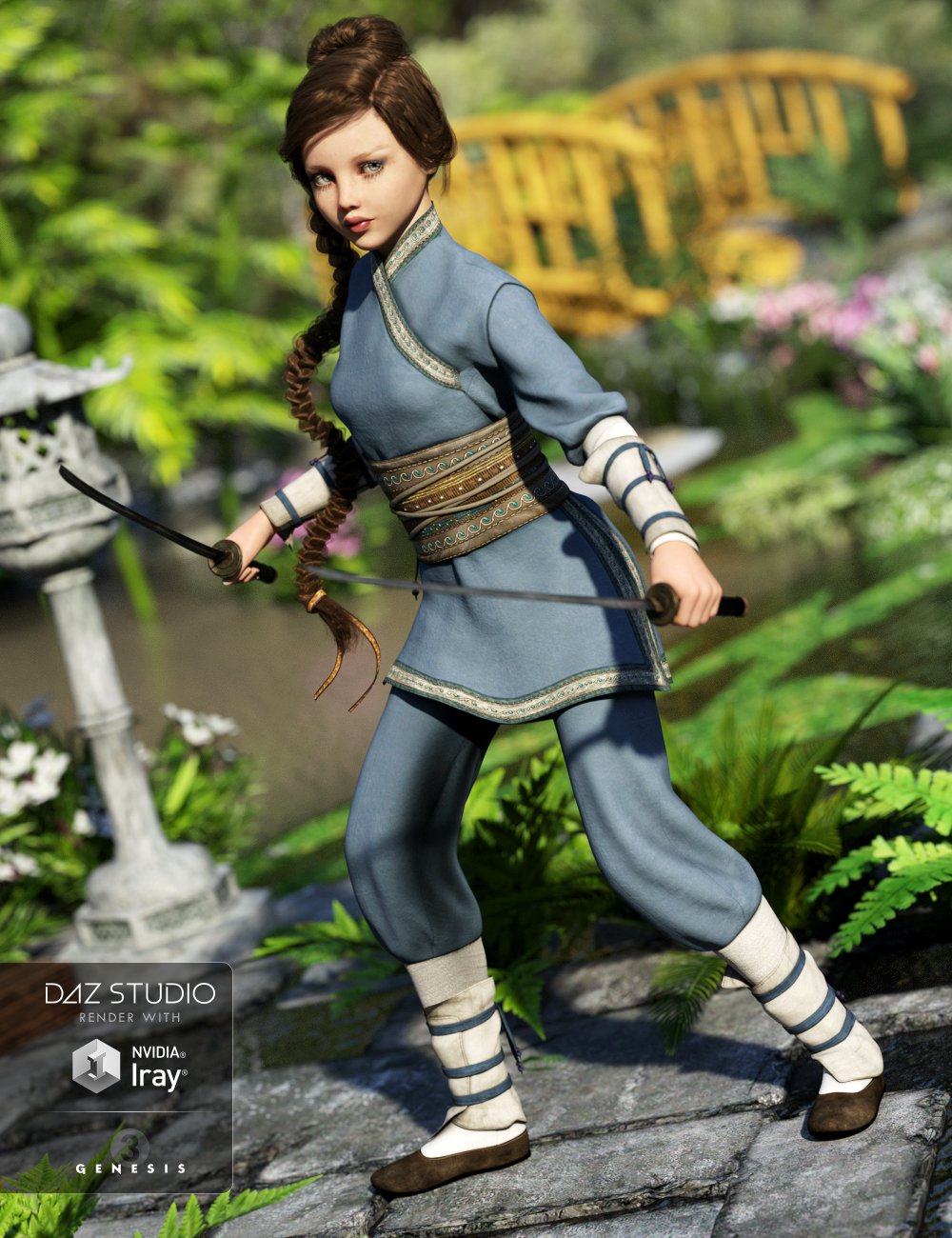
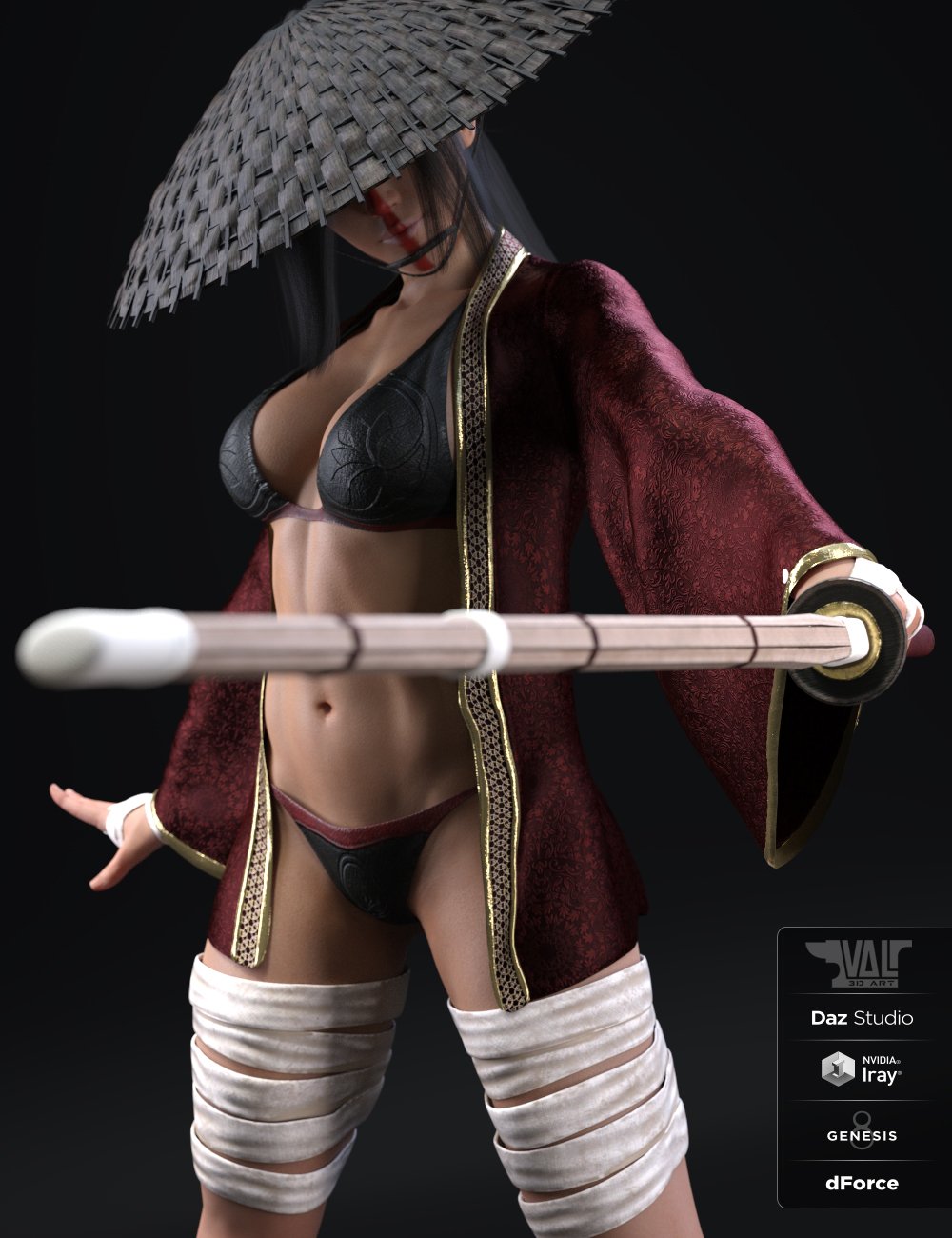
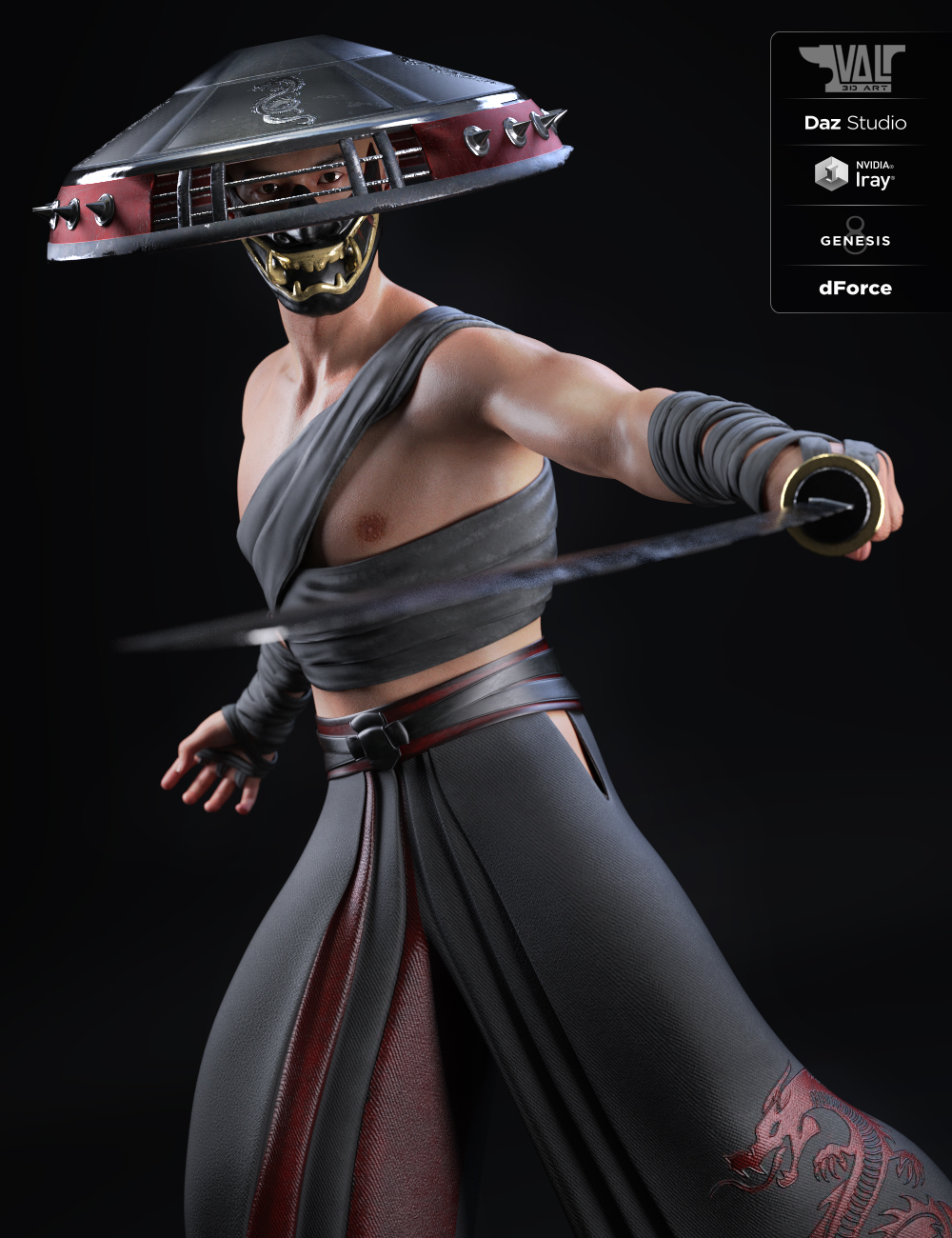
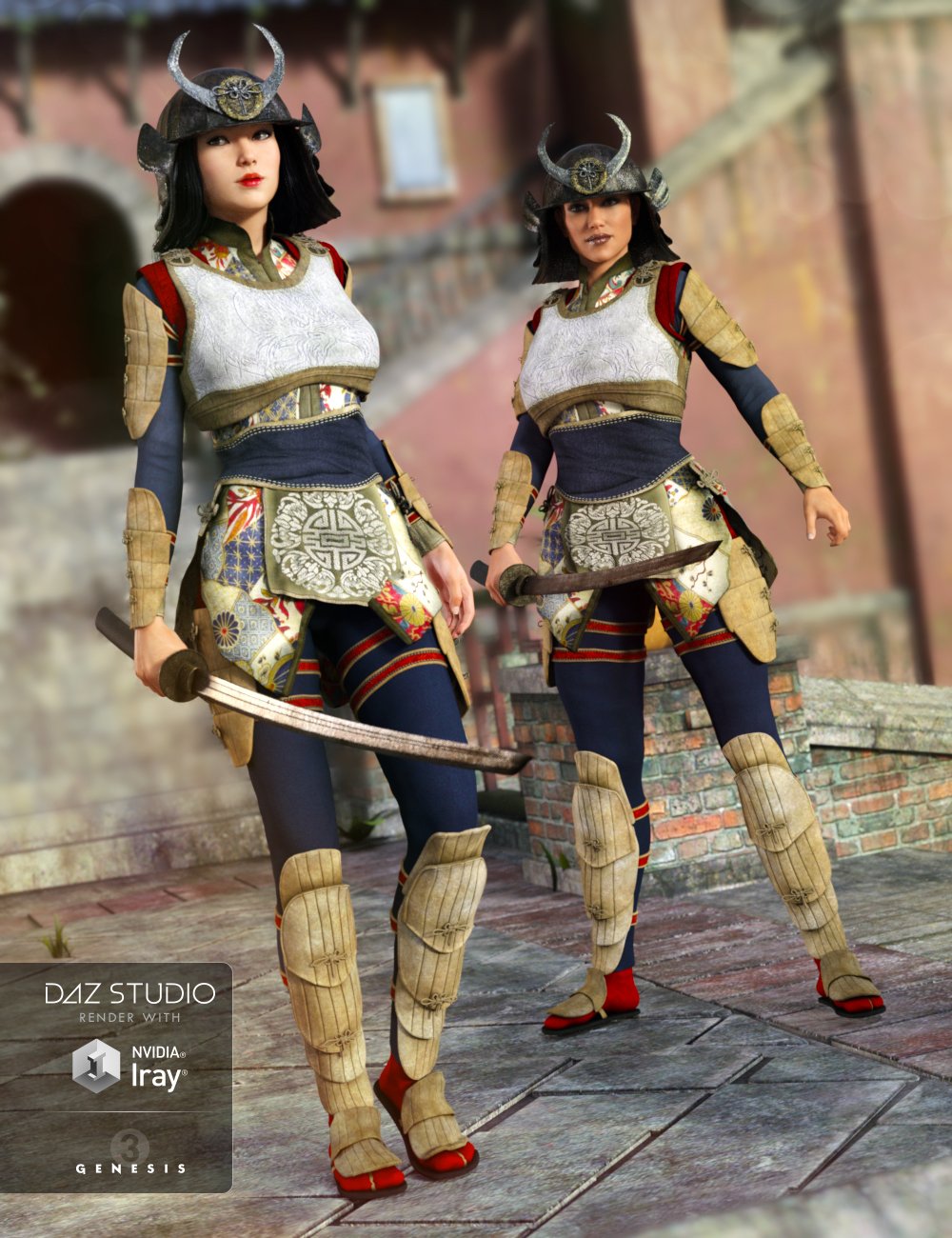
"Ronin outfit" makes me long for a ronin outfit..what gets me is the marked difference between male and female samurai/ronin/ninja/martial artist or whatever outfits. The female ones always either be more skimpy and/or have to show cleavage. Even the karate gi for G2F (none was released for G3) is more "revealing" than the male version (and there is no "open/close top" morph).
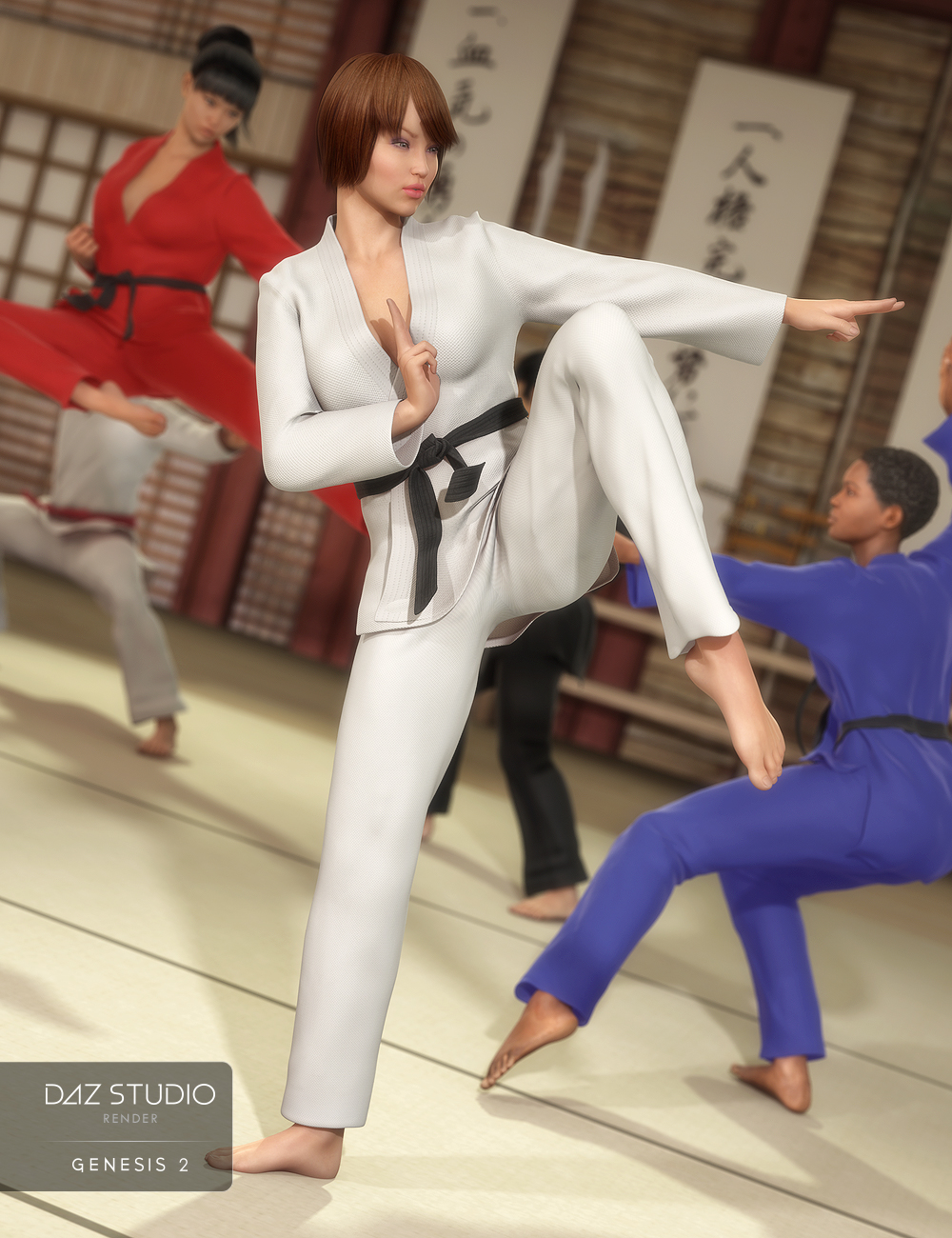
I ended up getting the dForce G8 versions and converting them to G3 as both are more "proper".
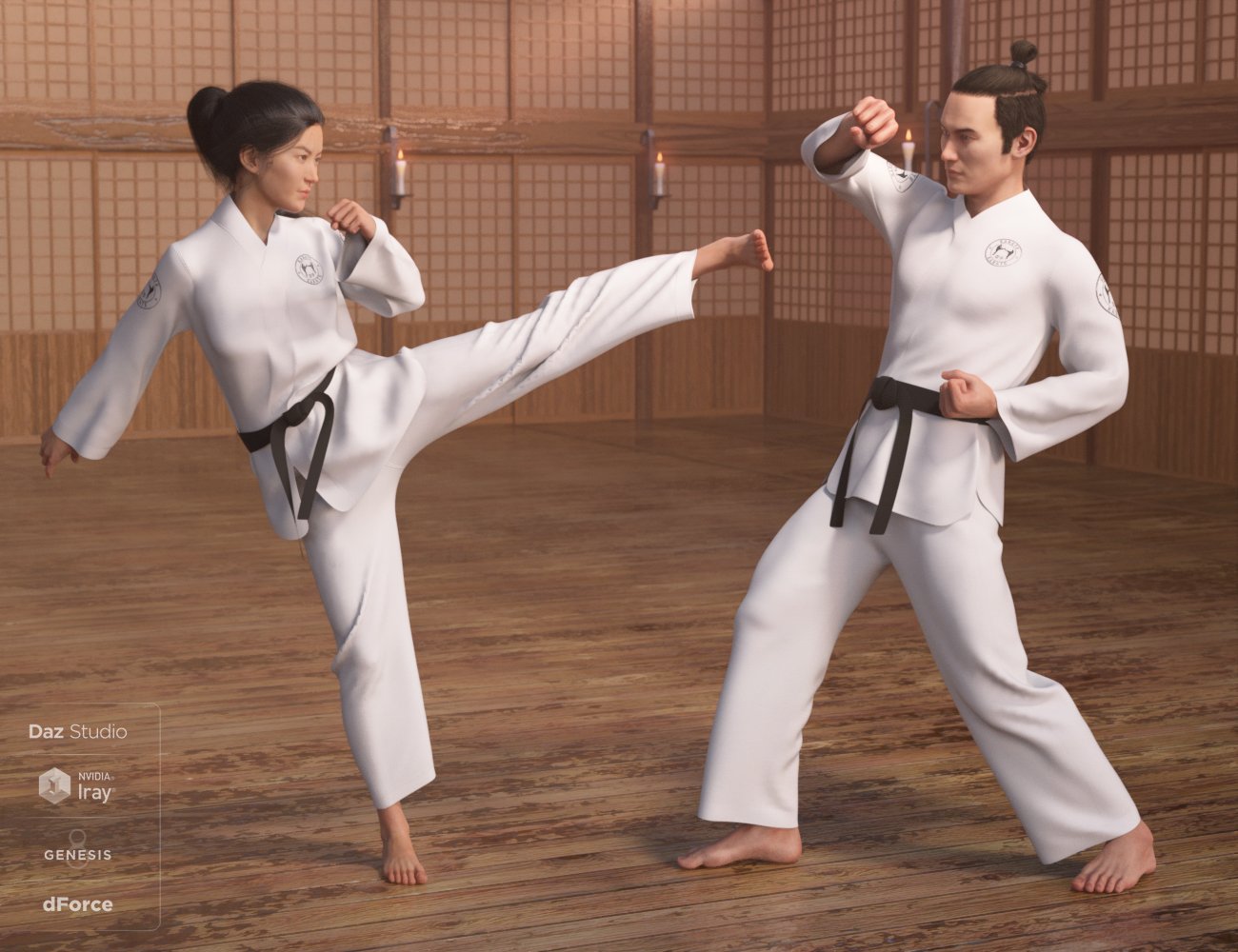
Oh and there was this for G3F which was part of the Tween Julie bundle (but fits any G3F female).
One of the worst contrasts was the Ren Outfit for G8F which is supposed to be the female counterpart to the Senshi Outfit for G8M.
Whereas the Nitsu Hinshi Samurai Armour for G8F (even though slightly stylised) makes much more sense.
 SereneNight’s Sci-Fi Fun Thread 3
His morph reminds me of Rob Liefeld's art, in a roundabout way, where he has added details that don't really correspond to actual human anatomy.
SereneNight’s Sci-Fi Fun Thread 3Here is Nasiri, with Nicoley's head dialed in at 65 percent, Hal's eyelashes, and Nicoley's bod at 50 percent. Yeah, I can't do much about that rib cage, its pretty sharp, and part of the Nicoley morph.
 Can't find/install face transfer unlimited
odastein said:
riverman63 said:
Just found this in a post from a few years back.....
How to activate the plugin
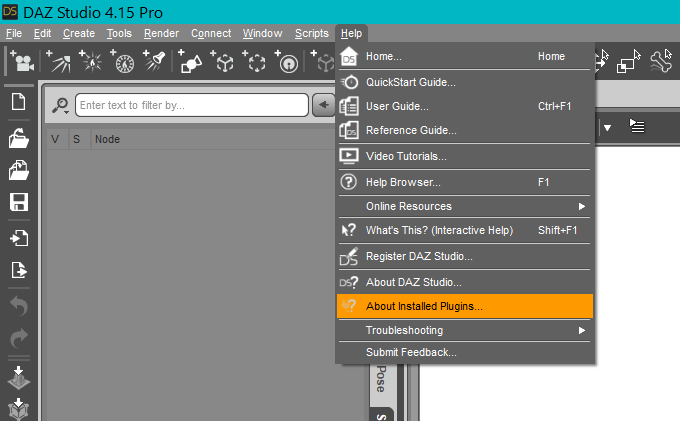
This plugin does NOT require a separate installer to be downloaded and run separately. The plugin itself is included in the installation of Daz Studio, but it is not activated until you enter a valid serial number. To do this, go to the "Help" menu in the main menu bar of Daz Studio and select the "About Installed Plugins…" action. Next, find the entry for "Face Transfer" and paste or type in your serial code* into the Serial Number field. Finally, click on the "Accept" button to finish the registration process. You will need to close Daz Studio and reopen it before you can start using the the plugin.
*Your serial code will be listed in the "Serial Numbers" section of your www.daz3d.com account.
Thank you, but there was no "about installed plugins" in "help". So, I had to submit a ticket for an information that should be immediately and obviously available when you buy a product, instead of having to ask people and then send a ticket.
Yes there is:
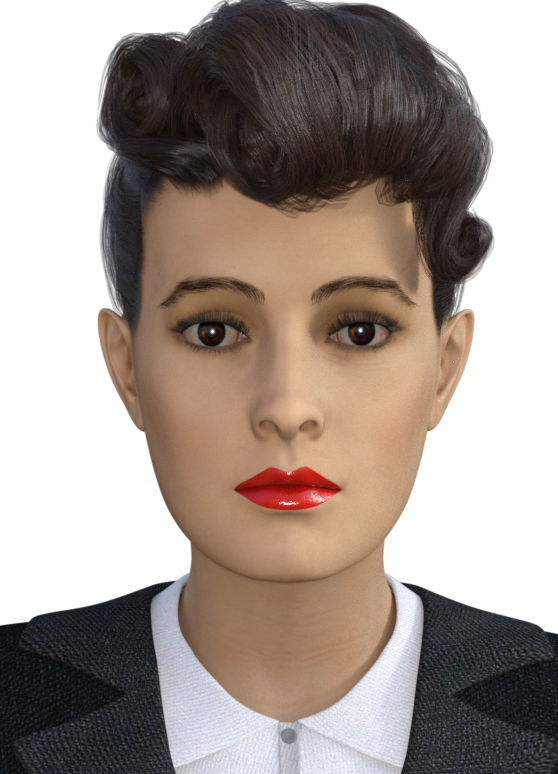
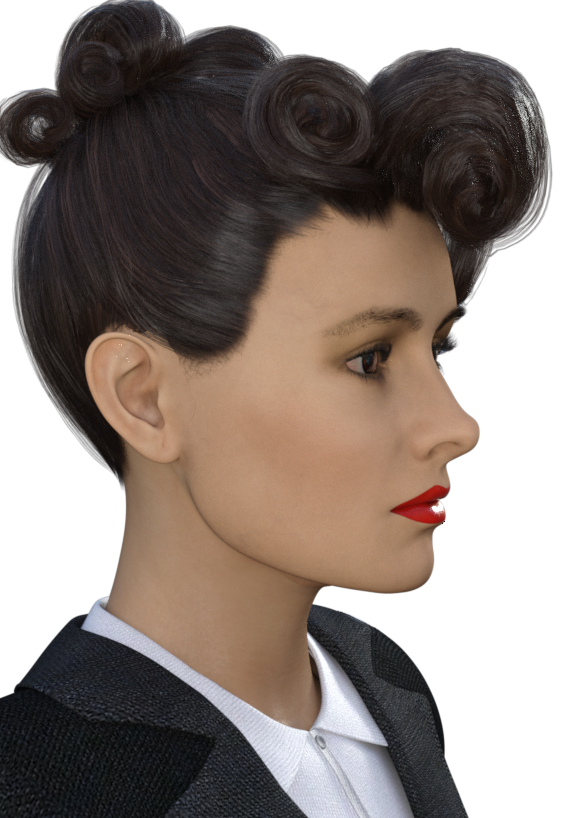
 Lady Noir for G8.1F ("Blade Runner's" Rachael) head morph. Rockabilly Noir hairdo!
This is the first time I am shaping and packaging from scratch a head morph for a Genesis character, so please forgive me any errors that I might have made. If something is wrong, just let me know and I will do my best to fix the problem. If something is unclear in the ReadMe.txt file, please don't hesitate to ask.
I would appreciate your help with potential blunders. As I said - this is new territory for me.
I did not include any texture maps, because I am pretty bad at making them. I believe you are better off using existing textures. In the images below I have used Victoria 7's for G3F face map that I somewhat modified - most notably I removed the eyebrows and replaced them with fibermesh ones and changed the eyeshadow and lip color in Photoshop.
For the promo images I also used the Yvette hair and the Business Suit for G3F.
This version of Lady Noir is not a continuation of my Lady Noir for V4 or the G3 convertion from V4. It is a brand new head morph created specifically for G8.1F.
Noncommercial use only.
Please let me know what you think!
Enjoy!
AOBB
 3D Art Freebie Challenge-May 2021-"May Mysteries" -Main Thread Only
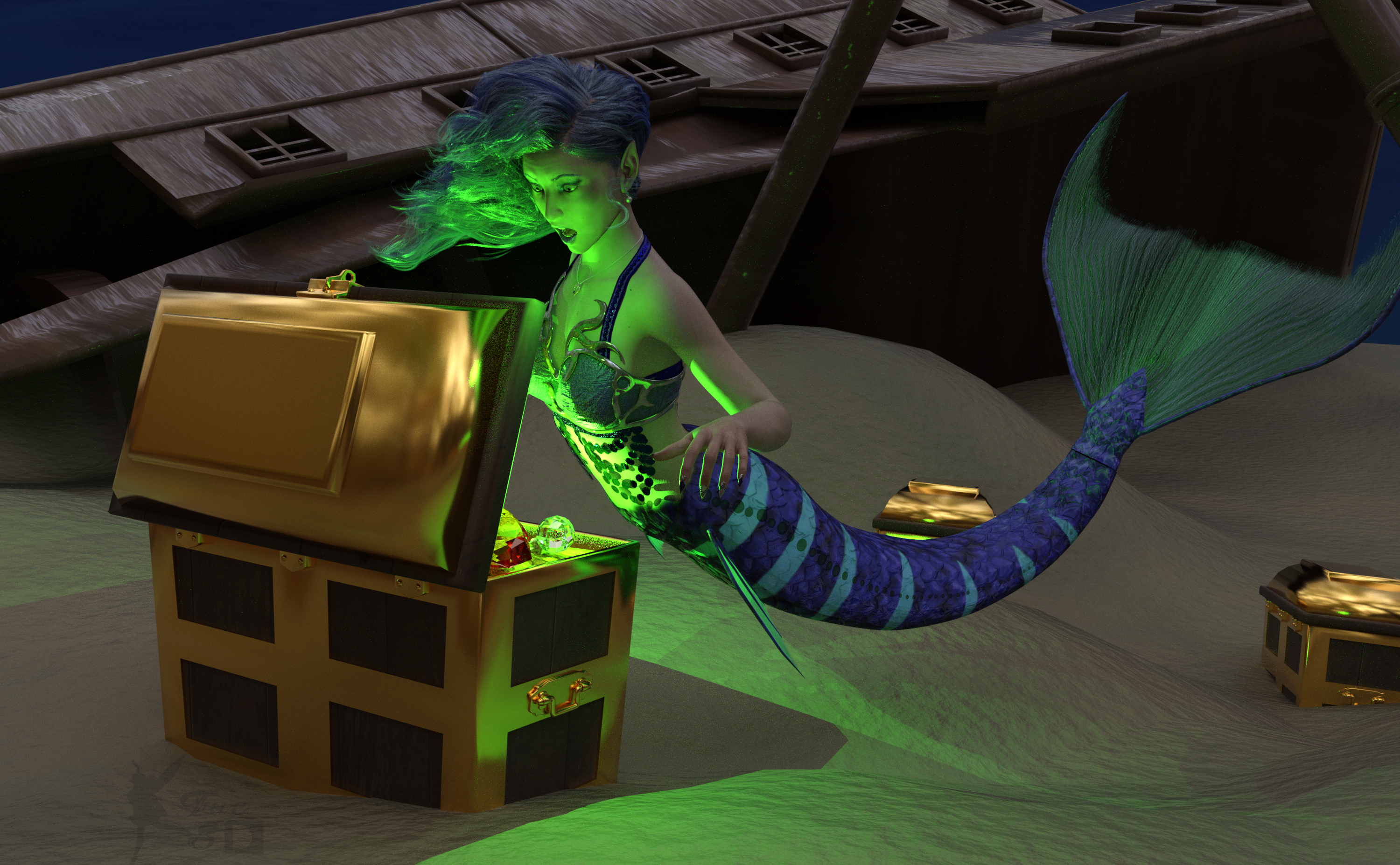
Here's mine! What a fun theme!
Mysterious Find
What is causing that strange glow?
Free:
Chameleon ROse 2 for G8F (Nails morph and color, Lashes morph) - https://www.renderosity.com/mod/freestuff/chameleon-rose2-for-genesis-8-female/85859
dForce Belly Dance Nights Outfit for Genesis 8 Females (Under Bra) - https://www.renderosity.com/freestuff/items/82950/dforce-belly-dance-nights-outfit-for-genesis-8-females
Side Swept Rose Hair - https://www.renderosity.com/mod/freestuff/side-swept-rose-hair-g3f-g8f-part-1/79533, https://www.renderosity.com/mod/freestuff/side-swept-rose-hair-g3f-g8f-
My Heart Necklace for Genesis 8 Female - https://www.deviantart.com/amyaimei/art/My-Heart-Necklace-for-Genesis-8-Female-729010047
Pearl Earrings - https://sharecg.com/v/96388/favorite/21/DAZ-Studio/Pearl-Earrings
SY 200 Morphs Genesis 8 (Ears, Breasts) - https://sharecg.com/v/91888/favorite/21/DAZ-Studio/SY-200-Morphs-for-Genesis-8-Head-and-Body
Autumn Hockey HDRI (Not visible, just for light)- https://hdrihaven.com/hdri/?c=nature&h=autumn_hockey
Deep Sea Treasure for Deep Sea Diver - https://www.renderosity.com/freestuff/items/67650/deep-sea-tresure-for-deep-sea-diver
Ball Cane - https://sharecg.com/v/95943/favorite/21/DAZ-Studio/Ball-Cane
Ds4 Diamond - https://sharecg.com/v/64999/favorite/21/DAZ-Studio/Ds4-Diamond
Ocean Floor Underwater Background (Put on a Plane Primitive) - https://www.renderosity.com/freestuff/items/85808/ocean-floor-underwater-1
WTP Shaders (For the sand and wood) - https://sharecg.com/v/86001/favorite/7/Material-and-Shader/WTP2-Will-Timmins-Perlin-Shaders-for-Iray and https://sharecg.com/v/87095/favorite/7/Material-and-Shader/WTP3-Will-Timmins-Procedural-Shaders-for-Iray
Iray Jewelry Shaders (For the metal and jewels)- https://sharecg.com/v/95893/favorite/21/DAZ-Studio/Iray-Jewelry-Shaders
Paid:
SY Merfolk (Character, Fins, Outer Bra and Pose) - https://www.daz3d.com/sy-merfolk-for-genesis-8
Genesis 8 Female Expressions - https://www.daz3d.com/genesis-8-female-expressions
I tweaked some materials, the pose and the lights. Created the green glow with point lights. Set up and rendered within Daz Studio Iray. No post work except for the watermark.
Daz 3D is part of

Connect
DAZ Productions, Inc.
7533 S Center View Ct #4664
West Jordan, UT 84084Licensing Agreement | Terms of Service | Privacy Policy | EULA
© 2026 Daz Productions Inc. All Rights Reserved.