-
smile morphs
PerttiA said:
That is because Pepper is G8 and Bianca G8.1 with the "Mouth Smile Open" being a G8 morph that apparently uses the base expressions for G8.
By default the G8 base expressions have been disabled for G8.1, but you can get them working by deleting the dummy/placeholder files DAZ has placed in G8.1 morph folders.Making the G8 base expressions (and any expressions that are using them) work on G8.1 requires removing dummy/placeholder expressions that are installed to G8.1 morph folders - These dummy/placeholder expression files have no other function than to prevent the base G8 expressions from loading.
The dummy/placeholder files are located in;
...\Data\DAZ 3D\Genesis 8\Female 8_1\Morphs\Daz 3D\Base Pose Head\ (255 files)
...\Data\DAZ 3D\Genesis 8\Female 8_1\Morphs\Daz 3D\Expressions\ (24 files)
...\Data\DAZ 3D\Genesis 8\Male 8_1\Morphs\Daz 3D\Base Pose Head\ (255 files)
...\Data\DAZ 3D\Genesis 8\Male 8_1\Morphs\Daz 3D\Expressions\ (24 files)Please make sure you are removing the files from G8.1 morph folders and not G8 morph folders.
Hmm ... now I'm wondering if this hack will work for using G3 expressions on G8? Too bad I'm at work and can't try it atm.
How to correctly fit clothingHi all
After a long absence, I am back to 3D and so much has changed in Studio!
I made a hat for G8F and, following some very sketchy tutorials, used the transfer utility to transfer morphs ( should I have done that?) and fitted the hat to G8F. So far, so good, it follows her when I move her around. But alas, it breaks when I put her into a pose! See pics. I suspect that in the pose, the rim of the hat came into close proximity with bones other than the head, which caused the deformation.
Can someone please tell me what I did wrong and how to fix?
In this process, I used the "fit to" option, but now I can't find again! I figured that it doesn't need to have morphs transferred and that simply fitting it should be OK, but that option seems to have vanished. I'm sure that function was under Edit-Object-Geometry.
.
.
Cant Add material to morph?I am very new with daz and amtrying to firgure out basic stuff im guessing. I bought L4N4 HD Morph for Genesis 8 and i opened it but when i try to add the materials for it (kinda like a skin it says and error occurred while reading this file, i have looked online trying to figure it out but cant find anything. it might be a quick fix that im not doing but i have no idea. any pointers?
Daz Studio 4.16[.0.x] Pro, General Release! (*UPDATED*)how do i get face transfer plugin?
Super Hero Suit for Genesis 8 Female(s) [Commercial]solisphotography said:
I'm loving this suit quite a bit but I have a quick question; Is there a way to color the different zones without going into the UV maps? For example, I'd like black boots but a different colored top.
You could use the geometry editor to select the boots and create a new surface from selected - then paste the black version to the new surface.
I too love this suit - once I found all the morph options and different slider variations, it was like getting a whole bundle of suits in one.
Unofficial Updates for DazToUnity Bridge (URP, Built-In, PBRSkin, Anims... dForce?)Thank you for the detailed answer. I was really surprised that it is so much.
First of all, English is not my main language so I will probably sound quite strange, but I can understand everything.I see that you have already figured out everything I could tell you.
My problem is that I'm an indie developer who currently still exports and re-rigs everything by hand and then has to animate everything by hand. This process takes an enormous amount of work and time. That's why I was very happy about the bridge. Of course, the work is already facilitated by this, however, adult games but also medical programs belong to the daily work and accordingly it annoys me that exactly here the bridge fails when it comes to certain details.
What surprises me is the following:
The morphs are not displayed when you want to export a model with the corresponding body parts (genital).
However, if you want to export only the genital without a corresponding model (only the genital) then you will find in the export window and the export rules a rather long list with the corresponding morphs including bones and more.
This in turn tells us that the information must be somewhere.I have tested the following:
I loaded the corresponding body part into the scene. Export (morphs are displayed)
Now I loaded a model. Selected all meshes and exported. ( All morphs are displayed)
Now I used "Fit to Model" to fit the body part to the mesh -> Export Now the morph information has disappeared and only that of the Male Base Mesh is visible.My problem is mainly that I don't understand why this information disappears. Actually, the additional information from the body part should be visible there or at least in the corresponding subitem. It's not like this information, which was there before, has disappeared all of a sudden. Finally, you can still adjust everything in the parameters. Somewhere the information must be stored.
Eye geograft not transforming with the eyes ?I made a geograft for the eye cornea geometry of G8F.
It is correctly welded and working in general.
But, it does not transform with the eyes.
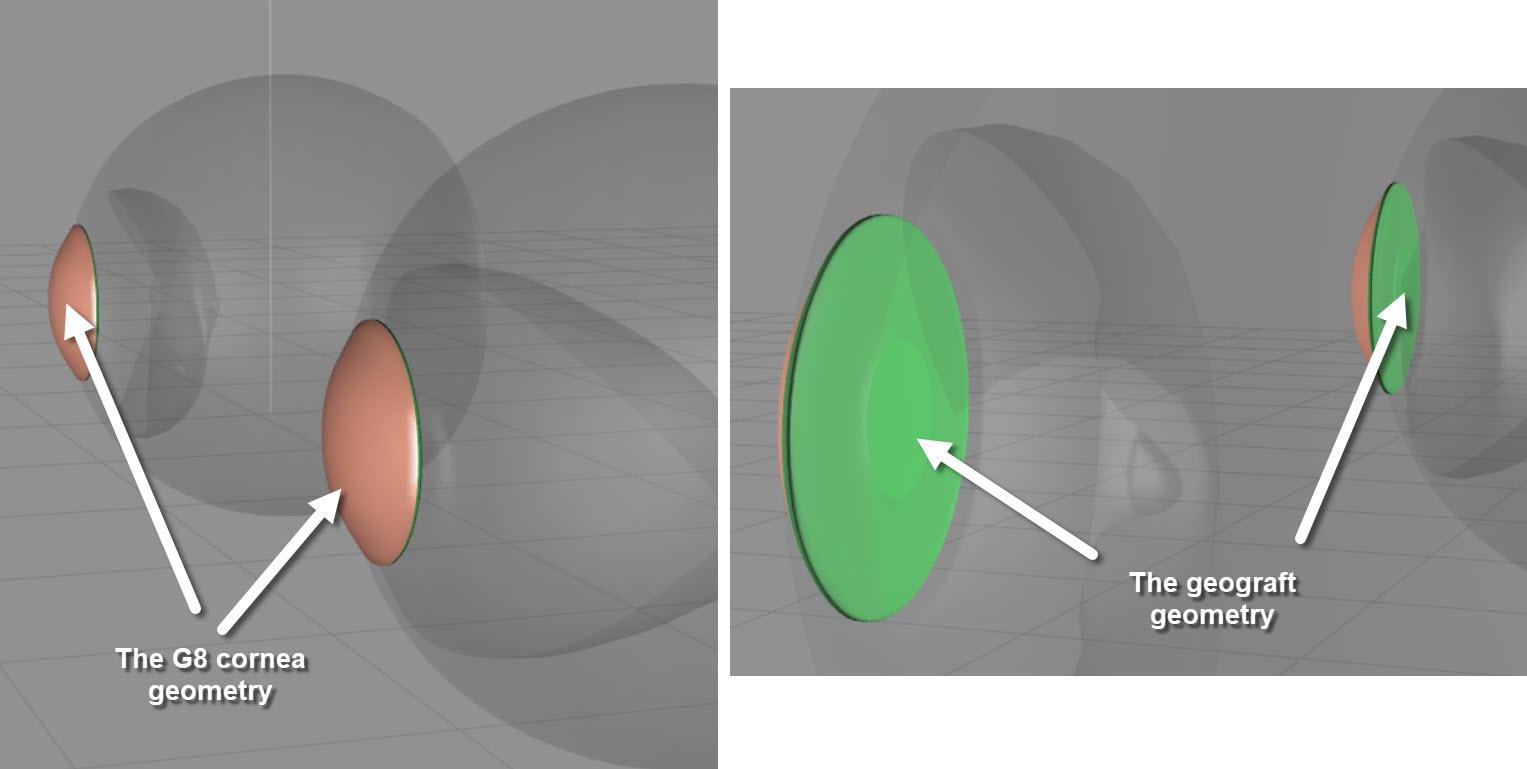
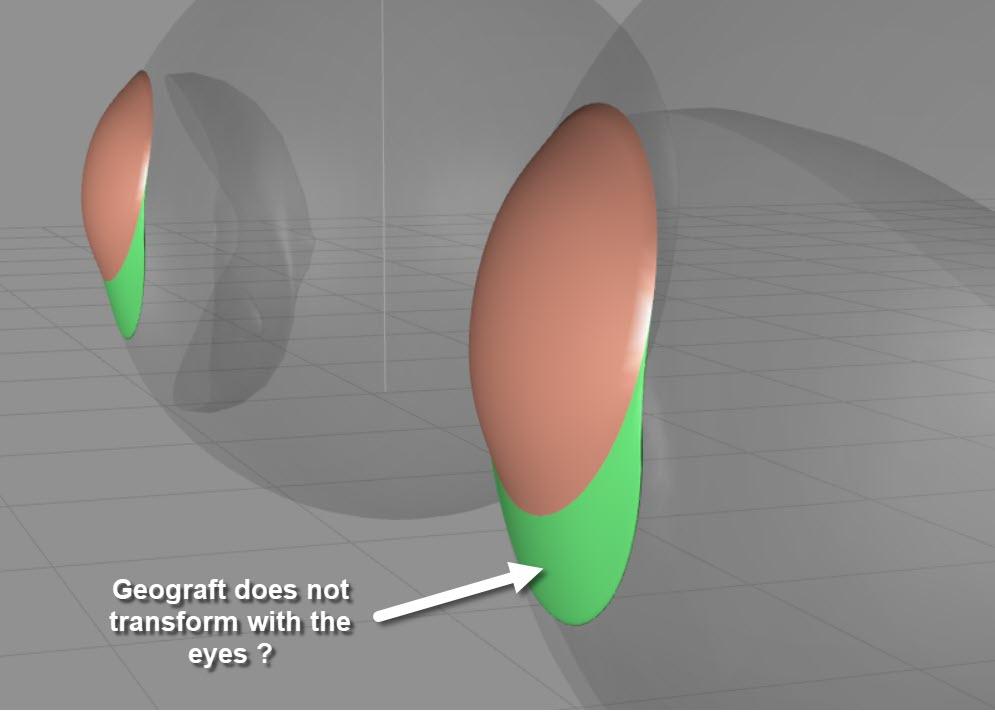
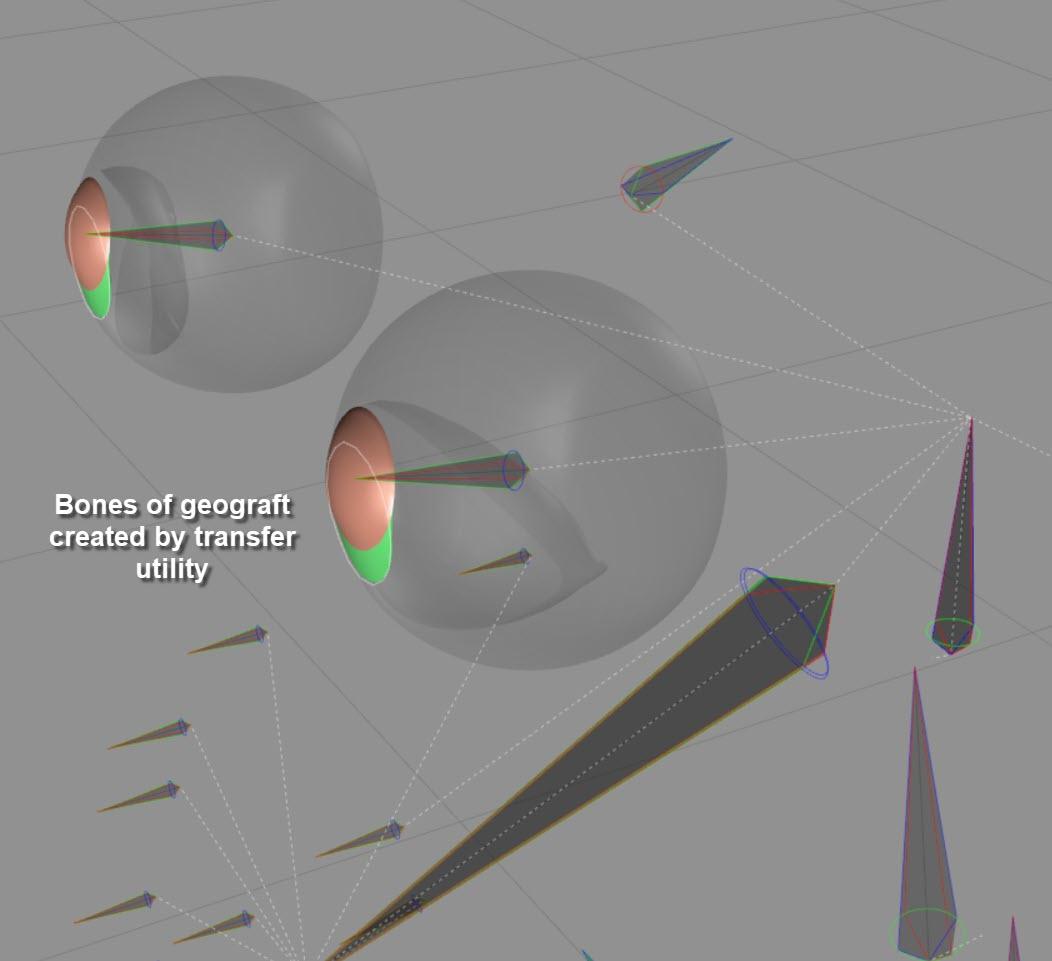
Mistake I made, I think.
The geograft is one geometry object for both eyes. I assume I need to create two independent grafts, one for each eye - correct?
How am I supposed to take care, that the transfer utility creates the correct bone assignment?
Somehow left geograft needs to get left eye bone and similar for the right one.
Thanks for help.
Poser figures and the parameters flowdown?you know how the face morphs only show when 'head' is selected,
i dunno why, but i thought clicking the double down arrows would show a selection of body parts under root to quickly get to the head and expression morphs, it's the toon dragon, no face rig is all morph based.
is there a way, after saving the figure to carrara, to show all the morphs in the figure without drilling down to the head?
thanks.
3D Art Freebie Challenge-May 2021-"May Mysteries" -Entries Thread OnlyMysterious Find
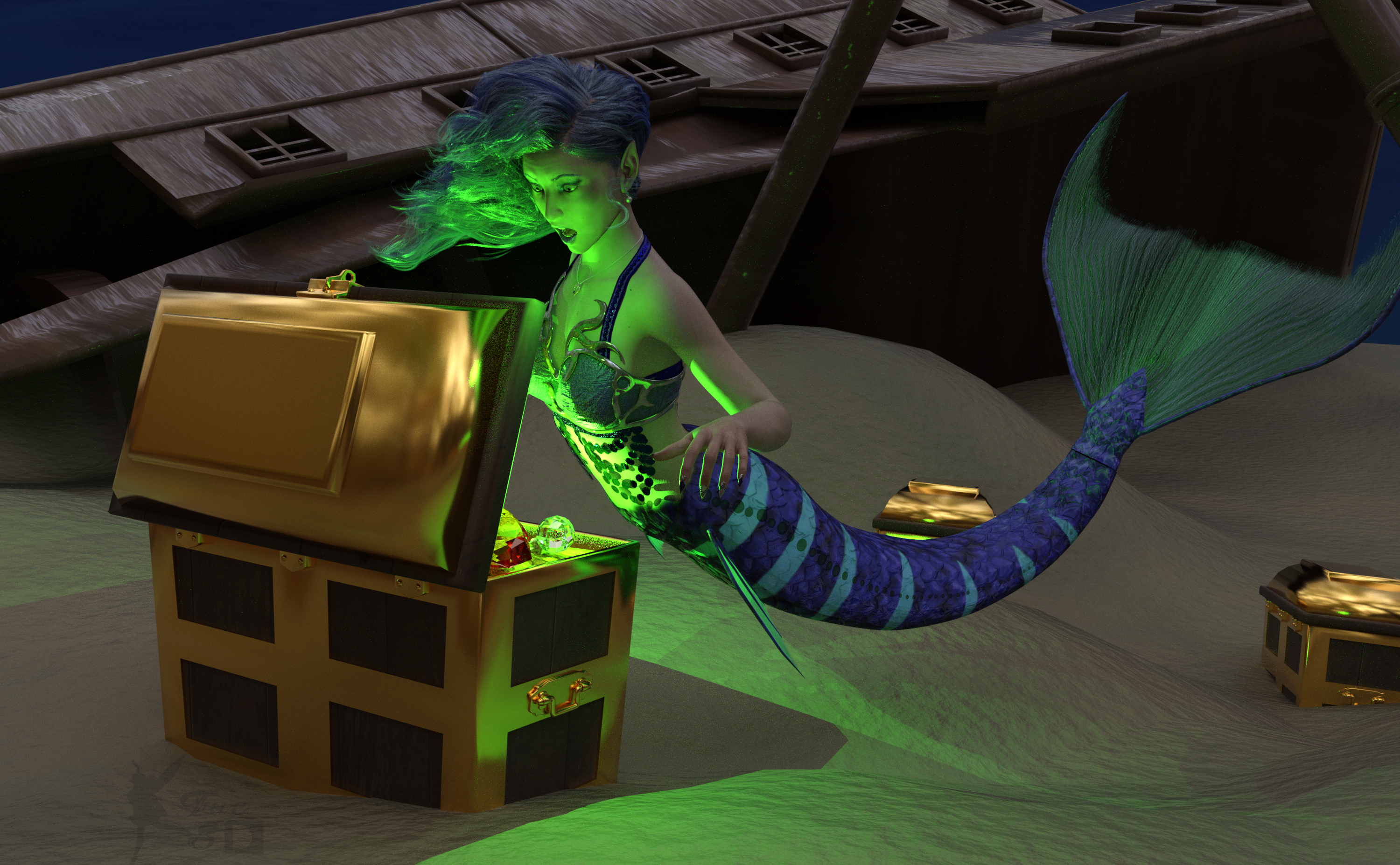
What is causing that strange glow?
Free:
Chameleon ROse 2 for G8F (Nails morph and color, Lashes morph) - https://www.renderosity.com/mod/freestuff/chameleon-rose2-for-genesis-8-female/85859
dForce Belly Dance Nights Outfit for Genesis 8 Females (Under Bra) - https://www.renderosity.com/freestuff/items/82950/dforce-belly-dance-nights-outfit-for-genesis-8-females
Side Swept Rose Hair - https://www.renderosity.com/mod/freestuff/side-swept-rose-hair-g3f-g8f-part-1/79533, https://www.renderosity.com/mod/freestuff/side-swept-rose-hair-g3f-g8f-
My Heart Necklace for Genesis 8 Female - https://www.deviantart.com/amyaimei/art/My-Heart-Necklace-for-Genesis-8-Female-729010047
Pearl Earrings - https://sharecg.com/v/96388/favorite/21/DAZ-Studio/Pearl-Earrings
SY 200 Morphs Genesis 8 (Ears, Breasts) - https://sharecg.com/v/91888/favorite/21/DAZ-Studio/SY-200-Morphs-for-Genesis-8-Head-and-Body
Autumn Hockey HDRI (Not visible, just for light)- https://hdrihaven.com/hdri/?c=nature&h=autumn_hockey
Deep Sea Treasure for Deep Sea Diver - https://www.renderosity.com/freestuff/items/67650/deep-sea-tresure-for-deep-sea-diver
Ball Cane - https://sharecg.com/v/95943/favorite/21/DAZ-Studio/Ball-Cane
Ds4 Diamond - https://sharecg.com/v/64999/favorite/21/DAZ-Studio/Ds4-Diamond
Ocean Floor Underwater Background (Put on a Plane Primitive) - https://www.renderosity.com/freestuff/items/85808/ocean-floor-underwater-1
WTP Shaders (For the sand and wood) - https://sharecg.com/v/86001/favorite/7/Material-and-Shader/WTP2-Will-Timmins-Perlin-Shaders-for-Iray and https://sharecg.com/v/87095/favorite/7/Material-and-Shader/WTP3-Will-Timmins-Procedural-Shaders-for-Iray
Iray Jewelry Shaders (For the metal and jewels)- https://sharecg.com/v/95893/favorite/21/DAZ-Studio/Iray-Jewelry-Shaders
Paid:
SY Merfolk (Character, Fins, Outer Bra and Pose) - https://www.daz3d.com/sy-merfolk-for-genesis-8
Genesis 8 Female Expressions - https://www.daz3d.com/genesis-8-female-expressions
I tweaked some materials, the pose and the lights. Created the green glow with point lights. Set up and rendered within Daz Studio Iray. No post work except for the watermark.
Can't seem to apply "Metal+Skin" combination materials to L4N4 HD Morph?Thanks for the response! I also DM'd Daveyabbo (the PA creator of L4N4), and on his advice did this (and it worked!) ;)
Loaded a basic Gen 8 Essentials figure and then loaded "L4N4 Full Body Morph + Both Geo Shells" from the "Props" folder. Then the combination presets work/apply perfectly.
3D Art Freebie Challenge-May 2021-"May Mysteries" -Main Thread OnlyWell, here is my second entry. A repost of the one I had to remove. Hope it is all ok now.
Pointing the way
They told me if I got this far I'd find the way. Well I did, but all I got was this damn glowing cube like thing and a small disgusting wiggly worm. Now what?
Free Items
Cheongsam - https://www.pretty3d.com/free-stuff.php?p=cheongsam-lingerie-for-genesis-8-females
Phantom Hair - https://www.deviantart.com/checkertoo/art/Phantom-For-G8f-858294456
Phantom morph - https://www.deviantart.com/checkertoo/art/Phantom-For-G8f-858294456
Pedestal - https://sharecg.com/v/94436/gallery/21/DAZ-Studio/General-miscellanous-prop-files
Cube - https://sharecg.com/v/97267/gallery/21/DAZ-Studio/A-cube
Dust - https://www.deviantart.com/squarepeg3d/art/Prop-Dust-Mote-Cloud-875458221
Godrays - https://www.deviantart.com/squarepeg3d/art/Prop-Morphing-Godrays-875530244
Dripster - https://sharecg.com/v/97202/browse/21/DAZ-Studio/Dripster
Shader used on dress - https://sharecg.com/v/95898/browse/21/DAZ-Studio/Shimmery-Sheer-Fabrics-IIPurchased Items
https://www.renderosity.com/rr/mod/bcs/jewelcrafter-iray-shaders/117892/
https://www.renderosity.com/rr/mod/bcs/sase-promo-lights-plus-extras/138498/
No Count ItemsG8F
Earrings - vyk-filigree-earrings-for-genesis-8-females - no longer available (freebie - Xmas 2019 - at DAZ)Converting CO Ichigo Genesis 8 to Genesis 8.1 ProblemI've converted other characters from genesis 8 to 8.1 successfully. But converting the Ichigo character, once the head morph is applied it doesn't look like what it is supposed to be. Does anyone know how to fix this or do we need to wait for the creator to release an update?
I have attached an image of the problem below.
https://www.daz3d.com/co-ichigo-and-ichigo-hair-for-genesis-8-females
Edit UV map on centaurI have but im mainly working with centauresses, tried getting it to transfer over but didnt have any luck. A problem with the other taur from rawart is you can only use their skin textures and not others, also the back is still high. Lower are around where the pubic area is and on the back near the buttocks.
Maxx I think uses both the skin and coat for a better transition.
Unofficial Updates for DazToUnity Bridge (URP, Built-In, PBRSkin, Anims... dForce?)SionSavior said:
The bridge works great but only as long as it is only the base mesh that is to be exported. As soon as morphs are included that no longer belong to the base mesh then the bridge does not work exactly as with the official version.
As an example:
Male -> base mesh -> works
Male -> base mesh with additional parts like genital (no morph) -> works
Male -> base mesh with morphs -> works (at least most of the time)Male -> base mesh with additional parts like genital with morphs -> NOT working.
Some morphs are exported / imported from the base mesh but all morphs concerning the additional parts (in this case genital) are ignored.The same applies to the females and some other tests...
Too bad I had the hope that it was finally fixed...Nevertheless, thanks for the effort. Great work so far...
Thanks for the feedback! Could you please clarify: do you mean that this is a bug that exists also in the official version of the Daz to Unity bridge, or are you trying to report a new bug that is only present in this unofficial version?
I will try to look into this issue when I have time. I do know that there is an issue with the FbxExporter which causes props and geoshells to be exported without proper rigging to the main figure. Maybe this is the same thing? I have read that there are workarounds for getting exported props to be rigged to the main figure, but I have not tried these techniques yet, and I do not know if that will work for other things.
UPDATE 1:
I've tried exporting genital morphs with both the official and unofficial bridges and confirm that they are not exporting. The problem appears to be in the DzFbxExporter module, which does not recognize the existence of the genitals. A common misunderstanding is that being able to see and select Morphs in the "Choose Morphs" dialog means that your morphs will be exported to Unity. This is not completely correct. Selecting morphs in this window is only a REQUEST for morphs to be exported. Daz to Unity does not actually do the direct export. When you choose morphs, Daz to Unity bridge will convert your selections into "Morph Export Rules" which the DzFbxExporter module will understand. You could also skip the "Choose Morphs" panel and create the "Morph Export Rules" directly inside the FBX Options Dialog (see below), but I think many people will find the "Choose Morphs" feature easier to use.
If you check the "Show FBX Dialog" checkbox on the Unofficial Daz to Unity dialog box, you will be presented with the DzFbxExporter's options panel after clicking Accept. This is the actual module which performs the FBX export and file generation; the Daz to Unity bridge only handles the preparation of the scene data prior to FBX export and the creation of the DTU file which contains the metadata information. FYI, the instructions to create the "Show FBX Dialog" checkbox are part of the official Daz to Unity Bridge source code, but they are just hidden and not compiled into the released version.
https://www.mediafire.com/view/ssgiycto7kn9n5v/UnofficialDTUBridge_-_Show_FBX_Options.jpg/file
https://www.mediafire.com/view/rim4w7lhdpu8bjp/FBXExport_-_no_genitals.jpg/file
Anyway, within the "FBX Export Options" dialog, you will see that the Genesis figure, hair, clothes and other props will appear in the "assets to be exported" panel, but genitals are NOT present. This suggests that the FbxExporter is unaware of the existence of the genitals: this means that it can not directly read the genital scene object data and can not export any morphs from an object it does not even know exists.
I will need to do more research to figure out how exactly the gentals differ from clothing or hair objects which prevent the DzFbxExporter module from seeing it. However, maybe if someone knows how to convert the genitals into a regular piece of clothing, then maybe the FbxExporter will be abe to see it and then be able to export morphs associated with it. In previous versions of Genesis, I remember that there were third party genital assets available that were created in this way: as regular clothing instead of geografts or geoshells. If someone is more familiar with this, please let us know if morphs for those assets work with FbxExporter and the Daz to Unity bridge.
UPDATE 2:
I was able to convert the genital to prop and export to Unity successfully. The morphs need to be exported from the original object into OBJ format and then imported back into the converted prop with Morph Loader Pro. You can also convert from prop back to figure, but I haven't been able to transfer the rigging / morph information back to the Figure-to-Prop-back-to-Figure object. I think you might be able to use the Transfer Utility to do this, but I'm not an expert in using that. Here is a helpful post about geograft to clothing: https://www.daz3d.com/forums/discussion/174126/converting-geograft-to-regular-conforming-item-inside-ds
Current issues: How to transfer back rigging from geograft back to non-geograft object? How to easily transfer back morphs so they can be easily combined?
smile morphsThat is because Pepper is G8 and Bianca G8.1 with the "Mouth Smile Open" being a G8 morph that apparently uses the base expressions for G8.
By default the G8 base expressions have been disabled for G8.1, but you can get them working by deleting the dummy/placeholder files DAZ has placed in G8.1 morph folders.Making the G8 base expressions (and any expressions that are using them) work on G8.1 requires removing dummy/placeholder expressions that are installed to G8.1 morph folders - These dummy/placeholder expression files have no other function than to prevent the base G8 expressions from loading.
The dummy/placeholder files are located in;
...\Data\DAZ 3D\Genesis 8\Female 8_1\Morphs\Daz 3D\Base Pose Head\ (255 files)
...\Data\DAZ 3D\Genesis 8\Female 8_1\Morphs\Daz 3D\Expressions\ (24 files)
...\Data\DAZ 3D\Genesis 8\Male 8_1\Morphs\Daz 3D\Base Pose Head\ (255 files)
...\Data\DAZ 3D\Genesis 8\Male 8_1\Morphs\Daz 3D\Expressions\ (24 files)Please make sure you are removing the files from G8.1 morph folders and not G8 morph folders.
Unofficial Updates for DazToUnity Bridge (URP, Built-In, PBRSkin, Anims... dForce?)The bridge works great but only as long as it is only the base mesh that is to be exported. As soon as morphs are included that no longer belong to the base mesh then the bridge does not work exactly as with the official version.
As an example:
Male -> base mesh -> works
Male -> base mesh with additional parts like genital (no morph) -> works
Male -> base mesh with morphs -> works (at least most of the time)Male -> base mesh with additional parts like genital with morphs -> NOT working.
Some morphs are exported / imported from the base mesh but all morphs concerning the additional parts (in this case genital) are ignored.The same applies to the females and some other tests...
Too bad I had the hope that it was finally fixed...Nevertheless, thanks for the effort. Great work so far...
Brow Remover (Commercial)Works on Face Transfer. Uses same UV maps.
Can't seem to apply "Metal+Skin" combination materials to L4N4 HD Morph?BLUEZKYWORLD said:
I don't seem to be able to apply the "Metal+Skin" materials to L4N4 HD Morph figure from the PA, Daveyabbo. I am getting the same error message whether I select the figure itself using the Universal Tool in Daz Studio and then double click on one of the "combined" materials, or select just the skin GEO shell, or just the metal GEO shell, or even a combination thereof... it's usually a pretty straightforward process that I've done a million times so I'm wondering is there a fault with the product?
Is anyone else having this issue, or if not is there something else I should be doing or selecting to be able to apply these "combined" materials successfully to this figure, as without them it's uses are severly limited?
Many thanks for any help!
Daz are aware of this as I have put a ticket in and got a response back the other day, they nhave said it a known problem & are looking into it.
The work-a-round for now is to load a base G8F & then apply the morph & geoshells (avoid using the 2 character/actors that came with the product)
3D Art Freebie Challenge-May 2021-"May Mysteries" -Main Thread OnlyFaeofthe3rdDimension said:
Here's mine! What a fun theme!
Mysterious Find
What is causing that strange glow?
Free:
Chameleon ROse 2 for G8F (Nails morph and color, Lashes morph) - https://www.renderosity.com/mod/freestuff/chameleon-rose2-for-genesis-8-female/85859
dForce Belly Dance Nights Outfit for Genesis 8 Females (Under Bra) - https://www.renderosity.com/freestuff/items/82950/dforce-belly-dance-nights-outfit-for-genesis-8-females
Side Swept Rose Hair - https://www.renderosity.com/mod/freestuff/side-swept-rose-hair-g3f-g8f-part-1/79533, https://www.renderosity.com/mod/freestuff/side-swept-rose-hair-g3f-g8f-
My Heart Necklace for Genesis 8 Female - https://www.deviantart.com/amyaimei/art/My-Heart-Necklace-for-Genesis-8-Female-729010047
Pearl Earrings - https://sharecg.com/v/96388/favorite/21/DAZ-Studio/Pearl-Earrings
SY 200 Morphs Genesis 8 (Ears, Breasts) - https://sharecg.com/v/91888/favorite/21/DAZ-Studio/SY-200-Morphs-for-Genesis-8-Head-and-Body
Autumn Hockey HDRI (Not visible, just for light)- https://hdrihaven.com/hdri/?c=nature&h=autumn_hockey
Deep Sea Treasure for Deep Sea Diver - https://www.renderosity.com/freestuff/items/67650/deep-sea-tresure-for-deep-sea-diver
Ball Cane - https://sharecg.com/v/95943/favorite/21/DAZ-Studio/Ball-Cane
Ds4 Diamond - https://sharecg.com/v/64999/favorite/21/DAZ-Studio/Ds4-Diamond
Ocean Floor Underwater Background (Put on a Plane Primitive) - https://www.renderosity.com/freestuff/items/85808/ocean-floor-underwater-1
WTP Shaders (For the sand and wood) - https://sharecg.com/v/86001/favorite/7/Material-and-Shader/WTP2-Will-Timmins-Perlin-Shaders-for-Iray and https://sharecg.com/v/87095/favorite/7/Material-and-Shader/WTP3-Will-Timmins-Procedural-Shaders-for-Iray
Iray Jewelry Shaders (For the metal and jewels)- https://sharecg.com/v/95893/favorite/21/DAZ-Studio/Iray-Jewelry-Shaders
Paid:
SY Merfolk (Character, Fins, Outer Bra and Pose) - https://www.daz3d.com/sy-merfolk-for-genesis-8
Genesis 8 Female Expressions - https://www.daz3d.com/genesis-8-female-expressions
I tweaked some materials, the pose and the lights. Created the green glow with point lights. Set up and rendered within Daz Studio Iray. No post work except for the watermark.
All The Links Check Out Plz Move To Entries Thread
Brow Remover (Commercial)Hmmm ... I just tried to scan the forum to determine if the brow remover works on a FACE TRANSFER??? I can't find a reference ...
Does anyone know if this product works on a FACE TRANSFER?
Thank you
Daz 3D is part of

Connect
DAZ Productions, Inc.
7533 S Center View Ct #4664
West Jordan, UT 84084Licensing Agreement | Terms of Service | Privacy Policy | EULA
© 2026 Daz Productions Inc. All Rights Reserved.