-
Genesis to Genesis 2, 3 or 8 Character Converter?
Is there a Genesis to Genesis 8 converter? the Gen X 2 tool will not import the Genesis file and re-save to Genesis 3, it keeps looking for poser files. I cannot figure out X transfer and it's getting annoying. It shouldn't be this hard to create a genesis 8 character from poser or genesis. I successfully converted the poser character to genesis. Gen X 2 will not save it under genesis 3 even with the genesis 2 and 3 plugins installed, it doesn't accept the skin mats on the genesis 3 character like it does on the genesis. The x transfer tool is a useless waste of money to me, it converted something then disappeared and didn't tell me where the files went. There's very little videos on youtube to figure this out.
Genesis to Genesis 8Ok so I tied the Gen X 2 with the genesis 2 and 3 addons, and have tried the X transfer and feel like I've wasted money. I can convert the character to Genesis and am able to apply skin mats, etc. However, if I try to export to genesis 3 with the genx tool, it will not allow me to apply skin mats, etc. Then, I attempted to use the x transfer tool and well yeah, it did something but I have no idea where the files went and it didn't convert my character to genesis 8. Guess I will try character converter.
What's the difference between genesis 8.1 and genesis 8.0?MeneerWolfman said:
melissastjames said:
MeneerWolfman said:
Honestly, nothing that I can tell. It's the exact same geometry, otherwise the 8 morphs wouldn't work on 8.1.
A couple of minutes in notepad++ and copying the files to the Genesis 8 Male morph directory and the 8.1 character is now an 8 character. See torment 8.1 below on both an g8.1m and g8m. That's with hd morphs and jcm's.
As far as the new uv goes, just copy and paste it from the 8.1 to the 8 uv directory. You can quickly make the "new" head surface pretty quickly in geometry editor.
Would it be possible for you to expand upon these steps just a bit? I have 4.15 and have Torment along with a couple other 8.1 characters but I hate the heavy resource usage of 4.15. It's ridiculous. I have a 11GB 1080TI and it's like night and day for me if I try to render a scene on 4.12 vs 4.15. So I want to stick to using 4.12 as much as I can...and I'd love to be able to use the 8.1 characters in 4.12. I'm not even worried about not being able to use the new shader...because I prefer the Uber Shader anyways. If it's possible just to use those character morphs in 4.12 I would be so happy. Until I can manage to find a RTX card with the same amount of VRAM or more (which means a 3090), then I just can't use 4.15.
https://docs.google.com/document/d/1FMez7Rzs76gKYRZ0_cA5BX1SJVQRE4tNwUw-p3nyMl8/edit?usp=sharing
That's what I used.
Thank you!
What's the difference between genesis 8.1 and genesis 8.0?melissastjames said:
MeneerWolfman said:
Honestly, nothing that I can tell. It's the exact same geometry, otherwise the 8 morphs wouldn't work on 8.1.
A couple of minutes in notepad++ and copying the files to the Genesis 8 Male morph directory and the 8.1 character is now an 8 character. See torment 8.1 below on both an g8.1m and g8m. That's with hd morphs and jcm's.
As far as the new uv goes, just copy and paste it from the 8.1 to the 8 uv directory. You can quickly make the "new" head surface pretty quickly in geometry editor.
Would it be possible for you to expand upon these steps just a bit? I have 4.15 and have Torment along with a couple other 8.1 characters but I hate the heavy resource usage of 4.15. It's ridiculous. I have a 11GB 1080TI and it's like night and day for me if I try to render a scene on 4.12 vs 4.15. So I want to stick to using 4.12 as much as I can...and I'd love to be able to use the 8.1 characters in 4.12. I'm not even worried about not being able to use the new shader...because I prefer the Uber Shader anyways. If it's possible just to use those character morphs in 4.12 I would be so happy. Until I can manage to find a RTX card with the same amount of VRAM or more (which means a 3090), then I just can't use 4.15.
https://docs.google.com/document/d/1FMez7Rzs76gKYRZ0_cA5BX1SJVQRE4tNwUw-p3nyMl8/edit?usp=sharing
That's what I used.
Daz to Cinema 4D Beta: How To Download Release Versions, Manually Install, and Replace Old InstallsDAZ_sam said:
peterpeter said:
Lots of new stuff! Congrats!
Unfortunately this beta doesn't work with C4D R24 (Previous ones did). Here are the bugs I've found so far.
Bug #1: If you click the gear icon, then a message pops up telling you the bridge is not compatible with C4D R24 and the software crashes (see image #1)
Bug #2: After you click import the character, the bridge doesn't do anything and gets stuck (see image #2)
I tried to import a basic G8F, level 0 and JCM morphs
Thanks Peter!
So I took a quick look to see if I could fix the error. Seemed to work on my end after a small fix if you could take look that be awesome and I will post an update to the release on Monday then :)
Both errors should not happen now.
https://github.com/daz3d/DazToC4D/archive/refs/heads/develop.zip
Thanks for the quick response.
I'm happy to inform you that both bugs have been fixed in CD4 R24!
Unfortunately, I've found another one related to the SubDivision Level:
-If you export the character using Subdivision Level 1 or 2, you get this weird result once you import in C4D (See Image #1)
And one related to the JCMs:
If you grab the hand control and bend the arm, the elbow morph works to a certain point (See image #2a). However, if you keep bending the arm, then the morph stops working (See image #2b).Those are the only ones I could find in my latest test.
Keep up the good work.
resetting daz is impossibleThe morph assets you save are inth e data folder for the figure - e.g. /Data/daz 3d/genesis 8/female/morphs/author/product/, where author and product are the names you entered in the options dialogue when saving
What's the difference between genesis 8.1 and genesis 8.0?MeneerWolfman said:
Honestly, nothing that I can tell. It's the exact same geometry, otherwise the 8 morphs wouldn't work on 8.1.
A couple of minutes in notepad++ and copying the files to the Genesis 8 Male morph directory and the 8.1 character is now an 8 character. See torment 8.1 below on both an g8.1m and g8m. That's with hd morphs and jcm's.
As far as the new uv goes, just copy and paste it from the 8.1 to the 8 uv directory. You can quickly make the "new" head surface pretty quickly in geometry editor.
Would it be possible for you to expand upon these steps just a bit? I have 4.15 and have Torment along with a couple other 8.1 characters but I hate the heavy resource usage of 4.15. It's ridiculous. I have a 11GB 1080TI and it's like night and day for me if I try to render a scene on 4.12 vs 4.15. So I want to stick to using 4.12 as much as I can...and I'd love to be able to use the 8.1 characters in 4.12. I'm not even worried about not being able to use the new shader...because I prefer the Uber Shader anyways. If it's possible just to use those character morphs in 4.12 I would be so happy. Until I can manage to find a RTX card with the same amount of VRAM or more (which means a 3090), then I just can't use 4.15.
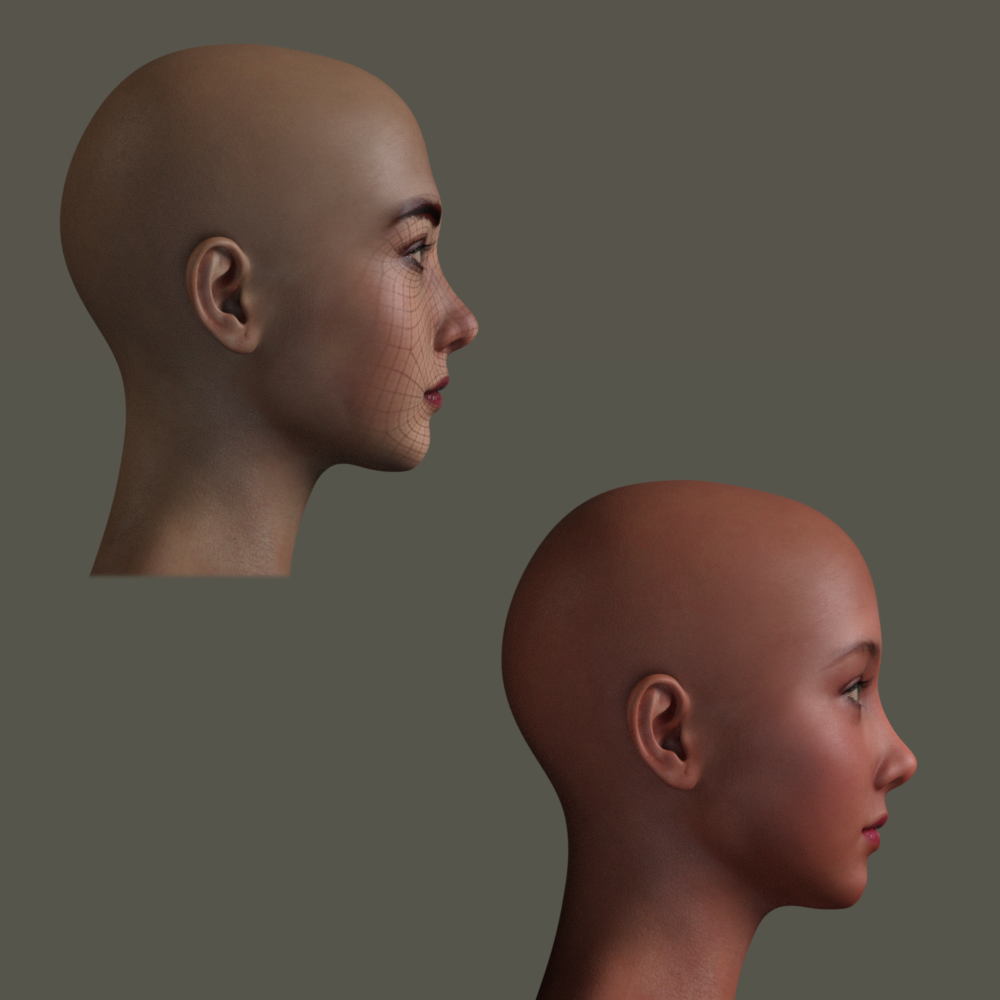
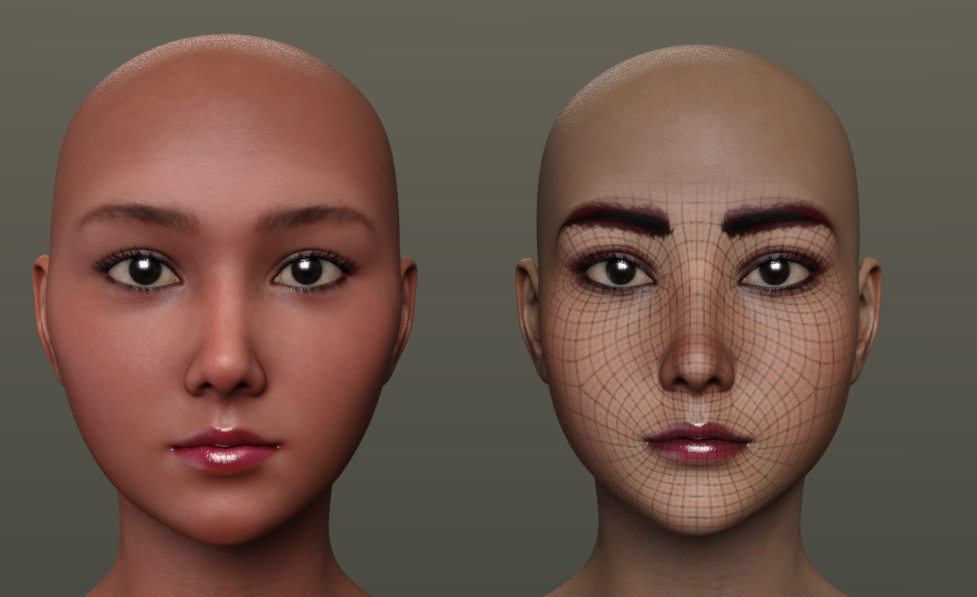
Face Transfer - Custom 'base' textures?Hi, i wonder if there is a way to change 'the base' textures for my Face Transfer attempts?
I mean using custom genesis 8 textures to blend the face and color hue-brightness to the body on them, instead of G8F base. I know FaceGen can do that.
I have tried renaming my custom textures and replacing with them G8F base textures in starters folders, but it didn't work, Face transfer was still using base G8F ones somehow, even while my default G8F model has custom textures applied upon daz start.
I found this post:Catherine3678ab said:
tippy tippy toe ...
okay here are the 2 more attempts using the additional photos for to try in Facegen.
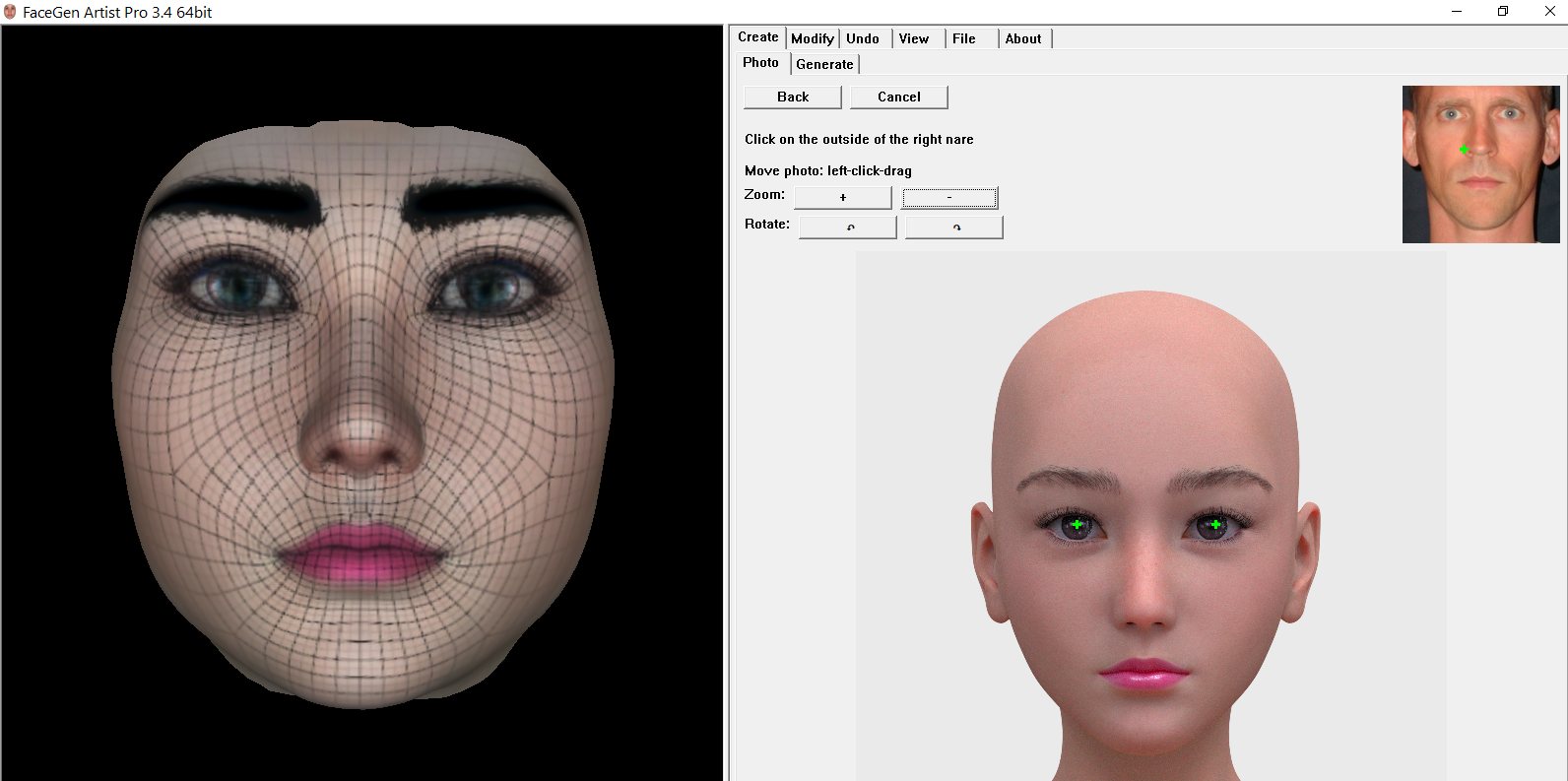
As somebody with vision problems my little frustration with facegen is that the instruction image is rather small so exactly 'where' one is supposed to put the little "x" is a bit of guesswork which I would hope with tons of experience one would come to know.
With regards to Face Transfer, I have in my tutorial thread quite the topic for swapping out textures so yes one can use one's own textures so Face Transfer can in effect get a starter skin set started. I was cautioned by an experienced Facegen user NOT to try swapping out its textures in this manner as it will goof up the program(s). However Facegen does permit one to select one's own textures in the first place so in the end that part is 6 of one, half dozen of the other.
To note the differences of the head model in Facegen against G8F. ... that is the same result that produced the G8 head in the renders.
{the eyes are a preset from one of the many characters sets we have}
saying it's possible, but i wasn't able to find mentioned tutorial
what the heck is a heirarchical material preset?Hello,
I recently got the L4N4 HD Morph for Genesis 8 Females, and in the images it looks really nice, but I cannot figure out how to load the h.materials into it at all. Is there a special way Im missing?
identity of male figure in Paul Hair promo pics?Thanks zombietaggerung. Could be. The mole placement looks similar, from the limited shots in the promos. The lips in the Paul hair promo are wavier but that could be a morph.
3D Art Freebie Challenge-May 2021-"May Mysteries" -Main Thread OnlyWhat is this Obalisk, and what is inside?
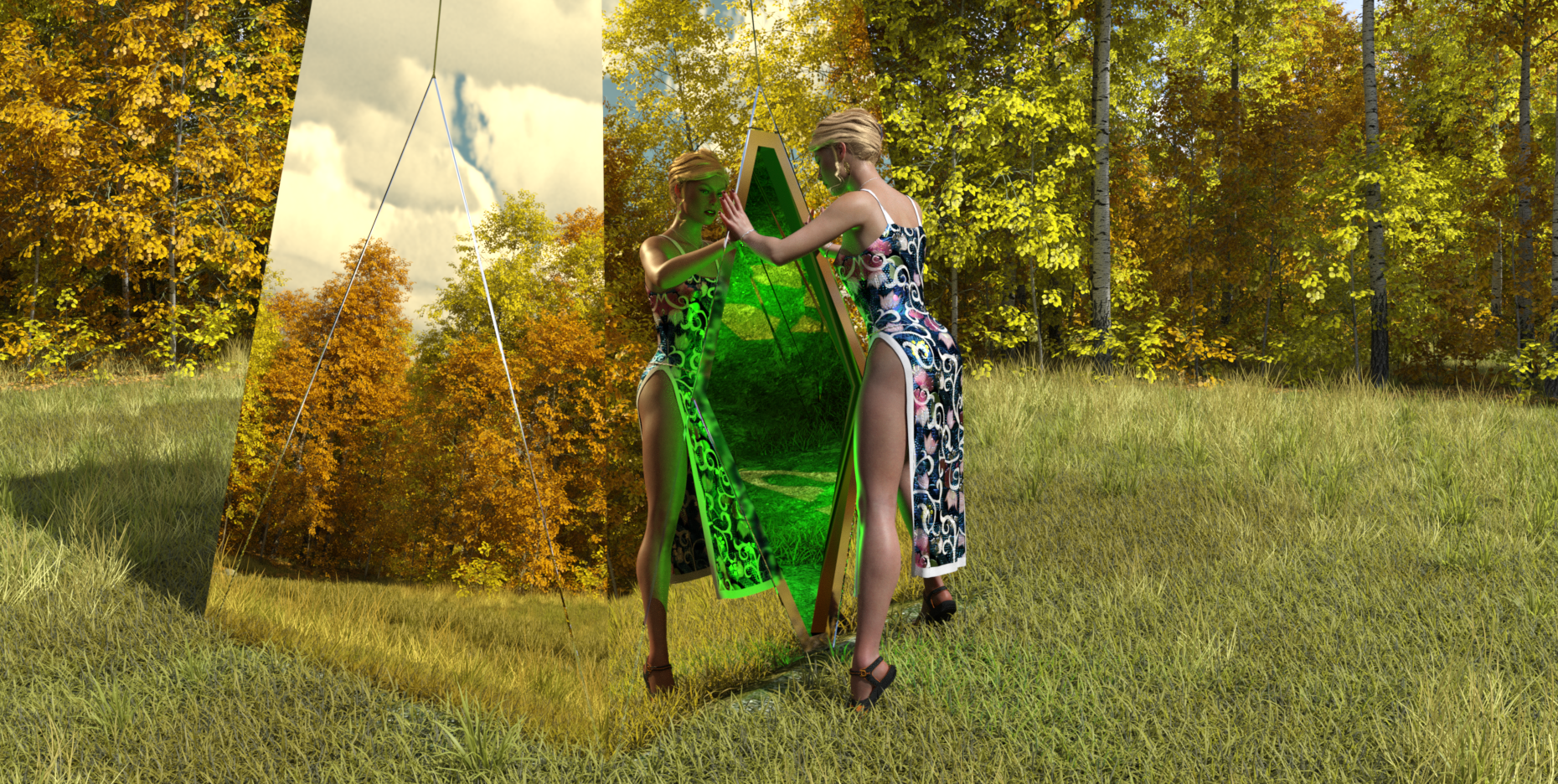
Free Items
1) Obalisk
https://www.renderosity.com/freestuff/items/87671/obalisk2) Sky
https://hdrihaven.com/hdri/?c=skies&h=circus_maximus_13) Wrist and Waist Rope
https://www.deviantart.com/noone102000/art/Odalisque-Dress-FREEBIE-TO-DOWNLOAD-822900201
Caution, mature content on page.4) My heart necklace
https://www.deviantart.com/amyaimei/art/My-Heart-Necklace-for-Genesis-8-Female-7290100475) Asian Dress 01:
https://www.renderosity.com/freestuff/items/833466) Hair
https://www.renderosity.com/freestuff/items/81937/dforce-french-twist-hair-for-genesis-8-femalesPaid Items
Character: A) TritiumCG custom morph. B) Skin: CB Guilia skin texture hue and tone mapped. C) Sue Yee SY sandals from 'Cute suspender dress'. I thought they were freebies until I found the link pointed to the DAZ store. Oops.
Background: D) UltraScenery basic package with home-made vegetation distribution maps for the trees and grasses.No Count Items
1) G8F
2) VYK Filigree Earrings. Christmas 2019 freebie.I had to increase the raytrace Max Path Length to 9 to get all the reflections to show inside the obalisk. Took nearly 4 hours to render on my GTX 1060 GPU, and about 8 mins for the first iteration to appear. Tried red and blue lights inside the obalisk, but neither looked particularly peculiar. There is no post-work - I am so ham-fisted in graphics packages that it's best I don't do any. Had intended this to be a second entry, but liked it enough to make it into my main entry.
Regards,
Richard
Problem with deformed fingernails - SOLVEDI think felis thoughts show in the right direction e.g. my log looks very different after loading the base character:
2021-05-29 11:37:14.559 Begin Loading Character Addons...
2021-05-29 11:37:14.655 File loaded in 0 min 0.0 sec.
2021-05-29 11:37:14.656 Loaded file: Genesis 8 Female Eyelashes.duf
2021-05-29 11:37:14.658 Loaded Morph Deltas in 0 min 0.0 sec.
2021-05-29 11:37:14.659 Loaded file: PHMEyelashesLengthUpper.dsf
2021-05-29 11:37:14.660 Loaded Morph Deltas in 0 min 0.0 sec.
2021-05-29 11:37:14.660 Loaded file: PHMEyelashesLengthLower.dsf
2021-05-29 11:37:14.660 Loaded Morph Deltas in 0 min 0.0 sec.
2021-05-29 11:37:14.660 Loaded file: PHMEyelashesCurl.dsf
2021-05-29 11:37:14.679 Loaded Morph Deltas in 0 min 0.0 sec.
2021-05-29 11:37:14.679 Loaded file: PHMEyelashesLengthUpper.dsf
2021-05-29 11:37:14.680 Loaded Morph Deltas in 0 min 0.0 sec.
2021-05-29 11:37:14.681 Loaded file: PHMEyelashesLengthLower.dsf
2021-05-29 11:37:14.682 Loaded Morph Deltas in 0 min 0.0 sec.
2021-05-29 11:37:14.682 Loaded file: PHMEyelashesCurl.dsf
2021-05-29 11:37:14.683 Loaded Morph Deltas in 0 min 0.0 sec.
2021-05-29 11:37:14.684 Loaded file: PHMEyelashesExpand.dsf
2021-05-29 11:37:14.778 File loaded in 0 min 0.0 sec.
2021-05-29 11:37:14.779 Loaded file: Base MAT Eyelashes.duf
2021-05-29 11:37:14.781 Finished Loading Character Addons
2021-05-29 11:37:14.823 File loaded in 0 min 12.7 sec.
2021-05-29 11:37:14.825 Loaded file: Genesis 8 Basic Female.duf
2021-05-29 11:37:15.833 Loaded image G8FBaseLegsMapD_1003.jpg
2021-05-29 11:37:15.868 Loaded image G8FBaseEyes01_1007.jpg
2021-05-29 11:37:15.993 Loaded image G8FBaseArmsMapD_1004.jpg
2021-05-29 11:37:16.028 Loaded image G8FBaseMouthMapD_1005.jpg
2021-05-29 11:37:16.157 Loaded image G8FBaseFaceMapD_1001.jpg
2021-05-29 11:37:16.272 Loaded image G8FBaseTorsoMapD_1002.jpg
2021-05-29 11:37:16.309 Loaded image G8FBaseEyelashes_1006.jpg
2021-05-29 11:37:16.521 Loaded image G8FBaseTorsoMapB_1002.jpg
2021-05-29 11:37:16.672 Loaded image G8FBaseTorsoMapS_1002.jpg
2021-05-29 11:37:16.781 Loaded image G8FBaseTorsoMapSSS_1002.jpg
2021-05-29 11:37:16.949 Loaded image G8FBaseFaceMapS_1001.jpg
2021-05-29 11:37:17.078 Loaded image G8FBaseFaceMapB_1001.jpg
2021-05-29 11:37:17.205 Loaded image G8FBaseFaceMapSSS_1001.jpg
2021-05-29 11:37:17.241 Loaded image G8FBaseMouthMapB_1005.jpg
2021-05-29 11:37:17.365 Loaded image G8FBaseLegsMapSSS_1003.jpg
2021-05-29 11:37:17.521 Loaded image G8FBaseLegsMapS_1003.jpg
2021-05-29 11:37:17.654 Loaded image G8FBaseLegsMapB_1003.jpg
2021-05-29 11:37:17.779 Loaded image G8FBaseArmsMapSSS_1004.jpg
2021-05-29 11:37:17.907 Loaded image G8FBaseArmsMapB_1004.jpg
2021-05-29 11:37:18.073 Loaded image G8FBaseArmsMapS_1004.jpg
2021-05-29 11:37:18.107 Loaded image G8FBaseEyesB_1007.jpg
2021-05-29 11:37:18.575 Ran tdlmake on image F:/!CONTENT/Studio4/Runtime/Textures/DAZ/Characters/Genesis8/FemaleBase/G8FBaseTorsoMapD_1002.jpg
2021-05-29 11:37:20.712 Ran tdlmake on image F:/!CONTENT/Studio4/Runtime/Textures/DAZ/Characters/Genesis8/FemaleBase/G8FBaseTorsoMapS_1002.jpg
2021-05-29 11:37:20.993 Ran tdlmake on image F:/!CONTENT/Studio4/Runtime/Textures/DAZ/Characters/Genesis8/FemaleBase/G8FBaseTorsoMapSSS_1002.jpg
2021-05-29 11:37:21.068 Ran tdlmake on image F:/!CONTENT/Studio4/Runtime/Textures/DAZ/Characters/Genesis8/FemaleBase/G8FBaseTorsoMapB_1002.jpg
2021-05-29 11:37:22.008 Ran tdlmake on image F:/!CONTENT/Studio4/Runtime/Textures/DAZ/Characters/Genesis8/FemaleBase/G8FBaseFaceMapD_1001.jpg
2021-05-29 11:37:22.815 Ran tdlmake on image F:/!CONTENT/Studio4/Runtime/Textures/DAZ/Characters/Genesis8/FemaleBase/G8FBaseMouthMapD_1005.jpg
2021-05-29 11:37:23.678 Ran tdlmake on image F:/!CONTENT/Studio4/Runtime/Textures/DAZ/Characters/Genesis8/FemaleBase/G8FBaseMouthMapB_1005.jpg
2021-05-29 11:37:23.857 Ran tdlmake on image F:/!CONTENT/Studio4/Runtime/Textures/DAZ/Characters/Genesis8/FemaleBase/G8FBaseFaceMapS_1001.jpg
2021-05-29 11:37:24.067 Ran tdlmake on image F:/!CONTENT/Studio4/Runtime/Textures/DAZ/Characters/Genesis8/FemaleBase/G8FBaseFaceMapSSS_1001.jpg
2021-05-29 11:37:24.381 Ran tdlmake on image F:/!CONTENT/Studio4/Runtime/Textures/DAZ/Characters/Genesis8/FemaleBase/G8FBaseFaceMapB_1001.jpgProblem with deformed fingernails - SOLVEDfelis said:
You have some additional morphs in there - only the eyelashes should be there.
Why they don't show up in the parameters tab, I don't know.
It doesn't look like, based on their names, that they should affect your hands, but no way to know for sure.
Is this problem one you have discovered by random, ie can have been there for a long time, or do you know if it is one that have happened recently?
THANK YOU for pointing me to the logfile and take a closer look there.
It was releated to some X-Transfer stuff - revoving the "XT_PHMMouthRealismHD.dsf" and some other XT_ morphs I do not use solved the problem.
Genesis 8 Base Female loading with normal nails again.
Problem with deformed fingernails - SOLVEDfelis said:
If you load the base character yo an empty scene, could you then paste the load section from the log file?
2021-05-29 11:18:53.527 Begin Loading Character Addons...
2021-05-29 11:18:54.594 File loaded in 0 min 1.0 sec.
2021-05-29 11:18:54.595 Loaded file: Genesis 8 Female Eyelashes.duf
2021-05-29 11:18:54.609 Loaded Morph Deltas in 0 min 0.0 sec.
2021-05-29 11:18:54.611 Loaded file: Vagina_UltraPenet-Tight_key.dsf
2021-05-29 11:18:54.612 Loaded Morph Deltas in 0 min 0.0 sec.
2021-05-29 11:18:54.614 Loaded file: Vagina_SupPenet-Tight_key.dsf
2021-05-29 11:18:54.615 Loaded Morph Deltas in 0 min 0.0 sec.
2021-05-29 11:18:54.617 Loaded file: Vagina_Penet-Tight_key.dsf
2021-05-29 11:18:54.618 Loaded Morph Deltas in 0 min 0.0 sec.
2021-05-29 11:18:54.619 Loaded file: default-shape.dsf
2021-05-29 11:18:54.620 Loaded Morph Deltas in 0 min 0.0 sec.
2021-05-29 11:18:54.622 Loaded file: !Tight Vagina.dsf
2021-05-29 11:18:54.628 Loaded Morph Deltas in 0 min 0.0 sec.
2021-05-29 11:18:54.629 Loaded file: XT_PHMMouthRealismHD.dsf
2021-05-29 11:18:54.631 WARNING: QFSFileEngine::open: No file name specified
2021-05-29 11:18:54.631 WARNING: ..\..\..\..\..\src\sdksource\general\dzmorphdeltas.cpp(784): Could not open HD file:
2021-05-29 11:18:54.633 Loaded Morph Deltas in 0 min 0.0 sec.
2021-05-29 11:18:54.634 Loaded file: PHMEyelashesLengthUpper.dsf
2021-05-29 11:18:54.635 Loaded Morph Deltas in 0 min 0.0 sec.
2021-05-29 11:18:54.636 Loaded file: PHMEyelashesLengthLower.dsf
2021-05-29 11:18:54.638 Loaded Morph Deltas in 0 min 0.0 sec.
2021-05-29 11:18:54.639 Loaded file: PHMEyelashesCurl.dsf
2021-05-29 11:18:54.776 Loaded Morph Deltas in 0 min 0.0 sec.
2021-05-29 11:18:54.777 Loaded file: PHMEyelashesLengthUpper.dsf
2021-05-29 11:18:54.778 Loaded Morph Deltas in 0 min 0.0 sec.
2021-05-29 11:18:54.779 Loaded file: PHMEyelashesLengthLower.dsf
2021-05-29 11:18:54.780 Loaded Morph Deltas in 0 min 0.0 sec.
2021-05-29 11:18:54.781 Loaded file: PHMEyelashesCurl.dsf
2021-05-29 11:18:54.783 Loaded Morph Deltas in 0 min 0.0 sec.
2021-05-29 11:18:54.784 Loaded file: PHMEyelashesExpand.dsf
2021-05-29 11:18:55.333 File loaded in 0 min 0.0 sec.
2021-05-29 11:18:55.333 Loaded file: Base MAT Eyelashes.duf
2021-05-29 11:18:55.335 Finished Loading Character Addons
2021-05-29 11:18:55.669 File loaded in 4 min 34.9 sec.
2021-05-29 11:18:55.673 Loaded file: Genesis 8 Basic Female.duf
2021-05-29 11:19:11.508 Loaded image G8FBaseLegsMapD_1003.jpg
2021-05-29 11:19:11.655 Loaded image G8FBaseEyes01_1007.jpg
2021-05-29 11:19:11.841 Loaded image G8FBaseArmsMapD_1004.jpg
2021-05-29 11:19:11.900 Loaded image G8FBaseMouthMapD_1005.jpg
2021-05-29 11:19:12.089 Loaded image G8FBaseFaceMapD_1001.jpg
2021-05-29 11:19:12.261 Loaded image G8FBaseTorsoMapD_1002.jpg
2021-05-29 11:19:12.321 Loaded image G8FBaseEyelashes_1006.jpg
Problem with deformed fingernails - SOLVEDHi
I need some help, clues, point at ... to get rid of the deformed fingernails as shown in the image.
shown in the image is Genesis 8 Basic Female without any other morphs.
In the image you see HighResolution and SubDivision Level 1
also the knuckles look strange.
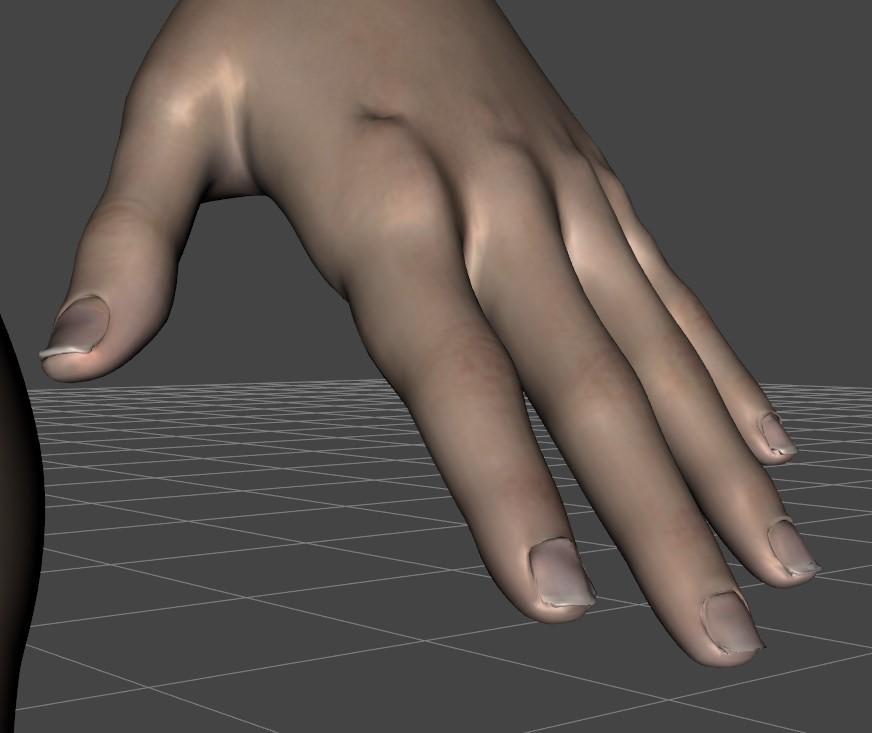
It´s solved
It was releated to some X-Transfer stuff/morphs - deleting them solved the problem
G8F/G8M Morphs to Genesis 1, How?An option would be to transfer them to G3 first with Riversoft Art character converters, then use GenX2 from G3 to G1.
https://www.daz3d.com/character-converter-from-genesis-8-female-to-genesis-3-female
https://www.daz3d.com/character-converter-from-genesis-8-male-to-genesis-3-maleWho is the guy in the Troy hair promos?vwrangler said:
I would say that all of the promos but the last one use the Lee 8 texture, but not necessarily his morph. They all have the weirdly red eyelids that Lee 8 has. I thought at first that it might be CC Jae for Lee 8, which is explicitly designed to be Korean, but he doesn't look quite like that either. He may be a mix of characters.
I think you may be right. I could see this being a less than 100% dial-in of CC Jae. I will look into getting both and experimenting. Thanks.
G8F/G8M Morphs to Genesis 1, How?So I have some characters for Genesis 8 and I want to use their morphs Genesis 1. Normally I use the GenX2 plugins for morph transfers, but there isn't one for Genesis 8. How do I get a morph of the default G8F/G8M on G1, and also morphs of specific G8 characters on G1?
Daz to blender is great, but what about Blender to Daz?@benniewoodell It should be possible to animate in mhx then export the baked animation to daz with "save pose preset". At least this was the intent from what I know. But im my tests it doesn't seem to work. Not sure why may be it's a bug or may be Thomas dropped mhx support for some reason. Will update as I know it better.
Unfortunately there's also a bug with the blender baking, so you have to use 2.91 that's the only working version now. Or 3.0 alpha. update. Bouich reports that the latest 2.93 beta is fixed too. Not tested it myself yet.
https://bitbucket.org/Diffeomorphic/import_daz/issues/527/mhx-rig-major-baking-issue-with-blender
https://diffeomorphic.blogspot.com/2021/04/save-pose-preset.html
update. Reported to Thomas.
update. It seems to work fine with the "simple ik" rig. So you can use "simple ik" to animate in blender then export the animation to daz.
update. Thomas fixed it and now it works with mhx too, though in my tests "simple ik" seems more accurate. You have to use "transfer ik > fk" first as explained in the discussion below. Please get the latest development version.
https://bitbucket.org/Diffeomorphic/import_daz/issues/545/save-pose-preset-doesnt-work
Who is the guy in the Troy hair promos?I would say that all of the promos but the last one use the Lee 8 texture, but not necessarily his morph. They all have the weirdly red eyelids that Lee 8 has. I thought at first that it might be CC Jae for Lee 8, which is explicitly designed to be Korean, but he doesn't look quite like that either. He may be a mix of characters.
Daz 3D is part of

Connect
DAZ Productions, Inc.
7533 S Center View Ct #4664
West Jordan, UT 84084Licensing Agreement | Terms of Service | Privacy Policy | EULA
© 2026 Daz Productions Inc. All Rights Reserved.