-
UltraScenery Experiments and Experiences
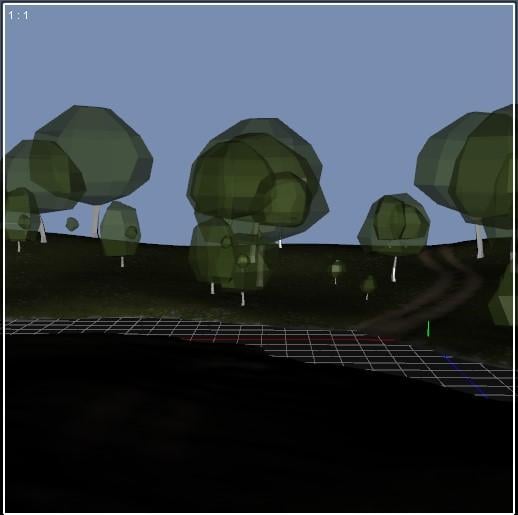
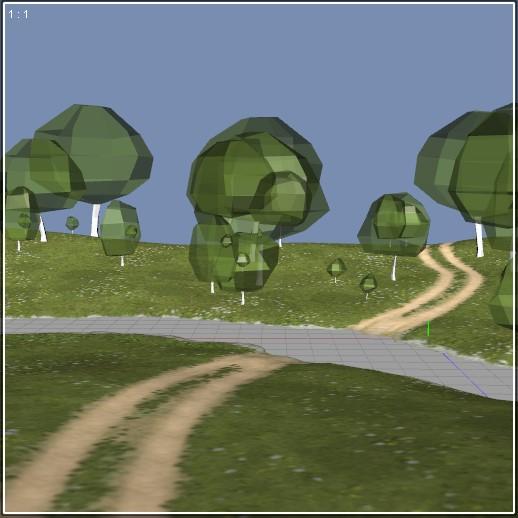
I recently had another Aha moment. I have struggled with not being able to see the UltraScenery terrain very well in my viewport. I couldn't tell where the dirt track was, etc. Filament viewport mode was helpful sometimes, but I found something even better that works for me - the camera Headlamp! This kind of thing is exactly what the camera headlamp is for, but the default camera headlamp settings didn't help me much with UltraScenery.
To change the camera headlamp settings, select the camera in the Scene pane. Then open the Parameters pane, you will see a Headlamp section. In there you can change the settings.
I changed the camera headlamp settings as follows:
Headlamp Mode: Auto (Edit: I now think Auto is better than On for my use)
Headlamp Intensity: 2.0
Y Headlamp Offset: 1500To turn the headlamp off reliably, I had to set the intensity and offset back to default and change the mode to Off.
There is something flaky about the Daz Studio Headlamp settings. Sometimes you have to toggle the mode off and on to get changes to intensity to work. Also, why doesn't just setting mode to Off turn it off reliably? I saved Property Presets to turn the headlamp on and off, so I don't have to directly fiddle with these settings in the Parameters pane.
Oh yes, one last important thing: If your Headlamp mode in the camera settings is On, turn the Headlamp Off before rendering. In Render Settings, I always have Auto Headlamp set to Never. That way when Headlamp mode in the camera settings is Auto, I don't have to turn the Headlamp off before rendering.
These screenshots of my DS viewport in Texture Shaded mode show the difference between the headlamp off and on with the settings above:
 Stephanie 8 does not show her (MDL) eyebrows in 'Texture Shaded' work env. but most other figures do
Stephanie 8 does not show her (MDL) eyebrows in 'Texture Shaded' work env. but most other figures do
Hi all would be great if you could help me with this one, can't find an answer in the forum or anywhere else.
I had an entire forum question prepared why my Stephanie 8 does not show her eyebrows even when I click on her a dedicated "MDL Eyebrows ON" tile while e.g. Victoria 8 never has this problem, but then I found out that Stephanie 8 does show the eyebrows from her own Smart Content tiles but you just can't see them in the 'Texture Shaded' work environment, but as soon as you switch to 'Filament (PBR)' or 'NVIDIA Iray' you can actually see them. Victoria 8's eyebrows show just fine in the 'Texture Shaded' work environment even when I put them on Stephanie 8's face (which I did as a workaround thinking the eyebrows were really absent on Stephanie 8).
Is there a way to show Stephanie 8's own eyebrows in the 'Texture Shaded' work environment and why doesn't Victoria 8 eyebrows (and many other figures) have the same 'visibilty' problem in the 'Texture Shaded' work environment?
Different issue, somewhat related, part from my initially prepared forum question:
"I know that expert users often do not have much use for standard eyebrows, but beginners like me are befuddled why anyone at DAZ corp. thought that making browless figures default was a good idea; I so wish there was a global setting to get rid of all that browless craziness until I am ready to do my own artsy eyebrows customization etc."Is there such a setting?
Thx!
Cat ZeusGrabbed Zeus and his extra furs for Carrara and Filament (strandbased tends to disappear animated in Filament)
models, prims, etc super washed out after updatingAs Gordig said, I didn't realize that you weren't confused by all the comments so I tried to cover all bases. There are no number of people who don't understand that a private place that has a no nudity rule means no nudity. Hopefully, the second part is helpful.
But, yes, the aux port is not using the Filament engine so it should look normal.models, prims, etc super washed out after updatingryotedeschi said:
nemesis10 said:
"Please clothes the figure or zoom to show only acceptable areas.
You are using Filament preview, you may want to switch to another Drawstyle or adjust the settings (especially the environment intensity values) or Tone Mapping."Translation:
- No nudity please....
- Next to the pulldown menu where it says "camera" and above the cube shaped positioning widget in your images is a little icon that looks like a shaded sphere (shaded texture view and what you want) as opposed to the hooped shaped icon with the square inside it (filament preview wgich uses another renderer). Click on the little arrow to choose shaded texture.

you dont have to get snarky, i understood completely what the first sentence meant. ridiculous since the model looks like a ken doll in the first place but whatever...
You said you didn't understand any of what Richard said, so it wasn't snarky for them to explain it to you.
models, prims, etc super washed out after updatingnemesis10 said:
"Please clothes the figure or zoom to show only acceptable areas.
You are using Filament preview, you may want to switch to another Drawstyle or adjust the settings (especially the environment intensity values) or Tone Mapping."Translation:
- No nudity please....
- Next to the pulldown menu where it says "camera" and above the cube shaped positioning widget in your images is a little icon that looks like a shaded sphere (shaded texture view and what you want) as opposed to the hooped shaped icon with the square inside it (filament preview wgich uses another renderer). Click on the little arrow to choose shaded texture.
you dont have to get snarky, i understood completely what the first sentence meant. ridiculous since the model looks like a ken doll in the first place but whatever...
models, prims, etc super washed out after updating"Please clothes the figure or zoom to show only acceptable areas.
You are using Filament preview, you may want to switch to another Drawstyle or adjust the settings (especially the environment intensity values) or Tone Mapping."Translation:
- No nudity please....
- Next to the pulldown menu where it says "camera" and above the cube shaped positioning widget in your images is a little icon that looks like a shaded sphere (shaded texture view and what you want) as opposed to the hooped shaped icon with the square inside it (filament preview wgich uses another renderer). Click on the little arrow to choose shaded texture.
models, prims, etc super washed out after updatingRichard Haseltine said:
Please clothes the figure or zoom to show only acceptable areas.
You are using Filament preview, you may want to switch to another Drawstyle or adjust the settings (especially the environment intensity values) or Tone Mapping.
i dont understand any of what you just said.
models, prims, etc super washed out after updatingPlease clothes the figure or zoom to show only acceptable areas.
You are using Filament preview, you may want to switch to another Drawstyle or adjust the settings (especially the environment intensity values) or Tone Mapping.
Updated to 4.14.0.8 but Filament does not appear in the menuLeana said:
I may be wrong but I think I've read that adding Filament into Mac version of DS required updating the version of Qt framework DS uses and so could only be done in DS5.
That said, initially Daz thought they couldn't get DS4 working on Big Sur and would need to release DS5 for that, but they found a way to in the end, so it might have changed.
No, this is - I am told - still the case.
Updated to 4.14.0.8 but Filament does not appear in the menuI may be wrong but I think I've read that adding Filament into Mac version of DS required updating the version of Qt framework DS uses and so could only be done in DS5.
That said, initially Daz thought they couldn't get DS4 working on Big Sur and would need to release DS5 for that, but they found a way to in the end, so it might have changed.
Unreal Engine renders better than NVIDIA IRAY in 1 second vs 30 minute IRAY renders-What's going on?vozolgant said:
I'm currently researching this topic.
Have the DAZ team figured out a way to make IRAY act like Unreal Engine, so we can produce faster renders? The Filament PBR feature is a step in the right direction, but comes no where close to unreal engine quality, not even close.
Not sure why this is in the Unreal Engine part of the forum. The OP wants DAZ Studio to perform with the same rendering speed as Unreal Engine.
it was posted before there was an Unreal forum, it was put here afterwards
there were many caveats the OP ignored as far as how things were done in Unreal at the time, Lumen and Nanite changes some of that now as far a real-time rendering goes but when this thread was started I was having to build lighting etc to get the sort of results he was seeing in Unreal in play mode
Unreal Engine renders better than NVIDIA IRAY in 1 second vs 30 minute IRAY renders-What's going on?I'm currently researching this topic.
Have the DAZ team figured out a way to make IRAY act like Unreal Engine, so we can produce faster renders? The Filament PBR feature is a step in the right direction, but comes no where close to unreal engine quality, not even close.
Not sure why this is in the Unreal Engine part of the forum. The OP wants DAZ Studio to perform with the same rendering speed as Unreal Engine.
Updated to 4.14.0.8 but Filament does not appear in the menuSame. I didn't even know about Filament until a friend pointed it out to me just now. It's been about a year since it came out on Windows, right? Any updates?
Why does my viewport look all washed out?Gordig said:
Can you post a screenshot? Also, what viewport drawstyle are you using? It sounds like you might be in Filament mode, but it's hard to know for sure without seeing what you're seeing.
That would be it! I changed it to the right setting and the backgrounds are there now. Thanks.
Why does my viewport look all washed out?Can you post a screenshot? Also, what viewport drawstyle are you using? It sounds like you might be in Filament mode, but it's hard to know for sure without seeing what you're seeing.
Decorative Norwegian Glass PropsPlease find a little pair of freebies attached. The two glasses are decorative glasses based on the shape of a glass my wife and I bought on holiday in Bergen in Norway during the early 1990's. We particularly love the coloured glass spirals within the stem of the glass and the fluting curve of the bowl in the glass on the right of the image. The shape is reminiscent of English 18th century bumpers, but I don't know if the glass blower took any inspiration from anywhere other than their imagination.
Anyway, I hope you like them.
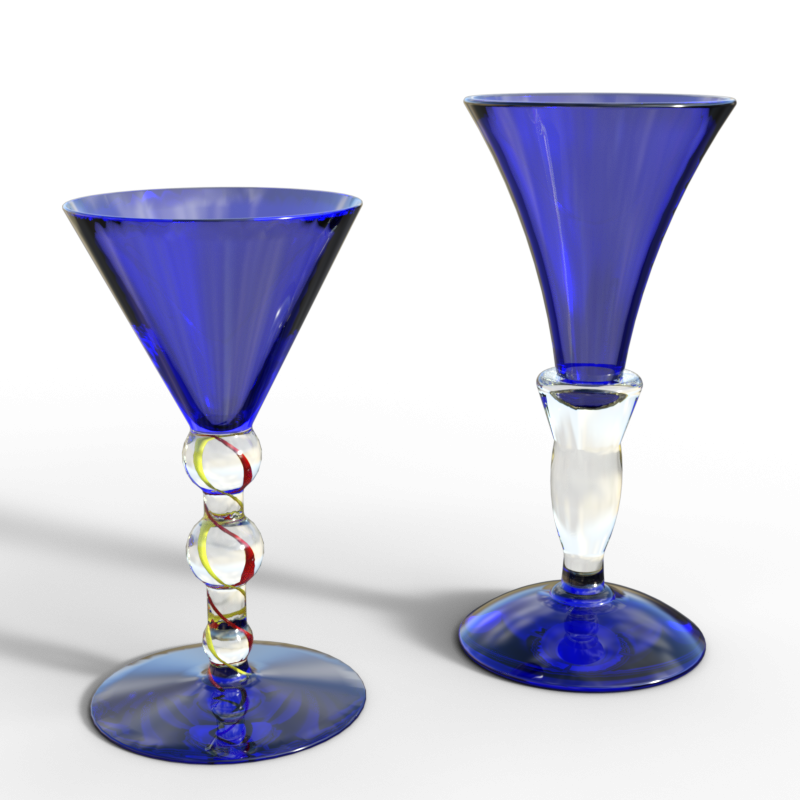
Please be aware that the glasses are almost totally invisible in Filament and not very visible in the texture shaded preview mode.
Regards,
Richard
AIUTO...CHI CONOSCE L’ITALIANO? PARTE TREDICIPenso che alla DAZ al momento vogliano toccare il meno possibile..
I Genesis 8 vanno più che bene e tra l'altro sono stati aggiornati con l'8.1 che ha aggiunto espressioni avanzate. La mesh invece può essere incrementata grazie agli HD morph (che l'utente normale può solo usare, la creazione è riservata solo ai PA) pertanto con un HD morph puoi modellare perfino i pori della pelle 1 a 1 e il problema delle figure low-poly è stato aggirato.Per i motori grafici vale un discorso a parte: cambiare un motore grafico, oltre a creare difficoltà nella programmazione, crea un casino coi prodotti (nel passaggio da 3DeLight a Iray quanti casini ci sono stati perchè alcuni prodotti erano compatibili con l'uno o con l'altro ?). Figurati se poi aggiungono un nuovo motore (i vecchi se li tolgono rendono la libreria esistente incompatibile.. a voglia a riaggiornare uno ad uno i prodotti per il nuovo engine). Pertanto lasciano quelli attuali (hanno aggiunto Filament solo perchè i materiali Iray sono compatibili al 70%). Perfino il concorrente Character Creator usa Iray. Ricordati che tanto puoi sempre migrare verso il software 3D che preferisci con un semplice export.
Il problema che invece mi fa incazzare sono i plugin di comunicazione: quello con Maya è scassato (mi tocca esportare ogni volta in FBX o OBJ), quello di Unreal è rimasto alla versione precedente del motore (4.16)..
Altro problema è l'impossibilità di riggare/creare weightmap in programmi esterni... dover editare le weightmap in DAZ è davvero atroce perchè la parte di editing è limitata e ostica da usare. Ci sono poi i problemi dati da Dforce e da altri altri plugin ormai vecchi e superati (gli Strand Hair)... quelli andrebbero ritoccati e aggiunta una documentazione decente perchè non è normale che un vestito "esploda" cambiando dei settaggi.
Filament (PBR)Hi I'm new to DAZ Studio and I'm having trouble applying the Filament (PBR) when trying to use the metamixer toolkit, whenever I try to apply it, the software freezes and doesn't respond. Is there a way to fix this because I tried closing and re-opening the software but got the same result. Thank you in advance.
Post your DAZ to Unreal renders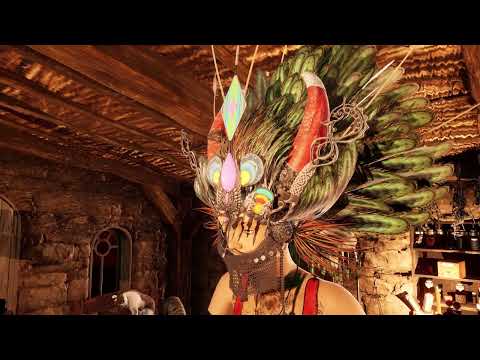
another video by me
first 15 secs are DAZ studio Filament, the rest is all Unreal
Daz 3D is part of

Connect
DAZ Productions, Inc.
7533 S Center View Ct #4664
West Jordan, UT 84084Licensing Agreement | Terms of Service | Privacy Policy | EULA
© 2026 Daz Productions Inc. All Rights Reserved.