-
~Problem with Millawa 8 Head morph~ (SOLVED)
avatar0319 said:
Yeah, i re-installed her a couple of times with no changes at all :'(
Now to the interesting part - you're right, NorthOf45! Her one crucial sub-component is indeed missing. There are a lot of components for her expressions and face parts, but there's no head morph' component at all. I've attached the screen with info. But the question is, how can I patch this up since re-installing do exactly nothing?
"Could not find parent for modifier: FHMMillawa8."
There is something not correctly specified inside the morphfile
~Problem with Millawa 8 Head morph~ (SOLVED)Yeah, i re-installed her a couple of times with no changes at all :'(
Now to the interesting part - you're right, NorthOf45! Her one crucial sub-component is indeed missing. There are a lot of components for her expressions and face parts, but there's no head morph' component at all. I've attached the screen with info. But the question is, how can I patch this up since re-installing do exactly nothing?
Catty 8.1 Gender Fluid Bundlej cade said:
I genuinely dont understand how some of the promos make characters look so dry
I just stuck them with the default settings and lit it with an hdri from hdrihaven
Wow! Those look amazing! Very realistic! If I had seen those promos first I would have been more enticed to buy the bundle. But I would definitely only use a partial of the morph. It seems strange to me to use the likeness of a real person. If the sale had worked I would have probably purchased the bundle but now it’s in my wishlist, The outfits look interesting to me too and seem like they’d be fun to kitbash.
3D Art Freebie Challenge-June 2021-"Dream Vacation" -Entries Thread Only3D Art Freebie Challenge June 2021 "Dream Vacation"
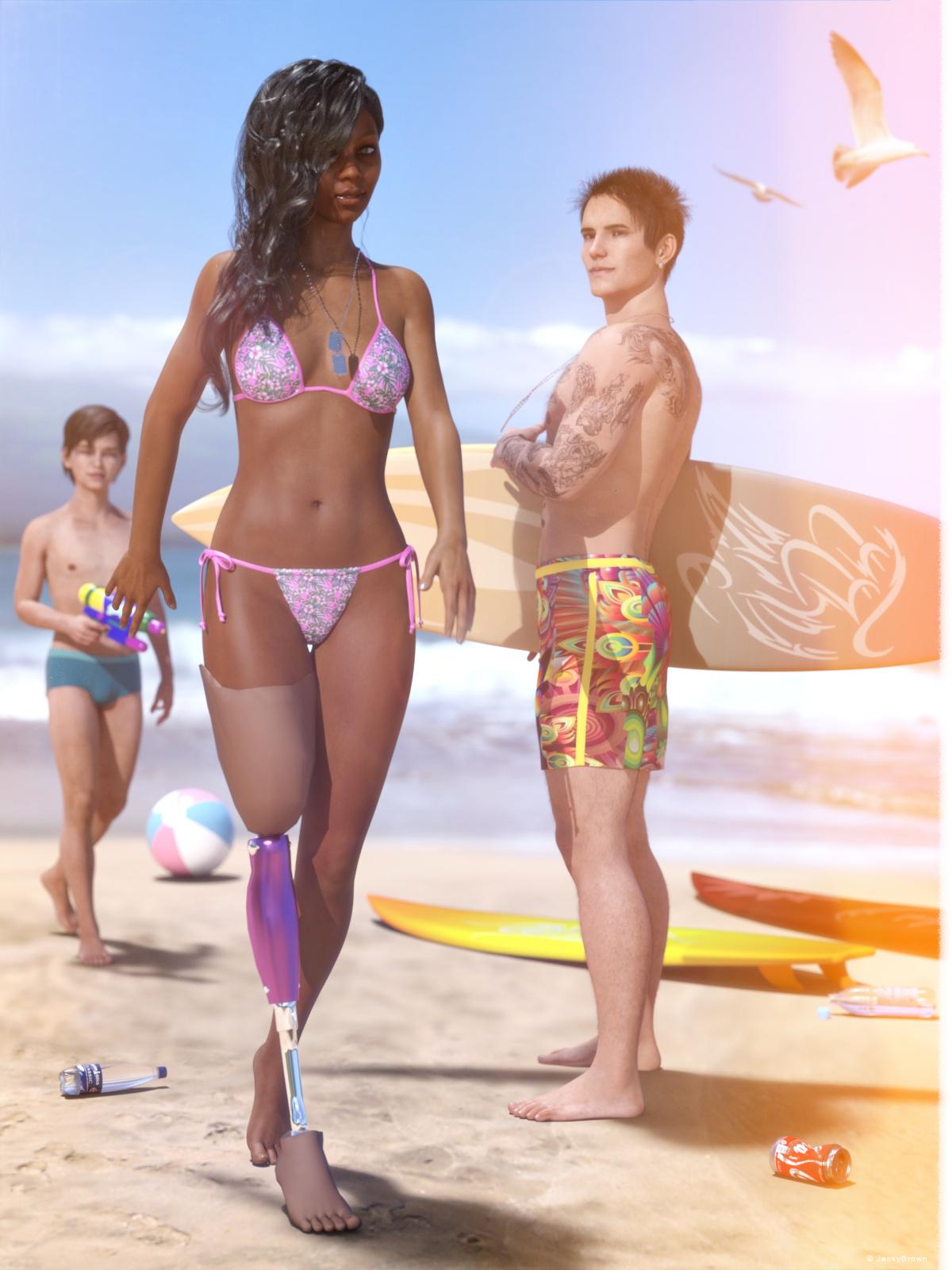
This is my third (and last) render for this month, because what's a dream vacation without at least one day at the beach? :)
[Best watched at full size for details.]
"Dog tags..."
Starring: Tiana, Walther and Walther 2.0
The tale:
Before Tiana lost her right leg on a secret mission in Iraq, her dream (vacation) was to surf in Maui, Hawaii. She was one of the best female surfers, but after the loss of her leg it was no longer possible to surf independently. Now that she's on vacation in Maui after years of rehab, she would love to try to get back on the water on a surfboard...
Walther has been suffering from PTSD since he returned from Iraq, he has the feeling that he will never be able to feel affection and love again because of the things he has seen there and that leads him to severe depressions. Until today, when he saw Tiana and immediately noticed that she also wears dog tags, he felt an enormous connection and warmth for her inside and after years a smile appeared on his face again...Soundtrack:
Tiana's choice:
Everly Brothers - All I Have To Do Is Dream (© 1958) https://www.youtube.com/watch?v=tbU3zdAgiX8
And Walther picked:
Iron Maiden - Infinite Dreams (© 1988) https://www.youtube.com/watch?v=HAGdPQPD7p8
COUNTABLE FREEBIES: (Alphabetic order)#01! 33 Eyes Materials for the Genesis 8 + 8.1 people by LevKornowska
https://www.renderosity.com/freestuff/items/88372/33-eyes-materials-for-the-genesis-8-81-people **#02! Bad Hair Day GM8 by MysticArtDesign
https://sharecg.com/v/97548/browse/21/DAZ-Studio/Bad-Hair-Day-GM8 **#03! Beach-Pant for G8M by kalhh
https://www.renderosity.com/freestuff/items/88738/dforce-beach-pant-for-dazstudio-iray-genesis-8-male **#04! Crushable Can by TrekkieGrrrl
https://www.sharecg.com/v/18196/poser/Crushable-beer-can **#05! Dante DMC5 Free Eyebrows for Genesis 8 Male by InTheFlesh
https://sharecg.com/v/94753/gallery/21/DAZ-Studio/Dante-DMC5-Free-Eyebrows-for-Genesis-8-Male **#06! Drinks by klausdbg
https://www.sharecg.com/v/74240/gallery/5/3D-Model/Summer-IV-Drinks **#07! ED's Brick Shader (Iray) by Edheldil3D
https://www.deviantart.com/edheldil3d/art/Freebie-ED-s-Brick-Shader-Iray-788871766 **#08! G8M Walther 2.0 by Ruslanomar
https://sharecg.com/v/97276/gallery/21/DAZ-Studio/G8M-Walther-2.0 **#09! Hawaiian Floral Prints Seamless by RedEyeCat
https://redeyecat.wordpress.com/2014/06/07/its-a-tile-lollapalooza/ (First item)
[Used on String Bikini for Victoria 6]#10! Iray car related shader presets 'megapack' by Tom2099
https://www.deviantart.com/tom2099/art/Iray-car-related-shader-presets-megapack-539622361 **#11! Leg Prosthetics Pack G3F by MinaBlanche
https://sharecg.com/v/91248/gallery/21/DAZ-Studio/Leg-prosthetics-pack **#12! LT Blade Outfit G3F by UltimateClash
https://www.renderosity.com/freestuff/items/82554/lt-blade-outfit **
[Dog Tags]#13! Private Beach by Redviper2012
http://viper2012.s602.xrea.com/x/ (item 8)
[Beach ball, Watergun]#14! REAL Hairy for Genesis 2 Male ***FREE*** by MikeyFTL
https://www.deviantart.com/mikeyftl/art/REAL-Hairy-for-Genesis-2-Male-FREE-859328094 **#15! Seagulls clipart by HiClipart
https://www.hiclipart.com/free-transparent-background-png-clipart-ybvkw#16! Side Swept ROse Hair (G3F,G8F) Part 1&2 by zoro_d
https://www.renderosity.com/mod/freestuff/side-swept-rose-hair-g3f-g8f-part-1/79533 **
https://www.renderosity.com/mod/freestuff/side-swept-rose-hair-g3f-g8f-part-2/79534 **#17! STRONG for G8M Character Morph & Pose by Mar3D
https://www.renderosity.com/mod/freestuff/strong-for-g8m-character-morph-amp-pose/82833 **#18! SY 200 Morphs for Genesis 8 Head and Body by SickleYield
https://sharecg.com/v/91888/view/21/DAZ-Studio/SY-200-Morphs-for-Genesis-8-Head-and-Body **#19! Tiana for G8F by RenderGuyNY
http://www.sharecg.com/v/88548/gallery/21/DAZ-Studio/Tiana-for-G8F-%5Bsome-nudity%5D **#20! Walther 2.0 simple hair for G8M by Ruslanomar
https://sharecg.com/v/97283/gallery/21/DAZ-Studio/Walther-2.0-simple-hair-for-G8M **
NO-COUNT ITEMS:++ Basic Wear G8M by Daz Originals
--- Bone Earrings for G8M by TwiztedMetal
++ DAZ Studio Iray HDR Outdoor Environments by DimensionTheory [Maui used]
--- Free Iray Outdoor Lights by Dreamlight
++ String Bikini for Victoria 6 by Mada, Sarsa
++ Surf's Up Outfit and Board by SarsaPURCHASED/PAID FOR ITEMS: None 100% Freebies
*1 E-mail address required
** Registration required
#x! Countable Items (Bold ones are used by me for the first time I think.)
--- No longer available freebies
++ Free with DAZ Studio (or the Essentials)
$x. Purchased/Paid For Item
Rendered with DAZ Studio 4.10.0.123 (nVidia Iray)Other free software used: GIMP v2.10.24 and Irfanview 4.57
Postwork: used the AltaLux Image Enhancement Filter (Effect) by Stefano Tommesani that comes with Irfanview and some filters (oa) that come with GIMP.
"Dog tags..."
I need a lot of help converting custom G3M morph to G8MWhat might be going 'wrong' is that these 2 figures are in very different poses at default positions.
You can make clothing out of the BASE mesh [no eyelashes on G8M] of G8M for G3M BUT first pose G8M to match the "T" of G3M. Then export out that .obj file. On G3M make the clothing piece. G3M is also to be at base resolution. Then pose G3M to match the "A" of G8M. Also dial in the morph you want to transfer over. HIDE all figures except the "clothing" - export that out [NO groups] Clear the scene, load in a fresh G8M, base resolution, no eyelashes - use Morph Loader Pro to bring in the morphed clothing figure .obj file and make the morph. Hopefully I didn't miss any major steps and this works. Finish as per usual.
Want to load 8.1 without "all" of 8's morphs? minitutCatherine3678ab said:
JackyBrown said:
When I load a (new, default) Genesis 8.1 figure none of the Genesis 8.0 morphs show up, which is really unwanted. What could be the issue that causes that? (I actually thought it was supposed to be like that, but here I learned differently.)
One needs to be using the latest release of Daz Studio - and possibly reinstall the Genesis 8 Starter package.
Hi @Catherine3678ab, thank you so much for your quick answer! I thought I was smart by just reinstalling the Genesis 8 Starter Essentials... ;) I remember that with the Victoria 4 and Michael 4 figures you can choose which morph packages you want to load or not, that was very handy.
Transfer G8F Morphs to G8MHavos said:
It is been a while since I used this script, but you have to favorite the morphs you want to move. This thread has more info https://www.daz3d.com/forums/discussion/176271/morphs-from-g3-to-g8/p1, look at the last 10 pages or so for info on this script.
BTW you might not be able to fully transfer Sasuke, as I was under the impression that the eyes are a geograft, not just a morph (I maybe wrong as I do not own that figure). This script will transfer the morph, but not the geograft, so will not be the same.
I have Sakura 8, not Sasuke which is based on Sakura 8. Can confirm that yes the eyes are geografts. Non-transferrable. And I imagine that the entire thing was enough work the first time 'round that is possibly why Sasuke was made as a morph for Sakura 8.
IF there were no geografts involved, the basic concept would be to make a clothing piece from G8M's BASE mesh [no eyelashes] FOR G8F. When exporting the .obj - NO groups. G8F would be dialed to the hidden male morph and when making the clothing she's the donor, the clothing is target. Her situation is "current" ... and then down the list of options 'reverse' morphs or something [sorry, forgot how it was worded atm - just found out my brother is in the hospital having reacted to the 2nd vax, he's not good, my mind is elsewhere but trying to hold on here]. Any way, after making "clothing" from the G8M's mesh, then dial OUT G8M shape, dial in the desired morph to transfer. [oh yes, G8F must also be already BASE mesh only, NO eyelashes]. HIDE all figures except the clothing which should be looking like the desired character to transfer. Export out that mesh [no groups]. [size settings, whatever you send out has to come back in the exact desired size] Now then load G8M, base resolution, NO eyelashes. Using morph loader pro [somewhere under Edit] bring in that clothing piece and make the morph. REVERSE deformations! Name the morph, for the moment is okay to leave it under Morphs ... you could place it now or later elsewhere under Actor ... I like to make sure that they are working before losing them under Actor. Yes to a control, whatever settings you would normally use for making morphs. And then hopefully it "takes" and appears over on the Parameters Tab. As you dial it in, G8M would be looking like the female character. Dial it in 100%, go to the bones editor tool, right-click on a bone. Edit ... adjust bones to mesh ... then back on the Parameters Tab, on the concerned dial, right-click [edit mode] and select ERC. Everything is left as is, make sure the 3 boxes at the bottom are checked also, Accept. Dial OUT the morph, File > Save As > Support Assets > Morphs ...
Clear scene load in fresh G8M, dial in new morph, have fun :-)
Trouble using or finding "Side Street" in Poser 10Never mind, I solved it!!!! My computer died in February and I had to transfer data to a new computer which had an extra DAZ Library in a different place. I remembered the "Ad Library" function to point to the new one. My 3 new purchase were suddenly there, including "City Streets" which I had feared was for DAZ Studio only. Whew! I'm not as dumb as I feared. I'm so happy!
Uniboob Morph? (making more pleasing clothes' lines)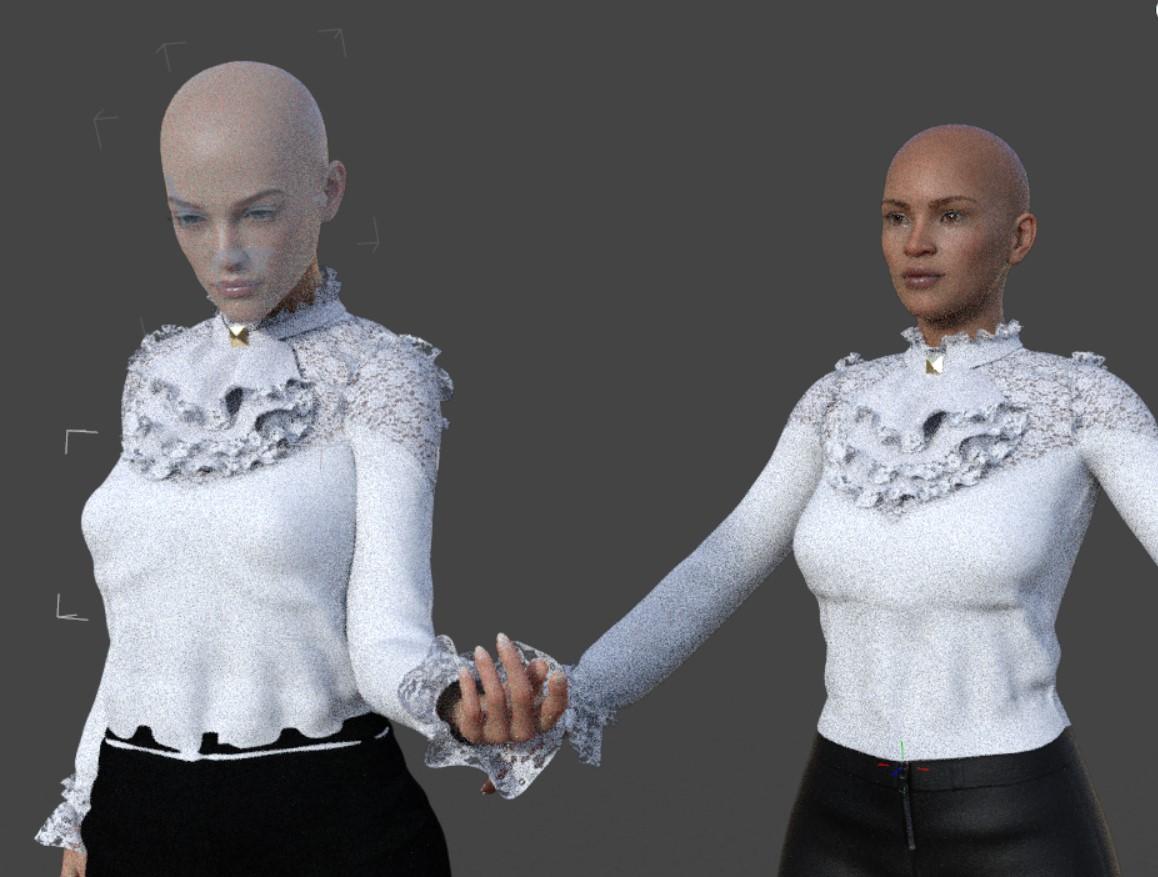
Thank you for your reply! Strangely enough I tried to test out fit control on Philadelphia (left) by trying to find a shirt that shrink wrapped to her chest but none did! Even the ones I know had given me issues. So I tried Apollonia (right) and she got the shrink wrap effect. I guess some characters come with a hidden (?) chest morph??? It still looks a bit weird though under each bo0b for Philadelphia and Apollonia- though I tried Fit Control with the one on the right and the one of the left came like that. I only use Gen 8 models. Any recommendations for a morph for that (would love just one I can slide and apply!).
Transfer G8F Morphs to G8MIt is been a while since I used this script, but you have to favorite the morphs you want to move. This thread has more info https://www.daz3d.com/forums/discussion/176271/morphs-from-g3-to-g8/p1, look at the last 10 pages or so for info on this script.
BTW you might not be able to fully transfer Sasuke, as I was under the impression that the eyes are a geograft, not just a morph (I maybe wrong as I do not own that figure). This script will transfer the morph, but not the geograft, so will not be the same.
I need a lot of help converting custom G3M morph to G8MI have a character I have created back when K4 came out. It is a combination of K4, M4. Thereare some G1, G2M morphs in there as well, but it has been so long, that I don't remember how many, or which ones.. I have converted this character to the newest figure to come out. First to G1, then from G1 to G2M, and finally from G2M to G3M. I have tweeked it between each conversion. Now, whenever I try to convert it to G8M, something always goes wrong. I have tried every way to convert it with no success at all. When I use Xtransfer, I get an error that then clears my scene and closes Xtransfer. I was wondering, if it doesn't violate any rules or the EULA, could someone convert it for me if I send them the morph, and paid them? Again, I don't want to do anything that is agaist the rules here.
Transfer G8F Morphs to G8MHavos said:
This free script will transfer morphs between G8F and G8M (and vice versa). https://github.com/TugLLC/GenNext
It works pretty well, but will struggle with some extreme morphs (eg highly stylised or monsters)
When I want to transfer the morphs, there's nothing in the window list, so I can't transfer anything. What am I doing wrong?
Transfer G8F Morphs to G8MCatherine3678ab said:
Is there a way? Yes. Long route though.
So the short route is dial the morphs into G8F, and dial in the hidden G8M shape [or if you have the free transgender shape, dial that it as it's rig was likely adjusted].
And then you'll tell us no no it 'must be' ... and like the long route is to make clothing shape of each figure, dialing in various morphs and exporting out .obj files and using Morph Loader Pro to bring them back into a figure as a morph.
And then eventually you'll probably come back with but the such and such doesn't fit, and like yeah no kidding. That's what 8.1 was invented for to take care of ;-)
It's rather hot and humid over here, don't mind me.
There may be a product but I don't recall if or where it is. Are you wanting the entire Gigabites collection transferred to him, or just a particular character?
I want to transfer Sasuke Morph for Genesis 8 Female to Genesis 8 Male. What is the easiest way?
Uniboob Morph? (making more pleasing clothes' lines)Hello all. I've tried some chest morphs but still have clothes shrink wrapping to the chest area for female characters. Is there an easy morph I can just slide to make the chest area more like a barbie so that there is a little cleavage but clothes treat the boobs as one? Thanks in advance!
Edit: Looking for Gen 8 specific morphs
Transfer G8F Morphs to G8MThis free script will transfer morphs between G8F and G8M (and vice versa). https://github.com/TugLLC/GenNext
It works pretty well, but will struggle with some extreme morphs (eg highly stylised or monsters)
How to edit a file to change a SubDivision setting ... and other ideas here for October projectsSome products such as https://www.daz3d.com/ab-delpyune-hd-for-genesis-81-female are loading with their subdivision settings too high which guarantees a crashing come render time. Dear PAs please do NOT do that. We can dial the settings up, thank you.
As I couldn't find a way to make a preset I edited the character file which of course I cannot share. But for others working on anything less than a monster-sized computer set-up, here's how.
First, zip up the original for backup and/or the day you do have a monster-sized computer set-up. Unzip the original using 7zip to decompress the info. Unzip to 'here' ... name the extension .txt ...
Then search for 2 specific settings and change their numbers to "1" ... when done, rename the extension to .duf replacing the original one [might have to delete that one first].
Open in Notepad or similiar;
Find:
SubDIALevel
and change the current value to 1 ... "current_value" : 1
SubDRenderLevel
and change the current value to 1 ... "current_value" : 1The above setting will have the Character displaying with
SubDivision Level 1
Render SubD Level 2Of course one can adjust the settings for whatever their computer/videocard can handle.
And now I can render in Iray.
Alternatively one can remake the mats to 3Delight and render in 3Delight ... the trickier part is remembering to reset the Render Engine "everytime" one opens D/S [esp. this beta] ....
..................................
Also, there's a nice product for getting a newer looking scary scarecrow figure - on sale today :-)
https://www.daz3d.com/dforce-wraith-for-genesis-8-male
Don't forget to download the free for awhile grave keeper and working graveyard, and some other pink items available over in the freebie thread.
....................................
Very helpful videos for making head - body separate morphs - so one can mix 'n match some figures is here:

Be sure to nab the free D-Former morph he supplies. If your 8.1 is reading 8's morphs, fine. If it isn't, simply copy the morphs also into the appropriate morph folders for 8.1 and they will work :-)
Transfer G8F Morphs to G8MIs there a way? Yes. Long route though.
So the short route is dial the morphs into G8F, and dial in the hidden G8M shape [or if you have the free transgender shape, dial that it as it's rig was likely adjusted].
And then you'll tell us no no it 'must be' ... and like the long route is to make clothing shape of each figure, dialing in various morphs and exporting out .obj files and using Morph Loader Pro to bring them back into a figure as a morph.
And then eventually you'll probably come back with but the such and such doesn't fit, and like yeah no kidding. That's what 8.1 was invented for to take care of ;-)
It's rather hot and humid over here, don't mind me.
There may be a product but I don't recall if or where it is. Are you wanting the entire Gigabites collection transferred to him, or just a particular character?
Catty 8.1 Gender Fluid Bundlerickrocker00 said:
I'm going to pass on this bundle.
One question I have is what do DAZ customers do with the content they purchase? My guess is people use the content for: (a) a personal library, (b) commercial products like book covers, or (c) content for games. I know I must be missing something so please feel free to share. I'm not against gender fluid characters, but none of the categories I listed have a huge demand for them.
I know lots of LGBTQIA people that would be interested in Caty as is. I love Caty's face, her body, and her sense of style. She seems like someone I might actually meet (and she is). Her face is interesting and seems very real. Even as a mix, I bet she could add depth to scenes. And like others have said, you don't have to use any of this as it is marketed. You can put the club outfit on a victoria's angel and so on.
As far as all this inclusive content being released lately goes: lots of straight people that just want to see beautiful people would be interested in someone like Rio, who is trans and gorgeous. Peopling your scenes with diversity can make them more interesting- stand out from all the hot white chicks. Want to show a really cool bar scene with interesting characters that come from all walks of life? This kind of content can help with that. Another use for the trans morphs, for example, is to make a feminine version of any male character you have who happens to have a face you really like, or vice versa going from female to male. Or that monster character that only comes for men or women (not both) as is fairly common? You can now make both genders out of that one monster morph. One more: You want to show a family resemblance across sexes/genders? Now you can pretty easily. I'm pretty stoked about all of this.
And last but certainly not least, economically speaking, you have to consider pron. Gender bending, swapped parts, and all sorts of stuff you might not think is popular, is actually pretty huge in some circles, with lots of people both making thier own fantasy content and doing commissions for others.
Transfer G8F Morphs to G8MIs there a product or a way for transferring Genesis 8 Females Morphs to Genesis 8 Males?
Recreating a character - any ideas on used presets, character or hair based on photo?There are several hundreds, possibly thousands, of morph dials that can be used if you own all the PA morph packs in addition to the Daz ones. The lips can be achieved with the bee bite morph from one of EmmaandJordi’s packs. If the artist owns as many morphs as I do, it could be literally anything.
Daz 3D is part of

Connect
DAZ Productions, Inc.
7533 S Center View Ct #4664
West Jordan, UT 84084Licensing Agreement | Terms of Service | Privacy Policy | EULA
© 2026 Daz Productions Inc. All Rights Reserved.