-
GoZ and Genesis 8 eyelashes....
IsaacNewton said:
Has anyone else noticed that sending a genesis 8 female (I don't have the male yet) to Zbrush via GoZ results in a strange artifact. The first time I use GoZ to send a G8f figure to Zbrush it works fine, the character and any conformed figures such as the eyelashes get sent to Zbrush as individual subtools. However, if I close Zbrush and send the figure again, then only the eyelashes appear as subtools (three copies of them!!)
I can work around this by clearing the GoZ cache, either manually or from within Zbrush, after which the figure will transfer normally (once). What is going on here? Something strange about the eyelashes? Is there a more permanent solution?
This happens to me as soon as I import my Genesis 8 figure. When I drag in the subtool I see the whole figure (but in the tools i see 3 eyelash tools) and as soon as I make it Polymesh3D the figure disapears and i'm left with only the eyelashes.
XTransfer Module 1- Genesis 3 to Genesis 8 Morph Converter (Commercial)Hi. To make the script work a bit less, try unselecting none core hidden files if it is just the shape you are after. Try and include only the core morphs related to figure shape. In attachment I deselected some expression helpers, whould cut transfer time roughly in half. Also some custom characters you will see the script try and include some morphs related to figure which can be bypassed as well.
G8 Centaur Posing - Horse 2 body posesI imagine the bone names and zero pose positions are different between G8 Centaur and Horse 2. It's the sort of thing that cries out for a little transfer script between the two. If someone wants to edit one of my freebie pose transfer scripts (G1F->G8F for example, https://www.daz3d.com/forums/discussion/502771/victoria-5-g1f-to-g8f-pose-transfer-script) to do the job, they are welcome to do so. There'll be about 2000 lines of code to edit, but it isn't difficult. Would just ask that it could be kept as a freebie.
I'm afraid I can't do the job myself, as I have neither model and in all honesty I don't really want them.
Regards,
Richard.
Silvercat's wip and stuffMade a few tweaks and started on a morph to bend it. I only vaguely know what I'm doing
 I need a lot of help converting custom G3M morph to G8M
Boorsman said:
I have a character I have created back when K4 came out. It is a combination of K4, M4. Thereare some G1, G2M morphs in there as well, but it has been so long, that I don't remember how many, or which ones.. I have converted this character to the newest figure to come out. First to G1, then from G1 to G2M, and finally from G2M to G3M. I have tweeked it between each conversion. Now, whenever I try to convert it to G8M, something always goes wrong. I have tried every way to convert it with no success at all. When I use Xtransfer, I get an error that then clears my scene and closes Xtransfer. I was wondering, if it doesn't violate any rules or the EULA, could someone convert it for me if I send them the morph, and paid them? Again, I don't want to do anything that is agaist the rules here.
I've worked out the work flow for making a G3M morph travel to G8M. It'll be coming out in a .pdf tutorial after I finished editing the images and gluing it together -- see my post in the freebies thread -- snag those pose presets. You will need to pose each figure to the other. This is not a hard thing to learn - just one has to pay attention to many details along the way.
What do you want to learn?Tutorials on the Shader Mixer would be nice, but frankly I think I'd have a better shot just trying to transfer my knowledge of Blender's Shader Editor over and fumbling around until I figure it out.
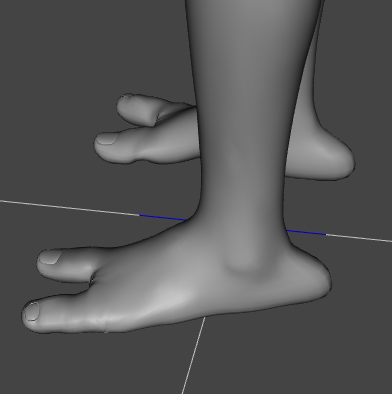
Silvercat's wip and stuffI'm currently working on a bunch of characters for a fic I'm writing. So I have to create morphs and textures for a bunch of stuff. The first one is a back toe, like for characters such as Nightcrawler.
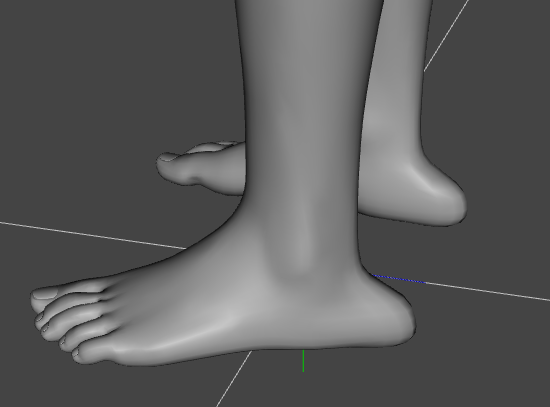
It looks a bit weird by itself but with the two-toed morph on it looks pretty good.
 Catty 8.1 Gender Fluid Bundle
memcneil70 said:
I will respect the human behind this 3D character. I have a fondness for this particular character, who reminds me of so many who had to hide their orientations when I was in the military. So many were friends and accepted the awkward person that I was and were not judgemental. I also note that this character is a great base to morph for someone from Eastern Europe or Russia. There is something that makes me think of a friend whose ancestors came from there.
I was successful with the hat! My thanks to all the fantastic help from the forum. You all are so great. Here is Catty dancing and tossing the hat.
Mary

Awesome - love the image :D
I need a lot of help converting custom G3M morph to G8MAre you moving just 1 morph for the character, or many? Bear in mind that if you are using standard body morphs, you are better off using the equivalent G8 ones, as these will then trigger the JCM correction morphs needed when you pose the figure.
Also does your morph change the base figures size significantly?, ie make it bigger or smaller. If so you are better off using a combination of a morph plus scaling, rather than just the morph. Again this should improve the posing of the character once it is transferred to G8.
XTransfer Module 1- Genesis 3 to Genesis 8 Morph Converter (Commercial)@Zev0 -- I'm having some problems transferring characters up from G3F. The morph transfer script works; it's processing something. However, in one case, the mesh blew apart. In the second case, the morph slider didn't seem to do anything except move a few verts. Help??
--MW
Catty 8.1 Gender Fluid Bundlememcneil70 said:
I will respect the human behind this 3D character. I have a fondness for this particular character, who reminds me of so many who had to hide their orientations when I was in the military. So many were friends and accepted the awkward person that I was and were not judgemental. I also note that this character is a great base to morph for someone from Eastern Europe or Russia. There is something that makes me think of a friend whose ancestors came from there.
I was successful with the hat! My thanks to all the fantastic help from the forum. You all are so great. Here is Catty dancing and tossing the hat.
Mary
WONDERFUL artwork... I'm glad you were able to make the hat a prop! Well done! Thanks for sharing.
Catty 8.1 Gender Fluid BundleI will respect the human behind this 3D character. I have a fondness for this particular character, who reminds me of so many who had to hide their orientations when I was in the military. So many were friends and accepted the awkward person that I was and were not judgemental. I also note that this character is a great base to morph for someone from Eastern Europe or Russia. There is something that makes me think of a friend whose ancestors came from there.
I was successful with the hat! My thanks to all the fantastic help from the forum. You all are so great. Here is Catty dancing and tossing the hat.
Mary
~Problem with Millawa 8 Head morph~ (SOLVED)avatar0319 said:
PerttiA said:
avatar0319 said:
PerttiA said:
"Could not find parent for modifier: FHMMillawa8."
There is something not correctly specified inside the morphfile
...and this is what I can't just understand. I downloaded Millawa 8 and installed her through DIM, all's good, no errors or bugs during installation or downloading. But since I don't see a lot of threads about Millawa 8 head morph bug, I can safely assume that the problem is on my end. Yet I can't understand how it's possible - every other character works as intended and only Millawa failed me. Is there something special about her morphs? Maybe there's some hidden required product I should buy? I mean, it's a really strange bug. I can't wrap my mind about it.
Ok, finally at home...
The error tells that the head morph cannot find the "parent" as it is specified inside the morph file.
This is the relevant section of FHMVictoria8.dsf, what is written inside FHMMillava8.dsf should be the same exept with the "id" and "name" referring to Millawa8 (Note that every character/dot/point/etc. counts);"modifier_library" : [
{
"id" : "FHMVictoria8",
"name" : "FHMVictoria8",
"parent" : "/data/DAZ%203D/Genesis%208/Female/Genesis8Female.dsf#geometry",If this information is correct inside the file, you may have the morph installed twice in different locations, but that would show in the log.
Installing whatever characters and/or morphs does not report any problems of this type, they will only surface when you are trying to load any figure that uses the same base figure (Genesis 8 Female in this case)
Hmmm... This is what my FHMMillawa8.dsf file says:
},
"modifier_library" : [
{
"id" : "FHMMillawa8",
"name" : "FHMMillawa8",
"parent" : "/data/DAZ%203D/Genesis%208/Female/Genesis8Female.dsf#Genesis8Female",This part is different, it doesn't reffer to geometry like with Victoria 8, so... should I changed it to #geometry? (i'm kinda scared though!)
P.S. Thanks, NorthOf45, I'll try to reinstall everything but only when I'm out of options :)
That's what mine has ( "parent" : "/data/DAZ%203D/Genesis%208/Female/Genesis8Female.dsf#Genesis8Female"), so that's not the source of the problem.
And, @PerttiA, my Victoria 8 "FHMVictoria8.dsf" does not have "#Geometry", it has "#Genesis8Female", too.
@avatar0319, I suggest to only install Millawa 8 and Genesis 8 Starter Essentials in a separate library, isolated from everything else, not to re-install everything.
~Problem with Millawa 8 Head morph~ (SOLVED)avatar0319 said:
PerttiA said:
Ok, finally at home...
The error tells that the head morph cannot find the "parent" as it is specified inside the morph file.
This is the relevant section of FHMVictoria8.dsf, what is written inside FHMMillava8.dsf should be the same exept with the "id" and "name" referring to Millawa8 (Note that every character/dot/point/etc. counts);"modifier_library" : [
{
"id" : "FHMVictoria8",
"name" : "FHMVictoria8",
"parent" : "/data/DAZ%203D/Genesis%208/Female/Genesis8Female.dsf#geometry",If this information is correct inside the file, you may have the morph installed twice in different locations, but that would show in the log.
Installing whatever characters and/or morphs does not report any problems of this type, they will only surface when you are trying to load any figure that uses the same base figure (Genesis 8 Female in this case)
Hmmm... This is what my FHMMillawa8.dsf file says:
},
"modifier_library" : [
{
"id" : "FHMMillawa8",
"name" : "FHMMillawa8",
"parent" : "/data/DAZ%203D/Genesis%208/Female/Genesis8Female.dsf#Genesis8Female",This part is different, it doesn't reffer to geometry like with Victoria 8, so... should I changed it to #geometry? (i'm kinda scared though!)
P.S. Thanks, NorthOf45, I'll try to reinstall everything but only when I'm out of options :)
Make a copy of the original FHMMIllawa8.dsf and change the name to FHMMillawa8_dsf.old to have a backup copy of the original.
Change the "parent" to "/data/DAZ%203D/Genesis%208/Female/Genesis8Female.dsf#geometry" inside the remaining FHMMillawa8.dsf and save, you can not break anything.
Send a ticket about the problem and fix so that DAZ is aware of it.
~Problem with Millawa 8 Head morph~ (SOLVED)PerttiA said:
avatar0319 said:
PerttiA said:
"Could not find parent for modifier: FHMMillawa8."
There is something not correctly specified inside the morphfile
...and this is what I can't just understand. I downloaded Millawa 8 and installed her through DIM, all's good, no errors or bugs during installation or downloading. But since I don't see a lot of threads about Millawa 8 head morph bug, I can safely assume that the problem is on my end. Yet I can't understand how it's possible - every other character works as intended and only Millawa failed me. Is there something special about her morphs? Maybe there's some hidden required product I should buy? I mean, it's a really strange bug. I can't wrap my mind about it.
Ok, finally at home...
The error tells that the head morph cannot find the "parent" as it is specified inside the morph file.
This is the relevant section of FHMVictoria8.dsf, what is written inside FHMMillava8.dsf should be the same exept with the "id" and "name" referring to Millawa8 (Note that every character/dot/point/etc. counts);"modifier_library" : [
{
"id" : "FHMVictoria8",
"name" : "FHMVictoria8",
"parent" : "/data/DAZ%203D/Genesis%208/Female/Genesis8Female.dsf#geometry",If this information is correct inside the file, you may have the morph installed twice in different locations, but that would show in the log.
Installing whatever characters and/or morphs does not report any problems of this type, they will only surface when you are trying to load any figure that uses the same base figure (Genesis 8 Female in this case)
Hmmm... This is what my FHMMillawa8.dsf file says:
},
"modifier_library" : [
{
"id" : "FHMMillawa8",
"name" : "FHMMillawa8",
"parent" : "/data/DAZ%203D/Genesis%208/Female/Genesis8Female.dsf#Genesis8Female",This part is different, it doesn't reffer to geometry like with Victoria 8, so... should I changed it to #geometry? (i'm kinda scared though!)
P.S. Thanks, NorthOf45, I'll try to reinstall everything but only when I'm out of options :)
Transfer Head Genesis follow OBJ HeadI have a head model create from Blender. (It is A model in picture)
i want to change the look of the head g3, g8 like model A, is there any way to convert.
Or can a plugin tool morh G3, G8 head according to an available 3d model.
I don't know how to do , hope someone can show me how to do it effectively.Transferring Morphs Between Figures Tutorial - Released!As there seems to be a surge of interest in transferring morphs between from the G3 clan to the G8 clan I've decided to put together a tutorial illustrating some points for transferring a full character morph from G3M to G8M. The images are in the edit basket ;-)
Sometimes one can get away with shortcuts, sometimes one cannot. So I'll also be showing how to get rid of a newly made morph one does not want to keep.
Mandatory is to pose each figure at times to the default pose of the other one. For those that want pose presets I have attached 2 in a zip. Put them anywhere under the proper figure that you want to put them. Each preset is in the folder for the figure it is to be used on. Very basic.
Update: Here the post. It's in the wilds ;-)
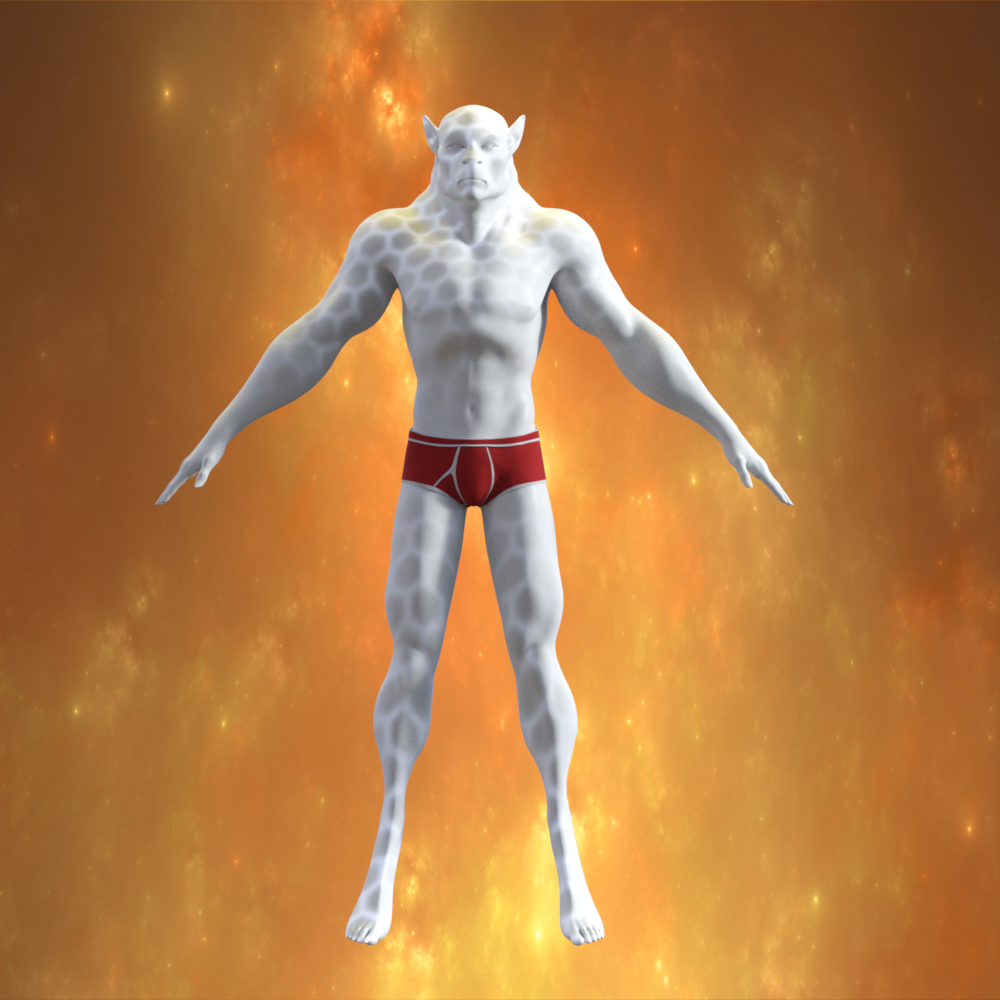
This is G8M morphed with Skin Changer Wolf from G3M.
 ~Problem with Millawa 8 Head morph~ (SOLVED)
avatar0319 said:
PerttiA said:
"Could not find parent for modifier: FHMMillawa8."
There is something not correctly specified inside the morphfile
...and this is what I can't just understand. I downloaded Millawa 8 and installed her through DIM, all's good, no errors or bugs during installation or downloading. But since I don't see a lot of threads about Millawa 8 head morph bug, I can safely assume that the problem is on my end. Yet I can't understand how it's possible - every other character works as intended and only Millawa failed me. Is there something special about her morphs? Maybe there's some hidden required product I should buy? I mean, it's a really strange bug. I can't wrap my mind about it.
Ok, finally at home...
The error tells that the head morph cannot find the "parent" as it is specified inside the morph file.
This is the relevant section of FHMVictoria8.dsf, what is written inside FHMMillava8.dsf should be the same exept with the "id" and "name" referring to Millawa8 (Note that every character/dot/point/etc. counts);"modifier_library" : [
{
"id" : "FHMVictoria8",
"name" : "FHMVictoria8",
"parent" : "/data/DAZ%203D/Genesis%208/Female/Genesis8Female.dsf#geometry",If this information is correct inside the file, you may have the morph installed twice in different locations, but that would show in the log.
Installing whatever characters and/or morphs does not report any problems of this type, they will only surface when you are trying to load any figure that uses the same base figure (Genesis 8 Female in this case)
AIUTO...CHI CONOSCE L’ITALIANO? PARTE TREDICISilvhe said:
Kainjy said:
Penso che non sia tanto il problema dei bambini.. ma degli adulti che con questi oggetti creano rendering/comics/novel/videogiochi con contenuti 18+ che poi diffondono nella rete (sopratutto DeviantArt). Probabilmente hanno messo questa regola per cercare di contenere la cosa creando un paywall.. altrimenti passa il primo con 1 euro, acquista i pacchetti e inizia a fare render di persone nude in pose da kamasutra. Non è un caso che moltissimi di questi contenuti siano realizzati con Poser e Daz.. ad esempio il gioco Dating Ariane famoso su Youtube anni fa è una serie di Rendering fatti con Poser. Non parliamo poi del famoso store che vende roba per Daz e Poser e inizia per R (no Renderosity, anche se pure Renderosity a volte vende roba 18+). Per cui penso che la DAZ voglia staccarsi dall'immagine di software house che vende prodotti per realizzare contenuti spinti 18+.. oggi l'immagine dell'azienda è la parte principale del marketing.
Date Ariane è uno dei più casti (e anche dei più vecchi) tra i "giochi" a sfondo erotico fatti con materiale del DAZ/Poser universo. Se ti fai un giro su Patreon è pieno, per non parlare di siti tipo Slushe dove ci sono solo render di questo genere. Renderotica è uno dei siti più vecchi del genere e credo che sia rimasto uno dei pochi con prodotti solo tripla x per DAZ/Poser
Patreon non lo frequento per niente e nemmeno Slushe per cui non saprei dirti.
Visto che si possono fare nomi e termini espliciti (pensavo che i moderatori intervenissero a censurare..) ti posso dire che basta aprire Renderosity e RenderHub per trovare contenuti sessuali in vendita (pose e anche attrezzi del piacere) anche al limite della legge (charcater nudi rippati da videogiochi a cui è applicato il rigging del G8 in vendita).
Ogni tanto cerco morph e/o prop gratis su DeviantArt e infatti incappo in questi render molto espliciti. Altre fonti non so.. ma so che ci sono e che è un vaso di pandora che non vorrei aprire... anche perchè poi gli algoritmi di ricerca inizierebbero a ripropormeli in continuazione.
Orpo!
 Siete informatissimi su questioni "ad alta temperatura"!
E comunque, da quel che so io, DAZ Studio e Poser sono tra i prodotti meno usati, vedo che molti sfruttano Blender o Steam Film Maker, entrambi totalmente gratuiti e con valanghe di prodotti pronti a costo zero. Per usare DAZ Studio o Poser è necessario fare almeno un piccolo investimento, specie per le parti "Aumm-aumm".
Se usi Blender e/o Film Maker i modelli li devi fare, sopratutto i personaggi li devi modellare, texturizzare, riggare e animare... magari usi questi programmi solo per renderizzare.
Per DAZ/Poser ci sono moooolti prodotti rapidissimi da usare e "particolari"... lingerie con vari optional, morph per genitali venosi, genitali di altri animali attaccabili ai G3/G8, morph che permettono di animare erezioni maschili o dilatazioni varie, geoshell che simulano le varie sostanze che sono fuoriuscite (non solo seme maschile).
Ci sono anche morph per trasformare i G3/G8 in minotauri, orchi, elfi, ecc.. (che compri sullo stesso store DAZ) e location che puoi usare (night club, uffici, castelli,...) con luci e camere già pronte.
Capisci che hai un mondo di possibilità grazie a questi elementi componibili. Rifare qusti elementi da 0 porterebbe via tempo (e denaro) oltre al dover avere determinate competenze che molto spesso certi artisti non hanno (chi è bravo a modellare magari non sa come riggare e vicevera) per questo si ricorre a DAZ/Poser.
Da quanto ne so anche molti autori di fumetti (sopratutto indipendenti) e perfino manga usano sempre di più DAZ/Poser (o prodotti simili). Creano una bozza di scena in 3D (per studiare inquadrature e pose), renderizzano, e poi ci disegnano sopra a mano (o photoshop) i modelli dettagliati.
Hair issuesIf the strand doesn't have movement morphs or they are not enough you will have to use a deformer (or export to a modeller to create a new morph).
Daz 3D is part of

Connect
DAZ Productions, Inc.
7533 S Center View Ct #4664
West Jordan, UT 84084Licensing Agreement | Terms of Service | Privacy Policy | EULA
© 2026 Daz Productions Inc. All Rights Reserved.