-
What do you want to learn?
marble said:
Faeryl Womyn said:
marble said:
Rigging and weight mapping would be nice.
Not going to happen. You ask anyone how to rig clothes and all anyone says is use the transfer utility or use dforce. A search only gives infromation about transfer utility and dforce. No one will give any information on how to rig clothes, they only know how to say transfer utility or dforce. Apparently the concept of rigging by means of properly setting up the bone system no longer exists.
I was thinking more along the lines of articulated props. For exampe, a suitcase or a holdall that opens.Sometimes rigged movement is better than sculpted morphs. Other examples: doors and windows, bendable cushions, snakes and hose pipes, you get the idea.
I actually do have a free tutorial on rigging articulated props with Figure Setup!
youtube.com/watch?v=vNFHv8K8qKg&t=1s
I was going to protest that I have a clothing rigging tutorial, too, but it looks like my old deviantart one's pretty outdated and doesn't cover the Figure Setup method. I will do my best to make that my next free thing. :)
the skimpiest skimpwear in store?WendyLuvsCatz said:
is that cybersuit actual geometry or a geoshell and HD morph?
It's an actual geometry and it does come with enough separate material zones to turn it into probably the most skimptastic sf outfit out there.
Although it also can be used for hiding the crotch parts and using it as a corset over a skin-tight bodyglove.
I need a lot of help converting custom G3M morph to G8MBoorsman said:
I have tried Sickleyield's tutorial several times as well as Xtransfer and Character converter. As for the morphs, I am using countless morphs that I have for G1, G2M, and G3M, as well as K4, and M4. As to which, I'm afraid thee are so many I have no idea which ones, or what percentages. I have made a single morph slider for my G3M version of this character. I have just recently discoveredthat I have a semi successful conversion of the morph. The issue is in the armpits (please see attached image). I know what the sissue is, because it's in the converted version for G3M. It's the arm corrective for JoeQuick's Classic Duckie for G3M. I can correct it for G3M by going to Hidden/Corrctives/Toon Duckie and setting the jcm_duckie_leftshoulderbend_83, and jcm_duckie_rightshoulderbend_83 to 0. But I can't find it with the G8M version.
If you correct the issue in G3M, then transfer the corrected morph to G8, it will look better.
I need a lot of help converting custom G3M morph to G8MBoorsman said:
I have tried Sickleyield's tutorial several times as well as Xtransfer and Character converter. As for the morphs, I am using countless morphs that I have for G1, G2M, and G3M, as well as K4, and M4. As to which, I'm afraid thee are so many I have no idea which ones, or what percentages. I have made a single morph slider for my G3M version of this character. I have just recently discoveredthat I have a semi successful conversion of the morph. The issue is in the armpits (please see attached image). I know what the sissue is, because it's in the converted version for G3M. It's the arm corrective for JoeQuick's Classic Duckie for G3M. I can correct it for G3M by going to Hidden/Corrctives/Toon Duckie and setting the jcm_duckie_leftshoulderbend_83, and jcm_duckie_rightshoulderbend_83 to 0. But I can't find it with the G8M version.
I think you'll like my tutorial. Hopefully it'll be ready sometime over the weekend.
I need a lot of help converting custom G3M morph to G8MI have tried Sickleyield's tutorial several times as well as Xtransfer and Character converter. As for the morphs, I am using countless morphs that I have for G1, G2M, and G3M, as well as K4, and M4. As to which, I'm afraid thee are so many I have no idea which ones, or what percentages. I have made a single morph slider for my G3M version of this character. I have just recently discoveredthat I have a semi successful conversion of the morph. The issue is in the armpits (please see attached image). I know what the sissue is, because it's in the converted version for G3M. It's the arm corrective for JoeQuick's Classic Duckie for G3M. I can correct it for G3M by going to Hidden/Corrctives/Toon Duckie and setting the jcm_duckie_leftshoulderbend_83, and jcm_duckie_rightshoulderbend_83 to 0. But I can't find it with the G8M version.
Transfer Head Genesis follow OBJ Headthaicuong2909 said:
I have a head model create from Blender. (It is A model in picture)
i want to change the look of the head g3, g8 like model A, is there any way to convert.
Or can a plugin tool morh G3, G8 head according to an available 3d model.
I don't know how to do , hope someone can show me how to do it effectively.To make a morph of the new head for either G3 or G8 you will need to use a modeler like Blender. There are a number of tutorials over on YouTube for Blender and Daz Studio. It is not a one post answer anybody can provide ;-)
Using clothing from the kids 4 on g8fI think the K4 clone for Genesis was a Christmas gift back in the day ... update: Checked the download and yes, it is available to all :-) So technically speaking one could work it up the chain to make a K4clone for G8F.
The clothing geometry could be imported into D/S, resize it to better fit on G8F - then hide G8F and export out the .obj with no groups, I would use Carrara settings. Delete the outfit's geometry. Import back in the recently made .obj ... it has to be landing on G8F precisely where it's wanted. Select it and run the Transfer Utility tool. G8F is the donor and the clothing is the target. If it looks like a keeper, then select it and save it as a Figure/prop file.
If it loses the uvmap - then before making clothing with it, send it over to a modeler like Blender or something and make a new uvmap. The .obj with the new uvmap is the one to then import into D/S and make a clothing file with.
Transferring Morphs Between Figures Tutorial - Released!richardandtracy said:
That will be really interesting. I have an RSSY G3->G8 convertor, but I am not wildly happy about it - I can't really imagine how it works, and that bothers me. Probably more than it should. To learn a possible alternative will make me a great deal more content.
Well I certainly don't know how they could work either ... if they do for some, great. I've read of others who returned the products and of others who totally messed up their morph collections [there's one very important line to read in those manuals].
As I understand the matter, one of the reasons for going to "new base figures" is because certain fields fill up and a fresh start would be nice. So to take "all the burdens" from the previous figure and give them to the newest figure - does not in my books make a whole lot of sense.
The method I'm using here would not all by itself make for a finished product if being done by a PA for their own work forward [esp. for extreme morphs} as there would still need to be a slew of correctives made. Maybe those script converters take care of that?
Anyhow while waiting for my vision to return, if anybody's in a hurry, a clothing of G8M's mesh is required. G8M - base resolution, NO eyelashes {or any other geograft} - 0 render SubD [may or not matter but certainly is okay to do] - export out an .obj using settings that will also be able to import it back in having it land perfectly from whence it came. NO groups. I used the Carrara settings with no groups and I normally collapse the uvsets too. And to help lighten the load in the scene, no textures on any figure - I just apply a basic shader.
Long load times? This may help! - Morphs ManagerInstalled! Shortcut to Desktop! Will try it out next time D/S is open :-) Thank you :-)
update: So glad I read those instructions first! I thought the selection process would have worked the other way 'round ;-)
Also: um, once we have unchecked a folder the files will be renamed with .noload extension.
BUT next time 'round then, all folders that were unchecked will be excluded from the list ERGO there would be no way to check them to have that extension removed. hmm ... no thanks............................
2nd update: isn't the English language wonderful. So now, all folders that were unchecked ARE included on the list, that's why it was said they would be excluded from the list, I dunno ... anyhow ... as long as the entire list of morphs reappears so one can check or uncheck all those morphs and then hit the update button, all should be well.
Maybe there's a way to select a mass of them at once, I have a lot of morphs ... decided to simply rename the folder and move into a new morph folder the ones I want to use. Because yes, loading times decrease dramatically if one is not trying to load in a figure with many Gs of morphs!
 New! Novica & Forum Members Tips & Product Reviews Pt 14
I appreciate the reminder of the coupons. I had forgotten we were in a new month. I spent the day producing one render, which only converged to 43% after 2 hours. And that is with everything closed that was not in the frame. But a person, kitten and a dog I guess that did it.
So this shows some of my purchases over the past few days.
Catty 8.1 HD I like the character, who is based on a real person but is also a good base to morph others I believe. The body is 'REAL' in size.
The hair is one I use a lot, Neroli Hair by chevybabe25, it is so fun to mess with.
The outfit is from x-trart3d, X-Fashion Summer Ladies Outfit. The blouse is dForce and did a lovely job. The shorts are not dForce, but even in the pose I used, there was no need to adjust anything before or after on the character. No poke through. The sandles are from esha's All Season Shoes. Love that they are so versatile. The necklace was from Rendo, Fabiana's Boho Life Jewelry and the glasses from dforce Boho Style Outfit, by Sixus_1_Media.
The pose and the stool is from the Take a Seat pose and prop set. I was very impressed with a sitting pose set that included the stools they used! So nice. The seat's color and then the background of the set, drove the choices I made for the clothing and other things in the picture. I bought all the 'Avil' sets today in the $3.99 sale and this is the balcony. The drink is from Fancy Cocktails. The magazine from IDG Drape Vignette.
I had Zorro in this render, I had render the other two chihuahua's already, I bought the bundle. Cute is too simple, there are teeth to keep you alert. The pose and bowls in the back come from the bundles' prop and pose set. His playmate is the DAZ House Cat but with the morph and pose from 'SBibb Kitten Poses and Morph' which is not for sale now in the store, I think it was a 2020 Christmas Freebie. Nice.
This started with me testing an HDRI that j cade linked to in the Catty thread. The only other light is from another favorite light, Monochrome Light Set.
So in honor of the misery of the Pacific Northwest, here is Early Summer Heat Wave.
 Long load times? This may help! - Morphs Manager
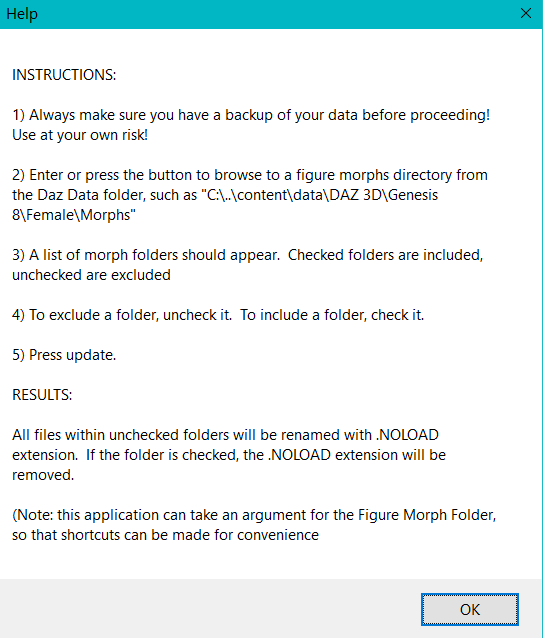
On my freebie page linked in my sig, I made a small utility to turn off morphs, by adding a .NOLOAD extension to the morph files. You choose the figure morph directory,, and it lists all the subdirectories. You then deselect folders that you do not want to load. When you press update, all files within those de-selected directories will get a .NOLOAD extension added.
If you want to add them back, just check them, and they will get the .NOLOAD removed.
- (NOTE: The below post on its usage from Catherine3678ab is incorrect, another explanation and use case is given further below, if it is not clear)
When you open it again to that directory, it will identify the folders as either being checked or unchecked by the presence of the NOLOAD file extensions.
Basically simplifying a tedious method to turn on and off morphs. There are a lot of figures I just never use...but dont want to worry about uninstall/reinstall...
It does accept a command-line argument of the Figure Morph folder, so you can make a shortcut to it to open right into the G8F Morphs folder, for example. Then shortcuts to other figures, etc.
There are much better solutions Daz or other probably could provide, but maybe this will help someone? It does what it does, I probably won’t expand too much on it, as it works for me. It decreased my load of one of my scenes from 6 minutes to 1 minute 10 seconds, by not loading a bunch of figure morphs I rarely use.

EDIT - Updated picture
EDIT - I dont see the picture anymore, so I added it in the post...delete image function appears to be broke.
Transferring Morphs Between Figures Tutorial - Released!Really looking forward to this tutorial! Since most Genesis 3 textures can be used on Genesis 8 figures, it would be great if we could use the character's corresponding morph(s) too!
.3CPO said:
Wonderland said:
I just found this thread and can’t wait to see this in the store! I looked through the whole thread and LOVE this render even though it is one of your earlier ones. I wish I was there right now! Will this still be possible with the product the way you currently adapted it as a beach?

The answer is yes, of course. The shore module consists of 2 seamless separate water tile geometries. The one adjacent to the the beach has the foam layer of breaking waves and an incorporated wave morph. The other one has foam only on the wave crests. The foam layer can be switched on and off. The height of the waves can be increased or decreased by manipulating the "y" axis of the tile. This latter one is suitable to be used for pools or other small closed bodies of water as well. Otherwise, you can use any other existing geometry, replicate my tile geometry construction and then transfer the shaders over to your target geometry. Note that it has to have the Daz Uber shader attached to it. This was what I used in that render you love.

LOL You lost me at “replicate my tile geometry construction”. Hopefully you will have a detailed PDF with screenshots!
~Problem with Millawa 8 Head morph~ (SOLVED)Come to think of it... The log says it failed to prepare modifier for FHMMillawa8 and yet you get the dial for it = It is loading something named FHMMillawa8...
If you start with fresh DS (empty scene) and load the "Genesis 8 Female Dev Load.duf" (from ...\People\Genesis 8 Female\Developer Kit\)
Select "Currently Used", which dials have non-zero value?
If you see just the dials for the lashes with non-zero value, select "all" to show all the dials and filter for "Millawa"
Use the gogwheel to get into the "Parameter Settings" of the headmorph and chance the "Color B" from pure white to something else and close the dialoque
Now go to Edit->Save As->Support Asset->Save Modified Assets, and before DS makes any changes, it shows a list of morph files it is going to change and asks for confirmation - Which files are listed?You can close the dialoque without confirming, so no changes are actually made. We are only interested in that list of morph files.
AIUTO...CHI CONOSCE L’ITALIANO? PARTE TREDICIComunque gli anatomical elements o come si chiamano, insomma i genitali, ce l'ho da qualche bundle fa... ma mica è facile usarli: hanno complicato, credo a bella posta come avete fatto notare su, il tutto.
Poi, visto che generalmente faccio rendering dei personaggi non esattamente decollacciati, per me hanno un'importanza tutto sommato relativa: a mero titolo d'esempio la modella primaria con la quale collaboro, ora in 3D giusta Face Transfer e plug-in vari, mi ha fatto pochi giorni fa una giusta osservazione perché il vestito dForce era un poco sgambato, l'ho coperto sol per sentirmi dare del Braghettone (leggasi Daniele da Volterra).
Ma comunque tra quelli delle varie generazioni non c'ho capito granché (mi sembra che sino alla versione 3 - NON Genesis 3, dico Michael 3 ecc. - i genitali ci fossero di default, o sbaglio?).
[Released] dForce2Morph [Commercial]RiverSoftArt said:
cridgit said:
Just brilliant.
One question: when using dforce hair/clothes I have to setup a series of stills at intervals across the timeline so that I can allow for time to simulate/settle before each "still" frame. The problem being after simulating for say frame 0-30, when I simulate 31-60 dforce resets the simulated shape on frame 30.
So with this product I'd be able to simulate frame 0-30 and save that as a morph, then simulate frames 31-60 and save that as a morph which would solve my problem. Does that sound like it would work?
It *might* work? I think there might be problems with such an approach, but I would need to test to see what happens.
I'd think it ought to work, but starting from a morphed shape may not give the same results as starting from zero - dForce uses the edges of the geometry as "springs" and tries to balance their energy out, with a morph you are going to change the starting states of those springs.
[Released] dForce2Morph [Commercial]cridgit said:
Just brilliant.
One question: when using dforce hair/clothes I have to setup a series of stills at intervals across the timeline so that I can allow for time to simulate/settle before each "still" frame. The problem being after simulating for say frame 0-30, when I simulate 31-60 dforce resets the simulated shape on frame 30.
So with this product I'd be able to simulate frame 0-30 and save that as a morph, then simulate frames 31-60 and save that as a morph which would solve my problem. Does that sound like it would work?
It *might* work? I think there might be problems with such an approach, but I would need to test to see what happens.
Product that you can use a Gen 8 Male morph on Female?No It's impossible because G8 female and male have different number of vertices and topology. They share only the self rigging (you can use pose for men and females).
But you can create a morph to deform a G8 female to look like a man and vice-versa.
G8 Centaur Posing - Horse 2 body posesrichardandtracy said:
I have done quite a number of transfer scripts, all of which are in the freebies forum here, but they are more easily found in my freebies over at Rendo - https://www.renderosity.com/users/richardandtracy/freestuff.
To create a new script is relatively simple, but tedious. To begin with you need to pose the 'source' figure in its zero pose. Then pose the destination figure so it matches the source figure as closely as possible. Where the limb matches another exactly, the code would look like: oZRotCtrlG8F.setValue(nZRotG1F); .(used with G1F to G8F)
When there is non-zero pose value for a parameter in a limb, this is an offset that needs to be programmed in along these lines (for an example 5 degree offset in the motion being considered): oZRotCtrlG8F.setValue(nZRotG1F + 5.00);
Furthermore, at each bone you need to check that a set deflection at a bone causes the same deflection in both figures (eg G1F shin at 90 degrees is only matched by G8F bending 94 degrees). If the two figures don't move the same distance, find the angle of the destination figure needed to match the source figure's deflection. Then a scale factor can be calculated. The scale factor is calculated from destination deflection/source figure deflection. Imagine the source figure moves 90 degrees and the destination figure needs to move 94 degrees to match, this leads to a scale factor of 94/90 = 1.0444. So, we could end up with a line like: oZRotCtrlG8F.setValue(1.0444 * nZRotG1F + 5.00);.
Then there is a final thing - does the parameter slider cause the same direction of movement? If the direction is opposite (as G8F eyes compared to V3/V4/G1/G2) then a reversing minus sign is needed, as oZRotCtrlG8F.setValue(-nZRotG1F);
Do this for every bone in the source figure, and every parameter you want to consider (eg Bend, Twist & Side-Side). I tend to add overall scale & particular axis scale values too. That way they are not missed if a pose uses them. You need to get the bone name and parameter name EXACTLY as shown on screen, even the case & spaces need to be right. I tend to start at the hip & work to the extremity of each limb, following the bone tree in the scene tab. Where a set of bones in one figure corresponds to a different set in the second, then I leave it up to you to decide how to divide up the movements. In a G8F to V4 transfer, the G8F pelvis and thigh bones have to be shared out into the V4 thigh bones. That's the sort of thing that needs to be considered on a case by case basis..
Hope this helps a little. Contact me if you need any advice. It's not hard - I had virtually no scripting experience when I started the first one - and have leveraged my limited learning about as far as it'll go.
Regards,
Richard
and this is so beyond my understanding I could cry...... which is why I line everything up by hand ,and laugh and laugh ,til my kids take the computer away from me !!!
 What's up with VOOTW?
Yes, separate morph injections were made for the Genesis 8 version from the Genesis 8.1 version, but still only one Actor preset (it's 8.1). The orignal morph injections (for 8.1, now redundant) are still in place, and the metadata for the new morph injections is completely absent.
Daz 3D is part of

Connect
DAZ Productions, Inc.
7533 S Center View Ct #4664
West Jordan, UT 84084Licensing Agreement | Terms of Service | Privacy Policy | EULA
© 2026 Daz Productions Inc. All Rights Reserved.