-
if i cut and scale g9 materials to fit the eye uvs for g8.1 is it possible to get them to work?
crosswind said:
mangosteins said:
crosswind said:
luckydurians said:
crosswind said:
Yes, as long as you have the textures well aligned as much as possible based on the UV templates in image editor.
Altanatively, if you have these products:
https://www.daz3d.com/legacy-uvs-for-genesis-9-genesis-3-8-and-81-female
https://www.daz3d.com/legacy-uvs-for-genesis-9-genesis-3-8-and-81-male...you can easily convert the texture maps by using Surface pane > Map Transfer, with G8 eyes UV Sets on G9 eyes node.
the g9 uv to 8.1, is there any down side to going this route, it uses geoshells so i though that would make the model more heavy?
They use geografts... not geoshells. In your case, actually you would just adopt the UV Sets from the products for texture map convertions...rather than use the geografts to apply G8 texture maps.
Anyway, since you don't have the products, you don't have to buy them, using image editor will do. That was just a reminder from me~~
using the plugin you mentioned i atempted this but when i compared the same face textures betweent g8.1 with g9 uvs and g9 with the same character and textures the textures were a bit distorted or not exactly aligned as they were on a g9 model with g9 uvs
edit: I had seams showing too and some spots were just transparent like there was no texture, i followed the instructions, I think im going to wait and come back to this then ask for help on the g9 uv for g8.1 thread
It works well on my side. Show the issues if you cannot get it fixed ~
Or, go for the way of rigging which is the best way so far ~ You can benefit every strong points from G9 eyeballs.
I will look into the rigging, that sounds more like what I would want to do
if i cut and scale g9 materials to fit the eye uvs for g8.1 is it possible to get them to work?mangosteins said:
crosswind said:
luckydurians said:
crosswind said:
Yes, as long as you have the textures well aligned as much as possible based on the UV templates in image editor.
Altanatively, if you have these products:
https://www.daz3d.com/legacy-uvs-for-genesis-9-genesis-3-8-and-81-female
https://www.daz3d.com/legacy-uvs-for-genesis-9-genesis-3-8-and-81-male...you can easily convert the texture maps by using Surface pane > Map Transfer, with G8 eyes UV Sets on G9 eyes node.
the g9 uv to 8.1, is there any down side to going this route, it uses geoshells so i though that would make the model more heavy?
They use geografts... not geoshells. In your case, actually you would just adopt the UV Sets from the products for texture map convertions...rather than use the geografts to apply G8 texture maps.
Anyway, since you don't have the products, you don't have to buy them, using image editor will do. That was just a reminder from me~~
using the plugin you mentioned i atempted this but when i compared the same face textures betweent g8.1 with g9 uvs and g9 with the same character and textures the textures were a bit distorted or not exactly aligned as they were on a g9 model with g9 uvs
edit: I had seams showing too and some spots were just transparent like there was no texture, i followed the instructions, I think im going to wait and come back to this then ask for help on the g9 uv for g8.1 thread
It works well on my side. Show the issues if you cannot get it fixed ~
Or, go for the way of rigging which is the best way so far ~ You can benefit every strong points from G9 eyeballs.
Catsuit morphFirstly, Sue Yee never comes to Daz Forums. You can fill a support ticket with the option: Contact PA / Vendor if you'd like to ~~
Actually you can easily make it yourself (as Richard mentioned...) by deleting the related bones and save a separate Wearable Preset with which you can use in the case you mentioned above.
0) 1stly, download this free script: https://www.mikededes.com/delete-selected-bones/ Place it into your Daz Library\Scripts\ folder.
1) Right-click on the auto-fitted Latex > Expand All. Shift + Select from Abdomen Lower to Right Pectoral (screenshot 1)
2) Dbl-click to run the script to delete selected bones. Wait for a while till it's finished.
3) Dial the morph and save it as a Wearable Preset. Then always load the preset in the cases that you need the bodysuit with this morph (screenshot 2)We've done this on quite a few similar cases even if the vendors didn't provide separate presets for whatever reasons ~~ As for the explosion issue in simulation, I may give you optimal settings if needed but I have to reproduce the issue firstly ~~ It works so far so well.
Catsuit morphtombraider4ever said:
It should say - around her waist morph - only for skilled users, involves ect .... HOw do I do what you say? is there a tutorial somewhere? and again - should NOT have to look up complicated tutorials to use an outfit morph.
Regrettably, the only real options for this kind of feature are either to rely on dForce (and simulation is always at least somewhat finicky), or to not include them at all.
(There is theoretically some very complicated set up that can be done, but it's not entirely reliable either, causes other side-effects, and you'd still really need to rely on dForce to some extent).
It also becomes somewhat inviable for creators to include this stuff at all if they need to commit the effort to provide lengthy guides to the (frankly arcane) art of dForce.
The big things I can say about dForce (which I would say I'm fairly good at):
- Turn off all smoothing during the simulation. It (mostly) isn't actually used in the simulation (it's a constantly-recalculated modification layer on top of the "actual" geometry shape), bogs it down, and can disguise the mesh getting stuck in things. If you need to work from your smoothed initial shape, you need to look up the process of baking smoothing to a morph in order to actually be using that shape.
- Watch out for mesh getting stretched or crushed. These are some of the most common causes of explosions.
- Reducing bend and stretch stiffness (preferably as little as possible - start with jumps of like 0.1) can make a simulation much more stable.
- Check the layer stack; it helps to have these ordered correctly. Note that they are per item, despite being listed per surface, so all surfaces on an item should be kept on the same layer for simplicity.
- If the mesh is getting... "crinkly" and bumpy in dense areas after generating a lot of springs, shorten the collision offset.
Catsuit morphrichardandtracy said:
One thing that may work a little, and it may not be enough to make you happy, is to pose the character, then go into the bone heirarchy of the jumpsuit and then pose the arms of the jumpsuit. Take off limits on the jumpsuit limbs as necessary. This then could get the jumpsuit to a close enough pose to your desired shape for dForce to be able to finish the job. It is what I regard as a last resort thing to do, but it may work.
There is another drastic resort, which I simply can't do, but an experienced DAZzer like @Matt_Castle may be able to get to work is this:
Delete or re-name the rigging of upper part of the jumpsuit for a second jumpsuit version. That way the upper part of the jumpsuit would be posable and dForceable, while not following the character, and the hip, pelvis & legs follow the character because they have the same rigging and are fitted to the character. I've not tried anything like it, but based on the fact that the rigging of hair allows this (same rigging to the head, then bones for shaping the back & sides - see the Akhelloos hair below with its non Genesis bones displayed for an example), it should be possible to make clothing do the same. I don't know if it would merely be a matter of renaming the bones or whether something more sophisticated would be needed.
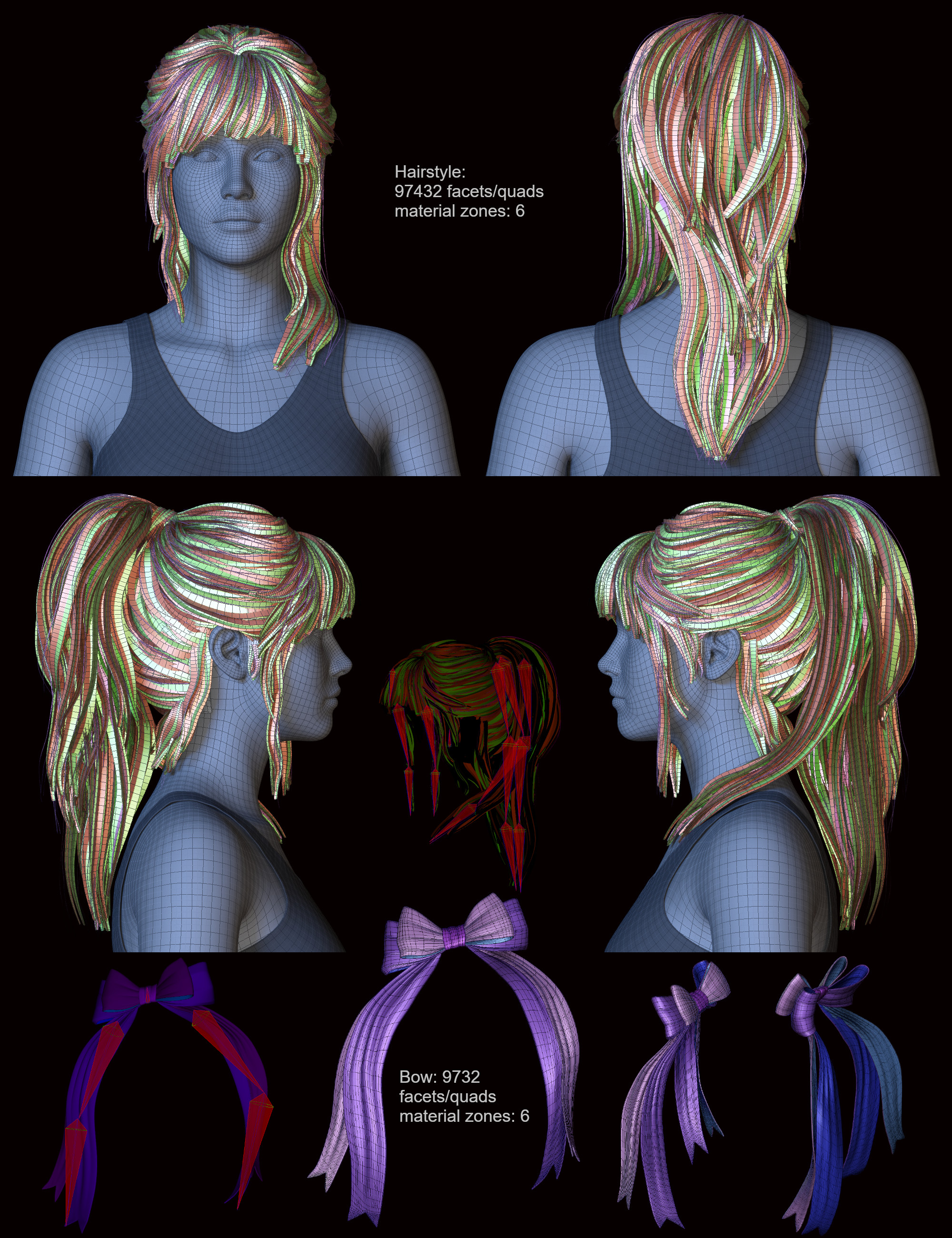
If it worked, it'd be fantastic.
Regards,
Richard
Thank you all for replying and trying to help me
 .
.I did try posing the the arms of the catsuit but that deforms them, all movement/rotations, that's one of the first things I tried, but it's kind of you to advice it
.The other solution you said sounds interesting - so 2 catsuits, one hidden to her waist and other other hidden legs I guess, rename the bones of the ones w the upper part, if they can be hidden w bones, that is not always the case I find. No idea why, But I will try that. I hope Sue-Yee makes a seperate catsuit, exactly the same, but made to just be worn like that, would buy it in a heartbeat
.
I will reply more later, and write what I test and how it goes, now I have no time, have to go.And I sincerily appologize if using that catsuit w weightmaps and not w maps and renaming bones is something everyone knows and no issue, did not mean any harm.
LOVE SUE-YEE
.But - I do in any case think that some words changed is in order - like - some skills involved in using the around her waist morph, does not work out of the box.
Love her stuff still, morphs for more folds ---- , the sweat stains....., love everyth about her stuff besides that morph. Catsuit morph
Matt_Castle said:
tombraider4ever said:
Please Sue Yee - can you make this morph function? OR make a new catsuit - the same look - but working, - an addon - WOULD TOTALLY BUY IT at once.
I should not have to open a ticket, why - this effects all that buys it. Could a mod report the outfit to Daz? if that can be done of course.
[...]
And I DO find the morph kind of fraud, most people will think that the model can be posed in some way at all... can't be done...
The short answer is "No, this cannot be made to function the way you are saying". As others have said, this is a pose that is supposed to be used in combination with simulation.
The reason is that Daz Studio does not allow figures to have variable weight mapping. If part of the mesh is rigged to the arms, it will *always* follow the arms, even if you morph the outfit to change the sleeves to be near the waist; there's no way to change that without an entirely separate asset within the package.
The only workaround is that during simulation, a fully dynamic object will ignore its bone weights, and thus be able to drape without following the arms. Note however that *after* simulation, its new shape will revert to following its rigging, so reposing after a simulation will often result in a mess.
There is nothing Sue Yee can do about this; it's a limitation within the software.
Thanks for the reply
. So there is a way but my ys of using daz is not enough knowledge. It should say - around her waist morph - only for skilled users, involves ect .... HOw do I do what you say? is there a tutorial somewhere? and again - should NOT have to look up complicated tutorials to use an outfit morph. How do I make it ignore it's boneweights and then don't . See here a G9, DIALED IN FEMALE as I guess it's made for females, then just posed the arms, then dialed in the morph fully, so that's BASE G9, BASE FEMALE, MORPH AT 100 - SHOULD WORK AT 100. I saw the arms move like they were still on her when simulated, then explosion. NO weird character, g9 base female, morph at 100, default dforce settings, from default.
If complicated dforce settings was involved then the settings should have came w the outift. If it was possible on a posed character then why did the artist that made it not pose it on the model in the promo? we see no model ... someth is not right.
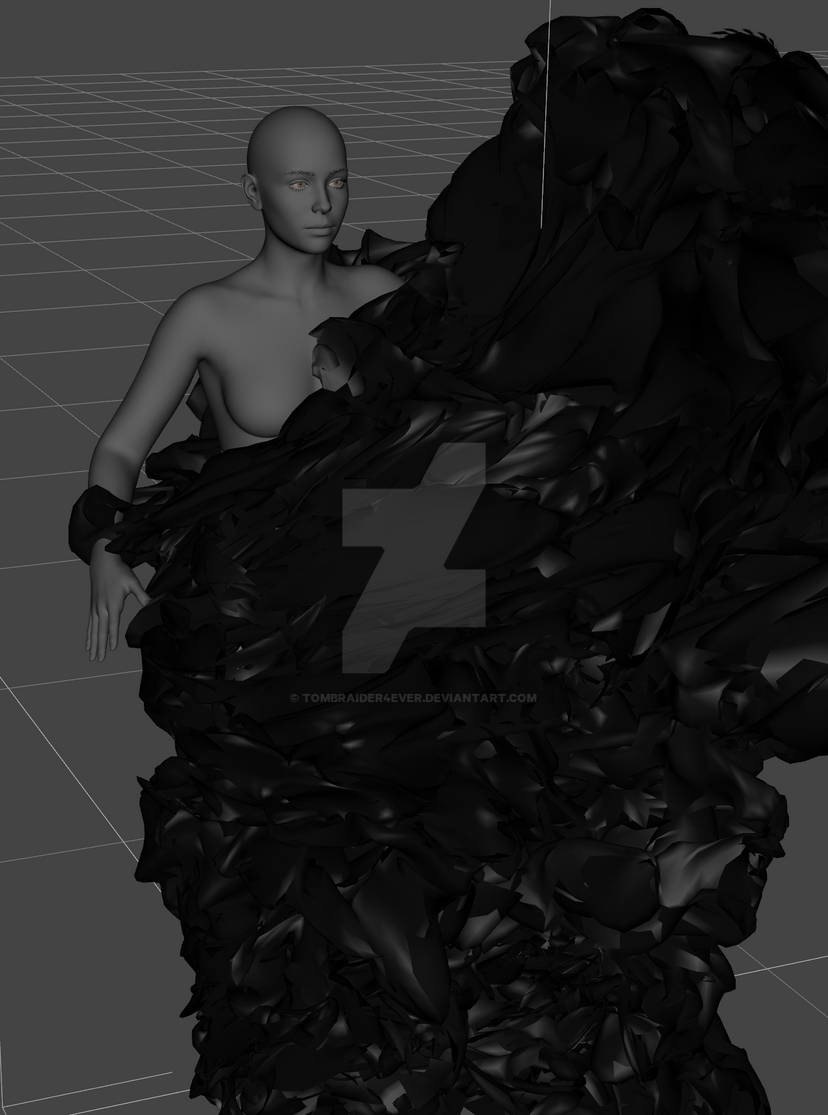
I have no more time to test this now or reply but I would appreciate a tutorial on what you said - ignore bone weights when dforcing.
And I was right in any case - should say that normal dforce is not possible w that morph. Have seen adds w that specified - use this and that dforce settings.
If this is considered accepted for stuff sold at daz - if I have no right to complain then I'm sorry, feel free to delete the thread. As I said - love her outfits, a big fan. Always. Just wanted to be able to use the morph.
Catsuit morphtombraider4ever said:
Please Sue Yee - can you make this morph function? OR make a new catsuit - the same look - but working, - an addon - WOULD TOTALLY BUY IT at once.
I should not have to open a ticket, why - this effects all that buys it. Could a mod report the outfit to Daz? if that can be done of course.
[...]
And I DO find the morph kind of fraud, most people will think that the model can be posed in some way at all... can't be done...
The short answer is "No, this cannot be made to function the way you are saying". As others have said, this is a pose that is supposed to be used in combination with simulation.
The reason is that Daz Studio does not allow figures to have variable weight mapping. If part of the mesh is rigged to the arms, it will *always* follow the arms, even if you morph the outfit to change the sleeves to be near the waist; there's no way to change that without an entirely separate asset within the package.
The only workaround is that during simulation, a fully dynamic object will ignore its bone weights, and thus be able to drape without following the arms. Note however that *after* simulation, its new shape will revert to following its rigging, so reposing after a simulation will often result in a mess.
There is nothing Sue Yee can do about this; it's a limitation within the software.
Catsuit morphThanks, I will try that, did not think of that it might not work without dforce. I think it will still move when the animation moves her,why would that be different? But I will try now, and edit the posts if it works.
It is simulating now, does not look good. When finished I will see if I had the default, alt click - dforce settings and try again if not.
Dforced it here, default settings for everything in dforce, from memorized pose. Just posed the arms a little bit. The around her waist morph at about 81 %, full collides with itself.
But I will try that also and show so it's clear that there is a bug. Have no reason to think that it's different on G9, tried it, not dforce, but moved g9 - moved the catsuit top. So WILL BE the same in dforce.
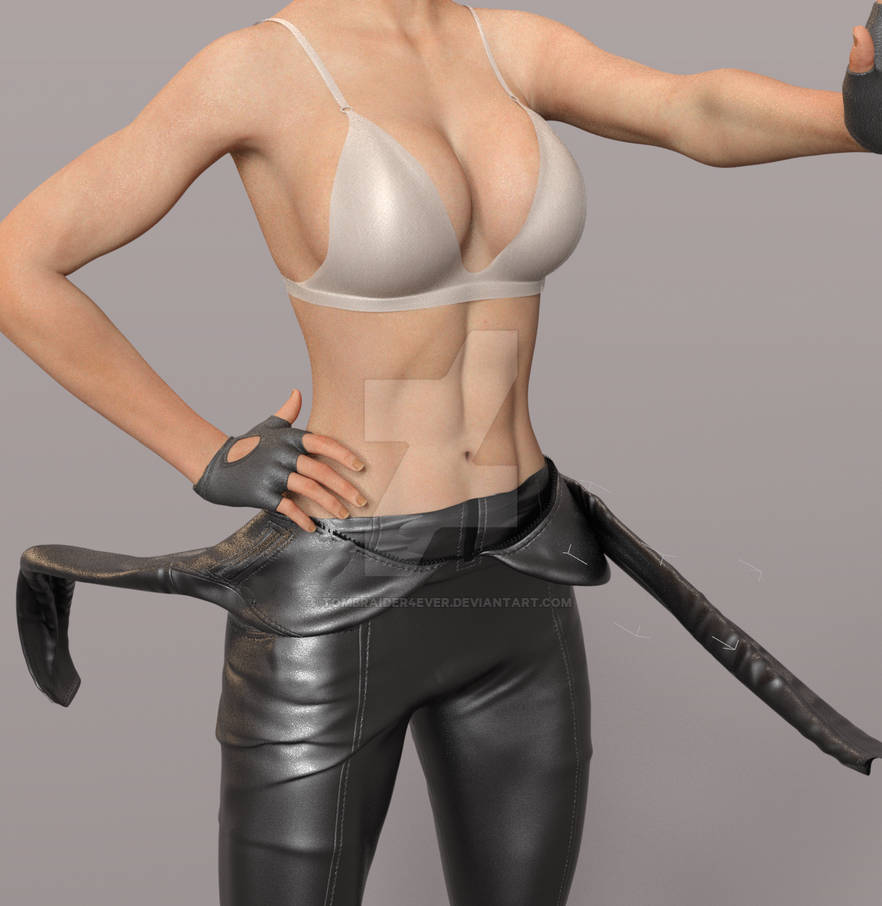
the morph at 100 % here, just the arms posed a bit, all on default dforce settings, from memorized pose. No matter how you do it - dforce - pretty sure the arms WILL move when she does... It's like glued, but at a distance.
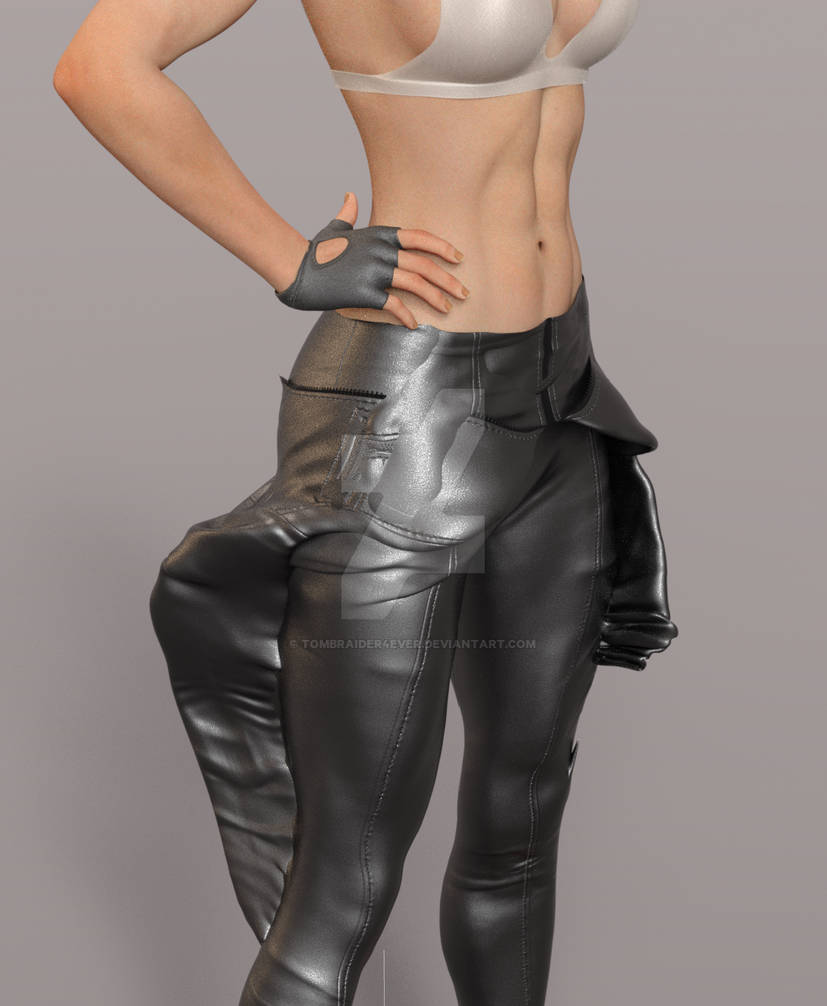
Just the arms posed.
When I say memorized pose, from that, I mean from the unedited DEFAULT POSE.
No time to test DFORCE IT on g9, but the arms bug - was THE SAME - NO CHANGE FOR THE BETTER AT ALL. so why would the dforce work by some magic on g9. The arms are glued at a distance no matter what I do.
Catsuit morphLong post, so adding this here in a new post, morph dialed in fully here, arm just posed a little bit...
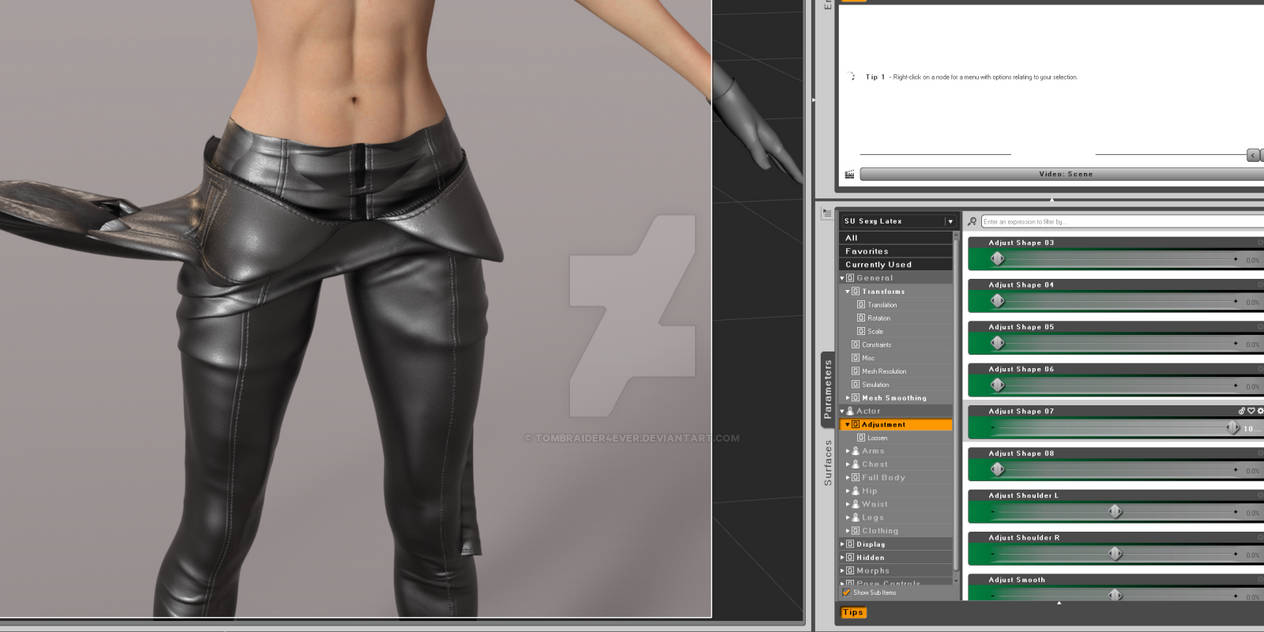
Same on G9. Base G9. Morph fully dialed in and partly on g9.
Catsuit morphI bought this catsuit, https://www.daz3d.com/dforce-su-sexy-latex-for-genesis-9 mostly for the super cool morph, w the character w the catsuit top hanging around her waits, I use it on G8.1, by an autofit clone I bought here at daz, no issues with it.
I now know why there is no character wearing that morph on the promo, just the catsuit........ It can't be used, if you pose her upper body in the smallest way - the arms, not fun having them in the starting pose..... if you pose the arms and the rest the upperbody part of the catsuit moves with it! So left w turing it into an obj I guess, with the pose, add the textures - can that be done?It is the same on G9. I admire the artist behind the outfit, Sue Yee, very much, one of my fav creators. BUT THIS....
Should have been warned by the fact that that pick w that morph has no body w it.... Who in their right mind makes poses - art - w the arms and hands COMPLETELY IN THE T POSE - T POSE FOR GEN 8.1 or G9?
I don't want to return it, it looks DAMN AMAZING fully on her also, so want to keep it. But I WOULD LOVE IF that morp can be made usable somehow, it looks AMAZING, have it on my G8.1 Lara character, looks like cl Lara is dressing, diled in the morph not fully, so we can see her belt and guns still.. Please Sue Yee - can you make this morph function? OR make a new catsuit - the same look - but working, - an addon - WOULD TOTALLY BUY IT at once.I should not have to open a ticket, why - this effects all that buys it. Could a mod report the outfit to Daz? if that can be done of course.
And it the meantime - what is the best way to use the catsuit w that morph? pose Lara's legs - copy the outfit model - convert to obj - can that be done without effecting the original model? is there any way at all to use the catsuit morph? it looks so good, was so much looking forward to make art w it.
Have used daz for years, I know how to put on an outfit and dial in a morph, can it be done wrongly? and it's the same on G9 - base g9.
Not sharing this to shame the artist, sharing this so she can make an update, I would totally buy an update if I have to.
Not accepting opening a ticket, this is not on my end... should effect all users resonably. If someone uses it perfectly I will open a ticket.
And the no body on the morph promo speaks volume I think.
Shes covered, does the cover need to be more to have the picks here? let me know and I will make the change and edit..
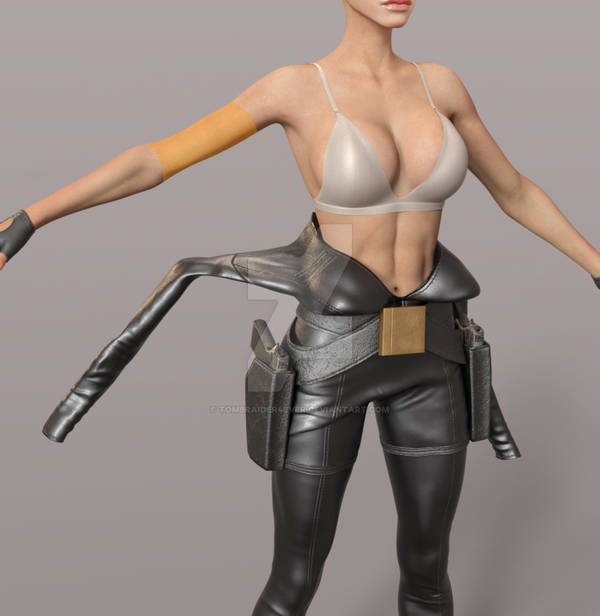
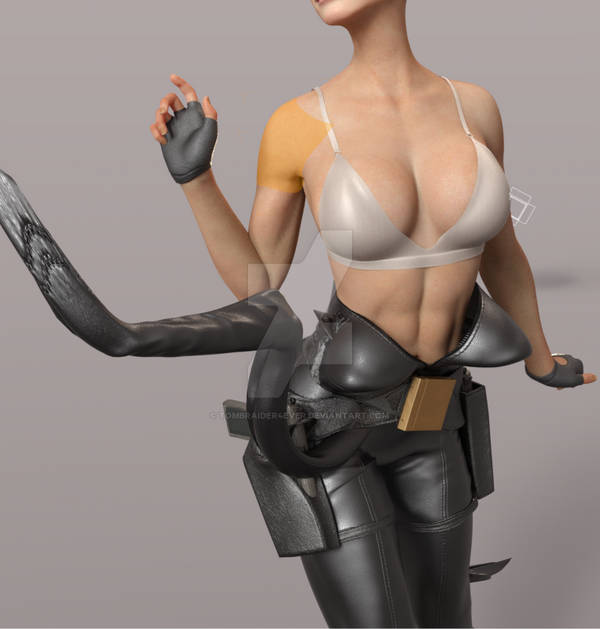
Looks this amazing w her unposed
 , I want to use it so bad, looks so good, cl Lara dressing for her adventure
 .
.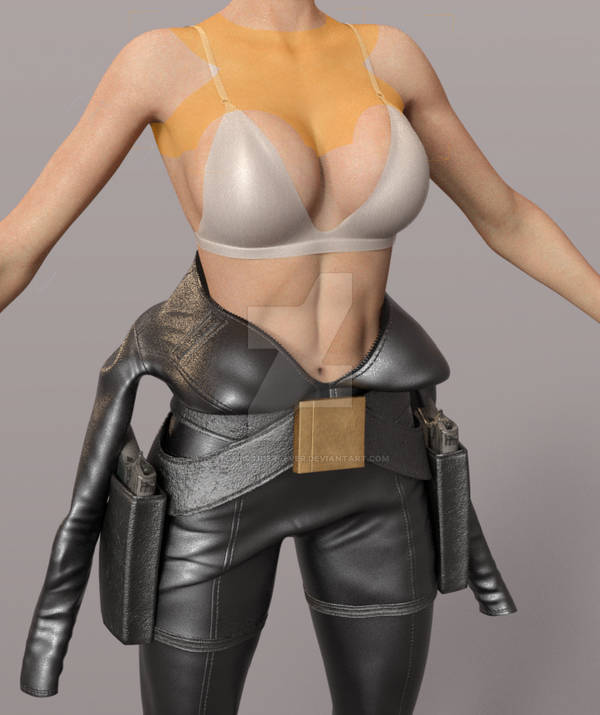
outfit promo here, w no mannequin w that morph promo -
It is the SAME w the morph DIALED IN FULLY. So that's not the issue.
 EDIT:
EDIT:I realise now, thinking more about it, that the lack of model in that morph promo could be down to modestly. Still needs some words though - can't be used out of the box.
[Released] Turbo Loader for Genesis 9 [Commercial]PoshTentacle said:
supahsekritdevacct said:
PoshTentacle said:
So after an extensive amount of debugging done with 3 different AI chat bots (no, I don't use I for my art - just tech problems), I finally found the issue. Essentially, Turbo Loader had somehow cause my JP Sandor figures to point to the wrong URL. JP Sandor actually has two .dsf files: the one in the old standard definition folder for the character and the one in the newer HD folder ("JP Sandor" and "JP Sandor HD" respectively). Both of those .dsf files are still called "JP Sandor HD," though. So I guess when Turbo Loader reset my morphs, it changed the URL of that .dsf file. Anyway, after uncompressing all my scene files using the Batch Convert pane in Daz Studio, I ran the following script (I saved this as a .dsa file and then opened that file in Daz Studio) to edit each of the .duf files to update the bad URL to the correct one:
// DAZ Studio version 4.24.0.4 filetype DAZ Script

// JP Sandor HD URL Repair Script
// Top-level folder only. No subfolders. URL replacement only.

var ROOT_FOLDER = "C:/SCENE_FOLDER_PLACEHOLDER"; // replace with your folder containing scenes

var BAD_URL = "/data/Daz%203D/Genesis%209/Base/Morphs/Jepe/JP%20Sandor/JP%20Sandor%20HD.dsf#JP%20Sandor%20HD";
var GOOD_URL = "/data/Daz%203D/Genesis%209/Base/Morphs/Jepe/JP%20Sandor%20HD/JP%20Sandor%20HD.dsf#JP%20Sandor%20HD-0xa95d2eb";

var scannedFiles = 0;
var changedFiles = 0;
var failedFiles = 0;

function makeBackup(path)
{
	var backupPath = path + ".bak";
	var src = new DzFile(path);

	if (!src.copy(backupPath))
	{
		print("Backup may already exist or copy failed: " + backupPath);
		return false;
	}

	return true;
}

function processDuf(path)
{
	scannedFiles++;

	var file = new DzFile(path);

	if (!file.open(DzFile.ReadOnly | DzFile.Text))
	{
		print("Could not open for reading: " + path);
		failedFiles++;
		return;
	}

	var text = file.read();
	file.close();

	if (text.indexOf(BAD_URL) < 0)
	{
		return;
	}

	var newText = text.split(BAD_URL).join(GOOD_URL);

	if (!makeBackup(path))
	{
		failedFiles++;
		return;
	}

	if (!file.open(DzFile.WriteOnly | DzFile.Truncate | DzFile.Text))
	{
		print("Could not open for writing: " + path);
		failedFiles++;
		return;
	}

	file.write(newText);
	file.close();

	changedFiles++;
	print("Fixed: " + path);
}

function scanTopLevelFolder(folderPath)
{
	var dir = new DzDir(folderPath);

	if (!dir.exists())
	{
		MessageBox.critical("Folder does not exist:\n" + folderPath, "JP Sandor HD URL Repair", "&OK");
		return;
	}

	var files = dir.entryList("*.duf", DzDir.Files);

	for (var i = 0; i < files.length; i++)
	{
		processDuf(folderPath + "/" + files[i]);
	}
}

scanTopLevelFolder(ROOT_FOLDER);

MessageBox.information(
	"Finished.\n\n" +
	"Scanned DUF files: " + scannedFiles + "\n" +
	"Changed files: " + changedFiles + "\n" +
	"Failed files: " + failedFiles + "\n\n" +
	"No subfolders were scanned.\n" +
	"Only the JP Sandor HD URL was modified.",
	"JP Sandor HD URL Repair",
	"&OK"
);
Obviously, if someone came across this error in the future, they would have to find the bad/good URLs for their individual morph, but I thought I would post this here just in case someone found it useful
Thanks. I just had the same issue with the same character morphs, which have given me other issues too. I probably would have hit my wit's end with Daz and quit my project if you didn't post this. Drop thousands of dollars a year to get constant bugs and lack of support lol.
Glad to hear it could help! But yea, the thing about Daz is that unless an asset comes from "Daz Originals," the asset doesn't seem to be supported by the company since someone else created the asset and uploaded it. At least with the Daz Originals ones, Daz seems to be part of the process and thus able to provide support. But don't be too hard on RiverSoft Art. As you can see by scrolling up, they tried their best to help me fix this obscure issue.
Oops, I made a boo-boo if my comment read as being aimed at any individual. I was just salty whining about non-response from official channels. RiverSoft makes great products and seems nice!! I don't want to cloud this discussion with non-relevant info but just wanted to clarify that! :)
Jigsaw Puzzlewould it need to be rigged? a morph would be easier
there is also this
https://www.daz3d.com/jigsaw-puzzle
The morph disappears after reloading the sceneThe problem is this:
I'm using the "Body Tone" morph to make the model more defined. I also remove the limit and set it to 200% for a stronger effect.Then, if I reload the scene, the morph disappears, and this happens.
If I try to create a completely new scene, the morph is still there, but if I apply it and reload the scene, it disappears again.
How can I fix this? So that the morph doesn't disappear?
I'm using - "Body Mixer Bundle for Genesis 3 and 8 Male and Female"
Use G9 skin on G8tzxc1600 said:
Eyelids are clipping into each other as the figure is 8.1. As the Uv pose with 8 works fine.
I remember I ever emphasized in the linked discussion thread : use G8.1F with High Resolution as the floating geometry so as to assure the quality of wrapping as well as the texture conversion ~~
In your screenshot, obviously you just imported a G8.1F with Base resolution...
Edit: Since you're not wrapping G9 for making G8F a morph other than converting texture maps from G9 > G8, so you don't have to use Base resolution... Instead, import G8.1F Dev Load (default SubD : 2) and G9 Dev Load (default SubD : 1). You can check my screenshot above, the wrapped figure has high quality mesh as well as textures with the settings.
If importing the mesh with correct SubD, you won't see the errors with exclamation in the graph ~~
V3Digitimes Daz Studio 2025 (6) compatibility StatusSo far, around 30 products have already been submitted, 7 of which are now live.
I still have at least 12 products to go:
- 1 : Ultimate Pose Master G9, already tested by a private beta tester, so this one should be near the top of the list.
- 2 : Wayfinder Sign Generator and Speech Bubble Generator. For these, I want to handle the new way DS6 separates Font Families and Font Styles. It is not implemented yet, but I already have an idea of how to deal with it.
- 4 : Iray Converters. These are not my highest priority, since they can largely be replaced by Texture Booster and Shader Converter. They mostly work already, but the Geograft Transfer Tool still needs to be adapted.
- 2 : Tan Lines for Michael 7 and Victoria 7. Only one script needs to be updated for each, so the actual update should be quick, but they still need testing on both DS versions, packaging, submission pages, etc.
- 1 : Scene Analyzer, which has not been updated at all yet. There are quite a few things to fix, and some features simply won't work in DS6 for now because there is currently no way to fix them.
- 2 : Ultimate Pose Master and Ultimate Pose Master Pro with Mega Pose Toolkit. For these, only the Menu and Toolbar installers still need to be finalized. They have been giving me trouble for a looong time, but I think I now have the solution. Maybe. :D
So that's at least 12 more products .... plus any I may have forgotten along the way. I'll do one final pass through everything once I reach the end, just to make sure nothing was missed.
And then there's QA... I just hope I won't end up blacklisted after sending them this many updates in such a short period of time. :D
edit : Maybe I should start sending QA a countdown with each submission... “Only 11 more to go!” :Dabsurd itemsthanks for reminding me of it, I own it, forgot about it and never rendered it
not even loaded it to see if I can animate it
update, pretty meh honestly
3 set morph positions for the cars, not rigged
I might be able to cut it up at best in Carrara and use motion paths and tracking
is Studio? still renders and AI animation at best
how do i make my new property group and custom property i make stay across daz files?Im going to make a control morph for every morph i commonly use and have them organized in sub categories Its going to take days to get this done and im nervous there is a scenerio I dont know about that could cause them all to get deleted. When i create my new control morphs and groups I save them as a modifier asset and they will always be there or if a product i have in dim gets updated they could get wiped out?
if i cut and scale g9 materials to fit the eye uvs for g8.1 is it possible to get them to work?crosswind said:
luckydurians said:
crosswind said:
Yes, as long as you have the textures well aligned as much as possible based on the UV templates in image editor.
Altanatively, if you have these products:
https://www.daz3d.com/legacy-uvs-for-genesis-9-genesis-3-8-and-81-female
https://www.daz3d.com/legacy-uvs-for-genesis-9-genesis-3-8-and-81-male...you can easily convert the texture maps by using Surface pane > Map Transfer, with G8 eyes UV Sets on G9 eyes node.
the g9 uv to 8.1, is there any down side to going this route, it uses geoshells so i though that would make the model more heavy?
They use geografts... not geoshells. In your case, actually you would just adopt the UV Sets from the products for texture map convertions...rather than use the geografts to apply G8 texture maps.
Anyway, since you don't have the products, you don't have to buy them, using image editor will do. That was just a reminder from me~~
using the plugin you mentioned i atempted this but when i compared the same face textures betweent g8.1 with g9 uvs and g9 with the same character and textures the textures were a bit distorted or not exactly aligned as they were on a g9 model with g9 uvs
edit: I had seams showing too and some spots were just transparent like there was no texture, i followed the instructions, I think im going to wait and come back to this then ask for help on the g9 uv for g8.1 thread
Tips on making scene file smaller?Viper141 said:
Hey Thanks again for the response
crosswind said:
Ah no, it shows just the geometry data with hundreds or thousands of code lines... to let you know what objects have these geometry data and can be saved as Figure / Prop assets or Modifier assets so as to shrink the DUF file size ~~
I tried it out but I can't well find the objects that need to be put in figure/prop asset. I looked under Geometry Library and well I saw this
Well the DUF file you checked might be more complex e.g. there're morph properties with linked geometry data not saved as assets, or dforced data on timeline, etc. You can search by using a keyword "vertex_count", like the screenshot 1 I attached.
crosswind said:
I ever wrote two scripts for a folk to change Base to High Resolution and vice versa for the items in the scene by content types. You can try and use them or modify them at will. https://www.daz3d.com/forums/discussion/comment/8541796/#Comment_8541796 ;Oh wow, so terms of content types I can make idk, all genesis figures and hair assets to base, then later in render queuer I can have the script running before render is cooked? Or is the script during work?
Well... I removed the content type check and rewrote the scripts, the scripts loop check all figures / props and set their lodlevel to Base or High. Check the screenshot 2 and try the modified scripts in the attached ZIP .
Edit: Pls be noted: if a figure or prop in your scene has not been Converted to SubD, its lodlevel cannot be set to High Resolution. Do Convert to SubD beforehand if needed ~~ (some figures / props may have artifacts after conversion... check 'n do it case by case)
crosswind said:
Because the vendor left this Daz3D store and moved to Rendo ~~
Man such a shame I really think this would've been super useful to me.
Celebrity Look-a-Likes for 3D figures Part 4Sophie Turner: Santana for Genesis 9 Feminine, by MagicMaiden

The morph seems solid as far as like, her facial features, and I'd wager it's supposed to be more of a "present-day" Sophie Turner, as opposed to when she was younger in Game of Thrones - defo spot-on in that regard, IMO.
But can I say something, she's smiling in all the promos and it's a personal peeve of mine when characters come with like a built-in smile (really, any expression other than neutral), that makes me a little wary. I don't love it (built-in smiles). Takes a bit of work to neutralize the smile and sometimes, the result still isn't good. But I mean, if that's not the case here, I might totally buy, the character looks great! :)
Daz 3D is part of

Connect
DAZ Productions, Inc.
7533 S Center View Ct #4664
West Jordan, UT 84084Licensing Agreement | Terms of Service | Privacy Policy | EULA
© 2026 Daz Productions Inc. All Rights Reserved.