-
Celebrity Look-a-Likes for 3D figures part 3
maikdecker said:
Stephen said:
Pudgy said:
https://www.renderosity.com/marketplace/products/158453/dr-graverobber-for-g8m
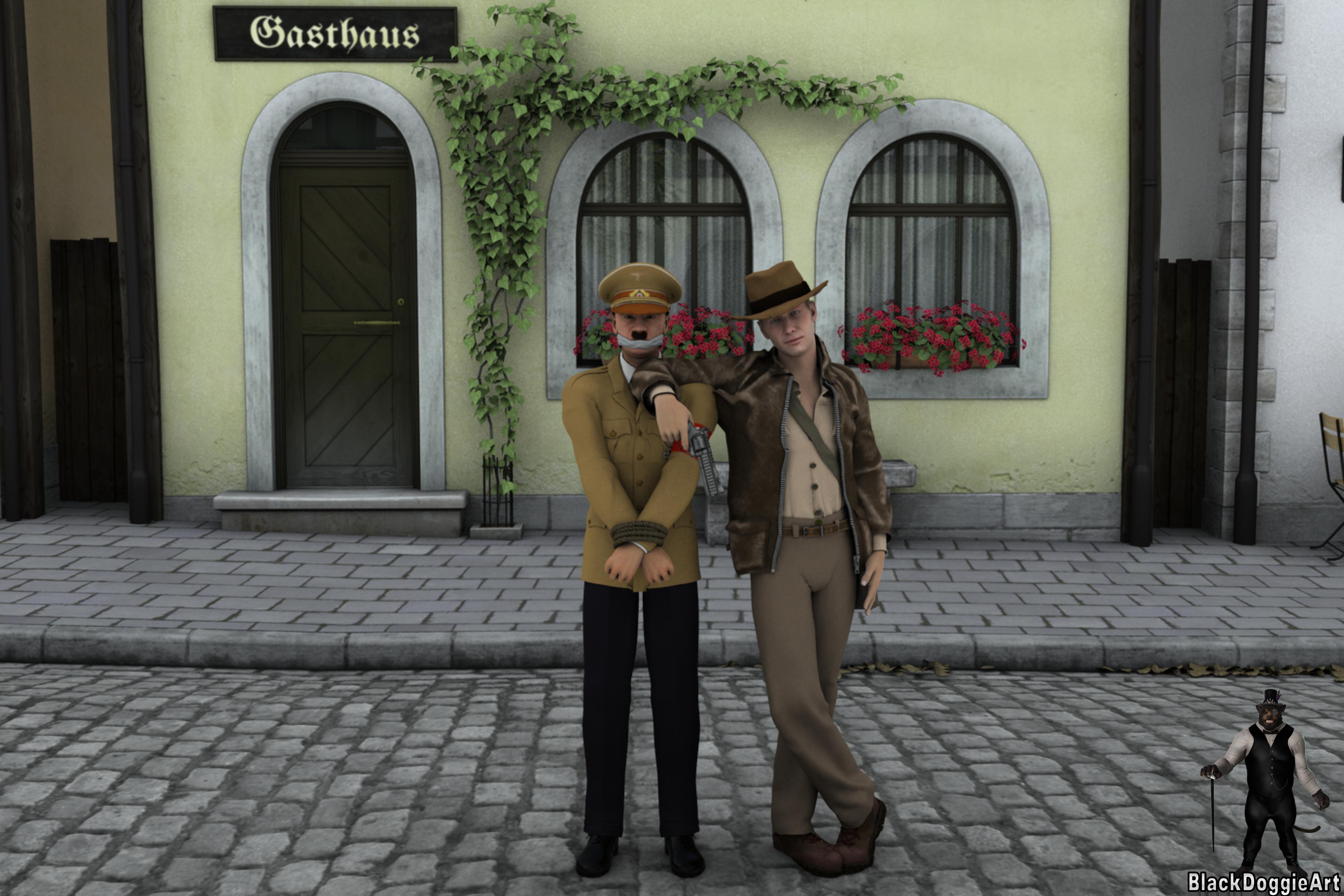
Indiana Jones aka Harrison Ford
It is only a wardobe item, without any character morphs or textures -- I already own the Michael 4 version (which is of very good quaility) and intend to use it via DAZ Studio's autofit -- This is the Harrison Ford clone that I have and intend to use with the Grave Robber Outfit: https://www.renderhub.com/3duk/han-solo-for-g8m
Editorial Use Only Restriction

(post #1 - 18.02.2023 19:45 gmt+1)
 There's Always Another Sale Thread -- Discussions Only
Charlie Judge said:
Robert Freise said:
I would've swore that I had seen a baseball uniform somewhere but after searching the only one I find is 9 years old and is for Aiko 3 at ShareCg
There is a uniform for Michael 4 at Poserworld: https://poserworld.com/baseball-player-for-michael-4
and a free partially completed one for G2M Garen here: https://www.daz3d.com/forums/discussion/121736/baseball-uniform-as-prop-fits-g2m-garen-could-convert-to-figure#latest
Thanks for the links.
I used to have a lifetime membership at Poserworld before they had to do away with them so I may have the one for M4 will have to search my files
Celebrity Look-a-Likes for 3D figures part 3Stephen said:
Pudgy said:
https://www.renderosity.com/marketplace/products/158453/dr-graverobber-for-g8m
Indiana Jones aka Harrison Ford
It is only a wardobe item, without any character morphs or textures -- I already own the Michael 4 version (which is of very good quaility) and intend to use it via DAZ Studio's autofit -- This is the Harrison Ford clone that I have and intend to use with the Grave Robber Outfit: https://www.renderhub.com/3duk/han-solo-for-g8m
Editorial Use Only Restriction
(post #1 - 18.02.2023 19:45 gmt+1)
There's Always Another Sale Thread -- Discussions OnlyRobert Freise said:
I would've swore that I had seen a baseball uniform somewhere but after searching the only one I find is 9 years old and is for Aiko 3 at ShareCg
There is a uniform for Michael 4 at Poserworld: https://poserworld.com/baseball-player-for-michael-4
and a free partially completed one for G2M Garen here: https://www.daz3d.com/forums/discussion/121736/baseball-uniform-as-prop-fits-g2m-garen-could-convert-to-figure#latest
Celebrity Look-a-Likes for 3D figures part 3Pudgy said:
https://www.renderosity.com/marketplace/products/158453/dr-graverobber-for-g8m
Indiana Jones aka Harrison Ford
It is only a wardobe item, without any character morphs or textures -- I already own the Michael 4 version (which is of very good quaility) and intend to use it via DAZ Studio's autofit -- This is the Harrison Ford clone that I have and intend to use with the Grave Robber Outfit: https://www.renderhub.com/3duk/han-solo-for-g8m
Carrara Challenge 65 - Turning Points - Voting ThreadEntry # 6
Title: Model T - cars for the masses
Artist: Bunyip02
WIP Link: https://www.daz3d.com/forums/discussion/comment/7969691/#Comment_7969691
Credits and Comments: Michael 4 Base - https://www.daz3d.com/michael-4-base-male-3d-model
Menswear 1930 for M4 - https://www.daz3d.com/menswear-1930-for-m4
Victoria 4.2 Base - https://www.daz3d.com/victoria-4-2-base
Everyday 1930 for V4 - https://www.daz3d.com/everyday-1930-for-v4
Charlotta Hair - https://www.daz3d.com/charlotta-hair
1924 Model T Runabout for Poser by Meshbox - Renderosity
Songbird - https://www.daz3d.com/songbird
Millennium Horse - https://www.daz3d.com/millennium-horse
CWRW The Elegant Equine: Classic TexMap Pack by cwrw - Renderosity
Millennium Horse Unicorn Poses 1 - https://www.daz3d.com/millennium-horse-unicorn-poses-1
Country Lane - https://www.daz3d.com/country-lane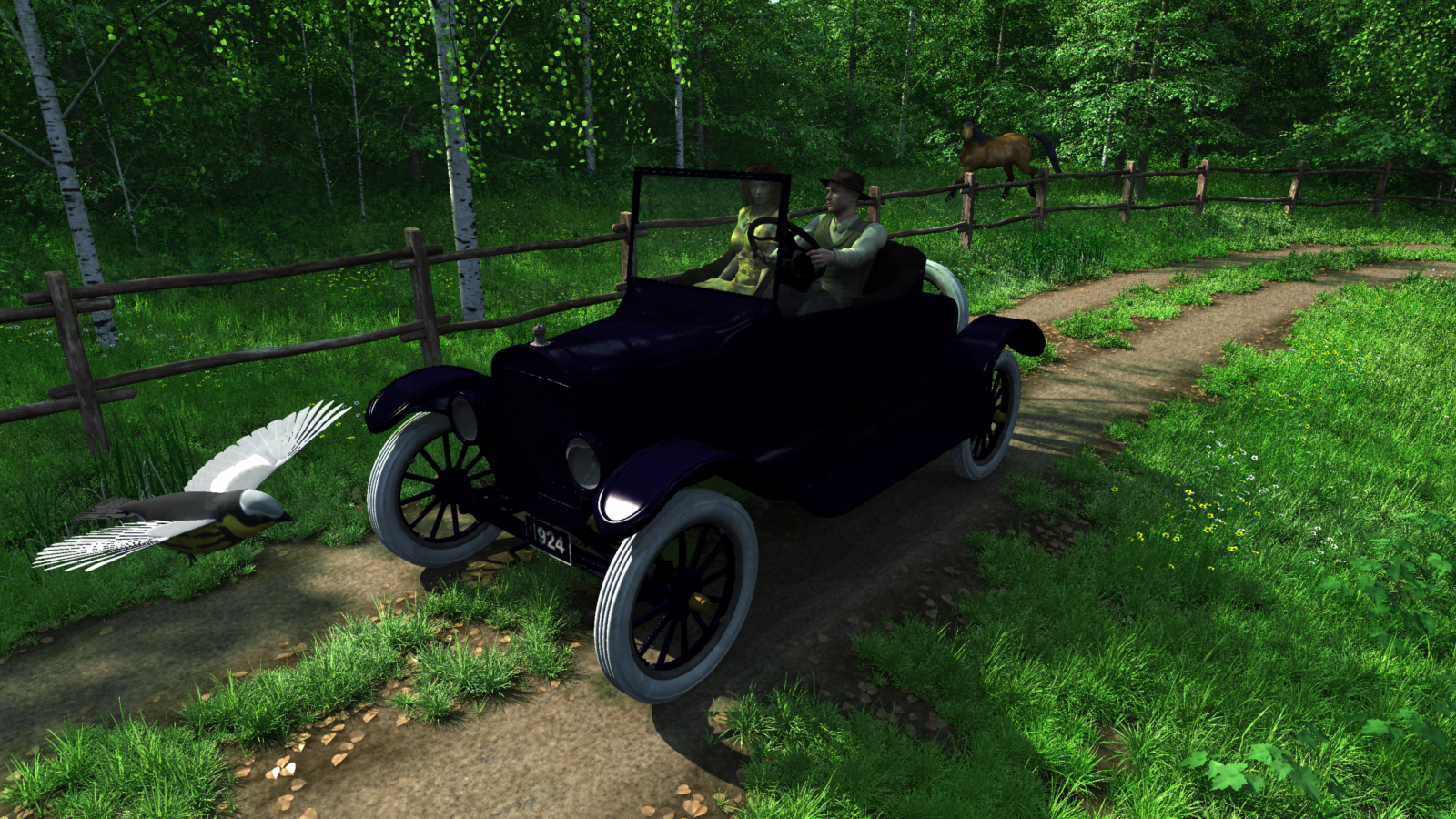 Carrara Challenge 65 - Turning Points - Voting Thread
Entry # 4
Title: Boomerang (Animation)
Artist: Bunyip02
WIP Link: https://www.daz3d.com/forums/discussion/comment/7961016/#Comment_7961016
https://www.daz3d.com/forums/discussion/comment/7966266/#Comment_7966266
Credits and Comments: Michael 4 Base - https://www.daz3d.com/michael-4-base-male-3d-model
M4 Zareb - https://www.daz3d.com/m4-zareb
Cheo Wear - https://www.daz3d.com/cheo-wear
Summer Casual Deck Shoes for M4 - by elleque - Renderosity
Fox Hair - https://www.daz3d.com/fox-hair
aniMate At The Park aniBlocks for M4 - https://www.daz3d.com/animate-at-the-park-aniblocks-for-m4
aniMate Walk Construction Kit for M4 - https://www.daz3d.com/animate-walk-construction-kit-for-m4
Boomerang - edplus - cgtraderSoftware
Carrara 8.5 Pro - Scene & Animation - https://www.daz3d.com/carrara-8-5-pro
Corel Paint Shop Pro 2023 Ultimate
Corel PicToPainting
Pinnacle Studio 23FONT - Chekharda - https://www.dafont.com/chekharda.font
MUSIC - Mega Sound Designer Loop Crate - Humble Bundle
Vimeo video - https://vimeo.com/manage/videos/789262503
Before I Start - Can I Do This?Daz has this for M4 and there's also versions for V4 and K4 - all of which the textures will work for Genesis 1: Basic Male, Basic Female and Basic Kid respectively - the UVs were made to match up*.
Clicking the image will take you to the product page, as will the links above.
A Carrara friend of ours has done a lot of primitive man work with this set. Either the
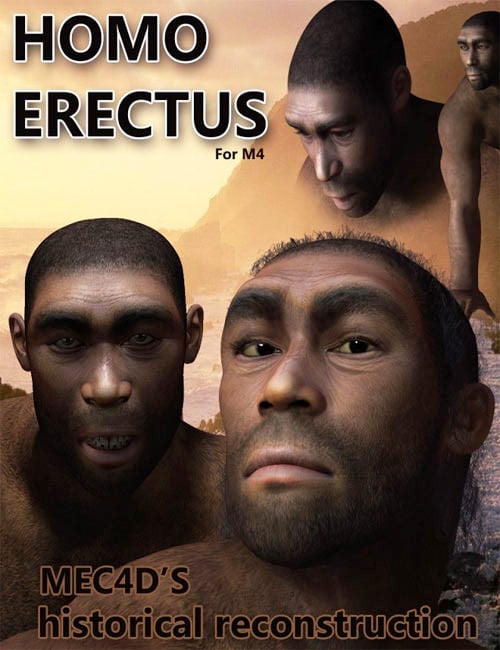
generation 4 figures or Genesis 1 can certainly give enough morphs to transition to various stages in between.
I remember when these first came out (and I bought them) - they were the first product I've owned that had Sub-Surface Scattering maps. Those were the early ways of doing that. The benefit of actually using M4, V4 and K4 would be the morphs that come with this. But Genesis 1 has a bazillion shapes available for it as well.
Let's say you do use Michael 4, Victoria 4 and/or Kids 4. Since the kit includes morphs that make them look this way, dialing those morphs down will automagically change them to modern Homo Sapiens.
Furthermore, ABAS can animate the shaders for you as well - but to actually switch texture maps gradually, you'd need to create a sequence of images between these and the new ones. Any image editor should make this job doable, but Project Dogwaffle Howler could actually automate the process for you. Both apps are very inexpensive - especially for all they have to offer!
If you go that route and need help, send me a PM and I'll step you through the process.
* Genesis presets:
- Basic Male was made to fit the UVs of Michael 4 - load Basic Male character and M4 materials will fit.
- Basic Female was made to fit the UVs of Victoria 4 - load Basic Female character and V4 materials will fit.
- Basic Kid was made to fit the UVs of Kids 4 - load Basic Kid character and K4 materials will fit.
Will the Animation side of DAZ ever get attention?his x said:
"One way that I learned how to better use Carrara was to buy products that I liked for it, and dissect what I see..."
I've tried to avoid that approach. My thinking has been, you can be a driver, or you can be a mechanic. Few are both. I may be too idealistic.
Another point to this is that, many of these PAs put a lot of time and effort to get it right. Again, using Linday as an example, it's really easy to see by looking at the instructions and playing the included videos that he wants us to succeed, no matter which outcome we're looking for.
Not being fluent in physical engineering, I try to absorb as best I can. Obviously it works, too. Because I'm having a Great time with this wonderful thing called dForce and loving to animate in Daz Studio more and more every day :)
Now, this can go the other way too. I have some dForce clothing that was weight painted to be completely motionless where one would expect the motion to occur, simply to make it user friendly in dForce, I think. Others are so well built for dForce that they don't have any weight painting at all - just using material zones and dForce settings in the surfaces tab to get the job done.
Nathy's dForce Latex Outfit is a great example of this. No weight painting. Very well designed material zones and mesh to work in dForce. By default the belt and metal bits on the belt (of the top) are not part of the simulation (turned off in the Surfaces tab). I wanted to get more drape from the cloth part, so I turned it on to set it up - but Nathy already has it set up - I only had to turn it on in the surfaces tab! And it simulated beautifully!
Thanks Nathy!
Between dForce and VWD, I'm so confident that I even just bought this amazing outfit for my Dartanbeck hero - made for Michael 4, going onto G3M!
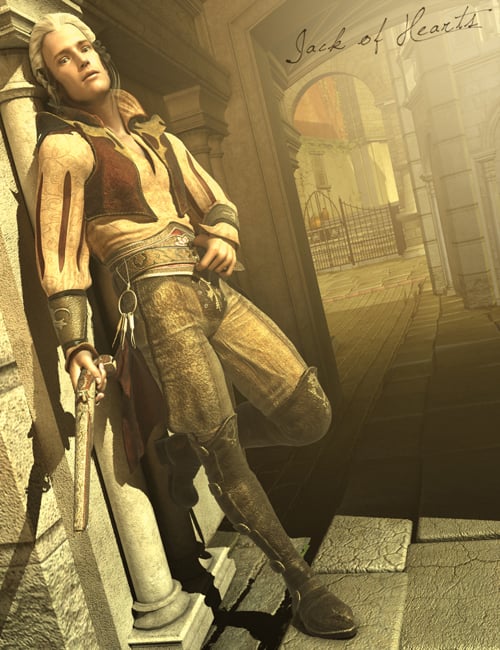 V4 poses on Genesis 9 - via Zev0's converters
I've spent a couple of days converting my (huge) collection of poses to Genesis 9 using 3 of Zev0's conversion products, and I thought people might like to see how well many of the V4-M4 generation of poses work on Genesis 9. These images are the raw converted poses with no tweaking, except for the last example where I show the raw vs. a minorly tweaked version. In general, "open" poses where the limbs aren't touching each other work better than "crunched" poses where the figure has a lot of intersections going on. I find that the tweaks required to make those work are still pretty minor--upper arm & thigh and sometimes some spinal adjustments, as well as flattening the feet when the original pose is for high heels - a whole lot of V4 poses defaulted to high heels, back before we all started including foot poses with outfits & shoes. There are more intersection problems where the original pose is for a scaled character like Freak4 or Kids4, but overall they aren't any worse than using base poses on a strongly morphed figure.
At each step, I converted all the native poses for each generation along with the converted poses from the previous generation, so the list got longer and longer as I went. Fortunately the scripts also get faster and faster; the G9 conversion script is super fast. After a couple of days of doing this in between other things, I've got about 400 pose sets in my Genesis 9 library. I am storing them separately from native Genesis 9 pose sets, to maintain my sanity.
Here are the steps in my workflow:
1. Convert from Victoria 4 or any of her "cousins" (Michael 4, Kids 4, Freak 4 etc.) to Genesis 2 Female with V4 Pose Converter by Zev0 & Draagonstorm. This converter runs pretty slowly (for me, anyway) so plan to run it overnight or while you're cooking dinner or something. Also, I have a lot of poses from this generation; if you're just doing one set at a time it's not a big deal to wait while it runs. Make sure you're putting these into their own folder, not mixing them in with "real" Genesis 2 poses, or things will get confusing quickly. Reminder: V4 poses are usually in .pz2 format so you'll find them in the Poser Formats part of your library, in the poses folder. Another reminder: a good 2/3rds of the stuff in your poses library is likely to be MAT files and shape injections, if you have a lot of content from that generation, so don't try batch-running the whole library folder. You can move or copy all of the actual poses into their own sub folder.
2. Convert the converted V4 poses from Genesis 2 Female & Male to Genesis 3 with Genesis 2 to Genesis 3 Pose Converter by Zev0 & Draagonstorm. You can ignore the reminder to run the ZUnlocker script, for continuing conversion, although you do need to run it to use the poses on Genesis 3. This script runs very fast, even on fairly large batches. If I tried to do more than about 10 sets at once, it would have trouble loading up the list, so I temporarily moved everything into a sequence of subfolders, 10 per subfolder, and then ran the batch several times against that.
3. Convert the poses again, this time from Genesis 3 to Genesis 9, with Genesis 3 and 8 to to Genesis 9 Pose Converter by Zev0 & Bitwelder. This goes lickety-split, but it still will hang up if you feed too many folders into it at once. I also ran this for all of the Genesis 8 poses in my library.
Genesis 1 poses are a bit of a pickle because the hands are terrible, and there's not (AFAIK) a batch utility for conversion, because other than the terrible hands, Genesis 1 poses work directly on Genesis 2. I use Handy Dandy by Sloshwerks to fix the hands on a pose-by-pose basis, but I don't like most of my G1 collection enough to do that without a batch option. RiversoftArt's Bone Minion products also let you convert poses as needed across every generation, so if you're not a batch-y person, check those out for sure. Personally, I like to batch pre-convert everything so that when I'm feeling actually creative (as opposed to merely liking to compulsively organize things, which is how I interact with my collection much of the time), I don't have to use any scripts or extra steps.
Anyway, here are some examples, including what sets they originally came from. I think the Freak 4 poses were part of the base character, because I definitely never bought anything extra for that dude! But I might have picked them up as a freebie at some point. You can click the images to embiggen them.
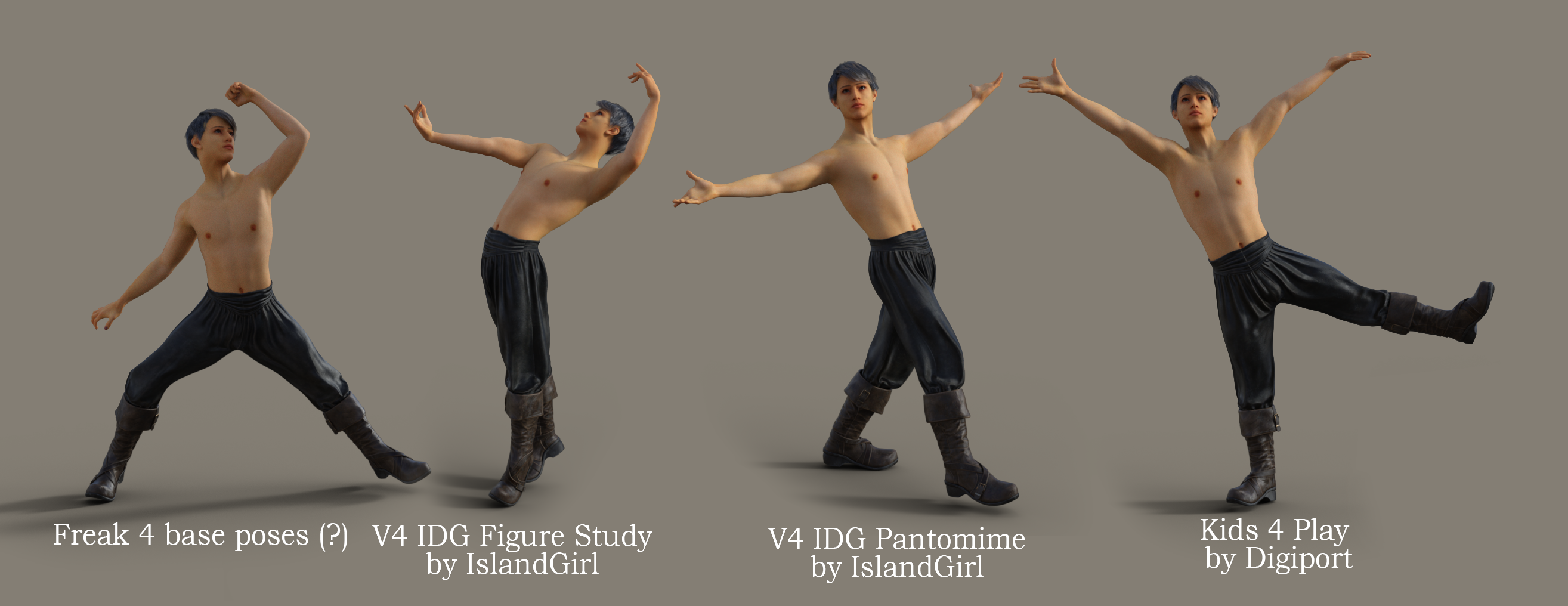
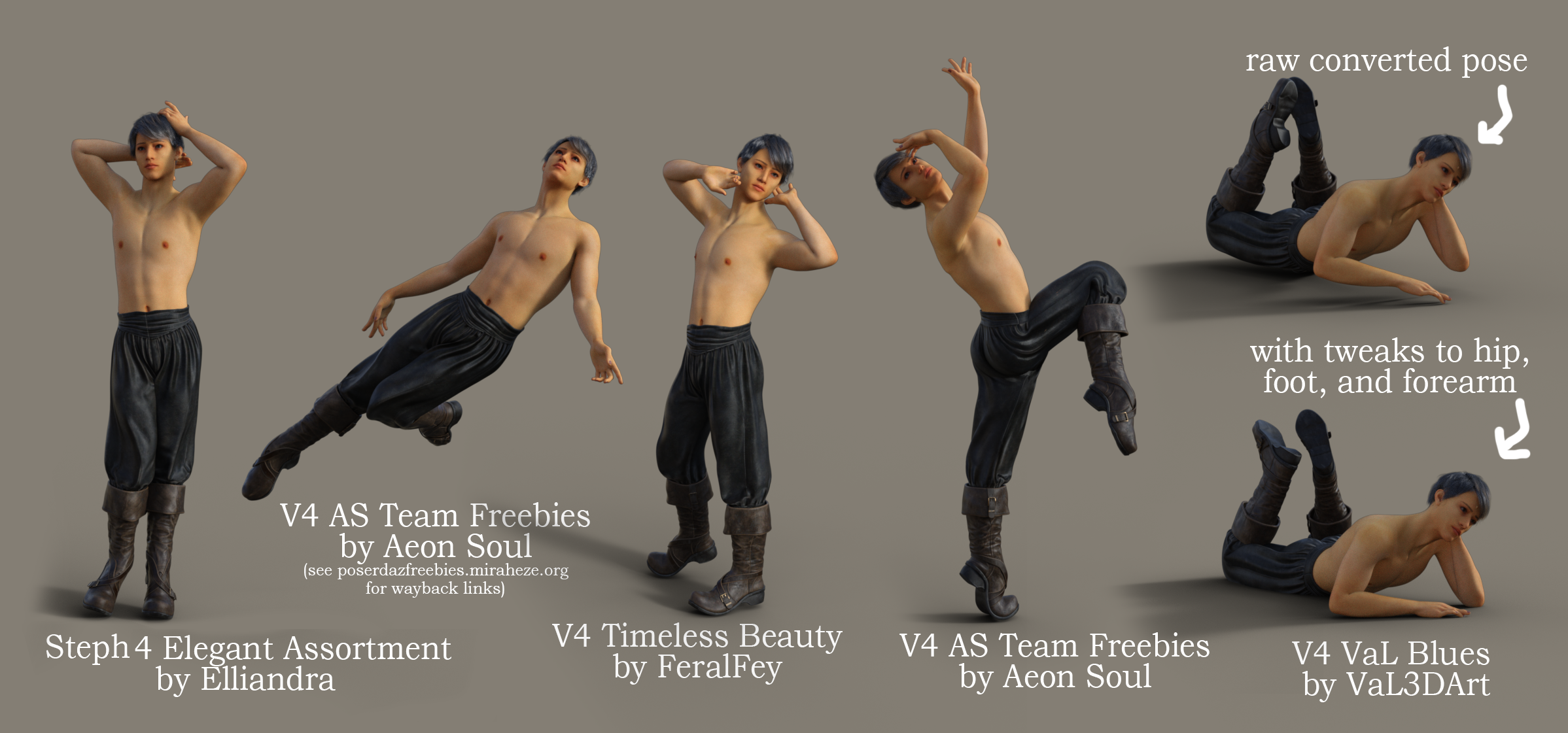
p.s. this character is one of my WIPs (hence the seam around his collarbones and his lack of bod fuzz); he's not in the store yet but hopefully will be once I finish him.
Nice Clown. Not Evil?NorthOf45 said:
von Hobo said:
NorthOf45 said:
I believe it is Sad Clown Theo for M4.
Thank you!
Do you think the makeup for that figure can be applied to Genesis 8 Male?
Not directly. First, they are 3DL, and have different surface names, and must be converted to .duf to apply to other Genesis generations. The textures will have to be re-mapped to G8 eventually. There are several paths to that end. You can apply them directly with Legacy UVs for Genesis 8: Michael 4, or move up through the generations with Legacy UVs for Genesis 8: Genesis 2 Male, Michael 5 and Michael 6, which might give more flexibility. There are also Legacy UV's for G3. See Cayman Studios for a full selection. The choices can be overwhelming, but they can come in handy.
Thanks! I appreciate the info.
Nice Clown. Not Evil?von Hobo said:
NorthOf45 said:
I believe it is Sad Clown Theo for M4.
Thank you!
Do you think the makeup for that figure can be applied to Genesis 8 Male?
Not directly. First, they are 3DL, and have different surface names, and must be converted to .duf to apply to other Genesis generations. The textures will have to be re-mapped to G8 eventually. There are several paths to that end. You can apply them directly with Legacy UVs for Genesis 8: Michael 4, or move up through the generations with Legacy UVs for Genesis 8: Genesis 2 Male, Michael 5 and Michael 6, which might give more flexibility. There are also Legacy UV's for G3. See Cayman Studios for a full selection. The choices can be overwhelming, but they can come in handy.
Nice Clown. Not Evil?MelissaGT said:
von Hobo said:
MelissaGT said:
von Hobo said:
NorthOf45 said:
I believe it is Sad Clown Theo for M4.
Thank you!
Do you think the makeup for that figure can be applied to Genesis 8 Male?
You'd have to compare the UV maps...I'm not sure how similar M4 is to G8M in the face. Either way, an image editing program such as Photoshop would definitely be required.
As an alternative, there might be a product that will allow you to use M4 textures on G8M...I know there's one for V4 on G8F.
Thanks so much! I will look into it.
This is the product -
Oh wow! Thank you Melissa!
Nice Clown. Not Evil?von Hobo said:
MelissaGT said:
von Hobo said:
NorthOf45 said:
I believe it is Sad Clown Theo for M4.
Thank you!
Do you think the makeup for that figure can be applied to Genesis 8 Male?
You'd have to compare the UV maps...I'm not sure how similar M4 is to G8M in the face. Either way, an image editing program such as Photoshop would definitely be required.
As an alternative, there might be a product that will allow you to use M4 textures on G8M...I know there's one for V4 on G8F.
Thanks so much! I will look into it.
This is the product -
Nice Clown. Not Evil?von Hobo said:
NorthOf45 said:
I believe it is Sad Clown Theo for M4.
Thank you!
Do you think the makeup for that figure can be applied to Genesis 8 Male?
You'd have to compare the UV maps...I'm not sure how similar M4 is to G8M in the face. Either way, an image editing program such as Photoshop would definitely be required.
As an alternative, there might be a product that will allow you to use M4 textures on G8M...I know there's one for V4 on G8F.
And here it is! https://www.daz3d.com/legacy-uvs-for-genesis-8-michael-4
Commission for a simple mask with morphkuro_neko said:
Llola Lane said:
Gordig said:
kuro_neko said:
Gordig said:
JoeQuick made a Spiderman suit for M4 that includes a mask you can pull up (shown in the second promo). I've fit it to a G8M and retextured it in an image I can't remotely post on the forums.
Hello Grodig,
Thank you for the suggestion! I already saw that suit and downloaded it. But I have no idea how to convert/fit it to G8M and make the morph work.
"Fit" is maybe the wrong word, because it's just a matter of scaling it to be approximately the right size.
There must be some trick... I can't get it to 'fit' to G8M... Maybe I need to buy a converter?
I found this product:
https://www.daz3d.com/sy-victoria-4-and-michael-4-clones-for-genesis-8I have no clue about the older generations or poster models. But it sounds like it's the right one.
wishlisted ;) thanks.
Commission for a simple mask with morphLlola Lane said:
Gordig said:
kuro_neko said:
Gordig said:
JoeQuick made a Spiderman suit for M4 that includes a mask you can pull up (shown in the second promo). I've fit it to a G8M and retextured it in an image I can't remotely post on the forums.
Hello Grodig,
Thank you for the suggestion! I already saw that suit and downloaded it. But I have no idea how to convert/fit it to G8M and make the morph work.
"Fit" is maybe the wrong word, because it's just a matter of scaling it to be approximately the right size.
There must be some trick... I can't get it to 'fit' to G8M... Maybe I need to buy a converter?
I found this product:
https://www.daz3d.com/sy-victoria-4-and-michael-4-clones-for-genesis-8I have no clue about the older generations or poster models. But it sounds like it's the right one.
Hello, could you tell me if you know of any type of hair style similar to this one?Alex Hair is the closest I can think of right now. This is the G3M version parented to G8F, select Scalp and set Y-Translate to about -5.0 (may depend on character used). Avoid autofit, seems to mess it up.
 Question about using DS from a different computer
hansolocambo said:
My way to do that : I store (synchronize) my Daz Libraries on a MEGA drive (I pay yearly for 8TB). And I use Raidrive to map the MEGA cloud locally, so that it can access it in my file manager like any local hard drive.
This way I can start Daz anywhere in the world basically and have access to the Library in the cloud.
But of course moving around with an hard drive. Installing Daz on different computers. And simply configuring the Content Directory Manager to point where are the libraries, works perfectly fine too. Even better if your external drive is a Solid State Drive (SSD).
How do you handle updates to items that are installed outside your content library?
Some of the following items only install partially in the content library the rest is installed in the program folder or my documents:
Accelerator for UltraScenery for DAZ Studio 4.5+ (Win 64-bit) 74497
Advanced Ambient Light 17031
Advanced Distant Light 18516
Advanced Spotlight 17409
Atmospheric Effects Cameras DS 13926
Breast Control Puppeteer Support 23183
C66 Graphics Plugin for DAZ Studio 4.5+ (Win 64-bit) 83341
Dagger Dancer Interactive Lesson for DAZ Studio 4.8+ 15813
Day at the Beach Guided Tour for DAZ Studio 4.8+ 18735
DAZ Studio 4.21 (Win 64-bit) 13176
DAZ Studio 4.21 (Win 64-bit) Public Build +BETA+ 12000
Daz to Blender 70891
Daz to Unity 72265
Daz to Unreal 4 (64-bit) 72003
Decimator for DAZ Studio 4.21+ (Win 64-bit) 10673
dForce Companion 2 for DAZ Studio 4.5+ (Win 64-bit) 82365
dForce Companion for DAZ Studio 4.5+ (Win 64-bit) 67493
Dynamic Clothing Control for DAZ Studio 4.21+ (Win 64-bit) 9032
Dynamic Clothing Control for DAZ Studio 4.21+ (Win 64-bit) Public Build +Beta+ 16591
EJ UIs and Styles For Everybody (layouts and Styles) Win 68979
EJ UIs and Styles For Everybody (Lesson Strips) Win 68979
Figure Metrics for DAZ Studio 4.6+ 16684
FLUIDOS Companion for DAZ Studio (Win 64-bit) 57257
FLUIDOS for DAZ Studio (Win 64-bit) 54155
GamePrint 3D Print for DAZ Studio 4.5+ (Win 64-bit) 45471
Genesis Generation X2 for DAZ Studio 4.5+ (Win 64-bit) 18321
GenX AddOn Gen3 for A3 and H3 14325
GenX AddOn Gen3 for S3 D3 and F3 14324
GenX AddOn Gen3 for V3 and M3 14326
GenX2 AddOn for Genesis 2 18322
GenX2 AddOn for Genesis 3 32599
GenX2 AddOn Gen3 for A3 and H3 14325
GenX2 AddOn Gen3 for S3 D3 and F3 14324
GenX2 AddOn Gen3 for V3 and M3 14326
GenX2 AddOn Gen3 Kids 18827
Gescon: Constructive Solid Geometry for DAZ Studio 4.5+ (Win 64-bit) 81368
graphMate for DAZ Studio 4.5+ (Win 64-bit) 15480
HedgeMaker for DAZ Studio 4.5+ (Win 64-bit) 80936
Histogram for DAZ Studio 4.5+ (Win 64-bit) 80927
IBL Master for Daz Studio (1of2) 48959
IBL Master for Daz Studio (2of2) 48959
Inside the Asylum Guided Tour for DAZ Studio 4.8+ 18732
Install Manager Default Filters 14811
Iray GeoLocator for DAZ Studio 4.8+ (Win 64-bit) 36921
keyMate for DAZ Studio 4.5+ (Win 64-bit) 15390
LAMH Player for DAZ Studio 4.5+ (Win 64-bit) 16151
LAMH2Iray Catalyzer for DAZ Studio 4.8+ (Win 64-bit) 44935
LineRender9000 34653
Materia MeshMaker for DAZ Studio 4.5+ (Win 64-bit) 79983
Measure Metrics for DAZ Studio 4.21+ (Win 64-bit) 16684
Measure Metrics for DAZ Studio 4.21+ (Win 64-bit) Public Build +Beta+ 16686
Mesh Grabber for DAZ Studio 4.5+ (Win 64-bit) 65751
Mesh Grabber Morph Editor for DAZ Studio 4.5+ (Win 64-bit) 73685
Mesh Grabber Rotations AddOn for DAZ Studio 4.5+ (Win 64-bit) 68547
Michael 4 Base Puppeteer StudioCF 7877
Mimic Live for DAZ Studio 4.21+ (Win 64-bit) Public Build +Beta+ 16596
Mimic Live! for DAZ Studio 4.21+ (Win 64-bit) 13000
Orbital Lights for DAZ Studio 4.5+ (Win 64-bit) 80933
pwCatch for DAZ Studio 4 4464
pwGhost for DAZ Studio 4 4345
Real Fur for DAZ Big Cat 2 LAMH 17843
Render Queue for DAZ Studio 4.5+ (Win 64-bit) 59787
Render Throttle for 3Delight 64317
Render Throttle for Iray 50257
Rock Shader for DAZ Studio 18994
Rodents by AM: Squirrels of Eastern Hemisphere LAMH 38539
Scene Builder for DAZ Studio 13176
Scene Builder for DAZ Studio Public Build +Beta+ 12000
Sci-Fi Warrior Guided Tour for DAZ Studio 4.8+ 18731
Slaying the Dragon Interactive Lesson for DAZ Studio 4.5+ 18736
Thickener for DAZ Studio 4.5+ (Win 64-bit) 82267
Turbo Content for DAZ Studio 4.5+ (Win 64-bit) 62619
UberSurface2 Layered Shader for DAZ Studio 4 12700
UltraSceneryXT for DAZ Studio 4.5+ (Win 64-bit) 84924Where to find anatomical elements for older generations of characters?"Morphs++" pack for generation 4 figures was renamed "Shapes++" later, but the original name stuck.
https://www.daz3d.com/victoria-4-2-shapes
https://www.daz3d.com/michael-4-shapes
V4 didn't really have "Anatomical elements" as in a separate add-on, only a genital crease morph. It was indeed included in shapes++ pack.
Daz 3D is part of

Connect
DAZ Productions, Inc.
7533 S Center View Ct #4664
West Jordan, UT 84084Licensing Agreement | Terms of Service | Privacy Policy | EULA
© 2026 Daz Productions Inc. All Rights Reserved.