-
New Tartarean Pirate Ship
Bendinggrass said:
AbyssalEros said:
It's a DO asset. Most likely, the answer is no. I guess the whole ship will not have a single morph.
What is a DO asset?
Daz Original meaning a PA made it and sold it to Daz.
New Tartarean Pirate ShipBendinggrass said:
AbyssalEros said:
It's a DO asset. Most likely, the answer is no. I guess the whole ship will not have a single morph.
What is a DO asset?
Daz Original
New Tartarean Pirate ShipAbyssalEros said:
It's a DO asset. Most likely, the answer is no. I guess the whole ship will not have a single morph.
What is a DO asset?
What's going wrong here?My apologies upfront for being an ignorant noob. This is the first time I've tried to transfer something from Hexagon to Daz, and whether I use the bridge or export as object and import into Daz, the geometries and textures are never right. I've done my best to show what is happening with the screenshots attached below. Any help would be greatly appreciated.
Some straight lines are curvy or wobbly, others show up with an ugly crosshatch look to them, plus a few black triangles on other bits.
Realism between character and propWhile you can use dFormers and the smoothing modifier, both have drawbacks. dFormers will move vertices based on the figure's A-pose, so it's next-to-useless for dynamic posing, and the smoothing modifier will warp things like fingernails and eyeballs that should not be smoothed.
Long story short, beyond very simple stuff, you need to make your own morphs.
You can cut corners, for instance by applying a smoothing modifier, exporting the figure as an OBJ, and reimporting it as a morph. Then you can just remove all the vertices you don't need so the morph only affects the problem area.
Beyond that, you need to get comfortable with using Blender to shape the figure how you want it. Research sculpting and proportional editing.
New Tartarean Pirate ShipIt's a DO asset. Most likely, the answer is no. I guess the whole ship will not have a single morph.
AIUTO...CHI CONOSCE L’ITALIANO? PARTE TREDICIKainjy said:
Il libro (in formato digitale e in inglese) lo trovate qui: https://www.packtpub.com/product/the-complete-guide-to-daz-studio-4/9781849694087
Sul sito stanno anche facendo 2 promo:
- 7 giorni accesso a tutta la libreria gratis (come prova)
- 5 mesi di accesso a 5 €
Il libro non ve lo consiglio perchè è del 2013 e ha 348 pagine di cui più della metà parlano di cose che voi già sapete fare (mettere vestiti, aggiungere oggettti alla scena, ecc..)
Inoltre se vi leggete l'indice troverete argomenti come LuxRender (ormai superato) e modellare un vestito con Modo (software 3D non così diffuso). Non c'è Iray e non va mai a fondo su questioni tipo i morph, o il Transfer Utility o ERC Freeze.
Potete sempre provarlo per 7 giorni gratis se volete.
Purtroppo i libri sui programmi 3D (in generale, non solo DAZ) stanno scomparendo, siccome ogni anno escono le versioni nuove dei vari programmi, i libri già dopo 1 o 2 anni sono obsoleti e non tengono il passo coi corsi dei vari Gnomon, Pluralsight, Lynda, Udemy ....e perfino quelli gratis su Youtube. Se poi qualche software house cambia l'interfaccia è un macello... è un trend che sta andando avanti da prima della pandemia.
Sì, è una questione abbastanza lampante (sorvolando sul fatto che il mondo si stia popolando di analfabeti funzionali e ormai tra un po' si faranno con video su Tik Tok anche i contratti…); proprio per questo, ormai, anche i manuali hanno più senso in formato elettronico (con, eventualmente, la possibilità per l'utente di stamparsi solo le parti che gli restano comode) che in questo modo risultano più facilmente (ed ecologicamente) aggiornabili. Rimane il fatto che la questione dell'aggiornamento o meno alle novità vale anche per i videotutorial.
Per quanto riguarda le mie conoscenze io sono un hobbista e dunque gioco con DAZ nel tempo libero (infatti posto sempre durante le pause o la sera dopo cena). Molte cose le ho imparate perchè sto cercando di creare contenuti per DAZ. Finora ho fatto dei morph (ancora da migliorare) e sto cercando di convertire oggetti 3D (scaricati da sketchfab, turbosquid, ecc..) in vestiti per DAZ. Pertanto sbatto la testa con queste cose.
All'utente medio non interessano questi argomenti (prende un character, 3-4 vestiti e uno sfondo e addirittura dei settaggi pronti) per cui la DAZ non ha interesse a fare guide specifiche su tali argomenti, infatti molta roba la trovo sui forum o addirittura sulla vecchia guida online (che è molto tecnica).Cmq nel tempo, mi sono creato una mia guida in word su come funzionano alcune cose (molto spesso se vado a memoria me le dimentico, così le ritrovo scritte) scritte però in formato appunti (dunque con termini non proprio italici). Però mi aiuta quando magari devo ricontrolalre qualche parametro o settaggio.
Io mi sono scaricata i pdf delle due guide di Daz - link qui sotto per chi ancora non le avesse - e magari prima o poi mi stamperò le parti più utili. La cosa deplorevole però è che siano loro per primi a non tenerle aggiornate. Non pretendo un manuale con tips & tricks, ma almeno indicazioni chiare su ogni comando e funzione, soprattutto quando se ne introducono di nuovi!
sottoscrivo quanto detto da Imago per la scheda Shaping... purtroppo ogni PA della DAZ fa a modo sui e dunque capita spesso che dentro a quella scheda non trovi solo i morph ma anche delle pose o altre cose che non centrano nulla (la scheda non è altro che il contenuto che trovi nel gruppo Actor nella Parameter TAB dei vari G/G2/G3/G8)
Io mi trovo bene a tenere aperti i tab (raggruppati in un'unica finestra) shaping/posing/surface/parameters; i primi per le modifiche più specifiche e l'ultimo per aggiustamenti più generali sulla figura come il posizionamento. Poi tendenzialmente seguo la stessa logica per altri aspetti (smart content+content library+scene), ecc. Chiaramente ognuno ha il proprio modo di organizzarsi il lavoro che corrisponde alle proprie formae mentis (le mie sono particolarmente contorte
 ), quindi più le cose sono modificabili per adattarsi ai gusti personali, meglio è.
*post modificato per correzione di un errore
My Morphs are all so weird! Help, please!That means that a character has been saved with a non-zero default value for its morph - there was one a while back that did that, but if so it has been fixed so you just need to make sure you are using the latest copies of the files from your account page rather than a previous download.
My Morphs are all so weird! Help, please!I am new to Daz3D and I have a problem when adding any character into the scene. So, when I add characters I get them like this (as seen in the image), no matter what the character is. Btw, this is Michael 8. Please, help! How can I add them normally without this messed up morph?
 Daz to Blender back to Daz > Textures?
Are you copying the shader settings from the original armor, or just applying the maps? Surface settings don't survive transfer between apps fully intact, especially given that different programs use different render engines.
Is there a way to remove specific body parts from collision?Smoothing Modifier often does the job, check if Mesh Smoothing parameter is ON and try Collision Iterations : 5 or 15
But if it's not enough you can adjust manually with the FBMExpand or Expand All morph of the pants.
Fit Control product is good to adjust the morph for a specific area (Side Left for example).
Daz3d to Blender WorkflowJClave said:
I don't see the "effort" to replicate IRay in Blender as being worthwhile either, but if @JClave's work is going to give it to me with no effort, I would certainly like to use in Blender many assets that look great in IRay. Sure, Daz Importer will get me reasonably close, but who would not prefer to have one less thing to think about having to perfect once in Blender?
Just to be clear, the material transfer work I'm doing will only translate Iray Uber Shader to Blender Cycles.
I noticed some Daz assets use Shader Brick materials instead of Iray Uber.
With my approach, those Shader Brick materials will have to be converted to Iray Uber Shader in Daz before being exported to Blender.
This means that, those materials (which comprise a minor subset of total materials in Daz store) may look somewhat different to the original materials in Daz. (though should be much more of acceptable quality than materials created using existing methods)
Once the Iray Uber Shader implementation in Blender is successful, I will try my luck contacting Daz to see whether they would be willing to help me figure out all the Shader Bricks so they can be translated.
@wolf359 - rendering in Daz Iray is great if you are happy with the feature sets provided.
But if you want to do even just 5% more especially when extracting useful render passes for postwork / non-photorealistic rendering, you will have to do a lot of manual work for each time you generate render passes, or pray to Daz and Nvidia to provide extra features.
My ultimate goal with Blender is to customise Cycles further to generate purpose-built render passes that will be used for non-photorealistic renderingI`m interesting about Your " render passes for NPR" Goals . I would love to hear the progress
Making Hair? Include an "Elf Morph" pleaseI presume it's a shaping morph for the hair. I suppose it is meant to squash the hair down for one of those 'elf & safety plastic helmets.Shoe Rigging QuestionsI've modeled some sandals for G3F/G8F, and have rigged them and saved as a figure/prop asset. Although the sandals fit nicely, there is a lot of distortion when the toes are flexed, as seen in the first picture. I'd really like to accomplish the "graceful sole-bend/toe dangle" effect as seen in the second picture, rather than the glued-on sandal look. Way back, Victoria 3 had a set of morphing sandals which did this effect via adjusted bones in the sandals (V3 only had lFoot, lToe, rFoot, rToe rigging, which made it easier). Looking at G3F though, there are no JCMs for the toe bend, as compared to the thigh bend. My idea was to export the crumpled sandal, adjust and smooth it, and then re-import it back in as a morph to be driven by the toe bend. Is this still possible to do without a proper or dedicated toe-bend JCM channel?
Thanks,
-David
Is blender right for me & is it possible to animate daz scene in blender & export animation to daz.wolf359 said:
Is this possible or should I look elsewhere, if not is there any software that can do what I need.?Actually it wont matter what external program you use to create Character animation with IK (Autodesk MOBU,Reallusion 3DX,Mixamo etc)
The IK solving wont transfer to Daz studio correctly evenas baked FK.
I have told people about this for the past year
to no avail.
Wouldn't it be possible to just keyframe every frame and transfer that, transfering IK isn't necessary. I basically just need the Pose data that I would create in Blender. What I don't know is how to transfer a character to Blender with initial pose, Animate it in blender(this I can find out through already existing tutorials) then send the pose data back to daz. Ideally once I am done animating in blender I would just send pose data to daz and render.
I found this video where you can go from Daz to Mixamo to Daz again but Mixamo is more of an animiation preset site and not a animation creation program.
My guess from the video is that the workfow would be use daz to blender bridge to send objects to blender, animate it, Then save the figure as an FBX like in the video, open the FBX in daz save the pose data and apply it to the orignal figure. Question is.
Does daz bridge export non Genesis objects or just the daz genesis figure and what FBX settings do I need to bring it back to daz in the right scale.XTransfer Module 1- Genesis 3 to Genesis 8 Morph Converter (Commercial)Gordig said:
Blood-PawWerewolf said:
fredfredburger55 said:
inquire said:
It should be right under "Characters," before you click on any of the individual characters. Is it not there?
I found it in another folder! Thanks anyways!
I have another problem now though. I transfered "Robbus Goblin HD for Genesis 3 Male". Once I go to the sliders and try to use him he turns into this. On a sidenote, what is the recommended approach to transfer over the materials?
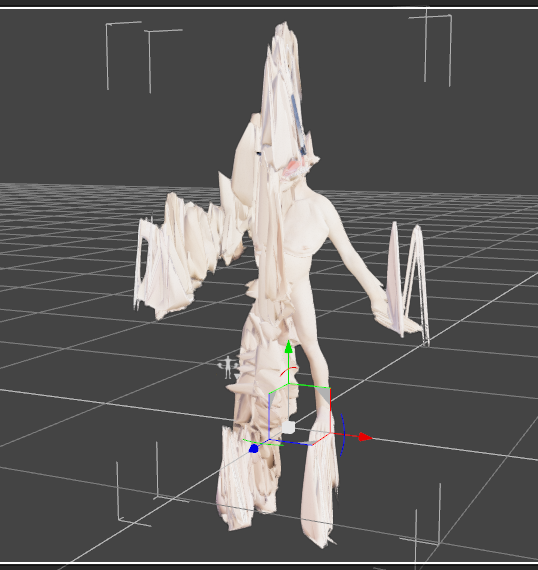
it's an HD character, so it won't work (HD characters and morphs are incompatible, which is a lot of popular figures sadly.)
I've converted a number of HD characters, and while they don't retain their HD details, they do still transfer successfully.
Here's a comparison of Anneka HD on the left, next to her XTransferred G8F counterpart. The G8 is not as detailed as the original (notice especially the thigh spikes), but she's also not the eldritch horror posted above.
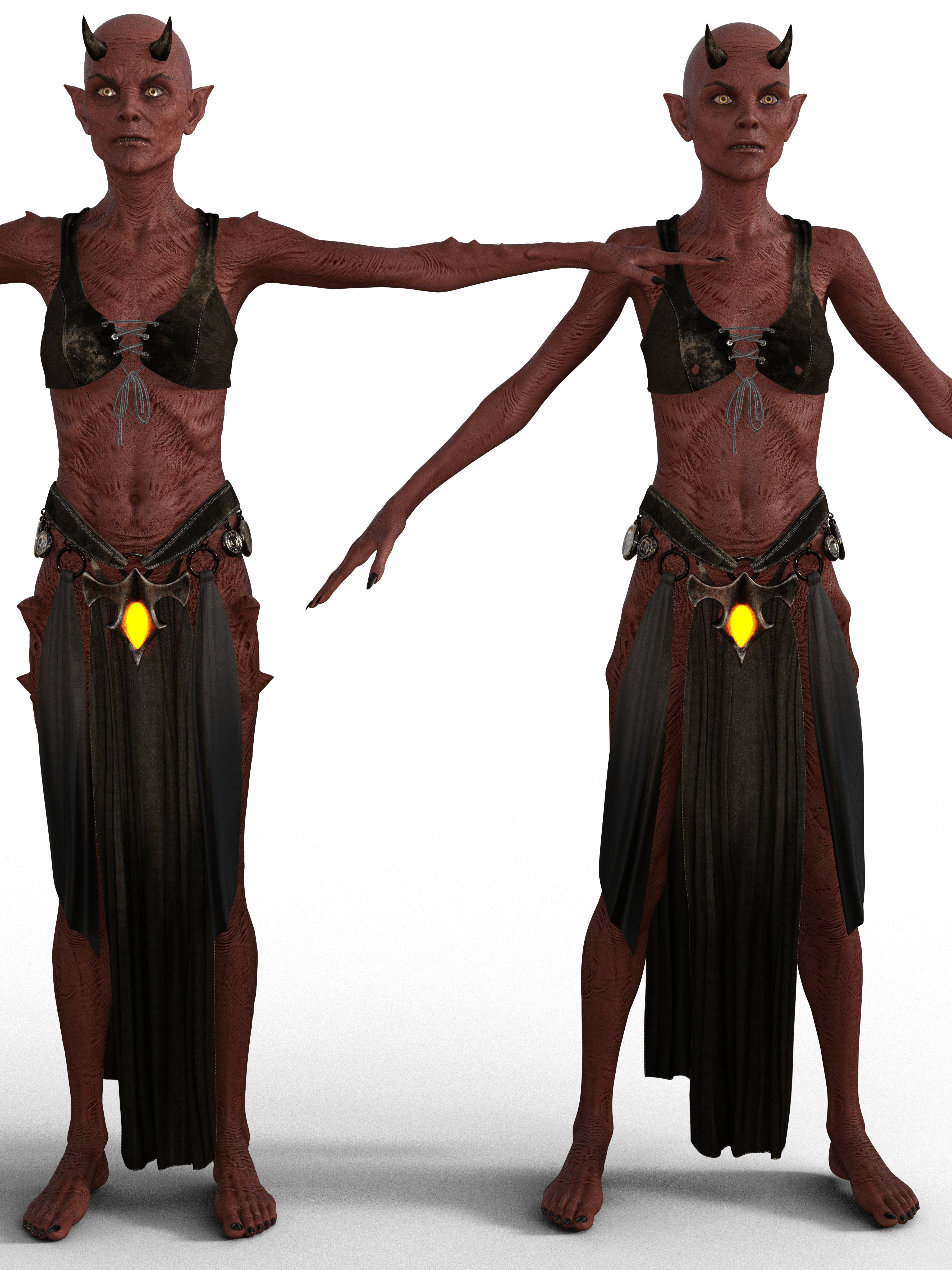
Interesting....
XTransfer Module 1- Genesis 3 to Genesis 8 Morph Converter (Commercial)Blood-PawWerewolf said:
fredfredburger55 said:
inquire said:
It should be right under "Characters," before you click on any of the individual characters. Is it not there?
I found it in another folder! Thanks anyways!
I have another problem now though. I transfered "Robbus Goblin HD for Genesis 3 Male". Once I go to the sliders and try to use him he turns into this. On a sidenote, what is the recommended approach to transfer over the materials?
it's an HD character, so it won't work (HD characters and morphs are incompatible, which is a lot of popular figures sadly.)
I've converted a number of HD characters, and while they don't retain their HD details, they do still transfer successfully.
Here's a comparison of Anneka HD on the left, next to her XTransferred G8F counterpart. The G8 is not as detailed as the original (notice especially the thigh spikes), but she's also not the eldritch horror posted above.
Free! Genesis 8 Male Casual Clothing (re-mapped jeans update)Starkdog said:
Wow Perlk,
This looks great! I too use Hexagon; however, after much UV frustration, I now make the lower-poly mesh in Hexagon to where it looks great at level 2 subdivision, but save as OBJ at base resolution, then import into Blender for any additional tweaks, modifiers, etc. I then subdivide as needed, add a solidify modifier, tweak a few things, and then UV map with Blender's awesome UV tools. It's still a little drawn out process, but I'm getting much better results.
-David
I model with Hexagon too, but I'll take everything to Blender for the UV maps because it is so much easier to UV map in Blender than in Hexagon.
And since OP is using Hexagon, if you want to create a morph for the pants instead of messing with the Dformers, load a figure with shoes and put the pants on him. Then send all three to Hexagon. Make the adjustments to the pants so the cuffs fit over the shoes. Then send the pants back to DS. You'll get the pop up asking if you want to import it as a morph. Click yes or ok or whatever the button says that goes ahead and does it. That should create the morph on the original pair of pants instead of importing a second pair of pants.
XTransfer Module 1- Genesis 3 to Genesis 8 Morph Converter (Commercial)fredfredburger55 said:
inquire said:
It should be right under "Characters," before you click on any of the individual characters. Is it not there?
I found it in another folder! Thanks anyways!
I have another problem now though. I transfered "Robbus Goblin HD for Genesis 3 Male". Once I go to the sliders and try to use him he turns into this. On a sidenote, what is the recommended approach to transfer over the materials?
it's an HD character, so it won't work (HD characters and morphs are incompatible, which is a lot of popular figures sadly.)
Creative Opportunity ($$) for Artistsinfo_b3470fa520 said:
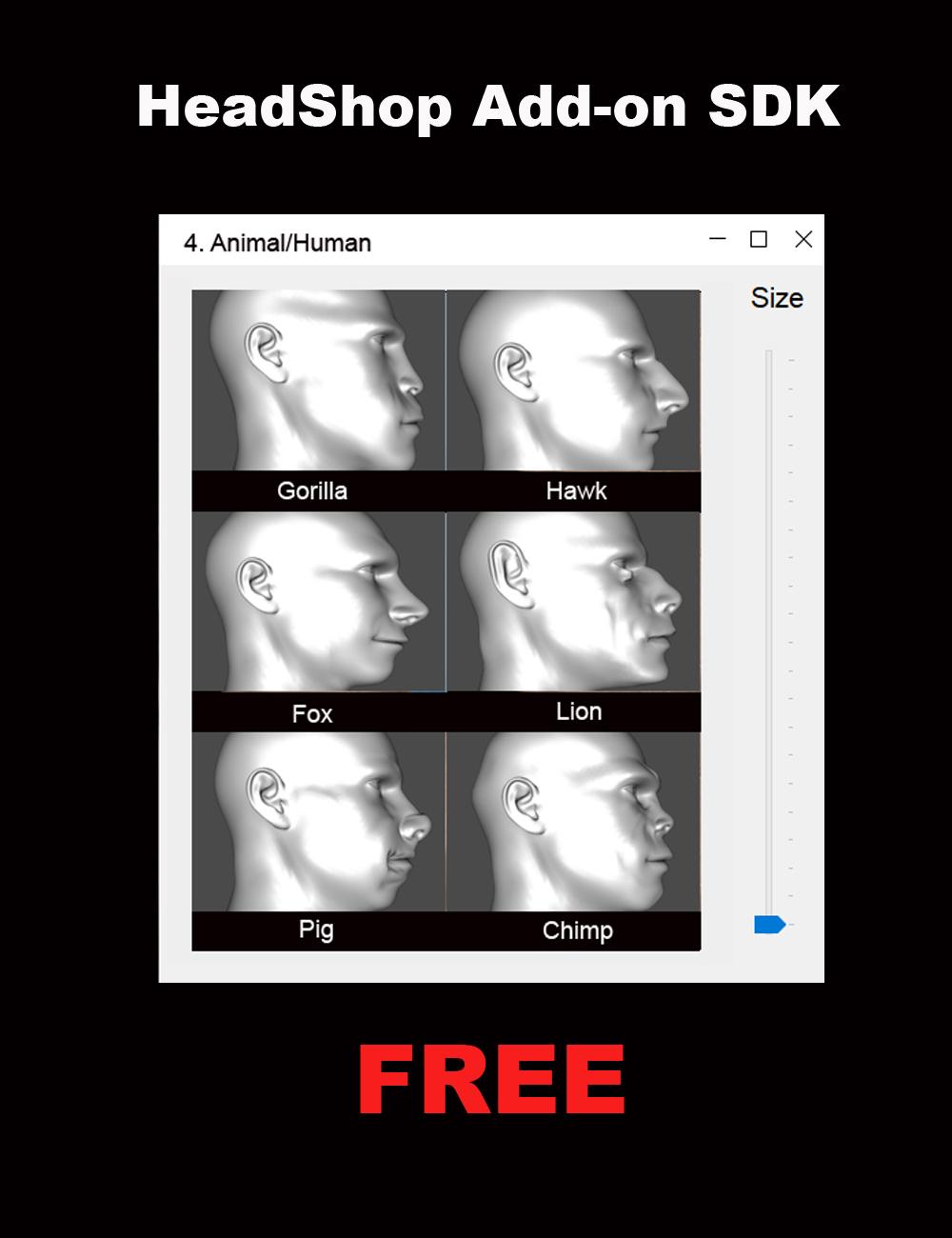
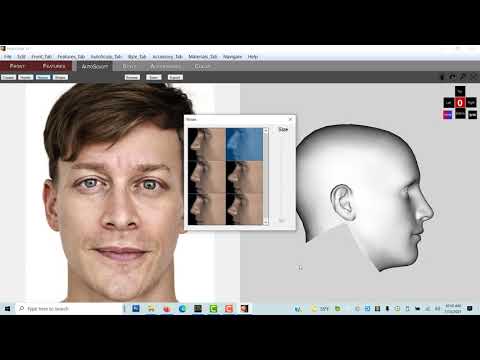
We had made some significant changes to the HeadShop product line (HeadShop 14 and OneClick). The new architecture now allows third party artists to easily create/add new morph libraries to HeadShop via the "AutoSculpt" tab. The architecture supports Genesis 8 and 8.1 Base Male and Female figures.
Do you have Daz' permission to include the OBJ files?
These libraries of six items can range from very simple "dial-spinning" to elaborate Blender or Hexagon sculpting all based on the supplied base Gen 8 and 8.1 OBJ files supplied with the HeadShop SDK. No coding is required and in fact you need to use no other software than DAZ Studio.
You can create HeadShop Add-ons for your own amusement or as a commercial product to be sold through DAZ, and make some easy profit from your effort. Abalone, the creators of HeadShop are fully supporting your efforts! Please don't hesitate to email us at [email protected] or skype at lasloves.
(HeadShop Add-on SDK - PrintAhead)
Good Luck and looking forward to your fun projects.
We hope you will also see a complete "how-to" on generating Add-ons at https://youtu.be/JajgHwrSSlE
Laslo Vespremi, CEO, Abalone LLC - A California Company (PrintAhead - 3D Printed Heads, Statues, Busts & More!)
Daz 3D is part of

Connect
DAZ Productions, Inc.
7533 S Center View Ct #4664
West Jordan, UT 84084Licensing Agreement | Terms of Service | Privacy Policy | EULA
© 2026 Daz Productions Inc. All Rights Reserved.