-
Genesis to Genesis 2, 3 or 8 Character Converter?
Male to female need a proper morph.. I've done one to convert a G8F to a male figure (it's yet in testing phase), you can find it in the Freebe section of the forum.
Usually is more confortable use the female to male because the female has more polygons in chest and bottom areas, so you have a more accurate mesh. If you use a male you obtain a low-poly feminine chest.. not the best.
If you are a PA you can also create a HD morph so this problem doesn't exist.. and you can start from a low poly to a high poly morph (the function is active only for PA.. not everyone).
Auto Muscle Enhancer HD [Commercial]The transferred morphs onto the G8M platform will NOT be shown as favorites. You marked them as favorites from the G8F platform, but that marking does not transfer. Go look for them in the same locations as they came from on the G8F platform. TD
Duplicate key
You are probably referring to duplicate formulas, as they are based on product names. This thread is about duplicate key errors which are raised by the CMS database while installing the associated metadata of a product. And those entries are supposed to be globally unique 32-digit hexadecimal characters (as per daz's implementation). A random probability of encountering such a duplicate key is one in 16^32 occurrences. Now if you do a site-wide search for "duplicate key value violates unique constraint" you would be shocked at the recurring pattern of users here encountering the error which has such low probability. How would you explain such a mathematical improbability, if not attributing to copy-pasted values from existing products? And it makes no difference whether Daz or the PAs are responsible for assigning those guids. The fact that users are encountering these errors so frequently reflects the low process maturity during both QA and metadata creation stages of product release.PerttiA said:mrinal said:
I had reported a duplicate key to support not too long ago. Apparently, the conflict was with another product from the same vendor which makes me assume that the vendor miight have simply copy-pasted the metadata from one of their older products and forgot to change the guid. Can't think of any other way how a globally unique id can ever have duplicates.
These kind of errors can easily be overlooked by QA if they are just testing the product in isolation. Most of those duplicate keys/formulas could have been avoided if QA validated the product by installing it on an existing content library loaded with all products from this store (atleast). But based on the kind off issues I keep seeing in the logs, I wonder if the QA ever bothers to check the log during the validation process.
DAZ makes the metadata, not the vendor.
There is no such thing as "globally unique id", there is "id" like "CTRLJulie", "name" can also be "CTRLJulie" and "label" which can be "Julie".
"Label" is used to identify the morphdials and I think the "name" is used to call the morph by other morphs, but I haven't been able to confirm it since usually the "id" and the "name" are the same.
If another vendor also makes a character called "Julie", it is highly likely, he/she is using the same names for these three.
Snake tongue for G8?Just the [snake] tongue morph [for Genesis 8] is all im looking for
Edited for Please put your question in the post body and the title - Daz 3D Forums
Dragon-person for G8FNoah LGP said:
Note: If you need a Drago with breast, you can apply a female morph to G8M
Wait, how do you do that? Not the drago part but adding a male morph to a female and vice versa?
Character head height too tall, which morph is it that lowers it?If you have Zev0's 200 Plus Head Morphs, there's a Cranium Height morph.
Character head height too tall, which morph is it that lowers it?I'm having trouble trying to figure out which morph it is to lower the head height.
Its for a Gen 8 F (not 8.1). I don't want to change the character morphs i have already.
All im looking to do is lower the bit of cone head she has going on but im going through the morphs and at a loss to find it.
Any help is most welcome!
SereneNight’s Sci-Fi Fun Thread 3Y'all are almost making me want to buy Dragan so's I can make him a dingus and then he can follow his dream to be the adultiest adult film actor that ever adultied.
But I shall resist! I already have one other kooki99 guy to make a dingus for, and another one that was included in another bundle -- which I bought for everything BUT him -- that I've declined to download, both because I don't want the additional morph overhead (my G8M/8.1M is GIGANTIC, morphwise), and I don't want to see that sad, dingusless crotch. (Hey, I may not use 'em all that often, but it's nice to know that the guy's got one, just in case, you know?)
More seriously, it does look like there's some weirdness around his chest to produce that double-pec effect. I wonder if he's got a misfiring JCM there?
Morph distortion of shader (Modeling question)The texture will distort when applying morph as the UVs do not change.
In Blender you can use option "Correct Face Attributes"(N panel > Tool > Options) when moving verts, but that will not help you in DS.
In DS, you will either have to create a material in Shader Mixer, so you can control Texture projection. Or, if using Iray, you can use an "Iray Decal Node" and use its Planer projection to add the texture.
Auto Muscle Enhancer HD [Commercial]Ricktor,
Looks to me like you did not click on the Morph Targets option to open up the Extended Options menu, then you can tag the favorites in that menu. The Transfer Utility menu box should look EXACTLY like shown from my post on P. 28. Make sure you have the morphs you want to move from G8F marked as favorites (tag those little hearts so they are solid, and ensure they show in the favorites dialogue box). Keep at it, it originally took me awhile to get it working, but I use this method very reliably now. TD
Ok I went back and rechecked all the peramiters and when I hit accept I get a 1/4 second of progress bar so quick I cant read what it is saying. And i'm left with both my models untouched. Everything is the same as in your post but I have to be missing something. I even used the same 2 models. I ensured that the morphs I wanted to carry over into the G8M were clicked ( hearts were solid ). After I hit the accept button it is like i had just placed the characters there. Nothing happens dispite having a very short progress bar. Like I said before, I have the UV swap and the cross figure resource kit. Is there anything else I am missing? Is there a step before this one that I am missing? Thanks again for your help Terry!
Morph distortion of shader (Modeling question)I'm confused by what I am looking at, and I am not easily confused...
Is that Solid Mode view, Texture Mode view with an actual material/texture shader applied?
Please, first, show the wireframe view from multiple angles (and for the love of all things morphing, Solid-wireframe, please), so someone can better assess any topology issues.
If you are having solid shading issues, they could be topology related, or unintended vertex normals issues based on incorrect topology for hard-surface meshes (example: Lack of mechanical edge bevels, or smooth setting values).
So, based on my above statement, my best guess is you have a sub-divided plane and you selected subsets of polygons in rows on the Z axis in Blender. Then you created a morph by moving them backwards on the Y axis.
If this is correct, then you are introducing shading (smoothing) artefacts with the vertex normals.
If I am correct with my assessment, and this is indeed the case, you can fix the issue with mechanical bevels (not to be confused by what the Boolean crowds call bevels, or true edge beveling -- mech bevels is a control technique going back nearly two decades).
What you will need to do is create extra control loops (the mech bevels) at the morphing batten edges (both sides of each batten), and employ their control location through the morphing. Meaning, they will be loose, or about halfway distance between the main polygons pre-morphed (to prevent visible crease/seam while plane is flat), and then you will slide them to near coincident edges (almost sitting on top of each other) with the morph itself.
Or, you can try to control them with smoothing value settings, but I believe that will be a lot more involved with manipulating the mesh once back in Studio.
Morph distortion of shader (Modeling question)I started building a simple wall / environment construction kit for myself to use. The idea being having props built in a way that they can be morphed to have more use cases.

This is it loaded in to Daz Studio. The wall is a simple plane subdivided, and the other bits are part of the overall mesh, but seperates.
The morph moves part of the plane to create batten on the wall.
This unfortunately seems to distort any shader applied. Obviously I could make these as seperates, but I wanted to know if there was anything I could look in to to getting what I'm striving for done.
Similar morphs made by moving the planes consisting of the side of the batten on the x axis in blender appear to cause the distortion. Moving the planes simple on the y axis in blender cause no distortion.
(these images are from Daz Studio but I modeled it in Blender)Duplicate keymrinal said:
I had reported a duplicate key to support not too long ago. Apparently, the conflict was with another product from the same vendor which makes me assume that the vendor miight have simply copy-pasted the metadata from one of their older products and forgot to change the guid. Can't think of any other way how a globally unique id can ever have duplicates.
These kind of errors can easily be overlooked by QA if they are just testing the product in isolation. Most of those duplicate keys/formulas could have been avoided if QA validated the product by installing it on an existing content library loaded with all products from this store (atleast). But based on the kind off issues I keep seeing in the logs, I wonder if the QA ever bothers to check the log during the validation process.
DAZ makes the metadata, not the vendor.
There is no such thing as "globally unique id", there is "id" like "CTRLJulie", "name" can also be "CTRLJulie" and "label" which can be "Julie".
"Label" is used to identify the morphdials and I think the "name" is used to call the morph by other morphs, but I haven't been able to confirm it since usually the "id" and the "name" are the same.
If another vendor also makes a character called "Julie", it is highly likely, he/she is using the same names for these three.
Wanted: Split tail geograft for Daz Dragon 3Here you go: Forum Link
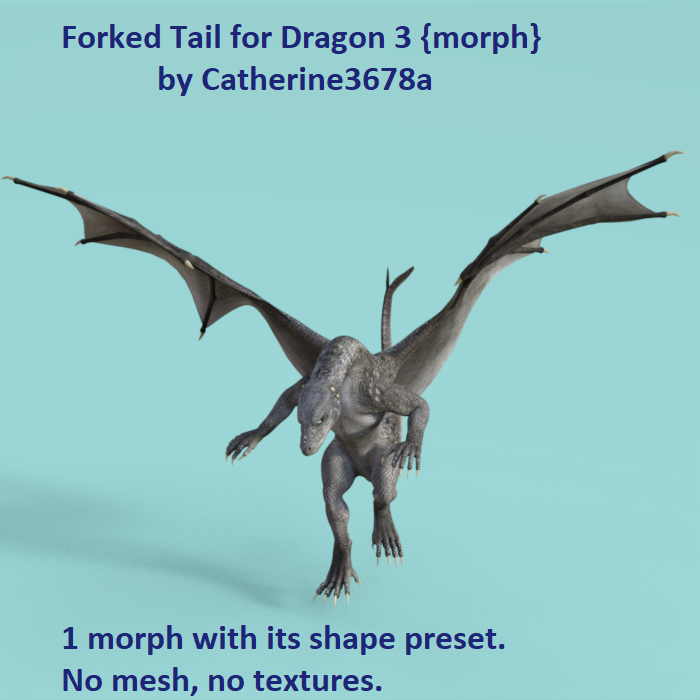
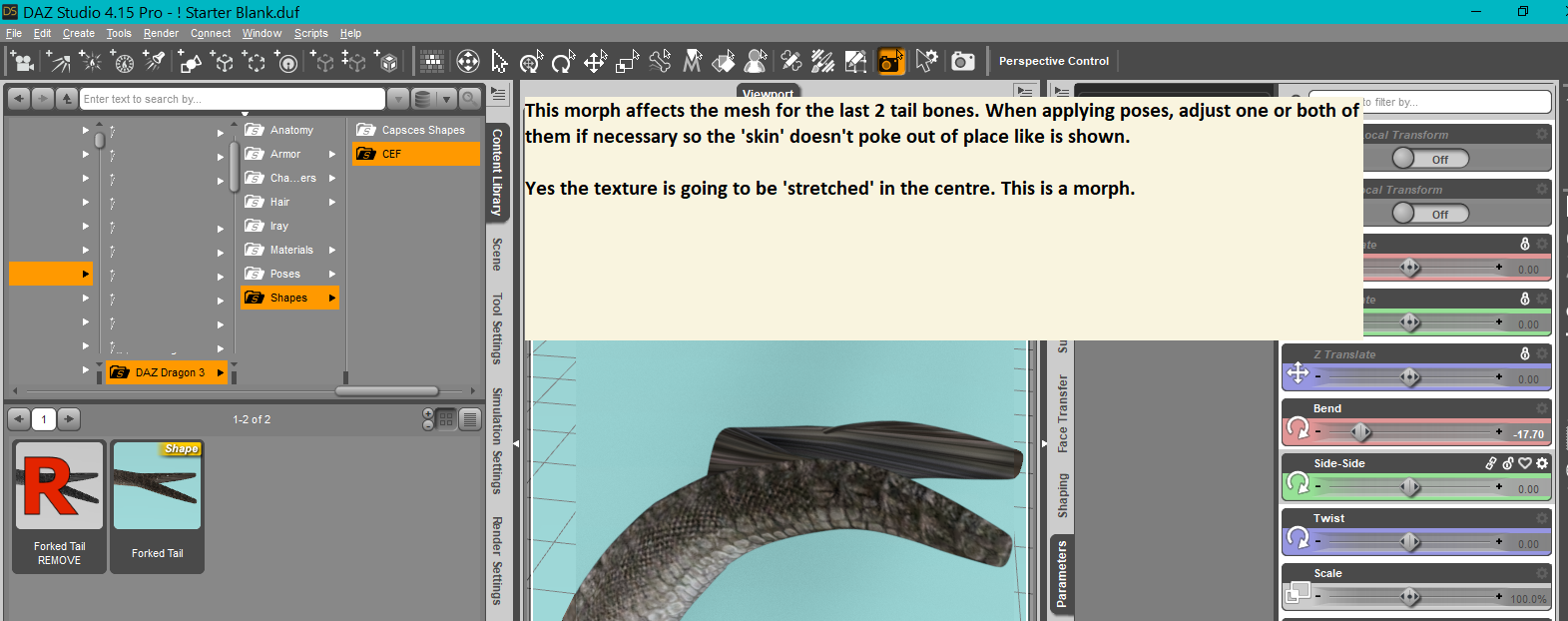
Forked Tail for Dragon 3 - MorphA little morph to fork the tail of Dragon 3. It splits apart the last 2 bones of tail mesh.
After applying poses, tweak those last 2 tail bones as necessary so the skin doesn't flail out.
May be used with whatever rights one has for Dragon 3.
 Daz Studio 5 development update
Some more OT stuff on character conversion between generations follows... those not interested in this topic (and those who don't have me on ignore yet) are free to disregard.
inquire said:
And about moving figures from one generation up to another, I've tried that. It isn't good enough, in my opinion. If I want to use a David 3, for example, I'll just use a David 3, either in Poser, or in DS. I tried moving him (to give just one example) to Genesis 1, and then to Genesis 2. Nope. Not satisfactory to me. I didn not go on and try Genesis 3.
I have. There are several reasons.
First, G3F is "the" one to replant Gen3 characters to (males included) - because it's the only figure that has a Gen3 UV map available thanks to Cayman Studios, so all the textures will still work.
GiGi_7 suggested moving up to G8(.1) which makes no sense in this case because G8+ aren't likely to ever get a Gen3 UV map.
Of course if one doesn't mind all the "quirks" (to put it mildly) of Gen3 rigging and bending, one can use the older figures as-is... but why put up with those when it's possible to have the same faces on a much less troublesome body base (with way more clothing options, to boot).
The key is to only transfer the head morph (will likely need finetuning either way, but it's fun artistic finetuning not a "gods, the teeth are coming through the back of the head" sort of technical nightmare) and approximate the body shape using G3F-specific morphs, so that its native JCMs go on doing their work.
Basically, specifically in my case, I wish I had gotten that GenX plugin years earlier. Would've saved me many hours of manual morph transplant attempts and trying to alleviate the nightmares of Gen3 bends. Could've also said thanks to the author while he was still alive...
Unlike Gen3, Gen4 (particularly V4) have "inspired" quite a few "fixer" products around dedicated to improving their rigging/bending issues; moreover, Gen4 are quite high-poly figures, with many quality texture sets, so we can safely conclude that Gen4 will go on being very much usable as-is for quite a while. They aren't as easy to dress (in new clothes), though. But (unconformed, timeline-draped) dForce items do work.
Auto Muscle Enhancer HD [Commercial]ricktor_345b893b97 said:
Hey guys, I am running daz 4.15 and am having trouble getting started. I went back to page 24 where Mike the 3d guy entered the fight. I am by no means a pro at daz but very much want this to work on g8f. I understand you need to clone the g8f to g8m but that is where i am having issuses. I have the genesis UV swap and the cross figure resource kit. Every time i use the transfer utility nothing happens or the 2 bodies or become one with deformaties. Once i have the 2 models by themselves i go to the transfer utilities. Sourse is the g8f with item shape selected to default Target is the g8m and item shape is selected to clone g8f. Projection template is selected to none. According to Terry the boxes selected are do I uncheck all the boxes except for morph targets, smart left/right filtering, and concider lines as rigid. Now either nothing happens at all and I still have my 2 models standing there with no changes or if i go to transfer utilities again and leave all the pre checked items i get stuck at 22% just like Mike did! I don't know what I am missing? I've read the post close to 100 times but and still scratching my head.
Ricktor,
Looks to me like you did not click on the Morph Targets option to open up the Extended Options menu, then you can tag the favorites in that menu. The Transfer Utility menu box should look EXACTLY like shown from my post on P. 28. Make sure you have the morphs you want to move from G8F marked as favorites (tag those little hearts so they are solid, and ensure they show in the favorites dialogue box). Keep at it, it originally took me awhile to get it working, but I use this method very reliably now. TD
Sending DAZ model to Zbrush and only seeing Hair and other attachments only???This is a known issue in 4.15.0.2.
You could use OBJ export/Morph Loader Pro import - I would recommend using the modo preset in the dialogue. You will need to hide any attachments and set the figure resolution to base, however, before exporting.
Wanted: Split tail geograft for Daz Dragon 3Not making a geograft for that. How about a morph?

 Why so many high heels
Ellessarr said:
yeah that is the issue if no one give a try on that we never gonna know because that is the problem in the end of the day, we only can know if anyone give a try in make outfits with proper adjustable heels where you could morph from a styleto, from a flat or boot, in this way we can see if the product will sell or not, but if none is trying then we don't know for sure?
Why do you assume it hasn't been tried?
Daz 3D is part of

Connect
DAZ Productions, Inc.
7533 S Center View Ct #4664
West Jordan, UT 84084Licensing Agreement | Terms of Service | Privacy Policy | EULA
© 2026 Daz Productions Inc. All Rights Reserved.