-
AIUTO...CHI CONOSCE L’ITALIANO? PARTE TREDICI
Perchè l'originale ha la posa di default così e dunque ho esportato Hiro nella sua posa standard (è un G1).
Ogni figura è modellata con una posa standard diversa.. per cui se vuoi ricreare la figura con un altro character devi modellare sulla geometria originale di partenza.
Ti lascio uno screenshoot esplicativo con
- in azzurro il G1
- in verde il G2M
- in rosso il G3M
- in blu scuro il G8M
La DAZ ogni generazione ha sempre cambiato un po' la posa delle braccia: da una posa a T con braccia leggermente in avanti e dita piegate (G1) a una posa perfettamente a T con dita dritte (G3) e poi col G8 ha deciso di passare alla A pose.
La differenza di posa iniziale è anche il motivo per cui le pose del G3 non sono compatibili con G8 (pur avendo lo stesso rigging !). Online però si trovano Morph che permettono di correggere la posa iniziale del G8 rendendo le pose dei G3 compatibili col G8.
Comunque una volta modellato il morph, basta riposizionare (a mano, joint per joint) il personaggio nella posa desiderata e poi riesportare e reimportare per avere il morph nella stessa posa
Al momento non l'ho ancora fatto perchè devo studiare prima dei problemi di proporzioni: se ad esempio si allungano le dita, tutte le pose prefatte che riguardano prese di oggetti si sfanculano.. quando si cambiano le proporzioni tra le varie parti del corpo le pose prefatte saltano (questo è il motivo per cui quasi tutti i morph che avete non cambiano mai l'altezza del personaggio o la lunghezza di braccia/dita/gambe o la quota da terra di parti del corpo quali occhi, bocca, naso, ombelico, ecc..)
EDIT se cambiano le proporzioni, di solito vi trovate un pacchetto di pose "fatte apposta per quel character"
Shoe distortion issuefaibolx said:
Siciliano1969 said:
Problem solved and easy.........simply click on your Morph in the parameter setting tab under the morph loader to access the properties panel and un-check auto follow....Done Credit goes to Leana in the below post. I think this needs to be posted somewhere!
https://www.daz3d.com/forums/discussion/48750/shoes-fitting-them-conforming-feet
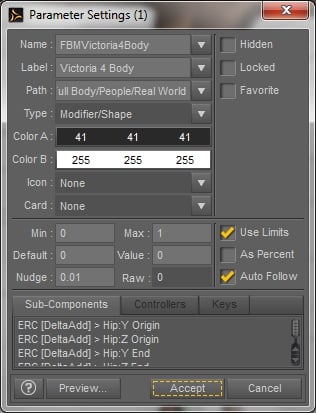
Thank you, this solved my problem!
My pleasure! I'm glad to see that new shoes being made don't include all those extra individual toe bones. That is also a huge help!
AIUTO...CHI CONOSCE L’ITALIANO? PARTE TREDICIKainjy said:
Colgo l'occasione per chiedere una cosa...
Volevo sapere che tipo di morph vorreste per i vostri G8 (sia M che F) che ricrei character vecchi (es. Aiko, Hiro, ecc..).Ad esempio ho ricreato Hiro 5 per G8 (allego immagine) e volevo fare qualcosa che potesse piacere e interessare alla gente.
Come mai la posa passa da A a T nella sequenza?
AIUTO...CHI CONOSCE L’ITALIANO? PARTE TREDICIColgo l'occasione per chiedere una cosa...
Volevo sapere che tipo di morph vorreste per i vostri G8 (sia M che F) che ricrei character vecchi (es. Aiko, Hiro, ecc..).Ad esempio ho ricreato Hiro 5 per G8 (allego immagine) e volevo fare qualcosa che potesse piacere e interessare alla gente.
Is there a way to convert a sculpted figure for Genesis ?Hi guys,
I post this question in the blender thread for I am a blender user but really it could be a question for any software user... especially the ones who have sculpting features, like ZBrush.
Here is my problem :
As a sculpting training, I made de hand-sculpted figure from scratch in blender. I am very happy of the result and I would like to be able to convert it as a genesis figure.
I know how to make a morph when starting from a Genesis figure. But I have no idea of how to CONVERT a figure for genesis, when the topology is not the same in the first place. The morphing system will fail.
Do anyone know a way to work around this ?
(please please please.... any advice would be so helpful !)Shoe distortion issueSiciliano1969 said:
Problem solved and easy.........simply click on your Morph in the parameter setting tab under the morph loader to access the properties panel and un-check auto follow....Done Credit goes to Leana in the below post. I think this needs to be posted somewhere!
https://www.daz3d.com/forums/discussion/48750/shoes-fitting-them-conforming-feet
Thank you, this solved my problem!
Daz Studio Iray - Rendering Hardware BenchmarkingJamesJAB said:
skyeshots said:
...
I wanted to check the math because of the load times, especially the A4000 test > 21 seconds. Are you using Slots 2 and 4 on the T7610? This may seem counter-intuitive given the layout of the board, but if you are using Slots 1 and 3, it may be slowing your overall workloads. Moving your assets to an SSD may also (dramatically) change the pace of your real-world creative processes.
These peripheral speeds (drives, CPU, bus, etc.) do not mean much in terms of final rendering performance, but they certainly do affect the overall creative processes.
Not sure why the load time wass o short with both GPUs running together. I think I hit render on a blank scene before loading the benchmark scene on that Daz studio load.
If you go a few posts up I already did the A5000 alone. If arrived a week or so before the A4000.
..The load times just seem out of balance with the overall build. The second test may have benefited from cached resources. Just keep away from slot 3 on the T7610 as it will always be limited to 4x transfers, regardless of the CPU count.
It looks like there are 2 additional PCIe 3.0x16 slots above the CPUs as well. These are the ones that specifically benefit from the 2nd Xeon CPU installed. Using a PCIe SSD in one of those for the Daz asset drive would be a modest expense and big step up from the 5400 RPM WD you have now. Perhaps 20x faster transfer rates, with quicker load times.
Stupid question; how do I rig a human figure?There is also a transfer rigging function that I used once, so it can't be too hard to use.
Edit | Figure | Rigging | Transfer Rigging
Thalia for Coral 8 - gills issueHellooo
The gills on/off are for the scalloped shape we did for them, not the gills themselves. Those are a part of the tail. I am working on a shape to dial them out though so folks can use Naia's gills on the neck if they prefer (those are a morph instead of a geograft). There was a UV change, and it looks like there might have been some confusion in the packing, (files were all named the same), so I'll check and make sure that was the issue, then get it updated asap if so. Sorry about this!
Sully monster-like morphHonestly, it would probably be easier and more sensible to create an original model for something like that instead of trying to morph G8 into it. Even the most extreme morphs of Genesis figures are still basically man-shaped, and Sully is decidedly not.
Never mind, I was thinking of Mike, not Sully.
Sully monster-like morphHow about a monster morph for Genesis Male 8 similar to Sulley from Monsters, Inc?
G2F Pose Transfer to G8Frichardandtracy said:
It actually looks much worse than it is.
There is pretty much a 1 for 1 correlation between G2F and G8F body parts, and after getting the script working features done and data for one body part, it's merely a matter of copying & pasting lots and lots of times with 9 checks for each body part. You need to see that the zero positions match & the Bend, Side-Side & Twist move the same amount on each figure & in the same direction (eg 90 degrees shin bend on G2F is equivalent to 94 degrees on G8F so a scale factor is needed, and the eyes move in opposite directions too so a -1 scale factor is needed). Fortunately having posed one side of the destination figure to match the source figure, you can use symmetry to mirror the pose from left to right & wiz through the settings for the right side body parts simply reading them off the destination pose positions. I use the brute ignorance & force programming method, not using any fancy loops to recursively go through the skeleton. This means it's longer than it might be, but the method is a bit more flexible when skeletons don't entirely correspond with each other. There may well be over 2900 lines to the script, but most of it is recognisably repeating self contained chunks only around 34 lines long.
On a figure like V3 it's a fair bit more difficult because you've got to proportion the buttock & thigh rotation values between the pelvis & thigh on G8F. With V3, I took the average of the left & right buttock bends and applied that to the G8F pelvis, then took the difference on each side from the average buttock bend, added it to the V3 thigh bend on that side and applied that sum to the G8F thigh bend. Gaagh, words are too wooly, to summarise mathematically:
G8F Pelvis bend = (V3 Left Buttock Bend + V3 Right Buttock Bend)/2
G8F Right Thigh Bend = V3 Right Buttock Bend - G8F Pelvis Bend + V3 Right Thigh Bend
similarly for the G8F Left Thigh Bend.
Took a bit of experimenting to get my head around the different capabilities of each body part, but it's not very difficult once the understanding is there (not like converting a morph between generations... boy, that's clever.). I have noticed that, as I have worked from V3 to V4, G1 and now G2 that as the generation closes in on G8, the amount the script needs to change in the base pose reduces, and the script becomes more of a read and paste script rather than a read, adjust then paste script.
One script Ihave occasionally wanted is a 'Copy & Paste Figure Pose' script for G8. Does anyone know if there is one? I know it can be done by saving a pose preset, but that seems rather like overkill for a single use pose, to me.
Regards,
Richard
Yep... like I said, a ton of work!!
 A "Copy & Paste Figure Pose" script sounds interesting! I haven't run into one yet. Missing Morph Targets?
After an especially long load, I checked my log file and saw it was riddled with errors, such as:
Could not find target property for formula: Genesis8Female:/data/DAZ%203D/Genesis%208/Female/Morphs/DAZ%203D/Expressions/eCTRLPain_HD.dsf#eCTRLPain?value in file : /data/DAZ%203D/Genesis%208/Female/Morphs/DAZ%203D/Zelara%208/eJCMZelara8_Pain_HDLv2.dsfIt looks like dozens of products are expecting me to own Genesis 8 Facial Expressions, but I don't.
This affects a lot of core characters, so I don't really want to uninstall them. But I don't really want to buy an expression pack I'll never use either.
Is there any way to get around this?
Previous answers weren't helpful, since I have Genesis 3 installed and all my Zev0 products are up-to-date.
Importing multiple morphs into Daz StudioHi, thanks for the answer!
Meanwhile I figured it out... Of course I need to import my morph files and indicate they come from 3DS Max... Then they do work perfectly... My bad, classical "user error".
I do have a follow up question: Now that my morophs are loaded in, I saved my prop as a subset so I can use it in the future. So far so good... Now I was wondering, what if I want to share that prop? Do I only have to send someone the subset file I created? (.duf) Does that also contain the morphs ready to use for another user on another computer? Or do I need to save my morphs seperately somewhere in the data folder and also share that?
Thanks a lot,
Kind regards,
Me
Hair and elf ears fix?margrave said:
It's in that same menu, but it's been moved to a subheader. The first one, at the top, I think.
To show all currently used morphs, click the "Currently Used" header in the properties pane.
If I needed elf ears, first I'd make sure there wasn't a morph for it already. If not, I'd export it to Blender and do some light sculpting to move the hair away from the ears.
Can you show a screen shot? Im looking and i dont see anything about sub headers in it. Only thing close is 'show sub nodes' but that shows things i have no idea what they are but its not morphs
XTransfer Module 1- Genesis 3 to Genesis 8 Morph Converter (Commercial)Zev0 said:
Hi. This happens only with certain morphs transferred from G3 over to G8 where the G8 version of that morph already exists. Technically duplicate id's shouldn't happen because the morphs are named differently after transfer but sometimes the vertice info or morph linking is identical to something already present on G8. Send me a log file and i'll try and see what morph is causing the conflict that you can remove from the XTransfer data folder.
Thanks for answering. I would send you a log file only I don't know where to find it. Can you help with that? Thanks so much (I now know what it's like to be a vendor - I have 14 G8F figures up for sale in my store at Renderhub!)
Importing multiple morphs into Daz StudioThe size changing will be down to different presets in the OBJ import and Morph Loader dialogues - import the OBJ again and note which preset iss elected, assuming that comes in at the right size make sure you use the same in the Morph Loader dialogue.
As for the cancelling out, they both work correctly alone and with the other morph(s) loaded?
G2F Pose Transfer to G8FIt actually looks much worse than it is.
There is pretty much a 1 for 1 correlation between G2F and G8F body parts, and after getting the script working features done and data for one body part, it's merely a matter of copying & pasting lots and lots of times with 9 checks for each body part. You need to see that the zero positions match & the Bend, Side-Side & Twist move the same amount on each figure & in the same direction (eg 90 degrees shin bend on G2F is equivalent to 94 degrees on G8F so a scale factor is needed, and the eyes move in opposite directions too so a -1 scale factor is needed). Fortunately having posed one side of the destination figure to match the source figure, you can use symmetry to mirror the pose from left to right & wiz through the settings for the right side body parts simply reading them off the destination pose positions. I use the brute ignorance & force programming method, not using any fancy loops to recursively go through the skeleton. This means it's longer than it might be, but the method is a bit more flexible when skeletons don't entirely correspond with each other. There may well be over 2900 lines to the script, but most of it is recognisably repeating self contained chunks only around 34 lines long.
On a figure like V3 it's a fair bit more difficult because you've got to proportion the buttock & thigh rotation values between the pelvis & thigh on G8F. With V3, I took the average of the left & right buttock bends and applied that to the G8F pelvis, then took the difference on each side from the average buttock bend, added it to the V3 thigh bend on that side and applied that sum to the G8F thigh bend. Gaagh, words are too wooly, to summarise mathematically:
G8F Pelvis bend = (V3 Left Buttock Bend + V3 Right Buttock Bend)/2
G8F Right Thigh Bend = V3 Right Buttock Bend - G8F Pelvis Bend + V3 Right Thigh Bend
similarly for the G8F Left Thigh Bend.
Took a bit of experimenting to get my head around the different capabilities of each body part, but it's not very difficult once the understanding is there (not like converting a morph between generations... boy, that's clever.). I have noticed that, as I have worked from V3 to V4, G1 and now G2 that as the generation closes in on G8, the amount the script needs to change in the base pose reduces, and the script becomes more of a read and paste script rather than a read, adjust then paste script.
One script Ihave occasionally wanted is a 'Copy & Paste Figure Pose' script for G8. Does anyone know if there is one? I know it can be done by saving a pose preset, but that seems rather like overkill for a single use pose, to me.
Regards,
Richard
Importing multiple morphs into Daz StudioHi all,
I have created a very simple nail prop in 3DS Max for use in Daz Studio and exported it using the default OBJ export settings. Now I have also created some variations on that prop, using the same mesh, but pushing some vertexes around (being very carefull not to add or delete any) and also exported that using the same default OBJ export settings. The idea was to use these variation models as morph files for my base nail... But something went wrong: I can import all morphs using morph loader pro, but they aren't working as expected: first off all they also affect the overall size of my prop, where they should only affect the shape. Up untill value 0,99 it just scales down, upon setting it to 1.00 it finally applies the morph (all the way all at once), but to a severly scaled down version of my prop... Also, they don't combine at all: I created a variation of the nail that is bent and a variation that is twisted. The idea was that I could now load in both morphs and create a nail that was both bent and twisted... Yet I can only apply one morph at a time, combining two brings it back to the default shape.
Thanks for mpointing out what I'm doing wrong here.
Kind regards,
Me
Copy selected Morph/PropertiesI have two figures A and B. I have applied a couple morphs to A and some others to B. I have two questions here.
How can I copy the morphs from A to B? All morphs are present in B, I am not cloning morphs, I just need to copy the morphs values from fig A to B, without overwriting the morphs from B. One particular way is to lock the currently used morphs in B and then copy the entire fig A to B. It's unnecessary but works. That arises another question.
I simply want to copy selected morphs values from fig A and not all, to B. Unfortunately I haven't seen a way to do that yet. Why doesn't Copy selected Items work as intended? Unless it seems to be very misguided on how it works and why it is there?
In the screenshot I have applied a couple morphs to a figure. I go to the shaping/parameters tab, Currently Used, and highlight the morphs I want to be copied. From here, pressing Right Click produces this menu.
Some of the options like favourites, lock, hidden etc etc work for the selected morphs but some of the others are more universal instead. Like Edit Mode. Collapse/Expand which is more for the left hand side pane than morphs pane. And one of those options is Copy/Paste. Now Copy produces another sub menu, Copy Figure or rather, Copy selected Items.
What is that meant to do? One might think, at least that was to my understanding that it is supposed to copy those selected/highlighted properties but unfortunately it does not work as I had thought.
Daz 3D is part of

Connect
DAZ Productions, Inc.
7533 S Center View Ct #4664
West Jordan, UT 84084Licensing Agreement | Terms of Service | Privacy Policy | EULA
© 2026 Daz Productions Inc. All Rights Reserved.