-
G8F and G8M Doorway Fitness Rail, Poses and BloopersI will quote the rendo links as they're easier to find. There is G2->G8F here https://www.renderosity.com/freestuff/items/89255/g2f-pose-transfer-to-g8f and G2->V4 here https://www.renderosity.com/freestuff/items/87764/g2f-pose-transfer-to-v4a4. That's the lot that I have done regarding G2. G2 seems to be the forgotten one, with very little notice being taken of it. Have never loaded anything on ShareCG. HTH, Regards, Richard.Some morphs break import?
mikael-aronsson said:
If you have a gazilion of morphs you try to import, what is the error ? you are not just running out of memory ? each morph can use a lot of ram, as far as I know all morphs are in ram even if you don't use them on Blender so it's not like DS.
Fortunately not, Daz only gets up to about 55gb while doing this and I have 64gb.
The error I am getting is the in the image I attached. Blender imports the figure as a 2d plane with an error message attached.
Ambient Occlusion Maps for G3 or G8
You can convert them to G8 with Map Transfer in Studio.hazneliel_cc85b88108 said:RawArt said:
hazneliel_cc85b88108 said:
RawArt said:
Also be aware that this is for G8.1 Female not G8 Female
Thanks, do they not have the same UVs?
Nope...thats why I mentioned it
Unfortnately I learned that too late, would have to request a refund...
Celebrity Look-a-Likes for 3D figures part 3Haruchai said:
totocandy1 has started selling some of their face morphs and textures on DeviantArt. Slightly stylised but may be of interest.
Salma Hayek - Salma HEADMORPH for sale by totocandy1 on DeviantArt
Gal Gadot - Gal head morp for sale by totocandy1 on DeviantArt
Anya Taylor Joy - Anya head morph for sale by totocandy1 on DeviantArt
Of course I could just be seeing things I want to see.
Jesus, the Gal morph looks like a Mad Magazine illustration.
Celebrity Look-a-Likes for 3D figures part 3totocandy1 has started selling some of their face morphs and textures on DeviantArt. Slightly stylised but may be of interest.
Salma Hayek - Salma HEADMORPH for sale by totocandy1 on DeviantArt
Gal Gadot - Gal head morp for sale by totocandy1 on DeviantArt
Anya Taylor Joy - Anya head morph for sale by totocandy1 on DeviantArt
Of course I could just be seeing things I want to see.
[Released] dForce Magnet [Commercial]esha said:
Hemi426 said:
Another issue:
I selected the vertice of the dress (yellow dot) and executed the script. It placed the magnet way off. Any idea what might be causing this?
There could be several reasons for this. The magnet attaches itself to the vertex's position of the default shape. If it shows an offset that means the current shape is not quite identical with the base shape. It might be caused by a morph, or the dress has already been simulated, or it's the SubD that has softened the folds and moved the vertex away from its original position. Seeing that you have SubD on the dress I'm leaning towards the 3rd possibility but it might also be one of the others, or a combination.
I had this problem with two different garments. I set up a pose then intended to use the magnet to drag the garmet to the right place. I was able to move the magnet to the general area of the vertex and it mostly worked. I was setting it up with a different garment, hoping it might work more as intended and it did not. When I loaded the magnet, it was way off again. I didn't bother doing the work around I came up with. After an hour of messing around with it, I needed a break.
But is it accurate to say that the magnet needs to be used in a fully default state? And then you would set it up with the pose as it goes? That seems like a lot of work to play with the time line so intensely. But great results require that I suppose.
Daz Originals G8F Character Compatible with 8.1 Figure?Hello,
You already have 8.1 in your Product Library ;-) Download and install the Genesis 8 starter sets. Also the default bundle package for the D/S program [to get the new shaders]. Also you need to be working in D/S4.15+ in order for the new PBR shader to work and in order for the 8.1 figures to properly read all the morph data, etc. for the 8 figures.
Then, yes, any character morphs you have for G8F will work on G8.1F. What to watch out for is that new products made only for G8.1 - those will not work on G8 figures.
The 8.1 figures can use any of the uvsets 8 has, plus it has its own 8.1 uvsets. The eyes are different. You can apply the eye mats from G8 to G8.1 - or use eye mats made for G8.1. If something looks too weird, check that the uvmat is correct for the concerned body part.
Oh yes, also install the products for their gens. You will find that for the 8.1 figures, each figure now has something special from the other gender ;-)
Warrior (aka Roy Batty from "Blade Runner") for G8.1M. Head morph only.If you can't get the look you want with what's available in Daz, wny not bring him into a modeler, such as Blender, BforArtist, Sculptris and Hexagon, which are all free and then there's ZBrush, which is not free. So long as you are not adding or taking away from the geometry and only pushing and pulling to get the morph you want, just bring it back to make a morph asset. You might be able to get that look for the eyes that way.
Problems making H.Material work in Cursed HD 8.1Richard Haseltine said:
The file list shows an HD nose remove morph
I can see that, but nothing happens when I apply the "Cursed HD Dead - Nose Off"-H.material? can see any No nose dials at the Parameters- tab?
Problems making H.Material work in Cursed HD 8.1FenixPhoenix said:
There are apparently two characters to load. The human and the undead version, right? So when you load the undead version, does it load without the nose?
No it loads with the red nose as the screenshot I posted. But I can sse that there is a morph for remove nose installed - I can see it when I search outside of daz.
Problems making H.Material work in Cursed HD 8.1The file list shows an HD nose remove morph
Problems making H.Material work in Cursed HD 8.1FenixPhoenix said:
Eggs Actly said:
FenixPhoenix said:
I don't owe the product, but according to the "what's included" there seems to be a material to turn off the nose. So, just in case, have you tried to apply that?
Thanks for responding to my post :) Yes I've tried this as the first thing and it didn't work. Tried to delete and reinstall character but still no "no nose" for me :)
Try to see if there's a morph dial to remove the nose. Perhaps the preset to turn off the nose isn't working, but the dial should be there (assuming the nose off effect is created through a morph).
Can't find any morphs connected to this?
8.1 AutofitKC Riley-Gyer said:
Richard: I tried that and it didn't work. Yes, I do get the standard Autofit dialogue and I did choose G8F but the 8.1F mertail will not fit to 8.1M. His legs still show instead of disappearing like they're supposed to.
AutoFit will transform the item to fit the new figuer and project its rigging into it (which may give odd results on a tail if the legs are posed) but it can't transfer the geoGraft features, which are much more intimately dependent on the actual geometry (the polygons selected to hide, the welding vertices have to exactly align),
Problems making H.Material work in Cursed HD 8.1Eggs Actly said:
FenixPhoenix said:
I don't owe the product, but according to the "what's included" there seems to be a material to turn off the nose. So, just in case, have you tried to apply that?
Thanks for responding to my post :) Yes I've tried this as the first thing and it didn't work. Tried to delete and reinstall character but still no "no nose" for me :)
Try to see if there's a morph dial to remove the nose. Perhaps the preset to turn off the nose isn't working, but the dial should be there (assuming the nose off effect is created through a morph).
Some morphs break import?If you have a gazilion of morphs you try to import, what is the error ? you are not just running out of memory ? each morph can use a lot of ram, as far as I know all morphs are in ram even if you don't use them on Blender so it's not like DS.
G3 to G8 clothes conversion and JCMsWhen converting G3 clothes by changing Scene Identification and posing the G8 character in G3 pose (edit: also Transfer Rigging - Figure Space), it works great, unless the clothes have JCMs. If the clothes have JCMs, they kick in as soon as the clothes are fitted to G8, deforming the mesh. Is there a way to deal with this without removing them? Edit: Is there a way to make JCMs work correctly, like they would on G3?"Why it’s so hard to make CGI skin look real" - VOXDartanbeck said:
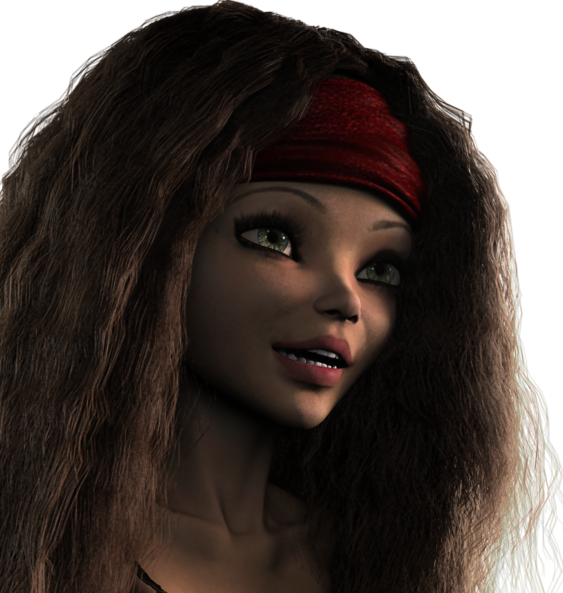 This is by no means a good render - settings are about as low as Carrara goes. But I did add roughly 70,000 more strands of hair than the pictures I've shown lately, while reducing the size of the strands as well. When I started a render with the hair's render settings at max on the slider (500 - I think it goes higher by manual entry), it was going to take too long for this simple still shot.
I basically wanted to show a small example of how Rosie's eye gleam works during an animation, though it's a still... so it's still not showing what I want.
Feels good to be rendering Rosie 5.2 in Carrara though!
Doing this short demonstration animation got me wanting to go back to the drawing board with another new version of Rosie. Again, start by building a preset for her in Daz Studio so I have a backup preset in case I add morphs that I want to add to her later.
This hair is so much more "Alive" than the dForce hair I'm using in DS. I think that, learning from what I've done so far, I should dig into Rosie's dynamic hair again and shhot for something even better.
I have enough rendered of the DS version for the project I want to finish now ASAP, so the timing feels right to me.
Ah, that really is beautiful hair Dart. Dang it, I shouldn't be up this late, but a combination of coincidences has kept me up diddling around on nonsense. It started when I found an old M4 texture that looked really quite decent and kinda familiar. Paired with a morph I found, and then I was like 'do I have something like the armor in one of my top 5 favorite sword fights of all time?' Then Dart gets me thinking about hair, and how I'm way overdue to get back to playing with it, and I wonder 'could I whip up a messy mullet in a few minutes?' Ah, the nonsense I fritter my time away doing... :)
 "Why it’s so hard to make CGI skin look real" - VOX
Dartanbeck said:
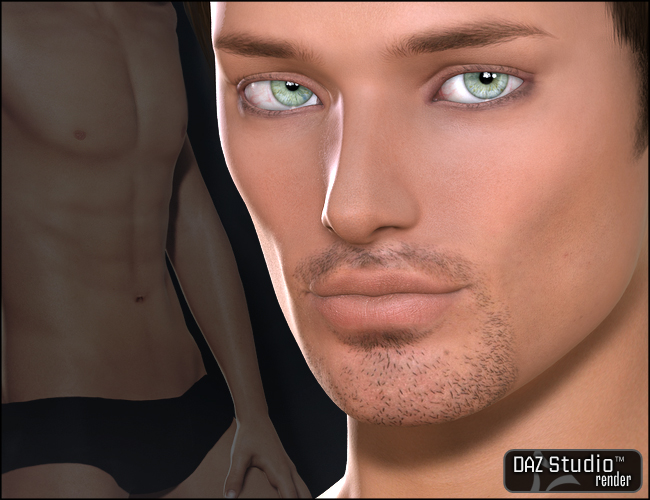 Just a quick FYI:
While on the subject of Liquid Rust stuff on sale, I'd just like to point out that we can use products like Calvin for V4 for Genesis.
Simple method:
Load in the Genesis Basic Female character preset and dial off the Basic Female morph and shape Genesis however you'd like.
Now it's just a simple process of setting up the shaders with Calvin for V4's maps ;)
Yes, and he's not the only male built for V4 UVs, in fact I was surprised to find a lot of them as I was going through my character sets and saving out a shader set for each one. V4 was the queen of crossdressing UVs, lol. Here's the ones I found:
The GW bundle is probably pretty obvious:
https://www.daz3d.com/victoria-4-gw1-male-texture
https://www.daz3d.com/victoria-4-gw2-male-texturehttps://www.daz3d.com/victoria-4-gw3-male-texture
https://www.daz3d.com/victoria-4-gw4-male-textureThere was Vittorio, although I don't own that one and it isn't in the store anymore, there are still some textures built to fit Vittorio, which is V4 UV, the ones Morris did for Vittorio:
https://www.daz3d.com/zere-for-vittorio-4
https://www.daz3d.com/jinn-for-v4-male-vittorio
Also Xavier by Morris, but apparently that's no longer available in the store.
Calvin, as you mentioned, by Liquid Rust: https://www.daz3d.com/calvin-for-v4But then I found some that were suprising:
Aaron for young teen Justin: https://www.daz3d.com/aaron-for-genesis-young-teen-justin
Edward Odd by Silver/Jessai: https://www.daz3d.com/emelie-and-edward-odd ; (probably not surprising that Emelie from that bundle is a V4 UV too)
Also there was Paul by 3dream over at Rendo
And I'm not sure how to classify this, but the Genesis Baby also uses V4 UVs.
I also found a lot of other oddities, strangest perhaps of all was that Stephanie 5 is a crossdresser too!Hayden for young teens is built on a Steph5 UV: https://www.daz3d.com/hayden-for-young-teen
On the other side of the coin, I could only find one female texture that was built for an M4 UV, which was Mina by pdxjim, apparently no longer available in the DAZ store.But the weirdness didn't stop there. I found several products that were advertised as being Michael5 exclusives, but found that the UV was actually Michael4:
Ohia: https://www.daz3d.com/ohia-for-michael-5
Nigel: https://www.daz3d.com/nigel-for-m5
Tyrese: https://www.daz3d.com/tyrese-for-m5
In the same vein, I found a lot of Michael 6 products that were actually built with Michael 5 UVs, here's some examples:Ash for teen Jayden: https://www.daz3d.com/fw-ash-character-and-accessories ;
Dan for M6: https://www.daz3d.com/fw-dan-megapack
Ja-long for Lee 6: https://www.daz3d.com/fw-ja-long-hd-for-lee-6
There were even more on the female side that use different UV maps than the figure they advertise, such as V6 characters actually built with V5 uv maps, but I kind of ran out of oomph to go find and list them all (maybe later I'll edit to add more).
Btw, I don't think of it as false advertising, since in each case the character does actually require the advertised morph, even if it's built using a different UV. It's just odd that they don't advertise it as also being compatible with the character of the UV it's actually using.
has Headshop fixed the eyelash problem?Well alan bard newcomer you are more than welcome to contact this vendor and discuss the matter with him. He does provide support.
The plugin does make the morph. No plugin [yet] both makes and saves a morph. In the saving process one normally "polishes" the morph dial so it will work as desired. For example one might set the minimum value to "0" - change the colours of the dial, things like that. And while there, make sure the auto-follow is checked.
"Why it’s so hard to make CGI skin look real" - VOXJust a quick FYI:While on the subject of Liquid Rust stuff on sale, I'd just like to point out that we can use products like Calvin for V4 for Genesis.
Simple method:
Load in the Genesis Basic Female character preset and dial off the Basic Female morph and shape Genesis however you'd like.
Now it's just a simple process of setting up the shaders with Calvin for V4's maps ;)
Daz 3D is part of

Connect
DAZ Productions, Inc.
7533 S Center View Ct #4664
West Jordan, UT 84084Licensing Agreement | Terms of Service | Privacy Policy | EULA
© 2026 Daz Productions Inc. All Rights Reserved.