-
Noska 8.1
As usual I like the morph. The skin is pretty useless to me since I'd be converting it to 3DL anyway, and if I'm going to do that, I might as well just use a different skin.
The long kimono is tempting, but it's dForce, and it looks like dForce only So not that interested. The only other thing even remotely useful to me would be AprilYSH's new hair, but I'm pretty well stocked with hair models. Ergou's new hair is attractive, but its Iray only, and hair doesn't always convert to 3DL that well.
So, a whole lot of nope. I will probably watch for sales on the character and the hair down the road. But for the moment I'm not interested.
XTransfer Module 1- Genesis 3 to Genesis 8 Morph Converter (Commercial)Zev0 said:
Did you retry the morph? What morph is this so I can try on my side.
I've retried the morphs. Either Genesis 3 female or victoria 7 based don't work for me. The base Victoria 7 morph even doesn't transfer correctly.
XTransfer Module 1- Genesis 3 to Genesis 8 Morph Converter (Commercial)Did you retry the morph? What morph is this so I can try on my side.
GoZWhen you use GoZ, on a sub-divided model, you are asked if you want to use the current resolution (or divisions - I can't rcall the exact wording). For a morph you don't.
FBX weight values export issueI decided to create this thread because it seems that DAZ FBX exporter doesn't work properly. At least for me.
https://www.daz3d.com/forums/discussion/517201/model-looks-shattered-when-i-sent-it-to-maya#latest
I am facing the same problem as the person started that ☝️ thread. And after doing some research import-export moves I have to say that FBX export doesn't transfer Weight Maps (attributes, values, ..) correctly in those cases when "SubDivision Level" parameter is set (and locked) to anything above 0. Or.. Maybe I am wrong and I just need (as the developers of DazToMaya Bridge) to export those Weight Maps correctly by locking some parameter.. ¯\_(ツ)_/¯
I attach the GIF-file ( https://s9.gifyu.com/images/eq2yWGJoiA.gif ) that shows my exact actions during use of DazToMaya Bridge and I also attach 2 screenshots from Houdini viewport with Weights visualized on both SubD 0 ( https://i.imgur.com/BDr2hez.jpeg ) and SubD 2 ( https://i.imgur.com/U0hTcRd.jpeg ) *.fbx models exported from DAZ using regular "Export" option.
XTransfer Module 1- Genesis 3 to Genesis 8 Morph Converter (Commercial)Zev0 said:
Hi. Was the transfer session interrupted? eg was studio minimized or placed in background over a browser? That is the only time a morph transfer gets corrupted mainly. Also, how many morphs were being transferred when this happened?
The transfer was not interrupted. I only transfer one character morph at a time so I can check if the morph transferred correctly.
GoZNot sure, I did not export, I just hit Goz in daz, brought it into zbrush, when I hit zbrush to export a really tiny geometry to the model, it came back into daz as a new solid model, and only one small box opened and gave me no options to add as a morph.
Umbra Outfit for Genesis 8 & 8.1 Females [Commercial]You (HH) are obviously skilled at crafting a good quality mesh but I'm not really into these fetish sets. I would humbly request that you put those skills towards making a non-fantasy lingerie set. One that might be bought in a real-life department store?
I've looked and can't find a good, realistic full set of bra/panties/garter (suspender belt), perhaps with a thin-soled (non-platform) pair of high-heels. Many of the available stocking sets don't even allow for the pull of the suspender clips (sorry, I don't know the correct terminology). Also, the couple I have bought suffer badly from poke through the moment I dial in a morph to G8F. I never use a base G8F so those purchases are difficult, if not impossible, to fit to my characters.
GoZI am using Daz3dStudio, newly updated....and trying to use GoZ to Zbrush....all goes well, I do my morph that I am adding, then from zbrush I go to GoZ and when it comes back into Daz, I have not options to bring it in as a morph, only an object, really small box but it does not allow me to choose...example.....GoZ update Options box does not even open up. What am I don't wrong? It use to work with no problems. Please help
Rheena Centaur for G3F [commercial]Wonderland said:
Two questions: Can you change the morph and skin on the girl? (I'm primarily interested in the zebra skin.) And what bow/arrow was used for the poses? Thanks.
Horse body and human body are one morph.
The textures included are made to work how I liked the division between horse and human, not along the actual graft lines, so if you change the human skin, you will have a seam that does not blend well.
as far as the bow.....that was made so long ago, I really have no idea...sorry
Rheena Centaur for G3F [commercial]Two questions: Can you change the morph and skin on the girl? (I'm primarily interested in the zebra skin.) And what bow/arrow was used for the poses? Thanks.
Morphing fitted itemI have used Blender to make morphs for the base figures, but now I wanted to make morphs that would mostly effect a fitted 'item'.
In DS the base figure is posed and this pose is changing the item, the item also has morphs of it's own that are applied.What I'm trying to do would be a sort of corrective morph that would partly effect the base figure but mostly the fitted item.
I can OBJ export the base figure and the fitted item separately to Blender, but in there they are separate objects and I don't know how to proceed from there.
I tried parenting, but that moved the item way off the base figure.Any hints on how to proceed?
Noska 8.1
Only a few characters got the tattoos done right... for example G8M NoburoHylas said:I like-not-love Noska.
Her body morph looks great!
Skin and head morph look good, but nothing too special as far as I can tell. I find her face not all that distinctive in some of the promos.
Her tattoo looks better than V8.1, but in some spots still looks more like body painting.
Noska 8.1I like-not-love Noska.
Her body morph looks great!
Skin and head morph look good, but nothing too special as far as I can tell. I find her face not all that distinctive in some of the promos.
Her tattoo looks better than V8.1, but in some spots still looks more like body painting.
New one for me. Part of the hair doesn't auto-follow.The ponytail has a rigidity group to stop it deforming when different shapes are applied. It works great for most shapes, but some body scaling morphs aren't playing nice with the rigidity. (I don't have your particular one, but it happens with the giant HD scaling morph). A partial fix would be to remove the rigidity group. Select the ponytail, go to geometry editor and choose vertex mode, then right click the rigidity group that shows up and delete it. Best to do this before you apply your morph, otherwise you'll need to go to scene tab and with the hair selected, click the dropdown menu and click assets - clear generated morphs. I say partial fix, as without the rigidity, the ponytail may be a little distorted by your morph.
hi can someone tell me why this happening to the genesis 8 male charactersWhen did you first notice the issue with the bending? Can you recall which sets - characters or morph sets - you had installed just before it started to happen?
[Released] Thickener plugin [commercial]
Just bought the thickener plugin, and have not read the PDF yet. I'm primarily interested in using it on both hair and clothing to help with stylized/toon style renders. I used it here on the hair, the necklace, and the dress.
Thought I would share in the event this is not known to all, but I was able to export the new thick dress to Marvelous Designer and bring that back in as a morph (since that technically exported as 'base'). This was applied to the new geometry as I deleted the old. Might be a way to get more polygons for the MD simulations to get around the base export limit :) Took a long time with my GPU though.
AIUTO...CHI CONOSCE L’ITALIANO? PARTE TREDICIKainjy said:
https://zbrushcore.com/compare.php
Ad occhio rapido:
- Non hai l'import/export in FBX.. per cui i rigging fatti con le dynasphere restano in Zbrush.. puoi sempre usare l'OBJ come formato (DAZ lo supporta)
- GOZ non c'è.. per cui il bridge di DAZ non funziona (devi esportare e reimportare i file in OBJ manualmente)
- Manca la possibilità di creare texture: non ti f fare l'UV Mapping e nemmeno dipingere una texture (ti fa applicare solo colori singoli alle geometrie)
- Niente Fibermesh: niente peli 3d
- Hai meno pennelli
- Molte funzioni sono basiche senza parametri avanzati
Puoi usarlo comunque per modellare/scolpire. Se devi fare dei morph è più che sufficiente
UVmap, Texture e pelurie varie li puoi fare con un altro programma 3D@Imago
qualcosina in Zbrush la so fare... ho già provato in passato a scolpire qualcosina di basico (un vaso, una spada).Inoltre ho visto molti tutorial brevi in Italiano (cerca Accademia Zeta) mi manca però molta manualità (che è il cardine del software).
1) Poco importante, DAZ Studio non li supporta e i Dev non hanno la benchè minima intenzione di fixarlo esattamente come tutti gli altri bug. Alla fine non sono più bug ma features (à la mec!).
2) Non funziona quasi mai correttamente per cui devi in ogni caso fare export-import.
3) Quello sarebbe molto più scocciante in effetti...
4) A che ti servono le fibermesh al giorno d'oggi? Usa direttamente gli StrandBased
5) Dai retta che alla fine usi solo i sei iniziali per tutto. Ho visto un pò di video di "gente che ne sa" e non vanno mai oltre un certo tipo. In effetti a che ti serve un pennello "noise" quando hai già le maschere?
6) Su questo non dico nulla, ma credo valga il discorso del 5.Se hai molto fegato e pochi soldi, a questo punto opta per Blender che fa tutto quello che chiedi. C'è pure il bridge che (per ora) funziona e addirittura tieni il rig e i morph.
Il fegato ingrossato perchè nonostante lo abbiano reso qualcosa di fruibile non solo per Sheldon Cooper, ha comunque una curva di apprendimento ripidissima. E il loro sistema sinistrorso è una ginocchiata sui denti piorreici da paura per chiunque arrivi dal sistema destrorso.
 XTransfer Module 1- Genesis 3 to Genesis 8 Morph Converter (Commercial)
Hi. Was the transfer session interrupted? eg was studio minimized or placed in background over a browser? That is the only time a morph transfer gets corrupted mainly. Also, how many morphs were being transferred when this happened?
Import/Convert xnalara .mesh.ascii / .mesh / .xps models?FSMCDesigns said:
margrave said:
Haruchai said:
margrave said:
Use the XNALara importer to open them in Blender. If you use snapping and the shrinkwrap modifier, you can theoretically make a morph for Genesis that conforms exactly to the XNALara base model. However, Blender has better posing/IK capabilities than Daz anyway, so unless you really want yo swap their hair/outfits, you're better off just posing them in Blender and exporting as an OBJ if you want to render in Iray.
XNALara/XPS has the ability to export to OBJ directly, and gather the textures, so not sure what the benefit if having Blender as an intermediate step is. Is there one?
The OP is asking how to open XPS format models they found on DeviantArt. They didn't say anything about using the actual XNALara program. That's another option, though it's not one I'm familiar with.
That is the way I do it since blender makes no sense to me. pose it in XPS/XNALara and then save as OBJ and import into DS. I used to import it into 3DSMax and pose it, but the plugin stoppd working.
It's how I did this image
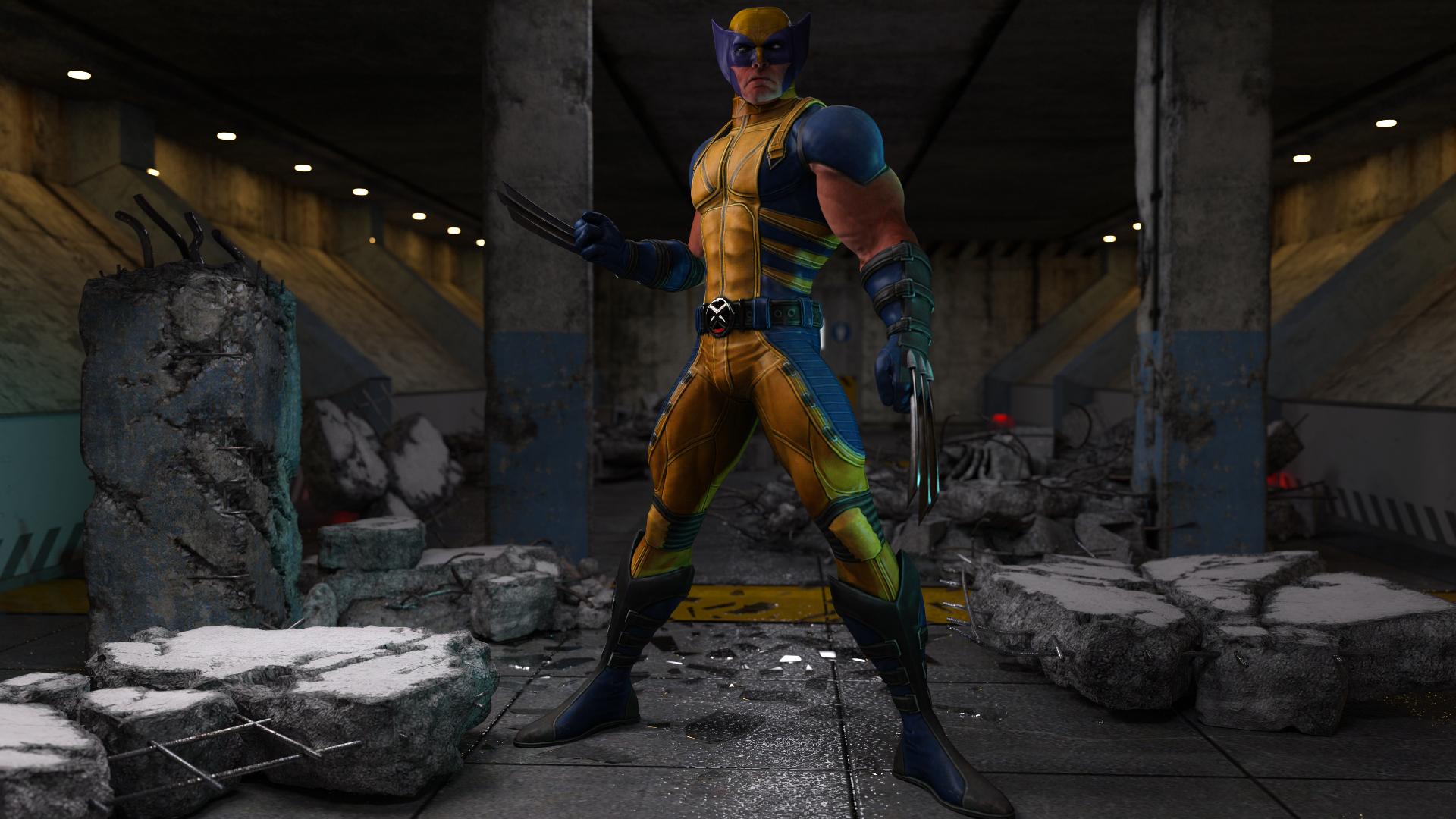
If possible to share , What setting You`ve used when importing OBJ from XNA ? Those object always flipped in DAZ studio
Daz 3D is part of

Connect
DAZ Productions, Inc.
7533 S Center View Ct #4664
West Jordan, UT 84084Licensing Agreement | Terms of Service | Privacy Policy | EULA
© 2026 Daz Productions Inc. All Rights Reserved.