-
Auto Face Enhancer [Commercial]
bagnoz said:
' and there is weird morph around the neck ...
Yep, there is weird neck join. It can be smoothed with a few corrective morphs.
DFORCE ProblemsI wish they could improve deforce, I tried marvelous designer but I cant afford that and it also doesn't work with everything either.
If clothing can't drape or fall on a surface, then why dont vendors just make morphs for all clothing that have a drape or laying on floor morph dial?
I dont understand why none of them won't do this so we don't even need deforce anymore. It's the same thing with how some sofas I own have morphs where if a character is
sitting the cushion has squish morphs. Yet you have vendors still making sofas that dont even come with the most important feature. A sitting effect.
It seems like no matter how many clothing items I try to deforce none of them wont work..
Morphs from Blender to Daz not working properly [Solved]The main thing is to make sure the preset used in the OBJ exporter matches the preset used in the importer/Morph Loader.
About the transfer utility option, that is, the problem of transfer bindingRichard Haseltine said:
Please put the Viewport in Smooth Shaded mode if you need to show a nude figure.
In the dialogue, set the Source Shape to Current (or if it's a single morph, pick it from the list) then in More Options check Reverse Source Shape from Target.
Thank you for your answer. I will pay attention to it. However, after doing it according to your method, there are still some problems with the model weight. What should I do at this time? The white part is the model I imported. You can see that the weight on both sides of the mouth is incorrect.
Auto Face Enhancer [Commercial]It doesnt work with G8.1, at least for the materials, it doesn't apply on torso and there is weird morph around the neck ...
Hair and Elf ears, how do I stop this? (Problem solved)PixelSploiting said:
Right-click on the properties tab and pick "show hidden properties", then check all the now-showing hidden morphs for the hair item. Or check the "currently used" values for the hair because the character ear morph will be greater than 0.
Thanks. I have a bad memory, and I remembered something about hidden morphs, but I could not figure out how to do it again, and then another problem I was having is I was looking in the shaping tab, but for some reason, the morph does not show up in the shaping tab, even when show hidden is checked, not sure why, but it was there when I looked in the parameters tab... Thanks again, you saved me a lot of frustration.
AIUTO...CHI CONOSCE L’ITALIANO? PARTE TREDICIKainjy said:
hai fatto un po' di confusione.. Clo3d e Marvelous sono della stessa azienda (vedi in fondo alla pagina internet dei prodotti sui contatti) e sono al 90% lo stesso software.
Non li usi per cui non so esattamente chi li faccia, so solo a cosa servono.
 Io gli abiti per i miei personaggi me li creo da solo sadattando quelli esistenti e solo raramente li faccio interamente io. Non è difficile una volta che hai delle basi.
  Ci si può anche creare dei modelli di partenza e utilizzare quelli sempre, tipo una gonna corta, una media e una lunga e partendo da quelle basi aggiungere o togliere fino ad avere quelle che serve. Poi giù di Transfer e DForce e sei felice.
Puoi anche spulciare un pò in giro e trovi anche dei modelli pronti Merchant Resource e sei ancora più felice.
Parlando d'altro, avete visto che hanno intenzione di combinare al PC+?
 Hair and Elf ears, how do I stop this? (Problem solved)
Right-click on the properties tab and pick "show hidden properties", then check all the now-showing hidden morphs for the hair item. Or check the "currently used" values for the hair because the character ear morph will be greater than 0.
Hair and Elf ears, how do I stop this? (Problem solved)PixelSploiting said:
It's character ears morph under "hidden" in either properties or shaping tab. If you switch Daz to showing hidden properties for the hair item and then dial this morph back to 0 it will go away.
When clothing and hair are fitted to the character Daz is automatically copying morphs from the character. They all land in the hidden morphs properties.
Hmm, how do I do that? I have been goofing with it for about 5 minutes now and can't find it, Thanks for the quick reply BTW.
Hair and Elf ears, how do I stop this? (Problem solved)It's character ears morph under "hidden" in either properties or shaping tab. If you switch Daz to showing hidden properties for the hair item and then dial this morph back to 0 it will go away.
When clothing and hair are fitted to the character Daz is automatically copying morphs from the character. They all land in the hidden morphs properties.
Celebrity Look-a-Likes for 3D figures part 3Hi! I've made Chris Hemsworth using Magnus1781 Deviant user's morph. What do you think?
Morphs from Blender to Daz not working properly [Solved]RL_Media said:
It's scaling issue. When importing the morph with morph loader, remember to set the scale to 10000 I think it is off the top of my head.
Problem solved. Cheers!
3D Art Freebie Challenge August_September 2021-"Science" -Entries Thread OnlyMy daily routine
One day from the Engineer's work

Freebies:
https://www.renderosity.com/freestuff/items/88234/desk-and-bookshelf-for-daz
https://www.renderosity.com/freestuff/items/79697/corkboards-thumbtacks-and-flyer-for-daz-studio
https://www.renderosity.com/freestuff/items/82979/a-few-books-hardbacks-for-daz-studio-4
https://www.renderosity.com/freestuff/items/86919/modular-room-for-daz-studio (floor remapped with a shader)
https://www.renderosity.com/freestuff/items/84803/db-nobel-gas-lights-xenon
https://www.renderosity.com/freestuff/items/80004/venetian-blind-store-v233nitien
https://www.deviantart.com/ancestorsrelic/art/Electric-High-Security-fence-system-as-OBJ-299504446
https://www.cgtrader.com/free-3d-models/exterior/industrial/old-concrete-fence
https://sharecg.com/v/96440/gallery/21/DAZ-Studio/Ligeias-Military-Footlocker-with-Padlock
https://www.renderosity.com/freestuff/items/74365/office-chair
https://sharecg.com/v/71953/gallery/21/DAZ-Studio/Ghastlys-Ghastly-Lab-Coat-genesis-1
https://www.deviantart.com/tom2099/art/Tom2099-Iray-Car-Paint-2-643769532
https://developer.nvidia.com/vmaterials
https://www.sharecg.com/v/97305/
https://www.deviantart.com/smida460/art/Freebie-SmidA-Woodshader-889460034
https://sharecg.com/v/96438/browse/21/DAZ-Studio/Little-Robot (remapped with a shader)
https://www.renderosity.com/freestuff/items/77164/repair-drones
https://polyhaven.com/a/abandoned_hopper_terminal_03
https://www.renderosity.com/freestuff/items/80771/ivys-magic-pane-background-propPaid :
https://www.daz3d.com/tousled-hair-for-genesis-3-and-8
https://www.daz3d.com/mri-roomNo count :
Genesis 8 Male plus essentials.
My own morph.Primitives (planes, cubes)
Morphs from Blender to Daz not working properly [Solved]It's scaling issue. When importing the morph with morph loader, remember to set the scale to 10000 I think it is off the top of my head.
Morphs from Blender to Daz not working properly [Solved]Complete beginner with Blender here. When importing a Genesis 8 Basic Female (no morphs, clothing, hair, anything) into Blender, I'm able to do some basic scultpting. When using the "make new morph" option, everything seemingly works out fine as outlined in probably the most popular guide on YouTube for the bridge (not sure if I'm allowed to link) until the very last step.
Instead of applying the morph to the G8F figure, the created slider (generic name "to_daz_morph") does nothing but shrinking/enlarging the figure. I did not rename the morph during export from Blender, or import into Daz. obj. file is displayed correctly in 3D Viewer. Using current version of Daz unless I'm much mistaken. From my layman's perspective, something goes wrong during import into Daz, but I'm not sure what.
I'll provide screenshots if you need them. Thanks for the help.
GenX2 Error*slaps forehead*
Thanks. Not sure how I missed that.
*edit*
Bought it, now I'm getting this:
GenX - Transferring morphs.Creating clone morph ...
Loading figure ...
C:/Users/user/Documents/DAZ 3D/Studio/My Library/data/DAZ 3D/Genesis 3/Female/Genesis3Female.dsf
Creating intermediate clone morph ...
Loading figure ...
Error loading figure.
Error creating intermediate morph from clone.
Error creating morph from clone.
GenX2 ErrorSorry if this is the wrong part of the forum, please move if so.
Ok, I'm stumped. I installed everything I think I need, GenX2 and the Genesis 3 add-on. I try to transfer a character from V4 to Genesis 3 and I get this error message:
GenX - Transferring morphs.
"Creating clone morph ...
Loading figure ...
C:/Users/username/Documents/DAZ 3D/Studio/My Library/data/DAZ 3D/Genesis 3/Female/Genesis3Female.dsf
Could not find intermediate figure definition.
Error creating morph from clone."
I've uninstalled, reinstalled, installed with DIM, but nothing seems to work. Anyone else run into this issue and if so, how'd you fix it?
Thanks in advance.
Hylas' corner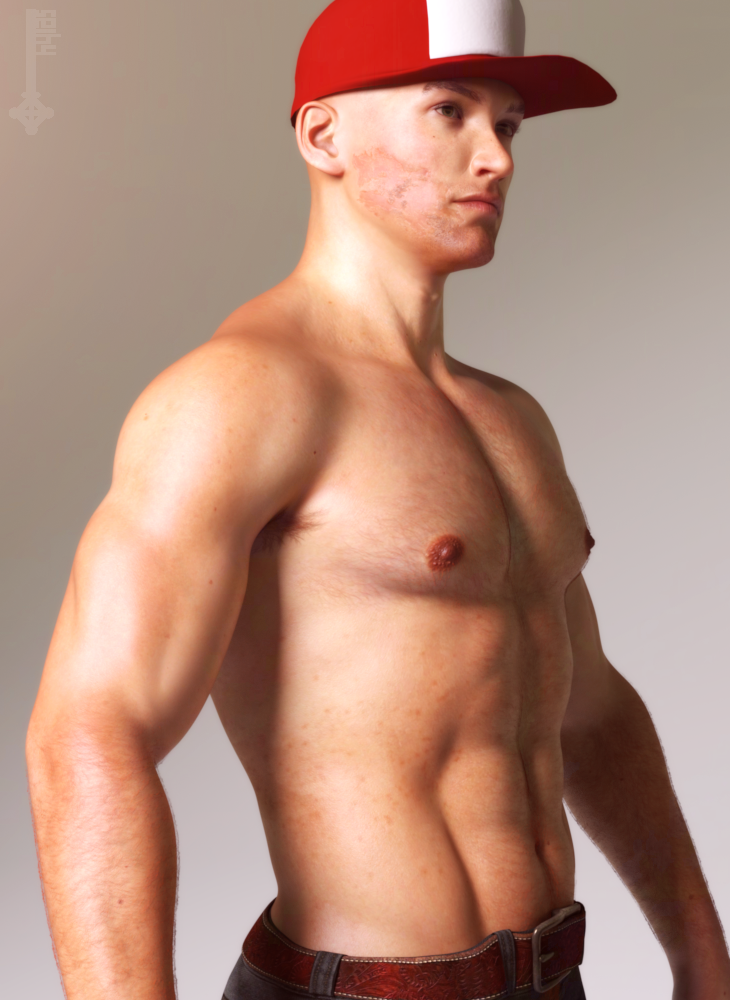
I bought Nikolas when he was discounted for his skin, and it does not disappoint! This is out of the box, I only added bodyhair.
His morph... well, he´s kinda plain looking. Intentionally so, I think, reading his description ("Just an average guy...")
But I can´t have average looking guys in my renders because I´m basic like that, so I had to hottify him.
Really confused about MorphsI export my character fine, i retarget the animations fine, i can see all the morph targets in the mesh pane and can tweak the settings, but as soon as i save and close the panels they revert to default again and my character goes back to original export look. Reopening the mesh/ skeleton dialogue all the sliders have reset to "Auto" checked and reverted to their zero state. How can i actually save the morphs so my character looks the way it should?
Danny
About the transfer utility option, that is, the problem of transfer bindingPlease put the Viewport in Smooth Shaded mode if you need to show a nude figure.
In the dialogue, set the Source Shape to Current (or if it's a single morph, pick it from the list) then in More Options check Reverse Source Shape from Target.
Daz 3D is part of

Connect
DAZ Productions, Inc.
7533 S Center View Ct #4664
West Jordan, UT 84084Licensing Agreement | Terms of Service | Privacy Policy | EULA
© 2026 Daz Productions Inc. All Rights Reserved.