-
More Non-photorealistic Renders (NPR III)
Been chewing the fat with another Daz artist on Comicfury. He's under the unfortunate assumption that realistic renders are all but impossible to turn into NPR via postwork, citing Filament renders as an example, but I regulary turn Filament renders into nice comic-style backgrounds.
 No Renderer Available Message
WendyLuvsCatz said:
all the yellow highlighted ones
Do need for the DSON Importer (Poser, and there can be only one anyway as far as I know), PostgreSQL (there can be only one, stick with the identical general release version), or Valentina to PostgreSQL tool (needed to be run once by users who had a database using the old Valentina engine that they wished to keep using in PostgreSQL, but Valentina was dropped arounf 4.6 I think and hasn't been an option since 4.8 or 4.9).
I am a Windows user with 4.11 as my release build because I don't have a RTX card so need the Optix prime disabled to get more VRAM
I use the latest beta (mostly for Filament which sadly you still have no support for) as well with no issues
so running both on Mac should be possible too
No Renderer Available Messageall the yellow highlighted ones
I am a Windows user with 4.11 as my release build because I don't have a RTX card so need the Optix prime disabled to get more VRAM
I use the latest beta (mostly for Filament which sadly you still have no support for) as well with no issues
so running both on Mac should be possible too
Eyes looking at camera texture shaded vs iray preview mismatchSwitch from texture shaded to Filament. It's much more WYSIWYG. There are brightness offsets that can be employed to make it more pleasant to view.
I cant see what i'm doing. lolMaybe you are using filament as a preview. You can use another preview mode or adjust filament.
To do that create>New Filament Draw Option Node Then select this node in the Scene tab and go to parameters>Tome Mapping and reduce the Iso Scale.
Clothes look wrong?Assets are supposed to look good only when rendered. To have a better idea of the final look, you can change the preview mode (in the upper right of the screen). It seems to be "texture shaded" and you can turn it to "Nvidia iray" (but it significntly slows down the display) or to "filament (PBR)" (the coloring is less faithful, but remains decent).
Help with getting puddles to show in in after rain 2Help with getting puddles to show in in after rain 2
I can see the puddle layers in filament but dont seem to show up in iray and I did make it higher than the ground, the puddle layers look huge also, how after Ic an get it to show do make it individual small puddles?
thanks
Is Animation scrubbing possible?980Ti here too, hence I use smooth shaded
or Filament but DAZ not made that work on Mac yet
 iClone 8 and CC4 anyone?
I took the plunge and upgraded to CC4 and iClone 8 just a day or so ago... Still downloading and making sure I have everything I'm entitled to, as I do get free upgrades to the plug-ins I already own, which is good.
I love Studio and I even love iRay (most of the time) but sometimes I just want my stories to move! I have never figured out Filament,and while I have achieved very moderate success in Blender, there are now so many versions of this software, I don't know which one I'm supposed to use? Animation is hard work, so if there are tools around that make it easier, I am happy to partake.
There are dozens of videos on YouTube showing what CC4 and iClone 8 software can do. It is quite overwhelming, really, almost too much to comprehend and of course, the big question is whether I can do any of it??? Well, probably not, but I'll have a go, I guess.
I did try my first import from Studio into CC4 yesterday and everything was fine - up to a point. I had shoes and socks on the character and the feet with socks were out of the shoes when the import finished, so I'm not sure what went wrong there - I need to hunt down a fix for that. Also, my characters shirt looked like it had been painted on him, not beeing worn, like a shirt would - again I have to work out fixes - there are probably ones I had with CC3 but i just can't remember, so I'll have to go back and refresh my memory.
But otherwise everything, including clothing, eyes and hair looked good. I imported into iClone 8 and had my character walking around a forest set I built pretty quickly, with HDR - well, I was pretty happy with the very basic results, considering my effort input was minimal.
The big difference I notice between Daz and Reallusion is the price of the software and anything you might want to add. Even a package of just plain old expressions for CC4 is around US$100, so a big jump up from Daz' prices, especially if you pick things up here on the many sales here!
I have achieved some (very moderate) level of success with CC3 and iClone 7, so maybe my investment will inspire me to plunge forward with iClone 8. Of course, all those features videos are done by people who actually know what they are doing, something that I am sadly lacking in. But if it is as easy to do animations in iClone 8 as they are claiming, I should be putting Pixar in the shade by oh, next week.
Is Animation scrubbing possible?yes or use smooth shaded view
Filament can with simpler scenes on my PCs, iray no way
 problem with ancient treasures product
Hi,
I so happen to own that asset. I uploaded it, it took a bit to load, but had no issues on deleting them while on texture shaded. However, something interesting did happen. If I turn off the eye in one set while in iray, the iray preview still shows the whole thing. Look at the aux view vs the iray preview in the attached image. I need to exit iray preview and go back to it to see the changes. Also, deleting while in iray preview gave me no issues. I don't use filament at all so i forgot to check that.
Since I'm not having the problem you have try reinstalling if you haven't done so yet.
Cheers
problem with ancient treasures productSo you are saying, you cannot load this set and then delete it, without DS hangs, under the condition that you haven't been in either Iray preview or filament drawmode?
And if you don't get any warnings in the log, then I would try to look at your memory consumption. It doesn't make sense as you have 64 GB which should be more that sufficient.
What happens if you load a G8 character with cloth and hair, and do similar? Does that causing any problems?
New DS Filament Render EnginemCasual said:
was able to get correct opacity/transparency with filament.
Could you explain it better, please?
problem with ancient treasures productDoes this also happen if you don't go into Iray preview or Filament?
And you said it only happens if you load 2 sets, i.e. if you load just 1 then you can delete it without issues?
problem with ancient treasures producthi Guys..i have a big issue with this product
https://www.daz3d.com/ancient-treasure
everytime im loading 2 props of it and then im try to delete them the program hungs or doesnt respond for a really long time...same is hoppening when turning from iray to filament...im aware that instances plays its role to this but usually with all other products takes some time and then it ok...
i have an i9 7920k (2.90) with 64 of ram and 2 2080 - one is ti...daz and drivers fully updated...
anyone else experienced same situation with this product?
thanks in advance!
New DS Filament Render EnginemCasual said:
by merging 2 hair pieces in one ( export/import .obj ) a was able to get correct opacity/transparency with filament.
Can't confirm, maybe I misunderstood (advanced beginner)?
I loaded a hair and exported it as hair1.obj and again as hair2.obj.
Then loaded both in Hexagon, grouped them, selected and exported as hair3.obj
Then imported as hair3.obj into DAZ Studio:
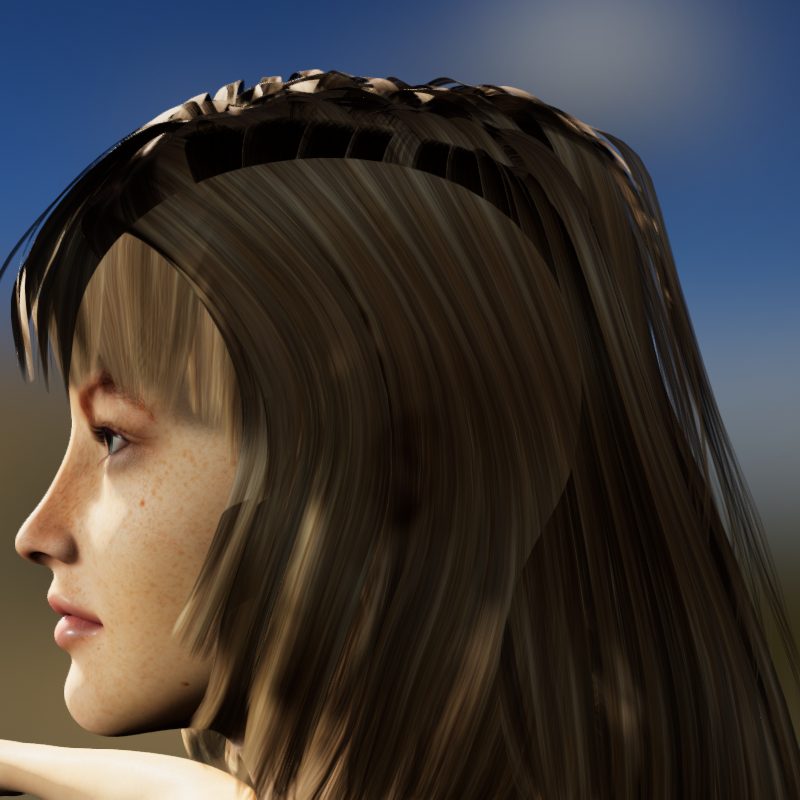
Edit: Before rendering I switched between Iray and Filament
New DS Filament Render Engineby merging 2 hair pieces in one ( export/import .obj ) a was able to get correct opacity/transparency with filament. Oh the other trick is to switch the view mode to iRay or the others, then switch back to filament preview mode, this seems to solve some issues with transparencies and lights.
( yes a static hair prop is not the same as real hair )
 Loading the Highlands set makes daz crash-problem solved-cannot use filament view
I wrote to Aako the maker of Highlands, he tested it, turns out filament is what was making daz crash-
he wrote me to put both viewports into texture shaded and there shouldnt be a crash, there was not, I then put it into iray preview and no crash,
Aako also wrote me this-
With my tests I could see that "FIlament (PBR)" does not support Instances well and if their total number exceeds a certain threshold, it crashes Daz Studio. These quick tests showed me that the maximum threshold tolerated by Filament is around 5000 instances (Not sure of the exact number). My Highlands product has over 12,000 instances, so way beyond the filament tolerance. Instances are actually very lightweight geometry clones (not real geometry) that help create a huge amount of props while keeping scene management easy and light on hardware. In Highlands, I used instances to multiply the clumps of grass while keeping the scene light.
Octagonal GlassesOK, maybe I am overstating it at the moment, but hopefully the title will fully come to fruition in time.
Please find an Octagonal Highball Glass freebie attached.
The glass is modelled on a set my wife and I bought not long after getting married. Think we have 4 left of the six.. Anyway, it's a tall glass, modelled separately from the contents. The contents have a fill level morph and a tilt morph. To avoid having to do many, many different tilt morphs I left the contents as a separate object that can be rotated in 45 degree steps to get the correct angle of tilt.
The glass and contents are totally invisible in Filament preview mode, and difficult to see in any preview mode except iRay, so I have included an opaque shader, to aide visibility, and a series of glass shaders to return the glass back to the colour you want. I have included four liquid colour shaders, Red & White Wine, Absinthe and 'Blue Lagoon' Cocktail.
This is what it looks like:
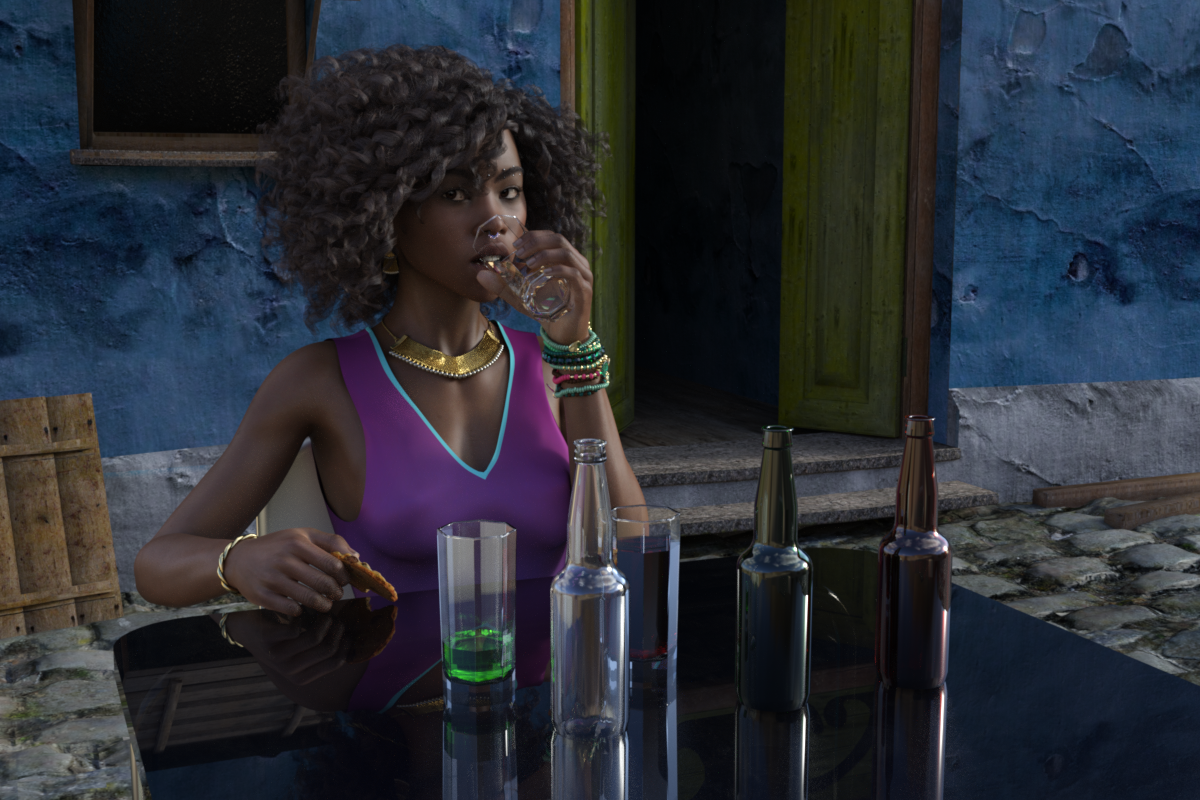
BTW, everything in that image is a freebie except the hair, skin texture and left arm bracelets.
Regards,
Richard.
Merging files bug?There are three ways to overcome this:
1 - Save the render preset of your current scene before you merge another scene/character/subset/anything and then reload it afterwards. File -> Save As -> Render Settings Preset
2 - Load the scene you want to merge on its own and then re-save it as a scene subset with a new name, File -> Save As -> Scene Subset, removing the tonemapper options and environment options nodes when the options box pops up. When you merge that, your current scene's rendering options will still be in force.
3 - Reverse the loading order. Load the scene you originally planned to merge *first* and then merge your *original* scene.
What you can't do (as far as I'm aware) is choose to not load the render settings of any merged scene, regardless if a lock is applied or not. You would expect your current loaded scene to take priority but, sadly, it doesn't. I'm pretty sure this changed around the time Filament and those additional scene items were introduced. The number of times I've quickly kicked off a render to discover it's being done at some random aspect ratio and size because I merged in something else....
Daz 3D is part of

Connect
DAZ Productions, Inc.
7533 S Center View Ct #4664
West Jordan, UT 84084Licensing Agreement | Terms of Service | Privacy Policy | EULA
© 2026 Daz Productions Inc. All Rights Reserved.