-
Daz environment texture looks horrible in close shots 5.4
This https://www.daz3d.com/the-sylph-pavilion ? Are the maps perhaps meant to tile more than once but not doing so after import?
Daz environment texture looks horrible in close shots 5.4Like the title says, whenever i go on close ups on any environment i import inside Unreal 5.4 through bridge plugin it looks absolutely horrible as the photo explains. Is there any way to fix it or did i missed anything ? I had imported as an environemt, my matrial quality level epic and scene scalability is epic ( same happens in cinematic too) did the no mipmap on every single texture as a batch inside unreal, virtual texture disabled and tried both on lumen and path tracer, same result. The asset is Sylph Pavillion.
diffeomorphic skin Materials errorI imported gen8.1 female using diffeomorphic
The skin I used at this time was HID Suzu for Genesis 8.1 Female
However, if there is something wrong with the cycles only option in the easy import daz, the blender was completely shut down and I couldn't import it. When I used the extended principled option, it worked. However, an error pop-up window appeared
And I see a difference between Toroso and the other parts of what we see in the blender, whether it's problematic
I'm a beginner in the blender I don't know how to use the node well
Is there a way to solve this problem?
Thank you for your help.
Installing, activating, and accessing Daz Studio Premier featuresRichard Haseltine said:
Heckbarth said:
Leana said:
Did you log in from DS to activate the plugins?
Thanks for asking. Yes I did, in fact, I logged out and in again... To no avail. Not really sure what to do here. I'm using pi-hole, that might be a reason. Nobody else is having this problem?
So, installed the new plug-ins (with Premier in the name) through DIM, logged in to your Premier account through Daz Studio, restarted Daz Studio?
Exactly Richard, that's what I did, thanks.
Update: After running "Content DB Maintenance"->"Re-Import Metadata" and "Process Metadata Queue", closing DAZ Studio and reopening it, the warnings are gone :)Are dsx files necessary?nemesis10 said:
teechurz_7c41d96282 said:
I'm looking to clean up a lot of space in my computer and found a treasure trove of all the Zip files it looks like install manager put on my computer. Each one is accompanied by a dsx file.
Before I delete all these zip files (since I can always reinstall from IM), I wanted to make sure these corresponding dsx files weren't necessary.
What are they for anyway? Thanks!
They are how the database knows what files and products are in your library including Smart Content, compatibility, access to updates etc... intentionally they are very small files so having lots of them save you very little space but will seriously upset your installation. Do not delete them. It is the equivalent of running a library and deciding to throw out all those funny cards that have the books' names, category, and location.
The .dsx files mentioned are used by DIM, the .dsx files in /Runtime/Support are the metadata for the Content Management System but they are not used live, they are needed only to reimport metadata.
Need to hook up a blink morphcrosswind said:
Ah ~~ Using GoZ is already more efficient than using Blender !

Again :
- linking ERC controllers / sub-components in between morph properties just needs drag 'n drop with Property Hierarchy, there's no other way (except for modifying DSF files ...)
or using a custom script
- for saving sometime, next time you may try just making corrective morph on one side (e.g. on left eye...), then import the morph by using Mirroring options in Morph Loader Pro. In this way, you don't need to create / use any selection sets, as using Attenuate by needs more steps.
Need to hook up a blink morphAh ~~ Using GoZ is already more efficient than using Blender !
Again :
- linking ERC controllers / sub-components in between morph properties just needs drag 'n drop with Property Hierarchy, there's no other way (except for modifying DSF files ...)
- for saving sometime, next time you may try just making corrective morph on one side (e.g. on left eye...), then import the morph by using Mirroring options in Morph Loader Pro. In this way, you don't need to create / use any selection sets, as using Attenuate by needs more steps.
Blender to DazThat would have many limits especially for rigging and materials, as it is not possible to translate the blender rigs to daz studio or the blender shaders to iray. What one could eventually do is to export bones and some basic materials via the principled shader. That's basically what the fbx exporter already does.
So a blender to daz bridge is the fbx exporter. The fbx importer in daz studio 4.23 is improved so you can give it a try. If it doesn't work there's the Poser workaround where you import fbx in poser, which works fine, then export as cr2 for daz studio.
blender > fbx > daz studio
blender > fbx > poser > cr2 > daz studio
Do I still have access to free bundle after Premier expires?Richard Haseltine said:
N-RArts said:
The only items that I can find in my Smart Content pane, are the items that I have already installed on my computer. Plus, I can't find the tools (e.g. Character converter) that are also included with the Premier membership. :/
I will admit that I'm new to the Smart Content pane. However I did manage to update metadata (and something else, but I can't remember what ^^')
Thenplug-ins have, like all plug-ins, to be isntalled through DIM (they need elevated privileges to write to the application folder, which isn't possible for DS itself). Then you log-in to activate them after a restart.
Ah. Okay. Thanks ^^ I typed "Premier" into DIM's search and found them.
The only issue I have now is getting everything (especially the Premier Characters) to appear in my Smart Content Pane.
Do I still have access to free bundle after Premier expires?N-RArts said:
The only items that I can find in my Smart Content pane, are the items that I have already installed on my computer. Plus, I can't find the tools (e.g. Character converter) that are also included with the Premier membership. :/
I will admit that I'm new to the Smart Content pane. However I did manage to update metadata (and something else, but I can't remember what ^^')
Thenplug-ins have, like all plug-ins, to be isntalled through DIM (they need elevated privileges to write to the application folder, which isn't possible for DS itself). Then you log-in to activate them after a restart.
Do I still have access to free bundle after Premier expires?The only items that I can find in my Smart Content pane, are the items that I have already installed on my computer. Plus, I can't find the tools (e.g. Character converter) that are also included with the Premier membership. :/
I will admit that I'm new to the Smart Content pane. However I did manage to update metadata (and something else, but I can't remember what ^^')
Blender to Dazca would be great, I would love to retouch the weightpaint of my morph in Blender instead of "adjusting rigging to shape" and ERC freeze, I also tried weight painting in daz studio but I find it really atrocious, it just seems unusable. If anyone to news since I do not think something so bad can be by default in daz studio. This must be coming from me on this point that I do not know this feature well.
Another thing, since you can not import a figure Genesis 8 from Blender to daz by concervant are weight paint modify I also tried to transfer the weight of a figure export but so far I never succeeded.
Sci Fi Space Ship by David Brinnen is currently a freebieSo...
I've checked "UNREAL" option and found Unreal Engine specific file formats there. So, skip that one.
However, I also tried "FBX" and - to my surprise - it worked for Bryce! For some reason it didn't load textures. But, what's more important, the resulting object in scene, indeed, has subgrpoups. So you can assign materials or textures as you want.


Tl;dr
1) Use "DS" via DAZ Studio to Bryce Bridge if you want to import model with subgroups and fully textured (I recommend to resize textures into smaller dimensions first).
2) Use "OBJ" right into Bryce for a simple import - however it will come out as single object only, so you'll have to use just one material for it.
3) Use "FBX" right into Bryce - it won't load textures but you'll get model subgroups and that gives you flexibility.
Other download options might be ignored. "PS" is for Poser format (I think it can be opened in DAZ Studio as well), and "UNREAL" is intended for Unreal Engine.
Hope this helps.
The Mac FAQTotte said:
memcneil70 said:
After 50 odd hours the back up finished, but only copied the oldest drive. Regardless, I installed the Daz Beta and except for the first crash (of course) the program was polite as I registered a plug-in and did metadata on new products. So, it seems both systems working fine for me. But I wish I could get Time Machine to back up the correct external drives.
I think the problem is that the new drive needs the same name as the old one or smart content have problems finding the items when they are restored to a drive with a new name, that is at least my experience.
The Content Management System uses relative paths (for files in mapped directories) so that certainly shouldn't be an issue. Hoever, backing up and restoring a database can be tricky - and PostgtreSQL is fussy about folder permissions.
The Mac FAQmemcneil70 said:
After 50 odd hours the back up finished, but only copied the oldest drive. Regardless, I installed the Daz Beta and except for the first crash (of course) the program was polite as I registered a plug-in and did metadata on new products. So, it seems both systems working fine for me. But I wish I could get Time Machine to back up the correct external drives.
I think the problem is that the new drive needs the same name as the old one or smart content have problems finding the items when they are restored to a drive with a new name, that is at least my experience.
The Mac FAQAfter 50 odd hours the back up finished, but only copied the oldest drive. Regardless, I installed the Daz Beta and except for the first crash (of course) the program was polite as I registered a plug-in and did metadata on new products. So, it seems both systems working fine for me. But I wish I could get Time Machine to back up the correct external drives.
Do I still have access to free bundle after Premier expires?also make sure that you Update metadata, checkbox in the login dialogue or in the Connect menu - it is off by default now.
Carrara Community Art Gallery - Show us your Renders!!!Steve K said:
WendyLuvsCatz said:
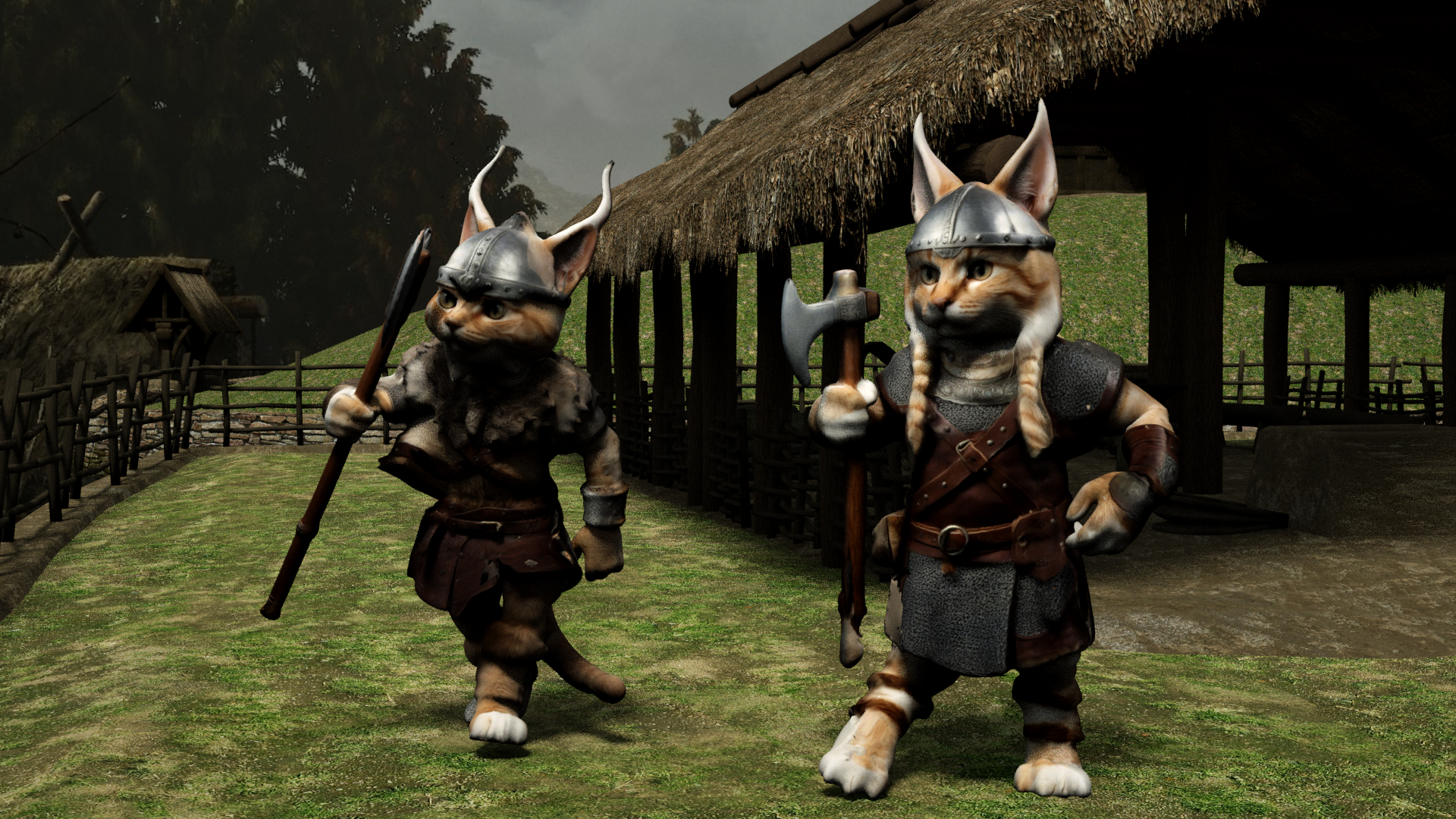
Meshy AI 3D Viking Cats
rigged with Mixamo but had to import into DAZ Studio Carrara plugin as FBX throws an error in Carrara
duf converted to blended weight saved as support asset works
Very good. I don't understand most of the maneuvers, but I think an animation is next for these guys.
it is animated but I haven't uploaded the video yet
Mixamo no longer exports an FBX compatable with Carrara but DAZ studio will import it now
so I had to save it from there
Carrara Community Art Gallery - Show us your Renders!!!WendyLuvsCatz said:
Meshy AI 3D Viking Cats
rigged with Mixamo but had to import into DAZ Studio Carrara plugin as FBX throws an error in Carrara
duf converted to blended weight saved as support asset works
Very good. I don't understand most of the maneuvers, but I think an animation is next for these guys.
Carrara Community Art Gallery - Show us your Renders!!!Meshy AI 3D Viking Cats
rigged with Mixamo but had to import into DAZ Studio Carrara plugin as FBX throws an error in Carrara
duf converted to blended weight saved as support asset works
Daz 3D is part of

Connect
DAZ Productions, Inc.
7533 S Center View Ct #4664
West Jordan, UT 84084Licensing Agreement | Terms of Service | Privacy Policy | EULA
© 2026 Daz Productions Inc. All Rights Reserved.