-
[Released] Blender to Daz Studio Plugin released!!! Official support thread [Commercial]
Artini said:
Matronius said:
I am about to release a tutorial on the transfer of a Kitbash 3D kit. The tool can handle several items and large environments. The textures are a different story as the tool can only export principled BSDF textures, so non-standard textures require manual or automatic conversion prior to export.
I have also experimented with KitBash3D assets from their own store.
The big problem for me is, that they provide textures as a separate download (.zip)
and they are not connected to the meshes, even in HDRP file for Unity.
It was not a problem before, when they sold their sets in Unity store.
The same happens with Blender format file - no maps are connected.
As a result the imported file to Daz Studio lacks materials and looks bright white.
Besides that, each small mesh has its own material, making the scene heavy.As for Blender part... from Kitbash3D kits, if you find texture maps not linked or connected, you can use the command: Find Missing Files under File > External Data..., targeting to the texture folder, the texture maps can be re-linked.
Freebie Challenge August 2025 - "Pure Cinema" - Entries ThreadTwo women, one car, no turning back.
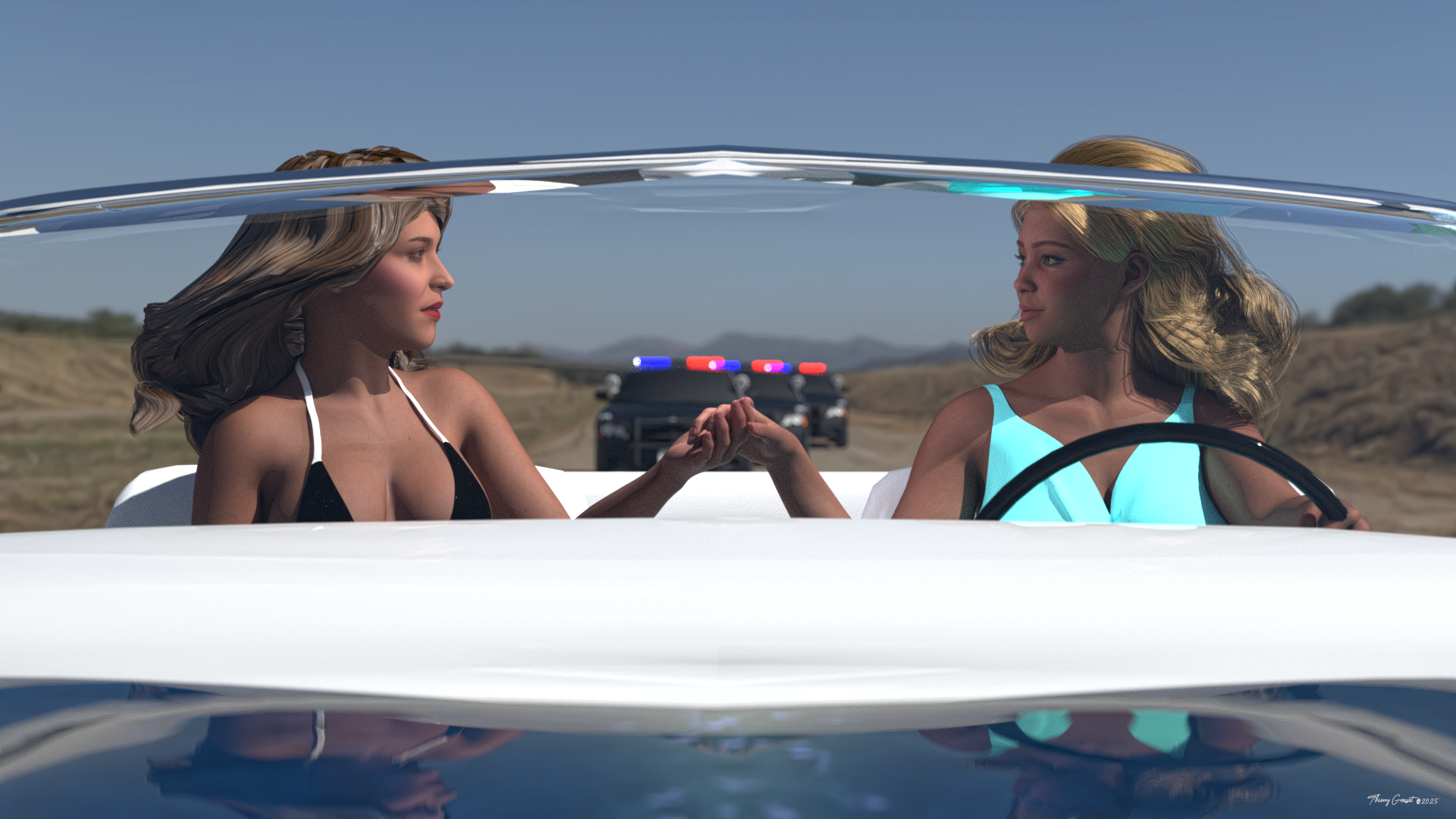
Vehicles
• Police Car – https://www.cadnav.com/3d-models/model-28397.html
• Ford Thunderbird ’66 – https://sketchfab.com/3d-models/ford-thunderbird-66-free-model-0a71cb1edcca4c269309fc063a6d63f1Environment / HDRI
• HDRI – Derelict Highway Midday – https://polyhaven.com/a/derelict_highway_middayCharacters & Morphs
• Traci Lords for Genesis 9 – https://www.renderhub.com/irene-adler-17/traci-lords-for-genesis-9
• HXD Gina Morph for Genesis 9 Female – https://www.renderhub.com/hyxod/hxd-gina-for-genesis-9-femaleHair Assets
• Drothari’s Silkstone Hair (Genesis 8 Female) – https://www.renderhub.com/herhey/drotharis-silkstone-hair
• Gabrielle Hair for Genesis 9 – https://www.renderhub.com/platero3d/gabrielle-hairClothing
• String bikini for Genesis 8 – https://www.renderosity.com/freestuff/items/92312/string-bikini-for-genesis-881
• Naboo Nightgown for Genesis 9 (dForce) – https://www.renderosity.com/freestuff/items/95160/arah3d-naboo-nightgown-for-g9-dforce[Released] Blender to Daz Studio Plugin released!!! Official support thread [Commercial]Matronius said:
I am about to release a tutorial on the transfer of a Kitbash 3D kit. The tool can handle several items and large environments. The textures are a different story as the tool can only export principled BSDF textures, so non-standard textures require manual or automatic conversion prior to export.
I have also experimented with KitBash3D assets from their own store.
The big problem for me is, that they provide textures as a separate download (.zip)
and they are not connected to the meshes, even in HDRP file for Unity.
It was not a problem before, when they sold their sets in Unity store.
The same happens with Blender format file - no maps are connected.
As a result the imported file to Daz Studio lacks materials and looks bright white.
Besides that, each small mesh has its own material, making the scene heavy.August 2025 - DAZ 3D New User Challenge - Open Render ChallengeNever entered anything I've created into something like this. Apologies if I do this wrong. I've been creating things for a few years with everything learned from online videos and forums. Lighting has consistently been my biggest problem (especially interiors) so it has also been the thing I've focused mostly improving on. Anyhow I wanted to finally do an image of my favorite mythological creature; the harpy. Would love feedback!
I've attached 2 images with the first being the primary and the second just wanted to show a goofy and funny angle of the same image from a different perspective.
----Image Title: Breakfast with a snack
----Software Used: DAZ3D (Daz Studio 4.24), GIMP (for postwork)
----Entering: Intermediate Challenge
I hadn't worked with Genesis 9 yet so I took this opportunity to do so. I primarily work with Genesis 8 and 3. In putting this together over 2-3 days (including post work) I was able to try out creating my own surface group which I used to hide the characters crown feathers so they wouldn't be seen clipping through the skull headdress which was both fun and a bit tedious. But hey, more knowledge gained.
For post work (using GIMP) I slightly adjusted the color to make things more vibrant and then added a small blur effect as things are in motion. In the second image an extra effect was used to warp the image- like a weak fisheye lense.
----And in case anyone is curious to what assets were used as they are all beautiful and excellent quality:- Model + Morphs: Ava 9 (skin tone), Ava 9 Harpy HD Add-On (initial body proportions), Harpy Talons HD, Wither (% of body morph used), Fangtastic (teeth morphs), STF Tribal Body Paints Vol.1 (for body paint)
- Outfit: Aello Dress (body feathers) and Aello Dress Texture Add-On (additional feather colors), Aello Wings (arm wings) and Aello Wings Texture Add-On (additional feather colors), STF dForce Moonfeather Shaman Outfit (skull headdress and necklace)
Let's appreciate/discuss today's new releases - more ongoinger threadElor said:
The dForce SU Fashion Trench Coat for Genesis 9, 8.1, and 8 Female looks nice on its own, but does someone know if it's easy to put it over clothes like pants and skirts ?
It looks rather tight, so default I would say no.
It has an expand all morph that might help. Else/and you can add a puch modifier and adjust as needed. Or last resort use mesh grabber it there is problem areas.
You might simulate the inner clothes first with a contraction/expansion of ~90-95 so the clothing will sit tighter.
INstalling DS in Windows 11In your case, you can either upgrade to 4.24 in you old PC before overwriting, or firstly copy the application folder of 4.22 to your new PC firstly, then install 4.24 there with DIM. If you want to keep 4.22, replicate its application folder and add a suffix to the folder name.
THanks for the information
I am not sure what the application folder is.
About a year ago I started using the install manager simply because manual installation meant I kept having packages with filenames too long for windows. And, I like the ability to review where i installed stuff. I know how to set up the libraries in DS (preferences, Content Directory Manage) to direct them to my external drive. I have also gone through the problem of moving to a new computer and then having to find files for every scene file. THAT is what I was hoping to avoid. And it would be great if I could transfer my install manager information. If I could keep 4.22 I would also be thrilled. I am just not sure I follow everything in your directions. But I can always try.
And the registry part you mention confused me a bit.
INstalling DS in Windows 11Hi everyone, I have a new computer and it's windows 11. My old one is windows 10. Is there anything I need to know about how and where to install Daz studio so that after I transfer my scene files, presets etc, they will open? My content is mostly on an external drive, so that I am not worried about. Honestly mostly worried about having to reinstall several tools and plugins. I know the drive path for my content like scenes, presets, etc on my current computer, but not sure if that will be the same on windows 11. Any advice appreciated. I have a ton of setup to do on the new computer before I can think about daz studio, but I want to be able to view my current scenes.
THanks in advance!
Beam and Shackles FreebieThe 'Adventures of Jack and Richard ' by Barbult in the Art forum managed to remind me, via a pair of handcuffs, that I haven't seen many freebie Lifting Shackles.
So, looking at my own workshop, I came to the conclusion we needed freebies of a 1.25 Ton (2800lb, 1270kg) bow shackle, a 1.5 Ton Dee shackle and an M12 collar lifting eye. Then, obviously, you need a 4 metre rusty steel I beam to lift. Like you do.
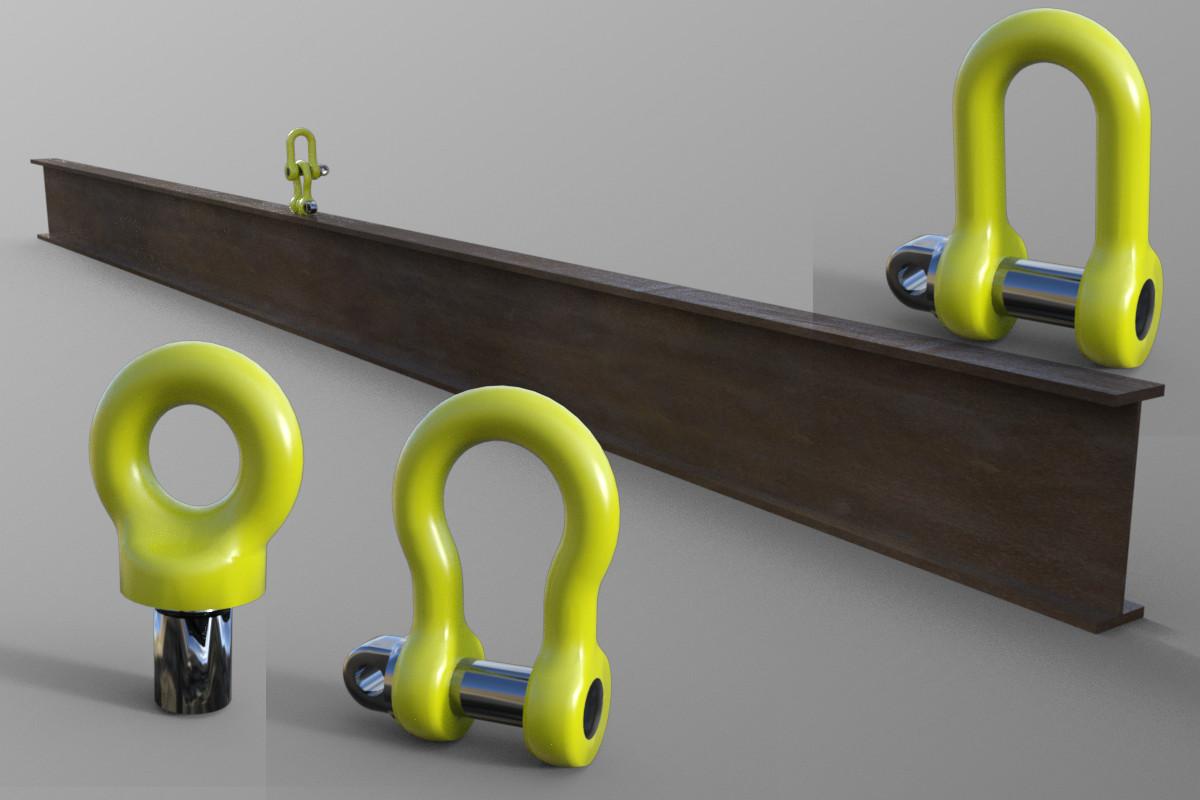
The collar eyebolt doesn't have the thread modelled, so just hide the thread if you don't like it. The lifting equipment bits are all correct to their standards. The steel beam has a lengthen/shorten morph, where +1.00 represents an extra metre on the length up to 10 metres, and -1.00 is a shortening of 1m to a minimum of 1metre.
So, I hope someone might find it useful. Possibly, one day. If not, it kept me happy for an afternoon.
Regards,
Richard
[Released] Blender to Daz Studio Plugin released!!! Official support thread [Commercial]I am about to release a tutorial on the transfer of a Kitbash 3D kit. The tool can handle several items and large environments. The textures are a different story as the tool can only export principled BSDF textures, so non-standard textures require manual or automatic conversion prior to export.
[Released] Blender to Daz Studio Plugin released!!! Official support thread [Commercial]From my experience, the plug-in handles large environments fairly well, but some textures don't transfer well. Like when I exported an apartment scene, the model transfered well, but some textures didn't.Let's appreciate/discuss today's new releases - more ongoinger threadbackground said:
The new release 'FN Susan'. Are those neck tendons normal? The front ones 'maybe' but the others look way too pronounced to me. No worries, I can just dial down the neck tendons morph, .. oh there isn't one. Ok well I can edit the morph more to my liking .... oh it's HD so I can't. Oh well, if I ever need a female character that can lift cwt sacks of coal with her head I know right where to come.
that does look freaky but maybe was inspired by a person, usually would expect more of their tendons to pop though if that's their physique
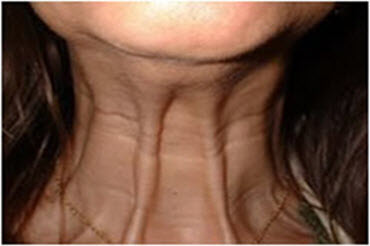
Googled and wish I hadn't
Let's appreciate/discuss today's new releases - more ongoinger threadThe new release 'FN Susan'. Are those neck tendons normal? The front ones 'maybe' but the others look way too pronounced to me. No worries, I can just dial down the neck tendons morph, .. oh there isn't one. Ok well I can edit the morph more to my liking .... oh it's HD so I can't. Oh well, if I ever need a female character that can lift cwt sacks of coal with her head I know right where to come.
Looking for Advice/Opinions on a Product I'm Makingcrosswind said:
Yeah, if you make the card enough polygons, technically you can further create bend morphs as you wish. But playing MTG is not like Hold'em or other "gambling card games", i.e. we don't really need to bend MTG cards haha ~~ esp. with the cards of R / MR.
Yeah, we definitely don't bend and fold them, but what about that authentic "magic curl" that you get with so many foils? Lol. That was actually the only reason I even wanted morph it in the first place. More realism. Haha
Indeed ! I usually had the foil partially bent near the seal before giving it a little yank ... But if making a foil prop in which you really don't need to literally place any cards there, making it a partial foil bend morph will just do, hoho ~
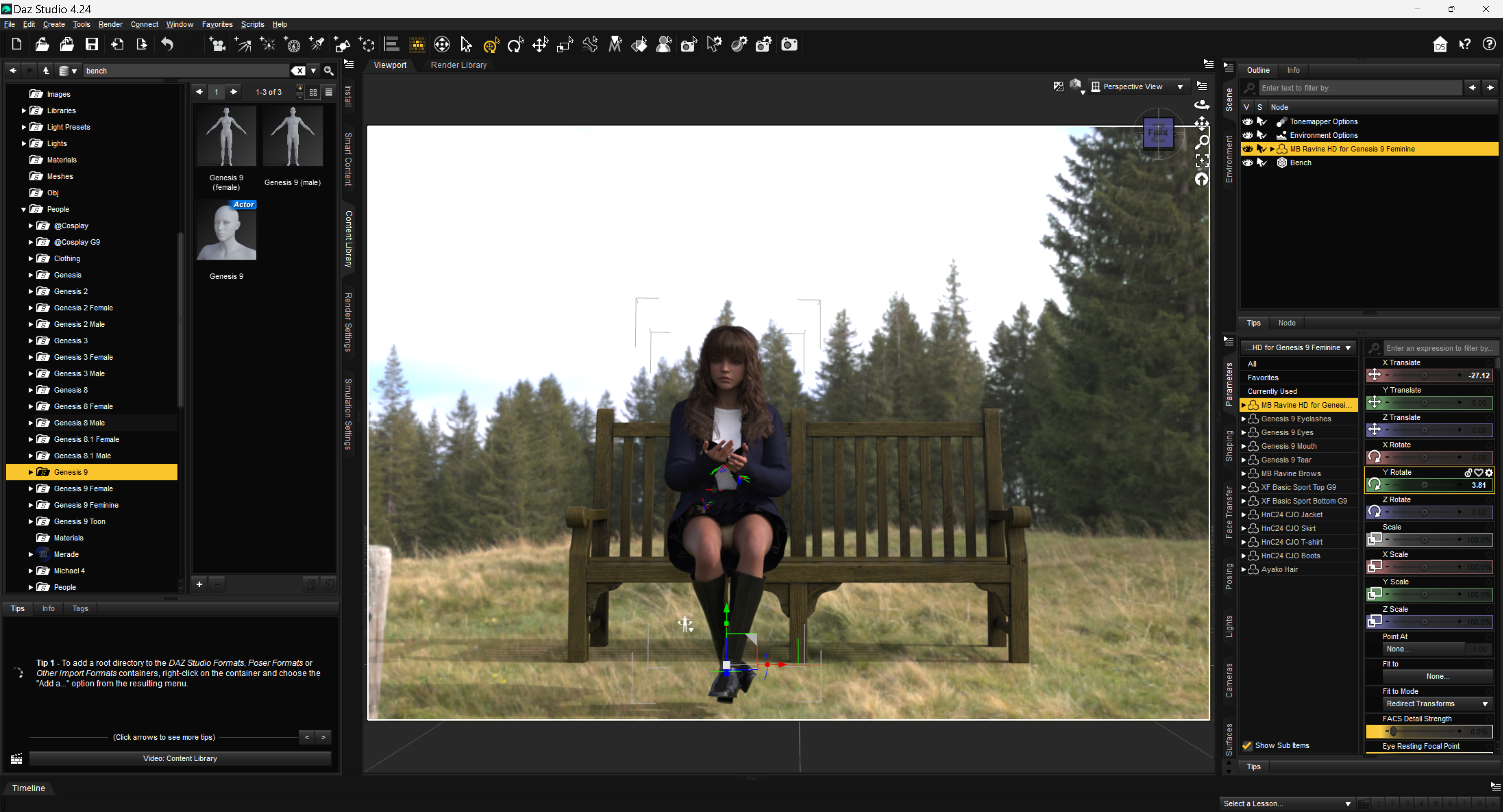
How to fit properly some clothing using Mesh GrabberHello, I have this problem.
I am trying to fit some ladies clothing in a seated position.
Not all clothing offers adjustments via Shaping Tab in Daz Studio.
I am using the current build 4.24 Windows 64-bit
Here are the items used as an example for this post, please note that not all of these items have been applied some Materials.
Genesis 9 Character “MB Ravine HD for Genesis 9 Feminine by Magic Brush”
Genesis 8 hair “Ayako Hair by goldtassel”
Clothing set “dForce HnC24 Casual Jacket Outfits by DAZkang”
The skirt gives me some headache trying to fit in the position.
The same happens with any other Genesis 9 figure.
Underneath is the “X-Fashion Basic Sport Lingerie by xtrart-3d” Yellow
The prop used is the “Premium Props - Park Bench by MindVision-GDS”
I have used “Z My Favorite Book by Zeddicuss” Genesis 8 Poses for F/M
Unfortunately, I didn’t added the book to the scene, as is cumbersome to get into the exact position when using a Genesis 9 character, even thought is a prop.
Added a HDRI from PolyHaven
I have Mesh Grabber Bundle, it comes with
Mesh Grabber for Daz Studio 4.5+ (Win64-bit)
Mesh Grabber Morph Edito for Daz Studio 4.5+ (Win64-bit)
Mesh Grabber Rotations AddOn for Daz Studio 4.5+ (Win64-bit)
Now I want to make use of it to try fixing the clothing issue.
However, I don’t know how to start with.
I am not a fan of searching useless videos, that will not get me where I need to do.
Just get me the know-how to get the things done.
I would really appreciate your input with some examples I can follow.
Thanks beforehand!
 Looking for Advice/Opinions on a Product I'm Making
Mattymanx said:
Static props would make more sense to me. You would only need to make one card and then 100 textures for it. Would be good if the center point of hte card, that point around which it will rotate, is at the center of the card. If the card has enought geometry, you could also make some bending morphs for ir
I ended up doing it a little differently so I didn't have to have 100 different textures. I created 4 different UVs for my card so I could put 4 images per texture. And I modeled the card with morphs in mind, cause I wanted to be able to put a little curl in the foil cards.
crosswind said:
Yeah, if you make the card enough polygons, technically you can further create bend morphs as you wish. But playing MTG is not like Hold'em or other "gambling card games", i.e. we don't really need to bend MTG cards haha ~~ esp. with the cards of R / MR.
Yeah, we definitely don't bend and fold them, but what about that authentic "magic curl" that you get with so many foils? Lol. That was actually the only reason I even wanted morph it in the first place. More realism. Haha
Why is there no "scale" option in parameters for this assetWell, if you change Scale on a rigged garment without fitting it on any Genesis figure, you may get unexpected result as Scaling is not proportional (screenshot 1). You might have to further tweak it cumbersomely.
Suggest you an alternative :
1) Re-rig the garment to G2F by using Transfer Utility + Full-body template, as the settings shown in (screenshot 2)
2) You'll find a new morph property FBMExpandAll on the garment. Dialing it may bring you better result (screenshot 3)Then dForce the garment as you wish ~
Looking for Advice/Opinions on a Product I'm MakingI used to be an MTG player many many years ago but now I mainly play MTGO ~~ Well, since you're not making game-ready assets but just assets for DS, then two cents from me:
- Make one card case like the black+red one shown in the above image. Rig it as a figure so that it can be opened.
- Make one card Prop. The card needs a thickness to certain extent. You'll not have to make two surfaces for it but just a good UV will do ~.Then to make a Deck, whatever for the case, library, graveyard or exile... etc., create Instance Nodes with a Card then form them as a Deck with Align plugin. That'll be a very easy process.
To make cards in hand, battlefield or wherever needed, two options:1) group of Card props; 2) a rigged figure with multiple cards and control the number of cards (actually shown or hidden...) by using Conditional Graft. (I personally prefer to this way 'cause that'll be interesting, as you can show / hide card(s) as well as make the cards have sort of different forms or "a bit messy form..." by translating / rotating them separately with morph properties... etc .etc.)
Finally, save them as Scene Sub-sets, Pose Presets, Mat Presets, etc... as needed. Suggest you make a PSD template as per the card UV layout so that the users can easily add MTG card images for the use of their own ~~
Edit: If you really want to make it as a freebie, you may go for the easier ways ~
 Mauro for G9 Hair?
lilweep said:
Well, for the record it is probably this one here https://www.3dscanstore.com/hair/realtime-hair-short-curly
It should be very easy to transfer this to your genesis figure of choice. Cant be bothered posting instructions though (maybe over DM if anyone insists).
Thanks for that find.
Mauro for G9 Hair?
Ohhh thank you for linking this.lilweep said:Well, for the record it is probably this one here https://www.3dscanstore.com/hair/realtime-hair-short-curly
It should be very easy to transfer this to your genesis figure of choice. Cant be bothered posting instructions though (maybe over DM if anyone insists).
How to make the Window glass surface transparentDouble-check that the proper figure has been selected before adding the clothing items. They should be "landing" where they belong. [assuming they were made correctly of course]
eta:
To pose a skirt for the sitting position, I do not have the grabber tools, I use dForce and the timeline, and of course Hexagon if required.
Clear the scene, load the figure and the skirt/dress, and of course the chair. One can add a dForce modifier to the skirt/dress if one doesn't already exist.
At "0" everything is in the default position. Except the chair, have that pulled back away from the figure so it can be slid into position at "30."
At "30" [at least, maybe a few more steps] the figure is posed to the sitting position on the chair.
Return to "0" and run the dForce simulation. Ideally as the figure goes to sit down, the garment drapes along with it. Might not be perfect but it's usually a good start.
Then I would send the lot over to Hexagon and fix any imperfections of the drape that are of concern for the image.
Then in D/S I would clear the drape from the garment, garment selected, then from Hexagon send the fixed drape back into D/S and make a morph. I would give it an appropriate name so I know what this morph is for. Then dial the morph to "0" and save the morph.Then clear the scene, load the scene you're working on, when the figure is sitting - select the garment and dial in the morph.
Render the still image.
n.b. If one can use Mesh Grabber on a draped garment, you can certainly use that then instead of Hexagon.
Daz 3D is part of

Connect
DAZ Productions, Inc.
7533 S Center View Ct #4664
West Jordan, UT 84084Licensing Agreement | Terms of Service | Privacy Policy | EULA
© 2026 Daz Productions Inc. All Rights Reserved.