-
can anyone give me a basic map on what I need to start?
Using the DIM (DAZ Install Manager) to install freebies or products bought here on this site is relatively easy and straight forward. Installing freebies or products bought elsewhere is a nightmare. After 2 years, I'm still not sure where things belong or where they will end up if I have to install manually. One single product can include several different folders which go in different places. The DIM knows where to put them; I don't. If you manually install any of the folders in the wrong place, problems happen.
There's no one-size-fits-all solution. Poser products have different requirements, and need to go in different places, separate folders and in a different order than DAZ products. Once you think you have things correctly placed, you need to go see if you can find them. Not just the product itself, but all the associated files as well, like materials, props, poses. They all go somewhere different, and if they're not placed correctly, they can disappear in your hard drive.
This is the price we pay for having an excellent FREE product. They could never sell it unless the file management structure got a complete overhaul. Since there's no money to be earned, and only a lot of work sorting it all out, and since everyone muddles through somehow, it's not likely to change any time soon. A cynical person might suspect that the powers that be prefer it this way to discourage spending money anywhere other than here.
This question has been asked many times on these forums, and people have tried to offer help here and with Youtube videos etc. It doesn't help at all that new releases and upgrades make older solutions obsolete.
My best advice is to go slow and completely install one product or freebie at a time. Make absolutely certain that all of the components of any product are accounted for and working properly. Avoid mass installations unless you are using the DIM. Even then, go slow and make sure everything can be found before adding more content.
Keeping a notebook with notes about how to do things, and where things can be found will be very useful. There are a lot of tasks that need to be repeated, and it can be frustrating to have to go look simple things up again.
Once you have a handle on manually installing DAZ products (there are a lot of freebies available here) try 3rd party products and freebies from Renderosity and CGShare.
We have a great community here, and there are a lot of helpful people around. Searching for solutions and previous answers on the forums will yield a lot of useful knowledge. If that doesn't work..ASK!
: )
"D"
edit to add: If you want to stretch a dollar a long way, start with a Platinum Club (PC) membership. Then get Victoria 4 and Michael 4 (V4 and M4). Even though they are older models (We're up to V7 now) there is a ton of clothing, poses and other content available for them, both here and on other sites. And because they are so popular, content creators are still making new stuff for them. Plus, anything you buy for older generations is (generally) usable on newer generations with a few modifications.
Some stuff you buy for the older generations can be as cheap as $1.99 at regular price, where newer outfits for newer models can cost $15 or more. There was a sale yesterday where I bought over $200 worth of stuff, and it cost me less than $10.
So start with a PC membership if you haven't already.
Trouble with V3 and M3 shapes for GenesisI have both these products and I'm using the latest build of Daz Studio (4.8) on Windows 7:
V3 and M3 Shapes for Genesis: http://www.daz3d.com/v3-and-m3-shapes-for-genesis
GenX AddOn Gen3 for V3 and M3: http://www.daz3d.com/genx-addon-gen3-for-v3-and-m3
I've had these products for ages, but I think this is first time I've tried to use them, and apparently I could use some help.
Yesterday I loaded the Genesis Female figure and expected to find a V3 modifier as an option for her shape (along with all the other age and male/female modifiers that are available) either on the SHAPE tab or under the PARAMETERS tab. It wasn't there, so I thought I would need to load them onto her. But I cannot find separate morphs or shapes associated with these products (not in Smart Content (which I didn't expect) or in the Content folders for Daz or Poser).
I even uninstalled and reinstalled both products. I even deleted the Genesis femal figure and replaced it with the Genesis Male figure. Same results.
If you're familiar with these products, or some other way I can turn Genesis into Victoria 3, please let me know.
Mike
Can G2F wear Genesis clothing (or skins)? How?Victoria 6 is a particular shape for Genesis 2 Female, a bit like A4 for V4.
You have the auto-converter for V4 skins, but do you have this: http://www.daz3d.com/victoria-4-for-genesis-2-female ? That will give you the V4 UVs for G2F, and a clone to autofit V4 clothes to G2F.
You already have the V5 UVs included in G2F, so textures which use those UVs should work directly on G2F. I don't know of any product which gives you the Genesis basic female UVs for G2F, but I'm not sure there are many textures which use those.
can anyone give me a basic map on what I need to start?In Daz I see you need things like the latest genesis and michael or victoria and stuff. I get confused though. I have a fair bit of money to spend so could someone tell me all the basic needs one would need to generally go all out with on this program to generally be able to use rich characters? a little list would be nice.
Victoria 5.Ciao a tutti.
Vorrei comprare 5 carattere victoria 3d a buon mercato. È possibile inserire link DAZ Studio 3D, per vedere cosa comprare? Grazie.
Struggling to add Daz3D file into PoserHello
I've searched the internet for some tips and guidance but I'm still confused (and struggling) to add my Daz3d charcter into Poser correctly.
I've had a look at lots of documentation and videos but no joy, and hope I can find some help here :)
The problem I am experiencing
I am using Windows 7 and I did the default install Poser Pro with my files in the Shared Location (C:\Users\Public\Documents\Poser Pro 2014 Content)
I've purchased a bundle (http://www.daz3d.com/genesis-michael-victoria-combo-bundle) and I am trying to add the Michael figure into my library.
I downloaded the Michael file

And unzipped it, which gave me this

I've tried...
- Poser > Content Tab > Install from ZIP archive. I put this in the Runtime folder but nothing seems to have happened when I go back to the Library.
- DSON importer for Poser. I followed the instructions here http://docs.daz3d.com/doku.php/public/software/dson_importer/poser/userguide/dson_importer_usage/tutorials/using_dson_importer/start but found myself lost as I can't find anything.
- I've tried a few other forum threads but no luck either.
I appreciaite I'm a newb to this, but hoping someone could help guide me please?
Thanks
Can G2F wear Genesis clothing (or skins)? How?Yikes, don't understand how to do any of that Richard. Sorry. I don't know any DS tech beyond point and click. I don't know what a figure asset is or a map transfer tool.
I own this program already: http://www.daz3d.com/v4-skins-auto-converter-for-genesis-2-female-s
that will covert all my old V4 skins to Genesis 2 Female. So I'm looking for something that will let me do the same thing to convert Genesis skins to fit Genesis 2 Female. Isn't there a program to do that? All I seem to be able to find is one that takes G2F down to Genesis which is not what I'm looking for.
What's the difference between Victoria 6 and Genesis 2 Female? Aren't they the same? (That's how much I don't know).
Can G2F wear Genesis clothing (or skins)? How?The Victoria 4 for Genesis 2 Female will let you use maps and auto fit clothes directly. You could also use Genesis as a staging post, AutoFitting clothes to Genesis, saving as a figure asset, and autofitting that to G2F; using the map Transfer tool to convert maps from V4 UVs to V5 (as long as you have V5) for use on G2F.
not sure what order it goesNo, the various generations are not dependant of each other, you don't need G1 or G2 to have G3 working.
And installing Genesis 3 doesn't stop Genesis 1 and 2 from working either.
Or Victoria 1....
Each new generation just adds MORE it doesn't replace anything.
not sure what order it goesThx for replies. Just wanted to know about these things: would I need Genesis 1 and 2 to make Genesis 3 work? would I need Victoria 5 and 6 to make Victoria 7 work? Thx.
can't save ERC controller settingsyup, those existing ERCs(created n poser) that daz able to retain are actually link between figures.. so if i change the morph dials in Victoria 4, the related slave dial in the conformed figure will change accordingly, but not with the ERC i've just made in daz studio, the link between figures just went off after i saved it into library as duf format...
iRay/CUDA problem with specific contentI'm running Mac OS X, and I have an ATI 7980 for display, and an NVidia GTX 780 for CUDA/iRay. This works fine most of the time. But I've found that loading certain content into the scene causes CUDA to fail and the device is not accessible until I restart DS. I can never get it to render that content - specifically, the Adrienne Cyborg MAT from "LYFW Adrienne HD for Victoria 6", sku 21698. I thought it might be memory, but I can load some huge scenes - like, large Stonemason sets with multiple characters - and render away; but if I apply that MAT to one of the characters, bang, I'm back to CPU rendering with a failure in the log:
Iray INFO - module:category(IRAY:RENDER): 1.5 IRAY rend info : CUDA device 0 (GeForce GTX 780): Scene processed in 42.116sIray INFO - module:category(IRAY:RENDER): 1.5 IRAY rend info : CUDA device 0 (GeForce GTX 780): Allocated 9 MB for frame bufferWARNING: /src/pluginsource/DzIrayRender/dzneuraymgr.cpp(261): Iray ERROR - module:category(IRAY:RENDER): 1.4 IRAY rend error: CUDA device 0 (GeForce GTX 780): unspecified launch failure (while launching CUDA renderer)WARNING: /src/pluginsource/DzIrayRender/dzneuraymgr.cpp(261): Iray ERROR - module:category(IRAY:RENDER): 1.4 IRAY rend error: CUDA device 0 (GeForce GTX 780): Failed to launch rendererWARNING: /src/pluginsource/DzIrayRender/dzneuraymgr.cpp(261): Iray ERROR - module:category(IRAY:RENDER): 1.5 IRAY rend error: CUDA device 0 (GeForce GTX 780): Device failed while renderingWARNING: /src/pluginsource/DzIrayRender/dzneuraymgr.cpp(261): Iray ERROR - module:category(IRAY:RENDER): 1.5 IRAY rend error: CUDA device 0 (GeForce GTX 780): unspecified launch failure (while initializing memory buffer)WARNING: /src/pluginsource/DzIrayRender/dzneuraymgr.cpp(261): Iray ERROR - module:category(IRAY:RENDER): 1.5 IRAY rend error: All workers failed: aborting renderWARNING: /src/pluginsource/DzIrayRender/dzneuraymgr.cpp(261): Iray ERROR - module:category(IRAY:RENDER): 1.5 IRAY rend error: CUDA device 0 (GeForce GTX 780): unspecified launch failure (while de-allocating memory)WARNING: /src/pluginsource/DzIrayRender/dzneuraymgr.cpp(261): Iray ERROR - module:category(IRAY:RENDER): 1.5 IRAY rend error: CUDA device 0 (GeForce GTX 780): unspecified launch failure (while de-allocating memory)WARNING: /src/pluginsource/DzIrayRender/dzneuraymgr.cpp(261): Iray ERROR - module:category(IRAY:RENDER): 1.5 IRAY rend error: CUDA device 0 (GeForce GTX 780): unspecified launch failure (while de-allocating memory)WARNING: /src/pluginsource/DzIrayRender/dzneuraymgr.cpp(261): Iray ERROR - module:category(IRAY:RENDER): 1.5 IRAY rend error: CUDA device 0 (GeForce GTX 780): unspecified launch failure (while de-allocating memory)WARNING: /src/pluginsource/DzIrayRender/dzneuraymgr.cpp(261): Iray ERROR - module:category(IRAY:RENDER): 1.5 IRAY rend error: CUDA device 0 (GeForce GTX 780): unspecified launch failure (while de-allocating memory)WARNING: /src/pluginsource/DzIrayRender/dzneuraymgr.cpp(261): Iray ERROR - module:category(IRAY:RENDER): 1.5 IRAY rend error: CUDA device 0 (GeForce GTX 780): unspecified launch failure (while de-allocating memory)WARNING: /src/pluginsource/DzIrayRender/dzneuraymgr.cpp(261): Iray ERROR - module:category(IRAY:RENDER): 1.5 IRAY rend error: CUDA device 0 (GeForce GTX 780): unspecified launch failure (while de-allocating memory)WARNING: /src/pluginsource/DzIrayRender/dzneuraymgr.cpp(261): Iray ERROR - module:category(IRAY:RENDER): 1.5 IRAY rend error: CUDA device 0 (GeForce GTX 780): unspecified launch failure (while de-allocating memory)WARNING: /src/pluginsource/DzIrayRender/dzneuraymgr.cpp(261): Iray ERROR - module:category(IRAY:RENDER): 1.5 IRAY rend error: CUDA device 0 (GeForce GTX 780): unspecified launch failure (while de-allocating memory)WARNING: /src/pluginsource/DzIrayRender/dzneuraymgr.cpp(261): Iray ERROR - module:category(IRAY:RENDER): 1.5 IRAY rend error: CUDA device 0 (GeForce GTX 780): unspecified launch failure (while de-allocating memory)WARNING: /src/pluginsource/DzIrayRender/dzneuraymgr.cpp(261): Iray WARNING - module:category(IRAY:RENDER): 1.5 IRAY rend warn : All available GPUs failed.Any thoughts?
Metamorphosis, head/body morphs for Genesis 3 Female [Commercial]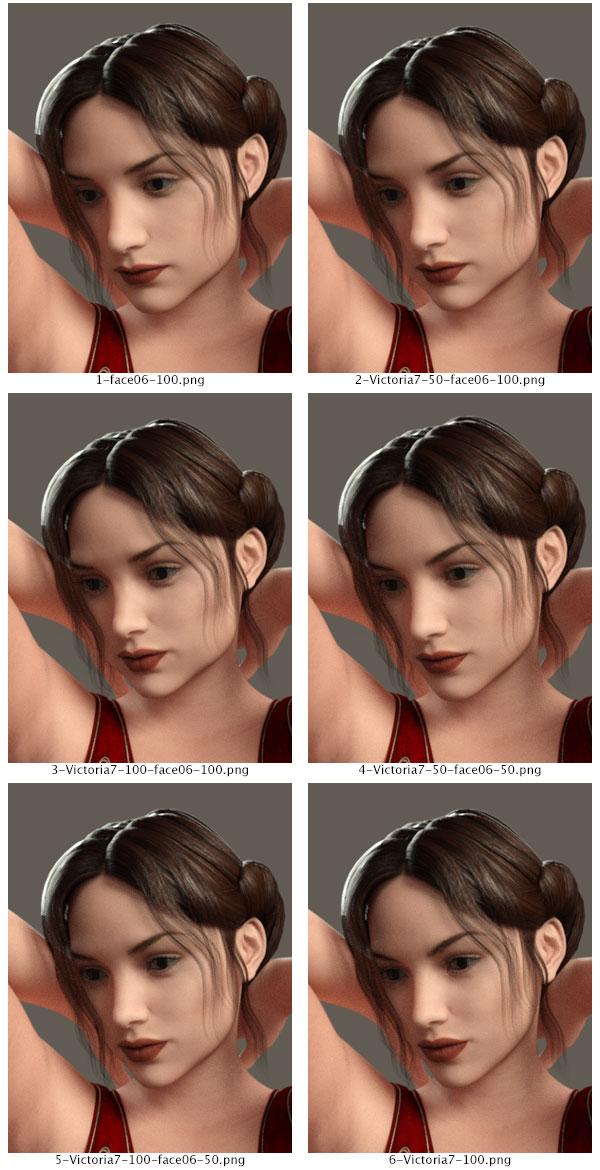
I'm so glad you posted your image, Spit. It looks great! It's great to see the different use you found for the morphs. That is, after all, my goal, to make them usable for your needs. :) Thank you, Spit. Oh, would you mind if I edited so we can see your attachment larger?
Thanks, also, for the comment, lars.
I hope to show further uses of the morphs. This one is showing mixtures of the Head 06 and Victoria 7 morphs. I will do some with Eva and will also include how the bodies mix later, as well.
not sure what order it goesHi. I have gotten back into using Daz Studio after about 2 years or so. I am confused as to what essentials I need for characters as it seems there is a bunch of things out there like genesis and genesis male/female and the Victoria models etc like tons of these things and I not even sure what order they are supposed to go into. I remember when I used it last I needed morphs +++ or something. Can anyone give me a simple line chart little thing from the beginning on what essentials you need to get the latest characters up and running? also another Q: if you have a character morph, can it be used to work on genesis models?
Also why do you seemingly need genesis female and genesis male? I assume you have to purchase these in order for genesis 3 to work right if you are going to be creating anything. Ty.
can't save ERC controller settingshi members
ive created an ERC between slave(on cloth item) and master(Victoria 4) paremeter just by dragging the master parameter dial from the parameter tab(editmode) into the slave controller located at hierarchy editor. the ERC worked just fine until i saved the cloth item( using wearable preset) into daz library. when loaded the item , the information/property
inside the controller is gone... pls help
GenX Error: Poser figure not supportedWhen I try to load a character I get this error:
GenX - Loading figure: Victoria 4.2
Loading figure file ...
Resolving script calls ...
Loading geometry file ...
C:/Users/Public/Documents/My DAZ 3D Library/Runtime/Geometries/DAZPeople/blMilWom_v4b.obj
Poser figure not supported.
I haven't used GenX in a while, I can't remember if I've worked with it since I upgraded to 4.8; I think so but I can't really say for sure.
Not sure what the problem is or how to fix it so any help would be greatly appreciated!
Having trouble with Victoria 6 and M6 uv's for genesishttp://www.daz3d.com/victoria-6-and-michael-6-uvs-for-genesis
I have this product, and I'm trying to apply M6 Nevio Skin to genesis. But I click to apply and it does nothing.
I do appear to have Slosh's UV sets in the C:\DAZ 3D\Studio\My Library\data\DAZ 3D\Genesis\Base\UV Sets\Slosh
Is there any other files I should check to see if I can troubleshoot the issue?
No Hiro 6 or Freak 6?With the recent release of Genesis 3 Female, we've already seen two characters released for it; Victoria 7 and Eva 7. However, even as we move on to the next generation of DAZ figures, I have to admit to being miffed over some figures that never got released for Generation 6. Namely, our old friends, the Freak and Hiro.
Seriously, am I missing something?! I was really looking forward to seeing these two figures and what Genesis 2 Male could do for them! And yet they're apparently left behind while we move on to the next generation?! Please tell me I'm not the only one who has a problem with this!
What works and what doesn't in 8.5?I just did a quick "grab" of Genesis/Genesis2 items in my product library. I think I removed everything that I know doesn't work, but I could have missed one or two. Some of the products listed may have issues that will require some work to get functioning properly. As I recall, all of the Genesis 2 items listed should work without a lot of problems (though some will need you to manually set up the textures - they will come in all black - Hot Mess and the X-Bikini bith have this issue), but I do stronly recommend Poke-Away 2 for Genesis 2, it really makes fiting things much easier.
Also, many of the Genesis (1) products come in the older ..DSF format and have never been upgrader to .DUF, and Carrara 8.5 does not recognise .DSF file. These products are still usable, you will just need to open them in DAZ Studio (DS) and resave them as the appropriate type back to your content libray (this will save them as a .DUF and they will now be usable in Carrara). Many of the Gensis products will have significant poke through that will require a bit of work in Carrara to fix. In my experience Genesis 2 items seel to fit better straight "out of the box", plus Poke-Away 3 makes fitting thins much better on Genesis 2.
I hope the list helps - and I didn't inadvertantly give you and bad info (though it is VERY possible - it's a fairly long list). I'm 99% sure all of the morph products listed work very well, the cloths and hair are more of a mixed bag.
Essina Outfit for Genesis 2 Female(s)
Capricornia for Genesis 2 Female(s)
Miwa Anime Hair for Genesis 2 Female(s)
Bow Skirt For Genesis 2 Female(s)
Janna Hair for Genesis 2 Female(s) and Victoria 4
Scifi Bunny For Genesis Textures
Leyton Hair for Genesis 3 Female(s) and Genesis 2 Female(s)
Genesis 2 Alive! (need to bake the morphs to keyframes using DS and Animate2)
Muscularity Morphs for Genesis 2 Female(s)
Birthday Girl Hair for Genesis 2 Female(s)
AlphaKini for Genesis 2 Female(s)
Heart Jewels for Genesis 2 Female(s)
Shoe Pack For Genesis 2 Female(s)
Scifi Sniper Suit for Genesis 2 Female(s)
Patty Jewels for Genesis 2 Female(s)
Actual Hair 2 for Genesis
Nomad Wanderer for Genesis 2 Female(s)
Shape Presets for Genesis 2 Male(s)
The Artemesia Gown for Genesis 2 Female(s)
Angel of Retribution for Genesis 2 Female(s)
Leisure Pants for Genesis 2 Male(s)
Paper Dress for Genesis 2 Female(s)
Christmas Earrings for Genesis 2 Female(s)
Clogs for Genesis 2 Female(s)
Indoor Shoes for Genesis 2 Female(s)
NJA Ponytail Hair for Genesis 2 Female(s)
Fantasia For Genesis 2 Female(s)
Mech Girl for Genesis 2 Female(s)
REV Hair for Genesis 2 Female(s)
Sorcery Poses for Genesis
Tears Hair for Genesis
Battle Kimono for Genesis 2 Female(s)
Newport Outfit for Genesis 2 Male(s)
Genesis Starter Essentials
Pharaohs of the Sun for Genesis Female
Genesis 2 Starter Essentials
Crazy Locks Hair for Genesis & V6
Jungle Girl for Genesis 2 Female(s)
End of Summer Hair for Genesis and Genesis 2 Female(s)
Genesis 2 Female Clone for Genesis
Superhero Monokini for Genesis 2 Female(s)
Breast Control for Genesis 2 Female(s)
Char Hair for Genesis 2 Female(s)
Francesca Dress for Genesis 2 Female(s)
Leris Outfit for Genesis 2 Female(s)
Guardian for Genesis 2 Female(s)
Dark Heart for Genesis 2 Female(s)
Lilim Outfit for Genesis 2 Female(s)
Victory for Genesis 2 Female(s)
Mistress Lilith for Genesis 2 Female(s)
Sci-Fi Siren Outfit for Genesis 2 Female(s)
Rope Sandals 2 For Genesis 2 Female(s)
Olympian Heroine for Genesis 2 Female(s)
Genesis 2 Female Mixed Morph Resource Kit
Genesis and V5 Walk Aniblocks (Requires Animate for Carrara)
Crowns for Genesis
Everyday Wardrobe for Genesis 2 Female(s) Jeans and Shirt
Hawthorn Hair for Genesis and Genesis 2 Female(s)
Poke-Away2! for Genesis 2 Female(s) (STRONLY RECOMMENDED)
Fantasy Collar Set for Genesis 1 & 2 Female(s)
Fantasy Collar Set for Genesis 1 & 2 Male(s)
Prehistoric Princess for Genesis 2 Female(s)
Belly Control For Genesis 2 Male(s)
T-Shirt Dress for Genesis
Ranger Outfit for Genesis 2 Female(s)
Ranger Hair for Genesis 2 Female(s)
Ranger Props for Genesis 2 Female(s)
Intriguing Poses for Genesis Male
Morphing Fantasy Dress for Genesis
Clothing Breast Fixes For Genesis 2 Female
Handy for Genesis
Genesis Female Genitalia
DragonLord for Genesis
Genesis Ranger
Carrara Hair Caps for Genesis and Genesis 2
SciFi Bunny For Genesis
Sexy Silky For Genesis
Magna Hart for Genesis
Expressive for Genesis
Town and Country for Genesis
Preppy for Genesis
Pure Hair: Bubblegum for Genesis
Pure Hair: Classic for Genesis
Pure Hair: Sleek for Genesis
Genesis Supersuit
Genesis 2 Female Head Morph Resource Kit
Shape Shift for Genesis 2 Female and V6
Shape Shift for Genesis
Casual Sexy Poses for Genesis 2 Female(s)
Genesis 2 Female Body Morphs
Victoria 4 for Genesis 2 Female
Genesis 2 Female Head Morphs
Glute and Breast Movement for Genesis
Lily Nymph for Genesis
Boots for Genesis
NGM for Genesis Female
K-Nicky Hair for Genesis
Andromedas Legend for Genesis
Motorcycle Helmets for Genesis
Genesis Body Morph Resource Kit 1
Genesis Bracers
Nata Toon Hair for Genesis
Nata for Genesis
Lady Blaze for Genesis
Enamore Mage for Genesis
V3 and M3 Shapes for Genesis
A3 and H3 Shapes for Genesis
Stephanie 3 and FREAK Shapes for Genesis
Genesis Head Morph Resource Kit 3
Genesis Head Morph Resource Kit 2
Ethnicity for Genesis: Native American
Ethnicity for Genesis: Asian
Ethnicity for Genesis: African
Genesis Head Morph Resource Kit 1
Genesis Bikini
Genesis Alive (will need to bake the morphs to keyframes using DS and Animate 2)
G4 and F4 for Genesis
Gorilla for Genesis
Svana for Genesis
Highlander: Wildenlander for Genesis
Genesis Generation X
Genesis Evolution: Muscularity
V4 and M4 Shapes for Genesis
Genesis Evolution: Expressions
Genesis Evolution: Body Morphs
Genesis Evolution: Head MorphsIn Home "Motion Capture" Plug-in for DAZ Studio?I've passed along this product suggestion to Topher ( -who promised me it would be forwarded onto DAZ's Development Team ). Here's my suggestion: "Why doesn't DAZ develop a plug-in or utility that would allow DAZ Studio users to record "motion capture" sequences ( i.e: walk cycles, body movements, facial expressions, etc. ) right at home using their own Digital Cameras or Camcorders? The plug-in/ utility would allow DAZ Studio users to then "import" their motion-capture sequences into DAZ Studio ( -for use in animating their Genesis and Victoria/ Michael figures )? Can you imagine the boost to productivity such a utility would afford DAZ Studio users? No more tedious and time-consuming posing and "aniblocking" -just large chunks of complex "mo-cap" ready to use for animating your DAZ characters. No more purchasing pre-packaged "mo-cap" sequences with movements that someone else thinks you need! I can't be the ONLY DAZ user out here who sees what a "no-brainer" such a utility would be! WHY should IClone 6 users be the only ones having all the fun? Shouldn't DAZ have it's own low-cost "in-home" motion capture product? I think so. Even if it would require DAZ to produce a low-cost ( hardware ) camera interface -similar to IClone's it would be worth it. So, if you too would like to see DAZ introduce a low-cost "in home" motion-capture product ( -similar to IClone's ), be sure to let the good people at DAZ know! If enough of you do this -perhaps us DAZ users can also join in on the fun of low-cost "in-home" mo cap!" P.S: I understand that IClone's system allows DAZ figures to be "imported" and used with IClone 6's mo-cap feature but what's the point of that if you have to reduce your res/ poly count down to IClone's almost "cartoonish" low-res look?"
Daz 3D is part of

Connect
DAZ Productions, Inc.
7533 S Center View Ct #4664
West Jordan, UT 84084Licensing Agreement | Terms of Service | Privacy Policy | EULA
© 2026 Daz Productions Inc. All Rights Reserved.