-
AIUTO...CHI CONOSCE L’ITALIANO? PARTE TREDICI
Buonasera (o forse sarebbe meglio buonanotte vista l'ora).
E' da un po' che non scrivevo perchè ho avuto da fare in questo periodo. Per farmi perdonare vi lascio un freebe fatto da me (compatibile con Install Manager):Si tratta di una skin per trasformare la G8F in una Victoria 4:
- Prendete la G8F/G8.1F
- Gli applicate la pelle (come un vestito)
- Al vestito applicate uno qualsiasi dei materiali di Victoria 4 e riavrete i vostri vecchi materiali di V4 applicati alla G8F (o 8.1F).
Essendo un vestito, esso si adatterà alla figura sottostante, per cui tutti i morph che applicate alla G8 avranno effetto anche sulla pelle.
Per posare la figura ovviamente basta mettere in posa la G8F (non la pelle). Non abbiate paura di testare anche le espressioni. Così potrete usare i G8 anche con 3DeLight.
Si tratta di un pezzo di un prodotto che mi hanno scartato (non sono interessati a prodotti 3DeLight) per cui lo metto freebie.. intanto ve lo lascio, nel fine settimana lo carico su R.
Provatelo e fatemi sapere cosa ne pensate che eventualmente correggo i bug.
Vi lascio un'immagine dove potete vedere lo stesso materiale applicato a V4 e a G8F (non posso mettere nudi)Is it possible to convert a Genesis 8.1 figure to Genesis 8? Reallusion doesn't support G8.1VBeerry said:
So, it's been a while since I started this thread but still, I wanted to come back and say Transfer Utility worked like a charm. It was perfect as far as I could tell and after transferring all the morphs from GF8.1 to GF8 I had no problems taking my figure into Reallusion. Thanks Gordig for suggesting that.
As you state you can get G8 into iClone, if you just want the basic shape without all the morphs, there is an easy way. Save G8.1 as a shape preset, apply that shape to G8 and then what you'd normally do to get that into iClone. That may not be enough for what you want though but I figured it was worth mentioning. :-)
Best 3dsMax obj export settings for DAZ import?Hi, I have an arcade scene made in 3ds max 2016 with cabinets I want to export to .obj and transfer to my DAZ scenes. I would like to know what the best settings are to ensure a smooth import. I'm aware that I need to edit the "Tr" property in the .mtl files.
The trouble I'm having when importing is a loss of mapping coordinates. I'm using default export options, and am switching options trial-and-error and getting nowhere.
Character morph(s) breaks the clothing mesh (custom-made)I'm back :)
And I feel really dumb. I think I'm missing something again... still. I created each one Rigid Follow Node from (on?) the polygons where the rivets are supposed to be, parenting them to the bones that are the closest. Then I positioned them according to the mesh to have their Z axes perpendicular to the mesh. Then I parented the rivets to them.Still, no luck :( The Follow Nodes move noticeably when I fit the cuirass to the morphed character. Also, what surprises me, is they don't follow the mesh when I morph it without a character it is attached to.
So, um... Could you guys point me to my mistake? I mean, they do make those clothing items with buttons that follow the clothes when morphed, posed, and so on. It can't be that complicated?
felis said:
Rigidity nodes, must be created by one or more polygons where the rivets shall be attached.
This is the method used for buttons on a shirt.
Wondering why there is no proper bridge for Poser-DAZ Studiofrank0314 said:
Smith Micro at least worked with Daz on development to a point but when the new owners took over they didn't want anything to do with Daz and wanted to push their own figures.
The split happened long before then; I recall it was around 2015-ish when then Product Manager Charles Taylor made an announcement that Poser would not be persuing Genesis 3 support. Since the SM blog and the RDNA forums are long gone, I can't locate the announcement.
I think the orignal tension came in 2011 when Poser 9 was released without support for animated joint centers (it was added in an SR a few months later, which allowed the DSON Importer to be released). This was about the time Studio 4 and Genesis were released, and both needed to get their products out to make some money (Studio Pro was initially a paid product), so for the first time the primary DAZ figure couldn't be used in Poser.
The Genesis 2 figures were my go-tos in Poser, and since the DSON importer will not run on Poser 12, I did not upgrade, and have been transitioning to Studio. However, I do miss the Poser Material room and the morph brush, and I find lighting easier to set up in Poser...
Uncanny Valley question?!? (Imgur hosted image)I don't think 'uncanny valley' applies - that applies to attempted photorealism and I don't think you intended that. I get a more caricature vibe. That said, Melanie is... off. I'd probably try dialling back head morph by 33% or mixing it 50/50 with a softer morph. It demonstrates a problem with some more extreme morphs - expressions just don't work with them (unnatural creasing) and would require correction morphs to fix, which invariably are not provided.
How to bring and Daz Character back into Daz Studio after modificationsYes, that's what the morph loader in daz studio is for. This is the same for blender or any other modeler you may want to use.
edit > figure > morph loader pro
steps:
- Export the figure in rest pose at base resolution in obj format. You don't need normals and materials, just the geometry at base resolution.
- Import in blender preserving the vertex order.
- Edit the mesh as you wish. Do not add or remove vertices, the topology must not be changed.
- Export in obj format preserving the vertex order.
- Import in daz studio with the morph loader.
Is it possible to convert a Genesis 8.1 figure to Genesis 8? Reallusion doesn't support G8.1So, it's been a while since I started this thread but still, I wanted to come back and say Transfer Utility worked like a charm. It was perfect as far as I could tell and after transferring all the morphs from GF8.1 to GF8 I had no problems taking my figure into Reallusion. Thanks Gordig for suggesting that.
How to bring and Daz Character back into Daz Studio after modificationsIs it possible to create a character morph in Blender, and just import the morph into Daz and apply it to the base figure?
Creating/Saving Morphs - PartialsTo divide the legs of a figure is done in 5 steps.

1.- We select the Morph from the list of morphs.
If in this step, we don't find the morph we can create the morph from the current shape. This is done from the Combine tab. Once the morph is created you can see it in the list
2.- select the legs3.-. Click in Preview
4. -save the morph
5.- Establish the name of the new morphNow we have divided only the legs

Important.- To use this new one in other scenes it is necessary to save it as Assets.

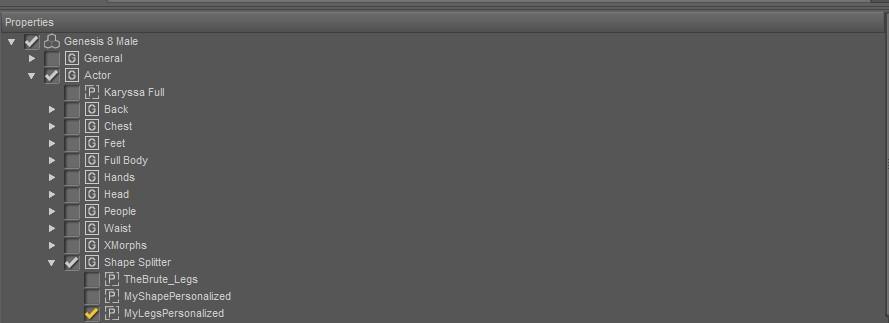
For more information, you can refer to the manual.
Daz Studio Animation Tools by 3D UniverseAscania said:
kwannie said:
Does anybody know if there are any sample videos of what these tools do? Can someone explain in particular what the Body2Hip tool does. I am wishing that it is a tool to help combat sliding feet.
Right out of the readme:
BODY2Hip: Having position and rotation information saved on the [Body] element of a figure is certainly not ideal as it limits being able to have the figure in the same pose in a different position in your scene. BODY2Hip will transfer the position and rotation that has been applied to the [Body] of a figure to the [hip] node of the same figure for a single frame, custom range, or an entire animation. This can be done for a single figure or multiple figures across part or all of an animation.
Personally, I'm someone who needs to see something sometimes to understand it instead of reading text. Everything in that paragraph I get the concept of, but I can't picture how it works in my head or how it can benefit my workflow. I'm sure once I see the whole Body2Hip thing in action I'd go, "Oh, I get it! " But right now I'm missing something.
Daz Studio Animation Tools by 3D Universekwannie said:
Does anybody know if there are any sample videos of what these tools do? Can someone explain in particular what the Body2Hip tool does. I am wishing that it is a tool to help combat sliding feet.
Right out of the readme:
BODY2Hip: Having position and rotation information saved on the [Body] element of a figure is certainly not ideal as it limits being able to have the figure in the same pose in a different position in your scene. BODY2Hip will transfer the position and rotation that has been applied to the [Body] of a figure to the [hip] node of the same figure for a single frame, custom range, or an entire animation. This can be done for a single figure or multiple figures across part or all of an animation.
Introduce Yourself, Hello, my name is.....Hello, I just downloaded DAZ but haven't had a chance to play with it yet. What I want to do is tell simple stories. I want the girls to be gorgeous and busty. I have seen some awesome renders on another site that uses a Victoria body, Mayra. Now G8 is another body type...are these two compatable? Can a G8 body morph work with a Victoria model? or clothing?
If, not are there G8 renders as good as Victoria? I haven't found any yet. I did see a listing of about 20 models on the DAZ catologue. am I looking in the wrong place?
I would love to buy a finished model tinker a bit with the body, and start telling stories.
also I need villains and I can't find Nazis anywhere. No one cares when you shoot a nazi. They are the perfect villain. I hope PC concerns didn't kill off the WWII genre. I'm at a loss for a good replacement villian
Genesis 8.1 - Power Pose dots for face are missingPerttiA said:
Making the G8 base expressions (and any expressions that are using them) work on G8.1 requires removing dummy/placeholder expressions that are installed to G8.1 morph folders - These dummy/placeholder expression files have no other function than to prevent the base G8 expressions from loading.
The dummy/placeholder files are located in;
...\Data\DAZ 3D\Genesis 8\Female 8_1\Morphs\Daz 3D\Base Pose Head\ (255 files)
...\Data\DAZ 3D\Genesis 8\Female 8_1\Morphs\Daz 3D\Expressions\ (24 files)
...\Data\DAZ 3D\Genesis 8\Male 8_1\Morphs\Daz 3D\Base Pose Head\ (255 files)
...\Data\DAZ 3D\Genesis 8\Male 8_1\Morphs\Daz 3D\Expressions\ (24 files)Please make sure you are removing the files from G8.1 morph folders and not G8 morph folders.
If you are logging in to DS and allowing DAZ Connect within DS to install/update the content, these same files may be found also in whereever DAZ Connect installs content, in ...\Data\Cloud\1_xxxxx\ (xxxxx is the SKU number of the product)
This no longer works. Has anyone found any solution?
Ultimate Pose Master [Commercial]I would say the reloading of the pose is the issue. As I mentioned above, if I save a pose preset, and load it again, it takes forever. Many pose products do not take very long, presumably because they were saved on base figures in cleaner runtimes. Much less morph clutter.
Was it too much effort?Would have been the perfect time for a new international texture or ethnic head morph bundle, but sure, a restaurant and a drop off bin will work too.
Custom morph posing and zeroing out joint bends / also morph asset saves thousands of filesI created a custom morph in zbrush and I had spread the legs slightly, I have the morph applied in Daz Studio and did my ERC Freeze but is there a way to bend the thighs back where they should be but have it zero out the bend sliders back to 0 to make that the new default pose for that morph?
Also, when I went to save my morph as a morph asset, it created a new folder and put thousands of files in there, any idea why or how to prevent that? Cheers!
How to swap genesis 8 base mesh for higher subD resolution mesh?I did some research and evidently Blender has a mesh decimator that has an "Unsubdivide" function and it uses the same subdivision algorithm as Daz Studio so that ended up working out for me. I'm really just needing Daz Studio to generate the custom dsf files for my morphs that I can transfer into Maya so this works because I can use whatever resolution mesh I want in Maya and will then use the dsf file for the joint movement instructions. Thank you for the help and ideas, it sent me down the right path to figure something out!
How to swap genesis 8 base mesh for higher subD resolution mesh?Thank you, Wendy. Does doing it that way change the vertex order? It sounds like it might in which case this workflow probably wont work for me. Do you know if there is a way to import a subD2 mesh then have Daz Studio revert it back down to SubD0? Or another solution, is there a way to force a SubD2 morph to load on a SubD0 character?
How to swap genesis 8 base mesh for higher subD resolution mesh?I have sort of done this using an autofitted skin suit.
DAZ will weld the mouth shut using the transfer utilty so you need to export just the skins minus lips, mouth and eye bits as obj then use them for morph targets to each other.
Then hide all the skin on the figure you load it on with the Geometry editor.
I mostly have done this for creatures I FBX exported to iClone.Daz 3D is part of

Connect
DAZ Productions, Inc.
7533 S Center View Ct #4664
West Jordan, UT 84084Licensing Agreement | Terms of Service | Privacy Policy | EULA
© 2026 Daz Productions Inc. All Rights Reserved.