Coming soon: Nature Tools DS for DAZ Studio
 umblefugly
Posts: 224
umblefugly
Posts: 224
- Terrain Tools
- Procedural terrain generation and heightmap-driven terrain
- Multiple terrain resolutions, including high-resolution terrain generation
- Terrain shaping, elevation and detail controls
- Procedural noise blending and seeded variation
- Modify/rebuild existing generated terrain
- Terrain-aware material generation using elevation and slope
- Automatic Ground, Grass, Rock and Snow distribution
- Layered PBR terrain materials
- Integrated Hydro / water generation
- Shoreline/environment workflows
- Save/load terrain and material presets
- Scatter Tools
- Bulk Scatter large populations across terrain
- Paint Scatter directly onto the surface
- Paint Erase to interactively remove placements
- Scatter trees, rocks, grass, plants, props, or other scene assets
- Single-source or multi-source / variant pools
- Randomized scale, rotation and placement variation
- Surface/terrain placement constraints
- Density and population controls
- Reusable source objects with native instancing
- Very large instance populations
- Proxy / performance-friendly viewport workflows
- Camera-aware preview/performance controls
- Scatter sets remain organized and reusable rather than becoming thousands of unrelated objects
- Rock Generator
- Procedurally generate reusable rock assets directly in DAZ Studio
- Multiple rock families/styles including Granite, Basalt, Sandstone, Limestone, Slate and River Stone
- Shape and seed variation
- Size and detail controls
- Weathering controls
- Fracture/form variation
- Proper UV generation
- Iray/PBR material support
- Built-in presets
- Custom material/texture support
- Generated rocks can be used directly or fed straight into Scatter Tools
- Heightmap Generator
- Procedural heightmap creation inside DAZ Studio
- Multiple generation methods including FBM/Perlin, Hills and Diamond-Square
- Editable procedural noise sources
- Seeded generation for repeatable results
- Landmass and island shaping
- Normalize/remap tools
- Mudslide-style shaping
- Water/erosion processing
- Interactive preview
- Preset system
- True 16-bit PNG heightmap export
- Send generated heightmaps directly into Terrain Tools
- Environment Export
- Export complete NatureGen environments as GLB or glTF + BIN
- Export terrain, hydro/water, generated rocks and scattered populations
- Preserve transforms, normals, UVs and PBR material data
- Export Base Color, Normal, Roughness, Metallic and Cutout/Opacity data
- Efficient shared-mesh reuse for large scatter populations rather than unnecessarily duplicating geometry
- Preserve NatureGen source/scatter identity in exported scene data
- Versioned
.naturegen.jsoncompanion data - Generated Blender companion script
- Generated Cinema 4D companion script
- Reconstruct materials and large scattered environments in the destination DCC
- Designed as a bridge from a DAZ-built environment into a wider 3D production workflow
Shooting for a November/December 2026 release.
Post edited by umblefugly on

Daz 3D is part of 
Connect
DAZ Productions, Inc.
7533 S Center View Ct #4664
West Jordan, UT 84084
Licensing Agreement | Terms of Service | Privacy Policy | EULA
© 2026 Daz Productions Inc. All Rights Reserved.
Comments
Oooh, this could be a fun product to work with....
Question. Would it be possible to create river valleys, waterfalls and the like?
River valleys are definitely possible, especially when starting from a heightmap that already contains the river/valley structure. NatureGen can use that terrain data as the base and then handle the surrounding terrain, materials, scattering, rocks, vegetation, water, etc.
For more complex river networks, I’d currently recommend generating or converting the terrain/river layout to a heightmap first, then bringing that into NatureGen. That gives you much more control over the actual river course than trying to force it procedurally afterward.
You can use an online tool like: https://cotamap.com/
Waterfalls are a little different. NatureGen doesn’t currently generate flowing waterfall geometry/effects on its own, so for now those would need to be added with an existing waterfall asset/effect after the terrain is created.
I do have plans to keep improving the water system, though, so rivers and more advanced water features are definitely areas I’m interested in expanding. :D
What's the comparison to the various Ultrascenery products?
I don't own any of those so I have no baseline to compare. What would you like to know?
I'll be honest, this just went straight over my head. Any tutorials for technological dumbass dinosaurs you could point me to?
Sure, I can provide a simple pdf.
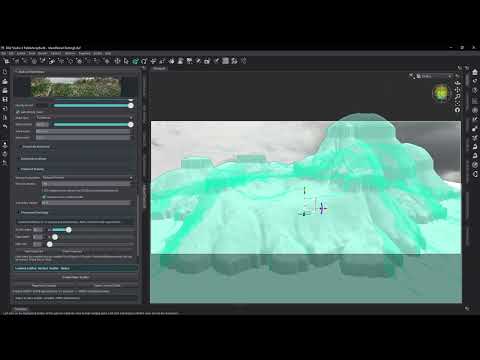
Small video demonstrating a little paint/erase
Just to clarify, this will be DS4 compatible?
Currently it is in dev for DS 2026, I can do it for DS 4.24 but that waits until this version is mature enough to do so.
And there goes the "instant buy" option for me. I'm way too invested in DS4 infrastructure right now to buy something that's DS6 only. Still, I wish you luck and I'll probably pick this up once DS6 looks more viable.
sounded good for a moment. sorry, i dont have DS6/2026. My buying over has ended and i have way toio many plugins and scripts that wont workwith it
Awww poop
It just makes sense to finish (A), before starting (B). This is a few months from being released, but around 70% complete which means there is plenty of time for a conversion to DS 4.24. Don't lose hope lol
Yay!
Why Daz found it necessary to change the architecture under the hood so nothing worked any more is beyond me. Then again, I don't see any advantages to DS6 apart from Nvidia 50xx support.
Because the underlying framework DS4 was build on was no longer supported by QT. That alone was reason to change the architecture. The problem is they were working toward changing this as far back as 2020. Then NDIVIA forced their hand with the 50xx series of GPUs and their interface not being compatible with the compilers used by DS4 and QT4. It was upgrade of not support the latest graphics hardware at all. That wouldn't be a good business plan at all.
I just had to ask Google what QT4 is
I see your point - being fairly technologically illiterate where computer software is concerned, I have to ask the question. I am always hopeful that the answer is in plain English for me to understand though...
I think I've only succeeded so far in VS code because in my first 15 years of work I was heavily involved with PLC programming for industry, so I understand logic ladders and such. VS code is just a different set of conditions and variables.
If I had tried to explain all the steps in between it would have taken me a lot more words. The tech for DS4 is 15 years old. That is a long time in tech terms. They always knew there'd be pain when they updated the tech, and that's why they put it off so long. But eventually the piper must be paid. They just didn't know NVIDIA played the pipes.
Qt from TrollTech ( original company name before they got bought up, sold, bought up again ) is a cross plattform toolkit that DS ( and many other programs are built on ),
DS 4 is built upon Qt 4 ( 4.8 ), but with backwards compatibility layers all the way back to Qt 2. Qt 4 is as other says, old, very old, even stone age old in the tech world.
DS is built on Qt 6 which is a much more modern toolkit, with support for many things and also is "future safe" which means tuff that has been depracated from operating systems for a while has been removed.
I have the save hard decitions to make with my stuff, support DS 4 and stay forever behind in technology, or move forward to DS 6.
Yes. The easiest workflow would be to export your terrain from Gaea, World Creator, or a similar application as a 16-bit heightmap.
In Nature Tools DS, you would then choose Heightmap Image as the terrain source and load that heightmap. Nature Tools recreates the terrain from the elevation data, so you can then continue working with it using Nature Tools — materials, rocks, vegetation/scatter, water, shoreline effects, and other terrain controls.
So, for example:
Gaea / World Creator → export heightmap → load into Nature Tools DS → continue building the environment.
You aren't limited to terrains generated inside Nature Tools itself.
Importing an already-meshed OBJ/FBX terrain and converting that into a fully editable Nature Tools terrain is a somewhat different problem. That's something I may look at later, but for terrain-authoring applications, the heightmap route is currently the cleaner and more reliable workflow.
In theory, it could work by letting you create the terrain in Gaea, World Creator, or another terrain app, export it as a mesh, and import that mesh into DAZ Studio.
Nature Tools DS could then have an Adopt External Terrain option. You’d select the imported terrain, Nature Tools would analyze it, register it as a terrain source, and then use that mesh as the base for things like materials, scatter, rocks, vegetation, water, and shoreline effects.
The important part is that Nature Tools would treat the imported mesh itself as the authoritative terrain shape, rather than regenerating it.
So the workflow could be:
Create terrain externally → export mesh → import into DAZ → Adopt in Nature Tools → continue building the environment.
It’s only a theory at this stage, but technically it looks very plausible.
A couple of new features are currently being integrated into Nature Tools.
First is a new Lighting & Camera Setup tool. This will allow you to use a normal LDR image — JPG, PNG, BMP, etc. — and optionally generate an HDR lighting environment and simulate light probes from it. For example, you could take a photo of a partly cloudy sky, use the original image as the scene backplate/background, generate an HDR environment for lighting, and automatically create a camera matched to your current viewport.
You will also be able to use an existing image together with an HDR or EXR environment and have Nature Tools handle the backplate, camera, and Iray environment setup from one place.
Also coming to the Heightmap Generator is a spline-based river and stream editor.
Procedurally generating terrain with useful waterways can be very hit-or-miss — usually more miss than hit — so instead you'll be able to draw and shape waterways directly over the generated heightmap. The spline will control the path of the river or stream, along with options such as starting/ending width, depth, and bank falloff.
The goal is to keep the procedural terrain generation while giving you much more direct artistic control over where important landscape features actually go.
Usually my workflow is, Idea->Can DS do it->Develop a POC (Proof of concept)->Implement concept as C++
Im sharing some of the POCs and results.
Stay tuned for more :D
And an important part of "Adopt a Terrain" has been proven here with a Terrain to Heightmap conversion inside DAZ Studio. And a side by side comparison: Left is the original imported terrain, and on the right is a new terrain created from the calculated heightmap from the original terrain.
I look forward to this! Brings back nostalgic memories of sitting in front of an Amiga computer ALL DAY watching Terragen generate a landscape scene pixel by pixel, line by line. And we were EXCITED the whole time! I'm sure this one will be faster, better, stronger!
In this case you only have to wait about 2 seconds :D
In those days we were still excited by the fact that we had a freaking computer to play with. In our house! My Dad and I bought the VIc-20 and C-64 when they both came out and I picked up an Amiga 500 a few years later. Way too much time spent sitting there playing with it just to see what it could do...
Environment Lighting is here!
The Environment / HDR tool turns a regular sky or landscape image into scene lighting.
It can:
In simple terms: choose an image, adjust the look, then click Generate HDR + Apply to create matching background and lighting.
Will this be suitable for close up renders or is it more suited for medium to long range? Whats the largest terrain it can make?