Why doesn't Autofit for Genesis 9 include Genesis 8 female?
 dracorn
Posts: 2,384
dracorn
Posts: 2,384
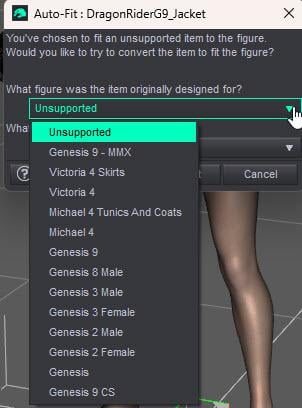
Am I missing an update? There is no option in the auto-convert for Genesis 8 Female.
I am still running Daz Studio 4.24.
Post edited by dracorn on

Daz 3D is part of 
Connect
DAZ Productions, Inc.
7533 S Center View Ct #4664
West Jordan, UT 84084
Licensing Agreement | Terms of Service | Privacy Policy | EULA
© 2026 Daz Productions Inc. All Rights Reserved.
Comments
Which item are you tryimg to autofit?
ANY Genesis 9 clothing item to Genesis 8 Female. More specifically, I was trying to fit necklaces.
I do have the G9 to G8 clothing converter, but it does not work for jewelry items/accessories.
It seems strange that they would include Genesis 8 Male in the autofit but not Genesis 8 Female.
I see that there are lots of converters forward and back between Genesis 8 and 3 and even Genesis 2 and Genesis, but we are lacking in Genesis 9 to Genesis 8 converters - specifically hair. I'm sure this has had to have been discussed at one time, but I haven't been using Daz Studio for a little while.
Genesis 8 Female does not include an auto-fit clone for Genesis 8 Female because it is Genesis 8 Female.
What you pick from the list is what you're converting the garment from, not what you're converting it to.
He's trying to convert from G9 to G8.
Yes, and that's why G8F doesn't have an option for G8F, because normally you wouldn't be auto-fitting G8F clothes to G8F, because G8F clothes are already G8F clothes.
They need to pick an option to convert from Genesis 9 (of which they have several choices).
so what Matt_Castle said is right, he has to click on G9 because the clothing was designed for G9 :D
€dit: 2 late, Matt is too quick
That's what I get for not using Daz Studio for a few months.
Duh.
Thanks, everybody.
Hopefully one day there will be a hair converter from Genesis 9 to Genesis 8.
Hair can be converted with any auto fit. The main problem is with SBH_Hair, where dforce is not converted with it.
This is another vendors only feature, like HD morphs is. (temper tantrum)
Honnestly with hair the simplest way to use it on other figures is to parent it to the head (after you manually position / adjust it) rather than fitting it.
still the most shortsighted decision DAZ ever made, I can model clothing, figures and polygon hair but that has NEVER stopped me buying masses of such from DAZ3D, I can knit and sew but still buy my clothing from shops
its just stupid gatekeeping that makes me use software other than DAZ Studio
and yes, I want to use SB Dforce hairs on Genesis 1 even
no PAs are making any for it
I will whisper this as I know not everyone agrees: I prefer polygon hair to SBH. The newer hairs by Akhelloos are polygon and are really nice, and while I'd like Linday's dForce cloth hairs to simulate more quickly, I like the results. The SBH hairs I have seem to put a bigger load on the machine for a given quality of result than a polygon hair - I don't have any tessalation 0 SBH (whatever that is), though.
Regards,
Richard
Any dforce hair can have it's tessalation set down to 0 or 1 and the resources it consumes (in particular RAM) will drop drastically. There is no such thing as Tessalation 0 SBH.
This can affect the color of the hair after you make the change, so I would recommend applying a more modern shader, in particular the omnishader.
While I agree there are a lot of nice polygon hairs out there, for long hair I tend to only use dforce ones (SBH dForce or cloth base dForce), otherwise with any other pose than the head straight up will look off.
I don't buy strand-based hair if I can identify it. Daz has way too many hair listings where it isn't obvious what kind of hair it is; for some reason, telling what sort of product it is is considered optional. So for me buying hair requires scrutinizing the listing, and guessing.
Naturally I buy a lot less hair than I used to. It's inefficient and chancy to shop for it.
I was going to apply an adjective following the word 'extraordinarily' to these practices, which bounce along the bottom of good sense right down there with making it hard for customers to search and categorize the items they want to buy, but I imagine you can easily fill in your own unflatttering adjectives.
Valiska,
Gosh! We've hijacked this thread beyond its original topic.
Akhelloos hair was mentioned above. I keep an eye on it too, not only because of the good styling but also because the PA supplies data about mesh faces/quads, material zones and rigging. I haven't checked, but information like this shows up in all of ALO's hair product pages, along with wireframe renders. I really appreciate that sort of disclosure.
Cheers!
nothing to hijack
dracorn was picking G8 instead of G9 in the dialogue to autofit to G8
just an oversight and once aware, no thread needed
WendyLuvsCatz,
Oh, please, say it isn't so! We hijacked the original G8-to-G9 discussion about clothing conversion and glommed onto it more general observations about Daz hair. No splitting of hairs about this (sorry for the pun).
What is it about a woman's hair in 3D-verse that invites so much natter? Think about Rapunzel's crowning glory -- SBH, or polygonal; dForce empowered or not?
The word for the day: "Discursion". For the record, here is where the discussion veered off ...
Cheers!
as long as a moderator doesn't lock the discussion of locks of hair because it strayed like a flyaway that needs a good gel, I guess we can style it whichever way the dryer blows
By contrast, I don't buy polygonal hair except in rare circumstances.
I'm glad you feel you get the best out of SBH, I don't seem to. Might be because I've not had enough practice during my limited time to play with DS. However, I am glad to see the diversity of types remains.
Regards,
Richard
I don't have anything against strand-based hair in Daz Studio, but it's a pain to export. Not impossible, but it has several more steps than exporting card hair, which is already time-consuming if you want all the colors handy.
I guess I am weird. I buy what I like based first on the style and what I see in the promos and notes and then do I have a use for that hair. At this point when I have over 1691 hairs, anything can be a repeat of a previous style. Today, what I use depends on my vision and the load on the computer I am using.
Nah, not weird. That's exactly what I'd do if I hadn't decided a few years ago that the chances of there being a successor to Daz 4.5+ weren't looking so good. (Any company with a graphics program who let more than 5 years pass without accommodating HiDPI monitors, eventually letting even the badly-understaffed open-source projects leave them choking on dust, is probably trying hard to take up another business: such was my thinking.) Poser was looking even less well for a while.
So back then I decided that, rather than lose my whole library, I'd export it. I'm about 2/3 finished. It'd be a darned sight easier to keep everything in Daz Studio, but:
I wish Blender asset management was better, but it's not well-designed, and from my perspective it's about 3/4 built (as is fairly typical for open source projects). Blender can't cope with loading texture sets at once. So the only way to end up with all the Daz/Poser texture variants available to load and look at quickly is to export every last one on models, which is a time-consuming, disk-eating nuisance. This is not likely to improve.
Exporting strand hair takes several more steps than card hair. Egad. No. (Also "Egad, no!" if the risk of inadvertently buying strand hair I mistake for card hair exceeds the benefit of having that particular hairstyle as card hair.)
I probably won't be shopping the same way after my Daz+ subscription runs out in October. I have a decision to make on other grounds.
I was looking at a tennis skirt on Amazon. The description said it keeps your phone, keys, and balls secure.
^This!