How to cast water reflections onto other surfaces- any advice?
 JeremyD
Posts: 265
JeremyD
Posts: 265
in The Commons
Hey all,
I'm trying to create a scene that involves water. That much I figured out by using the iRay water shader, but I'd love if I can create a ripply, glowing water reflection that casts onto other surfaces (ideally a wall and a Genesis figure.) I attached some examples, is there a way to do this? Even just faking it by projecting the texture would be cool. Thanks all
Jeremy

Daz 3D is part of 
Connect
DAZ Productions, Inc.
7533 S Center View Ct #4664
West Jordan, UT 84084
Licensing Agreement | Terms of Service | Privacy Policy | EULA
© 2026 Daz Productions Inc. All Rights Reserved.
Comments
here is a pretty good overview of iRay caustics: http://thinkdrawart.com/water-shader-tutorial-for-daz-studio-iray
Hi Jeremy, from what I see in your examples what you want to create is not a refection but the caustics of water: the way llight is altered refraction of materials and surfaces that are not flat. In both examples there is light coming through the surface of the water.
There are several products that can be used for effects like that (I believe some of them for Iray, but I'm a 3dlight girl so not to sure about that.
Alternatively you can create a similar effect using a water surface and transparency maps with the light actually going through. Again my experience is only from 3dlight.
You are talking about caustics...I'm not sure if enabling caustics in the Iray options is enough, but it should be. But doing so, it will slow down the render speed. Maybe someone who has done more with Iray's caustics will chime in later.
Ohh. I have so much to figure out :) Thanks guys, I was trying to find the correct terminology.
This looks handy. It seems like finding a caustics texture would be the fastest way to do it.
I would experiment with water ripple patterns in displacement (making actual ripple patterns in the surface) of water and see where that gets you.
Does that mean finding a ripple displacement texture? I'll give that a shot too. I imagine I have to hit it with a very strong lightsource so the light would bounce around?
And sure enough, a quick search on the Shop someone has Underwater Lights for iRay which achieves the results that I'm looking for. But since I'm still a newb I love trying to figure out the nuts and bolts and see what works (even though it might cause me a few headaches here and there :)
You can use a bump map from a water surface and put it into the displacement map. The difference is that displacement actually alters the texture of a surface while bump only effects the light/shadow distribution.
With the changing texture the lights will react different as the angles its broken at alters.
Remember, if you use displacement, to use displacement subd.
I have some pretty good results using Light gels http://www.daz3d.com/chaos-neurotic-light-gels
But they only work for delight & firefly not in Iray, if you need it for Iray. I would render the light gel part in 3dlight, as a over lay transparency layer on top of your Iray render using photoshop
or you could paint the effect in post work
This I did a while back using light gels , click it for 1080 HD view.
It's not hard to make a water displacement map...you just need an image editor (Photshop or GIMP) a set of water brushes and 5 to ten minutes.
Start a new layer (1024 or 2048 square...you can go higher) with a mid grey background. Then load a brush, darken the color some set the brush to cover the whole image. Paint. It's good to do this on a new layer with a transparent backgroud. Duplicate this layer and adjust the color to a lighter grey. Then experiment with mixing the two layers (or more, if you want) to get a good blend of dark/lights (shadows/highlights....low/high spots). Save it out and then apply to a plane/water prop.
Also you can create a gel mask the same way, except use black and white...
A little Gaussian blur added to the final map can soften/round over the waves...
Here's a quick one made in GIMP and rendered in 3DL, just a plane, no attempt at a water shader was made.
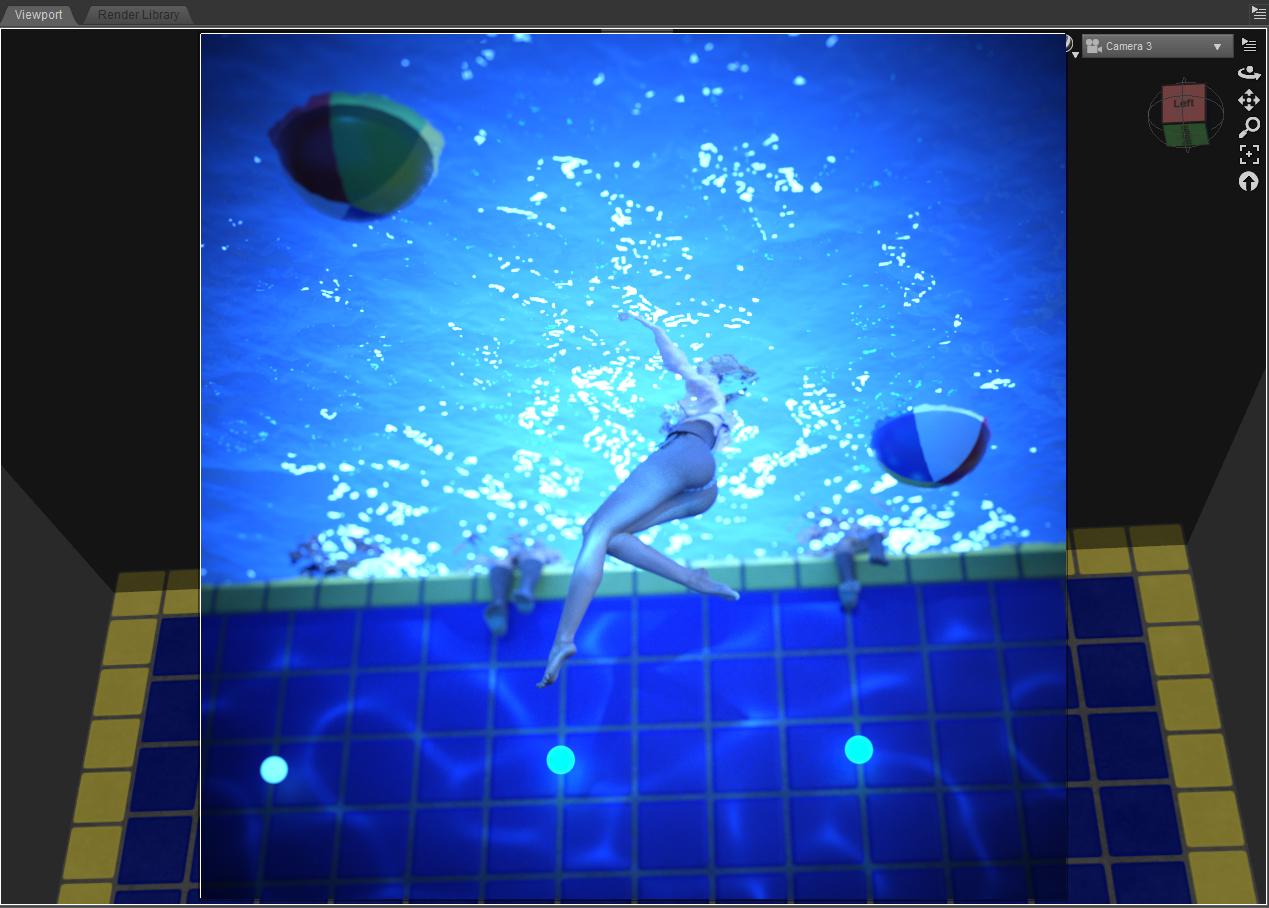
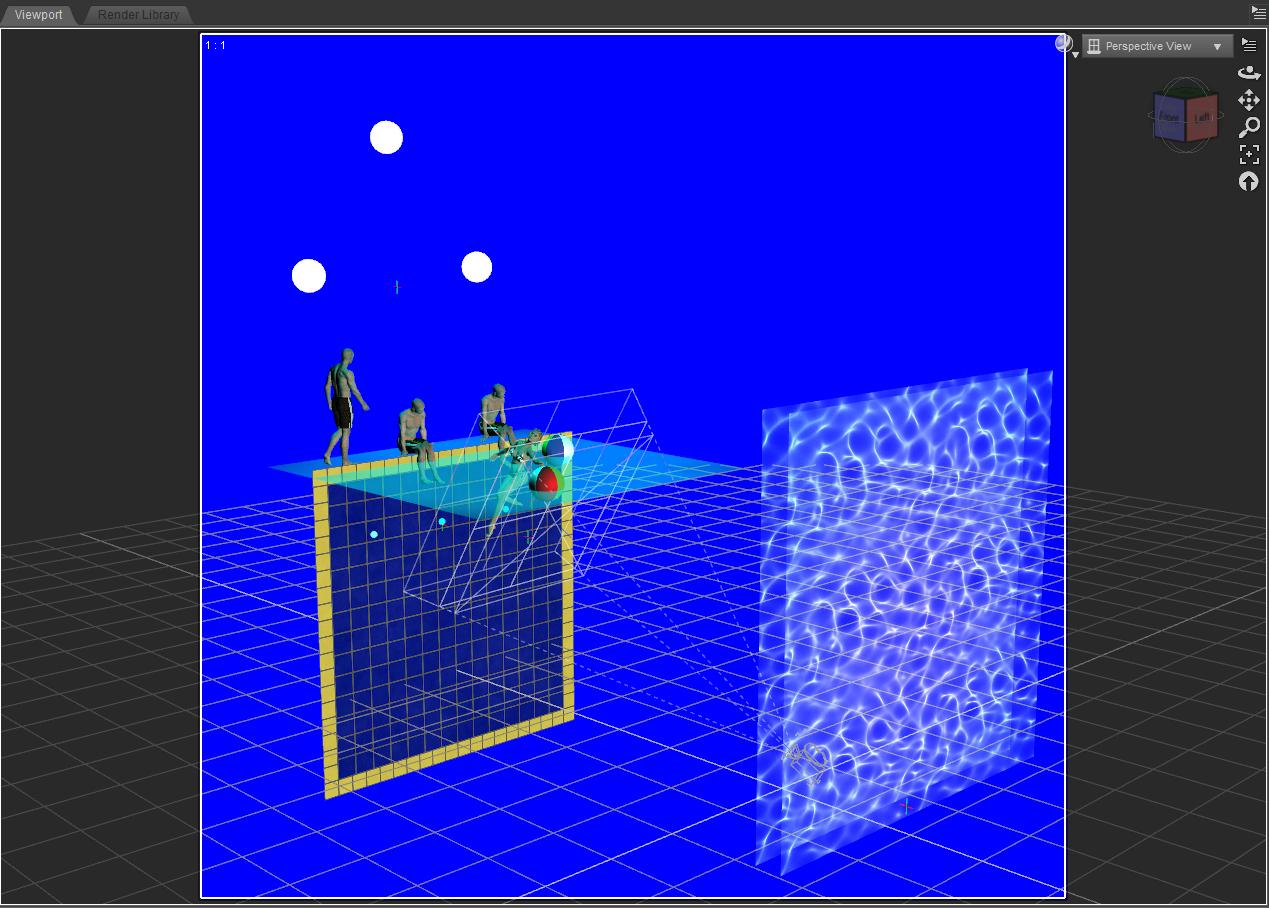
Thank you everyone for the responses! It's all been very helpful. This morning I spent some time wrangling with displacement textures and gel textures. Here's the result that I'm working with so far. (just a screenshot of my viewport.)
Very clever and a wonderful camera angle! It's nice to see creative solutions.
Very creative :) pretty good results too
Looks good! Nice work!
Thanks guys :)
I use Carrara, so I don't use iray. Carrara does have the ability to render caustics, and it does produce a nice effect, but sometimes it can be difficult to get the effect where you want it, so in those instances, I will use caustics, but also lights with gels to simulate a caustic effect if I'm having a hard time getting the look I want, where I want it.
This one uses caustics and gels.
Looks great! I especially like the pool's glow and the touch of light on her stomach.
something I did a while ago experimenting with ocean trying to get some nice reflection going on the water.
reflections mostly result from the realistic sky
I like to used animated texture maps for all my animated water scenes created in Daz studio. .example, I did this for the pool & water in this action animated short film I rendered in 3d light.Karate Girl In Pool Party
And I used the same Animated texture script for my newest film ( Karate Girl in Sadows of the past.) I used the animated texture to animated the water pane in the stonemason Streets of Asian sets which as static and not dynamic water pane.
After a few years messing with morphing water & rigged water panes.. I had learned rendering animated textures worked best for me when rendering water scenes especially when using daz studio for your animation tool. I can control the wave action speed and height effects etc easier using textures scripts. I hate post work so any tools i can use for accomplishing making effects right in the Studio scene I'll try to go with first. thats why I always am browsing Mcasuals Scripts for short cuts
00seven and ivy, great work!! You guys are light years ahead of me when it comes to 3D. I haven't even explored the animation aspect yet.
And yep! Mcasual Scripts are a great resource. I discovered his scripts "DroptoTop" and "Jump" which helps placing objects in the scene.
Hi, there. So, I'm still a newbie myself, but I think I found something that might help you. As far as maps are concerned, there is a very simple to use, free program that takes photos, and creates Normal Maps, Displacement Maps, Specularity Maps, Ambient Occlusion Maps, and even a Diffuse Map, if needed. It's called Crazy Bump. Here is the link to the website. I have found it immensely helpful in my work, I hope you will, as well.
~* Phoenix DeFalco *~
Thanks PhoenixDeFalco! I'm always up for using tools that help out the workflow. For the water texture, I used this one: http://cpetry.github.io/NormalMap-Online/ with decent results. But I'll check this one out.