
Daz 3D is part of 
Connect
DAZ Productions, Inc.
7533 S Center View Ct #4664
West Jordan, UT 84084
Licensing Agreement | Terms of Service | Privacy Policy | EULA
© 2026 Daz Productions Inc. All Rights Reserved.
Comments
Thank you, this confirmation helps a lot.
It matches what I am seeing on my side: all files even large files can work in DS4, small/medium DUF files can work in DS6, but larger or more complex DUF files may hang or crash during the initial source analysis step in DS6, before the item list is displayed.
I am already working on a possible solution, and I have some promising leads. It may be possible to use a safer analysis method for large files in DS6.
If you have any way to share one of the problematic DUF files with me, that would be extremely helpful (you can PM me). Testing against a real file that triggers the issue would make the fix much more reliable.
Interesting scripts. Glad, I am using only DS 4.24 at the moment, but plan to check DS 6 later at some point.
Hopefully, you will fix most of the issues by then.
All the best for you.
I emailed you some DS4 information (links to Dropbox) I couldn't get Dropbox to sync the scene file itself, so I only sent screenshot and log info. In DS4 with the large scene, the append script displayed the list and let me select a G9 character. When I continued, the script displayed an error message.
That is the only info I have at this point.
Thank you!
Yes, I hope so. I’m doing my best to fix DS6-related issues as they appear.
That said, DS6 is still not fully stable, so fixing a bug today does not always guarantee that the same script will behave the same way a few weeks later. This is true for any script and any DS6-related bug at the moment: the target is still moving.
But I’ll keep following the DS6 changes and updating the scripts when needed.
All the best to you too.
I tried the big scene in DS6 again and monitored the RAM usage as the script ran and crashed. There was no big spike.
You might want to consult with Totte (Code66). He has experience with DS6 scripting and lists. I know he is aware of some issues, but I don't know if they are related to what you are doing.
Thank you, Barb. The RAM information is useful too. If there was no big spike before the crash, that is one more indication that it may not be a simple memory exhaustion issue.
About the list itself, I don’t think this is the part involved here. I generated a test list with about 30,000 items without issue. But yes, I may ask Totte if he has already run into instability issues with XXL DUF files in DS6.
In my own tests, using virtual DUF files, I found that the DS6 issue happens just after the selected DUF file is read, even before the script starts parsing it for analysis. So at this stage, it looks more like a DS6 instability with very large DUF files than a list display issue. I already have two workaround/patch options for that part now.
Honestly, the only thing really missing for me is a real source file that triggers the crash, or a real source file that does not crash but ends with an error instead. That would allow me to solve the issue based on actual data, not only on hypotheses from artificial test files.
BTW, I answered your email. Thanks a lot for the extra information and testing.
The temp file that was created when the error occurred in DS4 was 0 bytes. It was still 0 bytes after I clicked OK on the error message. It was still 0 bytes after I refreshed the folder containing the file. It appears that nothing was written to that temp file.
I tried again, but this time I selected a different item from the scene (not a G9 character). It was appended successfully.
In another attempt to append the G9 character, I monitored the RAM usage. It got very high, close to the limit of what I have. I attached the screenshot. The two sharp pointy peaks is when the error occurred. I don't know if that is the cause of the problem or not. The RAM usage did not get that high when loading the successful non-G9 prop.
Thank you, Barbult. This is extremely useful information.
The fact that the temporary file is 0 bytes is very important. It means the problem is probably not that DS4 cannot reload a malformed generated DUF. It is more likely that the script fails before anything is actually written to that temporary DUF, and then DS4 tries to merge an empty file, which naturally ends with a “File Format Error”.
So that changes the diagnosis a bit: the error message appears at the reload step, but the real failure probably happens earlier, during the temporary DUF creation/export step.
The fact that another non-G9 prop from the same scene appended successfully is also very useful. It suggests that the scene is not simply unreadable, and that the list/scanning/ part is not the main issue here. The problem seems more specific to extracting that G9 character from this large scene.
Also, do you remember if there is anything special about that G9 character in the source scene, anything that could make this character different from a more “standard” G9 character? I don’t know yet if this is related, but since the non-G9 prop appended successfully from the same scene, anything specific to this character may help. And even specific technologies on its wearable could matter.
The RAM peaks are suspicious too. I cannot say yet whether they are the direct cause or just a symptom of the failure, but if RAM gets close to the limit only when extracting the G9 character, it may explain why the temporary DUF remains empty.
I will add specific checks for this case, so the script can detect a 0-byte temporary DUF and stop with a clearer diagnostic instead of trying to reload it. I am also working on alternative extraction paths / safer workarounds for very large or complex DUF scenes.
THANKS for your scene, just received it, I'm gonna work on it right now!
The G9 character appends in DS4 if I don't also load children nodes. So maybe one of the children nodes is the problem - maybe the hair? (FE Chic Layered Bob Hair)
Lol, I just came here to say the exact same thing : I am investing the children to see which one fails...
EDIT : and yes, I cannot load : FE Chic Layered Bob Hair...
I just need to know why...
EDIT2 : buying the product right now to be able to analyze it.
EDIT 3 : stand alone, directly from its product, not simulated, the hair loads properly : loading on a figure, simulating on the timeline 0-6 frames... Creating a new scene: Reloading timeline simulated hair without issue, with its animation (to be confirmed).
Here is a strange thing (DS4). I created a scene with a G9 Dev Load, so no eyes, mouth, etc.. I fit the FE Chic Layered Bob Hair to G9. Then I did a 30 second timeline pose transition of G9. Finally, I did a current frame simulation of the hair on frame 30. I saved the scene. I can append that G9 with children just fine. But if I append without children I get an error message about missing data files for the hair. Since I am not appending children and the hair items are not checked, why is it even looking for hair data files while appending only G9? G9 does get appended in spite of those error messages.
I'll put the scene on Google Drive for you.
Thanks, I am on the same path of tests, so this information is crucial..
Yes, if you append G9 without children, the script should not need the hair data files if the hair nodes are not selected and not included as children. So if DS4 still looks for FE Chic Layered Bob Hair data files, that probably means my extraction filter is still catching some hair-related data somewhere — most likely through animation / simulation / modifier data linked to the fitted hair or to the figure.
This was actually one of the hardest parts of the development: deciding exactly which pieces of information must be kept or removed depending on the user choices. A DUF scene contains a lot of cross-references, and during development I had to go through thousands and thousands of lines to avoid keeping too much or removing too much.
So yes, it looks like I missed one case here, but compared to the amount of filtering already done, this should be manageable. I will probably have to review the filter for child-related animation / simulation data, especially for fitted or simulated hair.
In my own quick test I did not reproduce the same problem yet, but I may not have saved exactly the same simulation state / cached state : I did not freeze. Your smaller test scene will be very useful, because it should be much easier to analyze than the big scene.
I will have to stop for today, but I will continue investigating this tomorrow.
At this point I have two main directions to check:
First, how the script should handle simulated hair data, and maybe other simulated items too, especially when the simulation is saved on the timeline or linked to fitted children.
Second, how to handle very large / complex DUF files more safely in Daz Studio 6. I have already made good progress on that part, but it still needs more development and testing.
Your smaller test scene will be very useful, because it should help me isolate the hair/simulation filtering issue without having to work only from the huge scene.
Thank you again for all the tests and information. This is really helping me narrow the problem down.
A small teaser of what’s coming in the next update...
Preliminary tests are looking good: you should be able to reload assets with or without standard timeline animations, and with or without dForce simulation data for timeline-simulated nodes.
All combinations are possible.... because apparently one checkbox was not enough. ;)
More to come soon - for this next update...
More coming in the next update (1.2, not submitted, developped the 10 and 11/05/2026):
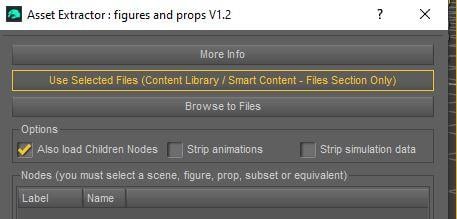
- Group nodes are now displayed and can be reloaded, either as empty parent nodes (to catch location/orientation for instance) or with their children, depending on the “Also load Children Nodes” option. his is implemented, but still needs to be tested with a wider range of scene configurations.
- The interface now displays parent/child hierarchies, closer to what you see in the Scene pane.
- Animation data is now filtered more safely: animations belonging to nodes that are not imported should no longer be kept in the generated DUF.
- Simulation data from non-imported geometries is now cleaned from the generated DUF file. Said differently : dForce simulation cache data can now be stripped from the generated DUF, without removing the dForce modifiers themselves.This one was on me: I had tested simulated dForce figures, but not timeline-simulated ones...
- For nodes that were animated in the original scene, you can now decide separately whether you want to keep (or not) standard timeline animations, and/or dForce simulation data.
For example, if you load an animated figure with timeline-simulated dForce hair, you can now choose between several combinations:
keep the figure animation but remove the hair simulation, remove the figure animation but keep the dForce hair simulation, keep both, or remove both.
So yes, you can even end up with a perfectly static figure and animated dForce hair. Which is probably useless, but pretty funny. ;)
@V3Digtimes,
Thanks much for your hard work and persistence in improving all of your products including this one. I bought the bundle on Saturday and played a little yesterday with extracting props and figures. I look forward to exploring the three sets of scripts more.
I just want to thank you for making this. I don't have much experience with it yet, but I have used it 3 times over the week-end and is a huge timesaver in my workflows.. so thank you so much! The amount of scene assets / scene subsets I've saved over the years because I wanted a specific hair with specific morphs applied, or clothes, or camera, or whatever.. now everything is much faster and just a few clicks away without the constant bouncing back and forth between scene files !
This has worked beautifully for me. I'm a little intrigued about why it gave me a message about not being able to find monks robes when the scene is doctors in scrubs, but it did just what I wanted it to.
@jjoyner
Thank you so much for your kind words, and also for your support. It really means a lot. This bundle took a lot of persistence indeed, because DUF files can be surprisingly deep and tricky, but I am very happy that it is finally out in the world and already useful. I hope the three sets of scripts will save you a lot of time once you start exploring them more.
@franky85
Thank you so much! This is exactly the kind of workflow problem I hoped the scripts would help with. In my own 3D development work, I often need to retrieve, compare, or reuse specific elements from previous scenes, scene subsets, or development files, without constantly reopening and navigating through the whole source scene. So I am really glad to read that it is already saving you time in real use.
@jhogenboom_da69c035a9
Thank you very much, I’m really glad it worked beautifully for you.
About the “monks robes” message in a doctors-in-scrubs scene: yes, that is exactly the kind of strange DUF filtering case I am very interested in investigating. Sometimes when I correct a DUF filter, the fix covers a whole family of cases, but DUF files are so complex and nested that some extra node-related data can hide in places where you would not expect it at all.
So I would be very interested in the DUF file, because it would allow me to confirm whether the fix I implemented yesterday already covers your case, or whether this is a new hidden case that I should handle properly too. Of course, only if you are OK with that and if it is not a problem for you to share it. If you prefer not to, I completely understand, no worries at all.
If you are OK with sharing it for analysis, we can continue by PM and find the easiest way to transfer it depending on the file size.
Going on with version 1.2 development.
I am currently testing the new hierarchical interface display with a heavily nested scene, including figures parented to bones of outfits/figures nested inside other figures, already nested in other props/figures/other nodes, where some "fit to" outfits are also children of children props..
The hyper-nested loading itself already works in the current 1.0 version. The real work here is about the interface: displaying this kind of complex hierarchy in a clear and usable way before loading.
Of course, the hierarchy can be collapsed and expanded.
Bones are not displayed as separate items, since they are not useful geometry import targets. However, when an item is parented to a bone, it is displayed under the corresponding figure, and the bone name is mentioned directly in its label, for example: [parented to: Right Hand].
And yes, what you see here is a typical dev test file: ugly, heavily nested, and intentionally made to stress-test the scripts.
I finally put this to the test. I didn't explore it fully. For just loading a figure, it seems fine. I haven't dug into the other scripts.
Can't wait for the group support. I usually put figures in a group and do translation and rotation on the group leaving the figure at 0,0,0 0,0,0 100%,100%,100%,100%. I think these translations and rotations aren't imported even when you choose the retain translation in the gui.
Thanks a lot for your feedback and remarks.
Group nodes already work in my in-development 1.2 version: they are displayed in the hierarchy and can be reloaded with their children.
In the current script logic, the “Zero after loading” option deliberately resets the loaded branch after import. More precisely, after loading, the script looks at the newly added nodes, matches them by label/name, finds the top node of the newly loaded branch, and applies the zeroing only to that top branch node, in order to place the loaded branch at the scene origin.
Bones, and also child props/figures inside that loaded branch, are not zeroed individually, because their placement depends on their parent hierarchy. They keep their relative position inside the branch. Zeroing every child separately would break that relative placement. If you want to zero a child item separately, then you need to select that child item itself instead of selecting its parent branch.
So if “Zero after loading” is enabled, the original placement is not supposed to be preserved. The loaded item or loaded branch is intentionally reset at 0, but only for the checked items. Also, if both a parent and one of its children are checked, the parent branch wins, because the child depends on it.
If “Zero after loading” is not enabled, then the script keeps the transforms as they are stored in the source file. That means:
if the figure/object was not parented, its transforms are effectively scene transforms;
if the figure/object was inside a group/parent, its transforms are local transforms relative to that group/parent.
This is why your case is important. If the figure itself is at 0,0,0 and the actual placement comes from the parent group, then loading only the figure will not necessarily reproduce the visible scene placement, because that placement belongs to the group transform.
I have already implemented a “reconstruct the world placement from the parent hierarchy” kind of behavior in the Cameras/Lights scripts, but it is rather complex and not something I want to blindly duplicate everywhere without careful testing. I will probably not try to add that specific reconstruction behavior in version 1.2, because loading the group itself should already solve this kind of case in a cleaner way.
The good news is that in the in-development 1.2 version, group nodes are now displayed and can be reloaded. So in your kind of workflow, you should be able to select the top prop/figure parent or group that carries the transform, load it with its children, and avoid zeroing its location. This should preserve the group placement and the relative placement of the children inside it. Then, if needed, you can keep only the interesting figure or prop afterwards, for example by unparenting it (with option "in place") and deleting the rest of the loaded branch.
I also plan to review scale handling more carefully in the next development step, probably with an additional user option for scaling.
Thanks again, this is exactly the kind of transform case I want to test before finalizing the group support.
I noticed some scale oddness. But couldn't really pin down the exact issue as I wasn't sure if there were scale differences in the source object. (And I didn't load it to find out.)
Indeed, the scale behvior was not clear or clearly explained anyway. So I worked on it too, not only to make it clearer, but - I hope - also better.
Here are the news of 1.2... almost done on my side...
It concerns only : V3D Magic Extract and Append: Figures and Props / Geom Append.
This update is mainly a consolidation update based on the first user feedback, private tests, and DS6-specific edge cases. The goal is not to change the general workflow of the product, but to make the Geom Append part more comfortable, clearer, and safer in real-world scenes.
The update is not submitted yet. I still have to perform the final tests, do the final cleanup of the script wording/messages, and update the documentation before sending it to DAZ.
But the main integration work is now in place, and version 1.2 should bring a real comfort improvement for all users, plus an important additional safety layer for DS6 users.
Improved hierarchy display, group node support, and text filtering
The hierarchy display has been improved so parent relationships are clearer in the item list. (you see the nested hiearchy, collapsable, and if something is parented to a bone, the name of the parent bone is shown in the child - which is shown as parented directly under the figure, with its parent bone specified after its label)
Group nodes can now also be used more naturally in the Geom Append workflow. When an item belongs to a group or parent structure, this parent structure is shown more clearly, making it easier to understand where the item originally belonged in the source scene.
A new text filter has also been added above the item list. Users can type part of a name or label in the “Enter text to filter by” field to quickly narrow the displayed items and find the content they want to append more easily.
Optional visual scale preservation
An additional optional behavior has been added to help preserve the apparent visual scale of extracted items when they come from scaled parent or group structures.
This is mainly useful for scenes where the object itself does not carry the full visible scale directly, because part of that scale comes from its parent hierarchy. When enabled, the script tries to reload the item closer to the way it appeared in the source scene, by recursing up the scales met along its parents hierachy.
That option is intended as a practical visual scale helper. It does not replace the standard loading behavior and can be left disabled if the default behavior is preferred.
Remember that loading a parent with its children will naturally preserve the parent/children scale ratio.
Cleaner final reference warnings
Some source scenes may contain hidden or indirect references that are not visually obvious in the scene itself.
In version 1.0, this could sometimes - occasionally - create confusing final warnings about missing or unexpected references, even when the selected item had actually loaded correctly.
The 1.2 update improves this filtering so the final report should be cleaner and less polluted by references that do not really help the user understand the append result.
Safer DS6 workflow for very large DUF files
One important issue reported during testing was a DS6 crash/freeze when trying to inspect a very large DUF file containing heavy timeline/simulation data.
The 1.2 test build now includes a safer DS6 workflow for this kind of case. When needed, the script can work from a temporary stripped copy of the source file, instead of directly parsing the original heavy DUF in DS6.
The original DUF file is never modified.
This is mainly a DS6 safety measure, because DS6 is still in development and some very large simulation-heavy files can currently be much harder for scripts to inspect safely.
DS6 Users only : Timeline Simulated dForce Warning
This warning only concerns DS6 users working with very large DUF files containing heavy timeline simulated dForce data.
For the moment, DS6 does not seem to handle these very large timeline dForce simulation data blocks safely when they are inspected directly by script. In some cases, this can lead to crashes, freezes, or extremely high memory usage before the item list is even displayed.
To avoid this, the 1.2 update includes an optional DS6-safe workflow. When this option is enabled, the script creates a temporary working copy of the source DUF and removes the heavy timeline simulation data blocks from that temporary copy before inspecting it.
The original DUF file is never modified.
This means that, when this DS6-safe workflow is used, timeline simulated dForce data will not be preserved in the appended result. This is intentional for now, because the priority is to avoid DS6 crashes or freezes on large simulation-heavy files.
This remains an optional behavior. Users can disable it at their own risk. This is useful if they are sure the size of the file is not linked to simulation data.
I will also contact DAZ about this specific DS6 behavior, to check whether they are already aware of this issue with large DUF files containing large timeline dForce simulation data, and whether this is something they plan to address before or around a more final DS6 release stage.
And if this cannot be handled on the DS6 side, do not panic: I already have other possible technical workarounds in mind... and on computer...
So, in short: the 1.2 update is not submitted yet, but it is already well advanced. I still need to complete the final tests, polish the script wording, and update the documentation, but the main goal is clear: better comfort for all Geom Append users, and better safety for DS6 users.
I FOUND A ISSUE with the Append Sricpt I finally figured out the issue with your script. After doing a bunch of testing by removing things one by one, I found that the script crashes on any scene that contains dForce hair that has already been simulated. When I removed the hair completely, the script worked perfectly. I then tested it further: when I added the same dForce hair but left it unsimulated, the script imported the scene without any problems. However, as soon as I simulated the hair, saved the scene, and tried to import it again, the script crashed immediately. So basically, the script cannot handle dForce hair that has already been simulated and saved in the scene file. The hair needs to be in its default, unsimulated state for the script to work. Just wanted to let you know the exact cause. Let me know if you need any more info.
Every now and then Daz just crashes when I use the extract figure feature. The only possible clue is a trace like this. No idea if that helps. But Daz doesn't create a dump file when this crash happens. This is DS6.
[WARNING] :: Global include() is deprecated. Refactor "C:/Program Files/DAZ 3D/64-bit/DAZ 3D/DAZStudio6/resources/guide pages/Common/PanePage.dsa" to use require().
Thanks for the detailed testing. That is indeed a known issue, but normally it should be specific to DAZ Studio 6.
So first, could you please let me know which exact DAZ Studio version you are using, especially if this happened in DS4? So far, I have not seen this problem occur in DS4.
The issue comes from the DS6 JSON parser. Simulated dForce hair can store very large simulation-data blocks in the DUF file, including extremely long lines that can reach several megabytes. DS6 currently has problems parsing files containing these very large blocks, and it will then hang or crash during the JSON parsing itself.
I reported the issue to DAZ several weeks ago, with a reproducible test case, but so far I have not received any further information about a fix.
In the meantime, while I have been busy updating the rest of my catalog for DS6 compatibility, I also developed an update for the Append scripts specifically to work around this problem. I have not submitted it yet because I was waiting to hear back from DAZ.
This version - not submitted yet - adds a DS6 "Safe Mode". Before the normal processing starts, it checks the source DUF and removes the stored simulation data from a temporary copy of the file. This prevents the DS6 parser crash and allows the scene to be processed normally. The original DUF is never modified.
The obvious drawback is that the stored simulation data cannot be preserved when Safe Mode is used.
There is another drawback that I am not very happy with: the Safe Mode can considerably slow down the process on large files because, in DS6, the file has to be pre-processed before it can safely be passed to the JSON parser.
I also tested a completely different approach using an external Python parser integrated into the product. That actually works very well: it avoids the initial DS6 parsing crash and can preserve the simulation data. Unfortunately, it would also require a very substantial rewrite of everything that happens after the file is parsed, so it is not a practical short-term fix.
So for now, the DS6 Safe Mode is the workaround I have as "soon submittable", unless DAZ fixes the underlying parser issue.
I am going to follow up with DAZ again about the parser issue. If I still do not get any feedback, I will submit the temporary Safe Mode update rather than keep waiting.
After that, there are basically two possible outcomes: either DAZ fixes the DS6 parser issue on their side, or, if it becomes clear that this is going to take a long time, I will probably complete the integration of the external Python parser for Windows.
That second solution would solve the problem properly for Windows users, including preserving the simulation data (and globally speeding the workflow too).
That warning should not be related to the Extract Figure crash. It comes from one of DAZ Studio's own resource scripts:
C:/Program Files/DAZ 3D/64-bit/DAZ 3D/DAZStudio6/resources/guide pages/Common/PanePage.dsa
It is simply a DS6 warning that the global include() function is deprecated and should eventually be replaced by require(). It is not generated by the Extract Figure script itself, and I have seen similar warnings in DS6 without them preventing scripts from working.
Since this is DS6, one thing I would be interested to know is whether the crashes happen with scenes containing already-simulated dForce hair or other heavy saved simulation data. There is currently a known DS6 parsing issue with very large simulation-data blocks, which can cause DAZ Studio to hang or crash without giving the script a usable error.
If you notice that the crash happens consistently with a particular scene or figure, especially one containing simulated dForce content, that would be very useful information. I would be greatful if you could share the duf so that I can see what goes wrong in a debug mode.
I've moved on to other things. I circle back to it during the week when I'm not trying to get a dozen things done because it's the weekend. :)