Wet Shader Product Name?
 3DIO
Posts: 530
3DIO
Posts: 530
I keep seeing a shader that appears to be using some sort of proximity data to calculate the transparency map. I first saw it used on Linday products, but at the time, I assumed the effect was just baked in and done by hand, just to give the effect.
But I saw this one last night, one by Matt Castle:
https://www.daz3d.com/gallery/#image=1165359
That looks way too accurate to be done by hand, so I'm guessing it's a special shader, but what's the name of it on the store here?

Daz 3D is part of 
Connect
DAZ Productions, Inc.
7533 S Center View Ct #4664
West Jordan, UT 84084
Licensing Agreement | Terms of Service | Privacy Policy | EULA
© 2026 Daz Productions Inc. All Rights Reserved.
Comments
Not sure, but maybe https://www.daz3d.com/iray-wetfx-2?
There have been several. Some are no longer available, like the excellent one that was included in Mec3D's old shader sets. The wetfx products are decent, as is vyktohria's https://www.daz3d.com/iray-wet--dry-fabrics The thing is, none of these are perfect as what really sells the idea of cloth being wet is varying layers of transclucency and staturation that vary in response to folds in the fabric and direct points of contact with the body or objects underneath. To really get the effect right requires specific wet textures in exactly the right spots and patterns, and while a dedicated AI program might be able to do, that's something that a basic shaders really can't do on it's own, To address this, there are some vendors who include special wet effect texture mats for specific products, Linday has been doing that since Genesis 3, but looking at your attached image, that looks more like one of SW Trium's wet items, many of which are in this bundle https://www.daz3d.com/dforce-dynamic-wet-tshirt-swimwear-bundle-for-genesis-9-and-8-and-81-females
They're not what I'm after, but thankyou both for the suggestions. When I first saw the name "Iray Wet-FX" I really thought that might be it, but it looks to be a decal overlay thing. I thought it must be a special shader that uses proximity to other geometry in order to drive the transparency of the shader, or something like that.
Unless perhaps the Linday product includes a shader that could be used on other items. If anyone has used the Linday or SWTrium product, and does the shader transparency adapt automatically depending on the character the shirt is clinging to, or is the effect baked into the texture and has the same pattern regardless?
I find it hard to believe this is done manually, I reckon that's gotta be a shader thing:
https://www.daz3d.com/dforce-dynamic-wet-tshirt-bikini-for-genesis-8-and-81-females
Has anyoneone used that exact product?
See it's not the T-shirt I'm interested in, I have lots of them. But if by "Dynamic" they're referring to the wet effect and not the dForce, I'd buy it in a heartbeat cause a shader that can be driven by proximity would open-up all sorts of really neat rendering possibilities for materials.
If anyone has that exact product, please let me know what's what with it.
Actually, forget that, I'll pick it up next time it's on sale since I'm very intrigued by the description they give it, and I'm curious how it works!
Please report back your findings!
Looking at the promos, from the oen showing the "Wetness factor" it seems likely that there is a gradiated transparency map on the first (might be baked from an occlusion map) and that the Wetness Factor is applying a threshold to control whiich levels of the map are opaue and which transparent. If it is live iin the shader than an occlusion channel may control it.
A number of Linday hairs come with their own solution for wet skin, so maybe that is what you are thinking of.
It is not a shader, but a geoshell with wet maps. I personally think this looks better than a lot of the wet skin products you can buy.
In the image the t-shirt is likely from a product where the garment is designed to look good when wet (ie that cling to the body look).
Ahem. I have the products in question (yes, all of them) and I will never suggest a product that I haven't used without a specific disclaimer. That said, to answer the previous questions. 1 - Yes, the SW Trium product in the image can indeed render results just like those shown in the image, provided you follow the instructions and use the right lighting, which is a direct main light with limited ambiance such as DS' integrated sun-sky mode. Strongly lit HDRI's may work as well, but the softer and more diffuse the light is, the less the defined the wet effects wiill be. 2. The" dynamic" in the name only refers to the draping of the cloth, although there are a number of additional wrinkle morphs that, besides making the cloth cling in a manner more like wet farbric than the standard Iray drape, also provide a pattern that is replicated by the textures used by the special "wetness tool" textures, which can be manipulated throgh a wetness tool slider or presets for a wide variety of effects. 3. No, there are no special shaders involved that can be used with other products. In fact, given that Iray shaders depend on seamless materials and basically fill any selected area with an identical repeating pattern over and over, there's really no way that Iray shaders could be used to create similar effects without creating entirely new material zones and using multiple shaders, which would be much less practical than using the basic textures map zones combined with all of the custom textures/masks the PA created for most of the layers. 4 - Because the wet wrinkles morphs can be applied seperately, the T-shirt can also be used in a completely "dry" mode and looks quite good that way.
@XtraDimensional
Sure, will do!
@Richard
Must admit the promos have me a bit baffled, especially when I read the description, but it'll be interesting to see how it's done whatever it is!
@Havos
I know what you mean, but no, nothing to do with the wet geoshell stuff.
@Cybersox
Thanks for the detailed explanation. Still baffled by it a little, but I'll pick this one up next time a generous sale is on. If I read the description for that specific product, it kinda does sound as if it uses a custom shader, but that the product has wrinkle morphs as well. Whether any one specific feature or combination of features is/are required to make it work, I have yet to get my head around. But it'll be interesting to mess around with and find out, just to see how it's done!
I mean, if you don't actually tag me in your post, the chance I'll see the question to answer it is somewhat diminished. It's kind of chance I opened this thread at all...
Anyway, it is a trick I learned from SWTrium's products, but there's no special shader here - it's geoshell trickery. The main layer of the shirt is relatively transparent, then there is a somewhat more opaque geohell with a negative offset. Where the clothing is close to the figure, that geoshell clips inside the figure, thus hiding that more opaque layer in that area. This technically messes with the SSS on the figure a bit, but it's usually not obvious.
In this case, I also threw displacement maps on the shirt (and its geoshell) to make the look more wrinkly than dForce alone was managing.
I couldn't quite get the vest to skintight in all the correct places (ok, I just couldn't go another round with Meshgrabber!) but the right light (to convince the eye); quite some tweaking of basic G8 skin surfaces and a simple opacity-map on the vest (tweaked over and over in paint-program of you choice) can get you pretty close for nada
https://www.daz3d.com/gallery/user/5444756578500608#gallery=newest&page=1&image=1348524
[yes, shameless ]
]
@Matt_Castle
Ah, right. That's making a lot more sense now. I couldn't figure out how, if it were not a shader, it could be used on other objects. I'm in no rush for it, I was just fascinated by it really, but I'll still pick it up when there's a generous sale on. Thanks for the explanation. I tend not to use geoshells, but I get the idea now.
I wasn't aware the forum has tag functionality, but it's good to know and I'll keep it in mind for next time.
@kpr
Great stuff, and to be fair it is looking kinda hot in there :-D
I bought a customisable droplet and sweat kit some time ago and haven't even used it yet!
But once I pick up one of those wet hair products, I'll likely get some use out of it.
I have to agree with Richard. The "wet effect" can be created as a static map using something like Substance Painter's Curvature Generator (not ambient occlusion). Then the map is created as a mask used in the opacity channel, in this case as a Geoshell (but it could also be done with a blended L.I.E. loaded into the opacity channel), so that it will affect the opacity of certain areas of the article of clothing (T-Shirt). This CANNOT be changed on the fly in DAZ Studio though. The dynamic part must be referring to the dForce elements of the clothing.
Basically the folds are modelled into the clothing items and when baked maps are created in Substance Painter, the Curvature Map can be used to determine the transparency values for a mask map.
Edit: Having another look at the product "dForce Dynamic Wet T-Shirt..." I realize I was wrong. Although my method would work for a static clothing item, it looks like they've used a different technique. It is likely two geoshells with different textures. One to produce wet looks and the other to product dry. The slider must control the intersection of the two geoshells (maybe using morphs on the T-shirt for certain areas?) . I don't own the product so I'm only speculating how I would do it if I created a similar product. I'm confident that it could NOT be translated to other clothing items though. You would need to re-create the process from scratch for any new clothing item.
I will note that I'm being somewhat facetious, but yes, if you have a reasonable question about something I've rendered, then tagging or messaging me is okay. (Although I may well say "Sorry, that's all custom work" or give a horrendously complicated explanation. Because, indeed, a lot of stuff I do is like that).
Gallery comments are probably less useful though, unless that's something they're fixing with the upgrade, because there's no comment notifications over there and thus no way I'll find a question on my older uploads. (I check new uploads for a few days, but not beyond that).
The basic principles can be applied to any clothing item where a geoshell with negative offset isn't a problem (such as through it coming out backwards through folded seams). Indeed, the shirt I used was from an old G3 set (which wasn't even originally dForce).
Dial in lots of translucency and refraction on the shirt itself, create a geoshell that has less translucency and refraction, offset the geoshell inwards until it's clipping into the figure.
In this case, the only thing that's reasonably custom is that I needed to take a wrinkle displacement map and align it with the UV, but it's not exactly wildly bespoke.
Indeed, Jinx's sister has also had a water related mishap at some point, using an entirely different shirt asset: https://www.daz3d.com/gallery/#image=1348673
@NewGuy
I'm understanding the dual geoshell thing now, although I'm surprised that while draping them using dForce, the two shells do not part. I totally understand what would be needed to do it manually, but it was really the automatic aspect of the shirt that interested me. I'm amazed there isn't such a shader available to be honest. I mean, they can make shaders that are effected by angle relative to the camera etc, so it's pretty surprising there isn't a proper wet (or perhaps soak) shader for Iray.
@Matt_Castle
Thanks for the insight and I'm definitely looking forward to playing with it. Not sure how you know that someone used a tag on here, but I'm all for highly detailed techincal posts, especially about stuff I'm trying to figure out or learn. Right now I'm wondering what happened to @TimberWolf cause he seems to have disappeared, and I've been waiting for him to re-appear so that I can pick his brain for a step-by-step on how to get dForce working on my Linux installation!
A Geometry Shell isn't an independent thing, it is a form of instance, a live copy of the base shape in its current state. It diffrs from a true instance in that it can have its own materials and a Push Modifier applied, but the offset from the Push Modifier aside it will be an exact match for the base item's shape.
@Richard
Cheers, I wasn't aware of that. I think I've probably been a bit too judgemental about geoshells. I remember a product I bought some years back, some catsuit type of thing, but there was stuff I couldn't do (or at least at the time I thought I couldn't do), and it put me right off geoshells.
Bit too hasty, but then today I've just been messing around with the first geoshell product I've purchased in years; I bought Vellus Horizon 2.0 which looks excellent in the promos, but I can't see the hairs at all which is just bizarre considering it's a geoshell. It says a PDF is included, but I can't find that, either!
For vellus hair products, you need decent (rim/back) lighting to make them noticeable in a close up shot.
Vellus Horizon doesn't add vellus hair through geometry, but by using a shader made to mimic how vellus hair would react under light: in textured mode, you'll only see a faint white translucent overlay on every surface of the figure. To see it in action, you need at least Iray preview and a light source properly placed.
Two screenshots of Daz Studio UI, to show what I mean (for the full render with the vellus active, click on Portrait in red - Hanako 9).
Without Vellus Horizon:
With Vellus Horizon:
A couple of examples from my gallery:
Dawn over Kyoto and Tea with a friend: you'll see vellus a bit under Hanako's mouth on both, a bit under the tip of her nose on Tea with a friend and overall it's mostly visible on the edges of her face and neck, creating a subtle halo.
While it's mostly visible on the face, it can also be visible on full figures too (when clothes are not covering vellus hair as they do in the two previous renders):
Portrait in red - Hanako 9 and Olympia 9 by night: on Hanako's render, vellus is barely visible on her face (it's on, I checked while doing the textured mode screenshots), but you can see the effect of vellus on her left arm (the rim light on both side are a result of Vellus horizon interacting with the sun behind Hanako). On Olympia's render, it visible on her face, and on her left arm.
I sometime forget to list VH 2.0 as a product used, but I'm almost always using it with a Genesis 9 feminine figure, even when it may not make as much sense as on previous renders, due to the character beeing a bit too far to really see Vellus, as shown on Together. I think it's slighty visible on Olympia's face (lighter part near her mouth) and on her right arm (a very subtle hallo is visible).
An element to keep in mind: using VH 2.0 will lead to longer rendering time. It's not night and day longer rendering times, but it'll will still have an impact on how render duration.
If you want vellus hair using geometry for Genesis 9, I think this product is the one you want:
https://www.daz3d.com/genesis-9-body-and-vellus-hairs
I don't remember using it and I have no idea how it fare compared to VH 2.0, quality and performance wise.
If at one point you want to get Vellus Horizon for Genesis 8, just a warning: it won't work if the SubD level of that figure is over 3: Daz Studio will be stuck at some steps needed to prepare the rendering of a scene. I don't really understand why but it's not a problem with VH 2.0.
@y3kman
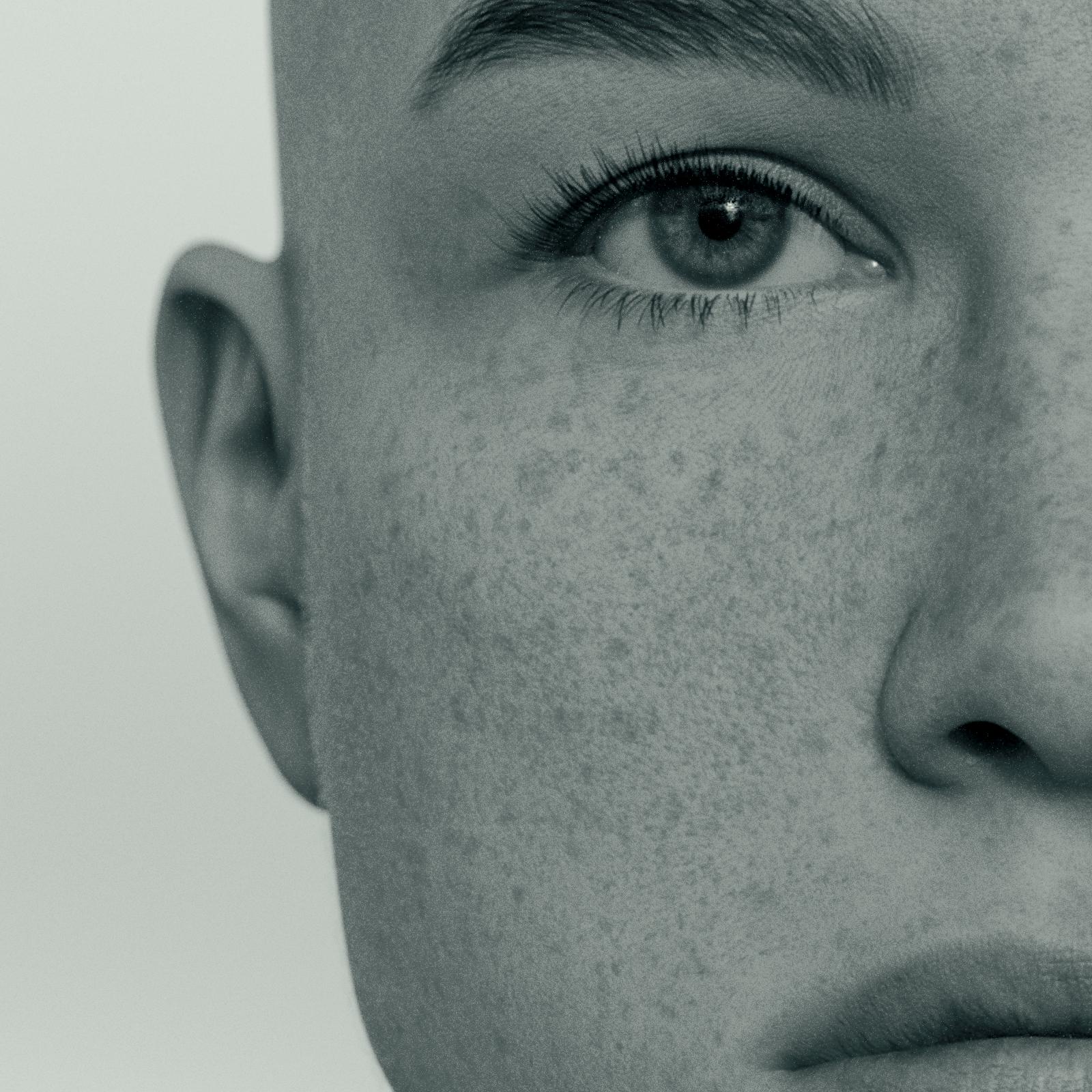
Back and rim lighting makes sense, but it didn't seem as if it was working at all. Turns out they were there, but I wasn't allowing enough render samples to see them. Got there in the end as shown in this 100% crop of her right cheek. I can see the vellus hair on her cheek, just forward of her ear. The image is resized to 800 wide for the forum but if you click on the image it'll go to the full size of the crop and you can see them better.
@Elor
Thanks for taking the time to do that. I think the lighting looks very nice on Portrait in Red. I did notice the slight change you mentioned (when applying the geoshell), but I just couldn't see the hairs rendered. In the end I figured it out and actually, in the attached crop, I have already made some adjustments. The offset was reduced from 0.0020 to 0.0010, and the Cutout Opacity was reduced from 47 to 42. So if anything, the hairs would be more visible than they are in the crop if I'd not done that. I just felt the default had a bit too much offset for close-ups. In contrast, the way you used it helps to render a nice, tight rim along the edge of the skin from a distance, and the default offset (unless you adjusted it) definitely works well for that. It seems the closer you get, the lesser the offset needs to be to look ok.
But yeah, wow, I'm well pleased with Vellus Horizon 2.0 now that I can actually see the hairs! It definitely is a plus in favour of geoshells since this is something it is ideally suited to. Can't say I even noticed a difference in render times to be honest, and extra nice is it doesn't look distracting or cause any lag in the viewport!
Click the image for the full-size crop:
I don't remember playing with the setting of Vellus Horizon, so any render of mine using it is very likely (like close to 100% likely) to use the default value.
I did finally pick-up this the other day while the sale was on, but the cruel reality of life right now is ensuring that I can't even play with it due to lack of dForce!