Daz Studio using the new RTX NTC (Neural Texture Compression)
 junk
Posts: 1,554
junk
Posts: 1,554
I know that this is new technology and not even released to the general world yet.
But if the new RTX Neural Texture Compression (NTC) can be baked into Daz Studio, it would allow laptop or desktop owners with less VRAM to effectively render like they have a 24GB or higher GPU.
Here's a link to one of the news outlets on this new RTX tech offering up to 80% compression without loss.
it is a matter of having it baked into Daz Studio software to utilize it as it is not "plug and play" technology. Essentially textures such as 8K skins, that might use a GB of VRAM, could effectively use 80% less after compression by the RTX cards "Neural Compression". This would happen in less than 1ms of time essentially being invisible to the end user.
A toggle within DS for "Neural Compression" in the Render Settings > Advanced or Optimization tab could be added for those who choose to utilize it.
Either way, I believe the viewport, rendering, loading of characters... pretty much everything would benefit from it. The output would most likely be faster or could have more iterations in much less time. Win, Win.
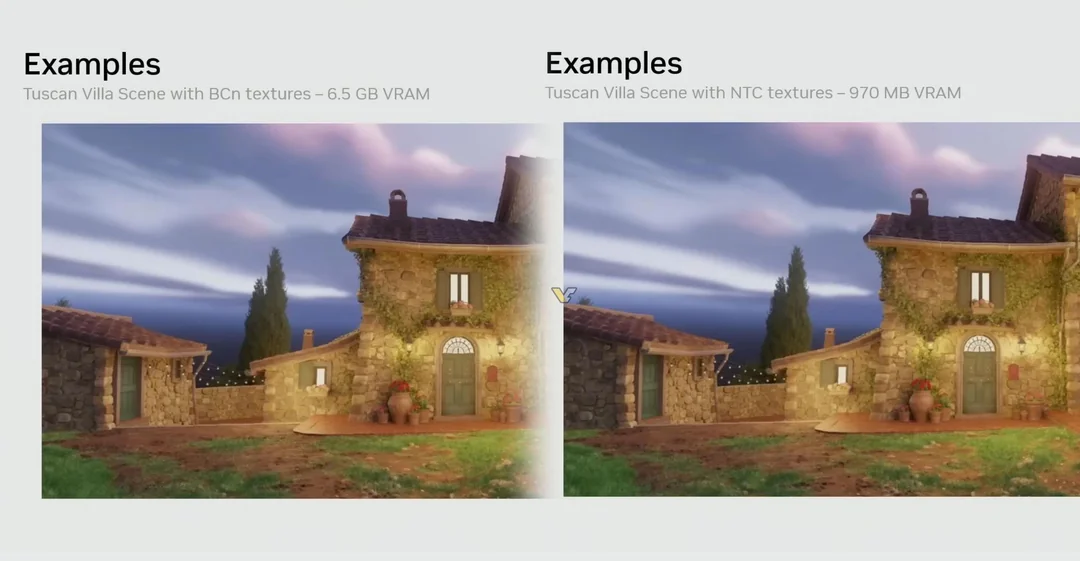
Is it just a matter of "when"?
Thoughts?

Daz 3D is part of 
Connect
DAZ Productions, Inc.
7533 S Center View Ct #4664
West Jordan, UT 84084
Licensing Agreement | Terms of Service | Privacy Policy | EULA
© 2026 Daz Productions Inc. All Rights Reserved.
Comments
From the linked article ^
IF I read that correctly, and your notebook has a 5090, then the DO and PAs would be putting in the work not necessarily IF it was integrated into the Daz software (like the tickbox/option you suggest, in the render-pipeline options)
(From gaming-experience - these Nvidia whizzbang features work best/at-all only on the high-end cards)
So, it seems to work much like Scene-Optimizer already does but, (by PA/DO using AI tools to make the strip down texture files) would produce 'better results' ?
That's how I saw it as far as how it might operate. As for how it's truly is implemented whether the PA's would have to be the start of it, I'm not sure. I was just after the mile high idea that, we coudl potentially get a near identical output for less VRAM end scenario. My laptop has an RTX 4060 with 8GB VRAM... and so the wish would be that it operates much faster than it does. :)
I' ve a 3070 8GB, so I do understand your wish
35 mins to an hour; after quite some time with Scene Optimizer, is pretty usual (though that is at least a day quicker than when I did CPU only!!). Even with the speed and total VRAM of the 3070 I do occasionally get some decent results (if somewhat slowly!) and part of me wonders if the RAM-budgetting and SO work - along with all the other tricks, like split rendering etc etc - doesn't make for "better considered scenes" (I know I learned a lot from 3 years of COU only)