FM Fightclub Underground [Commercial]
 Flipmode
Posts: 950
Flipmode
Posts: 950
Hi guys!
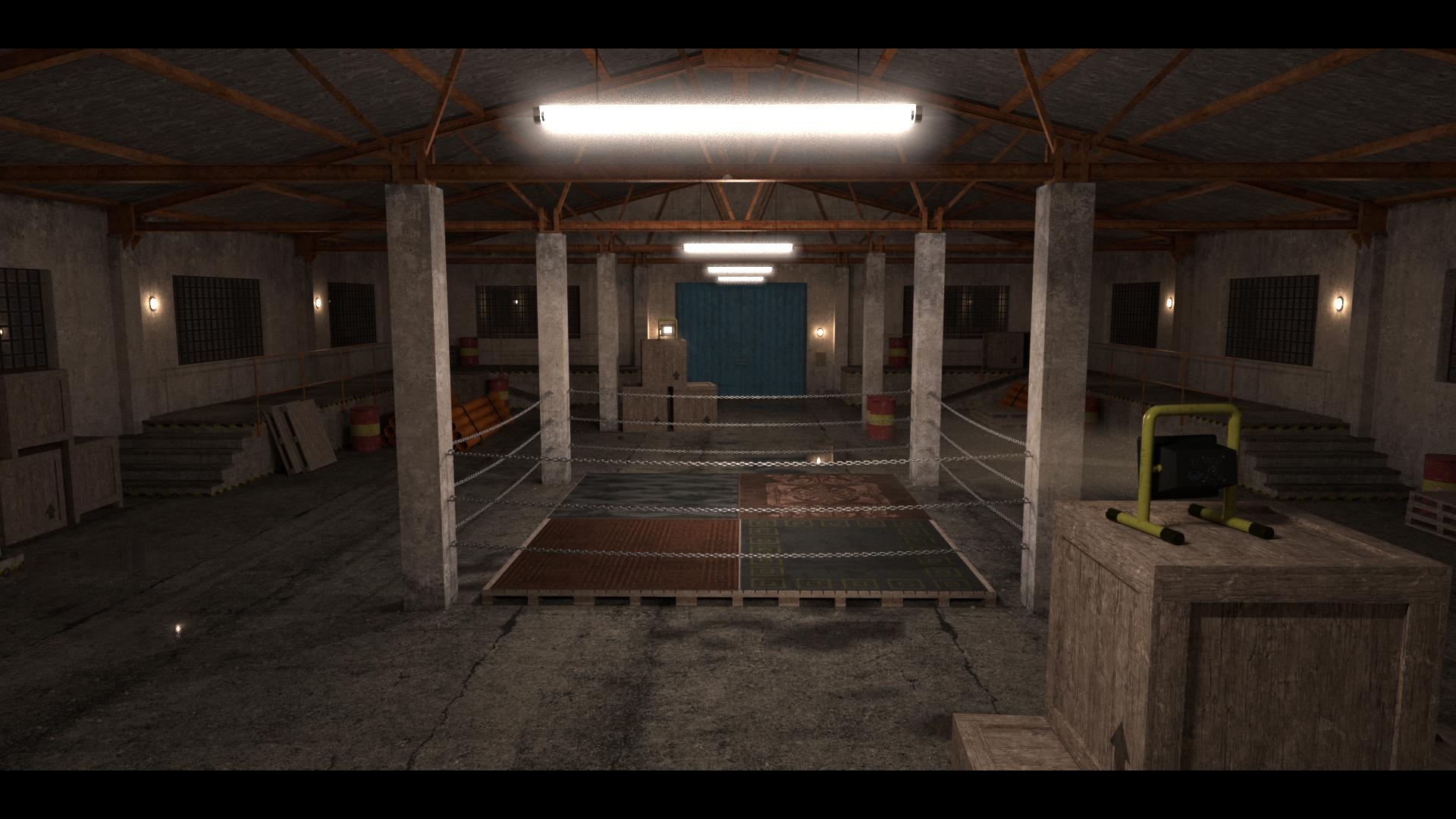
Here´s a quick preview for my upcoming set "FM Fightclub Underground".
I hope you´ll like it. :)


Features:
- Full scene and "ring only" preload.
- Matte Fog on/off presets.
- 3 Tonemapping Exposure presets.
- Chains "default" and "black" (hierarchical-) Material presets.
- 7 cameras included with the full scene preload.
- The ring chains are separate objects, you can easily adjust their hight.
- Carpets on the pallets can be hidden/removed if you want a different look.
- The blue gates can be opened.
- The 2D Spectator billboards are included, you can of course hide/remove them)
A set of "no rules" Fighting Poses for Genesis 9 will release alongside.
Most of them are done with two stages, like preparing a punch and landing a punch.



Daz 3D is part of 
Connect
DAZ Productions, Inc.
7533 S Center View Ct #4664
West Jordan, UT 84084
Licensing Agreement | Terms of Service | Privacy Policy | EULA
© 2026 Daz Productions Inc. All Rights Reserved.
Comments
Your images are not visible.
I see them
flipmode3d.com must be blocked for you
I see them on my phone but not on my work laptop, for some reason flipmode3D is categorized as "online games" by my work proxy and so is blocked
Correct. Trying to acces it, I get "Forbidden".
Oh well, new day new troubles I guess. ;)
Thanks for letting me know, I have no clue how to fix that though.
-
I used to work in gaming ages ago, but categorizing my site as gaming site is quite odd. :/
Potentially it can be it doesn't allow access using VPN.
This is kind of a laborious solution, but it works! Quite often I can't see images if they are hosted elsewhere when I view the forum while at my place of work.
You, as the poster, can make it work for everyone everywhere by attaching your images to your post, save the post, then right click on each attached image, open in a new tab (or window) and then one by one copy the image URL (now hosted on DAZ servers since it is attached to your forum post) and go back into your post, edit, click the image icon in the editing bar (see illustration below) paste that URL (be sure to click the other tab in the image pop-up and paste the URL there too so people can view the image full size - see example below). NOTE: Massive, or very wide images may distort in the forum, also depending on phone or PC, so setting a width of like or 800 pixels (let the height auto adjust to the size you pick) makes for a happier experience for everyone. I know this seems like a lot, but it is really very easy, only takes a moment, and prevents your post from being derailed by complaints about the images being missing. <wink>
Also, MEGA KUDOS for using a Ryobi light in this image. Ryobi Green FOREVER!
Example using this technique:
Thanks for the info and guide. I am not sure if I can keep supporting my website anyway, so this may be very useful soon enough. ;)
That said, this is the first time anyone mentioned issues with my image links, and I´ve been doing this for quite a while.
-
Anyway, I just updated all kinds of website stuff, blindly hoping some of it might fix it. ;)
Never heared of it, but I am glad you like it!
Hi guys!
The Fightclub Underground sets released today, hope you´ll like them. :)
https://www.daz3d.com/fm-fightclub-underground
https://www.daz3d.com/fm-underground-fight-poses-for-genesis-9