[Solved] The Heart Of The East - Does cameras all load at the same spot someone else too?
 Elor
Posts: 4,197
Elor
Posts: 4,197
Hello,
I'm speaking about this product by @Stonemason: https://www.daz3d.com/the-heart-of-the-east
I tested on multiple computers, but the results is the same: all cameras are loading at the same exact spot and looking at the various settings on them, they are all the same camera.
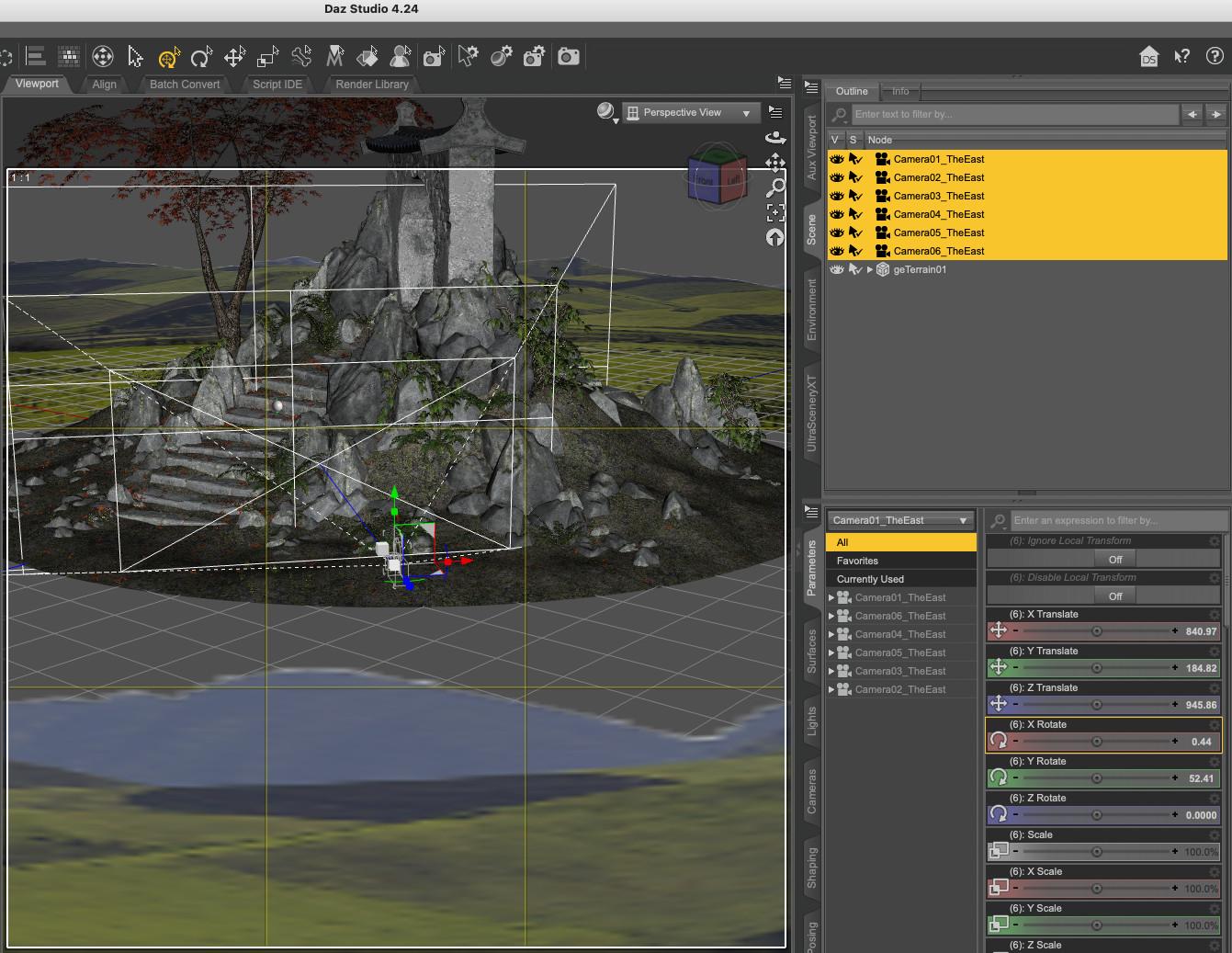
Is the same for others who have this product?
Post edited by Elor on

Daz 3D is part of 
Connect
DAZ Productions, Inc.
7533 S Center View Ct #4664
West Jordan, UT 84084
Licensing Agreement | Terms of Service | Privacy Policy | EULA
© 2026 Daz Productions Inc. All Rights Reserved.
Comments
@Elor, I have it but at first I couldn't find it! I finally tracked it down in my Content Library without any metadata. For a product released in 2017 this is crazy. I selected the Iray version did a quick metadata load for the set, cameras and render settings. I may have to do a Content Library Maintenance Save, then uninstall and reinstall the product for it to show up in Smart Content. But I can't get any of the cameras right now to work, nor the render settings to adjust anything.
I don't have a clue what happened to this @Stonemason product, but this is a mess. But thank you for bringing it to my attention so I could do manual metadata. I think a report to DAZ is needed as they are responsible for metadata. Camera movements and render settings, no clue how to be sure.
Mary
Edit to add: After the uninstall and reinstall my metadata brought the product into Smart Content finally. But the cameras are still the same shot, half way up the hill, cutting off the arch.
Yes, I see the same. In the .duf file, all cameras have the same position. (Metadata is okay for me).
The render settings do change the lighting, presumably to make the most of the corresponding camera (render settings 04 and 05 are identical, but that could be by design).
Thank you both: it's not a problem between my keyboard and my chair then
I'll try to send a ticket later (likely tomorrow or monday) to see if a fix is possible (it's hopefully just a simple mistake made while packaging the product and the correct cameras are still stored on a computer elsewhere).
@memcneil70 > I bough the product a week or two ago, when one of the offer was 'Buy a new release, get a big discount on Asian-themed product' and I don't have any problem with the metadata on my end.
I bought it on 9 Nov 2017 and before now didn't notice issues, but... those original files were installed on my older computers. Both the MacMiniM4 and Windows 11 I made a point of doing totally fresh installs. I had a drive on my Window 10 of zip files from DIM from that period but when I used them on another computer I started to find broken files. Hence, new installs this time around. But I will be honest, I have all but 19 of Stonemason's current store (that are under his name) and others under Daz Originals and I have never seen this issue with the cameras or render settings being messed up.
That's strange, no idea why it's doing that but have attached some new cameras to replace the old ones..
sorry for the hassle
Wow, that's service. All work properly, no worries.Your dedication to the craft is top-notch. Thanks!
NorthOf45 said it better that I could!
Thank you for the camera presets, @Stonemason
Thanks, greatly appreciated.