January 2026 - Daz 3D New User Challenge - Composition, Instancing, and Duplication
 DAZ_ann0314
Posts: 2,887
DAZ_ann0314
Posts: 2,887
New User's Challenge - January 2026
Sponsored by DAZ 3D
Are you new to the 3D World? Are you at the beginning stages of learning 3D rendering? Have you been around for a little bit but feel you could benefit from some feedback or instruction? Have you been around awhile and would like to help other members start their creative journey? Well then come and join the fun as we host our newest render challenge!
Back by popular demand (or well because we think it went well LOL), we are breaking down each month into 2 different challenges:
A Beginner Challenge and then also an Intermediate Challenge.
So which "Challenge" should you choose?
Follow the Beginner Challenge if you are:
- New to the New User Challenges
- New to Daz Studio
- Newer to 3D Rendering in General
- Or if you have not participated in the January Composition Challenge
Follow the Intermediate Challenge if you have:
- Participated in the New User Challenge for awhile
- Know the basics of Daz Studio and would like to learn more in depth topics
- Been using 3D Rendering Applications for awhile and feel comfortable with learning Intermediate Topics
- Or if you have all ready been spotlighted in the January Composition Challenge
*Please be sure to list in your post which Challenge you are participating in

Daz 3D is part of 
Connect
DAZ Productions, Inc.
7533 S Center View Ct #4664
West Jordan, UT 84084
Licensing Agreement | Terms of Service | Privacy Policy | EULA
© 2026 Daz Productions Inc. All Rights Reserved.
Comments
Beginner Challenge:
"Composition"
This is a general render challenge with the focus on how you compose your image. We are providing you with lots of great links on Composition from a variety of sources. Composition is key to pulling a viewer into your image and leading their eye to where you want them to see things. It is a fundamental skill that we, as artists, not only need to learn, but will continue to hone over the years. Read about and look at the examples, in these articles, for how composition works and how artists, from the Masters to people like you and me, put these compositional guidelines to use to make our pieces more appealing and invite the viewer to look around your image as you intended.
For those completely New to Daz Studio, we HIGHLY RECOMMEND checking out the new MASTERCLASS!
General Composition Rules:
http://design.tutsplus.com/articles/5-fundamental-skills-every-artist-should-master--psd-28054
The Golden Ratio:
https://designschool.canva.com/blog/what-is-the-golden-ratio/
http://www.hongkiat.com/blog/golden-ratio-in-moden-designs/
https://www.youtube.com/watch?v=8A3JnWzgXGk
Some Tools for Bryce:
Golden Rules Composition Helpers for Bryce by David Brinnen and Horo
Artists, filmmakers and photographers share similar traits in how we present our work, so you will find that a study of the art of photography will help, which is why you see various links to photographic articles included.
Photography Composition:
http://digital-photography-school.com/5-elements-of-composition-in-photography/
http://digital-photography-school.com/5-more-elements-of-composition-in-photography/
Color can be used as a compositional element, especially when you have color contrast. Here are some fundamentals on color:
Color Fundamentals:
https://99designs.com/blog/tips/the-7-step-guide-to-understanding-color-theory/
Other Types of Contrast:
http://photoinf.com/General/NAVY/Contrast_and_Framing.htm
Examples of Composition:
http://www.pinterest.com/dawnshiree/rules-of-composition/
Examples from Netflix's The Queens Gambit (The Director of this series did an EXCEPTIONAL job applying the Rules of Composition):
Composition of The Queen's Gambit (You may need a Facebook Account for this link which directs to a post - be sure to scroll through the pictures as there are TONS of excellent examples)
This is a bit of a long read but offers excellent examples of different kinds of composition and camera angles.
The Cinematography of "The Incredibles"
I will be checking in as will the rest of the Community Volunteers to try and help with anything you all may need.
For a list of the current challenge rules, please see this thread : Challenge Rules
Closing Date: January 31st 2026
Intermediate Challenge:
"Instancing and Creating Duplicates"
This is a general render challenge with the focus on using Instancing and Duplication within a scene. We are providing you with some links on the topics from a variety of sources. Utilizinging Instancing and Duplication well is key to creating intricate scenes while saving on file sizes and processing power. It is a fundamental skill for those wishing to do large battle scenes, those wishing to create their own worlds, or those wishing to create an environment that seems full and complex.
*If participating in this Challenge, please be sure to list what item(s) within your scene you have instanced or duplicated*
General Instancing and Duplicate Creation Information:
Node Instances
1. Click on the item in the scene you wish to Instance
2. Go to Create - New Node Instance (Good for Singular Instances)
or
1. Click on the item in the scene you wish to Instance
2. Go to Create - New Node Instances (Good for adding Multiple Instances at once)
Pluses:
Doesn't use as many computer resources as loading in the items again (So it won't show as more Geometry Loaded in if you look at the Scene Info Tab)
Great for filling in a scene with items that are going to look identical while keeping the computer strain down.
Can Populate a scene fairly quickly
Minuses:
All the items will share the textures of the original item.
Node Instances are an exact copy of the original, they cannot be morphed or posed separately
Duplicate Nodes
1. Click on the Item in the Scene you with to Duplicate
2. Go to Edit - Duplicate - Duplicate Node(s)
Pluses:
Creates a copy of the Selected Item
You are able to change textures, manipulate, repose etc as if you added in a new copy
Minuses:
Doesn't Save on Computer Resources since it is basically the same as loading in a second exact copy (Rig, Bones, and All)
*Duplicate Node Hierarchies *
(Duplicates the entire node tree below the Selected Node)
Example: If you select Genesis 8 that has clothing and hair attached then it will Duplicate Genesis 8 as well as the attached hair and clothing.
1. Click on the Item in the Scene you wish to Duplicate
2. Go to Edit - Duplicate - Duplicate Node Hierarchies
Pluses:
Creates a copy of the Selected Item and all items attached to it. (Great for creating a copy of a Figure with included clothing, accessories etc)
You are able to change textures, manipulate, repose etc as if you added in a new copy
Minuses:
Doesn't Save on Computer Resources since it is basically the same as loading in a second exact copy (Rig, Bones, and All)
Generally you want to use Duplicates or regular full figures with varying poses etc in the forground of the scene and then use the instances more in the background or as scene filler where it will be less likely to notice they are the same (especially useful when using Depth of Field etc) It can also be used to help cut down computer load when you actually want or need to identical things (props etc) in the scene..such as two chairs in a livingroom, two tanks (or 20 tanks) on a battlefield, multiple candles in a scene that are all the same color, books placed on shelves, potion bottles that can be moved to various places across the scene, or things like trees and grass.
Examples of Using Instances and/or Duplication within Daz Studio:
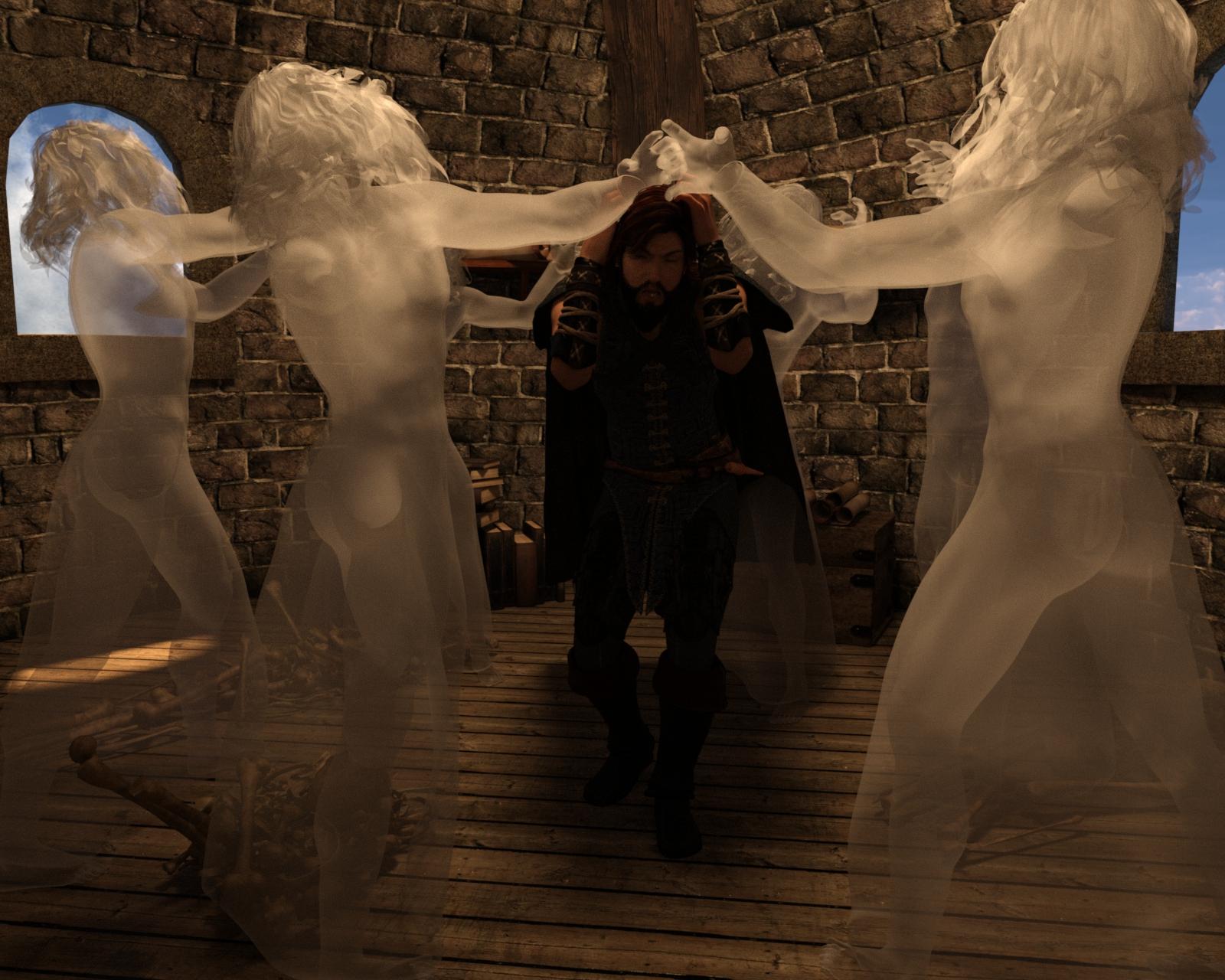
Instances used for the Spectres that are Attacking Ater Eterwood
(Special Thanks to Totte - Code 66 for the Example)
Instances used for the Crates and Barrels. Barrels were rotated to avoid the repeated look.
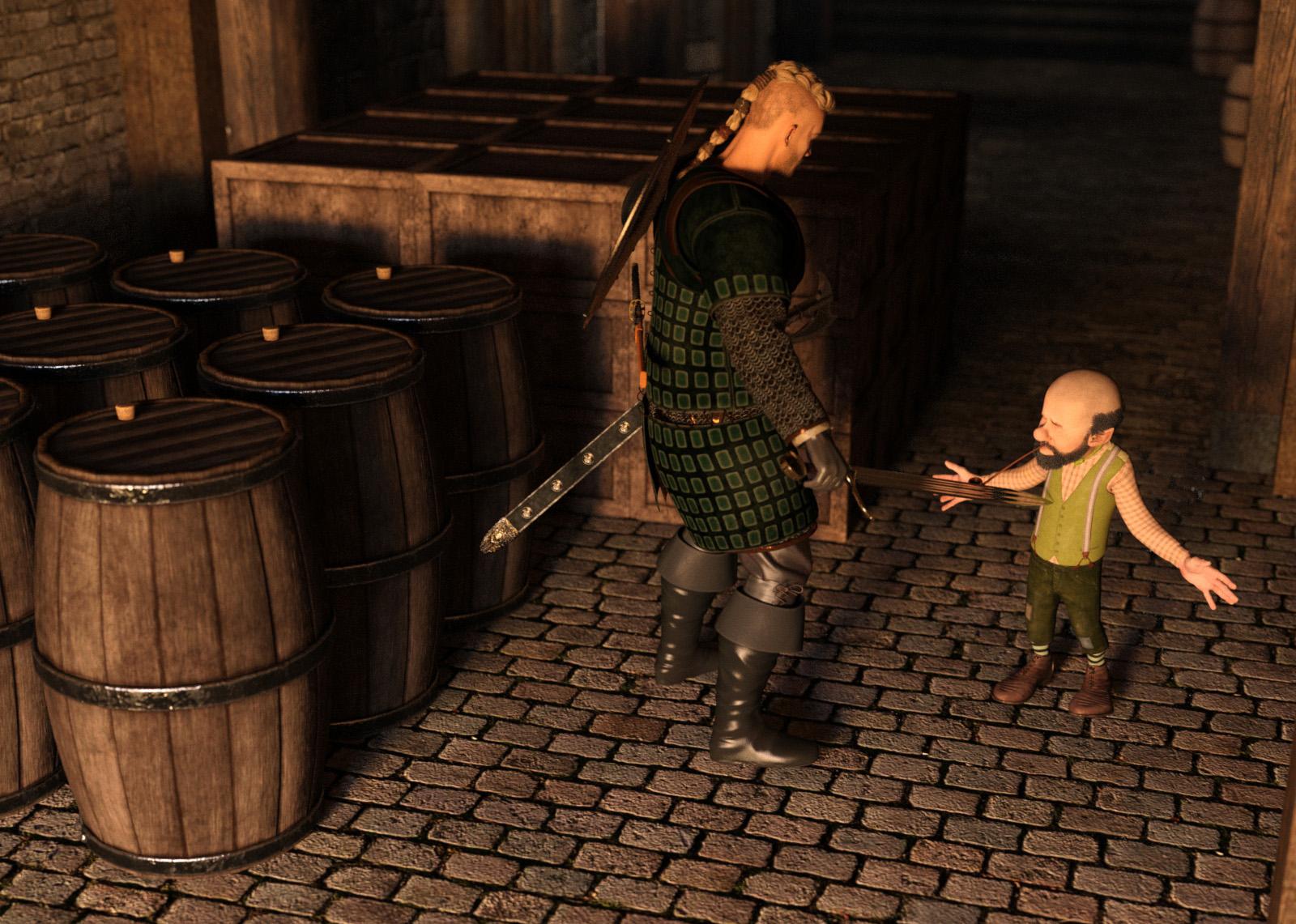
(Special Thanks to Totte - Code 66 for the Example)
Instances used to add more Patrons to the tavern
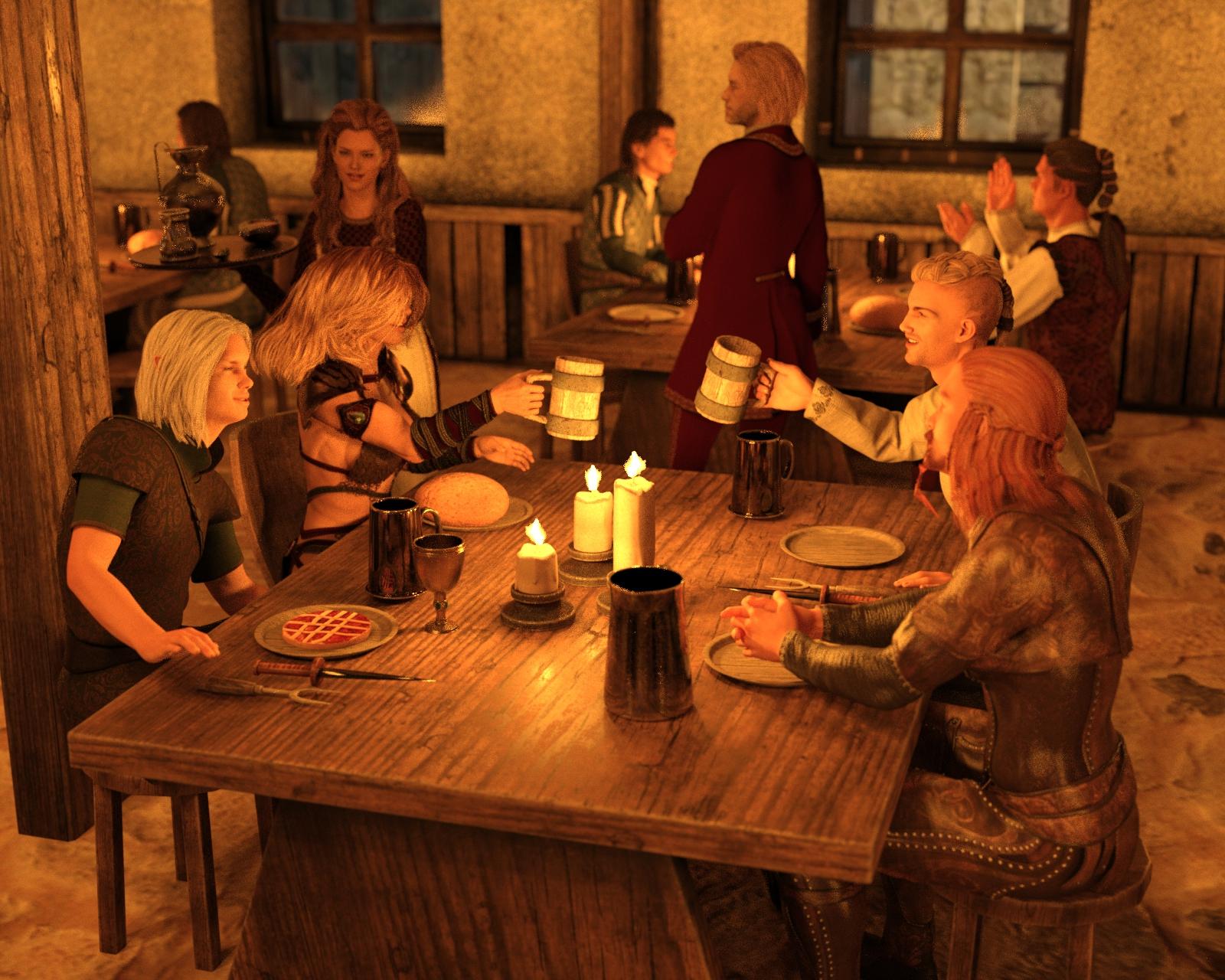
(Special Thanks to Totte - Code 66 for the Example)
Handy Products to Use while Instancing:
FlockIt
Traffic Patterns Script and Prop Collection
Have a Seat
Stack'Em Up
UltraScatter Advanced Instancing for Daz Studio
UltraScatter Pro
Instances Plus+ for Daz Studi
I will be checking in as will the rest of the Community Volunteers to try and help with anything you all may need.
For a list of the current challenge rules, please see this thread : Challenge Rules
Closing Date: January 31st 2026
EXTRA CREDIT:
This year I also wanted to start the year with a couple additional things that are a little bit different. I would like to start a little "Refer a Friend" BONUS.

Starting this year, if you refer a friend to the challenge that is newer to the website (or introduce someone new all together) and they participate in the challenge both you and they will get an extra little prize. To get the prize, simply mention your referal in this thread by their forum Username after they participate.
In addition, we are looking for some ideas on how to make the challenge more interesting and fun. We want people to be able to step through learning and that is our main goal here. As such, we want to keep the general topics in the order they are (which we feel is easiest to learn everything). That said, if anyone has any thoughts, feels anything should be moved to a different spot in the timeline, or feels there is something extra that could make for a more fun and enjoyable experience, please add your ideas to the thread here: https://www.daz3d.com/forums/discussion/752606/new-user-challenge-ideas-thread
This is just my attempt at the Begineer challenge.
I wanted to try this challenge to get some input. The character was instanced with the head gear attached. Daveyabbo's DA-15Y Lvl 4 HD Morph for Genesis 8 Female(s), Ansiko's Surgical Strike, Feng's Skyrail Bridge. Off set instances slightly.
Hi! This is my entry to the intermediate challenge!
Title: The Angel of Apocalypse
What was duplicated:
Hum... Almost everything! No, seriously:
However, I had quite difficulties to render the scene: even after having reduced some maps, the scene was too cumbersome for my computer, so I had to render separately the sky background, the village with fire, and the Dark Ascendent with the maginc ribbons. Then, I renconstructed the final images with GIMP.
I hope you'll enjoy it!
Edit: Oh, and I forgot I also diplicated point lingts in the scene: because of the HDRI I used, I needed several point lights around the Dark Ascendent to make its material correctly visible.
that is a very good idea and I love the fade out into the background. I have the feeling the focus on the first one could be a bit sharper or give a little more free room without the green mist for the distance to the first one
Very nice work here, maybe position your character a little deeper so that the wings are not clipped off on the upper edge?
This Challenge is now closed! Thanks to everyone who participated