Gag Christmas Pen Freebie
 Josh Darling
Posts: 143
Josh Darling
Posts: 143
Hey everyone! I got into the last-minute holiday spirit and wanted to share something a bit funny (and potentially very useful for those 'oops' renders) with the community.
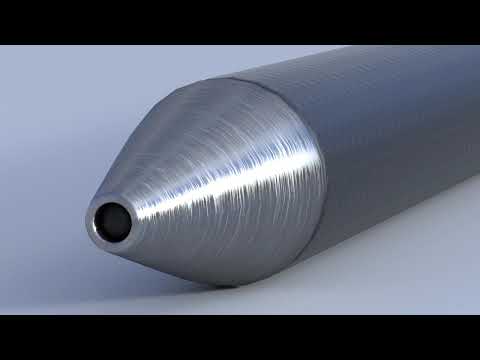
The JD Christmas Pen is a fully functional gag prop. It uses a custom script that triggers when you use the 'Activate Pen Tip' property and will knock your socks off (and more!)
What's inside:
- Christmas Pen Prop (with animated button and nib)
- Wearable Presets for Genesis 9 (Left and Right hands)
- 4 Hand Poses (Writing and Button-Pressing states for Left and Right hands)
- The Magic: Dialing the morph animates the button and nib, but the magic happens when you dial above 0.5. At that point it switches the texture on the pen from fully clothed to a naughtier amount of clothing. For extra giggles, as a bonus feature it hides the clothing on every figure in your scene!
Perfect for office party mishaps, 'Naughty List' renders, or just a quick way to clear a scene for a new outfit!
Grab it at https://dazstudioexperts.com/christmas-pen-freebie/

Daz 3D is part of 
Connect
DAZ Productions, Inc.
7533 S Center View Ct #4664
West Jordan, UT 84084
Licensing Agreement | Terms of Service | Privacy Policy | EULA
© 2026 Daz Productions Inc. All Rights Reserved.
Comments
This is fantastic thank you :) and a great way to demonstrate how scripts can be used in content creation!
Funny joke & use,of DAZ scripting I've still such a pen from decades ago.
Thank you Josh Darling for the gift!
On my Mac, the textures of the pen did change but for some reasons, it doesn't on my Windows 10 machine. In both cases, I'm using Daz Studio 4.24, Daz Studio and the pen were installed with DIM.
Clothes were not removed on either computers, but maybe the joke is saying the script will do that so who knows.
I have this warning on my Mac:
2025-12-27 17:21:30.550 [WARNING] :: Script Error: Line 257
2025-12-27 17:21:30.550 [WARNING] :: TypeError: Result of expression 'oHidingNode.getParent' [undefined] is not a function.
On my Windows computer the warning was at one point the following:
2025-12-27 17:07:20.530 [WARNING] :: Script Error: Line 239
2025-12-27 17:07:20.530 [WARNING] :: TypeError: Result of expression 'Scene' [undefined] is not an object.
Now the warning is the following:
2025-12-27 17:30:22.276 [WARNING] :: Script Error: Line 103
2025-12-27 17:30:22.277 [WARNING] :: TypeError: Result of expression 'App' [undefined] is not an object.
It's still a nice pen though, thank you for the gift :)
Thanks for testing it, sorry you found issues! I will have an update!
@mada much appreciated!
@nonesuch00 so glad you found the humor in it and that it hit close to home!
@emanuela1 thanks for your appreciation for this simple goodie!
@Elor That first error you got is a stupid typo on my part. I made a last-minute change to the script and didn't test it as well as I should have. That error made it so clothing wouldn't hide properly, so that is fixed now. Feel free to go back to https://dazstudioexperts.com/christmas-pen-freebie/ and download the files again.
Just a note on updates...If you make sure to drop into your downloads folder both the DSX and the ZIP, it will show up as an update in the Ready To Install tab. If it doesn't, then make sure you put the files in the right location and allowed them to overwrite the previous files.
Oh, and a note on the clothing hiding feature. That actually is supposed to work but I tried to make it smart. By doing so, it may end up being dumb at times!
Thank you for the update
It took a couple of un-installing before re-installing it to get it working on Mac and Windows but it seems to work now (at least with one Genesis 9 figure loaded: every item fitted to the figure were hidden with a couple of exceptions).
A question: if I want to load version without the script, I just have to duplicate the various .duf files loading it and remove the extra section in each copy ?
"extra" : [
{
"type" : "studio_node_channels",
"version" : 4
},
{
"type" : "item_post_load_script",
"name" : "Josh Darling__Christmas Pen__JD Christmas Pen__Callbacks_Element_Post_Load_Create",
"script" : "data/Josh Darling/Christmas Pen/Callbacks_Element_Post_Load_Create.dse"
}
]
I pushed out one more update to the product, which can again be downloaded at https://dazstudioexperts.com/christmas-pen-freebie/
I added a new property named "Clothing Hide Enable" that you can set to Off to make it so only the Santa texture on the pen gets affected when you activate the pen
Sorry for so many posts, but I wanted to mention that you can customize the textures on this if you like (since it seems like someone may want to use this pen for non-Christmas themed things). The script is a fairly simple one, it is looking for a layered image on the Base Color property of the "Body" material.
Within the layered image, it is looking for 2 layers named "SantaClothed" and "SantaNaked"
You can use any layered image setup you want and as long as you have layers with the same two names you can have it swapping any textures you want
Happy New Year and thank you very much for the new version and the explanation to change pictures
Which also explain why the log had a line about a picture being saved.