Re-install of DAZ Studio + Assets
 leo04
Posts: 400
leo04
Posts: 400
I had to reinstall my DAZ Studio programs and assets. (long story as to why).
I am now trying to understand why some assets do not seem to have installed, but are listed as "Available" instead.
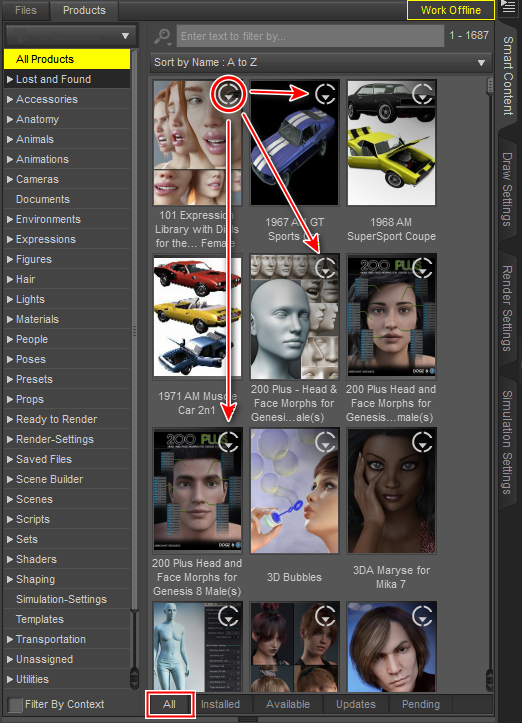
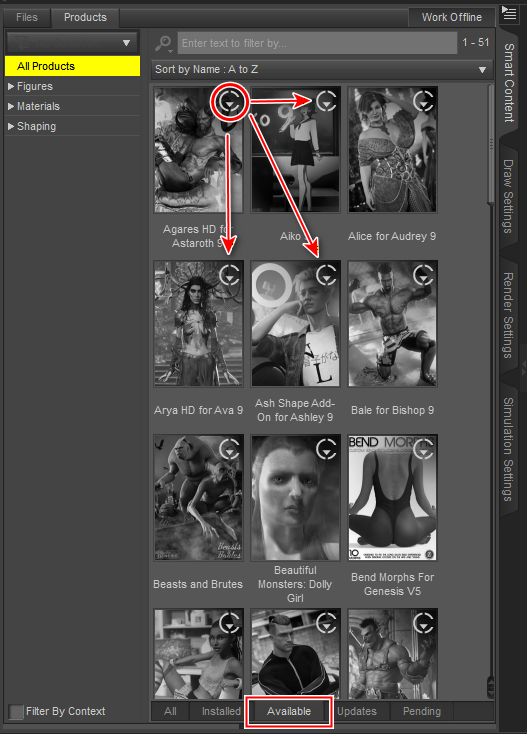
I have attached two images to further illustrate my questions.
In the first image is the "All Products" tab with the "Installed" products. I have also circled an icon in the upper right of the first icon as I am unsure what it means. Some assets have it others do not.
In the second image is "All Products" tab with the "Available" products. I have circled the same icon and note that "all" the assets have it on each of the icons. They all have it here. These asset icons are all grey, indicating they are NOT installed.
I am trying to understand why some installed when others did not. I double-clicked on one of these "grey" icons in the "Available" tab and it installed. I checked the "Browse to Folder Location" and it displayed a path to the "MyDazConnectLibrary" location.
One of the issues I was trying to address was to eliminate that location and the installation of assets there. (there was another issue, a "dupicate formulas" message kept appearing when loading scenes.)
I guess what I am asking is why the icon in the upper right of the asset icons display whether it is in the "MyDazConnectLibrary" or not and it there any way to install the "grey"ed out assets without installing them in that folder?
I was under the impression (wrongly perhaps) that Connect installed assets could cause issues with inserting and rendering assets into a scene. Is there any option that would allow me to install assets without placing them into the "MyDazConnectLibrary"?
What options are there in relation to this issue?
Thanks.
(Please keep in mind I am not a programing wizard. Pretty much an "out of the box" user.)

Daz 3D is part of 
Connect
DAZ Productions, Inc.
7533 S Center View Ct #4664
West Jordan, UT 84084
Licensing Agreement | Terms of Service | Privacy Policy | EULA
© 2026 Daz Productions Inc. All Rights Reserved.
Comments
What you are looking at is the "Daz Connect" (installed from inside Daz Studio) view. Colored images means installed, and the little cirkel with down-arrow means ready to download (with Connect). If you do that you will have two independante installs and Connect will take priority.
The grey images should mean not installed, but ready to download with Connect. If there are products that are grey but installed with DIM or manual, then you have an issue, because Daz does not consider it installed.
Thanks for your reply
I am trying to avoid installing into the Connect Folder. Can I do that?
(I sort of did know that the colored icons indicated they were installed and grey ones not.)
This whole issue was due to getting an error message about :Dual formulas error message. I am trying to fix that.
Any ideas on that?
I install everything through the DIM.
Dual formulas is usually something different, i.e. 2 products that is using the same name in a subitem. You can try look in your log (Help > Troubleshotting > <View Log) if you can track down the two products conflicting.
If you don't want to use Daz Connect, there is actually no need to log into Daz Studio.
Not sure what you meant there.
If I install the Connect only content, is there a way to move it OUT of that Folder to a NON Connect installation?
I have Content Wizard by Riversoft. I am reading the manual and it seems to indicate I could move Connect assets around but I wonder if it changes anything.
I want to have access to the Connect content but because of issues with this content with loading or rendering is the reason I want to avoid having anything "Connect" related installed.
What I mean is if you do not want to install further with Daz Connect, there is no reason to log into Daz Studio.
You will still be able to use content you already have installed with Connect. If you want to fully get rid of Connect, then right-click on a product and select uninstall. That can only be done with what is installed with Connect.
You can look in your Connect folder what is already installed.
That isn't entirely true, which is why updating the metadata is now an option in the log in dialogue rather than being done automatically.