
Daz 3D is part of 
Connect
DAZ Productions, Inc.
7533 S Center View Ct #4664
West Jordan, UT 84084
Licensing Agreement | Terms of Service | Privacy Policy | EULA
© 2026 Daz Productions Inc. All Rights Reserved.
Comments
But if I've installed properly, isn't what Elor Says above, OK? That is, shouldn't DS remove all the files as it Uninstalles?
@memcneil70: but you've had something of the same issue with DS4 and bone minion, haven't you? In that case, I don't think that I even have the app misconfigured nor the product misconfigured. Prior to coming to this new Mac I was running DS 23 on an Intel Mac. Now, I'm running DS 24 in Rosetta 2, not in Sequoia 15.6, on an M3 ultra chip. I think that's probably what counts for what is happening.
@inquire, my problems with Bone Minion are due to two things:
1. I don't use it enough to remember the process and fail to open the user manual and refresh my memory.
2. I will blame this on a head injury I had as a toddler, went through a car window and my skull was depressed and I was partially scalped. I have trouble with 'left' and 'right' commands/instructions. It can be my hand motions on a mouse or marching in a flight/squadron and turning the wrong way. It also impairs my ability to give directions. So I trigger my left mouse key instead of my right mouse key at the absolutely wrong time and crash stuff. I also have to focus really hard when I drive. I will tell you I can cause failures on Windows 10 and 11 machines due to my left/right mouse button issue too.
I have to really remember that 90% of the time a script failure is MY fault and figure out what I did this time. Of course there is always the possibility of a new OS or program upgrade that just tore up all the careful programming that went into the script and I am the 'lucky' fool to trip across it. It happens.
We have to analyze what just happened. Try to repeat what we did, watch our hands/fingers and document the steps. That is what a PA or DAZ needs to figure out is something is wrong, because they have to try to duplicate it. Look at some of the things barbult has done to analyze issues. I am no where near her skill level, so I do what I can, like try to eliminate human error.
I have no idea if I have Rosetta at all. I have what Apple sold me default with the configuration of the MacMini M4 Pro that I ordered. If it is supposed to be listed in Applications, I don't have it.
Mary
Rosetta 2 runs in the background of Silicon-based Macs to run Intel software, like DAZ Studio currently is. DAZ is working on making DAZ Studio Apple silocon-native, at which point you won't need Rosetta.
Correct, You won't find Rosetta 2 listed in the applications folder.
Well, is there any other Mac user with bone minion products, running DS 4. 24.0.3 on an Apple M chip computer? am I about the only one?
@memcneil70: I sent you a PM.
https://www.daz3d.com/forums/discussion/586556/released-bone-minion-for-genesis-8-and-8-1-poses-commercial#latest
I uninstalled and then reinstalled DS 4.24.0.3 to get Bone minion to work. But I hit a snag. If anyone has the time to help, please go to the link above and read my post and look at the files I uploaded. I did keep the "cms" and replaced it in my ~ Library after reinstallation; and I did go to the "content library" pane, where I clicked the menu icon and chose "Content DB Maintenance," after which I clicked the "Re-import Metadata." I thought that was all I needed to do.
I'm stuck. Hope someone can help. This is the first time I've tried uninstalling and then reinstalling DS. I did not describe the whole thing that's at the link above, so I don't think this is a double post. I am just trying to attract MacIntosh users who could help. Maybe windows people could just as well, but I don't know.
@inquire, you need to give RiverSoft Art the chance to reply. He might be busy and not had a chance to see your post. But he is one of the PAs that is very responsive to customers.
I got it figured out. Thanks -- bone minions working now. I reported that to Riversoft Art after we checking it this morning. Thank you for your help. Everything seems to be working well now. Whew! Thank goodness. See, that's why I haven't downloaded the alpha version. This is really hard for me to figure out and to correct. If you go to the link, I supplied, you could read what I did to correct the problem. It seems to have worked.
The same problem with bone minion has returned again. You could read about it here: https://www.daz3d.com/forums/discussion/586556/released-bone-minion-for-genesis-8-and-8-1-poses-commercial#latest
I think most of the Mac people are working on the Alpha version of DS, but hopefully there's someone who could respond to this and confirm that it's this present version that I'm using of DS that has a problem with bone minion: DS 4.23.0.3.
I can't test tha inquire. I am working in DS 4.24.0.3 BETA on my Mac. I haven't had an issue with Bone Minion, except when I forget which mouse key I need to use. User Error on my part.
Current 2025 alpha working stable on Mac. Bit cautious since the problems 2 releases before where nothing worked. So downloaded the fix. What does the recent update improve?
I'm at a loss with all the new Daz versions.
I currently run 4.21, should I expect problems if I downloaded Daz 4.23?
Please keep in mind that I'm far from a computer wiz.
The current release is Daz Studio 4.24.0.3. I use it on my Mac and Window computers without issue. The Alpha DS 2025 is a work in progress and does give an Apple OS user the option to use Filament/FilaToon. But scripts/plugins are not available yet. I am using both on my Macs and shifting from one to the other as I need different processes.
You can have all versions loaded at the same time if you isolate the 4.21 installers before downloading any updates. Put them into a folder separate and labeled what they are. I believe this is discussed above in this thread.
Help needed with the Blender to DAZ plug-in
Are there any Mac people out there who have successfully installed and used the Blender to DAZ plug-in?
I have tried installing using the Daz Install manager AND manually (in both Blender 4.4 and then 3.6). The Blender to DAZ add-on never shows up in Blender's Preferences> Add-ons window for me to activate it. Plus there is no tab to the right of the View window for me to press (like there was for the older DAZ to Blender plug-in).
BTW: (When I tried tinstalling manually) I followed the Install video that the plug-in’s creator provided. Though he was telling how to install on a Windows computer, I think I placed everything correctly on a Mac computer.
The weird thing is, when I try to manually install it (by manually downloading the ZIP file from DAZ) - it includes a folder to be installed in the Plug-ins folder. But when DAZ install manager instals it - it is not there.
Either way - I can’t get it to work.
I am running off an 2019 Intel Mac Pro tower using Sequoia. (The system requirements just says macOS - it does not say it only works on the M4 chip. So it should work on my Intel Mac - am I wrong?)
If there are any Mac users out there who got it to work, what are the exact steps that you took to get it to work? Also, what Blender version did you install it into (is it compatible with Blender 4.5)?
Please help
Has anyone upgraded to macOS Tahoe 26? I noticed that macOS Sequoia 15.7 is also offered as an alternative. I googled Tahoe and got a lot of 'Don't Install' entries. Is this compatible with DAZ3D?
Mary
Well I bit the bullet and did the update to macOS Tahoe 26 on my MacMini M4 Pro. Took about 26 minutes. I have been able to open Daz Studio 4.24.0.3 Beta and Daz Studio 6.25.2025.23807 Alpha without issue and did NOT notice any problems immediately. I was also able to open Marvelous Designer and ran right into an update for it, (2025.0.127). So my major worry is over. Now to deal with the other 'features' they added to appeal to the kids who need toys/games.
Edit to add 'NOT' in my statement.
Thank you for being the canary in the mine
I only updated my Mac to Sequoia during the summer so I'll wait before doing another major update
It may be just luck or the use of a fresh OS installation but I am finding the Alpha to be a touch more stable...
I am hoping the Beta on my MacBook Pro M1 will be more stable. I have been working for the past weeks to update my .dsa, .png/.jpg files in my Runtime>Support folder to match the new configurations entered in updated metadata by Daz Connect. I had to log in when Customer Service said they could only update one file that way. And ruined my files. But when I open the Beta it will crash at least once before becoming stable. I did have to remove the old drive that used to have my main files on it, once I did that the mouse stopped crashing constantly D|S. I will still have to fix the missing categorizations that were borked later.
The one thing I do like on my monitor for the MacMini M4 Pro are the widgits. I have the calender, weather, clock, and two photos, one of my photos folder and the other my son's family before he shipped out overseas. I always have trouble seeing the data on the tiny row at the top of the monitor because my bifocals cause it to blur out. The widgits are in my upper left of my screen and in black and white (my choice). I can move things over them if I need the space.
Does anyone own the bone minion batch converter product? I'm trying to find out if it will work on a McIntosh; the maker says he doesn't know because he doesn't own a Macintosh. I'm surprised that with all of the hurdles a creator has to go through to get his product listed on this site, having one or two Macintosh users test the product to see if it works on a Macintosh doesn't seem to be one of the DAZ STANDARDS.
I was just looking at the Customize Interface Style screens on my MacMini M4 with Tahoe 26.0.1 and noticed that all the lines show white instead of the color I have modified or is default. A few have the numbers showing, others do not. Since there have been no updates to Daz Studio 4.24.0.3 has anyone else seen this on their computers with other OS versions?
I opened Daz Studio 6.25.2025.27507 on my MacMini M4 with Tahoe 26.0.1 and and all my color choices show up on the Customize Interface Style screens.
I just opened my Windows 11 laptop and DS 4.24.0.3 and all my color choices show up on the Customize Interface Style screens.
Mary
I should add that the color choices DO show up correctly within Daz Studio as I assigned them. Just not in those screens.
Mary
I have now checked my MacBookPro M1 and DS 4.24.0.3 BETA also has the same issue with white lines.
So, how is it possible for the 4.25 to still reflect the colors and 4.24 to not on these screens? While I hadn't been messing around on them for a bit, I know they were working in before (not positive if in Tahoe 26.0.0 though).
I've just done a "very unscientific" render speed test.
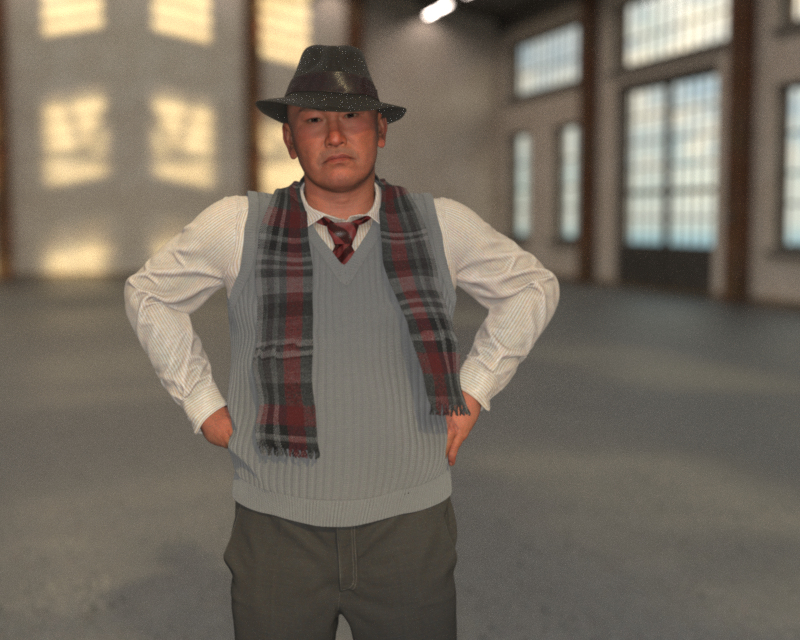
Set up a simple scene and let it render to 3000 iterations on 3 different machines ( yes, I've updated my HW stables )
(silent) M4 Max (macStudio) : 23 min 23.30 seconds
(fan howling!) M5 (macBook Pro): 50 minutes 6.76 seconds
(silent) M1 Max (macStudio) : 58 minutes 12.85 seconds
I hope someone finds it useful. Attached the render - not a magnificent work of art, as I only had install minimal content on the M5 so I based it on what I had there.
Can you do that scene on a pre M chip? I am just curious. I think you still have those machines around
Yes, is on my plan, I just need to assemble my MacPro-2014 temporary (dont have any permamnet place for it, ran out of desk space....), so it's neatly resting on my floor at the moment.
MacPro 2014 (dual 6-core 3.06 Ghz Xeon) : 1 hour 11 minutes and 0.63 seconds
will rerun the MacbookPro 2011 17" (Core i7 2.66GHz) (realized it never hit 3k iterations which was what I had set up ( had too narrow timeout set)