Daz 3D is part of 
Connect
DAZ Productions, Inc.
7533 S Center View Ct #4664
West Jordan, UT 84084
Licensing Agreement | Terms of Service | Privacy Policy | EULA
© 2026 Daz Productions Inc. All Rights Reserved.
Comments
Been doing some creature creation for Halloween. This is a combination of Synthoid for Genesis 9 | Daz 3D, SM Liquid Armor and Poses for Genesis 9 | Daz 3D, use of STF Brutal Gear - Serpentbane Deathmask | Daz 3D and some body morphs for hands, Harpy Talons HD for Genesis 9 | Daz 3D. Liking the results and still testing the look.
Yikes! I am going to have nightmares about this through Halloween. So mission accomplished?
Love it! Definitely shows what's possible with various Daz products.
As I promised (threatened?) in the freebies discussion a couple weeks ago, I cyberpunked up https://www.daz3d.com/the-sheriff outfit with https://www.daz3d.com/cybernetics-iray-shaders. I also tried out https://www.daz3d.com/absinthe-for-genesis-8-female dialed down as @SaphireBlue suggested. Environment https://www.daz3d.com/dystopian-dining-room.
I couldn't find Absinthe's eyebrows in the scene to remove & replace them. I have no idea why. I completely expanded the character and only found eyelashes. I tried in both DS4.23 & DS2025 beta.
And I think I went overboard on the glowing neon shaders. Well, I will fix that when I get a replacement for my laptop.
miladyderyni That looks great! The emissive textures work nice.
Absinthe's brows are part of her face texture, not separate elements. I used the brow remover script to remove them, then replaced them with one of the brows from one of chevybabe's beautiful brows sets.
TraceSL Very creatively put together!
Thanks. I wishlisted the script, hopefully it's still on sale when I get paid this week. :) I didn't realize some brows were part of the skin texture on G8. Come to think of it the original Absinthe brows look better with the character morph dialed down to about 50%. I might try a close up render when I get another computer.
I am glad you like how the shaders came out. For some reason I could not find the intensity slider in the DS2025 beta. I had all the other emission sliders. No idea what was up with that, as I had it when I worked on the piece in DS4.23.
Extremely disappointed by this month's members freebie, HT Pyramids of Atlantis. I get that we often get simple stuff, and I never expect multiple options, materials, etc. But to get something that out of the box (and even in one of the promo pictures) is leaving weird artifacts tells me not of a simple job but a sloppy one. I marked all the issues with weird artifacts (I'm guessing coming from using planes?) with arrows. On top of that, once you load the first environment, you're pretty much locked into the camera view. Switching to perspective view renders navigation buttons unusable. It might be some gimmick that could be easily switched on and off, but this is not the kind of thing I expect for out of the box setting.
I have no idea how this product passed QA (especially that I used the preset environment, not some weird customized angle and settings).
Leaving it here, because while this is freebie for now, so no money lost (just the bad taste in the mouth for members getting something like that), but in less than a month, it's going to be paid, and someone might get caught by the promo pictures.
I didn't pay much attention to the promo renders. I just downloaded it and tried it. I was unable to render anything without artifacts, regardless of what render setting or camera or whatever I chose. I looked bad in all cases. I didn't even save the renders; they were just no good. I was interested to see your experience reported here, since it matched mine so exactly.
I've had mixed results with the Brow Remover script, IMO the one that's included with Beautiful Brows generally does a better job, plus it's a much faster one-click solution. I tried doing a compare between the two, but Brow Remover just moved the brows lower down, so maybe I did something wrong, long time since I've use the script.
So I gave up and tried the Beautiful Brows version instead. Here's the result on Absinthe, dialed down to 65%. Not perfect, there are some shadows above the outer corners of the eyes (which can be fixed in an editor) but otherwise a fairly good job IMO.
That's bad. Should we file a ticket on this?
I only went looking closer at the promos after I first noticed the artifacts, because I wanted to check whether I was doing something wrong (kind of impossible when you use it as is, but who knows?). Your experience confirms, though, that this is not a "me" (or rather, my DS) issue but the product.
Part of me wants to say yes, so that Daz knows a faulty product was released, but realistically, I don't have the energy for it (been on painkillers for the last few days), and I doubt anything will be done about a free product. If you want to file, go ahead, though! I'll only cheer you on.
I will mention it to Jack in the members forum, though. That's easy enough for now.
You can use it as a prop...
I'm aware. But it doesn't change that there are serious issues with the product as it was offered, especially with the promo pictures highlighting the ready-made setups rather than using it as a prop.
For free, I'll probably just use it as it as a prop.
I am not sure what I did, but I ended stuck inside it at first and had to get out. Felt like a snail on a hot sidewalk. By that point, I just shut it off out of frustration. I don't care if it is free or for purchase, a product should meet a level of standards. I expect better of DAZ. It is why I shop here.
That said, many of the DAZ+, PC+ freebies have been the most used, versatile items in my runtime. The PAs put in an honest effort to create them and they are still bringing me joy and filling my renders to this day. My early years were spent duing the PC+ sale months collecting things released years before I joined. And I miss Jack Tomalin's creations and updates highly.
Well, Jack said he'd look into the Pyramids issue, so I was happy and quite excited to see an update in DIM. Readme said, "2025-10-09 - Fog Issue, Fixed." so that was promising. Except... That after updating it, the product became unavailable in Daz (a broken, unclickable icon in Smart Content). I unistalled and then reinstalled again, and now it's nowhere to be found, neither in Smart Content nor in the Content Library, and in DIM it's missing the "Click here to open" icon that is there for all other products.
So if you want to use it at all, do not update. At this stage, I don't even feel like reporting it again. I'll just avoid the vendor in the future, because I don't want to deal with similar issues.
Thanks anyway for bringing it up with Jack, and I hope you'll feel better soon.
How do you install, through DIM or Daz Studio? I have had cases where an updated product would not decrypt properly for a while when installed through DS, but DIM usually works in those cases.
DIM—as I mentioned above, the icon to open the product in Daz (which is there for pretty much all the products) is absent in DIM too which makes it look like it doesn't exist in the folder structure. It installs and uninstalls properly (i.e. no errors, shows as installed/uninstalled), though.
The DIM package does not work, The DIM log shows this:
2025-10-09 20:57:06.845 [INFO] :: Requesting: 110888-1 : HT Pyramids of Atlantis
2025-10-09 20:57:06.962 [VERBOSE] :: Session ID valid
2025-10-09 20:57:06.962 [INFO] :: Requesting: 112280-1 : Member Festival Pot Decor Ordinary
2025-10-09 20:57:07.306 [VERBOSE] :: Redirected Request: 110888-1 : HT Pyramids of Atlantis
2025-10-09 20:57:07.363 [VERBOSE] :: Redirected Request: 112280-1 : Member Festival Pot Decor Ordinary
2025-10-09 20:57:09.475 [INFO] :: Download Successful: 110888-1 : HT Pyramids of Atlantis
2025-10-09 20:57:09.482 [VERBOSE] :: Saving Adjacent Package Supplement: 110888-1 : HT Pyramids of Atlantis
2025-10-09 20:57:09.484 [INFO] :: Installing: 110888-1 : HT Pyramids of Atlantis
2025-10-09 20:57:10.518 [INFO] :: Asset : Environments/Architecture/Daz Originals/HT Pyramids of Atlantis/HT Pyramids of Atlantis - Config 1.duf could not be located
2025-10-09 20:57:10.518 [INFO] :: Asset : Environments/Architecture/Daz Originals/HT Pyramids of Atlantis/HT Pyramids of Atlantis - Config 2.duf could not be located
2025-10-09 20:57:10.518 [INFO] :: Asset : Environments/Architecture/Daz Originals/HT Pyramids of Atlantis/Materials/HT Pyramids of Atlantis - Ground Flat.duf could not be located
2025-10-09 20:57:10.518 [INFO] :: Asset : Environments/Architecture/Daz Originals/HT Pyramids of Atlantis/Materials/HT Pyramids of Atlantis - Ground.duf could not be located
2025-10-09 20:57:10.518 [INFO] :: Asset : Environments/Architecture/Daz Originals/HT Pyramids of Atlantis/Assets/HT Pyramids of Atlantis - Pyramid Group.duf could not be located
2025-10-09 20:57:10.519 [INFO] :: Asset : Environments/Architecture/Daz Originals/HT Pyramids of Atlantis/Assets/HT Pyramids of Atlantis - Sand Effect Group.duf could not be located
2025-10-09 20:57:10.519 [INFO] :: Asset : Environments/Architecture/Daz Originals/HT Pyramids of Atlantis/Assets/HT Pyramids of Atlantis - Shine Particles.duf could not be located
2025-10-09 20:57:10.519 [INFO] :: Asset : Environments/Architecture/Daz Originals/HT Pyramids of Atlantis/Cameras/HT Pyramids of Atlantis - Shot 1 - Cam.duf could not be located
2025-10-09 20:57:10.519 [INFO] :: Asset : Environments/Architecture/Daz Originals/HT Pyramids of Atlantis/Cameras/HT Pyramids of Atlantis - Shot 1 - Env.duf could not be located
2025-10-09 20:57:10.519 [INFO] :: Asset : Environments/Architecture/Daz Originals/HT Pyramids of Atlantis/Cameras/HT Pyramids of Atlantis - Shot 1 2 3 4 - Cinematic Light Set - optional.duf could not be located
2025-10-09 20:57:10.519 [INFO] :: Asset : Environments/Architecture/Daz Originals/HT Pyramids of Atlantis/Cameras/HT Pyramids of Atlantis - Shot 1 2 3 4 - Effects.duf could not be located
2025-10-09 20:57:10.519 [INFO] :: Asset : Environments/Architecture/Daz Originals/HT Pyramids of Atlantis/Cameras/HT Pyramids of Atlantis - Shot 2 - Cam.duf could not be located
2025-10-09 20:57:10.519 [INFO] :: Asset : Environments/Architecture/Daz Originals/HT Pyramids of Atlantis/Cameras/HT Pyramids of Atlantis - Shot 2 3 4 - Env.duf could not be located
2025-10-09 20:57:10.519 [INFO] :: Asset : Environments/Architecture/Daz Originals/HT Pyramids of Atlantis/Cameras/HT Pyramids of Atlantis - Shot 3 - Cam.duf could not be located
2025-10-09 20:57:10.520 [INFO] :: Asset : Environments/Architecture/Daz Originals/HT Pyramids of Atlantis/Cameras/HT Pyramids of Atlantis - Shot 4 - Cam.duf could not be located
2025-10-09 20:57:10.520 [INFO] :: Asset : Environments/Architecture/Daz Originals/HT Pyramids of Atlantis/Cameras/HT Pyramids of Atlantis - Shot 4 - Env.duf could not be located
2025-10-09 20:57:10.520 [INFO] :: Asset : Environments/Architecture/Daz Originals/HT Pyramids of Atlantis/HT Pyramids of Atlantis.duf could not be located
2025-10-09 20:57:10.552 [INFO] :: Install Successful: HT Pyramids of Atlantis
I don't know how it can declare it a successful installation, when it couldn't even find the product assets to install.
The dsx file downloaded with the zip file for HT Pyramids of Atlantis update declares that the InstallType is Plugin,Content. This product does not contain a plugin.
I think Daz no longer knows how to package product updates. It took them 5 attempts to properly package the recent small update to BJ Camera Manager, which IS a plugin. Now they seem to think everything is a plugin. Try again, Daz, because the product is completely gone from Daz Studio after updating it with DIM.
Eep, I'm glad I checked this thread (thanks to daz deals for showing it in the product page). I just installed it to work on it for the daz+ contest, and couldn't find it anywhere. I guess I'll need to wait for another update to it in DIM before using... And from what I see in this thread, maybe it's not even worth the wait? I'll go play with ideas for some other render contests.
In theory, if fog issues have been fixed, it miiiiight be worth the wait. But unless someone tells Jack or files a ticket, I doubt we're going to get another update.
I'm still seeing the 2025-10-10 update in DIM.
Testing som recent buys and a freebie (vignette).
Backroom Interior Vignette - https://www.daz3d.com/backroom-interior-vignette
AH dForce Magical Wizard Outfit For Genesis 9 - https://www.daz3d.com/ah-dforce-magical-wizard-outfit-for-genesis-9
Aria HD for Genesis 9 - https://www.daz3d.com/aria-hd-for-genesis-9 (head dialed down to 50%)
dForce Nathaniel Hair for Genesis 9 - https://www.daz3d.com/dforce-nathaniel-hair-for-genesis-9 (using some of the morphs)
I was pretty sure the dress would explode (the look (challenging pose), especially the skirt, and lots of spring errors) but gave it a try anyway. Worked OK to my surprise, despite the skirt being squeezed between the arm and the leg. The skirt did turn out a bit unexpected, but still realistic, though.
First render is before simulation, the second is after, and then a shot of the legs just exactly not toughing the sofa (which I discovered afterwards, trying to figure out why it worked - maybe that's the trick).
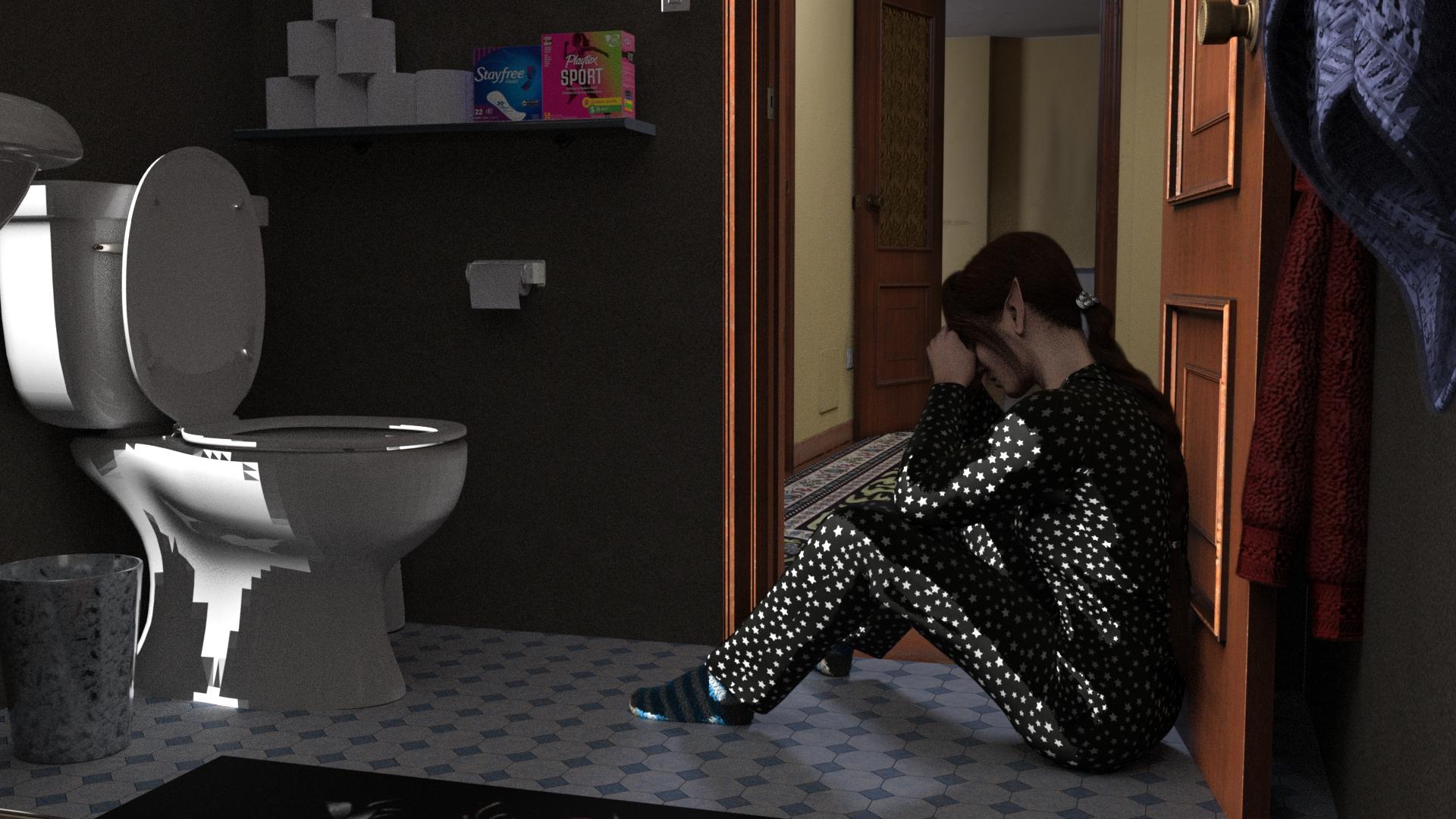
I finally got a chance to tinker a little this weekend. What causes the weird jaggy shadow lines?
These items were new in recent days:
https://www.daz3d.com/dforce-fv-enigma-veil-hair-for-genesis-9
https://www.daz3d.com/artful-model--set-01-for-genesis-9
https://www.daz3d.com/valon-tykki
https://www.daz3d.com/vyk-conforming-cloth
Look for information on Shadow Terminator. Try increasing the subdivision level and/or the triangulation direction of that part of the mesh.
Interesting, thanks. From my quick survey of info, it seems to be HDRI related and since I often use sun-sky, I guess I haven't run into this much. I tried the various suggestions without much luck, but now I know this is a thing so I can study it further. Here, it's using the HDRI that comes with this environment, but clearly it's just a thing that seems to crop up with HDRIs and extreme shadows.
Oh hey, I've run into that! Not HDRI related for me; lighting in the scene was mostly ghost lighting over the (insufficient) light that came with the kitbashed fixtures I was using.