Safe Area
 MaX Pupkin
Posts: 49
MaX Pupkin
Posts: 49
Hi everyone,
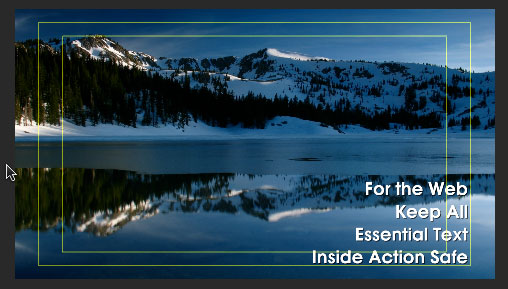
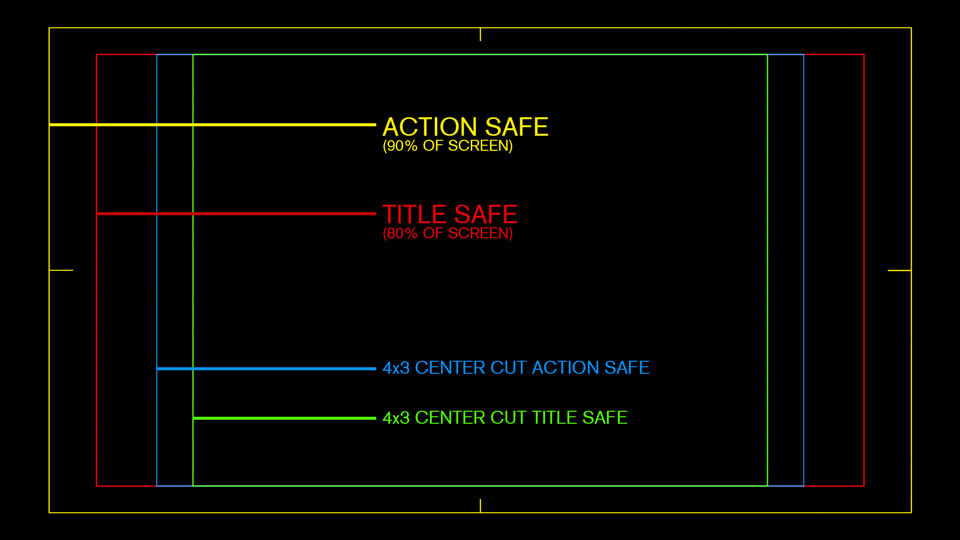
I'd like to know if DAZ Studio supports displaying Title Safe and Action Safe guides (as seen in Adobe Premiere). These safety zones help ensure key elements aren’t cut off or obscured when rendering for TV, YouTube, or other platforms.
If this functionality doesn’t exist already, are there any workarounds? For example, overlaying a semi-transparent texture in the camera view, or placing helper plane objects marked with safe frames. Has anyone tried something like this within DAZ?
I'd appreciate any ideas or tips on how this might be implemented.
Thanks in advance!

Daz 3D is part of 
Connect
DAZ Productions, Inc.
7533 S Center View Ct #4664
West Jordan, UT 84084
Licensing Agreement | Terms of Service | Privacy Policy | EULA
© 2026 Daz Productions Inc. All Rights Reserved.
Comments
In Viewport you can tick 'Show Asdpect Frame'. That will give you an outline of what will be rendered.
I have the "Show Aspect Frame" option enabled in DAZ Studio, but I don’t really understand what I’m supposed to see when it’s turned on. Nothing seems to visibly change in the viewport.
What I was expecting is something like customizable yellow guide lines (similar to the ones visible for "Show Thirds Guide") that could help with framing or composition. Is it possible to have something like that, and can it be customized?
If you render the whole viewport you won't see much difference, but if you choose another dimension preset it displays a frame which shows which part of the viewport will be rendered
It seems that you set Active Viewport in : Render Settings pane > Editor tab > General > Dimension Presets (Global) . That's why you see no aspect frame. Define it as Custom with a new Aspect Ratio as well as Pixel Size or choose a Preset from the list.
I believe what the OP is likely hoping for is not the display of the frame indicating the rendering area (Show Aspect Frame), but rather the display of a safety area (for example, a 90% margin for adding captions or an 80% margin considering cathode ray tube displays) in the Viewport.
How about setting an image of the safety area (drawn in white on a black background) as the texture for the Plane Primitive's Base Color and Cutout Opacity, then adjusting the Base Color as needed, resizing and repositioning it, and parenting it to the camera?
Aspect Frame is surely the safest "margin" for composing and rendering... and I really don't understand what's purpose of placing such a so-called safty area or "helpers" into DS' Viewport ...
Why not direclty go for a post-work after you have a "safer render" completed ? Simple and easy ~~
Yeah, buddy. That's exactly what I did too. You basically read my mind. But I was thinking maybe there's some native solution from the DAZ developers, since these fields are useful in game development — like adding spacing to visualize where the menu area starts. People who haven't worked in game development will never understand why this is needed.
Daz Studio might inherently lack strong features for video production or game development.
Such functionalities will likely need to be supplemented with add-ons.
It would be great if there were an add-on that could easily display a safety area.
Rendered images are used not only in games, but also in comics, visual novels, and other types of projects. These images don’t exist in isolation — they are placed into an interface that has menus, layout limits, and visual boundaries. Every developer defines a display area, and going beyond it is usually not recommended. It’s not a strict rule, but rather a helpful guideline that simplifies development and helps avoid unnecessary rework.