
Daz 3D is part of 
Connect
DAZ Productions, Inc.
7533 S Center View Ct #4664
West Jordan, UT 84084
Licensing Agreement | Terms of Service | Privacy Policy | EULA
© 2026 Daz Productions Inc. All Rights Reserved.
Comments
Does Ultrascenery 2 have any built in lighting?
I am playing around with it currently and slowly figuring things out. There does not seem to be any documentation.
If I have to buy some nice outdoor lights for the countryside, does anyone have any recommendations? I guess I need HDR and some kind of sky dome.
Thanks :)
UltraScenery2 comes with lighting and documentation. Daz has just made it a little hard to find.
Lighting: The lighting is a Sun-Sky Iray Render Preset called USC2 Late Morning. It is excellent for lighting your landscape, You can find it in your Content Library in the Products section under the UltraScenery2 product in the Render presets subfolder. You can find it in Smart Content in the Products View, in the UltraScenery2 - Realistic Landscape System product in the category Render-Settings.
Documentation: You can access the plugin Readme file and Reference Guide PDF file from inside Daz Studio by pressing the F1 key to open the Help pane. In the Help pane, expand the Plugins section (because UltraScenery2 is a plugin) and scroll down to UltraScenery2 - Realistic Landscape System. Then expand UltraScenery2 - Realistic Landscape System to see the Read Me and Documentation links. The Documentation will open in your OS selected default PDF viewer. Alternatively, outside of Daz Studio, you can just navigate to the folder containing the PDF documentation (aka the Reference Guide). You will find it (in Windows, I don't know about Mac) in C:\Program Files\DAZ 3D\DAZStudio4\docs\Plugins\UltraScenery2. The file name is UltraScenery2 Reference Guide.pdf.
Thank you very much!
All now located :)
Does anyone else get what appears to be missing textures?
These are Reeds and some are grey and I assume missing a texture. Is there any way to fix this please?
This is with the Ecology Preset Oaks 01.
Similarly in Oaks 2 some of the Reeds have no texture.
My trial with:
USC2 terrain: USC2 Marina 01
Render Preset: customized USC2 Late Morning
Unfortunately such render preset uses Environment Mode: Sun-Sky Only,
so it is a little hard for me to choose a desired sun location,
that can light both the face of the character and environment in a way I like.
I also miss the clouds.
For preview of the scenes is ok, but for final render I prefer the other lighting solutions.
The previous scene redered with:
https://www.daz3d.com/dramatic-sky-8k-hdris-and-haze-utilities
Also added a mesh light for enlighten the face.
The reeds are not missing their texture files. Some of the reeds are green and some are more tan by design. Even in your screenshot, you can see subtle texture changes on what you describe as "gray". They are not a solid untextured color.
If I have not yet convinced you that they are textured, you can do this:
This is the place to ask questions. Keep experimenting.
Edit: I added an Oaks 01 reeds render.
Thanks again :)
I see, I suppose they are meant to be older reeds, that do tend to grey as they advance. Good that I can chage them if desired though.
I also bought some of the US1 assets and had some success (although I found that with "Features" in the Classic Content I ran into some missing files).
But I did get the older content to play with the newer and made this.
Looks nice, @Widdershins Studio, just keep experimenting.
That's lovely!
Thanks both
This is the best thing I have bought in a while!
i picked up the new usc2 et... a quick render with Pacific pines classic ecology.. I could not find a way to set the terrain to 64x64, so maybe its why the trees are so thin? its most difficult to remove the docks, etc. one by one, select, delete over and over. must be a better way. My main thing was to have a larger lake that what is usually available. now some ducks or geese.
This is beautiful. You should post it in the gallery, so it gets the widest possible exposure.
Cheers,
Alex.
You can easily hide or delete some or all Feature Props by showing hidden nodes and then selecting the Feature Props you don't want and hiding or deleting them.
To change the terrain to 64 by 64, you should just change the Width value in the Terrain section of the UltraScenery2 pane. If you change the size of the terrain, Feature Props will not longer be scaled "properly". They are scaled for the originally defines terrain size. If you hide all the Feature Props, that shouldn't be a problem.
I think I understand your reason for wanting to reduce the size to 64x64 for the Classic Ecology, but keep in mind that if you do so, you won't have the large water expanse any more. The whole terrain will be no larger than a 64x64 USC1 feature. Maybe you would do better to just use one of the USC1 Features like the TA Coast 02 estuary. Just a thought.
Hi Alex,
Thanks! I had forgotten about the gallery, I have now added it:
https://www.daz3d.com/gallery/user/5479149401538560#image=1373478
Cheers :)
Rog.
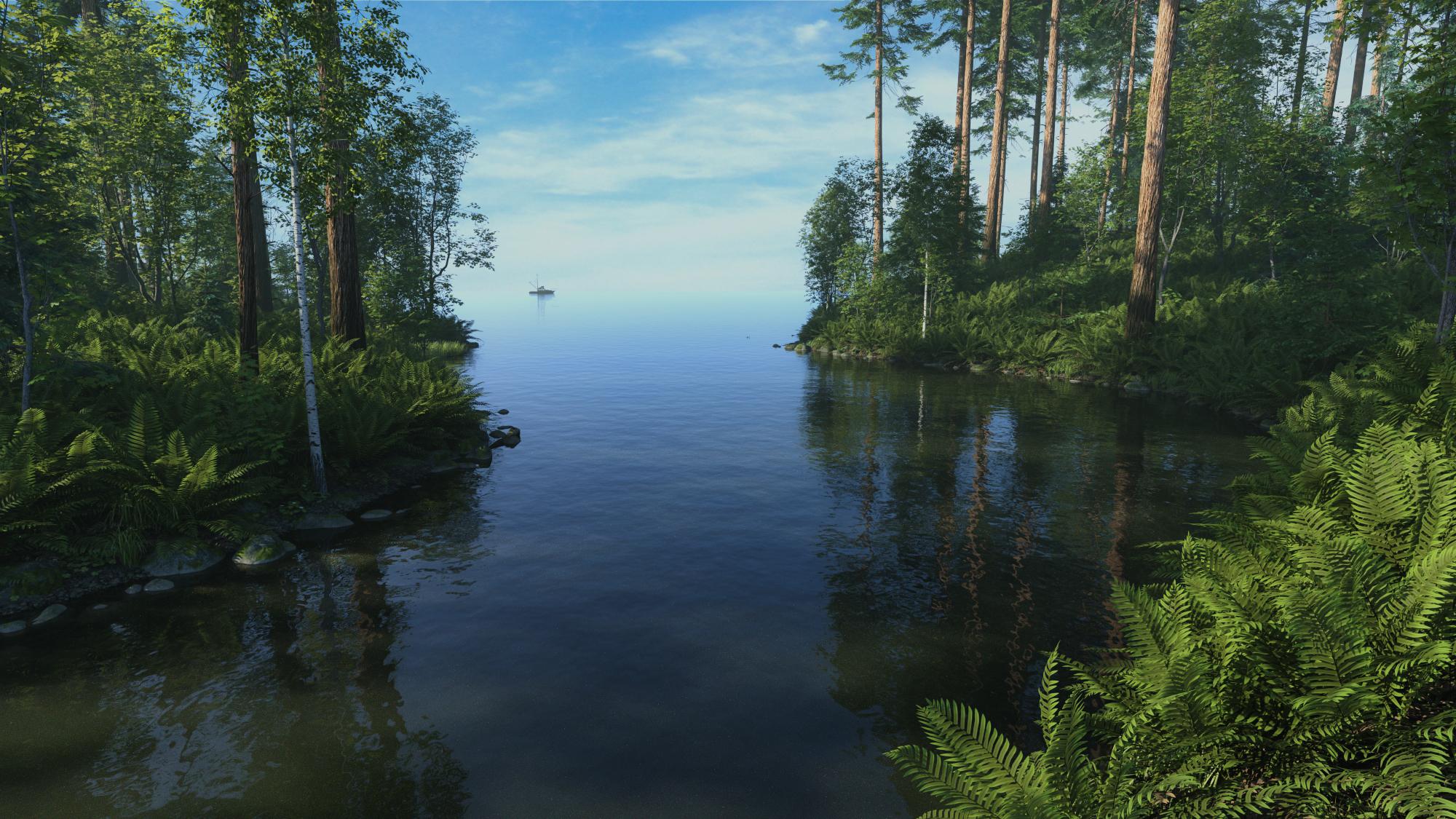
This is UltraScenery2 with Classic Feature TA Coast 02 (estuary) and Classic Ecology PNW 02. I instanced the Water node 4 times and placed the instances in a horizontal row behind the existing Water node, to have more water between the foreground and the horizon. The background is a photograph of the sky. I added Matte fog and some Bloom to better blend the water edge to the sky for the horizon. The small fishing boat was added and scaled down to make it look distant, to enhance the apparent horizon distance. In the end, I brightened it a bit in Photoshop.
Beautiful image, @Barbult - great job!
- Greg
Barbult,
Another beautiful image. I particularly like the way the sea and the sky are blended together, without a hard line.
Cheers,
Alex.
Thank you, Greg. How are you doing? I haven't seen you around the forum much.
I'vbe been remiss in playing with Ultrascenery lately. Here's an initial easy try with one of the Marinas and Moorings items. This particular render has a USC2 object with the Junction in the foreground, then USC and USXT objects in the background. On both of the USC/USC2 objects I used the old Pacific Northwest 04 ecology because on a hot summer day, I just immediately think of this beautiful, though dying, grass.
A guy rafting travels expediently to beat an incoming thunderstorm.
Thanks, Alex. I worked hard on the sea/sky blend.
Wow, you have a whole story to go with the nice render.
thanks. You seem to always have the answers
wow...beautiful. I'll have to look at the TA terrain for sure. I love your technique with the water. You have developed a great understanding and talent with Ultrascenery.
Thanks, daveso. I learn mostly by just trying things and by picking up tips from others in the forum, too. I share what I have learned when I can.
Really beautiful.
What lights are you used, if I may ask?
Wonderful :)
What do I need to buy to get the "Classic Feature TA Coast 02 (estuary) and Classic Ecology PNW 02" please?
I really like those ferns!
That is just Sun-Sky lighting at 8:30 AM with some Matte Fog. No HDRI was used. The background sky is just a photograph in the Environment pane as a backdrop. The fall of the light on the tress and terrain is due to the low angle Sun-Sky light and the position of the trees the light shines through. The render was a little dark, so I brightened it in Photoshop a little.
Ferns are a staple of many UltraScenery products. The two products I used are:
Pacific Northwest Botanica - Bundle
UltraScenery - Landscape Features Volume 1
The TA stands for TangoAlpha, the creator of the UltraScenery Features Volume 1 product.