How Do You Edit Omnihair Products?
 Write Idea
Posts: 454
Write Idea
Posts: 454
I have Jepe's dForce Omni Body Hair Sets & Omni dForce Body Hair Sets Part 2. I think they are great products, but I don't use them much for one specific reason. Depending on the texture, the chest hair has this negative ring around. If the texture doesn't fill the area perfectly, parts of it are symmetrically barren.
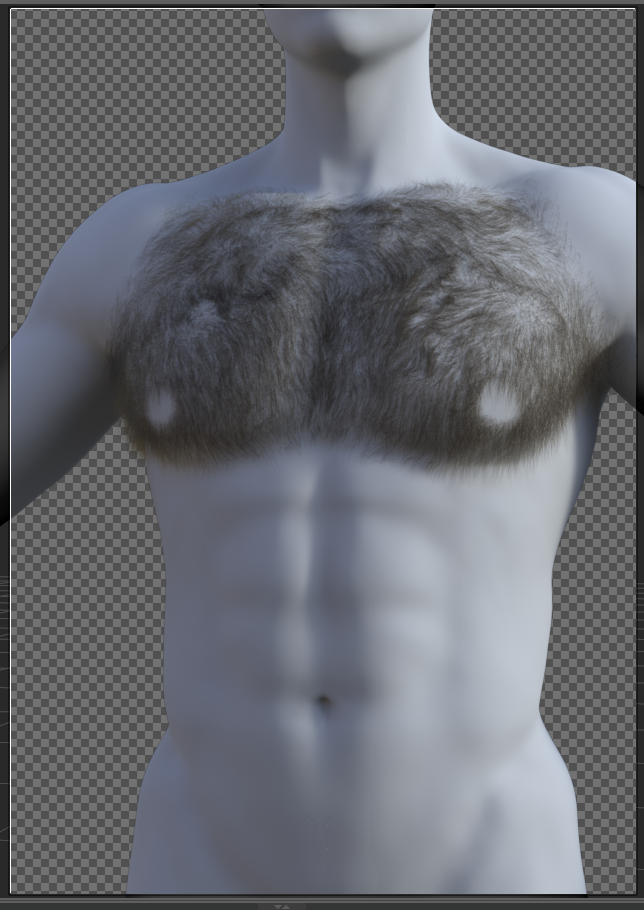
I know nothing about dForce and OMNI hair. If I want to edit any other product, I could use go into the GEOMETRY EDITOR and delete faces/vertices/etc. However, I can't do that with OMNI hair.
Suggestions? Options?
Thanks in advance.

Daz 3D is part of 
Connect
DAZ Productions, Inc.
7533 S Center View Ct #4664
West Jordan, UT 84084
Licensing Agreement | Terms of Service | Privacy Policy | EULA
© 2026 Daz Productions Inc. All Rights Reserved.
Comments
First off, some clarification: "Omni hair" is not a type of hair, but a shader used on strand-based hair. "dForce hair" is a little murkier, because some hairs labeled as dForce aren't actually strand-based, and some strand-based hairs aren't labeled as dForce.
Second, are the "symmetrically bare" parts just where the nipples should be? Or is there something else I'm not seeing?
Third, strand-based hair is not "geometry" in the sense that DS understands it, which is why you can't manipulate it with the Geometry Editor. If you created the SBH itself, you can edit it with the strand-based hair editor, but not so with "dForce" hair from the store. Luckily, there are still some options available to you. SBH can be manipulated extensively through the use of greyscale maps, governing things like density, length, frizz, clumping etc. On the above example (if, again, you're just talking about the bald spots where nipples should be), you could find the density map and just color in those areas with white, or whatever level of grey matches the amount of hair you want to be there.
If you happen to own Genesis 9 Body Shapes, then you can increase the diameter of the nipples(Parameteres tab, look for "Nipples Areolae Diameter Masculine") and that might help fill in the symmetrically barren areas.
Yes, it's where the nipples are. DAZ is so sensative about nudity. Even though they have a "1950s Old Hollywood Glam" approach to pictures, I wasn't sure if I could include anatomical names.
Though, thank you for the heads up and the detailed explination of strand-based hair. When I exported it as an OBJ, it did come up with geometry (only vertices). Fixed my problem!
And thanks for the suggestion, @Phoenix1966! You have wonderful products, btw!
Glad you fixed your issues. And thanks for the kind words.
What I'm still not quite clear on is what you want to do; you're talking about the bald spots around the nipples as if they're a problem, but that's just how hair grows.
Depending on the texture, there will be an area where no hair appears on the skin in general. I can expand out the areola, but then the character will just have cartoonishly large nipples. If you look at this render of Julian, there is a "symmetrically barren" area (as I put it in my original post) where hair should clearly be. Its far too uniformed to be natural looking. Now that I know its a simple mask (black/white map), I can adjust it accordingly.
Ah, makes sense. I would have thought nipples/areolae would be linked to mesh, but apparently that's not necessarily the case.
Instead of editing the hair or nipples, you can consider creating a new groom to fill in the blanks by using the SBH Editor in Daz Studio. This applies for other SBH that may have an area you want to fill.
If you are familiar with the process I suspect it would only take a few minutes. But if you are not, there could be some learning involved.
I uploaded an example i made in like 3 minutes. It's by no means good
https://drive.google.com/file/d/152uKYE0zu5a8uMghyG_9U455f334J4dR/view?usp=sharing
It's just a scene file duf, so you can merge with your scene and then "fit to G9" in parameters (unparented). May need to toggle off and on the aapply transforms button. To edit the groom further, you can select and go to Edit > Object > Edit Strand-Based Hair
Also, please change interpolation segment length to something better than i set it to. It should be a low number ideally.
As always, you're so kind @uncannyvalet! Thank you for taking the time out to make this for me. I really appreciate it!
I know I always say this, but I love your figures! Can't wait for the next figure!