UltraScatter2 - Now in store!

HowieFarkesHowieFarkes Posts: 624

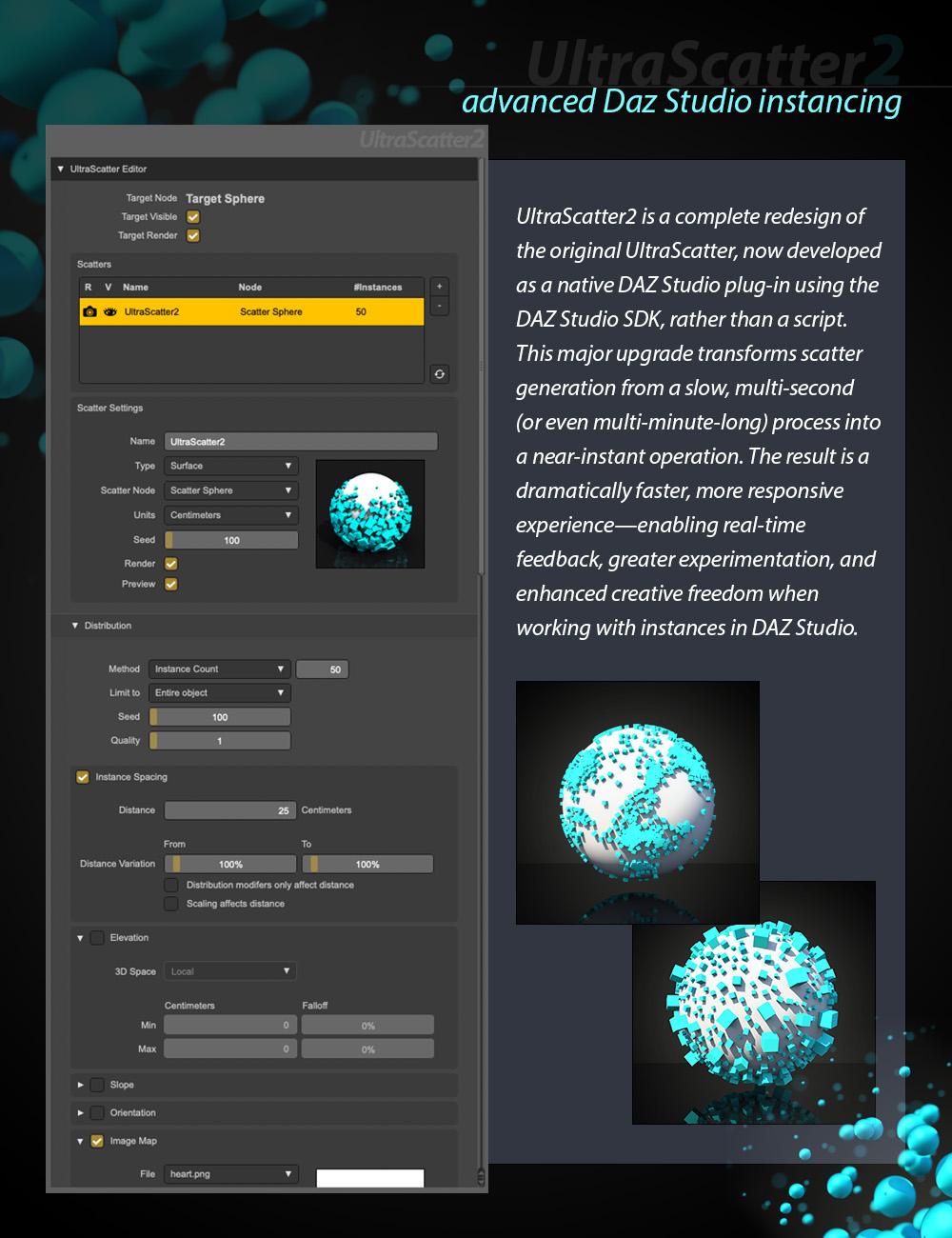
UltraScatter2 - Advanced Instancing for Daz Studio is now here! 

UltraScatter2 is a complete re-write of UltraScatter using the Daz Studio SDK* to now make it a Daz Studio Plug-in rather than a Script. Instead of waiting many, many seconds (or even minutes) for a Scatter to complete it is now an almost instant process. This allows for far greater levels of experimentation and creativity in the use of Scatters in Daz Studio with near real-time feedback on changes made to Scatter settings. Also optimized to work well on UltraScenery2 and UltraSceneryXT terrains so youcan scatter whatever you like. ( UltraScatter and UltraScatterPro were paricularly slow on UltraSceneryXT terrains).

So as well as the amazing speed boost - UltraScatter2 carries over all of UltraScatter's functionality and includes some of UltraScatterPro's as well, like scattering in a volume and noise functions for distribution and scaling.
 

* When the Daz Studio 2025 SDK becomes available I will be updating all my plug-ins.

Post edited by HowieFarkes on
«13456

Comments

  • alexhcowleyalexhcowley Posts: 2,402

    Howie,

    Speaking as a forty year veteran of commercial software development and  maintenance: a consistent user interface across all products is always a good thing. The increase in speed will also be welcome. 

    I'm also looking forward to further add-ons for Ultrascenery 2.

    Cheers,

    Alex.

  • AnEye4ArtAnEye4Art Posts: 846
    edited May 9
    This is great news and this new version will be an instant buy. I used ultrascatter (maxed out) to add trees on this very large imported terrain. This was only possible because I am now using a computer capable of handling the load.
    Terrain 3.png
    1500 x 1000 - 2M
    Terrain 2.png
    1500 x 1000 - 3M
    Terrain.png
    1500 x 1000 - 2M
    Post edited by AnEye4Art on
  • alexhcowleyalexhcowley Posts: 2,402

    AnEye4Art said:

    This is great news and this new version will be an instant buy. I used ultrascatter (maxed out) to add trees on this very large imported terrain. This was only possible because I am now using a computer capable of handling the load.

     Very impressive! I'd be interested to know what specification your PC is.  My main render PC is an 8 core i7 with 64GB of main memory and a 12GB 3080ti  GPU.

    Cheers,

    Alex.

  • AnEye4ArtAnEye4Art Posts: 846
    edited May 9
    It's a custom build that I bought about a month ago: Intel Core i9-14900k Meteor Lake 3.2GHz(5.8GHz Turbo)24-Core MEMORY DDR5 48GB (4x48GB) PC5-41600/5200MHz TR Grand Vision 360mm ARGB Black Liquid Cooler w/ 3.4 IPS LCD Screen RTX 4090 GPU 3 x 2TB M.2 drives
    20250419_172423.jpg
    4000 x 3000 - 3M
    Post edited by AnEye4Art on
  • AnEye4ArtAnEye4Art Posts: 846
    edited May 9

    A few questions for Howie: Imported terrains of any size will work? Will there be ready-made custom scatter packages for purchase - like Geo scatter for Blender? Can custom scatters be saved and reused.

    Post edited by AnEye4Art on
  • Oso3DOso3D Posts: 15,084

    Eagerly anticipating this!


  • memcneil70memcneil70 Posts: 5,235

    Absolutely will buy first day.

  • HowieFarkesHowieFarkes Posts: 624

    AnEye4Art said:

    A few questions for Howie: Imported terrains of any size will work? Will there be ready-made custom scatter packages for purchase - like Geo scatter for Blender? Can custom scatters be saved and reused.

    1. Yes, should work on any imported terrains.
    2. There will not be ready-made scatter packages for this release. It might be possible to do though as all the scatter's info is attached as DzProperties and therefore saveable. Which answers the next question...
    3. Yes custom scatters can be saved and refused. They can also be duplicated and moved from target to target in the scene.
  • AnEye4ArtAnEye4Art Posts: 846
    edited May 10
    Sweet. I appreciate the reply. I kinda knew the answer, but I wanted confirmation.
    Post edited by AnEye4Art on
  • AnEye4ArtAnEye4Art Posts: 846
    edited May 15
    I have several projects that will require ultrascatter2's fast scatter results. It'll make for a fast project turnaround. I really hope it's released this week.
    Post edited by AnEye4Art on
  • richardandtracyrichardandtracy Posts: 7,073

    In all honesty, the fact that UltraScatter worked is brilliant. Then Ultra Scatter Pro was even better, and followed by this: Mind = Boggled. 

    Regards,

    Richard

  • AnEye4ArtAnEye4Art Posts: 846

    In all honesty, the fact that UltraScatter worked is brilliant. Then Ultra Scatter Pro was even better, and followed by this: Mind = Boggled. 

    Regards,

    Richard

    I couldn't agree more. That's why I'll be an instant buy for me.
  • AnEye4ArtAnEye4Art Posts: 846

    It's in the store and, as promised, it was an instant buy!

  • ArtiniArtini Posts: 10,283
  • MelanieLMelanieL Posts: 7,711

    I almost hate to ask, but: Does it work in DS4.21.0.5 or does it need a newer version? (I have UltraSceneryXT and USC2 and both of those work there).

  • barbultbarbult Posts: 26,156

    MelanieL said:

    I almost hate to ask, but: Does it work in DS4.21.0.5 or does it need a newer version? (I have UltraSceneryXT and USC2 and both of those work there).

    If UltraScenery2 works for you, this probably will, too, because it is built on the same SDK and has a similar user interface, but this is not an official/informed answer. I don't have 4.21 to test it.

  • HowieFarkesHowieFarkes Posts: 624
    edited May 21

    MelanieL said:

    I almost hate to ask, but: Does it work in DS4.21.0.5 or does it need a newer version? (I have UltraSceneryXT and USC2 and both of those work there).

    It should*

    *although I haven't tested on older versions but I'm not using any new features so should almost work back to 4.5

    Post edited by HowieFarkes on
  • AnEye4ArtAnEye4Art Posts: 846
    edited May 21
    I've been playing with ultrascatter2 and it's good so far except for a few times it caused daz to crash. I may post a log file on this. But one of the things that I would like to see change is the 100,000 scatter limit.
    Post edited by AnEye4Art on
  • ImagoImago Posts: 5,649

    Is this able to animate the scattered props? Like make them appear bit by bit following a path/texture, slide along the surface or fall on the surface slowly and indipendently each instace?

  • AnEye4ArtAnEye4Art Posts: 846
    Another thing is that I can't get elevation to affect the tree scatter no matter what I do. I figured that the elevation calculation was based on the terrain's Y position so I lowered it and still no results. I am using a very large imported terrain so maybe that has something to do with it?
  • MelanieLMelanieL Posts: 7,711

    Thank you @barbult and @HowieFarkes - someone posted in another thread that they tried it and it worked.

  • HowieFarkesHowieFarkes Posts: 624

    AnEye4Art said:

    I've been playing with ultrascatter2 and it's good so far except for a few times it caused daz to crash. I may post a log file on this. But one of the things that I would like to see change is the 100,000 scatter limit.

    You actually can change that. If you directly select the scatter in the Scene pane, then in the Parameters pane there is a property called "Scatter Instance Cap" that you can then adjust to what you want (with the usual caveat of "use at your own risk")
  • AnEye4ArtAnEye4Art Posts: 846
    edited May 21
    Howie, you're the man! I figured that the crashes were due to the 100,000 cap. I was pushing 20,000,000 instances (for grass) when it crashed. Ultrascatter2's performance is very good on very large terrains. Money well spent! One last thing: any tips about the elevation issue? I currently use splatmaps to control elevation.
    Post edited by AnEye4Art on
  • barbultbarbult Posts: 26,156
    The default units are Centimeters. You can change that to Meters. You can also change 3D space to either World or Local. Those options might help with your large terrain. Min and Max Elevation both default to 0. After you change min to a higher number, Max stays 0, so don't forget to change it, too.
  • RexRedRexRed Posts: 1,493
    edited May 21

    I can't seem to find any way to cull the camera in Ultrascatter 2, also, are there masks as well? Rotation did not seem to be effective, a random Y rotation would be nice. And, will this be modified to work with Daz Version 2025? I only have a 5090 in my machine now. My 5090 does work with version 4.24 but I cannot render the final image other than my CPU.

    Harvest.png
    2000 x 1125 - 3M
    Post edited by RexRed on
  • ArtiniArtini Posts: 10,283

    The speed of UltraScatter2 is amazing.

    Simple example:

  • barbultbarbult Posts: 26,156

    Artini said:

    The speed of UltraScatter2 is amazing.

    Simple example:

    The speed sure makes it more fun to play with, doesn't it!

  • ArtiniArtini Posts: 10,283
    edited May 21

    Oh, yes, so much fun.

    Another simple example....

    RedPlanet04pic01.jpg
    1600 x 1200 - 325K
    Post edited by Artini on
  • AnEye4ArtAnEye4Art Posts: 846

    I am very pleased to say that ultrascatter2 has exceeded all my expectations without a single crash. This terrain has 2,000,000 clumps of grass and just 10,000 trees.

    Complete.png
    1500 x 1000 - 2M
  • AnEye4ArtAnEye4Art Posts: 846
    edited May 22

    For reference I placed an ultrascenery2 terrain next to the imported terrain. 

    Complete 2.png
    1500 x 1000 - 2M
    Post edited by AnEye4Art on
Sign In or Register to comment.
