

Daz Studio 2025 ALPHA - version 6.25.2025.32308! (Updated November 20, 2025)

1568101155

Comments

  • IceCrMnIceCrMn Posts: 2,319

    Gordig said:

    IceCrMn said:

    Richard Haseltine said:

    IceCrMn said:

    If I load a strand based hair, even by itself, in a scene and activate the new strand based hair editor the hair vanishes. Leaving behind only the scalp.

    Theres no apparent manipulators in the view port. Just a large cursor.

    Switching to the Universal Manipulation Tool

    You need to use the Tool Settings pane to work through the stages of hair creation/editing. Is the hair you are using actually Strand-Based Hair or dForce hair?

    If I change either of the two the tessellation values for example "Viewport Line Tessellation Sides" from 3 to 1 the app crashes instantly

    Good question, I really don't know.

    It's the "dforce Roxi Hair for Genesis 8 Female"

    I'm assumed it was because of the tressalation options.

    might just be regualr old deforce hair tho.

    It's not SBH, but that's not the same as being "regular old dForce hair". The reason Richard was asking is that the SBH editor works on SBH hairs created with the SBH editor, but once a PA applies dForce to the hair, it is no longer user-editable.

    so it was and now it's not , is that what you are saying?

    or was this one never SBH?

    Not even sure how to search for SBH in my library

    I'm sure I have a few, but if SBH isn't in the product or asset name not sure I'll be able to find it easily.

  • WendyLuvsCatzWendyLuvsCatz Posts: 39,999

    there are very few strandbased hairs sadly one can edit from PAs

    they would make great starting points for ones own styling if there were for people who can only grow haystacks like me

  • GordigGordig Posts: 10,597

    I'm pretty sure this particular hair is polygonal and uses the dForce cloth engine. However, what I meant above is that hairs that are for sale in the Daz store will never be user-editable, as far as I'm aware.

  • gramgram Posts: 68
    edited April 24

    Loading some of my scenes was maybe.. 10x faster? Impressive and good work. Also "texture shaded" view is a TON better now, which is nice.
    Also it seems (not 100% sure) that vram usage has gone down.


    Having Iray in  viewport seems to be somehow quite pixelated though, previous version rendered it "natively". Maybe I miss some setting.


    edit: not just viewport but also iray renders have a certain degree of blockiness/pixelation in them, especially visible on the edges of characters etc.  


    edit edit: There is some weird bug with iray being affected by windows DPI scaling settings  which causes this. Other views, like Texture Shaded are not affected by windows scaling. Iray is.

    Post edited by gram on
  • ImagoImago Posts: 5,650

    Press Alt key seems to lock the camera zoom with mouse wheel. Also, I have the WASD issue too, press the keys and it makes a single "step".

  • GordigGordig Posts: 10,597

    gram said:

    Having Iray in  viewport seems to be somehow quite pixelated though, previous version rendered it "natively". Maybe I miss some setting.

    I've noticed some lag after making certain changes, and sometimes to get it to resolve properly, you need to just slightly nudge the camera.

  • gramgram Posts: 68

    Gordig said:

    gram said:

    Having Iray in  viewport seems to be somehow quite pixelated though, previous version rendered it "natively". Maybe I miss some setting.

    I've noticed some lag after making certain changes, and sometimes to get it to resolve properly, you need to just slightly nudge the camera.

    No its not that, it does "resolve" but the result just looks jagged/pixelated especially at the edges of characters. 

  • gramgram Posts: 68
    edited April 24

    For the hell of it, as the UI also looked pixelated a bit, i disabled all custom text scaling I had in Windows display settings and it seems to have fixed it, or at least reduced by a lot.
    This must be some weird bug with how iray views interacts with windows dpi settings. Other views, like Texture Shaded was not affected.


    That said, the loading/saving speed improvements alone are probably enough for me to switch over, if its not going to crash too often.

    Post edited by gram on
  • Dude3DLabDude3DLab Posts: 38

    So it's just me or Geometry Sculptor is missing from the Premier Tools?

  • GordigGordig Posts: 10,597

    alexandremarques2000 said:

    So it's just me or Geometry Sculptor is missing from the Premier Tools?

    Plugins require a recompile before working with DS2025 (or any other major versions). I imagine the Premier bonus features are pretty high in the list of priorities for Daz, but in the meantime, there's still 4.x.

  • Dude3DLabDude3DLab Posts: 38

    Also, please add the functionality to change the interface text size—it's insanely big right now."

  • LeanaLeana Posts: 12,735

    alexandremarques2000 said:

    So it's just me or Geometry Sculptor is missing from the Premier Tools?

    Geometry sculptor probably requires more work to update it than some other plugins since it interacts with the viewport and that has changed a lot

  • Dude3DLabDude3DLab Posts: 38

    Also, just to add my dot to the conversation—I have both a 4080 and a 5090, and the viewport lag is still very much real on both. I just tested it again. I feel like it’s a little better on the 5090, but it’s still miles away from the crystal-smooth experience I get on version 4.23. (And before y’all ask—yes, I have Display Optimization set to 'Best' on both versions.)

  • gramgram Posts: 68

    alexandremarques2000 said:

    Also, just to add my dot to the conversation—I have both a 4080 and a 5090, and the viewport lag is still very much real on both. I just tested it again. I feel like it’s a little better on the 5090, but it’s still miles away from the crystal-smooth experience I get on version 4.23. (And before y’all ask—yes, I have Display Optimization set to 'Best' on both versions.)

    Yes the displayport is a bit sluggish, but, the old version generally tended to be quite slow in my scenes as well, and this is not that much worse - as it seems "stable" and doesnt get progressively worse so far.

    However if its a new scene then the difference to old version is obvious. Anyways, i dont think the viewport speed is much about GPU as much as its about just tied to code optimization wrt CPU usage.

  • Dude3DLabDude3DLab Posts: 38

    gram said:

    alexandremarques2000 said:

    Also, just to add my dot to the conversation—I have both a 4080 and a 5090, and the viewport lag is still very much real on both. I just tested it again. I feel like it’s a little better on the 5090, but it’s still miles away from the crystal-smooth experience I get on version 4.23. (And before y’all ask—yes, I have Display Optimization set to 'Best' on both versions.)

    Yes the displayport is a bit sluggish, but, the old version generally tended to be quite slow in my scenes as well, and this is not that much worse - as it seems "stable" and doesnt get progressively worse so far.

    However if its a new scene then the difference to old version is obvious. Anyways, i dont think the viewport speed is much about GPU as much as its about just tied to code optimization wrt CPU usage.

    I'm not sure exactly what the viewport relies on—GPU or CPU—but one thing I am sure of is this: the difference is abysmal and frankly unacceptable. To make the comparison simple, it's like the 4.23 viewport on the same scene is running at 200 FPS, while the new version crawls at 15 FPS. It's honestly game-breaking. I get that it's new code, and I'm sure there are a lot of mistakes in it that the good folks at Daz are actively working to resolve. That said, the new viewport looks nicer without a doubt but compared with the older one smoothness > looks 

  • gramgram Posts: 68
    edited April 24

    Yeah, as said for me in my quite complex scenes the performance is not great with older version either, but in simple scenes etc it is a big difference. I dont find it unusable though, but they'll probably improve it over time.


    wrt gpu vs. cpu, its just my assumption as I've run daz with very low power gpus and there is much less difference in texture shaded mode in performance etc. and looking at resource usage, cpu jumps quite high when you manipulate viewport.

    Post edited by gram on
  • TotteTotte Posts: 14,677
    edited April 24

    alexandremarques2000 said:

    gram said:

    alexandremarques2000 said:

    Also, just to add my dot to the conversation—I have both a 4080 and a 5090, and the viewport lag is still very much real on both. I just tested it again. I feel like it’s a little better on the 5090, but it’s still miles away from the crystal-smooth experience I get on version 4.23. (And before y’all ask—yes, I have Display Optimization set to 'Best' on both versions.)

    Yes the displayport is a bit sluggish, but, the old version generally tended to be quite slow in my scenes as well, and this is not that much worse - as it seems "stable" and doesnt get progressively worse so far.

    However if its a new scene then the difference to old version is obvious. Anyways, i dont think the viewport speed is much about GPU as much as its about just tied to code optimization wrt CPU usage.

    I'm not sure exactly what the viewport relies on—GPU or CPU—but one thing I am sure of is this: the difference is abysmal and frankly unacceptable. To make the comparison simple, it's like the 4.23 viewport on the same scene is running at 200 FPS, while the new version crawls at 15 FPS. It's honestly game-breaking. I get that it's new code, and I'm sure there are a lot of mistakes in it that the good folks at Daz are actively working to resolve. That said, the new viewport looks nicer without a doubt but compared with the older one smoothness > looks 

    Anyone with viewport issues, did you set it up under Preferences?
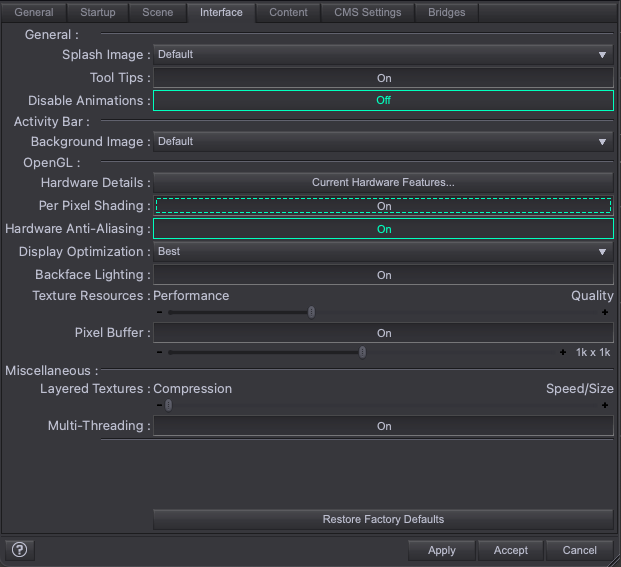
    screen.png
    621 x 567 - 72K
    Post edited by Totte on
  • gramgram Posts: 68

    Yes, none of those settings really do much for the viewports responsiveness for me.

    I could also add that i normally have an Aux viewport with iray preview running. So it may be its tied to having more viewports.

    Anyways, older version was snappier

  • Dude3DLabDude3DLab Posts: 38

    Totte said:

    alexandremarques2000 said:

    gram said:

    alexandremarques2000 said:

    Also, just to add my dot to the conversation—I have both a 4080 and a 5090, and the viewport lag is still very much real on both. I just tested it again. I feel like it’s a little better on the 5090, but it’s still miles away from the crystal-smooth experience I get on version 4.23. (And before y’all ask—yes, I have Display Optimization set to 'Best' on both versions.)

    Yes the displayport is a bit sluggish, but, the old version generally tended to be quite slow in my scenes as well, and this is not that much worse - as it seems "stable" and doesnt get progressively worse so far.

    However if its a new scene then the difference to old version is obvious. Anyways, i dont think the viewport speed is much about GPU as much as its about just tied to code optimization wrt CPU usage.

    I'm not sure exactly what the viewport relies on—GPU or CPU—but one thing I am sure of is this: the difference is abysmal and frankly unacceptable. To make the comparison simple, it's like the 4.23 viewport on the same scene is running at 200 FPS, while the new version crawls at 15 FPS. It's honestly game-breaking. I get that it's new code, and I'm sure there are a lot of mistakes in it that the good folks at Daz are actively working to resolve. That said, the new viewport looks nicer without a doubt but compared with the older one smoothness > looks 

    Anyone with viewport issues, did you set it up under Preferences?


    This is exactly the settings I'm using btw

  • TaozTaoz Posts: 10,230

    Ron Knights said:

    Pardon my confusion. What could be considered the minimum GPU needed for DAZ Studio 2025?! Are we talking the 50XX video cards?

    My old GTX 1070 with driver 552.22 works as such (can render), but there may be issues which I'm not aware of.

  • there is only iray rending with this other wise it render faster then beta

  • I do not see the studio install item show up in install manager and I unchecked the public filter. Anyone else have this issue?

  • meaznetmeaznet Posts: 5

    Not sure how to provide feedback on the current Alpha release Daz Studio 2025 (6.25)
    found an issue with scene list, if I hide an object in the scene the object does hide but the icon in the scene list doesn't update.  if I scroll the list so the object is not showing and then scroll back to show it the icon is changed.

    Also see the viewport doesn't have an option for Cartoon Shaded anymore.

  • Richard HaseltineRichard Haseltine Posts: 107,857
    edited April 24

    todd.dollar said:

    I do not see the studio install item show up in install manager and I unchecked the public filter. Anyone else have this issue?

    This is a Public Build, so you need that reklease channel checked. You also need to have purchased the free DS Beta product, as far as I know (and should then see the 4.23.x.x beta as well as the 2025 Alpha)

    Post edited by Richard Haseltine on
  • Richard HaseltineRichard Haseltine Posts: 107,857

    IceCrMn said:

    Gordig said:

    IceCrMn said:

    Richard Haseltine said:

    IceCrMn said:

    If I load a strand based hair, even by itself, in a scene and activate the new strand based hair editor the hair vanishes. Leaving behind only the scalp.

    Theres no apparent manipulators in the view port. Just a large cursor.

    Switching to the Universal Manipulation Tool

    You need to use the Tool Settings pane to work through the stages of hair creation/editing. Is the hair you are using actually Strand-Based Hair or dForce hair?

    If I change either of the two the tessellation values for example "Viewport Line Tessellation Sides" from 3 to 1 the app crashes instantly

    Good question, I really don't know.

    It's the "dforce Roxi Hair for Genesis 8 Female"

    I'm assumed it was because of the tressalation options.

    might just be regualr old deforce hair tho.

    It's not SBH, but that's not the same as being "regular old dForce hair". The reason Richard was asking is that the SBH editor works on SBH hairs created with the SBH editor, but once a PA applies dForce to the hair, it is no longer user-editable.

    so it was and now it's not , is that what you are saying?

    or was this one never SBH?

    Not even sure how to search for SBH in my library

    I'm sure I have a few, but if SBH isn't in the product or asset name not sure I'll be able to find it easily.

    if the product name is dForce .... Hair then it is dForce hair, made from Strand Based Hair or created in another application and imported. Either way, it cannot be edited with the Strand based hair Editor and that has always been the case. .... Hair with dForce uses the dForce cloth engine, and probably is modelled with strips rather than any kind of strand-based hair at all.

  • Richard HaseltineRichard Haseltine Posts: 107,857

    Squishy said:

    Gordig said:

    Headlamp off, preview lighting off:

    Yeah this is actually also headlamp lighting, because the render options also force it by default. This isn't the same as the preview lighting available in current and all previous versions (which seems to be just gone). The difference is you have no contrast with headlamp lighting so it makes it much harder to perceive volume and shape.

    There isn't a "preview light". When Preview Lights is on the non-PBR drawstyles attempt to do that, preview the lights (actual light nodes, not emissives or environment). When Preview Lights is off it uses a non-rendering headlamp-stylelight. The command is still in the Window menu, and it does work if there are light nodes (but I don't get a dark scene if I turn Preview Lights on in a scene with no lights in Texture Shaded mode).

  • Richard HaseltineRichard Haseltine Posts: 107,857
    edited April 24

    Leana said:

    alexandremarques2000 said:

    So it's just me or Geometry Sculptor is missing from the Premier Tools?

    Geometry sculptor probably requires more work to update it than some other plugins since it interacts with the viewport and that has changed a lot

    That is what we have been told, yes - I thought it was in the Evergreen thread but I don't see it there (yet).

    Post edited by Richard Haseltine on
  • Richard HaseltineRichard Haseltine Posts: 107,857

    meaznet said:

    Also see the viewport doesn't have an option for Cartoon Shaded anymore.

    It is expected that users go into Filament and use Filatoon for toon-style images, though this is of course more steps than just switching Drawstyle for a quick look-see.

  • ImagoImago Posts: 5,650

    I know that many plugins will be lost forever, if their original creators doesn't convert them to the new system, but what about Scripts?

    Once the new Scripting system is completed, there's any chance the new code library could support the old codes?

    Perhaps two separate DLLS (I don't know where the interpreter's library are located, just making an hypotesis) that, when you run a script in DAZ Studio, recognizes which one it needs (after all 90% of the scripts have "// DAZ Studio version 4.x.x.xx filetype DAZ Script" header that should make it easier) and use the right engine?

    If possible, it would save a colossal amount of scripts libraries.

  • TotteTotte Posts: 14,677

    Imago said:

    I know that many plugins will be lost forever, if their original creators doesn't convert them to the new system, but what about Scripts?

    Once the new Scripting system is completed, there's any chance the new code library could support the old codes?

    Perhaps two separate DLLS (I don't know where the interpreter's library are located, just making an hypotesis) that, when you run a script in DAZ Studio, recognizes which one it needs (after all 90% of the scripts have "// DAZ Studio version 4.x.x.xx filetype DAZ Script" header that should make it easier) and use the right engine?

    If possible, it would save a colossal amount of scripts libraries.

    The problem as I think it is, is that Qt 6.9 doesnt support the old way of calling stuff, doesn't support the way the old engine worked. As from both a user perspective, and a scripter/plugin developer perspective, I really hope Daz doesn't do as they did when they moved from 2 ->  3 -> 4 and kept a bunch of legacy code via translation bridge code and API overlays, which I think was the reason that DS 6/2025 has been such a beast to move to newer Qt (from 3/4.8 -> 6.9)
    Also, anything you add on top of existing APIs to make them backwards compatible will eat performance. I love that LowPi Crowd Generator (still in early dev port to DS 6)  is now about 3 times faster in DS 6 compared to DS 4, I dont want that speed gain being "eaten up" by shoehorning in some backward compatibility.


Sign In or Register to comment.