
Daz 3D is part of 
Connect
DAZ Productions, Inc.
7533 S Center View Ct #4664
West Jordan, UT 84084
Licensing Agreement | Terms of Service | Privacy Policy | EULA
© 2026 Daz Productions Inc. All Rights Reserved.
Comments
so it was and now it's not , is that what you are saying?
or was this one never SBH?
Not even sure how to search for SBH in my library
I'm sure I have a few, but if SBH isn't in the product or asset name not sure I'll be able to find it easily.
there are very few strandbased hairs sadly one can edit from PAs
they would make great starting points for ones own styling if there were for people who can only grow haystacks like me
I'm pretty sure this particular hair is polygonal and uses the dForce cloth engine. However, what I meant above is that hairs that are for sale in the Daz store will never be user-editable, as far as I'm aware.
Loading some of my scenes was maybe.. 10x faster? Impressive and good work. Also "texture shaded" view is a TON better now, which is nice.
Also it seems (not 100% sure) that vram usage has gone down.
Having Iray in viewport seems to be somehow quite pixelated though, previous version rendered it "natively". Maybe I miss some setting.
edit: not just viewport but also iray renders have a certain degree of blockiness/pixelation in them, especially visible on the edges of characters etc.
edit edit: There is some weird bug with iray being affected by windows DPI scaling settings which causes this. Other views, like Texture Shaded are not affected by windows scaling. Iray is.
Press Alt key seems to lock the camera zoom with mouse wheel. Also, I have the WASD issue too, press the keys and it makes a single "step".
I've noticed some lag after making certain changes, and sometimes to get it to resolve properly, you need to just slightly nudge the camera.
No its not that, it does "resolve" but the result just looks jagged/pixelated especially at the edges of characters.
For the hell of it, as the UI also looked pixelated a bit, i disabled all custom text scaling I had in Windows display settings and it seems to have fixed it, or at least reduced by a lot.
This must be some weird bug with how iray views interacts with windows dpi settings. Other views, like Texture Shaded was not affected.
That said, the loading/saving speed improvements alone are probably enough for me to switch over, if its not going to crash too often.
So it's just me or Geometry Sculptor is missing from the Premier Tools?
Plugins require a recompile before working with DS2025 (or any other major versions). I imagine the Premier bonus features are pretty high in the list of priorities for Daz, but in the meantime, there's still 4.x.
Also, please add the functionality to change the interface text size—it's insanely big right now."
Geometry sculptor probably requires more work to update it than some other plugins since it interacts with the viewport and that has changed a lot
Also, just to add my dot to the conversation—I have both a 4080 and a 5090, and the viewport lag is still very much real on both. I just tested it again. I feel like it’s a little better on the 5090, but it’s still miles away from the crystal-smooth experience I get on version 4.23. (And before y’all ask—yes, I have Display Optimization set to 'Best' on both versions.)
Yes the displayport is a bit sluggish, but, the old version generally tended to be quite slow in my scenes as well, and this is not that much worse - as it seems "stable" and doesnt get progressively worse so far.
However if its a new scene then the difference to old version is obvious. Anyways, i dont think the viewport speed is much about GPU as much as its about just tied to code optimization wrt CPU usage.
I'm not sure exactly what the viewport relies on—GPU or CPU—but one thing I am sure of is this: the difference is abysmal and frankly unacceptable. To make the comparison simple, it's like the 4.23 viewport on the same scene is running at 200 FPS, while the new version crawls at 15 FPS. It's honestly game-breaking. I get that it's new code, and I'm sure there are a lot of mistakes in it that the good folks at Daz are actively working to resolve. That said, the new viewport looks nicer without a doubt but compared with the older one smoothness > looks
Yeah, as said for me in my quite complex scenes the performance is not great with older version either, but in simple scenes etc it is a big difference. I dont find it unusable though, but they'll probably improve it over time.
wrt gpu vs. cpu, its just my assumption as I've run daz with very low power gpus and there is much less difference in texture shaded mode in performance etc. and looking at resource usage, cpu jumps quite high when you manipulate viewport.
Anyone with viewport issues, did you set it up under Preferences?
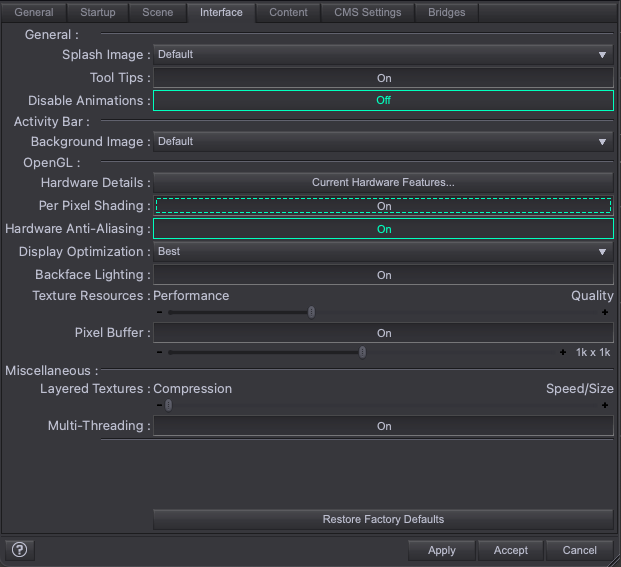
Yes, none of those settings really do much for the viewports responsiveness for me.
I could also add that i normally have an Aux viewport with iray preview running. So it may be its tied to having more viewports.
Anyways, older version was snappier
This is exactly the settings I'm using btw
My old GTX 1070 with driver 552.22 works as such (can render), but there may be issues which I'm not aware of.
there is only iray rending with this other wise it render faster then beta
I do not see the studio install item show up in install manager and I unchecked the public filter. Anyone else have this issue?
Not sure how to provide feedback on the current Alpha release Daz Studio 2025 (6.25)
found an issue with scene list, if I hide an object in the scene the object does hide but the icon in the scene list doesn't update. if I scroll the list so the object is not showing and then scroll back to show it the icon is changed.
Also see the viewport doesn't have an option for Cartoon Shaded anymore.
This is a Public Build, so you need that reklease channel checked. You also need to have purchased the free DS Beta product, as far as I know (and should then see the 4.23.x.x beta as well as the 2025 Alpha)
if the product name is dForce .... Hair then it is dForce hair, made from Strand Based Hair or created in another application and imported. Either way, it cannot be edited with the Strand based hair Editor and that has always been the case. .... Hair with dForce uses the dForce cloth engine, and probably is modelled with strips rather than any kind of strand-based hair at all.
There isn't a "preview light". When Preview Lights is on the non-PBR drawstyles attempt to do that, preview the lights (actual light nodes, not emissives or environment). When Preview Lights is off it uses a non-rendering headlamp-stylelight. The command is still in the Window menu, and it does work if there are light nodes (but I don't get a dark scene if I turn Preview Lights on in a scene with no lights in Texture Shaded mode).
That is what we have been told, yes - I thought it was in the Evergreen thread but I don't see it there (yet).
It is expected that users go into Filament and use Filatoon for toon-style images, though this is of course more steps than just switching Drawstyle for a quick look-see.
I know that many plugins will be lost forever, if their original creators doesn't convert them to the new system, but what about Scripts?
Once the new Scripting system is completed, there's any chance the new code library could support the old codes?
Perhaps two separate DLLS (I don't know where the interpreter's library are located, just making an hypotesis) that, when you run a script in DAZ Studio, recognizes which one it needs (after all 90% of the scripts have "// DAZ Studio version 4.x.x.xx filetype DAZ Script" header that should make it easier) and use the right engine?
If possible, it would save a colossal amount of scripts libraries.
The problem as I think it is, is that Qt 6.9 doesnt support the old way of calling stuff, doesn't support the way the old engine worked. As from both a user perspective, and a scripter/plugin developer perspective, I really hope Daz doesn't do as they did when they moved from 2 -> 3 -> 4 and kept a bunch of legacy code via translation bridge code and API overlays, which I think was the reason that DS 6/2025 has been such a beast to move to newer Qt (from 3/4.8 -> 6.9)
Also, anything you add on top of existing APIs to make them backwards compatible will eat performance. I love that LowPi Crowd Generator (still in early dev port to DS 6) is now about 3 times faster in DS 6 compared to DS 4, I dont want that speed gain being "eaten up" by shoehorning in some backward compatibility.