Neko : Line Tessellation Sides major bug
 nelchwetzal
Posts: 31
nelchwetzal
Posts: 31
https://www.daz3d.com/dforce-neko-hair-for-genesis-8-and-81-females
Hello
I use the next product:
https://www.daz3d.com/dforce-neko-hair-for-genesis-8-and-81-females
and I had a very bad surprise: the hair disappeared.
After a bit of searching, it turns out that the Line Tessellation Sidesis totally buggy when the value exceeds 1!
You can see it in the attached images:
Line Tessellation Sides 1 :

Line Tessellation Sides 2:
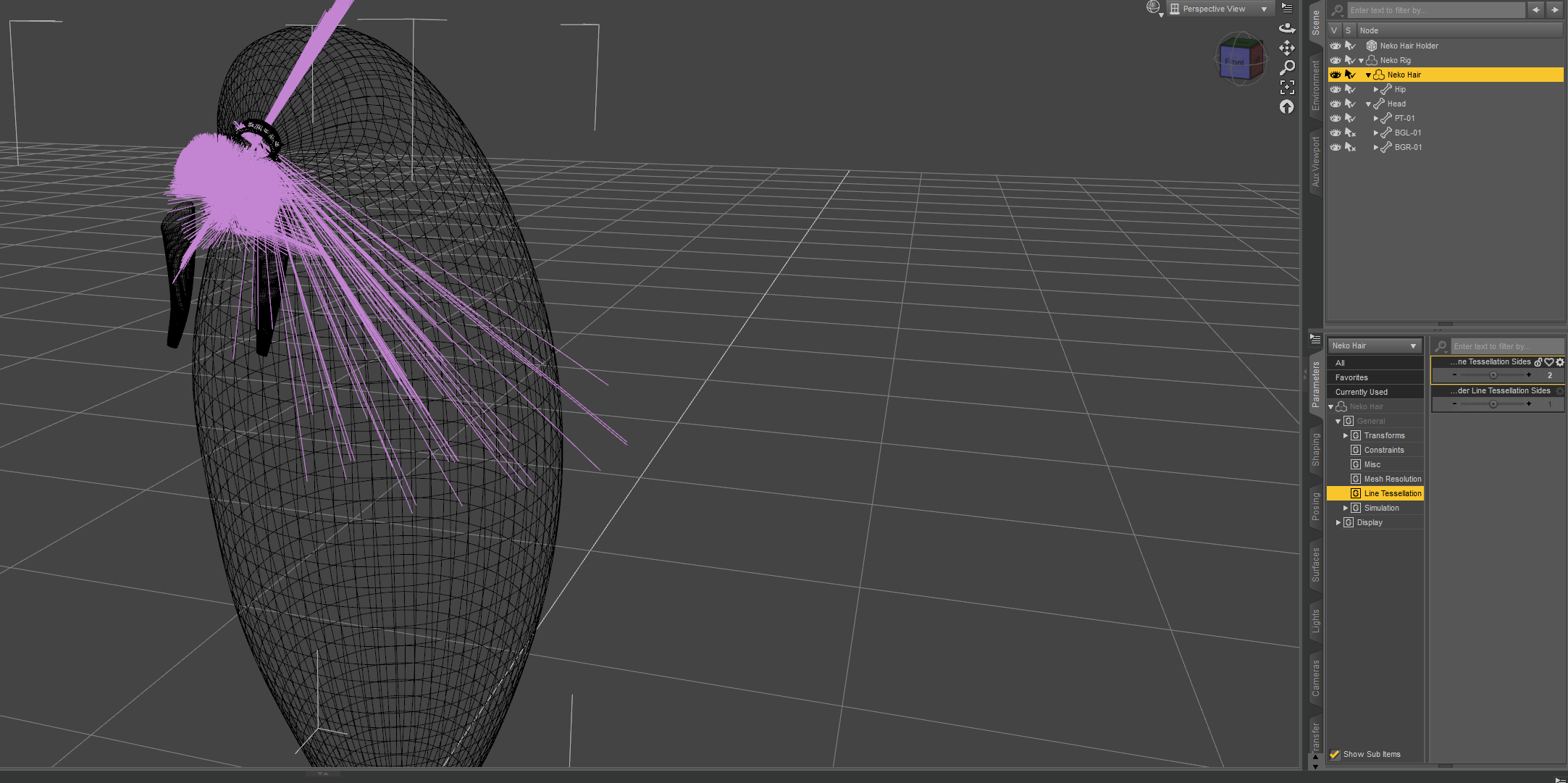
I use dforce hair, it's the first time I've seen something like this.
Does anyone have a solution?

Daz 3D is part of 
Connect
DAZ Productions, Inc.
7533 S Center View Ct #4664
West Jordan, UT 84084
Licensing Agreement | Terms of Service | Privacy Policy | EULA
© 2026 Daz Productions Inc. All Rights Reserved.
Comments
The readme says
If you want smoother results try a value of 0, which will use the newer Iray curves instead of a set tesselation.
No: I've found it's not a VRAM problem but a hair problem, and Shadow Cat Hair shows it :
https://www.daz3d.com/dforce-shadow-cat-hair-for-genesis-81-female
The product is supplied in two variants:
1 Shadow Cat Hair: the classic Dforce system
2 Shadow Cat Hair With RIg: dforce with a rig like neko hair and tenebris hair
Version 1 can easily reach Tessellation 4: you can see this in the picture.
As for version 2, well, the picture speaks for itself.
I've checked the Vram and ram, and there's still 7G and 22G, so it's not Vram, and besides, the lines are there, it's just that they're put in the wrong way.
Tenebris hair and neko hair, which use the same RIG technique, are also affected.
So it's definitely a bug.
Further demonstration: I put in several dforce hairs and then set the tesslation to 2 on all of them.
Line 0
Line 2
This affects daz studio 4.22 and 4.23
Edit :
Additional proof: when you took the hair out of the rig, the problem disappeared.
I had missed that there was a rigged version, but I think I did use that last night. Let me check again.
Yes, it does behave oddly when the hair is fitted to the rig - and the rig is odd as it shows itself fitted to <multiple>. I don't know what is going on.
Hello there.
The standard for dForce hair rendering used to be either Tessalation 1 or 3 in the past.
The current standard for dForce hair rendering is Tessalation 0 that takes advantage of the iray cuvres technology.
Therefore I would advise you to render all dForce hair on Tessalation 0 these days.
If the hair item is older (than 1.5 - 2 years) you might have to make adjustments to the materials as they look different on Tess 0 vs Tess 1/3.
Tessalation 2 should never be used. It just causes too many issues. Tessalation 4 is unnescessarily heavy for the system and there is absolutely no need to for it (especially these days with the iray curves technology).
Hope this helps.
Toyen
I don't have Neko hair, but I do have Tenebris hair. The Tenebris Hair is parented to the Tenebris Rig. Unparent it from the rig and parent it to the Tenebris Scalp. It then works fine for me at Line tessellation 2. It can still be posed with the rig bones, or the Active Pose tool, and it follows the head fine with regular character poses.
Previously discussed here.
Tessellation 2, however, is very important for exporting SBH hair to other DCCs. It's the minimum which creates actual geometry. I hope it continues to work.
I keep tesselation at 0 for exporting to C4D and Houdini.
Hi Gordig,
How do you export? When I request the geometry, it has no facets...
the default obj exporter from daz can write polylines from SBH - not sure if that helps.
What lilweep said: I export as OBJ, then adapt the hair to the respective hair system of whatever program I'm using. For Houdini, depending on the hair I'll either run the guides through a Hair Generate SOP, or keep as curves, in which case you can add a width attribute to make it render as hair.
Except that geometry is necessary for workflows on other systems.
For example, diffeomorphic needs a line tesslation of 2 to convert hair to blender's curve system.
What surprises me most is that the problem isn't recent: tenebris hair is from 2021, neko hair from 2022, and the problem is present with daz 4.22 and barbult's link shows posts from 2022.
Hmm... in Sagan, I set it to 2 so that I get a quad for each segment of the strands. Leaving it as 1, I get no facets. I'll have to try 0 and see if I can figure it out.
Thanks Gordig, lilweep