
Daz 3D is part of 
Connect
DAZ Productions, Inc.
7533 S Center View Ct #4664
West Jordan, UT 84084
Licensing Agreement | Terms of Service | Privacy Policy | EULA
© 2026 Daz Productions Inc. All Rights Reserved.
Comments
Auroratrek That's another fantastic chapter - love the slower pacing, attention to detail, the approach to the language used and everyone's gestures. How long does each chapter take to make?
I finished my first full animation experiment/project in FilaToon. My 3080 is able to render this (~3200 frames) in about 3 hours (I wasn't keeping track too closely, because it was fast!). Since FilaToon is so versatile and fast, and toon styles more forgiving, this really opens up animation possibilities in DS that I wouldn't have considered before.
FilaToon was a bit glitchy in this project but that kinda worked for this more stylized moody video. 3Diva gave me some tips on that, so hopefully I won't have those issues for a more regular story animation. A thank you to Emanuela1. Her theme "Dreams" for the Nov 2024 freebie challenge inspired this project, both the song and the scene that formed the basis for the music video.
The music was brilliant and engrossing with an excellent driving rythym, and the video added the mesmerizing and surreal visuals. I liked that alot. and watched it twice.
[edit]
and then found the link to check out the lyrics.
SapphireBlue is a very talented musician and great singer. You should check out her Youtube channel.
Omg, I'm blushing...
FirstBastion Thank you so much for the lovely compliments. I'm very glad you enjoyed it. FilaToon is such a cool and creative addition to Daz - I'm loving its possibilities a lot.
Oh, the lyrics... They're rather short and simple for this one, since this was very much an improv track. I knew the main line "I'm a dreamer" and its melody, and that it was going to be about the illusion of reality since that had been on my mind. But otherwise, once I had laid down the chords and rhythm, I just hit record and did the vocal melody and lyrics ad-lib, and left them as is since they worked for me. Very freeing to do it that way when the mood strikes!
David R Omg. You're too kind! Thank you.
Filament is the best thing to happen to Daz in 10 years.
What are animators using for voices these days? I've looked into some of the ai text to speech options, like elevenlabs, textaloud, polly, and while they seem like they would be great for voiceovers for tutorials and things like that, they still don't seem like they would be very good for story driven animations, where you want expressive, dramatic, dynamic voices. I guess we are still stuck with paying for voice actors or doing our own voice work with voice changers? Or is there something better I'm missing?
Getting closer to automating this entire process. Probably re-inventing the wheel, as usual, but it's going alright. I couldn't figure out how to make the spark component of the muzzle flash operator give the results I was looking for, and I still need to add smoke. I also haven't tested this fully inside of an APEX setup, much less with a ragdoll setup, so there's still plenty of work to be done.
Hire a good voice actor, it's the only way to have a good product.
TTSs are good for a quick wip or a simple lipsynch but if you are looking for real quality, real actor are the answer.
For PAID commercial projects with budgets yes.
For personal hobby projects AI is a practical
economic choice.
@FrankTheTank
Judge for yourself
I used AI voices for my feature length
animated film two years ago.
Alot of expressive range IMHO from stern, authoritative to

sarcastic, wispering & yelling
I made no money on this fan film
hiring voice actor AND studio musicians for personal hobby projects
makes ZERO sense unless you are $$$affluent.$$$$
Before the invasion
https://youtu.be/6e03ID895y4
Great stuff! Very, very impressive!
I've been away from animating for a bit and so I haven't been enjoying everyone's work here, I'll try to do a quick catch-up.
I don't totally agree with "silly" but I enjoy checking your stuff on Youtube whenever I have the time, it's always interesting. Every now and then you put up something that I find either purely delightful or whimsical, it always brings the smiles.
I love seeing where this is going; like FirstBastion, I find I'm drawn in and always waiting for the next episode. The only regret is that it's probably slowing down production on the next Aurora Trek episode...
Okay, I thought it was pretty good, until I found out you did the music and singing too, then it blew me away. How did you do the lip sync?
Looking forward to much more...
With DAZ Studio 2025 out, I can finally use Filament and Filatoon on my Mac.
Besides the new rendering options, D|S also works much, much better for the type of animation I do. If I were doing anything more action-oriented or special effects heavy, I'd definitely work in Blender, it's hands down superior for *real* animation.
My stuff, though, is more dialogue heavy, and doesn't ask for a lot of animation chops... which is lucky for me, since I don't have any.
When I made my first attempts at 3D animation a few years ago, DAZ Studio forced me to output frames instead of movies (not a huge drawback); it also wouldn't import audio, something that I'd like to have to help with the minor action that does occur in conversations.
And finally, the only Mimic-based lip synch was only available in the 32-bit version.
Mimic's still just 32-bit, sadly (I'd pay big bucks to have it in DAZ Studio 64 bit someday), but everything else works so much better for me.
I started testing Filatoon yesterday, and using 3Diva's Easy Filatoon I'm slowly working out my toon style and setting up my characters, sort of bringing over the 2D characters I used previously.
The biggest changes (other than Filament/toon) is that now I can import audio into my DAZ Scenes, and I can export a .mov file that *kinda* has the audio included.
The .mov file DAZ exports for me is a very simple container file (1 megabyte, roughly) that only links to the rendered frames in the temp folder. If I take the .mov file and drag it into iMovie (I haven't tested any other movie editing software yet), it imports the frames AND the audio into a single asset file in iMovie, which I can then export as an mp4, with sound.
Huge time saver
I took a run at manually lip syncing yesterday, and I am horrible at it. I know I'd get better with time and practice, but it took me almost 90 minutes to lip sync the mouth movements, then add some eye blinks and minor head movement (that was more like nervous ticks) for nine seconds of movie. The thought of working five or six hours just to key frame a minute of movie seemed way, way too much like "work" and not "fun"... but "fun" was what I signed up for when I retired.
I dug out my trusty old 2012 iMac and installed a content library for just Genesis 3 for lip syncing. I access the iMac over wifi and screen-share it, so I'm basically running 32-bit DAZ Studio on my MacBook Pro M4PRo.
I'm still defining the 2D Toon style I'm going for, so the shaders and such aren't final, but I grabbed two audio tracks from the first 2D animation I did, lip synced them to a female Science officer, saved out the two pose presets (I save out *just* the upper neck and head parts so that applying the pose doesn't change anything else on the character... if they're walking, after the pose is applied they're walking and talking) and rendered out the two files at 720p for testing purposes.
Here's the 22 seconds of animation; from the time I started the lip syncs to the time I uploaded the video to my website only about 35 minutes had transpired, so I'm getting about 20 seconds of video (with sound) in roughly 30 minutes.
https://sterdan.com/wp-content/uploads/2025/04/103-104-Science-Explains.mp4
I'm a very happy camper right now. Still an awful lot of practice and learning ahead, but it's suddenly fun again.
you can save the 32bit lipsync as pose files, I have lots I reuse for every figure
just to have them talking without dialogue in music videos if nothing else
one can have common phrases or words like yes, no, etc to load when needed even if the voice is different
That's what I'm doing, yes. I apply generate the lip sync (it takes a second or two for a 30-second speech), then save a pose preset for just the head and upper neck.
As well, as you suggest, I save out longer lip syncs *without* the lip syncing and apply those to background characters to give them a little "life". I have two different "background character" poses that I apply to characters in the scene at different times (e.g. frame 1, frame 15, frame 32, etc.) so that not everyone is blinking or moving their head in time with each other.
There will be no more Aurora Trek episodes due to Paramount's increased restrictions on Star Trek IP fan films a few years ago.
Glad you found a work around solution for native lipsinc on OSX going forward because well..........
Mimic is officially dead
I was hoping the starship animation they posted a few weeks ago was something in the pipeline. Too bad, it looked awesome.
I figured I'd try lip synching Genesis 9 and see what sort of issues might pop up. Here's my first try using Willow 9; I'm having way more fun than I deserve...
https://sterdan.com/wp-content/uploads/2025/04/TOS-Willow-Tactical-C-U.mp4
very nicely done - love the result (and it's only a test)...
is it safe to assume that for this particular sample that you did this with your DS 32bit mimic workflow (described above), or did you use some other lipsync workflow?
thanks for posting that - inspiring!
--ms
Just keep a backup of any DAZ Studio 4 32bit version and you will be OK.
I hope they will make a new version of it in the 6 version.
the standalone not so much dead as no longer available
it remains awesome
I created a dmc file and pz2 animation files for Predatrons Barnabus Ragwort with it the other week
(after exporting him as a cr2)
shame for others they stopped selling it
rename txt to dmc
Thanks very much! Yes, I'm running the 32-bit version by screensharing with my 27" 2012 iMac, sitting quietly in the basement. My son's donating his 21" 2011 iMac (it's only been used for about 2 years, after which he had to switch to a laptop for college) and I'll be setting that up as the main lip sync machine and archive the 2012. I should be able to keep the 32-bit lip sync for the foreseeable future. With this set-up, it really feels like I'm running the lip sync on my MacBook Pro M4 Pro.
Thanks to wofl359 (and a few others) I was able to get Blender set up with Papagayo in a few hours as a backup for more action-oriented animation should I need it.
I plan on doing a little longer version of this test clip once I get some decent-looking male characters in the Willow 9 style.
As wolf359 quoted, the docs say it's retired (wtih 3Delight and other things). As smooth as my current set-up is, I'd be glad to pay a couple of hundred books to have it built into a 64-bit version of DAZ Studio. I still haven't seen anything as good for what it does.
I may have to reinstall it on the older machines and give it a run, but for now I'm still editing other .dmc files to make new ones as needed; thanks again, Wendy, for showing me how to do that all those years ago, I still owe you for that.
I am mostly doing 2D animation these days
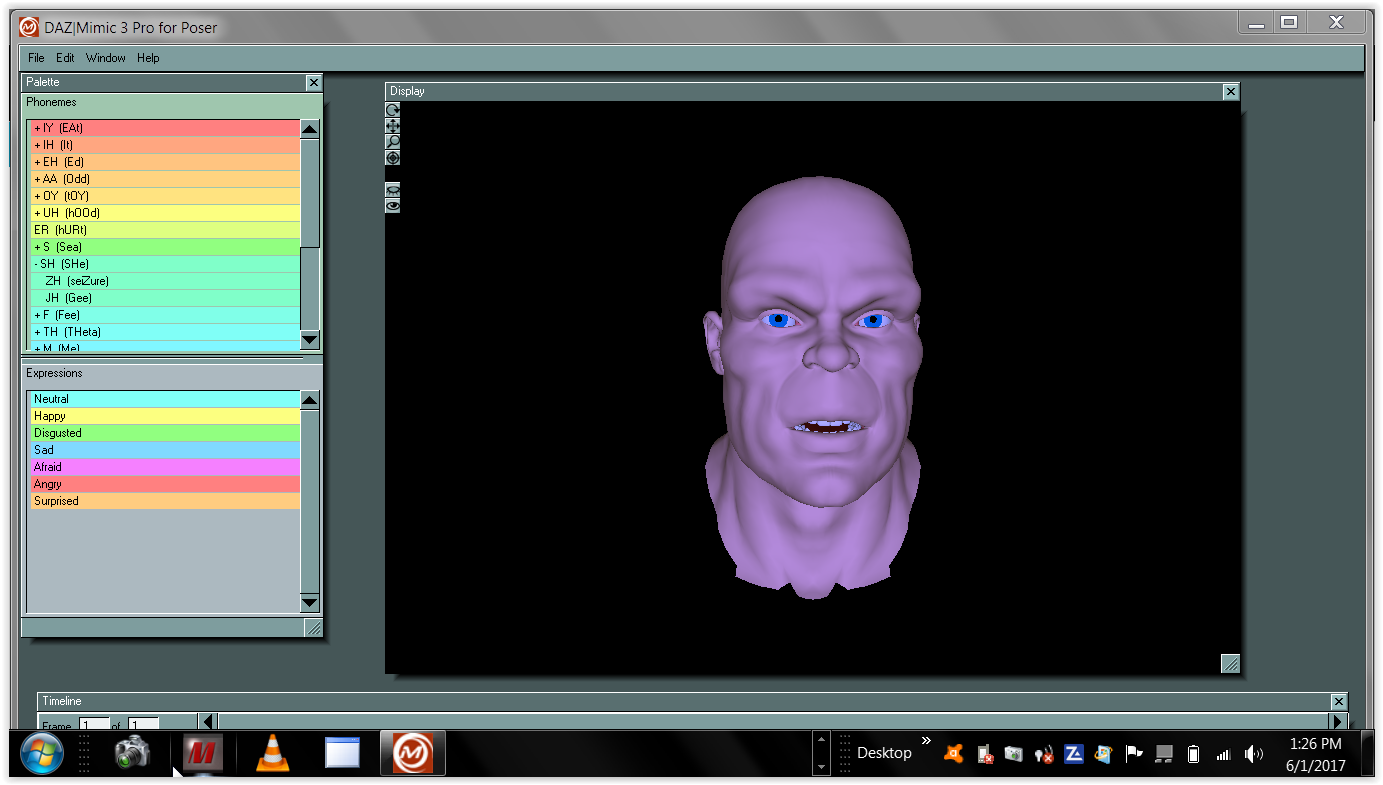
But I still have the old Mimic3 pro studio on
one of my old laptops.
@wsterdan
The 32 bit mimic software was licensed from another
long dead company with no license provision to recompile it for 64 bit according to a Daz forum mod.
so unless Daz creates a new 64 bit audio based lipsinc feature themselves
you will have to continue to use the old 32 bit under DS 4.X
or wait for some third party Like Dobit ( Anilip 3)
to create some new option compatible with DS 2025
I bought PoseRecorder some time ago and have done some testing with it, it seems to work pretty well for facial animation and lip syncing and can be a good alternative to Mimic perhaps. I don't see anyone here ever talk about it though. Just thought I would bring it up in case you may have missed it. It seems to be the only thing in the store by this PA so it may have gone unnoticed.
Thanks for the extra info, much appreciated. I am -- as always, these days -- mildy confused; I assumed it was DAZ who used the code to make the Carrara and Lightwave 64-bit plug-ins, but those were from the same era of Mimic itself so it may have been the owner, but they also made the 64-bit Mimic Live years later.
It's more than a little frustrating that they *didn't* license it for 64-bit DAZ Studio when the chance was available, but such is life.
Thanks again, for all your help and info.