• Daz 3D
  • Shop
  • 3D Software
    • Daz Studio Premier
    • Daz Studio
    • Install Manager
    • Partnerships
    • AI Training data
    • Exporters
    • Daz to Roblox
    • Daz to Maya
    • Daz to Blender
    • Daz to Unreal
    • Daz to Unity
    • Daz to 3ds Max
    • Daz to Cinema 4D
  • 3D Models
    • Genesis 9
    • Genesis 8.1
    • Free 3D Models
  • Community
    • Gallery
    • Forums
    • Blog
    • Press
    • Help
  • Memberships
    • Daz Premier
    • Daz Plus
    • Daz Base
    • Compare
  • Download Studio
ADVANCED SEARCH
  • Menu
  • Daz 3D
ADVANCED SEARCH
Add image
  • Shop
  • 3d Software
    • Daz Studio Premier
    • Daz Studio
    • Install Manager
    • Partnerships
    • AI Training data
    • Exporters
    • Daz to Roblox
    • Daz to Maya
    • Daz to Blender
    • Daz to Unreal
    • Daz to Unity
    • Daz to 3ds Max
    • Daz to Cinema 4D
  • 3D Models
    • Genesis 9
    • Genesis 8.1
    • Free 3D Models
  • Community
    • Our Community
    • Gallery
    • Forums
    • Blog
    • Press
    • Help
  • Memberships
    • Daz Premier
    • Daz Plus
    • Daz Base
    • Compare

Notifications

You currently have no notifications.

Loading...
    • Categories
    • Recent Discussions
Daz 3D Forums > 3rd Party Software > Blender Discussion

Question: Diffeomorphic, Posing, Mesh Deformation

csaacsaa Posts: 932
September 2023 in Blender Discussion

At this stage I'm interested in generating images from static poses. I haven't gotten my feet wet in Blender animation yet.

After importing with Diffeo, a figure with all its attire in rest pose looks good. However once I apply a pose, the attire mesh begins to deform, as expected, following the underlying bone system. (See image below, for example). To correct these, I resort to JCM adjustments or go into sculpt mode and adjust the mesh accordingly. Yet in some cases, no matter how I try, the adjustments don't come out well.
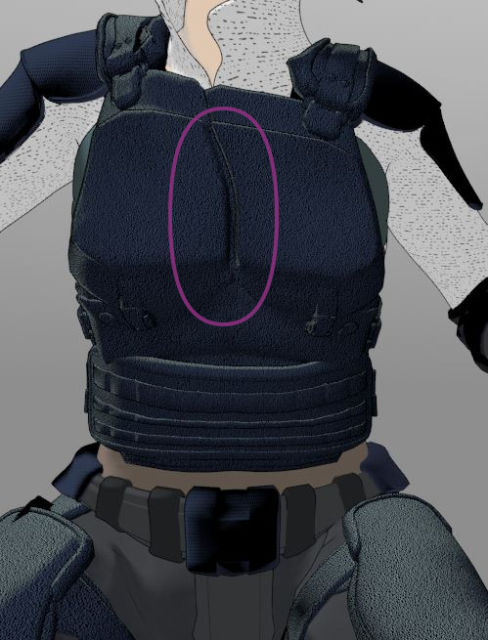
Naturally I'd like to minimize these types of deformations. Are there settings in the Diffeo apply-pose process that I should check? Are there adjustments in the DIffeo Morph panel that I overlooked? Lastly, as I'm beginning to understand the rigging and mesh deformation system in Blender, would skinning/weight painting be a factor that helps overcome these posing deformations?

Thanks.

Comments

  • PadonePadone Posts: 4,016
    September 2023

    If you use easy import then jcms are transferred to the outfit, vendor morphs are used if available, and you get the same deformations as daz studio. If you don't use easy import then you have to transfer by hand. Then if you don't like the deformations you can sculpt over, and/or edit or disable the affected jcms in the blender shapekeys list, and/or edit the weightmaps. The choice is wide and up to you.

    https://bitbucket.org/Diffeomorphic/import_daz/wiki/Import/Easy Import DAZ

Sign In or Register to comment.
Adding to Cart…

Daz 3D is part of Tafi

Connect

DAZ Productions, Inc.
7533 S Center View Ct #4664
West Jordan, UT 84084

HELP

Contact Us

Tutorials

Help Center

Sell Your 3D Content

Affiliate Program

Documentation Center

Open Source

Consent Preferences

JOIN DAZ

Memberships

Blog

About Us

Press

Careers

Bridges

Community

In the Studio

Gallery

Forum

DAZ STORE

Shop

Freebies

Published Artists

Licensing Agreement | Terms of Service | Privacy Policy | EULA

© 2025 Daz Productions Inc. All Rights Reserved.
