[Released] CC Jynksie for Genesis 9 [Commercial]

ChangelingChickChangelingChick Posts: 3,366
edited August 2023 in Daz PA Commercial Products

CC Jynksie for Genesis 9 is out!!

She includes feminine and masculine shaping presets, human and goblin skins. 
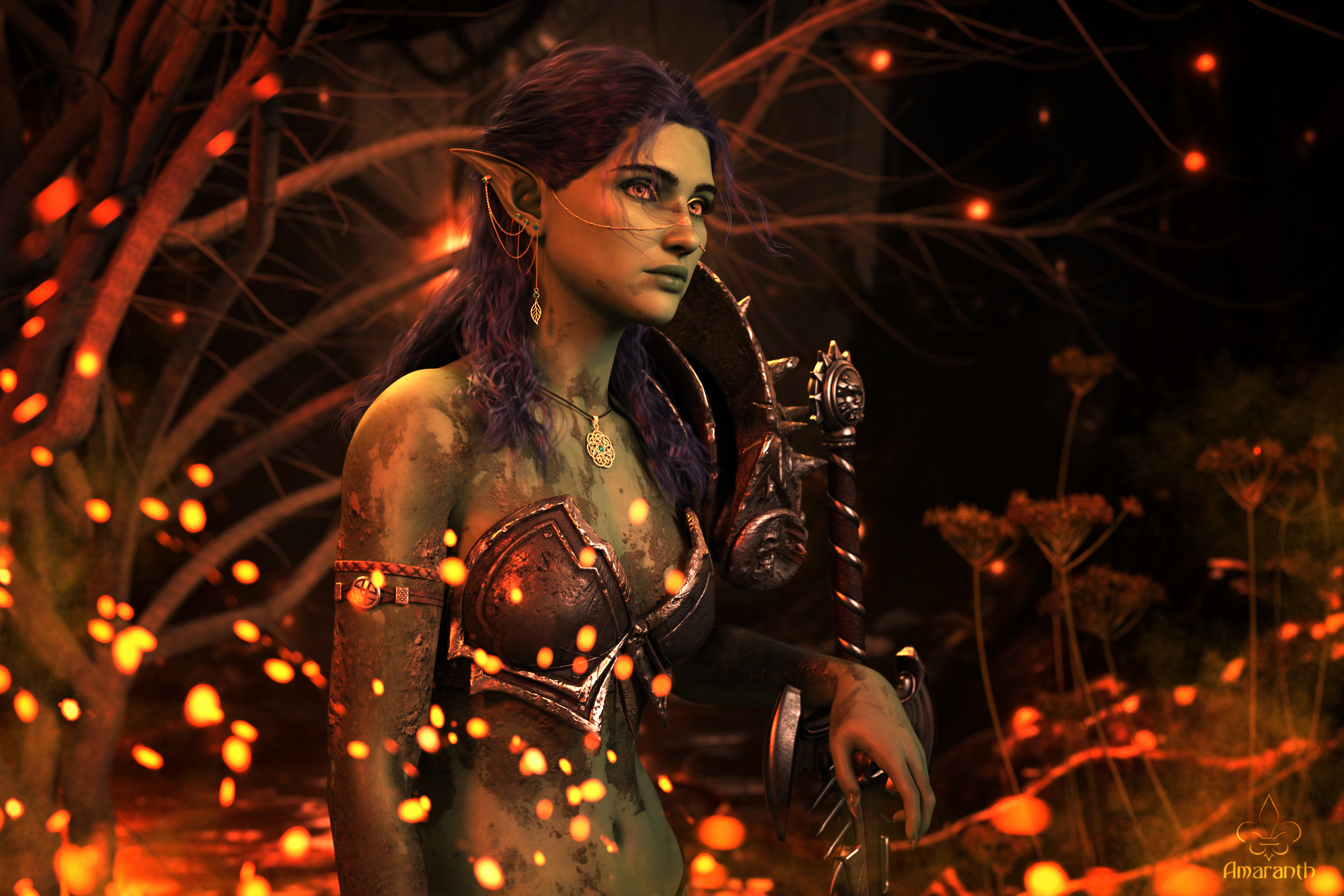
*Gallery Image by Amaranth


What's Included:    
  • CC Jynksie for Genesis 9: (.DUF)
    • CC Jynksie Character Preset
    • CC Jynksie (Goblin) Character Preset
    • CC Jynksie Masculine Character Preset
    • CC Jynksie Masculine (Goblin) Character Preset
    • Anatomical Elements Hair Fibermesh
  • Shaping Presets:
    • Jynksie Full Apply/Remove
    • Jynksie (Goblin) Full Apply/Remove
    • Jynksie Head Apply/Remove
    • Jynksie Body Apply/Remove
    • Jynksie Breasts (Supported) Apply/Removed
    • Jynksie Breasts (Unsupported) Apply/Remove
    • Goblin Ears Apply/Remove
    • Goblin Teeth Apply/Remove
    • Goblin Claws Apply/Remove
    • Square Nails Apply/Remove
    • Round Nails Apply/Remove
    • Sharp Nails Apply/Remove
    • Nails Thickness Apply/Remove
    • Navel Apply/Remove
    • Nipples (Feminine) Apply/Remove
    • Jynksie Masculine Full Apply/Remove
    • Jynksie (Goblin) Masculine Full Apply/Remove
    • Jynksie Masculine Head Apply/Remove
    • Jynksie Masculine Body Apply/Remove
    • Nipples (Masculine) Apply/Remove
  • Material Options:
    • Jynksie Feminine (with M/F Anatomical Elements)
    • Jynksie (Goblin), Feminine (with M/F Anatomical Elements)
    • Jynksie Masculine (with M/F Anatomical Elements)
    • Jynksie (Goblin), Masculine (with M/F Anatomical Element
    • Resets:
      • Eyes
      • Anatomical Elements
      • Anatomical Elements (Goblin)
      • Eyelashes (Feminine)
      • Eyelashes (Masculine)
      • Face (Feminine)
      • Face (Goblin, Feminine)
      • Face (Masculine)
      • Face (Goblin, Masculine)
      • Browns (Feminine)
      • Brows (Masculine)
      • Nails
      • Nails (Goblin)
      • Mouth
      • Mouth (Goblin)
      • Tear
      • Toenails
      • Toenails (Goblin)
    • 21 Eye Color Options
    • 02 Solid Eye Options
    • Eye Emissive On/Off
    • Black Sclera Option (LIE)
    • Blush [Geoshell]
    • Makeups:
      • 04 Eyeshadow Styles
        • Classic
        • Cut Crease
        • Simple
        • Smoky
      • 26 Shadow Colors
      • Shadow Darkener
      • Shadow Lightener
  • 04 Eyeliner Styles
    • Simple
    • Thin Color
    • Filled
    • Hearts
  • 26 Accent Colors (By Style)
  • Liner Accent Darkener (By Style)
  • Liner Accent Lightener (By Style)
  • 18 Fingernail Colors
  • 03 Fingernail Shine Options
  • Fingernail Shimmer On/Off
  • 18 Toenail Colors
  • 03 Toenail Shine Options
  • Toenail Shimmer On/Off
  • 02 Eyelash Styles
  • 23 Eyelash Colors
  • Lip Geoshell:
    • 05 Style Options
    • 18 Color Options
    • 03 Shine Options
    • Shimmer On/Off
    • 05 Coverage Options
  • CC Jynksie Brows & CC Jynksie Brows (Masculine)
    • 23 Colors 
  • CC Jynksie Anatomical Elements Hair
    • 23 Colors
  • Textures Include:
    • 160 Texture, Normal, Roughness, Specular, Translucency, and Transparency Maps (4096 x 4096)
  • Daz Studio Iray Material Presets (.DUF)


  •  


Post edited by ChangelingChick on

Comments

  • memcneil70memcneil70 Posts: 5,413

    They are in my runtime now. Thank you so much for an incredible amount of work you did on documenting what was included. I so appreciate that. And the expressions! Adore them.

    Mary

  • Thank you! Those are all the base Daz expressions (Genesis 9 Expressions) . With all my characters I try and make sure the expressions work nicely (I add correctives when need be), but I tend to forget to show it.

  • GoggerGogger Posts: 2,501

    Something about the initial promo image in the store made me scroll right on by, but later I came back and had a second look and BOY AM I GLAD I DID!  JUST WOW!   What an insane level of options and stuff and everything! Human AND Goblin! But wait, there's more! Male AND Female for BOTH! And if that wasn't enough, how about more material options than you can shake a stick at? YOU BETCHA!

    Amazing value for this price. Amazing product at any price, really!

    @ChangelingChick  I salute you! (with my wallet even!) 

  • LOL Thank you :D I very much appreciate it :D

  • nemesis10nemesis10 Posts: 3,830

    ChangelingChick said:

    LOL Thank you :D I very much appreciate it :D

    i appreciate that I can buy your products and then go back and look at what's included and say "oh, yeah, this is exactly my vibe".

  • nemesis10 said:

    ChangelingChick said:

    LOL Thank you :D I very much appreciate it :D

    i appreciate that I can buy your products and then go back and look at what's included and say "oh, yeah, this is exactly my vibe".

    heart 

  • DoctorJellybean said:

    Nice!! Is that the new Stone Bridge for Ultrascenery?  

  • ChangelingChick said:

    DoctorJellybean said:

    Nice!! Is that the new Stone Bridge for Ultrascenery?  

    Thank you, and yes.

  • ElorElor Posts: 3,336

    Hello,

    I have two questions related to Jynksie and creating morphs for clothes.

    1. From what I understand, it seems to me that:

    • Jynksie's morph was created on top of Base Feminine.
    • Jynksie's Clothed Breasts' morph was created on top Jynksie's morph.
    • Jynksie's Nude Breasts' morph was then created on top of Jynksie's Clothed Breasts' morph.

    When I want to create morphs to get a better fit for a piece of clothing, I'm currently following these steps:

    1. I load Genesis 9 Dev and the clothes I want to fix
    2. I dial in 'CC Jynksie Body' (which automatically dial 'Base Feminine Body')
    3. Sometime, I remove the 'CC Jynksie Body'  autogenerated morph on the clothes if I feel like I will do a better job than Daz Studio, sometime I keep it and just fix the part I know how to fix.
    4. I export Genesis 9 Dev and the clothes into Blender, do what I need to in Blender before exporting it back as .obj
    5. I create a morph in Daz Studio using the .obj file

    Then, I will do the same process after dialing in 'CC Jynksie Breasts (Clothed)', keeping 'CC Jynksie Body' at 100% and the last step is adding 'CC Jynksie Breasts (Nude)' on top of everything.

    Is it the correct way to do it or is there a better one?

    2. By default (if I'm not doing something wrong which is always a possibility of course), Jynksie loads without Genesis 9 micro-details maps loaded. Is it useful to add them using the preset from Genesis 9 Starter Essentials ?

    Two and half years later, I still find the main render great and I'm happy to have finally an idea to take advantage of the soot preset (was it based on a specific pair of glasses?), in Dear Diary : 

  • ChangelingChickChangelingChick Posts: 3,366

    First off, I LOVE that! Absolutely love it!!

    Second, yes, you're doing everything right :D I keep the breasts separate specifically for clothing fits. Since a lot of the base breast morphs will be supported by clothing already, some folks find it easier just to use those dials. But if you like the ones that come with her, then yes, the procedure you described is spot on. 

    And absolutely you'll get a benefit from the default micro details with her. Those are great maps, and as I recall I didn't use anything in the micro details channels, so they'll be additive. 

Sign In or Register to comment.

