• Daz 3D
  • Shop
  • 3D Software
    • Daz Studio Premier
    • Daz Studio
    • Install Manager
    • Partnerships
    • AI Training data
    • Exporters
    • Daz to Roblox
    • Daz to Maya
    • Daz to Blender
    • Daz to Unreal
    • Daz to Unity
    • Daz to 3ds Max
    • Daz to Cinema 4D
  • 3D Models
    • Genesis 9
    • Genesis 8.1
    • Free 3D Models
  • Community
    • Gallery
    • Forums
    • Blog
    • Press
    • Help
  • Memberships
    • Daz Premier
    • Daz Plus
    • Daz Base
    • Compare
  • Download Studio
ADVANCED SEARCH
  • Menu
  • Daz 3D
ADVANCED SEARCH
Add image
  • Shop
  • 3d Software
    • Daz Studio Premier
    • Daz Studio
    • Install Manager
    • Partnerships
    • AI Training data
    • Exporters
    • Daz to Roblox
    • Daz to Maya
    • Daz to Blender
    • Daz to Unreal
    • Daz to Unity
    • Daz to 3ds Max
    • Daz to Cinema 4D
  • 3D Models
    • Genesis 9
    • Genesis 8.1
    • Free 3D Models
  • Community
    • Our Community
    • Gallery
    • Forums
    • Blog
    • Press
    • Help
  • Memberships
    • Daz Premier
    • Daz Plus
    • Daz Base
    • Compare

Notifications

You currently have no notifications.

Loading...
    • Categories
    • Recent Discussions
Daz 3D Forums > 3rd Party Software > Blender Discussion

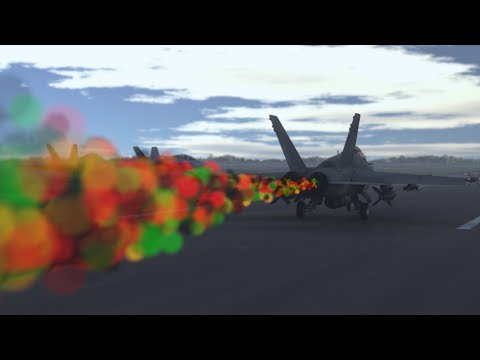
Anyone know how to create this effect (heat distortion)?

KitsumoKitsumo Posts: 1,221
September 2020 in Blender Discussion

It's a heat distortion effect done using particles and the compositing tab.

My normal method of doing heat distortion is using a plane in front of the camera with displacement and refraction, but this one looks a lot easier and more realistic.

Anyone have any idea how it's done?

Comments

  • brainmuffinbrainmuffin Posts: 1,267
    September 2020

    I'm not sure, but I just found this interesting flame tutorial:


  • KitsumoKitsumo Posts: 1,221
    September 2020
    brainmuffin said:

    I'm not sure, but I just found this interesting flame tutorial:

    Thanks for that. I've been doing flames for a while now. BlenderGuru has an excellent tutorial for a flamethrower, but it's for 2.7 and earlier, so kind of hard to follow using modern Blender.

    I made quite a bit of progress on this heat distortion thing today. I probably need to just learn the shader and compositing tabs more. I guess that's the fun thing about Blender, there's always more to learn.

  • brainmuffinbrainmuffin Posts: 1,267
    September 2020
    Kitsumo said:
    brainmuffin said:

    I'm not sure, but I just found this interesting flame tutorial:

    Thanks for that. I've been doing flames for a while now. BlenderGuru has an excellent tutorial for a flamethrower, but it's for 2.7 and earlier, so kind of hard to follow using modern Blender.

    I made quite a bit of progress on this heat distortion thing today. I probably need to just learn the shader and compositing tabs more. I guess that's the fun thing about Blender, there's always more to learn.

    Yeah, I started into this tutorial and didn't get very far when there were too many differences with 2.9 to continue. I find it is odd that they make changes to modifiers, but they NEVER fix the UI. Moving around in a large model is beyond painful.

  • KitsumoKitsumo Posts: 1,221
    September 2020
    brainmuffin said:

    Yeah, I started into this tutorial and didn't get very far when there were too many differences with 2.9 to continue. I find it is odd that they make changes to modifiers, but they NEVER fix the UI. Moving around in a large model is beyond painful.

    Arghh! Don't get me started on UI design. I don't know what makes someone decide "Hey, everyone should be using a totally different UI. Right-click to select is obviously superior." Seriously?

    The flame effect isn't hard to do once you learn the basics.

    daz studio render

    If you want, I could try to stream it on Steam and explain it tomorrow.

  • brainmuffinbrainmuffin Posts: 1,267
    September 2020 edited September 2020
    Kitsumo said:
    brainmuffin said:

    Yeah, I started into this tutorial and didn't get very far when there were too many differences with 2.9 to continue. I find it is odd that they make changes to modifiers, but they NEVER fix the UI. Moving around in a large model is beyond painful.

    Arghh! Don't get me started on UI design. I don't know what makes someone decide "Hey, everyone should be using a totally different UI. Right-click to select is obviously superior." Seriously?

    I saw an interview recently with the guy who first created Blender. It was an Amiga program and then Silicon Graphics. I wonder if that is where the oddness started and was never updated. I haven't used an SGI machine and IRIX in 23 years, so I don't remember any GUI oddness.

    Post edited by brainmuffin on September 2020
  • brainmuffinbrainmuffin Posts: 1,267
    September 2020
    Kitsumo said:
    brainmuffin said:

    Yeah, I started into this tutorial and didn't get very far when there were too many differences with 2.9 to continue. I find it is odd that they make changes to modifiers, but they NEVER fix the UI. Moving around in a large model is beyond painful.

    Arghh! Don't get me started on UI design. I don't know what makes someone decide "Hey, everyone should be using a totally different UI. Right-click to select is obviously superior." Seriously?

    The flame effect isn't hard to do once you learn the basics.

    daz studio render

    If you want, I could try to stream it on Steam and explain it tomorrow.

    Ubuntu Linux?

  • KitsumoKitsumo Posts: 1,221
    September 2020
    brainmuffin said:

    Ubuntu Linux?

    Lol, yes, but I switched to Kde awhile ago and caused a lot of issues for myself. One of these days I'll install a clean version of Kubuntu.

    That Amiga comment kind of makes sense. It would explain why Blender just does so many things "differently" but still gets good results. With hindsight being 20/20, Commodore could have probably survived if they'd switched to making 3d accelerators. They would've stomped the crap out of Matrox, Rendition, S3 and at least put up a good fight against 3Dfx. But I think they went bankrupt before 3d cards became a thing.

    I had a C64 back in the day and I'm planning to order the new retro version as soon as it's released in the US. I started learning 6502 assembly last year and it's been a lot of fun.

    As far as Linux goes, it's been pretty reliable. DS and DIM give me a few issues sometimes, and then Diffeomorphic can be a pain, but once I export to Blender, everything goes smoothly.

  • nicsttnicstt Posts: 11,715
    September 2020
    brainmuffin said:
    Kitsumo said:
    brainmuffin said:

    I'm not sure, but I just found this interesting flame tutorial:

    Thanks for that. I've been doing flames for a while now. BlenderGuru has an excellent tutorial for a flamethrower, but it's for 2.7 and earlier, so kind of hard to follow using modern Blender.

    I made quite a bit of progress on this heat distortion thing today. I probably need to just learn the shader and compositing tabs more. I guess that's the fun thing about Blender, there's always more to learn.

    Yeah, I started into this tutorial and didn't get very far when there were too many differences with 2.9 to continue. I find it is odd that they make changes to modifiers, but they NEVER fix the UI. Moving around in a large model is beyond painful.

    It is incredibly simple and far easier than studio. Then again, I've never like Studio's interface or navigation.

    I select the part i want to move to, and press period on numpad.


  • AscaniaAscania Posts: 1,855
    September 2020

    Transparent refractive material on the particles?

  • lorddayradonlorddayradon Posts: 536
    June 2023 edited June 2023

    Interested in this for the next few days.  I may work out a solution before anyone responds.  I'm looking more for the effect of heat waves, ie: on a hot summers day, looking down a road, it appears as if there is a puddle or water on the roadway, but it is actually "Heat Waves" distorting what you see.  The last post above appears to be more inline with the concept, but based on my set, I'm sure it would increase my render time 10 fold.


    Maybe somehow incorporating a pool water waves in the refraction channel or something? scale to effect?

    My other option is to render the  major BG, and photoshop blur/distorion in, then render forground with out BG, to use as a mask, and finally render entire image, use the mask to  remove all the non Foreground stuff in the full image so the background PS'd modified verstion shows throw.  Lotta work and render time.  Just hoping there is a faster/better solution.

    I suppose DOF  has a similar effect, though you wouldn't get waves type effect as it is all uniform.


    Post edited by lorddayradon on June 2023
  • PadonePadone Posts: 4,001
    June 2023

    Basically you can drive the ior on a surface or a solid. The solid is independent from the camera angle so works better in general. The surface is probably faster to render.

Sign In or Register to comment.
Adding to Cart…

Daz 3D is part of Tafi

Connect

DAZ Productions, Inc.
7533 S Center View Ct #4664
West Jordan, UT 84084

HELP

Contact Us

Tutorials

Help Center

Sell Your 3D Content

Affiliate Program

Documentation Center

Open Source

Consent Preferences

JOIN DAZ

Memberships

Blog

About Us

Press

Careers

Bridges

Community

In the Studio

Gallery

Forum

DAZ STORE

Shop

Freebies

Published Artists

Licensing Agreement | Terms of Service | Privacy Policy | EULA

© 2025 Daz Productions Inc. All Rights Reserved.