Can I export a whole scene from Daz into Blender?
 EZ3DTV
Posts: 1,543
EZ3DTV
Posts: 1,543
Can I export a whole scene from Daz into Blender?
Then use Blender to animate my characters?

Daz 3D is part of 
Connect
DAZ Productions, Inc.
7533 S Center View Ct #4664
West Jordan, UT 84084
Licensing Agreement | Terms of Service | Privacy Policy | EULA
© 2026 Daz Productions Inc. All Rights Reserved.
Comments
I have with Diffeomatic more than once. All depends on what is in the scene. I typically have replaced lights and cameras afterward, but not always. My Urban Future 3 (Stonemason set) animations started as scenes in Studio, were upgraded to Iray using a pack from Dreamlight, converted to Blender via Diffeo, reapplied HDRI in Blender, and then animation rendered. I did update cameras to follow certain objects post conversion. As I added items, I did export them individually from Studio and appended in Blender.
Yikes that, sounds really complicated. I just downloaded the Daz to Blender PDF and got no further than the first page.
Tutorials make me sleepy...
I have a 3Ddelight to Iray converter I bought in the Daz store? I use it a lot. Is that the same as the pack from Dreamlight?
RSSY 3Delight to Iray Converter
https://www.daz3d.com/rssy-3delight-to-iray-converter
I have that same converter and use it for old content to bring it from 3Delight to Iray. In Blender, I tend to use Cycles, so starting with Iray tends to be better for me. When I use an Iray based set, it is pretty much click and move without much effort till I tweak things in Blender.
This is the old Urban Future 3 set from Stonemason: https://www.daz3d.com/urban-future-3
The Add-on that makes it ready for Iray: https://www.daz3d.com/ds-iray-lights-for-urban-future-3
One of many of my animation renderings: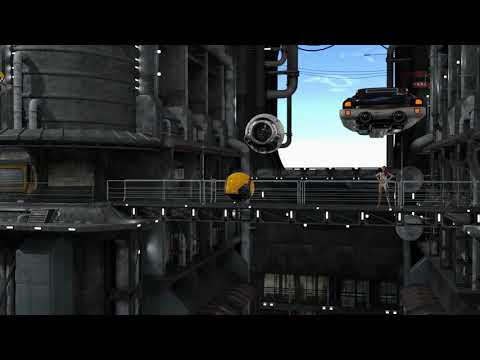
The Solaris station set (https://www.daz3d.com/solaris-station) using Cycles X: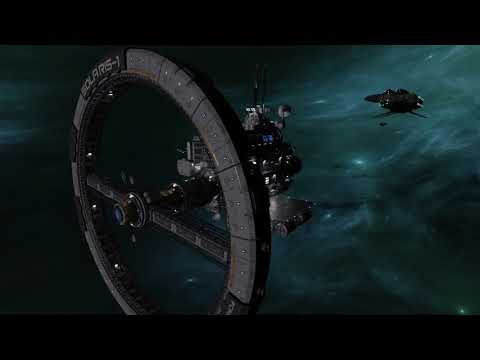
Most of these ports only took a few minutes to setup and move to Blender. All with Diffeomorphic.
At some point I want to layer sound into these clips. I've moved twice in the past year, so I've not been able to get back to them yet.
WOW! Very nice work indeed Brainmuffin! Last week I wanted to make my own hair styles for men in Blender.
After much research I have decided that that may be much more than I can chew.
But as for animation I do think I have enough personal experience animating in the past to make a go of it.
20 years ago I was dropping Jell-O like blobs in 3ds Max and working in Truespace and Povray.
Though my experience is not extensive it is a good foundation to build upon now.
I spent months in Bryce animating cubes, volumes and text. Stuff that seems rudimentary now.
I even animated in Poser many years ago.
I think I can pull off the animation thing.
I need to figure out a process.
I am going to try to animate in Daz first...
1 get my figures in the scene
2 Make them blink and do some kind of very subtle movements like breathe and follow the camera with thieir eyes and head. Just enough to indicate that they are alive.
3 Animate the camera
4 Create the environment
5 Animate elements in the environment grass, birds, sky, clouds, lights etc...
Starting out with a scene already packed with stuff seems like the backward way to progress in an animation.
Right now, when I put two Gen 8 figures in Daz and have them in wireframe moving I cannot even scrub the timeline.
Not sure if that is the way it is supposed to be with 2x3090's.
It is discouraging at this point.
Complete Daz sets & props import just fine via Diffeomorphic
Pov-Ray.....now there's a name I haven't heard in many years. I probably still have a copy of source code around somewhere. Is that project still around?
Very nice.
Pov-Ray is still around, I hear of it currently being used a lot to benchmark graphics cards and their render speeds.
My memory of Pov-Ray is lists and lists of materials and libraries and copy and pasting chunks of text.
Printing out sphere sheets with various textures on them.
I used Turbo Loader and finally learned how to use it.
https://www.daz3d.com/turbo-loader-for-genesis-8-and-81
I turned off a ton of my morphs. It is easier to use than I thought it was but I did turn off some Genesis morphs that were "required".
I had to figure out which ones were needed.
This has sped up loading times of my characters.
I have over 8,000 assets and I am amazed that I know most of them, especially my figures by name.
It has also sped up scrolling around, scrubbing and previewing my animation timeline.