• Daz 3D
  • Shop
  • 3D Software
    • Daz Studio Premier
    • Daz Studio
    • Install Manager
    • Partnerships
    • AI Training data
    • Exporters
    • Daz to Roblox
    • Daz to Maya
    • Daz to Blender
    • Daz to Unreal
    • Daz to Unity
    • Daz to 3ds Max
    • Daz to Cinema 4D
  • 3D Models
    • Genesis 9
    • Genesis 8.1
    • Free 3D Models
  • Community
    • Gallery
    • Forums
    • Blog
    • Press
    • Help
  • Memberships
    • Daz Premier
    • Daz Plus
    • Daz Base
    • Compare
  • Download Studio
ADVANCED SEARCH
  • Menu
  • Daz 3D
ADVANCED SEARCH
Add image
  • Shop
  • 3d Software
    • Daz Studio Premier
    • Daz Studio
    • Install Manager
    • Partnerships
    • AI Training data
    • Exporters
    • Daz to Roblox
    • Daz to Maya
    • Daz to Blender
    • Daz to Unreal
    • Daz to Unity
    • Daz to 3ds Max
    • Daz to Cinema 4D
  • 3D Models
    • Genesis 9
    • Genesis 8.1
    • Free 3D Models
  • Community
    • Our Community
    • Gallery
    • Forums
    • Blog
    • Press
    • Help
  • Memberships
    • Daz Premier
    • Daz Plus
    • Daz Base
    • Compare

Notifications

You currently have no notifications.

Loading...
    • Categories
    • Recent Discussions
Daz 3D Forums > 3rd Party Software > Blender Discussion

Diffeomorphic: Daz Poses and Neck Bone Follow Through *SOLVED*

csaacsaa Posts: 938
October 2022 edited January 2023 in Blender Discussion

I'm not sure if this issue happens to others. I run into it frequently when I apply Daz poses using Diffeo. At any rate I'm reporting it as a way to understand what's going on and to suggest improvements.

I use Diffeo 1.6.2 with Blender 3.1.0. When I import a GF8.1 figure from Daz and Rigify the rig, then apply a pose, the neck bones often don't follow. To correct this, I have to manually adjust the neck bone settings. The screenshots below illustrate the issue.

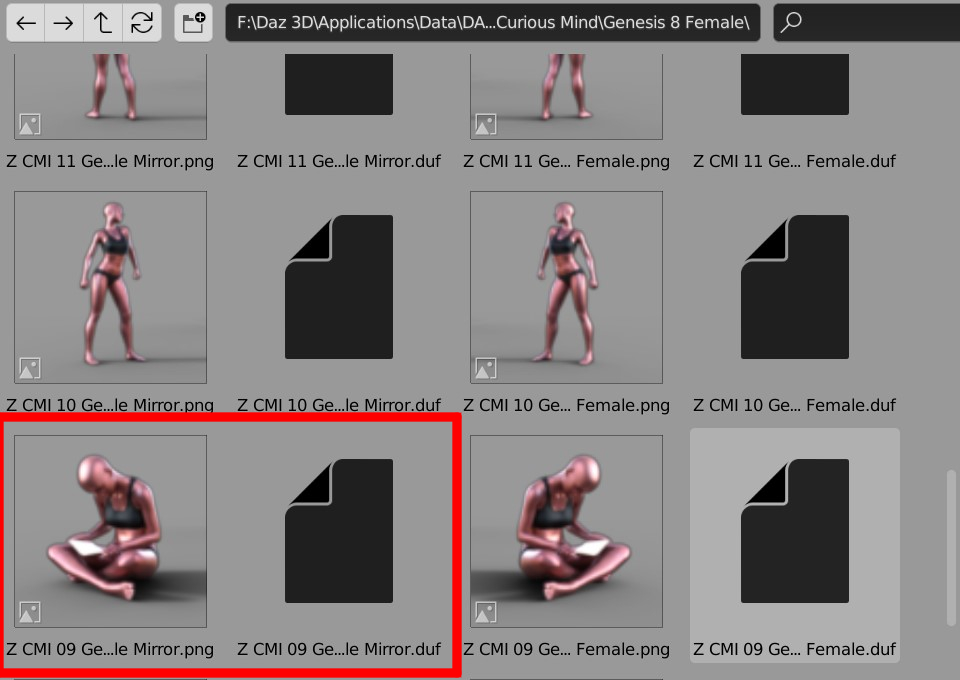
(1) My figures are imported in an A-Pose. Using Diffeo, I proceed to apply a Daz pose.
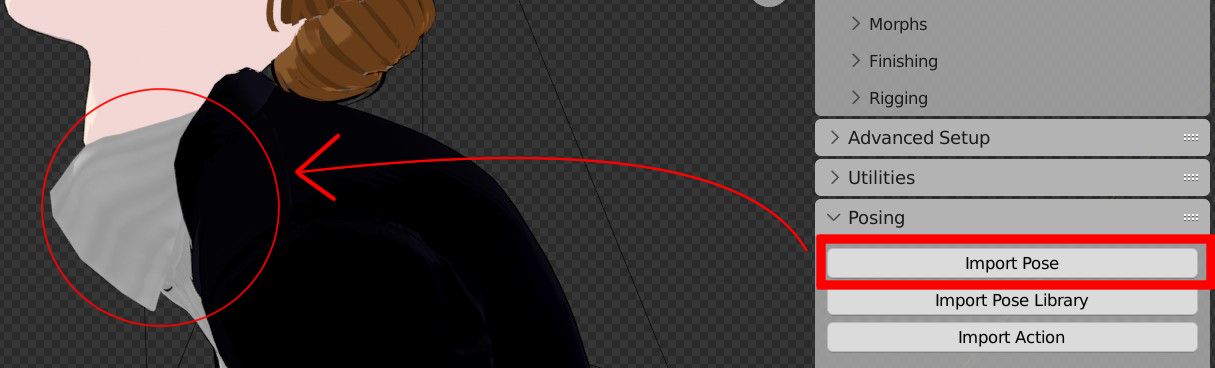
(2) The outcome of the pose import leaves the neck bones awry.
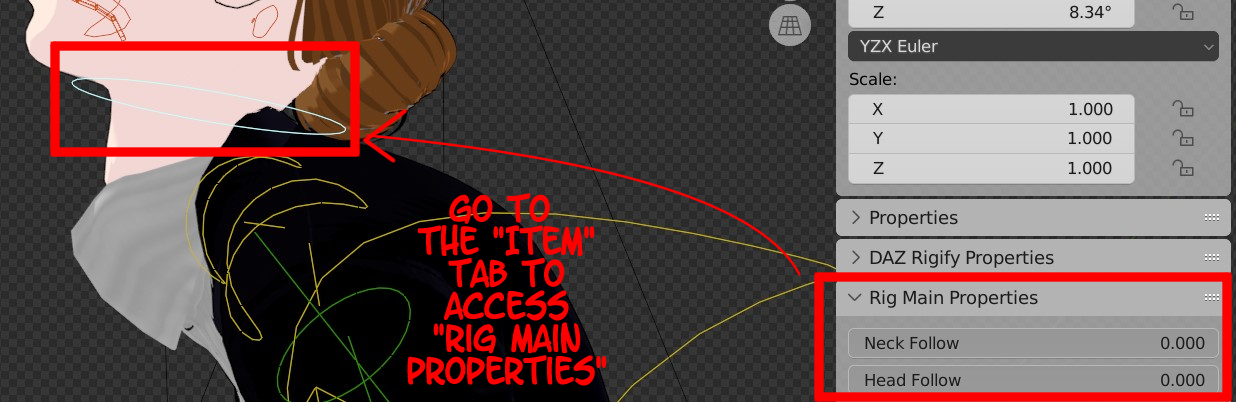
(3) I can manually correct this by revealing the Rigify bones in pose mode, selecting the neck rotator and adjusting the pose follow-through. Setting the two values to "1.0" corrects the neck pose.
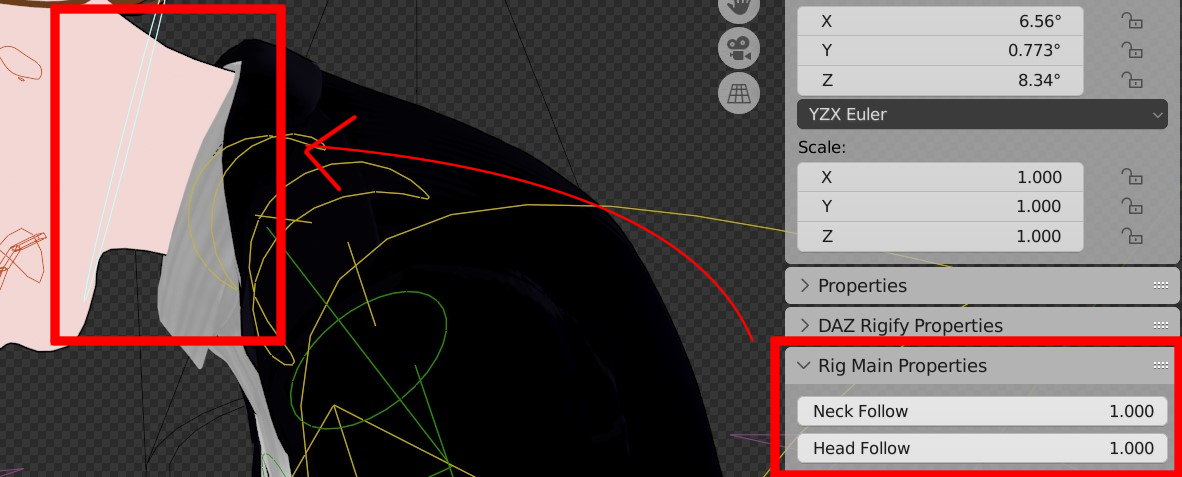
While I'm happy to correct the pose this way, it's not all too clear to me what's going on underneath the hood. Why the neck bones? I understand the value of giving the end user the means to adjust the follow-through of a Daz pose on particular bones, but would it not make sense for the defaults to be set to 100 percent? Just a thought.

Cheers!

Post edited by csaa on January 2023

Comments

  • PadonePadone Posts: 4,019
    October 2022

    Will look at it and let you know what I find.

  • csaacsaa Posts: 938
    October 2022 edited October 2022

    Padone,

    Thanks!

    I tried to reproduce the issue with a base G81.F ... please see the screenshots below.

    (1) My easy import settings.

    (2) Importing a base G8F pose.

    (3) The outcome with the neck bones unset.

    Cheers!

    duf
    duf
    Test_G81F.duf
    138K
    Post edited by csaa on October 2022
  • PadonePadone Posts: 4,019
    October 2022 edited October 2022

    @csaa Thank you for the detailed steps. I can reproduce the issue and opened a report for Thomas. No idea why this happens.

    https://bitbucket.org/Diffeomorphic/import_daz/issues/1187/

    update. Thomas fixed it, let us know if this works for you.

    Post edited by Padone on October 2022
  • csaacsaa Posts: 938
    January 2023

    Padone,

    I didn't see this until now ... probably because the forum didn't email me when you updated your response.

    I never got a chance to thank you for the help. I installed the latest Diffeo and the problem has been resolved.

    Cheers!

    Padone said:

    @csaa Thank you for the detailed steps. I can reproduce the issue and opened a report for Thomas. No idea why this happens.

    https://bitbucket.org/Diffeomorphic/import_daz/issues/1187/

    update. Thomas fixed it, let us know if this works for you.

Sign In or Register to comment.
Adding to Cart…

Daz 3D is part of Tafi

Connect

DAZ Productions, Inc.
7533 S Center View Ct #4664
West Jordan, UT 84084

HELP

Contact Us

Tutorials

Help Center

Sell Your 3D Content

Affiliate Program

Documentation Center

Open Source

Consent Preferences

JOIN DAZ

Memberships

Blog

About Us

Press

Careers

Bridges

Community

In the Studio

Gallery

Forum

DAZ STORE

Shop

Freebies

Published Artists

Licensing Agreement | Terms of Service | Privacy Policy | EULA

© 2025 Daz Productions Inc. All Rights Reserved.
