Diffeomorphic: G8.1 Wardrobe Tears at the Joints
 csaa
Posts: 946
csaa
Posts: 946
Hi, to All.
Apologies in advance if this issue has been discussed before.
Up until recently I've exported Daz scenes as OBJ to Blender. I'd first pose Genesis figures in Daz, run dForce and correct any tears in the wardrobe there. Lately I've switched my workflow over to Diffeomorphic. Starting with a Genesis figure in a-pose, with all wearables attached, I'd export the figure to Blender where I'd apply a pose preset. In most cases, I see wardrobe tears near the joints. (Please see the accompanying screen shot.)
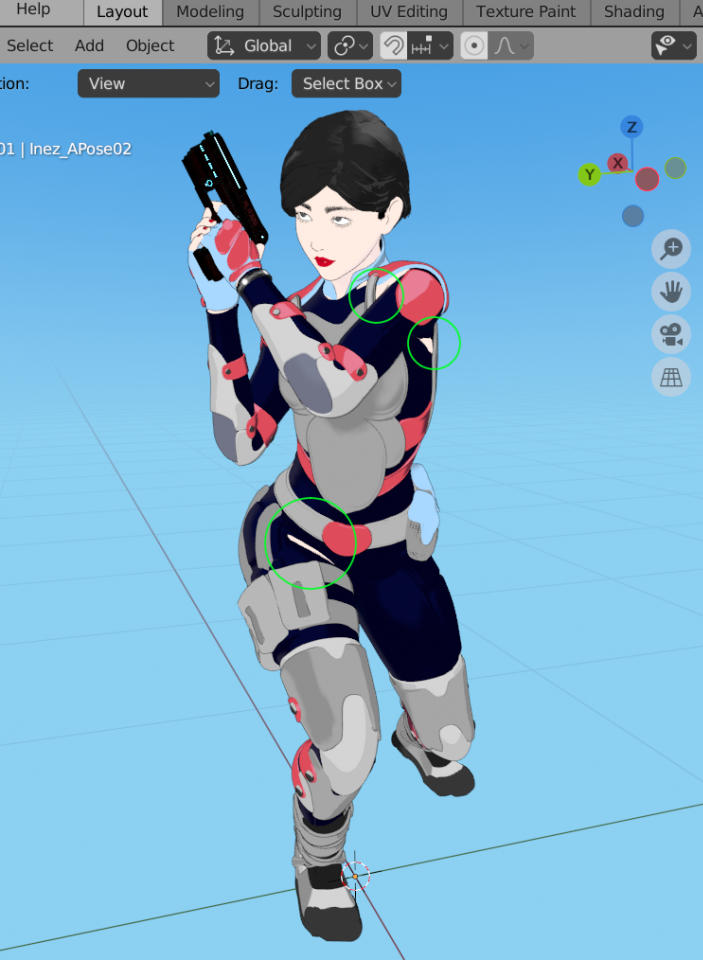
So far the issue has been manageable. I work mainly with static images, and its no big deal to fix the scene in post-edit. But I was wondering if wardrobe tears arising from Diffeomorphic was a common concern. If so, I'm interested in ways to address them.
Cheers!

Daz 3D is part of 
Connect
DAZ Productions, Inc.
7533 S Center View Ct #4664
West Jordan, UT 84084
Licensing Agreement | Terms of Service | Privacy Policy | EULA
© 2026 Daz Productions Inc. All Rights Reserved.
Comments
It happens all the time for me, in fact right now I'm re-rendering 200 frames to fix it. There's two ways to go about it, just depends on how you feel. I either render out the sequence twice and turn off the character's body so it's just the clothes, overlay it in after effects (I'm doing animation so I heavily use AE, but stills you could photoshop) turn off the clothes layer but highlight it and just cut out all the spots that the body pokes through and when you turn the clothes layer back on, it's seamless.
The other way is if you're done with the character, you could go into edit mode and delete the parts of the mesh that are poking through and it won't then. Because I use the same character in a hundred shots for a film, I don't really use that method often, but it works just like turning a limb off in daz for the same issue.
Hi, if someone just does stills, no Adobe is needed. Nothing you can't fix with some clicks in sculptmode, using the grabbrush, elastic deform or smooth brush.
Some tips:
Add a shape key to the cloth mesh, dial the value to 1.
If you can't rename it, switch off the subdiv or the multires modifier temporarily in the viewport and rename the key. The shape key can be deleted, if you aren't satisfied with the changes.
Replace any subdivision modifiers by multires modifiers. Then you can sculpt on the desired subdiv level instead of the base mesh level. You're working virtually, the base shape and morphs stay intact. One of the best inventions in Blender imo!
The outfit pokes are common in daz studio so of course you get them in blender too. This is an issue with the figures themselves.
To fix them you do in blender the same things you do in daz studio. Either apply a shrinkwrap (smooth in daz studio) or hide underlying surfaces when possible.
https://diffeomorphic.blogspot.com/p/visibility-section-version-16.html