Is blender right for me & is it possible to animate daz scene in blender & export animation to daz.
 Rodrij
Posts: 158
Rodrij
Posts: 158
Is blender right for me & is it possible to animate daz scene in blender & export animation to daz.
The thing I hate about daz is I can't preview animations in realtime in viewport probably due to the amount of morphs I have and the IK never works right.
So I need an alternative for animating but I still want to use Daz for everything else.
Basically what I want to do is take a Daz scene, bring only the relevant interacting objects and characters I want to animate to blender, Animate it in blender and then bring just the animation back to Daz to the corresponding figures.
Is this possible or should I look elsewhere, if not is there any software that can do what I need.?
If possible where can I find tutorials to do this.
An example to illsustrate what I want to do. Say you have scene of a guy in a full gym doing pullups on a pullup bar. Can I export only pullup bar and character to Blender with the same pose as it was in Daz, animate it and then bring that animation for the character back to daz.

Daz 3D is part of 
Connect
DAZ Productions, Inc.
7533 S Center View Ct #4664
West Jordan, UT 84084
Licensing Agreement | Terms of Service | Privacy Policy | EULA
© 2026 Daz Productions Inc. All Rights Reserved.
Comments
Actually it wont matter what external program you use to create Character animation with IK (Autodesk MOBU,Reallusion 3DX,Mixamo etc)
The IK solving wont transfer to Daz studio correctly to G3/8 even as baked FK.
I have told people about this for the past year
to no avail.
Apparently there is a third party Houdini Character motion transfer plugin
in the works, so that may have a solution at some point
assuming you want to acquire&learn SideFX Houdini
The bridges exist for people who actually plan to render Genesis
figures in EXTERNAL programs where the native IK system of those other
progams can be applied.
If you plan to render in Daz studio you really need to animate your figures in Daz studio as best you can,
I know Padone was able to get the diffeomorphic method to work with simple IK, but for the life of me following every direction on the Diffeo site to the T as well as the other link Padone sent regarding the ticket that was set up in another thread, I just could never get it work. I don't know what exactly the step I'm missing is considering I've tried it at least a dozen times going exactly step by step to no avail in Blender multiple versions of Blender. I was able to get the keyframes to transfer using the MHX rig and then the transfer that they lay out how to do, but you can't transfer IK with that. So it's possible if you don't want IK, but if you're doing pull ups and such, you're going to want that.
I wish there was a way that worked flawlessly, that would be so awesome.
Wouldn't it be possible to just keyframe every frame and transfer that, transfering IK isn't necessary. I basically just need the Pose data that I would create in Blender. What I don't know is how to transfer a character to Blender with initial pose, Animate it in blender(this I can find out through already existing tutorials) then send the pose data back to daz. Ideally once I am done animating in blender I would just send pose data to daz and render.
I found this video where you can go from Daz to Mixamo to Daz again but Mixamo is more of an animiation preset site and not a animation creation program.
My guess from the video is that the workfow would be use daz to blender bridge to send objects to blender, animate it, Then save the figure as an FBX like in the video, open the FBX in daz save the pose data and apply it to the orignal figure. Question is.
Does daz bridge export non Genesis objects or just the daz genesis figure and what FBX settings do I need to bring it back to daz in the right scale.
Sure you can just export the pose from Blender back into Daz using the diffeomorphic tool.
Diffeomorphic: Save Pose Preset
Good luck with importing an FBX into Daz. If I remember correctly, it's easier to do with the Genesis 1 or 2 characters, but I've tried 3 and 8 and it requires a lot of work and I've never been successful at it (I could be completely wrong about G1 and 2 but something is telling me I've read this somewhere on the forums before).
I think you import it back for a G2, save as pose preset, then apply that preset to G3. At least that's how I did it with Mixamo animations.
Wolf359 maybe you have an insight to this because I don't understand programming stuff. But the Daz to Maya Bridge has an option to export animation back into Daz and it works perfectly, I got a trial of Maya late last year or early this year and I was using it for the free month and then I had heard the plan was to implement that in the Daz to Blender Bridge as well so I didn't pay for Maya and have been waiting patiently. Why is it though that there is a way to export IK animation from Maya back into Daz but not Blender into Daz? Is it the rigging in Blender?
Oh yeah, I think that's what I've read in the past. Thanks for the refresher :)
Hi
it could
be related to the fact that Blender still considers the "Z" axis to be up
while every other 3DCC considers the "Y" axis as up.
or the fact that Maya is the King of Character animation programs
and can parse the G3/8 twist bones better ..who knows??
BTW Maya is not actually "exporting" IK animation back to Daz studio
IK cannot be exported per say.
it is baking the IK to FK for every frame which gives you great fidelity
on the animated Characters feet in Daz studio or any importing application.
Accurate FK transfer is what generally happens with Genesis one and 2
Look at how solidly the Genesis one figures feet are planted with this mixamo spinning kick, in this Blender Retargeting tutorial.
ALL just standard FBX export from Daz studio to Blender.
NO surprise that peope are still using genesis one with Mixamo
Has anyone tried Cascadeur - https://cascadeur.com/help/import_from_daz_studio
Export to Daz Studio
Once you’ve finished animating your model, you’d probably want to send it back to Daz Studio for rendering.
Animation can be exported with standard means.
However, certain preparations are required:
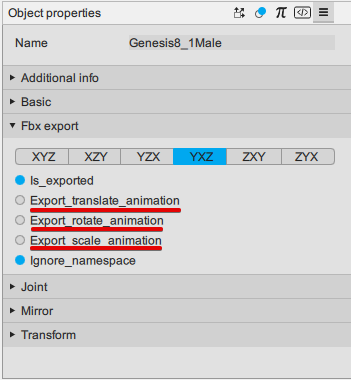
1. The Root joint (the first joint in the hierarchy) should not use any keyframes or animations. Export_translate_animation, Export_rotate_animation and Export_scale_animation should be disabled:
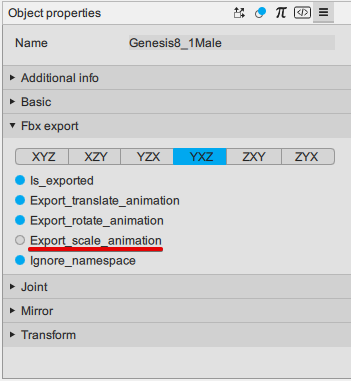
2. The next bone (Hip by default) should only use rotate and translate animations. Scale (Export_scale_animation) should be disabled:
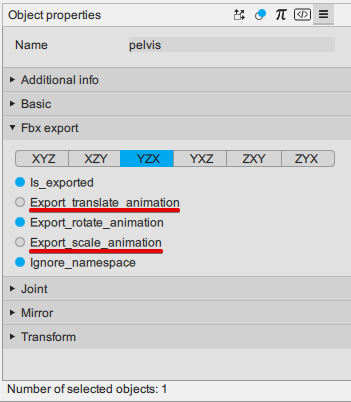
3. Every other joint should only use rotation animation. Export_translate_animation and Export_scale_animation should be disabled:
With this, exported animations should work correctly.
Keep in mind, however, that at the moment exported animations cannot be applied to pre-existing Daz Studio characters. They will be imported as separate objects.
This limitation will be removed in the future.
What people overlook is that it's not as simple as animating in Blender (or anywhere else) and bringing it back to Blender. You will have to learn how to animate in Blender first as well as non-animation specific Blender things. Animation isn't some isolated thing that you can learn to do in Blender while ignoring everything else.
I made the switch from Daz specifically because I was frustrated with animation just like you, however I now recommend people either dive into Blender fully or stay in Daz because trying to do a bit of both will leave you frustrated.
This is why I made this thread, if I can't bring back animations to Daz from blender in an efficient manner that doesn't slow down my workflow more than animating in daz, then it is not worth learning animating in blender to begin with, so I need to know what is possible before I invest time learning. For example if I learn to animate in Blender and find out I can't take the animation back to Daz, then it would just be a giant waste of time.
I have used blender before and learned to do static model objects, create morphs for genesis, uvunwrap and I've used Blender to paint out seams in Daz textures so I'm not completely unfamiliar with blender.
You're right here. My experience of Diffeo so far is multiple "eh?" moments, inadequate documentation for all the options, and nowhere to go when it doesn't work as you expect (I don't expect this question to get answered). Oh and Blender won't make it obvious what to expect either. Put it this way, animating in Daz, Blender, Maya, etc. is *easy*, but the latter want you to be an expert at rigging too, so you can understand and debug problems. It's a completely different skill. What we need is, as with Daz, a standard rig setup for G1, G2, G3, G8, a morph and JCMs configured for your character. Nobody should need to fiddle with a hundred settings on an importer. It's so frustrating.
Diffeomorphic allows to animate in blender with an IK rig, then bake the animation to FK and export it as a daz pose that you can then load back to your figure.
https://bitbucket.org/Diffeomorphic/import_daz/issues/545/save-pose-preset-doesnt-work
interesting way of looking at it
I have never found learning to do stuff in software other than DAZ studio a waste of time
especially superior software to DAZ studio
I just find Blender very hard to use due to my own cognitive limitations
it is probably the most awesome CGI software out there and free
(well Houdini and Maya might be better but at eye watering prices)
@Padone
Indeed, and it does work.
However there are three Videos ,in this thread, that clearly demonstrate
the need to filter your imported animation through the original
Daz genesis one rig before transferring to G-3/8,if you want the baked IK
to minimize the major footslide with G-3/8.
As I said earlier, it does not matter what external animation program you
are using( mixamo,Blender/Diffeo etc) you will likely get a better import by "filtering" the motion data through
genesis-1 first
Everyone here has the Genesis 1 starter essentials (with the base Genesis-1),
in their product libraries.. that is all you need.
This was my experience too. I have to say that I am not now the adventurous type that I was years ago so learning new software is no longer easy nor exciting. So every time I have attempted to grok the DAZ/Diffeo/Blender workflow I hit a roadblock. Whether it was material conversions or geografts/geoshells or morphs/shape keys or IK I found that every step I took required learning something more about Blender. Not that learning is a bad thing but is disheartening when you set out to do one seemingly simple task and are led down the garden path to the forest of know-how that is required to operate adequately in Blender. Rigging, the material node system and even just posing in Blender (which, to me, is a pain compared to posing in DAZ Studio) - these are all things that take a lot of study and understanding. It might be a breeze for some but not for me. So I inevitably fall back on the clearly inferior tools available in DAZ Studio.
DAZ tends to charge for plugins that only go some way to providing working and useful utilities. Mesh Grabber is an example of such an addon but, for me, it turned out that I actually preferred exporting to Blender to use the Edit and Sculpt tools. For once, I found Blender preferable. Not so with animation, however. I still use the paid-for KeyMate and GraphMate rather than take on learning how to export and animate in Blender. Probably short-sighted but perhaps I am learning about my limits. It seems to me that DAZ has made the decision that it will never be able to offer the tools that Blender has for free so I hope that future efforts will be directed at greater synergy with Blender so that we don't need to re-rig, re-texture, resize or all the other things that Diffeo attempts to do for us.
Don't get me wrong, Blender is quite rewarding. I don't regret making the switch and if I could go back in time I'd still make the exact same choices. Took me about 6 months before I was comfortable enough to continue working on my Daz projects but in Blender. Now it's been over 1 year since I made the switch and I can't work in Daz anymore. Funny enough, after learning Blender I find it much easier to learn other 3D packages. The leap from Daz to Blender was giant, Blender to any other 3D package is a lot smaller.
Daz is a wonderful software for what it does and the assets are still great.
@wolf359 If you use mhx or rigify then yes, there's feet sliding unless you retarget, as explained by Engetudouiti in the link I provided. But you can also use the "simple ik" rig that just adds ik to the original daz rig so there's no need to retarget and there's no feet sliding.
Blender is an animation software in the first place. I don't get why you're talking about it this way. You don't need nothing else after you figure it out. I can import mixamo animations to Daz G8 and export it with hd morphs in 3 subdivision level with over 10K frames all with visemes, expressions etc.
3D stuff isn't something like graphic designing or painting. You have to deal with the technical stuff for sure. If you have a problem in Blender like you need something not implemented yet, you just can open the shell and fix it yourself so I never had difficulties like you guys are mentioning. You can't use the software without knowing what it's all about and as I said this is not Photoshop.
I use Daz just to model the character and if I need humanoid animation I import the mixamo fbx to Daz bc all the vertex weights are perfectly assigned there. I take care all the rest in Blender and I think you guys are really really underestimating it. After a while you got used to it you're probably going to have extremely specialized workflow, custom own made features, ui and plugins. Just don't think the problem is with the Blender. It's probably just you are looking for something straightforward. I mean I've been using it for a while and I feel like I have the control in full in Blender. Right down to the deepest attribute of a point because the software itself got adapted to me. You're never going to toss a wall like there always will be a solution unlike the others. You can't improve yourself much if you start to put blame over the software.
Daz to Blender and Diffeomorphic both are useful but if you take a look to the codes it's already not that much complicated to understand the difference between Daz and Blender rigs. And after you understand it you can implement solutions. Not just scripting but playing with the import/export settings or using multiple plugins.